audio LEXUS RX300H 2017 Owner's Manual
[x] Cancel search | Manufacturer: LEXUS, Model Year: 2017, Model line: RX300H, Model: LEXUS RX300H 2017Pages: 640, PDF Size: 35.53 MB
Page 216 of 640
2164-2. Driving procedures
RC300h_EE(OM24740E)
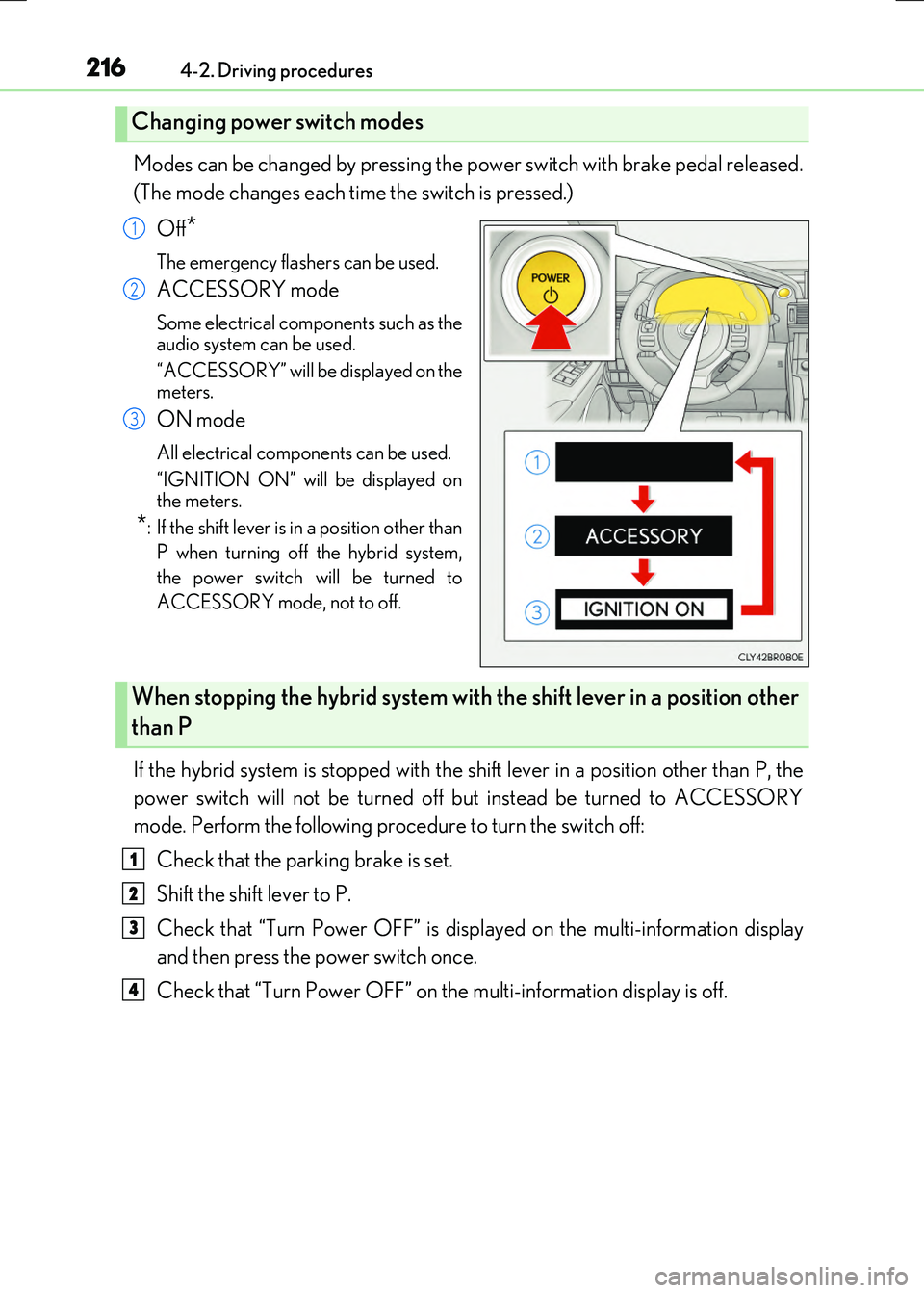
Modes can be changed by pressing the power switch with brake pedal released.
(The mode changes each time the switch is pressed.)
Off*
The emergency flashers can be used.
ACCESSORY mode
Some electrical components such as the
audio system can be used.
“ACCESSORY” will be displayed on the meters.
ON mode
All electrical components can be used.
“IGNITION ON” will be displayed on the meters.
*: If the shift lever is in a position other than
P when turning off the hybrid system,
the power switch will be turned to
ACCESSORY mode, not to off.
If the hybrid system is stopped with the sh ift lever in a position other than P, the
power switch will not be turned off but instead be turned to ACCESSORY
mode. Perform the following procedure to turn the switch off:
Check that the parking brake is set.
Shift the shift lever to P.
Check that “Turn Power OFF” is displayed on the multi-information display
and then press the power switch once.
Check that “Turn Power OFF” on the multi-information display is off.
Changing power switch modes
1
2
3
When stopping the hybrid system with the shift lever in a position other
than P
1
2
3
4
Page 276 of 640
2764-5. Using the driving support systems
RC300h_EE(OM24740E)
■Temporary cancelation of the LDA system functions
If any of the following occurs, the LDA system functions will be temporarily canceled. The functions will resume after the necessary operating conditions have returned.
●The turn signal lever is operated.
●The vehicle speed deviates from the operating range of the LDA system functions.
●When the lane lines cannot be recognized while driving.
●When the lane departure warning sounds.
The lane departure warning function will not operate again for a several seconds after it has been activated, even if the vehicle leaves the lane again.
■The lane departure warning
Depending on the audio system sound level or air conditioning fan noise while the audio system or air conditioning system is in use, it may be difficult to hear the warning sound.
■After the vehicle has been parked in the sun
The LDA system may not be available and a warning message ( P. 548) will be dis- played for a while after driving has started. When the temperature in the cabin decreasesand the temperature around the camera sensor ( P. 273) becomes suitable for its
operation, the functions will begin to operate.
■If there are lane markers on only one side of the vehicle
The lane departure warning will not operate fo r the side on which lane markers could not
be recognized.
■Conditions in which the function may not operate correctly
In the following situations, the camera sensor may be unable to recognize lane markers
causing the lane departure warning function to operate incorrectly. However, this does not indicate a malfunction.
●When driving through an area with no lane markers, such as a tollbooth, a crossing or
before a ticket checkpoint
●When driving on a sharp curve
●When lane markers are extremely narrow or extremely wide
●When the vehicle leans to one side an unusual amount due to a heavy load or improper tire inflation pressure
●When the following distance between your vehicle and the vehicle ahead is extremely
short
●When the lane markers are yellow (These ma y be more difficult for the system to rec- ognize compared to white markers.)
●When the lane markers are broken, Botts’ dots (raised pavement markers) or stones
●When the lane markers are on a curb etc.
●When lane markers are obscured or partially obscured by sand, dirt, etc.
●When there are shadows on the road running parallel with lane markers, or if a shadow covers the lane markers
●When driving on a partic ularly bright road surface, such as concrete
●When driving on a road surface that is bright due to reflected light
●When driving in a location where the light level changes rapidly, such as the entrance to
or exit from a tunnel
Page 279 of 640
2794-5. Using the driving support systems
4
Driving
RC300h_EE(OM24740E)
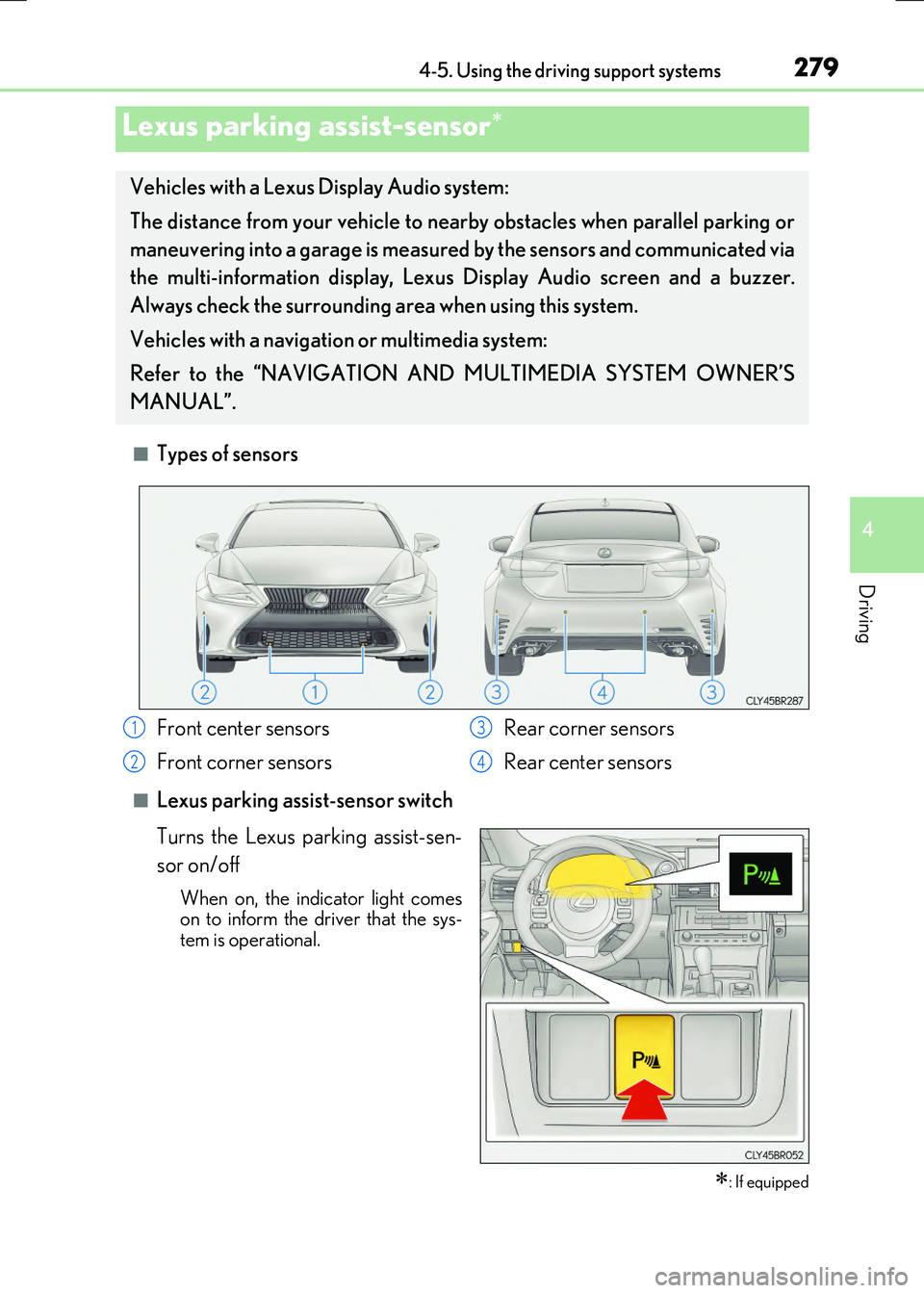
■Types of sensors
■Lexus parking assist-sensor switch
Turns the Lexus parking assist-sen-
sor on/off
When on, the indi cator light comes on to inform the driver that the sys-tem is operational.
Lexus parking assist-sensor
: If equipped
Vehicles with a Lexus Display Audio system:
The distance from your vehicle to ne arby obstacles when parallel parking or
maneuvering into a garage is measured by the sensors and communicated via
the multi-information display, Lexus Display Audio screen and a buzzer.
Always check the surrounding ar ea when using this system.
Vehicles with a navigation or multimedia system:
Refer to the “NAVIGATION AND MULTIMEDIA SYSTEM OWNER’S
MANUAL”.
Front center sensors
Front corner sensors
Rear corner sensors
Rear center sensors
1
2
3
4
Page 280 of 640
2804-5. Using the driving support systems
RC300h_EE(OM24740E)
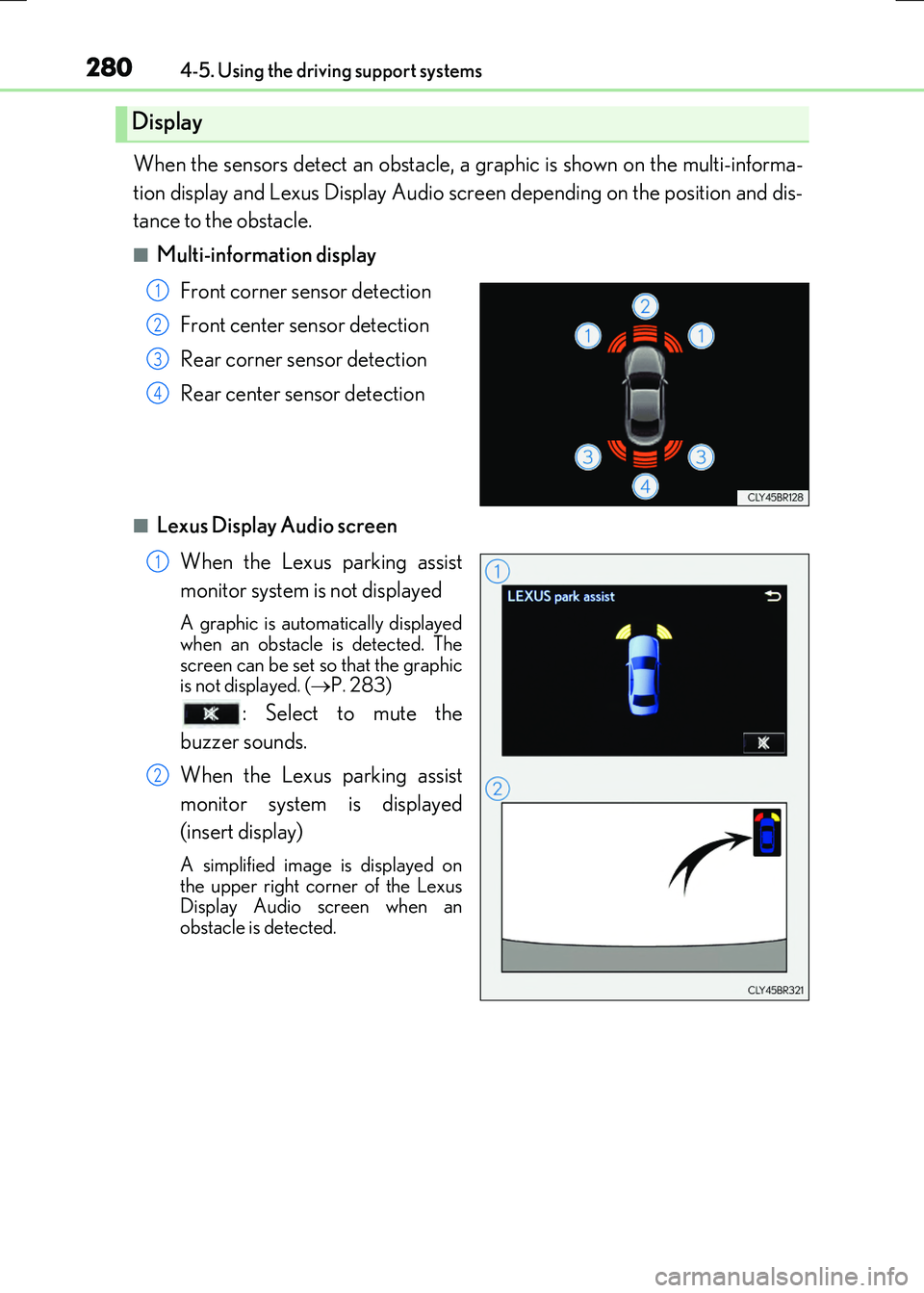
When the sensors detect an obstacle, a graphic is shown on the multi-informa-
tion display and Lexus Display Audio screen depending on the position and dis-
tance to the obstacle.
■Multi-information display
Front corner sensor detection
Front center sensor detection
Rear corner sensor detection
Rear center sensor detection
■Lexus Display Audio screen
When the Lexus parking assist
monitor system is not displayed
A graphic is automatically displayed
when an obstacle is detected. The screen can be set so that the graphicis not displayed. ( P. 283)
: Select to mute the
buzzer sounds.
When the Lexus parking assist
monitor system is displayed
(insert display)
A simplified image is displayed on
the upper right corner of the Lexus Display Audio screen when anobstacle is detected.
Display
1
2
3
4
1
2
Page 281 of 640
2814-5. Using the driving support systems
4
Driving
RC300h_EE(OM24740E)
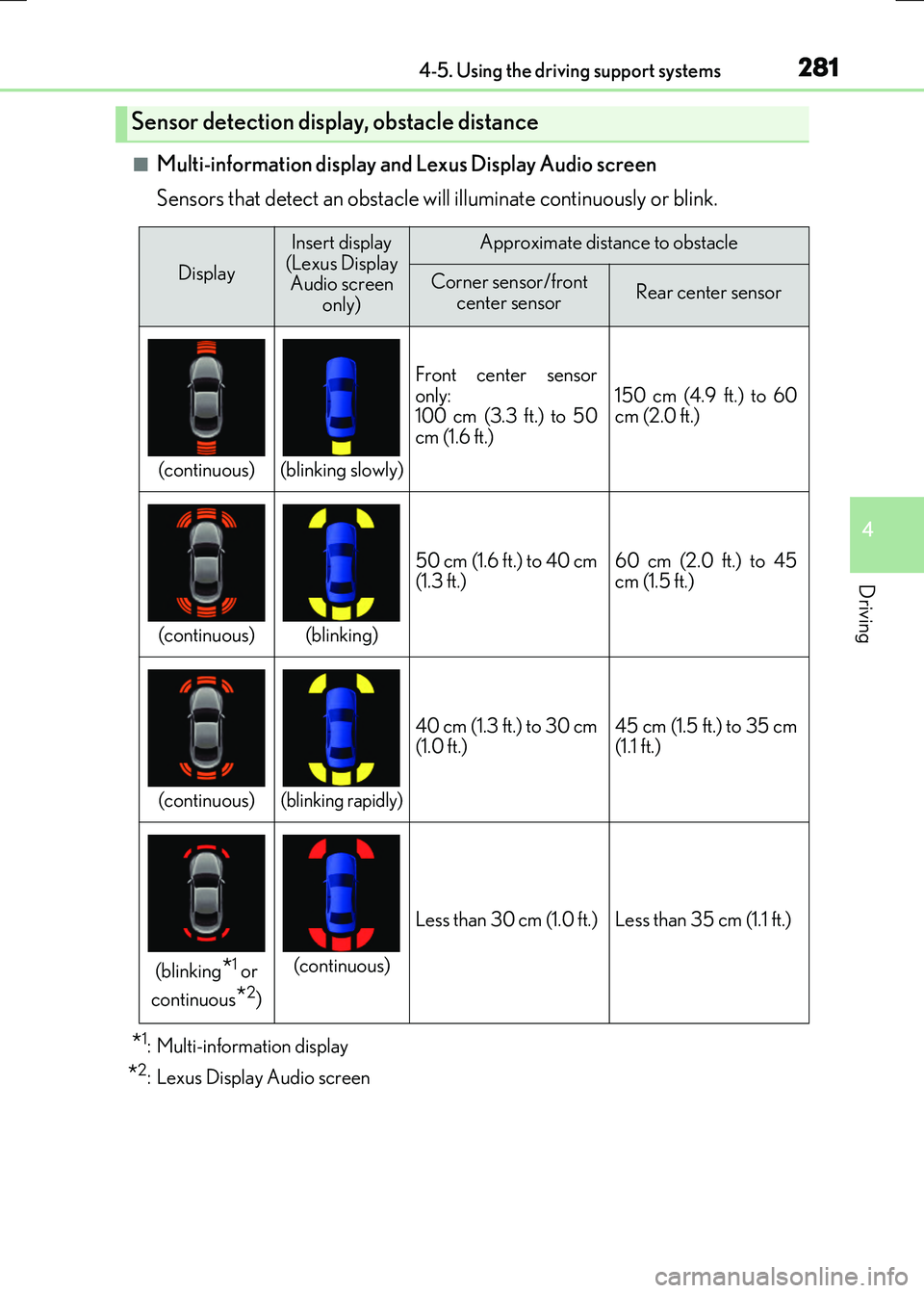
■Multi-information display and Lexus Display Audio screen
Sensors that detect an obstacle will illuminate continuously or blink.
*1: Multi-information display
*2: Lexus Display Audio screen
Sensor detection display, obstacle distance
Display
Insert display
(Lexus Display Audio screen only)Approximate distance to obstacle
Corner sensor/front center sensorRear center sensor
(continuous)(blinking slowly)
Front center sensor
only:
100 cm (3.3 ft.) to 50
cm (1.6 ft.)150 cm (4.9 ft.) to 60
cm (2.0 ft.)
(continuous)(blinking)
50 cm (1.6 ft.) to 40 cm
(1.3 ft.)60 cm (2.0 ft.) to 45
cm (1.5 ft.)
(continuous)(blinking rapidly)
40 cm (1.3 ft.) to 30 cm
(1.0 ft.)45 cm (1.5 ft.) to 35 cm
(1.1 ft.)
(blinking*1 or
continuous
*2)
(continuous)
Less than 30 cm (1.0 ft.)Less than 35 cm (1.1 ft.)
Page 283 of 640
2834-5. Using the driving support systems
4
Driving
RC300h_EE(OM24740E)
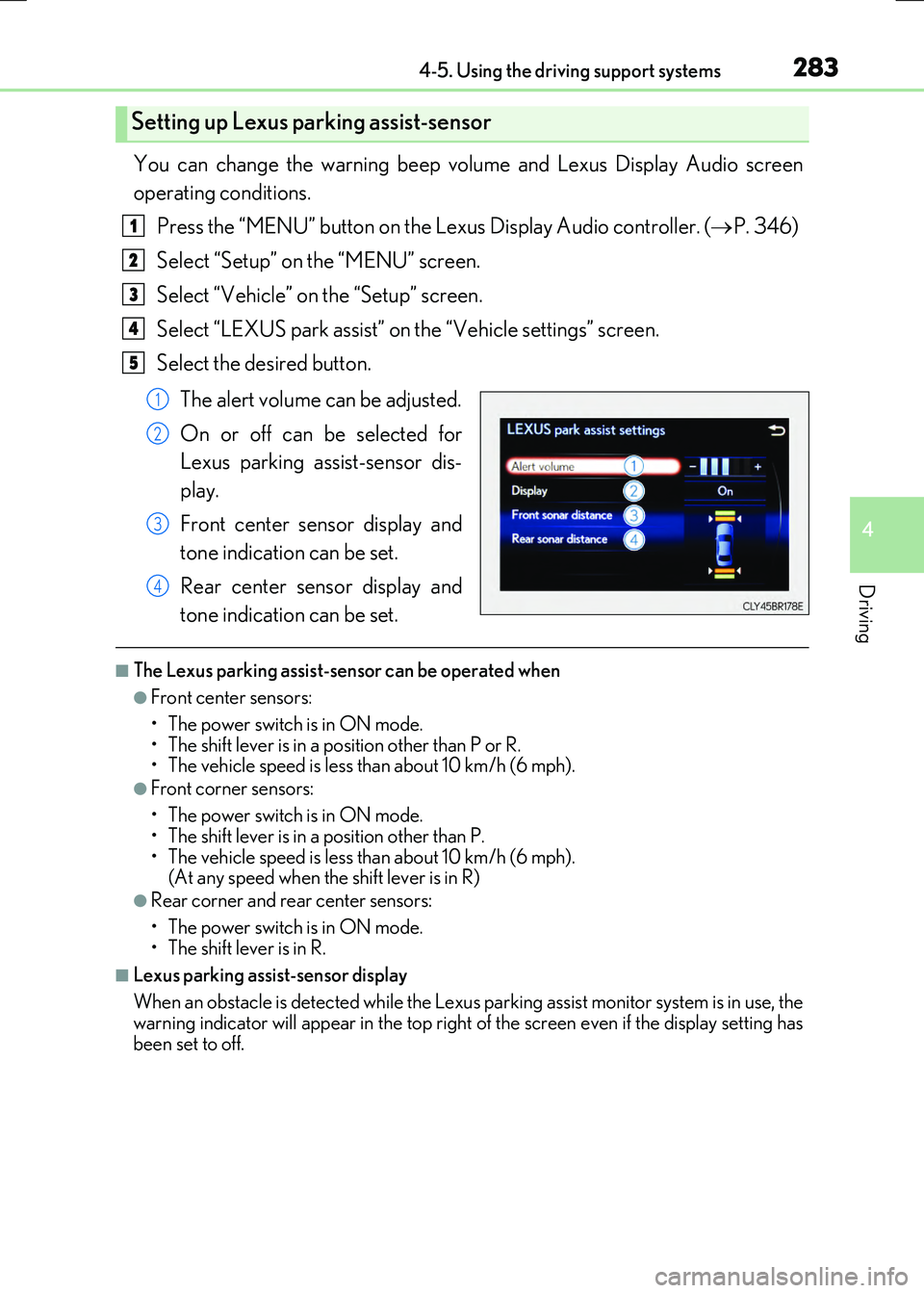
You can change the warning beep volume and Lexus Display Audio screen
operating conditions.
Press the “MENU” button on the Lexus Display Audio controller. ( P. 346)
Select “Setup” on the “MENU” screen.
Select “Vehicle” on the “Setup” screen.
Select “LEXUS park assist” on the “Vehicle settings” screen.
Select the desired button.
The alert volume can be adjusted.
On or off can be selected for
Lexus parking assist-sensor dis-
play.
Front center sensor display and
tone indication can be set.
Rear center sensor display and
tone indication can be set.
■The Lexus parking assist-sensor can be operated when
●Front center sensors:
• The power switch is in ON mode. • The shift lever is in a position other than P or R.• The vehicle speed is less than about 10 km/h (6 mph).
●Front corner sensors:
• The power switch is in ON mode.
• The shift lever is in a position other than P. • The vehicle speed is less than about 10 km/h (6 mph). (At any speed when the shift lever is in R)
●Rear corner and rear center sensors:
• The power switch is in ON mode.
• The shift lever is in R.
■Lexus parking assist-sensor display
When an obstacle is detected while the Lexus pa rking assist monitor system is in use, the
warning indicator will appe ar in the top right of the screen even if the display setting has been set to off.
Setting up Lexus parking assist-sensor
1
2
3
4
5
1
2
3
4
Page 285 of 640
2854-5. Using the driving support systems
4
Driving
RC300h_EE(OM24740E)
WARNING
●The shape of an object may prevent the sensor from detecting it. Pay particular atten- tion to the following:
• Wires, fences, ropes, etc.
• Cotton, snow and other materials that absorb sound waves • Sharply-angled objects•Low objects
• Tall objects with upper sections projecting outwards in the direction of your vehi- cle• People, animals and other moving objects
• People wearing certain types of clothing
●The following situations may occur when using the Lexus parking assist-sensor.
• Depending on the shape of the object and other factors, the detection distance may be shortened, or detection may not be possible.• Objects may not be detected if they are too close to a sensor.
• There will be a short delay between the de tection of an object and display of the detection. Even at slow speeds, there is a possibility that the object will come within a sensor’s detection area before the display is shown and a warning beep
sounds. • Thin posts or objects lower than a sensor may not be detected when approached,even if they have been detected once.
• It might be difficult to hear beeps due to the volume of the audio system or air flow noise of the air conditioning system.
NOTICE
■When using Lexus parking assist-sensor
In the following situations, the system may not function correctly due to a sensor mal-
function etc. Have the vehicle checked by any authorized Lexus dealer or repairer, or another duly qualified and equipped professional.
●The Lexus parking assist-sensor operation display flashes, and a beep sounds when
no obstacles are detected.
●If the area around a sensor collides with something, or is subjected to strong impact.
●If the bumper or grille collides with something.
●If the display shows continuously without beeping, except when the switch has been turned on.
●If a display error occurs, first check the sensor.
If the error occurs even when there is no ice, snow or mud on the sensor, it is likely that the sensor is malfunctioning.
■Notes when washing the vehicle
Do not apply intensive bursts of water or steam to the sensor area.
Doing so may result in the sensor malfunctioning.
Page 288 of 640

2884-5. Using the driving support systems
RC300h_EE(OM24740E)
When the shift lever is in any position other than R, the display mode can be
changed in the following procedure.
Press the “MENU” button on the Lexus Display Audio controller, and then
select “Setup” on the screen.
Select “Vehicle”, and then select “Back camera guide line setting” on the
screen.
Select the desired display mode.
Estimated course line display
mode ( P. 289)
Parking assist guide line display
mode ( P. 291)
Distance guide line display mode
Distance guide lines only are dis-
played.
Switching the display mode
1
2
3
1
2
3
Page 321 of 640
3214-5. Using the driving support systems
4
Driving
RC300h_EE(OM24740E)
■Outside rear view mirror indicator visibility
In strong sunlight, the outside rear view mirror indicator may be difficult to see.
■Hearing the RCTA buzzer
The RCTA buzzer may be difficult to hear ov er loud noises, such as if the audio system
volume is high.
■When there is a malfunction in the Blind Spot Monitor
If a system malfunction is de tected due to any of the following, a warning message will be
displayed: ( P. 548, 549)
●A sensor is malfunctioning
●A sensor is dirty or covered with snow or a sticker
●The outside temperature is extremely high or low
●Sensor voltage is abnormal
●A sensor is misaligned
Page 342 of 640
342
RC300h_EE(OM24740E)
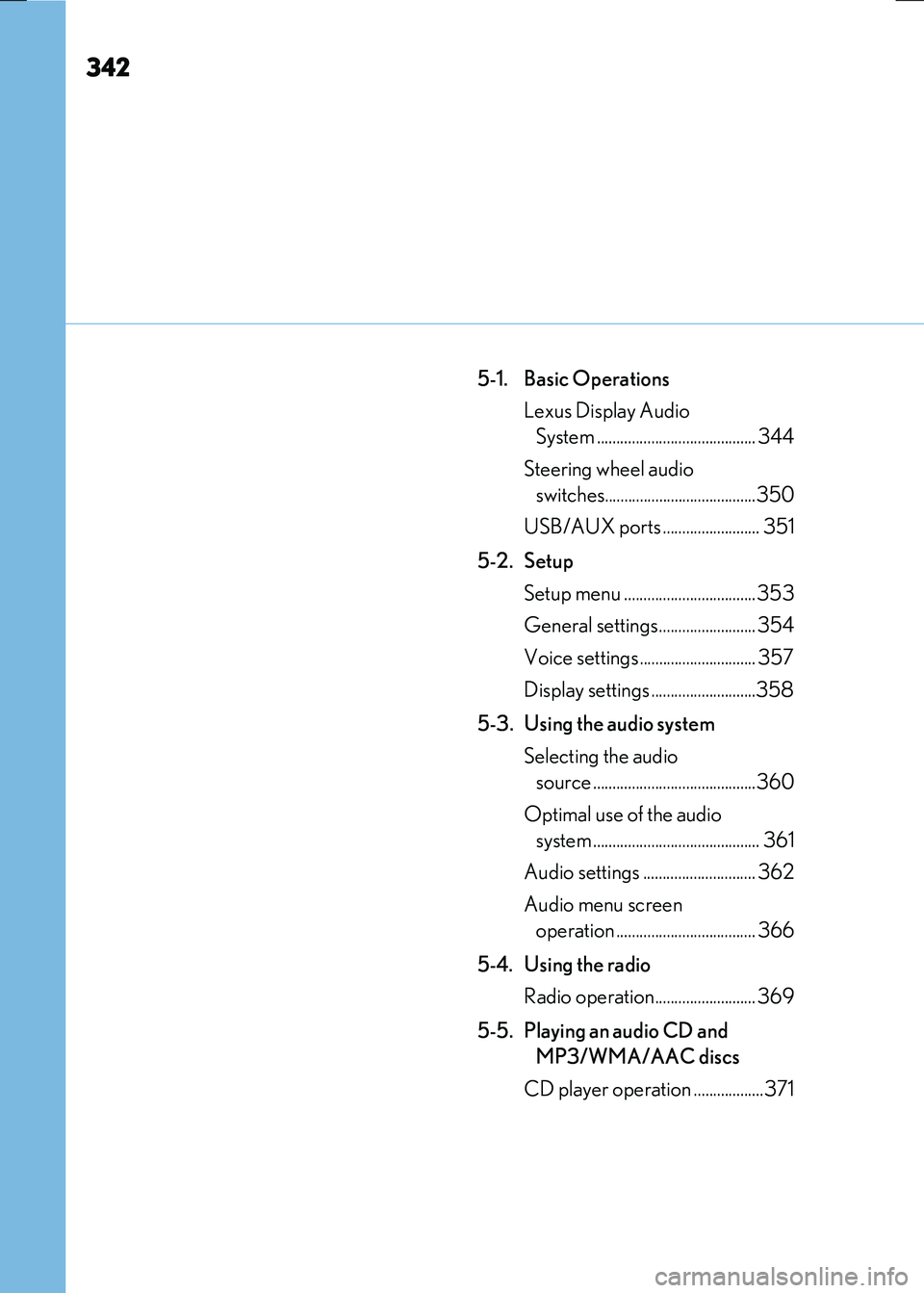
5-1. Basic Operations
Lexus Display Audio
System ......................................... 344
Steering wheel audio
switches.......................................350
USB/AUX ports ......................... 351
5-2. Setup
Setup menu ..................................353
General settings......................... 354
Voice settings.............................. 357
Display settings ...........................358
5-3. Using the audio system
Selecting the audio
source ..........................................360
Optimal use of the audio
system ........................................... 361
Audio settings ............................. 362
Audio menu screen
operation .................................... 366
5-4. Using the radio
Radio operation.......................... 369
5-5. Playing an audio CD and
MP3/WMA/AAC discs
CD player operation ..................371