ECU LEXUS RX300H 2017 Repair Manual
[x] Cancel search | Manufacturer: LEXUS, Model Year: 2017, Model line: RX300H, Model: LEXUS RX300H 2017Pages: 640, PDF Size: 35.53 MB
Page 213 of 640
2134-1. Before driving
4
Driving
RC300h_EE(OM24740E)
Cargo and luggage
Take notice of the following information about storage precautions, cargo
capacity and load:
WARNING
■Things that must not be carried in the trunk
The following things may cause a fire if loaded in the trunk:
●Receptacles containing gasoline
●Aerosol cans
■Storage precautions
Observe the following precautions. Failure to do so may prevent the pedals from being depressed properly, may block the driver’s vision, or may result in items hitting the driver or passengers, possibly causing
an accident.
●Stow cargo and luggage in the trunk whenever possible.
●To prevent cargo and luggage from sliding forward during braking, do not stack any-
thing in the enlarged trunk. Keep cargo and luggage low, as close to the floor as pos- sible.
●When you fold down the rear seats, long items should not be placed directly behind
the front seats.
●Never allow anyone to ride in the enlarged trunk. It is not designed for passengers. They should ride in their seats with their seat belts properly fastened.
●Do not place cargo or luggage in or on the following locations.
• At the feet of the driver • On the front passenger or rear seats (when stacking items)
• On the package tray • On the instrument panel• On the dashboard
• In front of the navigation or multimedia system screen (if equipped) or Lexus Dis- play Audio screen (if equipped)
●Secure all items in the occupant compartment.
■Load and distribution
●Do not overload your vehicle.
●Do not apply loads unevenly. Improper loading may cause deterioration of steering or braking control which may cause death or serious injury.
Page 217 of 640
2174-2. Driving procedures
4
Driving
RC300h_EE(OM24740E)
■Auto power off function
If the vehicle is left in ACCESSORY mode for more than 20 minutes or ON mode (the hybrid system is not operating) for more than an hour with the shift lever in P, the power switch will automatically turn off. However, th is function cannot entirely prevent 12-volt
battery discharge. Do not leave the vehicle with the power switch in ACCESSORY or ON mode for long periods of time when the hybrid system is not operating.
■Sounds and vibrations specific to a hybrid vehicle
P. 88
■Electronic key battery depletion
P. 141
■When the ambient temperature is low, such as during winter driving conditions
When starting the hybrid system, the flashing time of the “READY” indicator may be long. Leave the vehicle as it is until the “REA DY” indicator is steady on, as steady means
the vehicle is able to move.
■Conditions affecting operation
P. 157
■Notes for the entry function
P. 158
■If the hybrid system does not start
●Check that the shift lever is securely set in P. The hybrid system may not start if the shift lever is displaced out of P.
●The immobilizer system may not have been deactivated. ( P. 95)
Contact any authorized Lexus dealer or repairer, or another duly qualified and equipped professional.
■Steering lock
After turning the power switch off and openin g and closing the doors, the steering wheel will be locked due to the steering lock func tion. Operating the power switch again auto- matically cancels the steering lock.
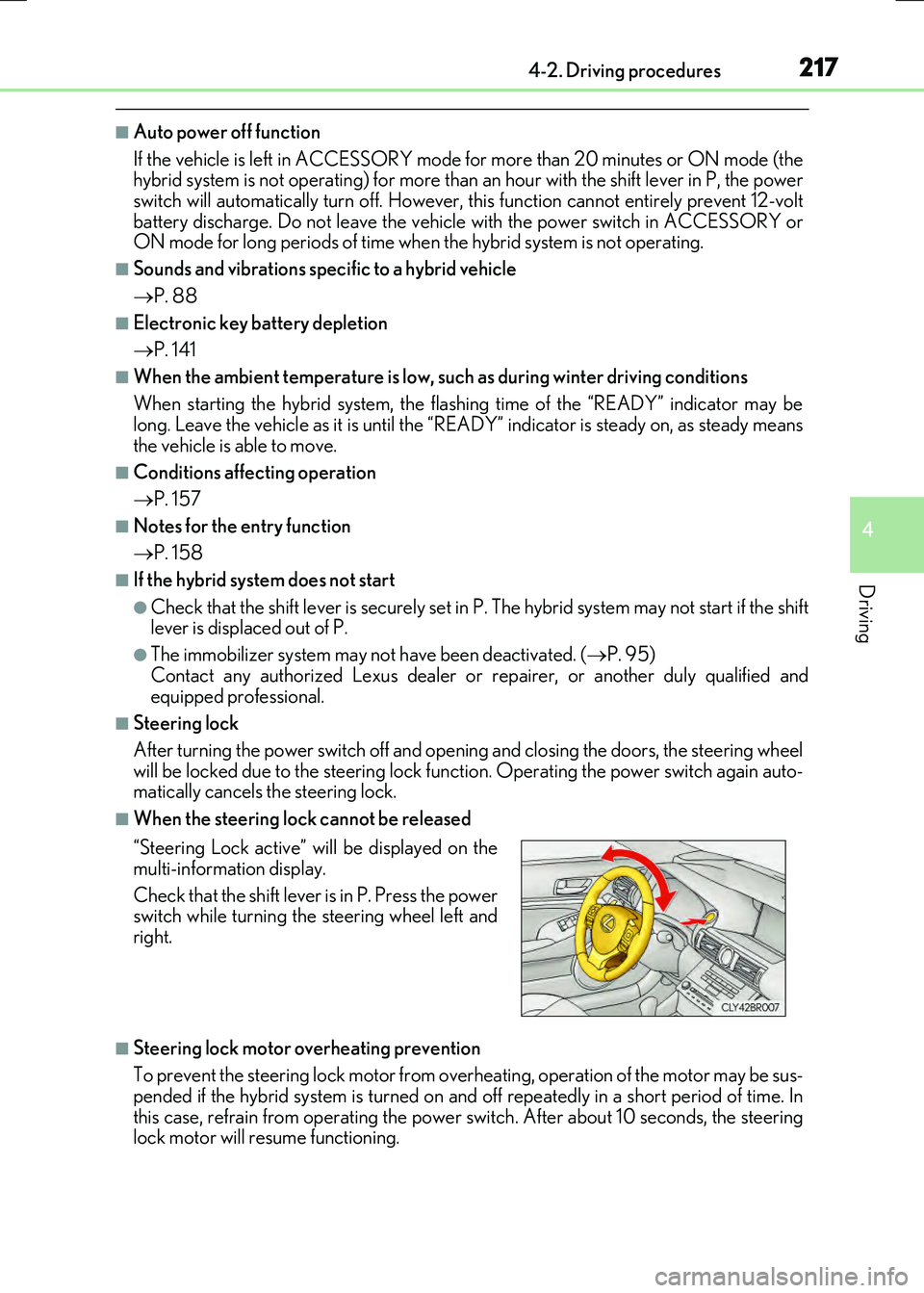
■When the steering lock cannot be released
■Steering lock motor overheating prevention
To prevent the steering lock motor from over heating, operation of the motor may be sus- pended if the hybrid system is turned on an d off repeatedly in a short period of time. In
this case, refrain from operating the power switch. After about 10 seconds, the steering lock motor will resume functioning.
“Steering Lock active” will be displayed on the
multi-information display.
Check that the shift lever is in P. Press the power switch while turning the steering wheel left and
right.
Page 239 of 640
2394-3. Operating the lights and wipers
4
Driving
RC300h_EE(OM24740E)
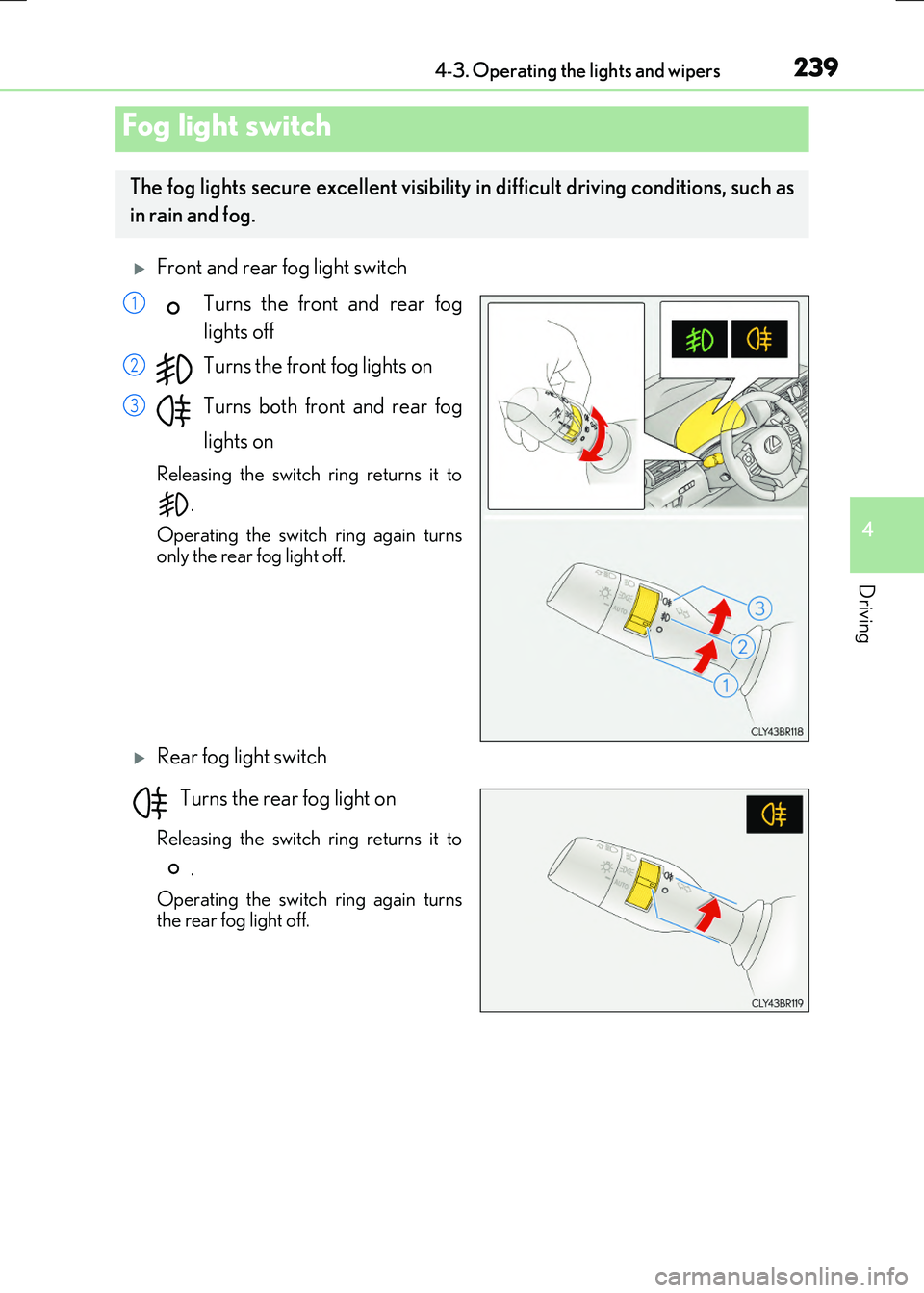
Front and rear fog light switch
Turns the front and rear fog
lights off
Turns the front fog lights on
Turns both front and rear fog
lights on
Releasing the switch ring returns it to
.
Operating the switch ring again turns only the rear fog light off.
Rear fog light switch
Turns the rear fog light on
Releasing the switch ring returns it to
.
Operating the switch ring again turns the rear fog light off.
Fog light switch
The fog lights secure excellent visibility in difficult driving conditions, such as
in rain and fog.
1
2
3
Page 250 of 640

2504-4. Refueling
RC300h_EE(OM24740E)
WARNING
■When refueling the vehicle
Observe the following precautions while refueling the vehicle. Failure to do so may result in death or serious injury.
●After exiting the vehicle and before opening the fuel door, touch an unpainted metalsurface to discharge any static electricity. It is important to discharge static electricity before refueling because sparks resulting fr om static electricity can cause fuel vapors
to ignite while refueling.
●Always hold the grips on the fuel tank cap and turn it slowly to remove it. A whooshing sound may be heard when the fuel tank cap is loosened. Wait until the
sound cannot be heard before fully removing the cap. In hot weather, pressurized fuel may spray out the filler neck and cause injury.
●Do not allow anyone that has not discharged static electricity from their body to come
close to an open fuel tank.
●Do not inhale vaporized fuel. Fuel contains substances that are harmful if inhaled.
●Do not smoke while refueling the vehicle.Doing so may cause the fuel to ignite and cause a fire.
●Do not return to the vehicle or touch any person or object that is statically charged.
This may cause static electricity to build up, resulting in a possible ignition hazard.
■When refueling
Observe the following precautions to prevent fuel overflowing from the fuel tank:
●Securely insert the fuel nozzle into the fuel filler neck.
●Stop filling the tank after the fuel nozzle automatically clicks off.
●Do not top off the fuel tank.
NOTICE
■Refueling
Do not spill fuel during refueling. Doing so may damage the vehicle, such as causing the emission control system tooperate abnormally or damaging fuel system components or the vehicle’s painted sur-
face.
Page 328 of 640
3284-5. Using the driving support systems
RC300h_EE(OM24740E)
■Conditions under which the BSM function may not function correctly
●The BSM function may not detect vehicles correctly in the following situations:
• When the sensor is misaligned due to a strong impact to the sensor or its surround-
ing area • When mud, snow, ice, a sticker, etc. is covering the sensor or surrounding area onthe rear bumper
• When driving on a road surface that is wet with standing water during bad weather, such as heavy rain, snow, or fog• When multiple vehicles are approaching wi th only a small gap between each vehicle
• When the distance between your vehicle and a following vehicle is short • When there is a significant difference in speed between your vehicle and the vehiclethat enters the detection area
• When the difference in speed between your vehicle and another vehicle is changing • When a vehicle enters a detection area traveling at about the same speed as yourvehicle
• As your vehicle starts from a stop, a vehicle remains in the detection area • When driving up and down consecutive steep inclines, such as hills, dips in the road, etc.
• When driving on roads with sharp bends, consecutive curves, or uneven surfaces • When vehicle lanes are wide, or when driving on the edge of a lane, and the vehiclein an adjacent lane is far away from your vehicle
• When a bicycle carrier or other accessory is installed to the rear of the vehicle • When there is a significant difference in height between your vehicle and the vehiclethat enters the detection area
• Immediately after the BSM main switch is turned on
●Instances of the BSM function unnecessarily detecting a vehicle and/or object may
increase in the following situations:
• When the sensor is misaligned due to a strong impact to the sensor or its surround-
ing area • When the distance between your vehicle and a guardrail, wall, etc. that enters thedetection area is short
• When driving up and down consecutive steep inclines, such as hills, dips in the road, etc.• When vehicle lanes are narrow, or when driving on the edge of a lane, and a vehicle
traveling in a lane other than the adjacent lanes enters the detection area • When driving on roads with sharp bends, consecutive curves, or uneven surfaces• When the tires are slipping or spinning
• When the distance between your vehicle and a following vehicle is short • When a bicycle carrier or other accessory is installed to the rear of the vehicle
Page 389 of 640
3895-7. Connecting Bluetooth®
5
Lexus Display Audio system
RC300h_EE(OM24740E)
Turn the Bluetooth® connection setting of your device set to on.
Go to “Bluetooth
* setup”: “Setup” “Bluetooth*”
Move the controller to the left and then select “Add device”
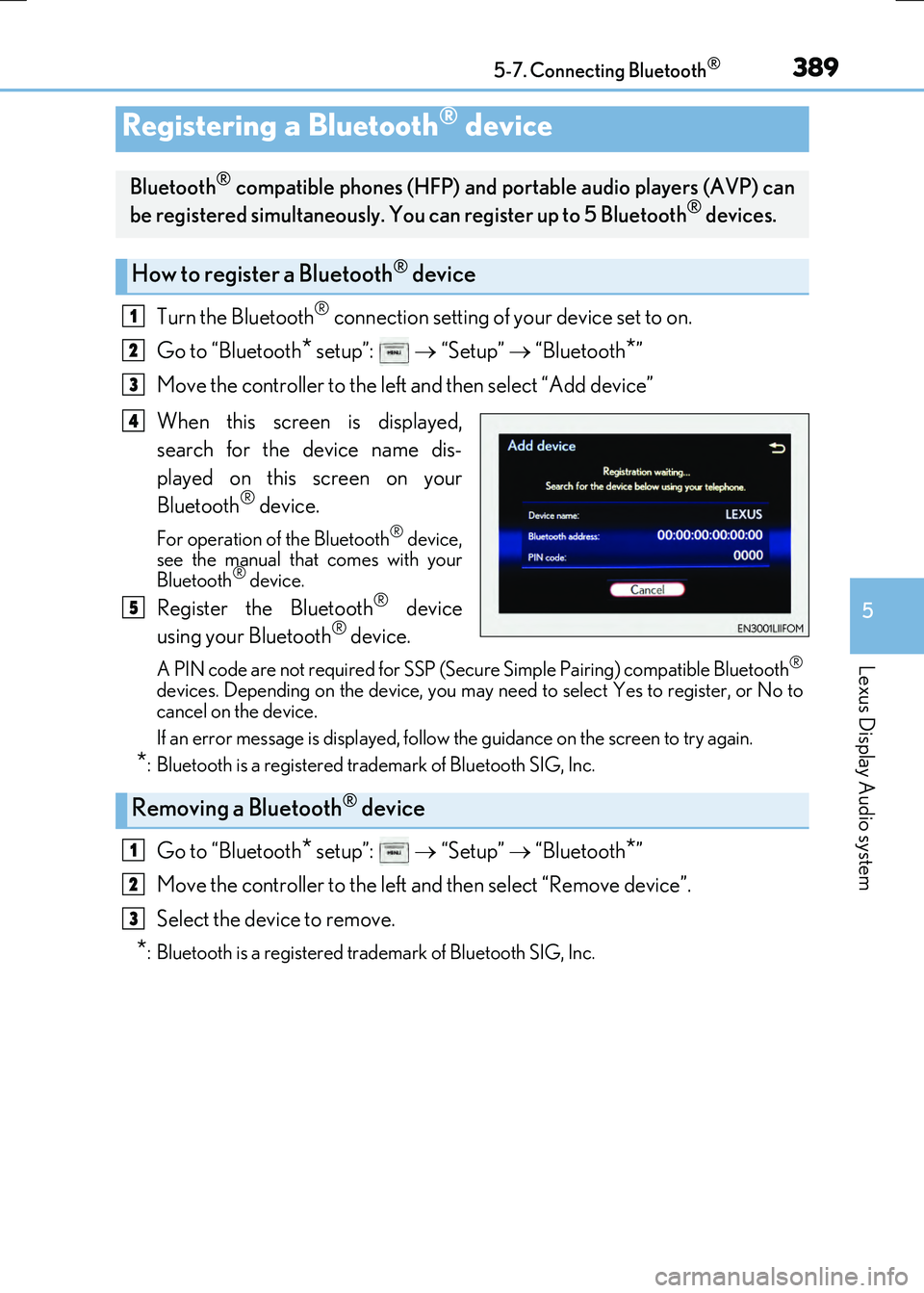
When this screen is displayed,
search for the device name dis-
played on this screen on your
Bluetooth
® device.
For operation of the Bluetooth® device,
see the manual that comes with your
Bluetooth
® device.
Register the Bluetooth® device
using your Bluetooth® device.
A PIN code are not required for SSP (Secur e Simple Pairing) compatible Bluetooth®
devices. Depending on the device, you may ne ed to select Yes to register, or No to
cancel on the device.
If an error message is displayed, follow the guidance on the screen to try again.
*: Bluetooth is a registered trademark of Bluetooth SIG, Inc.
Go to “Bluetooth* setup”: “Setup” “Bluetooth*”
Move the controller to the left and then select “Remove device”.
Select the device to remove.
*: Bluetooth is a registered trademark of Bluetooth SIG, Inc.
Registering a Bluetooth® device
Bluetooth® compatible phones (HFP) and po rtable audio players (AVP) can
be registered simultaneously. You can register up to 5 Bluetooth® devices.
How to register a Bluetooth® device
1
2
3
4
5
Removing a Bluetooth® device
1
2
3
Page 417 of 640
4175-11. Bluetooth®
5
Lexus Display Audio system
RC300h_EE(OM24740E)
In other situations
Even though all conceivable measures have been taken, the symptom status does not
change.
The cellular phone is not close enough to this system. Bring the cellular phone closer to this system.
The cellular phone is the most likely cause of the symptom. Turn the cellular phone off, remove and reinstall the battery pack, and then
restart the cellular phone. Enable the cellular phone’s Bluetooth® connection. Stop the cellular phone’s security software and close all applications.
Before using an application installed on the cellular phone, carefully check its source and how its operation might affect this system.
Page 452 of 640
4526-3. Using the storage features
RC300h_EE(OM24740E)
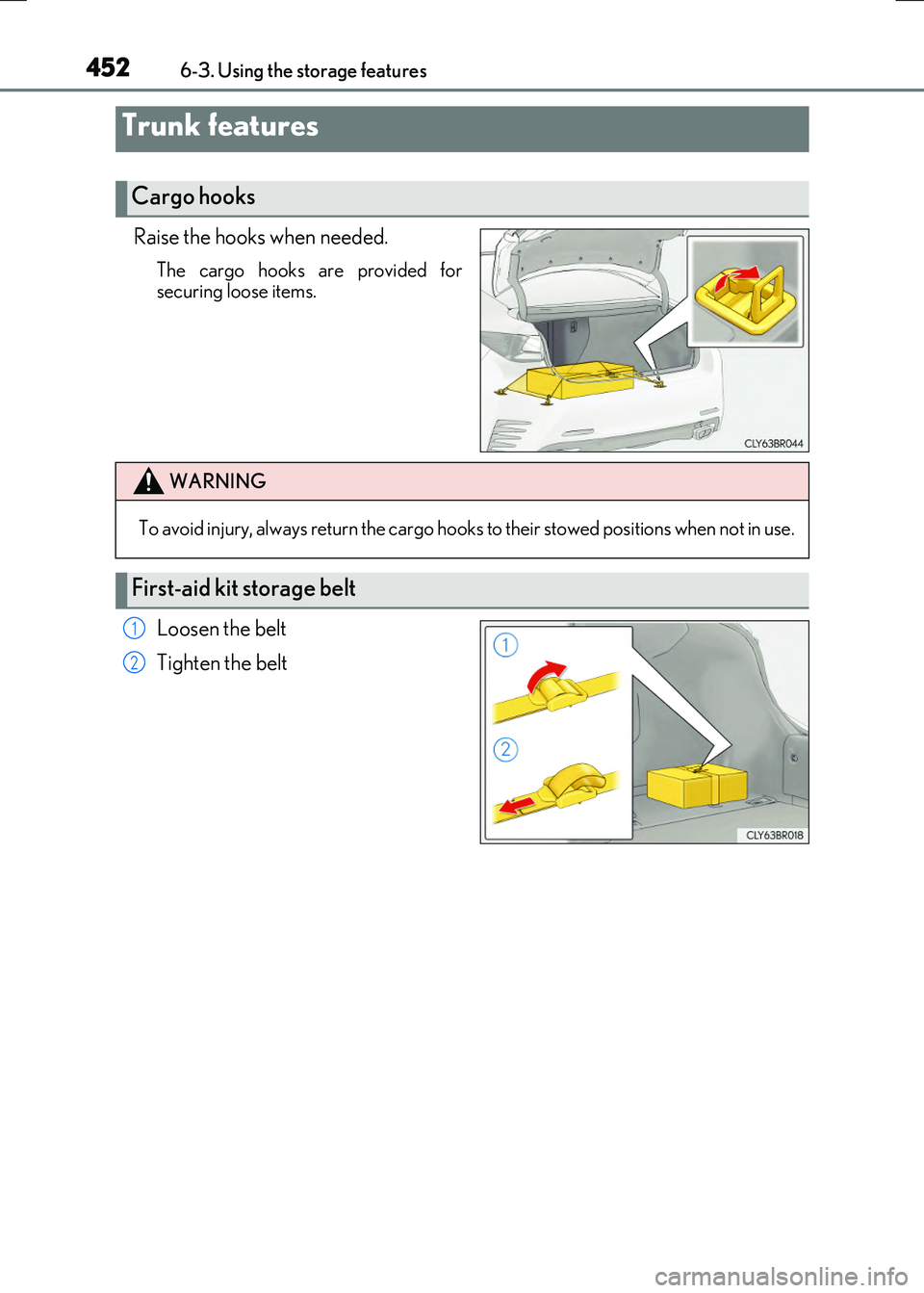
Raise the hooks when needed.
The cargo hooks are provided for securing loose items.
Loosen the belt
Tighten the belt
Trunk features
Cargo hooks
WARNING
To avoid injury, always return the cargo hooks to their stowed positions when not in use.
First-aid kit storage belt
1
2
Page 453 of 640
4536-3. Using the storage features
6
Interior features
RC300h_EE(OM24740E)
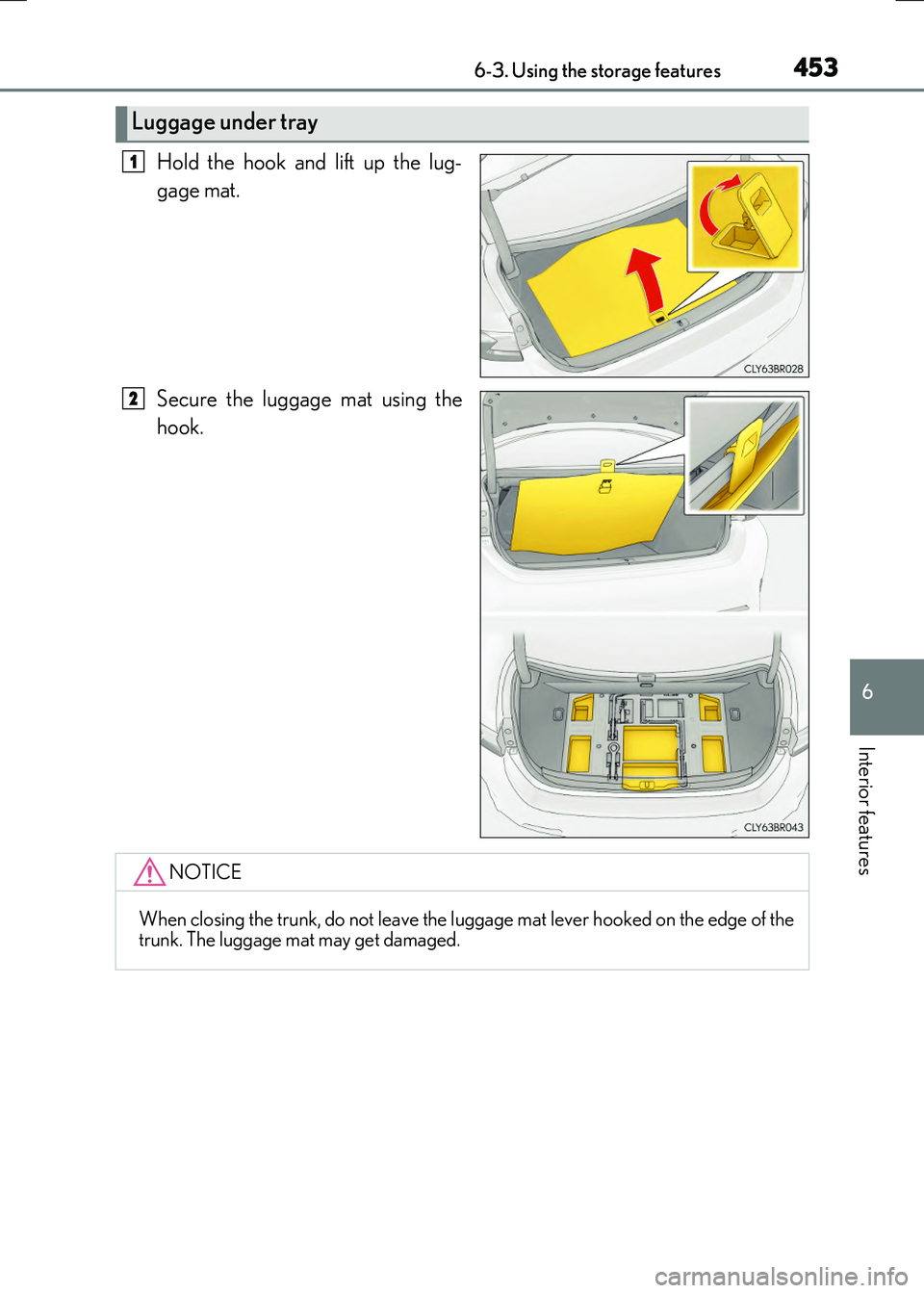
Hold the hook and lift up the lug-
gage mat.
Secure the luggage mat using the
hook.
Luggage under tray
1
2
NOTICE
When closing the trunk, do not leave the luggage mat lever hooked on the edge of the trunk. The luggage mat may get damaged.
Page 454 of 640
4546-3. Using the storage features
RC300h_EE(OM24740E)
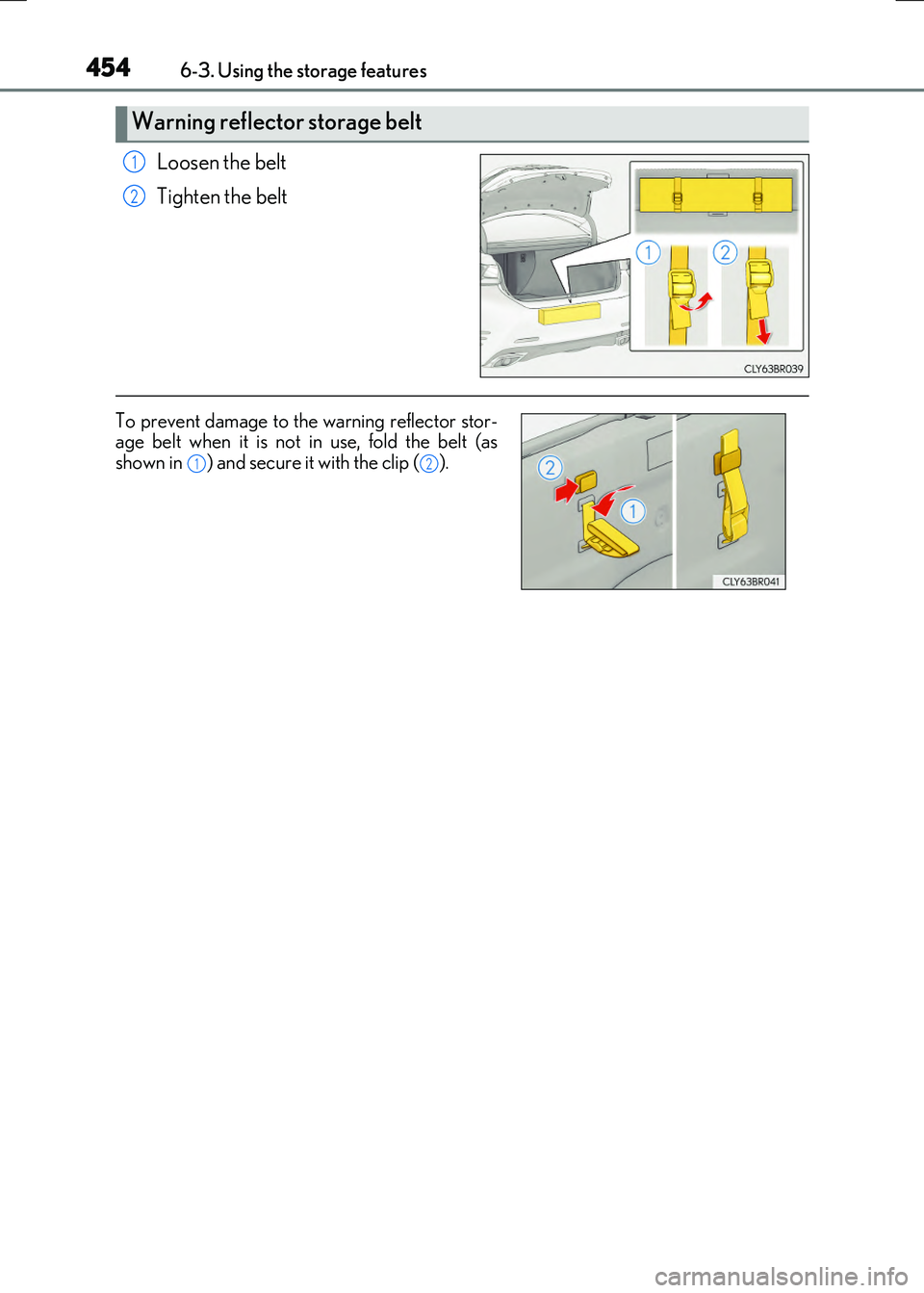
Loosen the belt
Tighten the belt
Warning reflector storage belt
1
2
To prevent damage to the warning reflector stor- age belt when it is not in use, fold the belt (asshown in ) and secure it with the clip ( ).12