AUX LEXUS RX300H 2017 Owners Manual
[x] Cancel search | Manufacturer: LEXUS, Model Year: 2017, Model line: RX300H, Model: LEXUS RX300H 2017Pages: 640, PDF Size: 35.53 MB
Page 4 of 640
TABLE OF CONTENTS4
RC300h_EE(OM24740E)
5-1. Basic Operations
Lexus Display Audio
System .........................................344
Steering wheel audio
switches...................................... 350
USB/AUX ports ......................... 351
5-2. Setup
Setup menu...................................353
General settings .........................354
Voice settings ..............................357
Display settings .......................... 358
5-3. Using the audio system
Selecting the audio
source ......................................... 360
Optimal use of the audio
system ........................................... 361
Audio settings..............................362
Audio menu screen
operation ....................................366
5-4. Using the radio
Radio operation ..........................369
5-5. Playing an audio CD and
MP3/WMA/AAC discs
CD player operation ................. 371
5-6. Using an external device
Listening to an iPod ................... 377
Using USB memory
device............................................ 381
Using the AUX port ................ 386
5-7. Connecting Bluetooth®
Steps for using Bluetooth®
devices.........................................387
Registering a Bluetooth®
device.......................................... 389
Selecting a Bluetooth®
device.......................................... 390
Connecting a Bluetooth®
audio player................................ 391
Connecting a Bluetooth®
phone ...........................................392
Displaying a Bluetooth®
device details ............................393
Detailed Bluetooth®
settings.........................................394
5-8. Bluetooth® Audio
Listening to Bluetooth®
Audio............................................395
5Lexus Display Audio system
Page 342 of 640
342
RC300h_EE(OM24740E)
5-1. Basic Operations
Lexus Display Audio
System ......................................... 344
Steering wheel audio
switches.......................................350
USB/AUX ports ......................... 351
5-2. Setup
Setup menu ..................................353
General settings......................... 354
Voice settings.............................. 357
Display settings ...........................358
5-3. Using the audio system
Selecting the audio
source ..........................................360
Optimal use of the audio
system ........................................... 361
Audio settings ............................. 362
Audio menu screen
operation .................................... 366
5-4. Using the radio
Radio operation.......................... 369
5-5. Playing an audio CD and
MP3/WMA/AAC discs
CD player operation ..................371
Page 343 of 640
343
5
Lexus Display
Audio system
RC300h_EE(OM24740E)
5-6. Using an external device
Listening to an iPod................... 377
Using USB memory
device............................................ 381
Using the AUX port ................ 386
5-7. Connecting Bluetooth®
Steps for using Bluetooth®
devices.........................................387
Registering a Bluetooth®
device.......................................... 389
Selecting a Bluetooth®
device.......................................... 390
Connecting a Bluetooth®
audio player ................................ 391
Connecting a Bluetooth®
phone ...........................................392
Displaying a Bluetooth®
device details ............................393
Detailed Bluetooth®
settings.........................................394
5-8. Bluetooth® Audio
Listening to Bluetooth®
Audio............................................395
5-9. Bluetooth® Phone
Using a Bluetooth®
Phone........................................... 397
Making a call................................ 399
Receiving a call ........................... 402
Speaking on the phone ...........403
Using a Bluetooth®
phone messages .....................405
Using the steering wheel
switches.......................................408
Bluetooth® phone
settings ........................................409
5-10. Phonebook
Contact settings ............................ 411
Messaging setting .......................414
5-11. Bluetooth®
What to do if...
(Troubleshooting).................... 415
Bluetooth®.................................... 418
5-12. Other function
“Information” screen................. 423
MirrorLink ................................ 424
USB photo .................................... 427
Speech command
system .......................................... 429
Some of the functions cannot be operated while driving.
Page 351 of 640
3515-1. Basic Operations
5
Lexus Display Audio system
RC300h_EE(OM24740E)
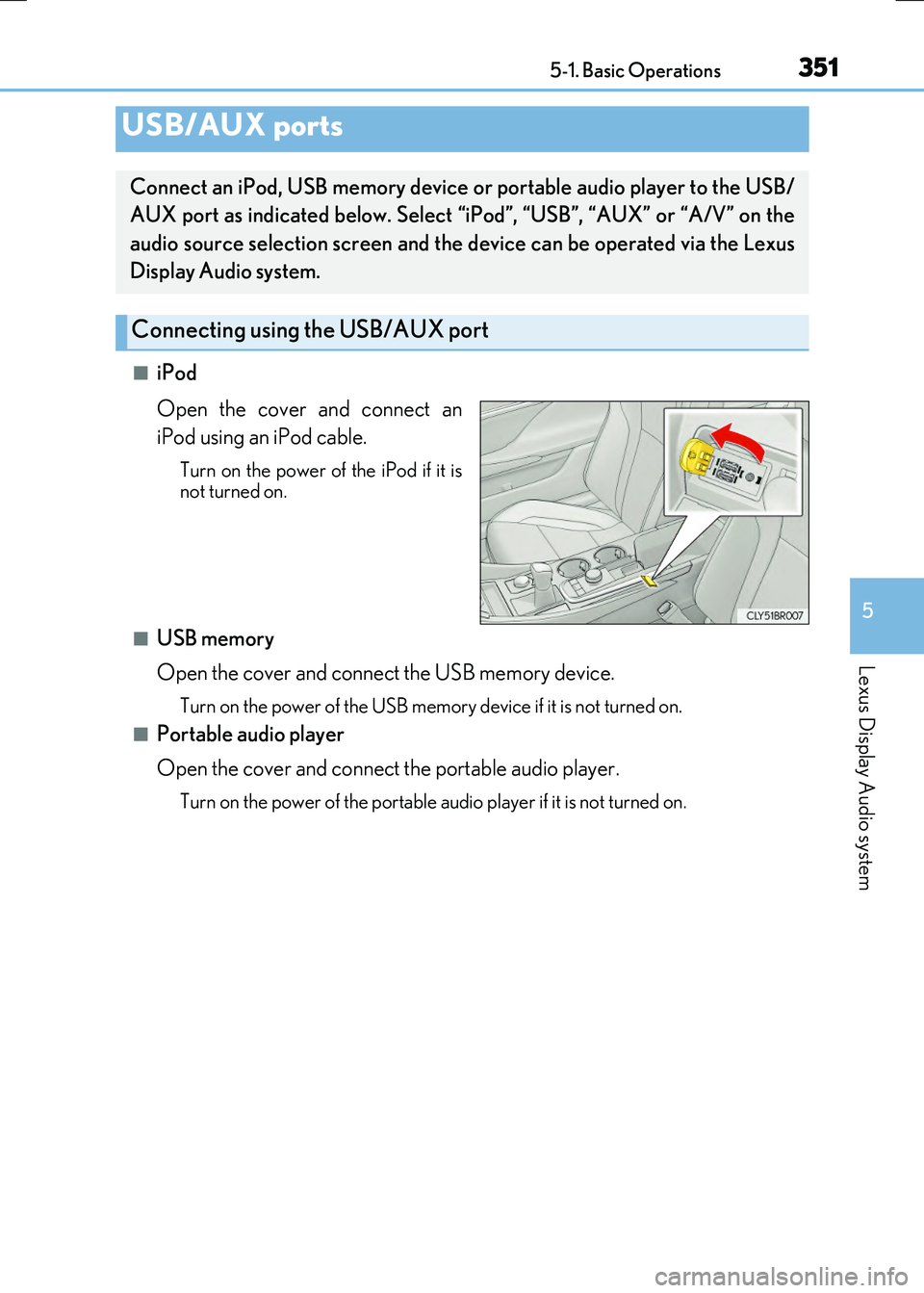
■iPod
Open the cover and connect an
iPod using an iPod cable.
Turn on the power of the iPod if it is not turned on.
■USB memory
Open the cover and connect the USB memory device.
Turn on the power of the USB memory device if it is not turned on.
■Portable audio player
Open the cover and connect the portable audio player.
Turn on the power of the portable audio player if it is not turned on.
USB/AUX ports
Connect an iPod, USB memory device or portable audio player to the USB/
AUX port as indicated below. Select “iPod”, “USB”, “AUX” or “A/V” on the
audio source selection screen and the device can be operated via the Lexus
Display Audio system.
Connecting using the USB/AUX port
Page 352 of 640
3525-1. Basic Operations
RC300h_EE(OM24740E)
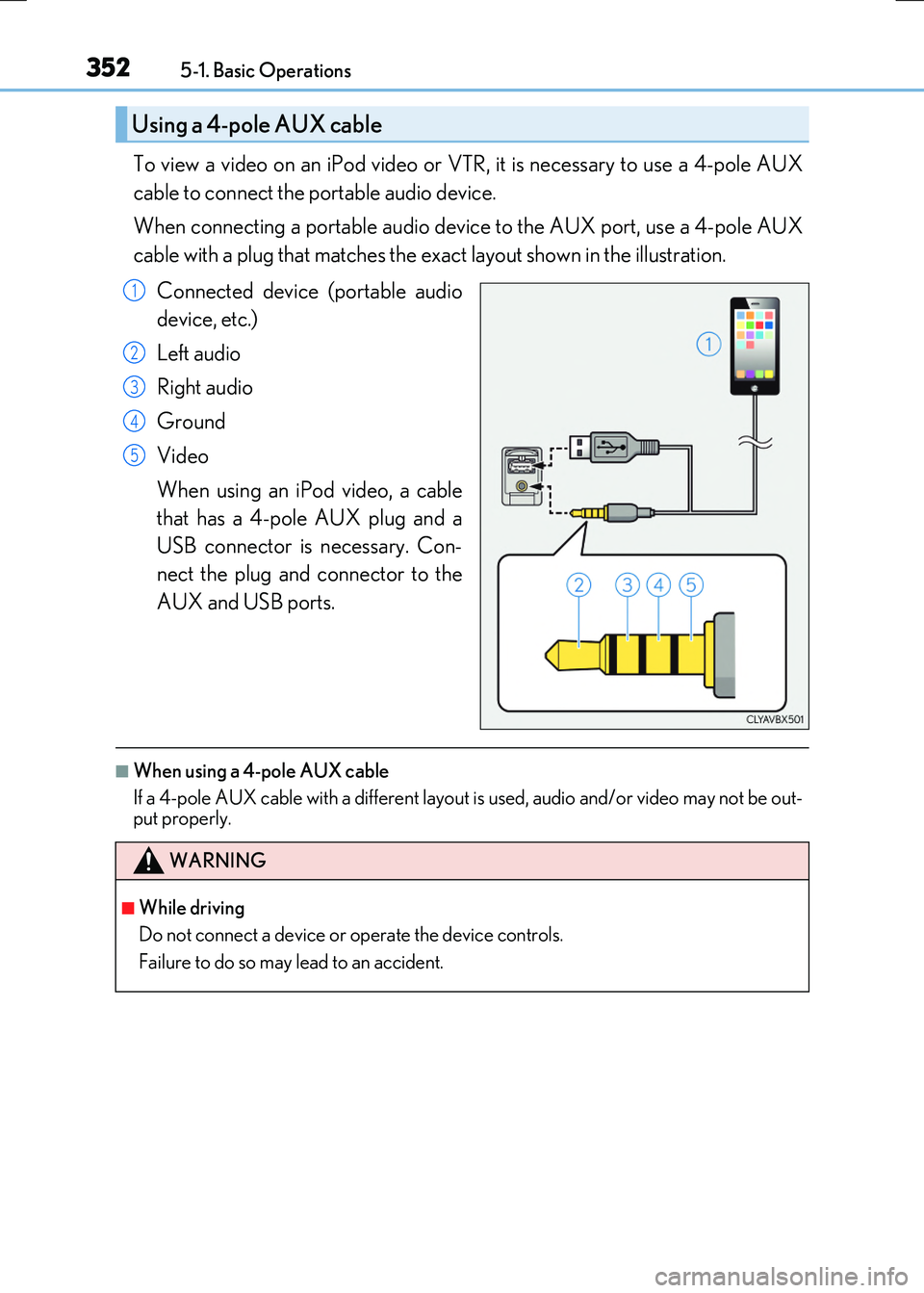
To view a video on an iPod video or VTR, it is necessary to use a 4-pole AUX
cable to connect the portable audio device.
When connecting a portable audio device to the AUX port, use a 4-pole AUX
cable with a plug that matches the exact layout shown in the illustration.
Connected device (portable audio
device, etc.)
Left audio
Right audio
Ground
Video
When using an iPod video, a cable
that has a 4-pole AUX plug and a
USB connector is necessary. Con-
nect the plug and connector to the
AUX and USB ports.
■When using a 4-pole AUX cable
If a 4-pole AUX cable with a different layout is used, audio and/or video may not be out- put properly.
Using a 4-pole AUX cable
1
2
3
4
5
WARNING
■While driving
Do not connect a device or operate the device controls.
Failure to do so may lead to an accident.
Page 367 of 640
3675-3. Using the audio system
5
Lexus Display Audio system
RC300h_EE(OM24740E)
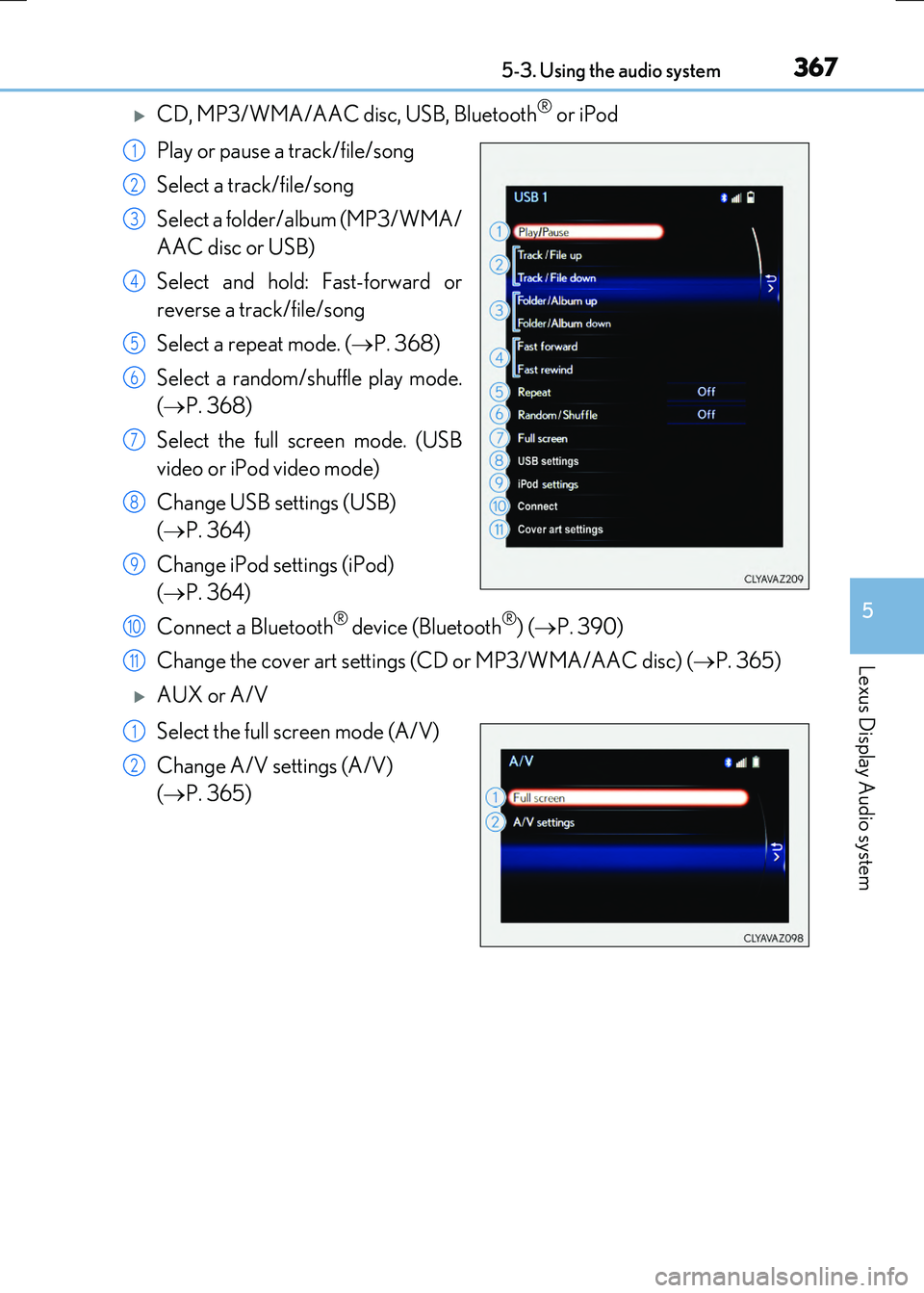
CD, MP3/WMA/AAC disc, USB, Bluetooth® or iPod
Play or pause a track/file/song
Select a track/file/song
Select a folder/album (MP3/WMA/
AAC disc or USB)
Select and hold: Fast-forward or
reverse a track/file/song
Select a repeat mode. ( P. 368)
Select a random/shuffle play mode.
( P. 368)
Select the full screen mode. (USB
video or iPod video mode)
Change USB settings (USB)
( P. 364)
Change iPod settings (iPod)
( P. 364)
Connect a Bluetooth® device (Bluetooth®) ( P. 390)
Change the cover art settings (CD or MP3/WMA/AAC disc) ( P. 365)
AUX or A/V
Select the full screen mode (A/V)
Change A/V settings (A/V)
( P. 365)
1
2
3
4
5
6
7
8
9
10
11
1
2
Page 386 of 640
3865-6. Using an external device
RC300h_EE(OM24740E)
P. 351
Pressing the “MEDIA” button displays th e top screen from any screen of the
selected source.
■Menu screen
P. 366
■Operating portable players connected to the audio system
Volume can be adjusted using the vehicle's audio controls. All other adjustments must be made on the portable player itself.
■When using a portable player connected to the power outlet
Noise may occur during playback. Use the power source of the portable player.
Using the AUX port
To use the AUX port, connect a portable player, press the “MEDIA” button or
select “AUX” or “A/V” on the “Source” screen.
Connecting a portable player
Top screen
NOTICE
■To prevent damage to the portable player or its terminal
●Do not leave portable player in the vehicle. The temperature inside the vehicle may
become high.
●Do not push down on or apply unnecessary pr essure to the portable player while it is connected.
●Do not insert foreign objects into the port.
Page 471 of 640
4717-3. Do-it-yourself maintenance
7
Maintenance and care
RC300h_EE(OM24740E)
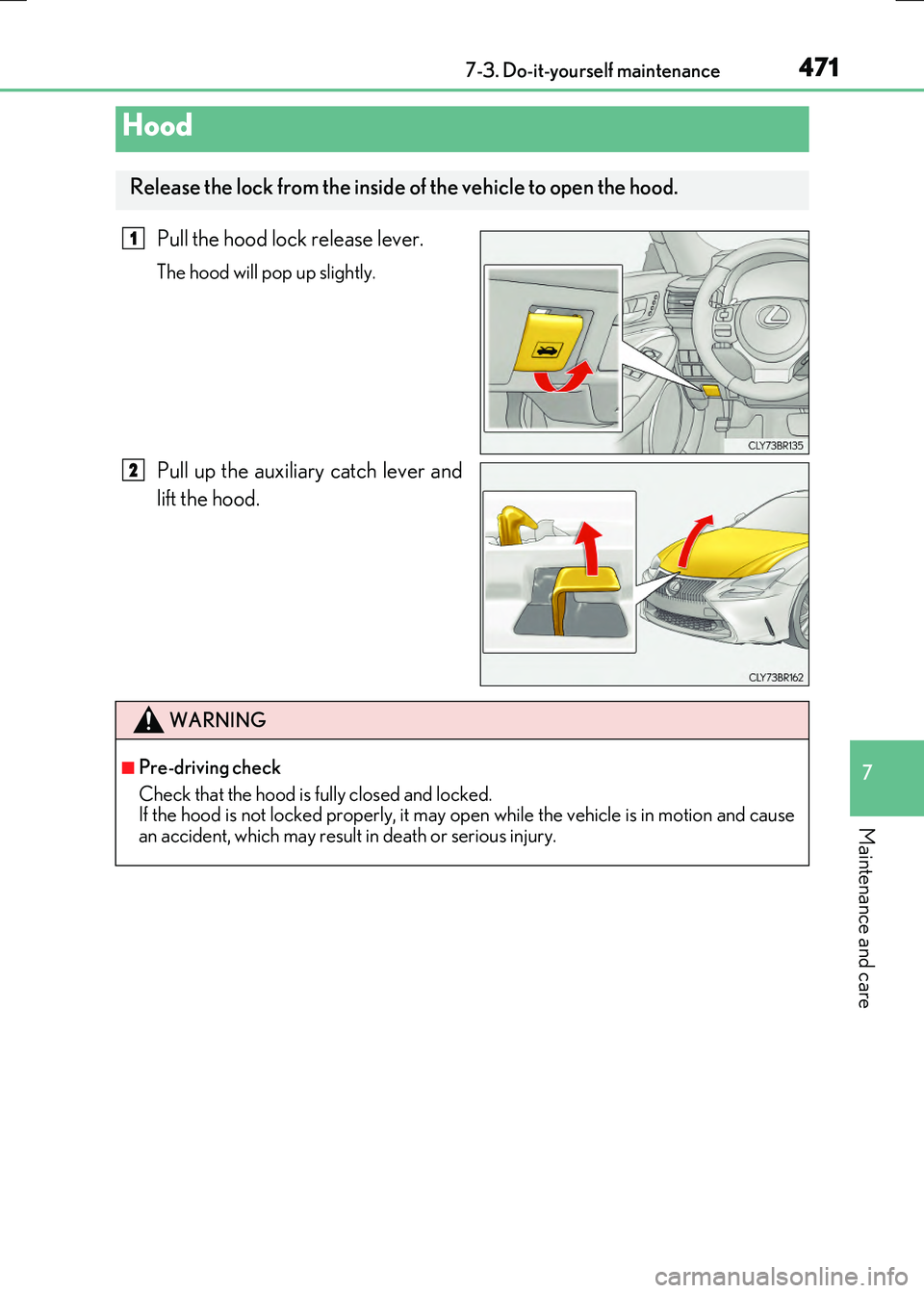
Pull the hood lock release lever.
The hood will pop up slightly.
Pull up the auxiliary catch lever and
lift the hood.
Hood
Release the lock from the inside of the vehicle to open the hood.
1
2
WARNING
■Pre-driving check
Check that the hood is fully closed and locked. If the hood is not locked properly, it may op en while the vehicle is in motion and cause
an accident, which may result in death or serious injury.
Page 489 of 640
4897-3. Do-it-yourself maintenance
7
Maintenance and care
RC300h_EE(OM24740E)
■Situations in which the tire pressure warning system may not operate properly
●In the following cases, the tire pressure warning system may not operate properly.
• If non-genuine Lexus wheels are used.
• A tire has been replaced with a tire that is not an OE (Original Equipment) tire. • A tire has been replaced with a tire that is not of the specified size.• Tire chains etc. are equipped.
• An auxiliary-supported run-flat tire is equipped. • If a window tint that affects the radio wave signals is installed.• If there is a lot of snow or ice on the vehi cle, particularly around the wheels or wheel
housings. • If the tire inflation pressure is extr emely higher than the specified level. • If tires not equipped with tire pressure warning valves and transmitters are used.
• If the ID code on the tire pressure warning valves and transmitters is not registered in the tire pressure warning computer.
●Performance may be affected in the following situations.
• Near a TV tower, electric power plant, gas station, radio station, large display, air- port or other facility that generates st rong radio waves or electrical noise
• When carrying a portable radio, cellular phone, cordless phone or other wireless communication deviceIf tire position information is not correctly displayed due to the radio wave conditions,
the display may be corrected by driving and changing the radio wave conditions.
●When the vehicle is parked, the time taken for the warning to start or go off could be extended.
●When tire inflation pressure declines rapi dly for example when a tire has burst, the warning may not function.
■The initialization operation
●Make sure to carry out initialization af ter adjusting the tire inflation pressure. Also, make sure the tires are cold before carry ing out initialization or tire inflation pres-
sure adjustment.
●If you have accidentally turned the power switch off during initialization, it is not neces- sary to press the reset switch again as init ialization will restart automatically when the
power switch has been turned to ON mode for the next time.
●If you accidentally press the reset switch when initialization is not necessary, adjust the tire inflation pressure to the specified leve l when the tires are cold, and conduct initial-
ization again.
■Warning performance of the tire pressure warning system
The warning of the tire pressure warning syst em will change in accordance with the con-
ditions under which it was initialized. For this reason, the system may give a warning even if the tire pressure does not reach a low enough level, or if the pressure is higher than the pressure that was adjusted to when the system was initialized.
Page 624 of 640
624
RC300h_EE(OM24740E)
Alphabetical index
Alphabetical index
A/C ............................................................ 432
Air conditioning filter....................... 509
Automatic air conditioning
system .................................................. 432
Blower customization ..................... 439
S-FLOW mode.................................. 434
AAC disc ...................................................371
ABS (Anti-lock Brake System) .......304
Warning light ...................................... 538
Active Sound Control (ASC)........... 231
Adaptive Variable
Suspension System .......................... 305
Air conditioning filter ......................... 509
Air conditioning system ..................... 432
Air conditioning filter....................... 509
Automatic air conditioning
system .................................................. 432
Blower customization ..................... 439
S-FLOW mode.................................. 434
Airbag manual on-off system ............. 54
Airbags......................................................... 43
Airbag manual on-off system ......... 54
Airbag operating conditions........... 49
Airbag precautions for
your child............................................... 45
Correct driving posture .................... 36
Curtain shield airbag operating
conditions.............................................. 49
Curtain shield airbag
precautions............................................47
General airbag precautions ........... 45
Locations of airbags............................ 43
Modification and disposal of
airbags .................................................... 48
Side airbag operating
conditions ..............................................49
Side airbag precautions.................... 45
Side and curtain shield airbags
operating conditions ........................49
Side and curtain shield airbags
precautions .......................................... 45
SRS airbags ..............................................43
SRS warning light .............................. 538
Alarm ...........................................................102
Anchor brackets ...................................... 64
Antennas (smart entry &
start system) ........................................ 155
Anti-lock Brake System (ABS)....... 304
Warning light....................................... 538
Approach warning............................... 262
ASC (Active Sound Control) ...........231
Assist grips .............................................. 457
Audio input ...............................................351
Audio system.......................................... 344
Audio CD player................................. 371
Audio input ............................................. 351
AUX port/USB port ......................... 351
Bluetooth® audio ............................. 395
iPod ........................................................... 377
Optimal use............................................ 361
Portable music player ..................... 386
Radio........................................................ 369
Steering wheel audio switch........ 350
USB memory ........................................381
Automatic headlight leveling
system ................................................... 234
Warning light....................................... 539
Automatic High Beam ...................... 235
Automatic light control system ...... 232
A