ECO mode LEXUS RX350 2011 User Guide
[x] Cancel search | Manufacturer: LEXUS, Model Year: 2011, Model line: RX350, Model: LEXUS RX350 2011Pages: 821, PDF Size: 13.27 MB
Page 164 of 821
91
1-4. Opening and closing the windows and moon roof
1
Before driving
nThe power windows can be operated when
The “ENGINE START STOP” switch is in IGNITION ON mode.
nOperating the power windows after turning the engine off
The power windows can be operated for approximately 45 seconds even after the
“ENGINE START STOP” switch is turned to ACCESSORY mode or turned off.
They cannot, however, be operated once either front door is opened.
nJam protection function
If an object becomes caught between the window and the window frame, window
travel is stopped and the window is opened slightly.
nWhen the power window does not close normally
If the jam protection function is operating abnormally and a window cannot be
closed, perform the following operations using the power window switch on the rel-
evant door.
lAfter stopping the vehicle, the window can be closed by holding the power win-
dow switch in the one-touch closing position while the “ENGINE START
STOP” switch is turned to IGNITION ON mode.
lIf the window still cannot be closed even by carrying out the operation
explained above, initialize the function by performing the following procedure.
Hold the power window switch in the one-touch closing position. Con-
tinue holding the switch for a further 6 seconds after the window has
closed.
Hold the power window switch in the one-touch opening position. Con-
tinue holding the switch for a further 2 seconds after the window has
opened completely.
Hold the power window switch in the one-touch closing position once
again. Continue holding the switch for a further 2 seconds after the win-
dow has closed.
If you release the switch while the window is moving, start again from the beginning.
If the window continues to close but then re-open slightly even after performing the
above procedure correctly, have the vehicle inspected by your Lexus dealer.
STEP1
STEP2
STEP3
Page 167 of 821

94
1-4. Opening and closing the windows and moon roof
nThe moon roof can be operated when
The “ENGINE START STOP” switch is in IGNITION ON mode.
nOperating the moon roof after turning the engine off
The moon roof can be operated for approximately 45 seconds even after the
“ENGINE START STOP” switch is turned to ACCESSORY mode or turned off. It
cannot, however, be operated once either front door is opened.
nJam protection function
If an object is detected between the moon roof and the frame while closing or tilting
down, travel is stopped and the moon roof opens slightly.
nSunshade
The sunshade can be opened and closed manually. However, the sunshade will
open automatically when the moon roof is opened.
nDoor lock linked moon roof operation
lThe moon roof can be opened and closed using the mechanical key. (→P. 5 8 1 )
lThe moon roof can be opened using the wireless remote control. (→P. 4 3 )
Page 176 of 821
103
1
1-6. Theft deterrent system
Before driving
Alarm
The system sounds the alarm and flashes the lights when forcible entry is
detected.
nTriggering of the alarm
The alarm is triggered in the following situations when the alarm is
set:
lA locked door is unlocked or opened in any way other than using
the entry function, wireless remote control or mechanical key.
lThe hood is opened.
lSome models: The back door window is tapped or broken.
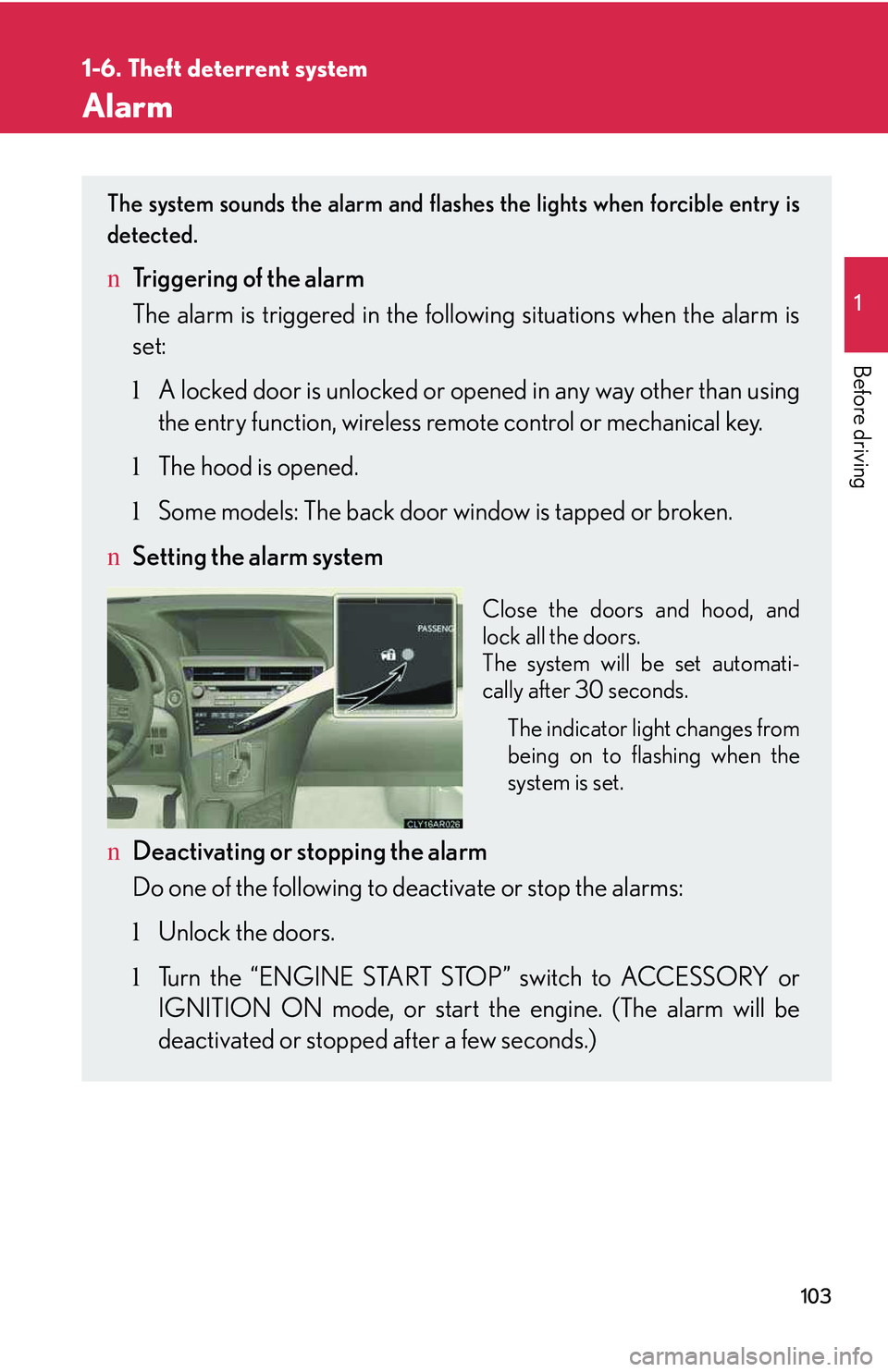
nSetting the alarm system
Close the doors and hood, and
lock all the doors.
The system will be set automati-
cally after 30 seconds.
The indicator light changes from
being on to flashing when the
system is set.
nDeactivating or stopping the alarm
Do one of the following to deactivate or stop the alarms:
lUnlock the doors.
lTurn the “ENGINE START STOP” switch to ACCESSORY or
IGNITION ON mode, or start the engine. (The alarm will be
deactivated or stopped after a few seconds.)
Page 225 of 821
153
2-1. Driving procedures
2
When driving
Engine (ignition) switch
Performing the following operations when carrying the electronic key on
your person starts the engine or changes “ENGINE START STOP” switch
modes.
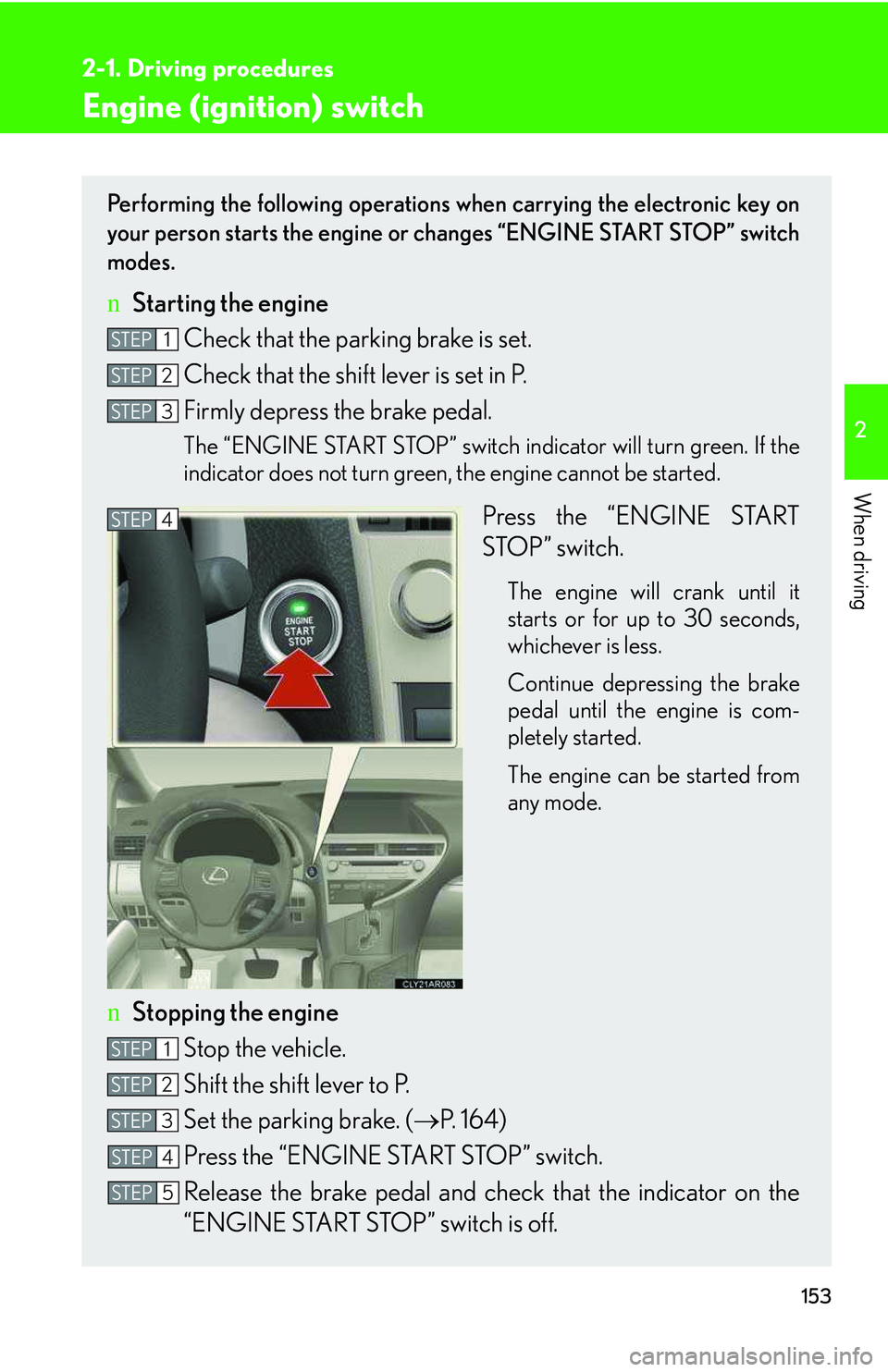
nStarting the engine
Check that the parking brake is set.
Check that the shift lever is set in P.
Firmly depress the brake pedal.
The “ENGINE START STOP” switch indicator will turn green. If the
indicator does not turn green, the engine cannot be started.
Press the “ENGINE START
STOP” switch.
The engine will crank until it
starts or for up to 30 seconds,
whichever is less.
Continue depressing the brake
pedal until the engine is com-
pletely started.
The engine can be started from
any mode.
nStopping the engine
Stop the vehicle.
Shift the shift lever to P.
Set the parking brake. (→P. 1 6 4 )
Press the “ENGINE START STOP” switch.
Release the brake pedal and check that the indicator on the
“ENGINE START STOP” switch is off.
STEP1
STEP2
STEP3
STEP4
STEP1
STEP2
STEP3
STEP4
STEP5
Page 230 of 821
158
2-1. Driving procedures
NOTICE
nTo prevent battery discharge
lDo not leave the “ENGINE START STOP” switch in ACCESSORY or IGNI-
TION ON mode for long periods of time without the engine running.
lIf the indicator on the “ENGINE START STOP” switch is illuminated, the
“ENGINE START STOP” switch is not off. When exiting the vehicle, always
check that the “ENGINE START STOP” switch is off.
lDo not stop the engine when the shift lever is in a position other than P. If the
engine is stopped in another shift lever position, the “ENGINE START STOP”
switch will not be turned off but instead be turned to ACCESSORY mode. If the
vehicle is left in ACCESSORY mode, battery discharge may occur.
nWhen starting the engine
lDo not race a cold engine.
lIf the engine becomes difficult to start or stalls frequently, have the engine
checked immediately.
nSymptoms indicating a malfunction with the “ENGINE START STOP” switch
If the “ENGINE START STOP” seems to be operating somewhat differently than
usual, such as the switch sticking slightly, there may be a malfunction. Contact your
Lexus dealer immediately.
Page 231 of 821
159
2-1. Driving procedures
2
When driving
Automatic transmission
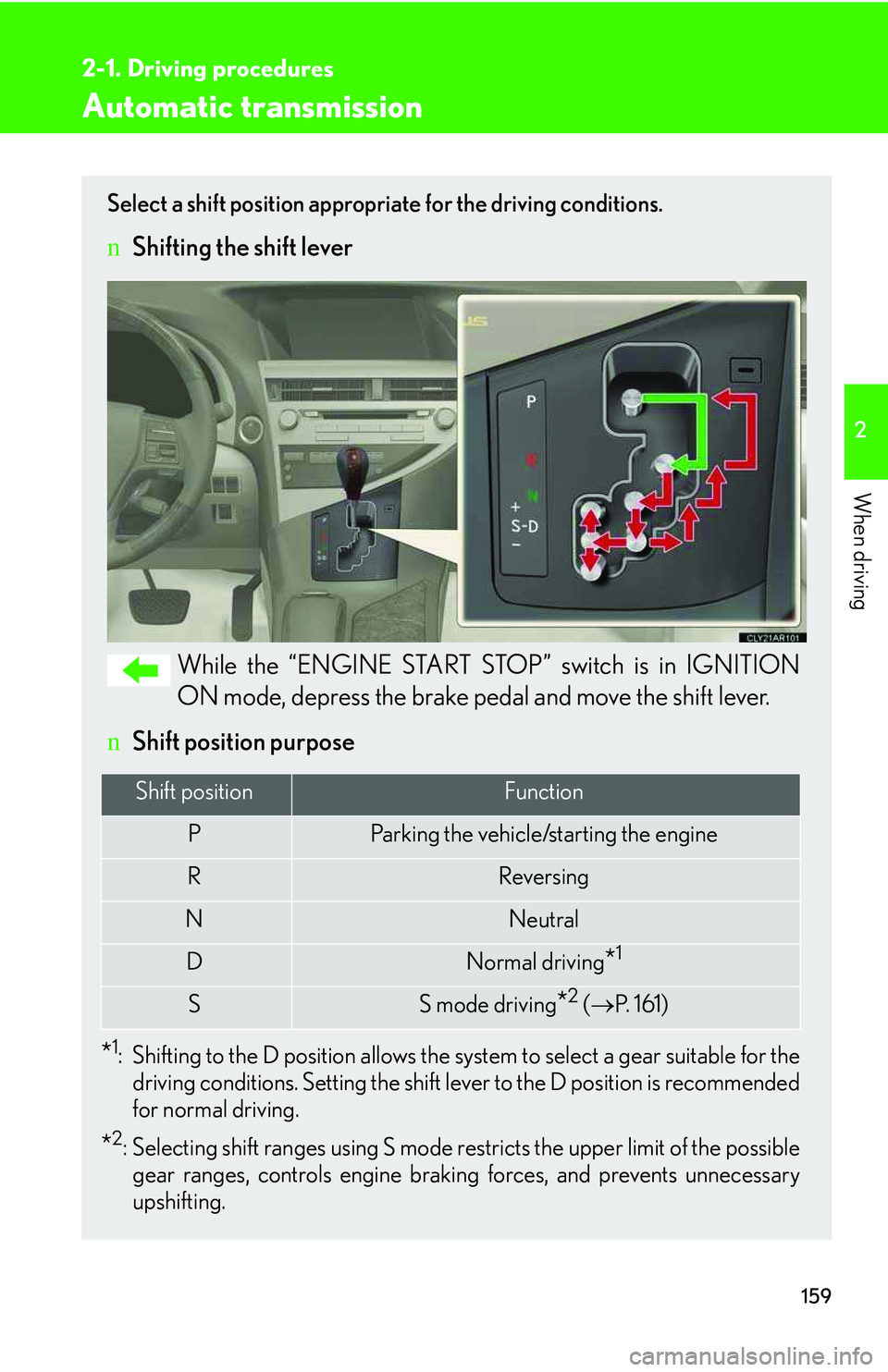
Select a shift position appropriate for the driving conditions.
nShifting the shift lever
While the “ENGINE START STOP” switch is in IGNITION
ON mode, depress the brake pedal and move the shift lever.
nShift position purpose
*1:Shifting to the D position allows the system to select a gear suitable for the
driving conditions. Setting the shift lever to the D position is recommended
for normal driving.
*2: Selecting shift ranges using S mode restricts the upper limit of the possible
gear ranges, controls engine braking forces, and prevents unnecessary
upshifting.
Shift positionFunction
PParking the vehicle/starting the engine
RReversing
NNeutral
DNormal driving*1
SS mode driving*2 (→P. 161)
Page 243 of 821
171
2-2. Instrument cluster
2
When driving
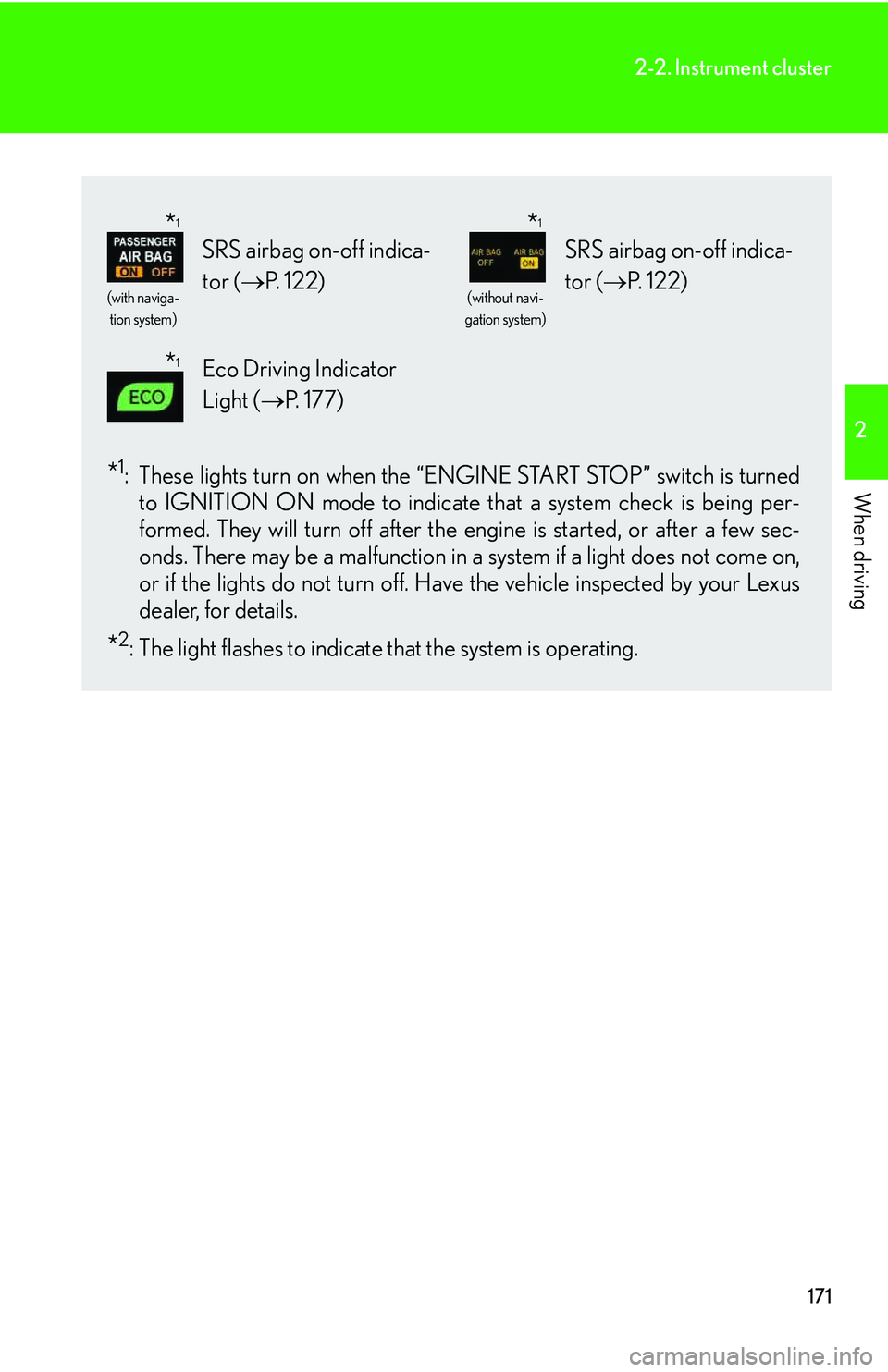
*1:These lights turn on when the “ENGINE START STOP” switch is turned
to IGNITION ON mode to indicate that a system check is being per-
formed. They will turn off after the engine is started, or after a few sec-
onds. There may be a malfunction in a system if a light does not come on,
or if the lights do not turn off. Have the vehicle inspected by your Lexus
dealer, for details.
*2: The light flashes to indicate that the system is operating.
(with naviga-
tion system)
SRS airbag on-off indica-
tor (→P. 122)
(without navi-
gation system)
SRS airbag on-off indica-
tor (→P. 1 2 2 )
Eco Driving Indicator
Light (→P. 1 7 7 )
*1*1
*1
Page 249 of 821
177
2-2. Instrument cluster
2
When driving
nElectronic features control can be turned on/off when
The “ENGINE START STOP” switch is in IGNITION ON mode.
nConditions for ending electronic features control
In the following situations, the electronic features control will end automatically:
lThe menu switch is pressed
lThe radar cruise control is operated
lIntuitive parking assist starts operating
lNo action is performed for some time after the electronic features control
screen is displayed
lA warning message appears after the electronic features control screen is dis-
played
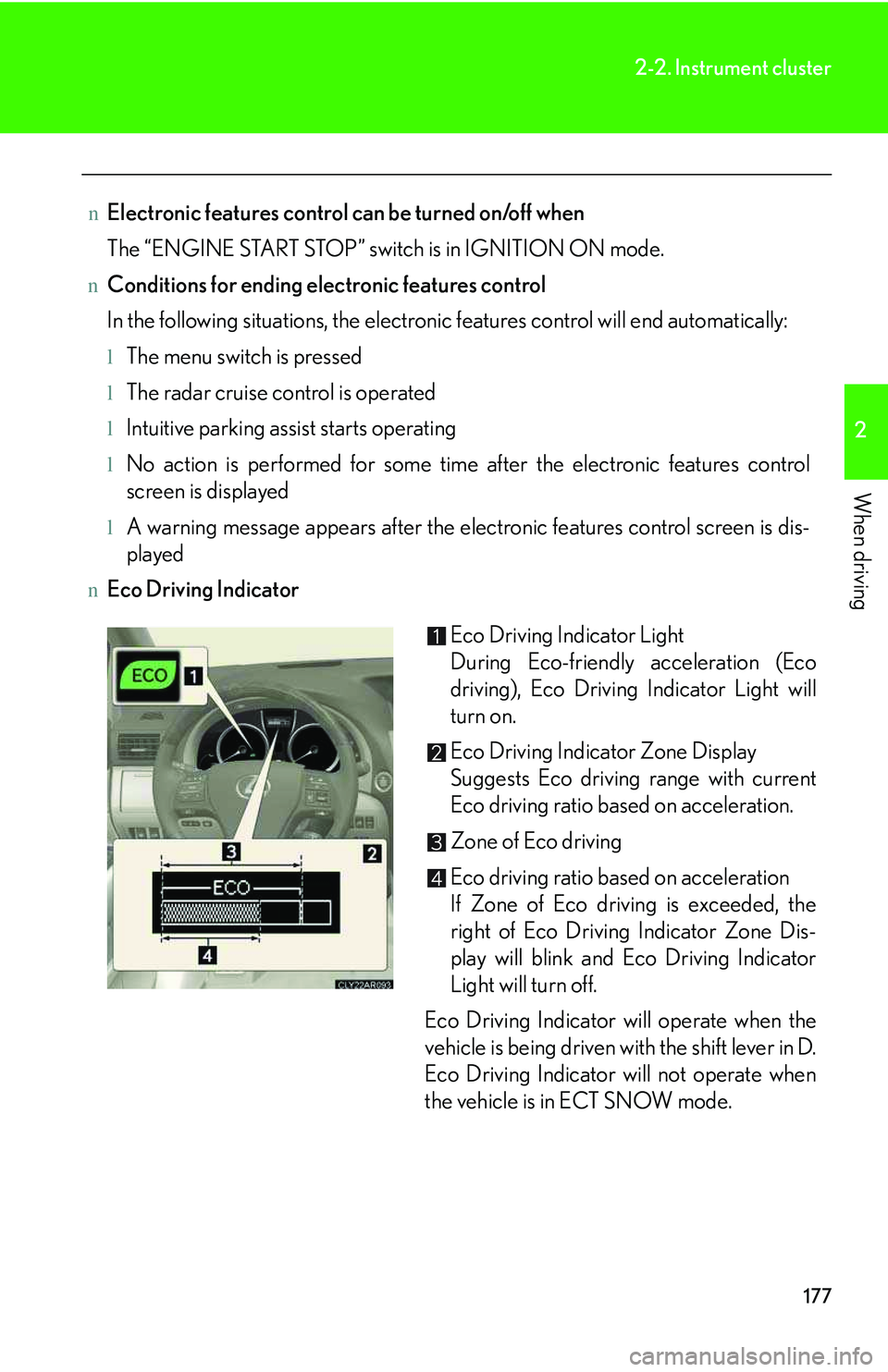
nEco Driving Indicator
Eco Driving Indicator Light
During Eco-friendly acceleration (Eco
driving), Eco Driving Indicator Light will
turn on.
Eco Driving Indicator Zone Display
Suggests Eco driving range with current
Eco driving ratio based on acceleration.
Zone of Eco driving
Eco driving ratio based on acceleration
If Zone of Eco driving is exceeded, the
right of Eco Driving Indicator Zone Dis-
play will blink and Eco Driving Indicator
Light will turn off.
Eco Driving Indicator will operate when the
vehicle is being driven with the shift lever in D.
Eco Driving Indicator will not operate when
the vehicle is in ECT SNOW mode.
Page 254 of 821
182
2-2. Instrument cluster
Display customization
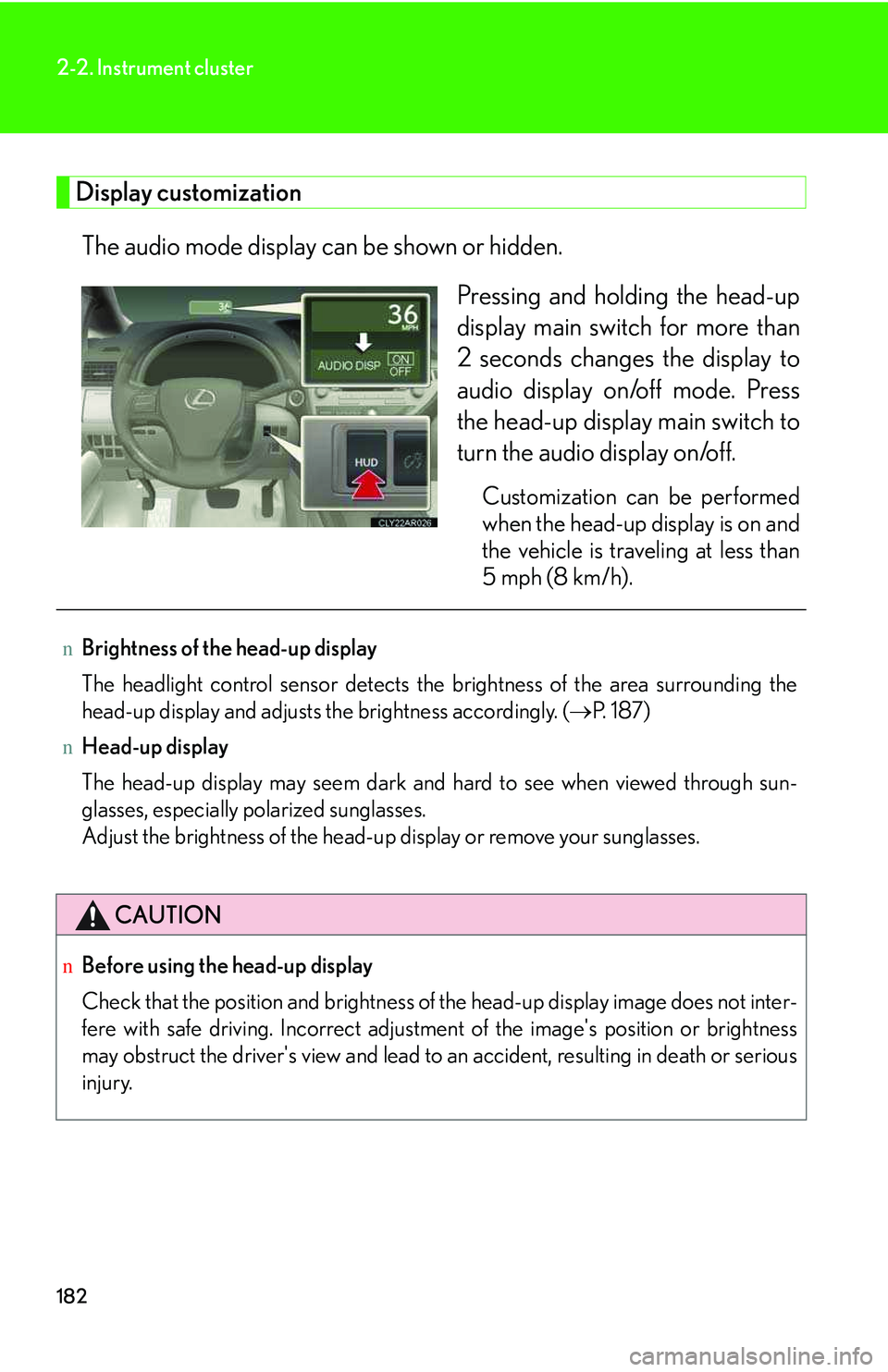
The audio mode display can be shown or hidden.
Pressing and holding the head-up
display main switch for more than
2 seconds changes the display to
audio display on/off mode. Press
the head-up display main switch to
turn the audio display on/off.
Customization can be performed
when the head-up display is on and
the vehicle is traveling at less than
5 mph (8 km/h).
nBrightness of the head-up display
The headlight control sensor detects the brightness of the area surrounding the
head-up display and adjusts the brightness accordingly. (→P. 1 8 7 )
nHead-up display
The head-up display may seem dark and hard to see when viewed through sun-
glasses, especially polarized sunglasses.
Adjust the brightness of the head-up display or remove your sunglasses.
CAUTION
nBefore using the head-up display
Check that the position and brightness of the head-up display image does not inter-
fere with safe driving. Incorrect adjustment of the image's position or brightness
may obstruct the driver's view and lead to an accident, resulting in death or serious
injury.
Page 260 of 821
188
2-3. Operating the lights and windshield wipers
nAutomatic light off system
lWhen the headlights come on: The headlights and tail lights turn off 30 seconds
after a door is opened and closed if the “ENGINE START STOP” switch is
turned to ACCESSORY mode or turned off. (The lights turn off immediately
if on the key is pressed after all the doors are locked.)
lWhen only the tail lights come on: The tail lights turn off automatically if the
“ENGINE START STOP” switch is turned to ACCESSORY mode or turned off
and the driver’s door is opened.
To turn the lights on again, turn the “ENGINE START STOP” switch to IGNITION
ON mode, or turn the light switch off once and then back to or .
nAutomatic headlight leveling system (if equipped)
The level of the headlights is automatically adjusted according to the number of
passengers and the loading condition of the vehicle to ensure that the headlights do
not interfere with other road users.
nIf the “AFS OFF” indicator flashes
It may indicate a malfunction in the system. Contact your Lexus dealer.
nCustomization
Settings (e.g. light sensor sensitivity) can be changed.
(Customizable features →P. 6 2 1 )
NOTICE
nTo prevent the battery discharge
Do not leave the lights on longer than necessary when the engine is not running.