warning LEXUS RX350 2011 Owner's Manual
[x] Cancel search | Manufacturer: LEXUS, Model Year: 2011, Model line: RX350, Model: LEXUS RX350 2011Pages: 821, PDF Size: 13.27 MB
Page 249 of 821
177
2-2. Instrument cluster
2
When driving
nElectronic features control can be turned on/off when
The “ENGINE START STOP” switch is in IGNITION ON mode.
nConditions for ending electronic features control
In the following situations, the electronic features control will end automatically:
lThe menu switch is pressed
lThe radar cruise control is operated
lIntuitive parking assist starts operating
lNo action is performed for some time after the electronic features control
screen is displayed
lA warning message appears after the electronic features control screen is dis-
played
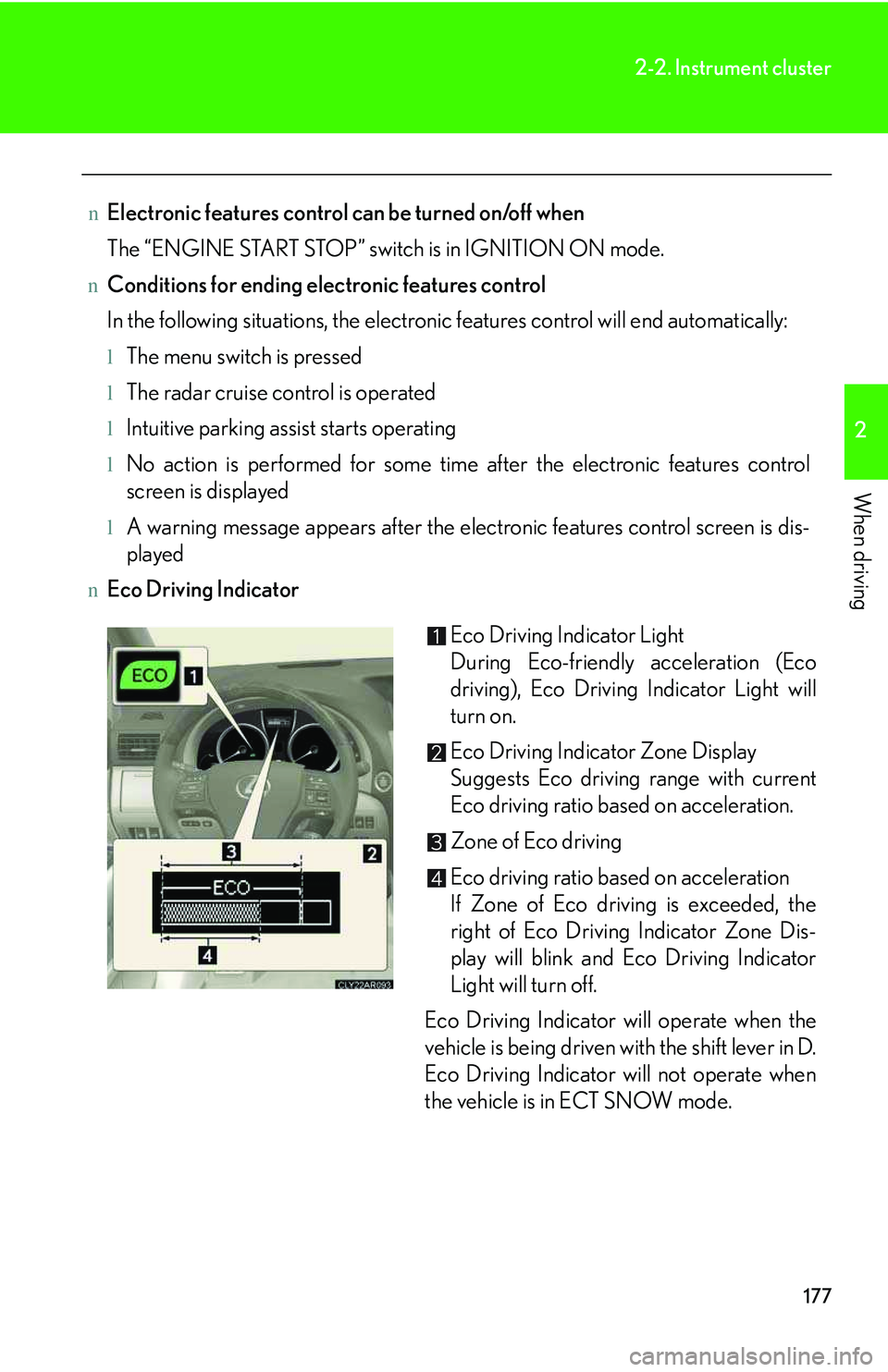
nEco Driving Indicator
Eco Driving Indicator Light
During Eco-friendly acceleration (Eco
driving), Eco Driving Indicator Light will
turn on.
Eco Driving Indicator Zone Display
Suggests Eco driving range with current
Eco driving ratio based on acceleration.
Zone of Eco driving
Eco driving ratio based on acceleration
If Zone of Eco driving is exceeded, the
right of Eco Driving Indicator Zone Dis-
play will blink and Eco Driving Indicator
Light will turn off.
Eco Driving Indicator will operate when the
vehicle is being driven with the shift lever in D.
Eco Driving Indicator will not operate when
the vehicle is in ECT SNOW mode.
Page 252 of 821
180
2-2. Instrument cluster
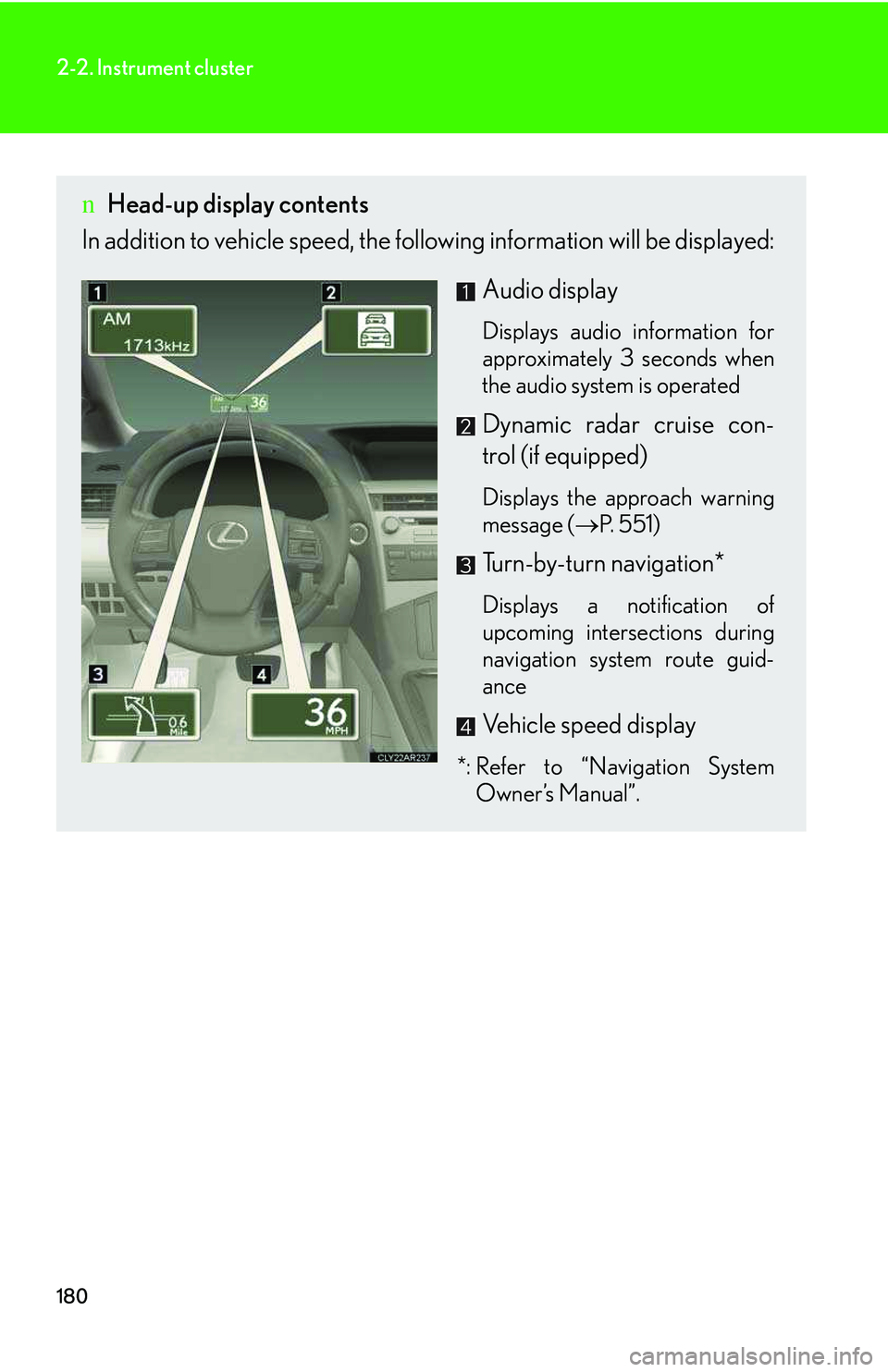
nHead-up display contents
In addition to vehicle speed, the following information will be displayed:
Audio display
Displays audio information for
approximately 3 seconds when
the audio system is operated
Dynamic radar cruise con-
trol (if equipped)
Displays the approach warning
message (→P. 551)
Turn-by-turn navigation*
Displays a notification of
upcoming intersections during
navigation system route guid-
ance
Vehicle speed display
*: Refer to “Navigation System
Owner’s Manual”.
Page 284 of 821
212
2-4. Using other driving systems
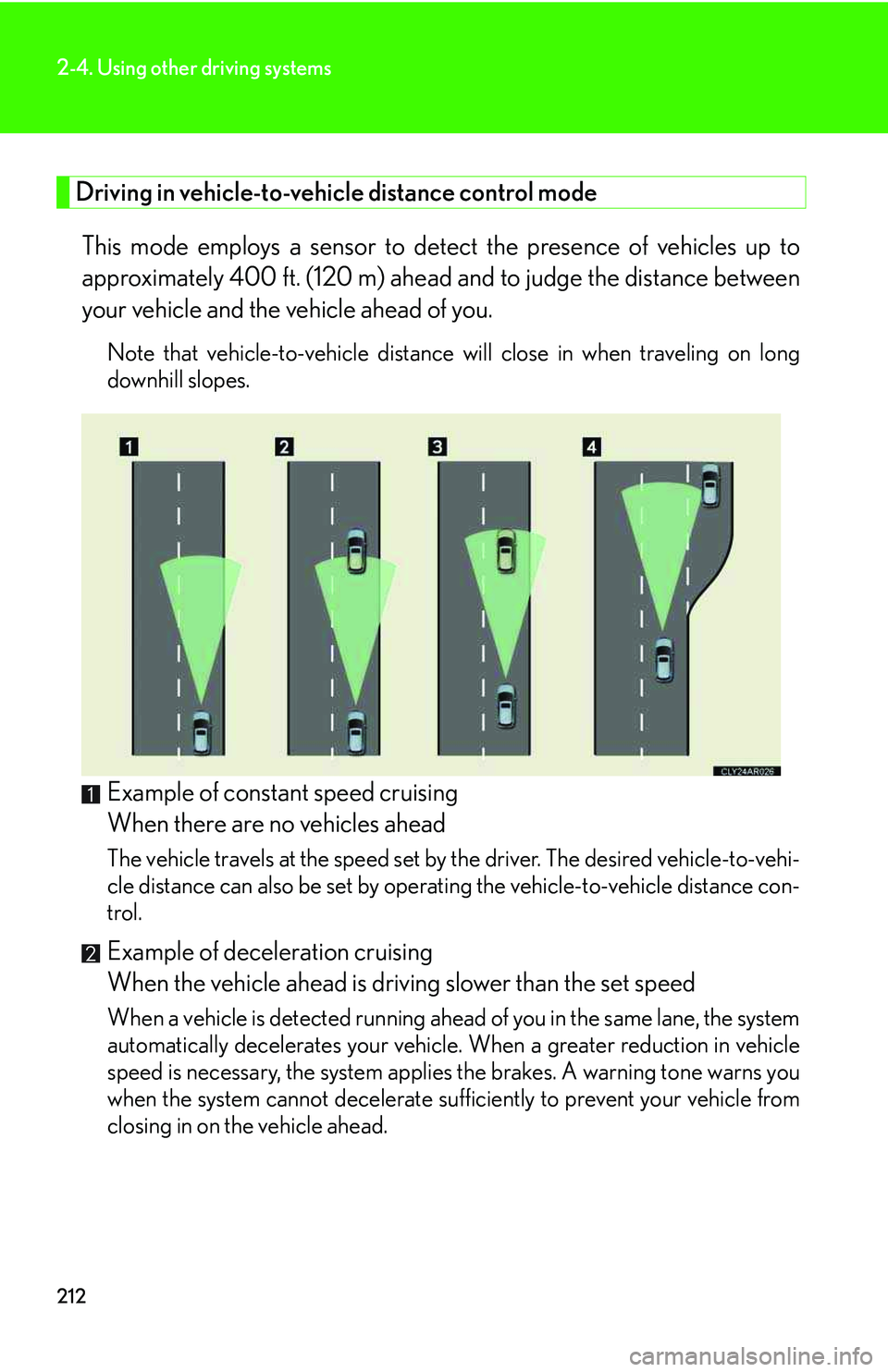
Driving in vehicle-to-vehicle distance control mode
This mode employs a sensor to detect the presence of vehicles up to
approximately 400 ft. (120 m) ahead and to judge the distance between
your vehicle and the vehicle ahead of you.
Note that vehicle-to-vehicle distance will close in when traveling on long
downhill slopes.
Example of constant speed cruising
When there are no vehicles ahead
The vehicle travels at the speed set by the driver. The desired vehicle-to-vehi-
cle distance can also be set by operating the vehicle-to-vehicle distance con-
trol.
Example of deceleration cruising
When the vehicle ahead is driving slower than the set speed
When a vehicle is detected running ahead of you in the same lane, the system
automatically decelerates your vehicle. When a greater reduction in vehicle
speed is necessary, the system applies the brakes. A warning tone warns you
when the system cannot decelerate sufficiently to prevent your vehicle from
closing in on the vehicle ahead.
Page 285 of 821
213
2-4. Using other driving systems
2
When driving
Example of follow-up cruising
When following a vehicle driving slower than the set speed
The system continues follow-up cruising while adjusting for changes in the
speed of the vehicle ahead in order to maintain the vehicle-to-vehicle dis-
tance set by the driver.
Example of acceleration
When there no longer are vehicles driving slower than the set speed in
the lane ahead
When the vehicle ahead of you executes a lane change, the system slowly
accelerates until the set speed is reached. The system then returns to con-
stant speed cruising.
Approach warning
When your vehicle is too close to a vehicle ahead, and sufficient auto-
matic deceleration via the cruise control is not possible, the display will
flash and a buzzer will sound to alert the driver. An example of this would
be if another driver cuts in front of you while you are following a vehicle.
Apply the brakes to ensure an appropriate vehicle-to-vehicle distance.
nDynamic radar cruise can be set when
lThe shift lever is in D. (Recommended)
Dynamic radar cruise control can also be set when the shift lever is in the S posi-
tion and range “4”, “5”, or “6” has been selected.
lVehicle speed is above approximately 30 mph (50 km/h).
nSwitching modes
The mode cannot be switched to constant speed control mode if vehicle-to-vehicle
distance control mode has been used. The mode also cannot be switched from
constant speed control to vehicle-to-vehicle distance control mode. Turn the sys-
tem off by pressing the “ON-OFF” button, and turn it on again.
nAccelerating
The vehicle can accelerate normally. After acceleration, the set speed resumes.
Page 287 of 821
215
2-4. Using other driving systems
2
When driving
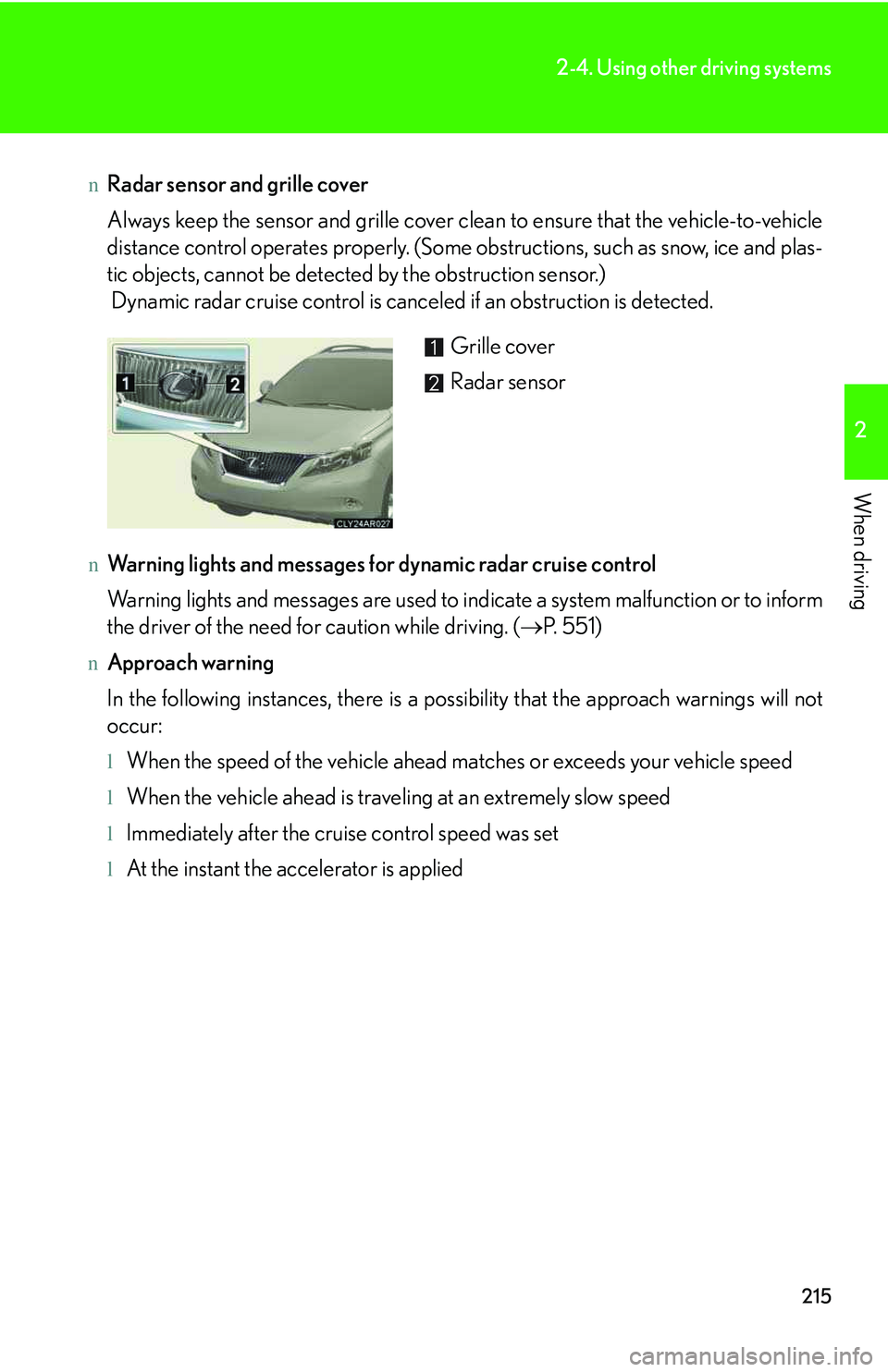
nRadar sensor and grille cover
Always keep the sensor and grille cover clean to ensure that the vehicle-to-vehicle
distance control operates properly. (Some obstructions, such as snow, ice and plas-
tic objects, cannot be detected by the obstruction sensor.)
Dynamic radar cruise control is canceled if an obstruction is detected.
nWarning lights and messages for dynamic radar cruise control
Warning lights and messages are used to indicate a system malfunction or to inform
the driver of the need for caution while driving. (→P. 5 5 1 )
nApproach warning
In the following instances, there is a possibility that the approach warnings will not
occur:
lWhen the speed of the vehicle ahead matches or exceeds your vehicle speed
lWhen the vehicle ahead is traveling at an extremely slow speed
lImmediately after the cruise control speed was set
lAt the instant the accelerator is applied
Grille cover
Radar sensor
Page 288 of 821
216
2-4. Using other driving systems
nCertification
For vehicles sold in U.S.A.
FCC ID: HYQDNMWR005
This device complies with Part 15 of the FCC Rules. Operation is subject to the fol-
lowing two conditions: (1) this device may not cause harmful interference, and (2)
this device must accept any interference received, including interference that may
cause undesired operation.
FCC WARNING
Changes or modifications not expressly approved by the party responsible for
compliance could void the use’s authority to operate the equipment.
Radio frequency radiation exposure Information:
This equipment complies with FCC radiation exposure limits set forth for an uncon-
trolled environment.
This equipment should be installed and operated with minimum distance of 20 cm
between the radiator and your body.
This transmitter must not be co-located or operating in conjunction with any other
antenna or transmitter.
For vehicles sold in Canada
Operation is subject to the following two conditions: (1) this device may not cause
interference, and (2) this device must accept any interference, including interfer-
ence that may cause undesired operation of the device.
CAUTION
nBefore using dynamic radar cruise control
Do not overly rely on vehicle-to-vehicle distance control.
Be aware of the set speed. If automatic deceleration/acceleration is not appropri-
ate, adjust the vehicle speed, as well as the distance between your vehicle and vehi-
cles ahead by applying the brakes etc.
Page 290 of 821
218
2-4. Using other driving systems
CAUTION
nSituations unsuitable for dynamic radar cruise control
Do not use dynamic radar cruise control in any of the following situations.
Doing so may result in inappropriate speed control and could cause an accident
resulting in death or serious injury.
lIn heavy traffic
lOn roads with sharp bends
lOn winding roads
lOn slippery roads, such as those covered with rain, ice and snow
lOn steep downhills, or where there are sudden changes between sharp up and
down gradients
lAt entrances to expressways
lWhen weather conditions are bad enough that they may prevent the sensors
from functioning correctly (fog, snow, sandstorm, heavy rain, etc.)
lWhen a buzzer is heard often
lWhen your vehicle is towing anything
nWhen the sensor may not be correctly detecting the vehicle ahead
Apply the brakes as necessary when any of the following types of vehicles are in
front of you.
As the sensor may not be able to correctly detect these types of vehicles, the
approach warning (→P. 213) will not be activated, and an accident may result.
lVehicles that cut in suddenly
lVehicles traveling at low speeds
lVehicles that are not moving
lVehicles with small rear ends (trailers with no load on board etc.)
lMotorcycles traveling in the same lane
Page 308 of 821
236
2-4. Using other driving systems
CAUTION
nWhen the VSC is activated
The slip indicator light flashes and a warning buzzer sounds. Always drive carefully.
Reckless driving may cause an accident. Exercise particular care when the indica-
tor light flashes and a buzzer sounds.
nWhen the TRAC/VSC systems are turned off
Be especially careful and drive at a speed appropriate to the road conditions. As
these are the systems to ensure vehicle stability and driving force, do not turn the
TRAC/VSC systems off unless necessary.
nReplacing tires
Make sure that all tires are of the same size, brand, tread pattern and total load
capacity. In addition, make sure that the tires are inflated to the recommended tire
inflation pressure level.
The ABS and VSC systems will not function correctly if different tires are installed
on the vehicle.
Contact your Lexus dealer for further information when replacing tires or wheels.
nHandling of tires and suspension
Using tires with any kind of problem or modifying the suspension will affect the driv-
ing assist systems, and may cause a system malfunction.
Page 314 of 821
242
2-4. Using other driving systems
When the system is activated in the situations described above, there is also a possi-
bility that the seat belts will retract quickly and the brakes will be applied with a force
greater than normal. When the seat belt is locked in the retracted position, stop the
vehicle in a safe place, release the seat belt and refasten it.
nObstacles not detected
The sensor cannot detect plastic obstacles such as traffic cones. There may also be
occasions when the sensor cannot detect pedestrians, animals, bicycles, motorcy-
cles, trees, or snowdrifts.
nWhen there is a malfunction in the system
Warning lights and/or warning messages will turn on or flash. (→P. 535, 545)
nCertification
For vehicles sold in U.S.A.
FCC ID: HYQDNMWR005
This device complies with Part 15 of the FCC Rules. Operation is subject to the fol-
lowing two conditions: (1) this device may not cause harmful interference, and (2)
this device must accept any interference received, including interference that may
cause undesired operation.
FCC WARNING
Changes or modifications not expressly approved by the party responsible for
compliance could void the user's authority to operate the equipment.
Radiofrequency radiation exposure Information:
This equipment complies with FCC radiation exposure limits set forth for an uncon-
trolled environment.
This equipment should be installed and operated with minimum distance of 20 cm
between the radiator (antenna) and your body.
This transmitter must not be co-located or operating in conjunction with any other
antenna or transmitter.
For vehicles sold in Canada
Operation is subject to the following two conditions: (1) this device may not cause
interference, and (2) this device must accept any interference, including interfer-
ence that may cause undesired operation of the device.
Page 329 of 821
257
2-5. Driving information
2
When driving
NOTICE
nRepairing or replacing snow tires
Request repairs or replacement of snow tires from Lexus dealers or legitimate tire
retailers.
This is because the removal and attachment of snow tires affects the operation of
the tire pressure warning valves and transmitters.
nFitting tire chains
The tire pressure warning valves and transmitters may not function correctly when
tire chains are fitted.