steering wheel LEXUS RX350 2011 Workshop Manual
[x] Cancel search | Manufacturer: LEXUS, Model Year: 2011, Model line: RX350, Model: LEXUS RX350 2011Pages: 821, PDF Size: 13.27 MB
Page 319 of 821
247
2-5. Driving information
2
When driving
CAUTION
nOff-road driving precautions
Always observe the following precautions to minimize the risk of death or serious
injury or damage to your vehicle:
lDrive carefully when off the road. Do not take unnecessary risks by driving in
dangerous places.
lDo not grip the steering wheel spokes when driving off-road. A bad bump could
jerk the wheel and injure your hands. Keep both hands and especially your
thumbs on the outside of the rim.
lAlways check your brakes for effectiveness immediately after driving in sand,
mud, water or snow.
lAfter driving through tall grass, mud, rock, sand, water, etc., check that there is no
grass, bush, paper, rags, stone, sand, etc. adhering or trapped to the underbody.
Clear off any such matter from the underbody. If the vehicle is used with these
materials trapped or adhering to the underbody, a breakdown or fire could occur.
lWhen driving off-road or in rugged terrain, do not drive at excessive speeds,
jump, make sharp turns, strike objects, etc. This may cause loss of control or vehi-
cle rollover causing death or serious injury. You are also risking expensive dam-
age to your vehicle’s suspension and chassis.
NOTICE
nTo prevent water damage
Take all necessary safety measures to ensure that water damage to the engine or
other components does not occur.
lWater entering the engine air intake will cause severe engine damage.
lWater entering the automatic transmission will cause deterioration in shift quality,
locking up of your transmission accompanied by vibration, and ultimately dam-
age.
lWater can wash the grease from wheel bearings, causing rusting and premature
failure, and may also enter the differentials, transmission and transfer case, reduc-
ing the gear oil’s lubricating qualities.
Page 336 of 821
264
2-5. Driving information
Trailer towing tips
Your vehicle will handle differently when towing a trailer. In order to avoid
accident, death or serious injury, keep the following in mind when towing:
lBefore starting out, check the trailer lights and the vehicle-trailer con-
nections. Recheck after driving a short distance.
lPractice turning, stopping and reversing with the trailer attached in an
area away from traffic until you become accustomed to the feel of the
vehicle.
lReversing with a trailer attached is difficult and requires practice. Grip
the bottom of the steering wheel and move your hand to the left to
move the trailer to the left. Move your hand to the right to move the
trailer to right. (This is generally opposite to reversing without a trailer
attached.) Avoid sharp or prolonged turning. Have someone guide
you when reversing to reduce the risk of an accident.
lAs stopping distance is increased when towing a trailer, vehicle-to-
vehicle distance should be increased. For each 10 mph (16 km/h) of
speed, allow at least one vehicle and trailer length.
lAvoid sudden braking as you may skid, resulting in jackknifing and loss
of control. This is especially true on wet or slippery surfaces.
lAvoid jerky starts or sudden acceleration.
lAvoid jerky steering and sharp turns, and slow down before making
turns.
lNote that when making a turn, the trailer wheels will be closer than the
vehicle wheels to the inside of the turn. Compensate by making a
larger than normal turning radius.
Page 337 of 821
265
2-5. Driving information
2
When driving
lCrosswinds and rough roads will adversely affect handling of your
vehicle and trailer, causing sway. Periodically check the rear to prepare
for being passed by large trucks or buses, which may cause your vehi-
cle and trailer to sway. If swaying occurs, firmly grip the steering wheel,
reduce speed immediately but gradually, and steer straight ahead.
Never increase speed. If you make no extreme correction with the
steering or brakes, your vehicle and trailer will stabilize.
lTake care when passing other vehicles. Passing requires considerable
distance. After passing a vehicle, do not forget the length of your
trailer, and be sure you have plenty of room before changing lanes.
lIn order to maintain engine braking efficiency when driving on a long
steep downgrade, do not use overdrive. Transmission shift range posi-
tion must be in 4 in S mode.
lDue to the added load of the trailer, your vehicle's engine may over-
heat on hot days (at temperatures over 85°F [30°C]) when driving up
a long or steep grade. If the engine coolant temperature gauge indi-
cates overheating, immediately turn off the air conditioning (if in use),
pull your vehicle off the road and stop in a safe spot. (→P. 587)
lAlways place wheel blocks under both the vehicle and the trailer
wheels when parking. Apply the parking brake firmly, and put the
transmission in P. Avoid parking on a slope, but if unavoidable, do so
only after performing the following:
Apply the brakes and keep them applied.
Have someone place wheel blocks under both the vehicle and
trailer wheels.
When the wheel blocks are in place, release the brakes slowly
until the blocks absorb the load.
Apply the parking brake firmly.
Shift into P and turn off the engine.
STEP1
STEP2
STEP3
STEP4
STEP5
Page 355 of 821
285
3-2. Using the audio system
3
Interior features
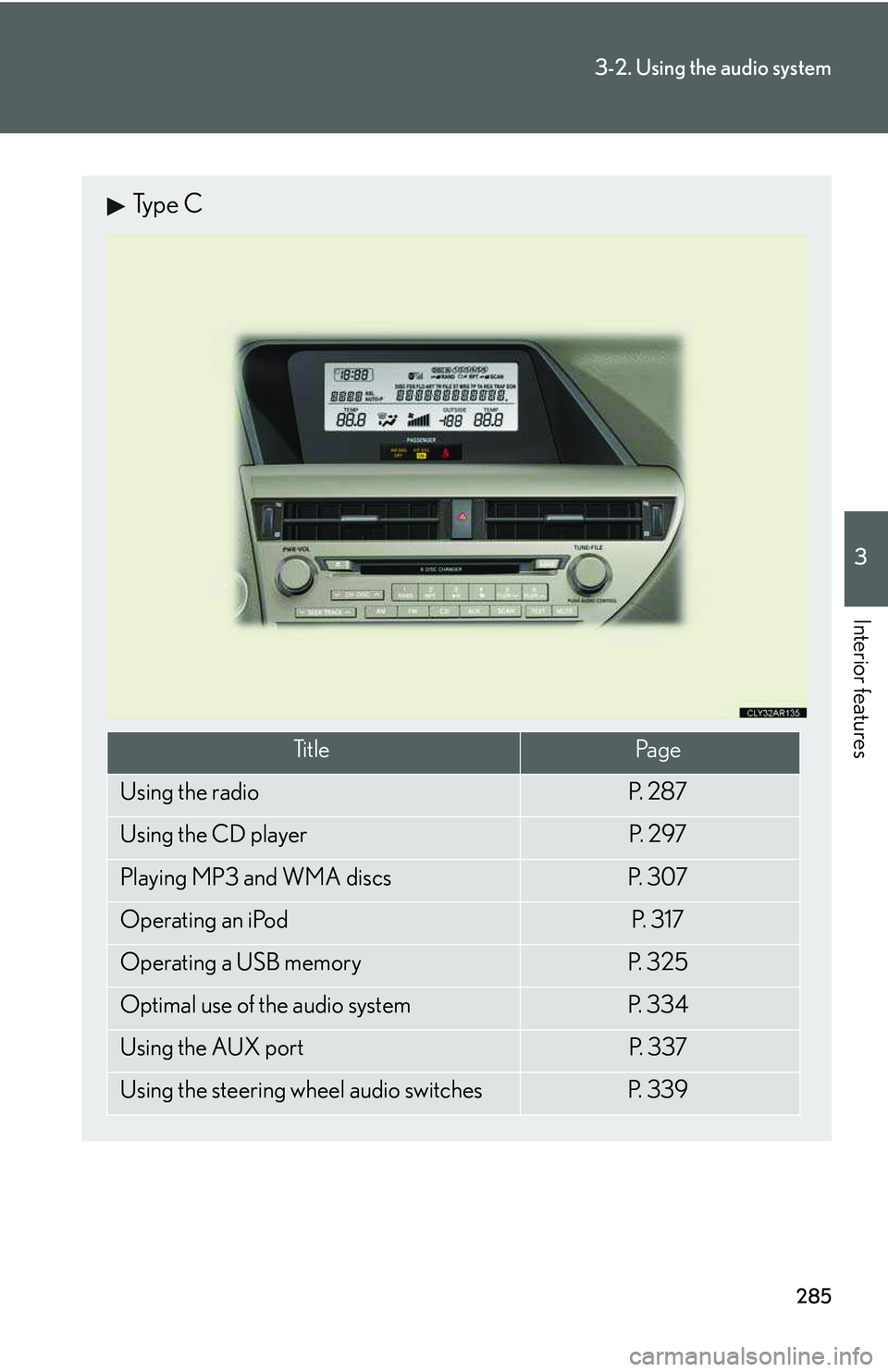
Type C
Ti t l ePa g e
Using the radioP. 2 8 7
Using the CD playerP. 2 9 7
Playing MP3 and WMA discsP. 3 0 7
Operating an iPodP. 3 1 7
Operating a USB memoryP. 3 2 5
Optimal use of the audio systemP. 3 3 4
Using the AUX portP. 3 3 7
Using the steering wheel audio switchesP. 3 3 9
Page 409 of 821
339
3-2. Using the audio system
3
Interior features
Using the steering wheel audio switches
Turning the power on
Press when the audio system is turned off.
The audio system can be turned off by holding the switch down for 1 second
or more.
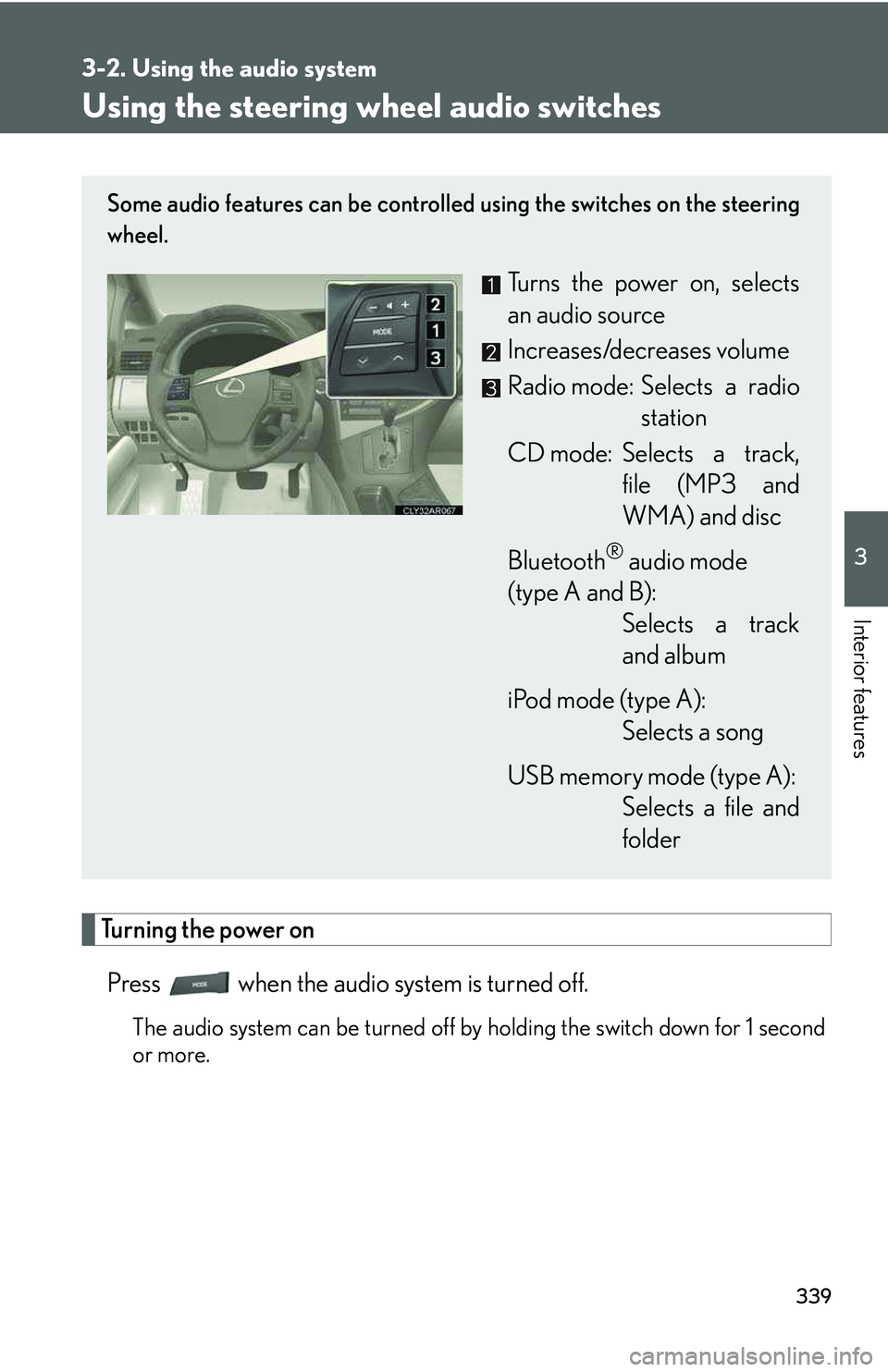
Some audio features can be controlled using the switches on the steering
wheel.
Turns the power on, selects
an audio source
Increases/decreases volume
Radio mode: Selects a radio
station
CD mode: Selects a track,
file (MP3 and
WMA) and disc
Bluetooth® audio mode
(type A and B):
Selects a track
and album
iPod mode (type A):
Selects a song
USB memory mode (type A):
Selects a file and
folder
Page 411 of 821
341
3-2. Using the audio system
3
Interior features
Selecting an album (type A and B)
Press to select Bluetooth® audio mode.
Press and hold “∧” or “∨” on until you hear a beep.
Selecting a folder (type A)
Press to select USB memory mode.
Press and hold “∧” or “∨” on until you hear a beep.
Selecting a disc in the CD player
Press to select CD mode.
Press and hold “∧” or “∨” on until you hear a beep.
nCanceling automatic selection of a radio station
Press again.
CAUTION
nTo reduce the risk of an accident
Exercise care when operating the audio switches on the steering wheel.
STEP1
STEP2
STEP1
STEP2
STEP1
STEP2
Page 423 of 821
353
3-3. Using the Bluetooth® audio system
3
Interior features
Switching the display
Press .
Each time the button is pressed, the display changes in the following order:
Elapsed time → Album title → Tr a c k t i t l e → Artist name
Using the steering wheel audio switches
→P. 3 3 9
nBluetooth® audio system functions
Depending on the portable player that is connected to the system, certain functions
may not be available.
nDisplay
→P. 3 0 3
nError messages
“Memory Error”: This indicates a problem in the system.
Page 437 of 821
367
3-4. Using the hands-free phone system (for mobile phones)
3
Interior features
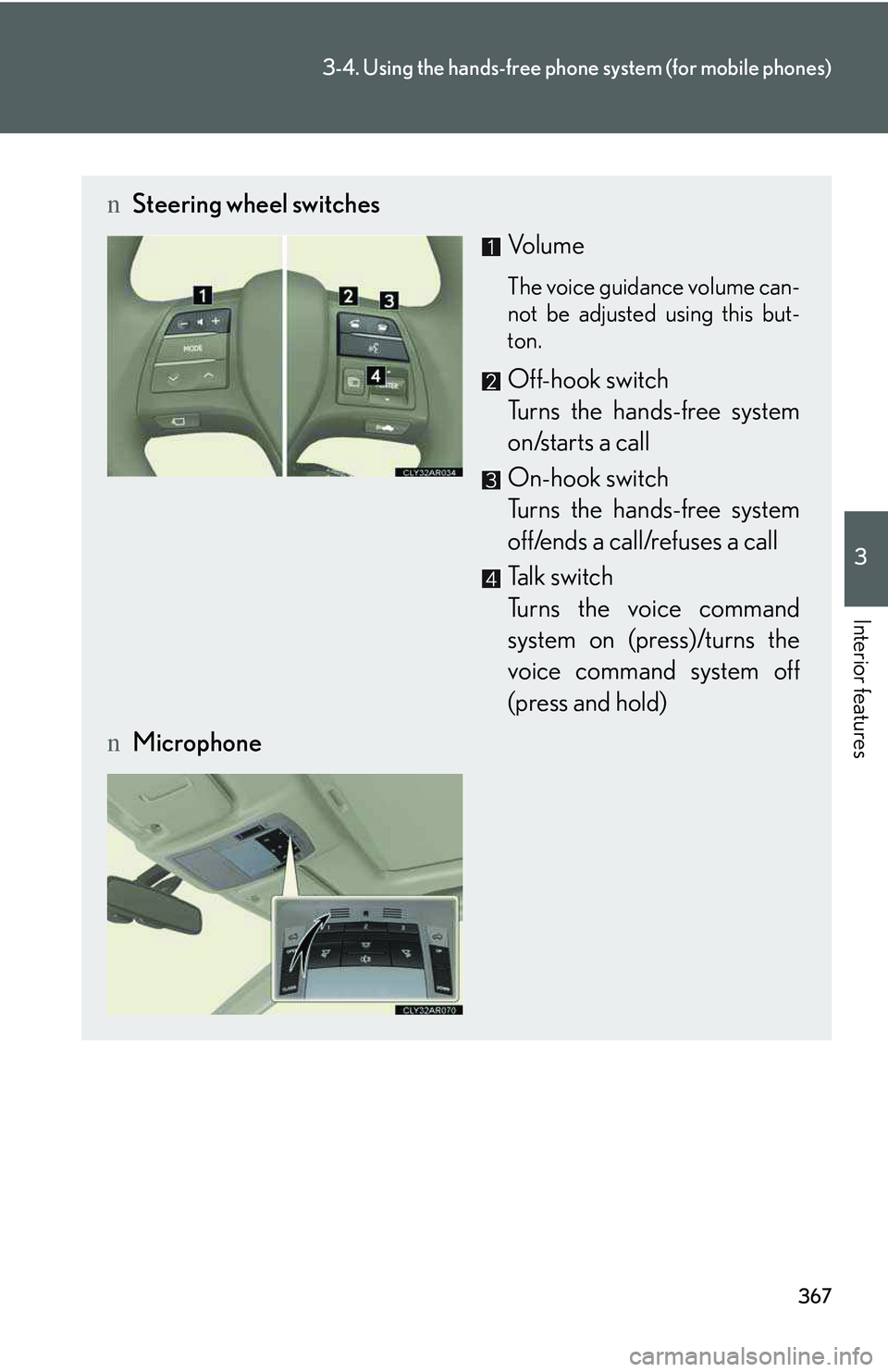
nSteering wheel switches
Vol u m e
The voice guidance volume can-
not be adjusted using this but-
ton.
Off-hook switch
Turns the hands-free system
on/starts a call
On-hook switch
Turns the hands-free system
off/ends a call/refuses a call
Talk switch
Turns the voice command
system on (press)/turns the
voice command system off
(press and hold)
nMicrophone
Page 595 of 821
526
5-1. Essential information
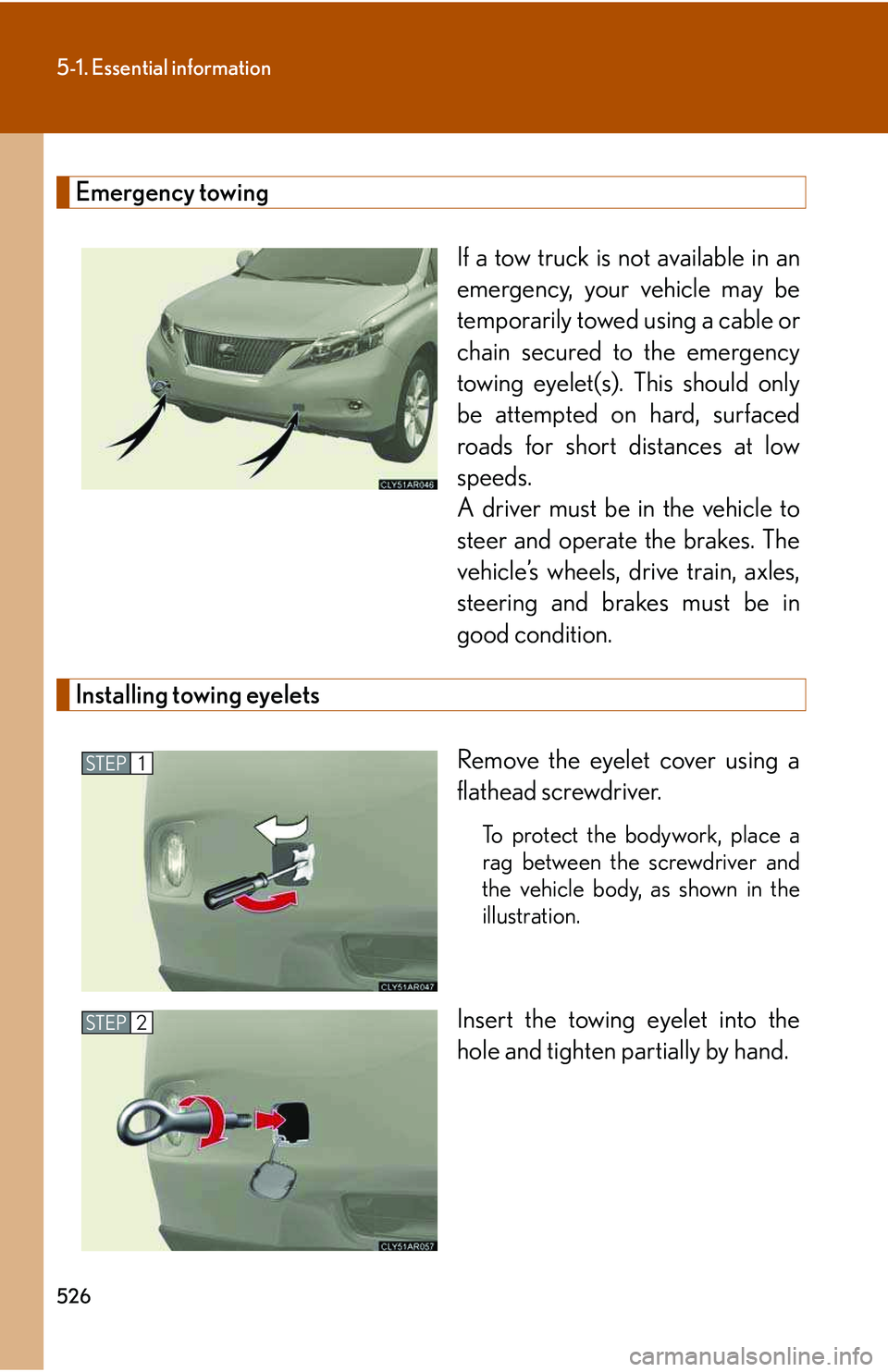
Emergency towing
If a tow truck is not available in an
emergency, your vehicle may be
temporarily towed using a cable or
chain secured to the emergency
towing eyelet(s). This should only
be attempted on hard, surfaced
roads for short distances at low
speeds.
A driver must be in the vehicle to
steer and operate the brakes. The
vehicle’s wheels, drive train, axles,
steering and brakes must be in
good condition.
Installing towing eyelets
Remove the eyelet cover using a
flathead screwdriver.
To protect the bodywork, place a
rag between the screwdriver and
the vehicle body, as shown in the
illustration.
Insert the towing eyelet into the
hole and tighten partially by hand.
STEP1
STEP2
Page 611 of 821
542
5-2. Steps to take in an emergency
CAUTION
nWhen the power steering warning light comes on
The steering wheel may become extremely heavy.
If the steering wheel becomes heavier than usual when operating, hold firmly and
operate it using more force than usual.
nIf the tire pressure warning light comes on
Be sure to observe the following precautions. Failure to do so could cause loss of
vehicle control and result in death or serious injury.
lStop your vehicle in a safe place as soon as possible. Adjust the tire inflation pres-
sure immediately.
lIf the tire pressure warning light comes on even after tire inflation pressure adjust-
ment, it is probable that you have a flat tire. Check the tires. If a tire is flat, change
it with the spare tire and have the flat tire repaired by the nearest Lexus dealer.
lAvoid abrupt maneuvering and braking. If the vehicle tires deteriorate, you could
lose control of the steering wheel or the brakes.
nIf a blowout or sudden air leakage should occur
The tire pressure warning system may not activate immediately.