steering LEXUS RX350 2011 Repair Manual
[x] Cancel search | Manufacturer: LEXUS, Model Year: 2011, Model line: RX350, Model: LEXUS RX350 2011Pages: 821, PDF Size: 13.27 MB
Page 337 of 821
265
2-5. Driving information
2
When driving
lCrosswinds and rough roads will adversely affect handling of your
vehicle and trailer, causing sway. Periodically check the rear to prepare
for being passed by large trucks or buses, which may cause your vehi-
cle and trailer to sway. If swaying occurs, firmly grip the steering wheel,
reduce speed immediately but gradually, and steer straight ahead.
Never increase speed. If you make no extreme correction with the
steering or brakes, your vehicle and trailer will stabilize.
lTake care when passing other vehicles. Passing requires considerable
distance. After passing a vehicle, do not forget the length of your
trailer, and be sure you have plenty of room before changing lanes.
lIn order to maintain engine braking efficiency when driving on a long
steep downgrade, do not use overdrive. Transmission shift range posi-
tion must be in 4 in S mode.
lDue to the added load of the trailer, your vehicle's engine may over-
heat on hot days (at temperatures over 85°F [30°C]) when driving up
a long or steep grade. If the engine coolant temperature gauge indi-
cates overheating, immediately turn off the air conditioning (if in use),
pull your vehicle off the road and stop in a safe spot. (→P. 587)
lAlways place wheel blocks under both the vehicle and the trailer
wheels when parking. Apply the parking brake firmly, and put the
transmission in P. Avoid parking on a slope, but if unavoidable, do so
only after performing the following:
Apply the brakes and keep them applied.
Have someone place wheel blocks under both the vehicle and
trailer wheels.
When the wheel blocks are in place, release the brakes slowly
until the blocks absorb the load.
Apply the parking brake firmly.
Shift into P and turn off the engine.
STEP1
STEP2
STEP3
STEP4
STEP5
Page 355 of 821
285
3-2. Using the audio system
3
Interior features
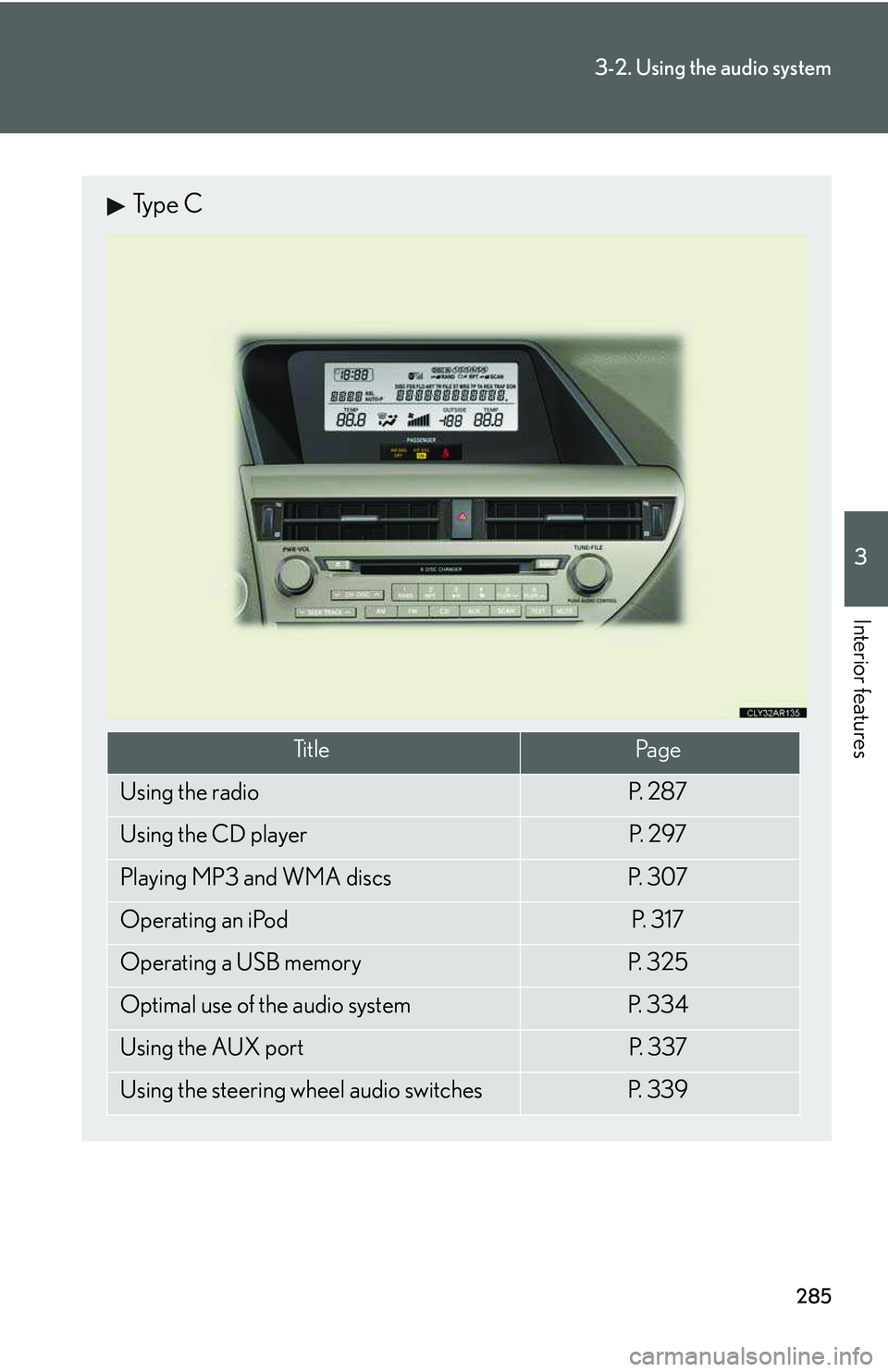
Type C
Ti t l ePa g e
Using the radioP. 2 8 7
Using the CD playerP. 2 9 7
Playing MP3 and WMA discsP. 3 0 7
Operating an iPodP. 3 1 7
Operating a USB memoryP. 3 2 5
Optimal use of the audio systemP. 3 3 4
Using the AUX portP. 3 3 7
Using the steering wheel audio switchesP. 3 3 9
Page 409 of 821
339
3-2. Using the audio system
3
Interior features
Using the steering wheel audio switches
Turning the power on
Press when the audio system is turned off.
The audio system can be turned off by holding the switch down for 1 second
or more.
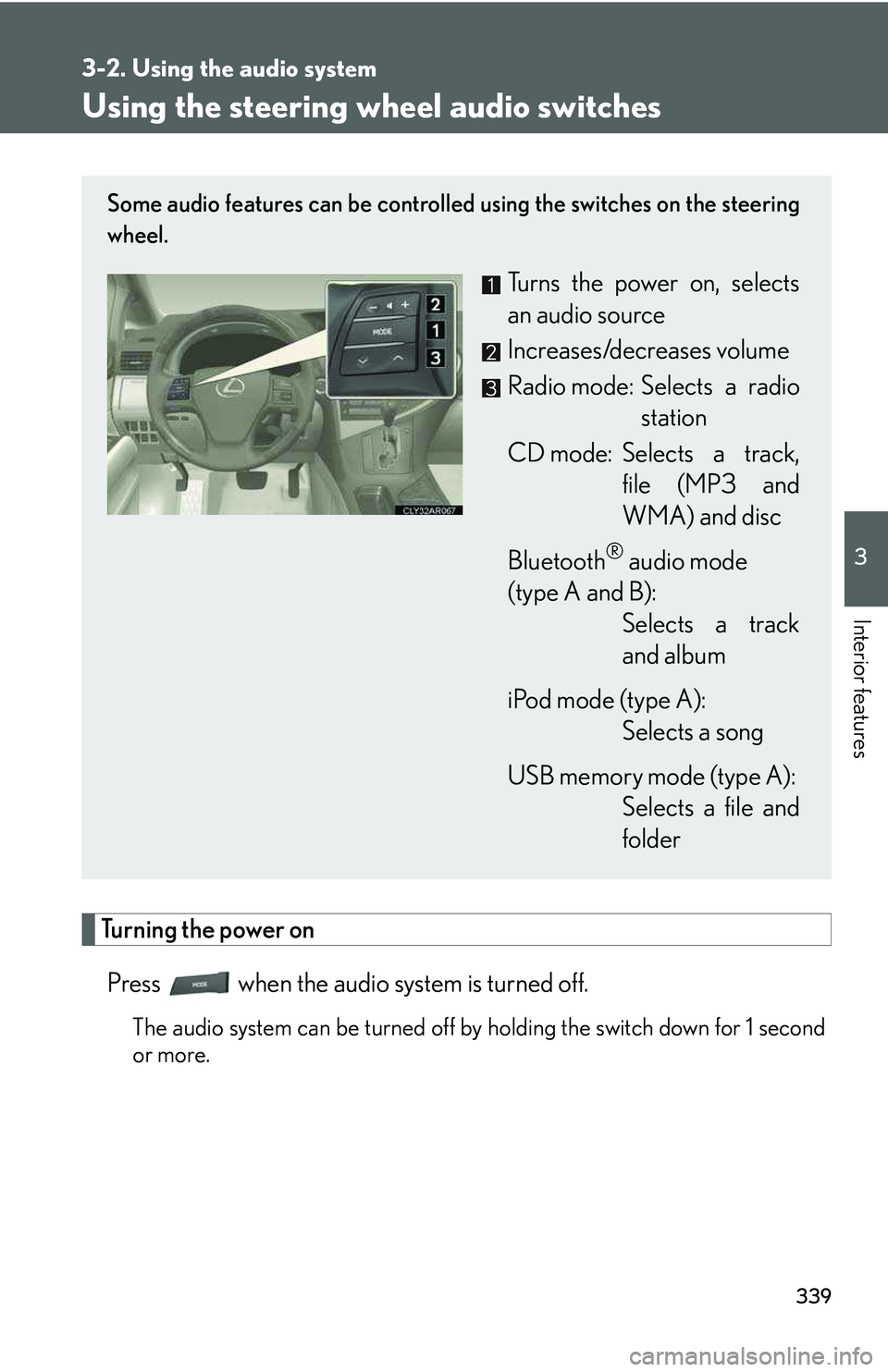
Some audio features can be controlled using the switches on the steering
wheel.
Turns the power on, selects
an audio source
Increases/decreases volume
Radio mode: Selects a radio
station
CD mode: Selects a track,
file (MP3 and
WMA) and disc
Bluetooth® audio mode
(type A and B):
Selects a track
and album
iPod mode (type A):
Selects a song
USB memory mode (type A):
Selects a file and
folder
Page 411 of 821
341
3-2. Using the audio system
3
Interior features
Selecting an album (type A and B)
Press to select Bluetooth® audio mode.
Press and hold “∧” or “∨” on until you hear a beep.
Selecting a folder (type A)
Press to select USB memory mode.
Press and hold “∧” or “∨” on until you hear a beep.
Selecting a disc in the CD player
Press to select CD mode.
Press and hold “∧” or “∨” on until you hear a beep.
nCanceling automatic selection of a radio station
Press again.
CAUTION
nTo reduce the risk of an accident
Exercise care when operating the audio switches on the steering wheel.
STEP1
STEP2
STEP1
STEP2
STEP1
STEP2
Page 423 of 821
353
3-3. Using the Bluetooth® audio system
3
Interior features
Switching the display
Press .
Each time the button is pressed, the display changes in the following order:
Elapsed time → Album title → Tr a c k t i t l e → Artist name
Using the steering wheel audio switches
→P. 3 3 9
nBluetooth® audio system functions
Depending on the portable player that is connected to the system, certain functions
may not be available.
nDisplay
→P. 3 0 3
nError messages
“Memory Error”: This indicates a problem in the system.
Page 437 of 821
367
3-4. Using the hands-free phone system (for mobile phones)
3
Interior features
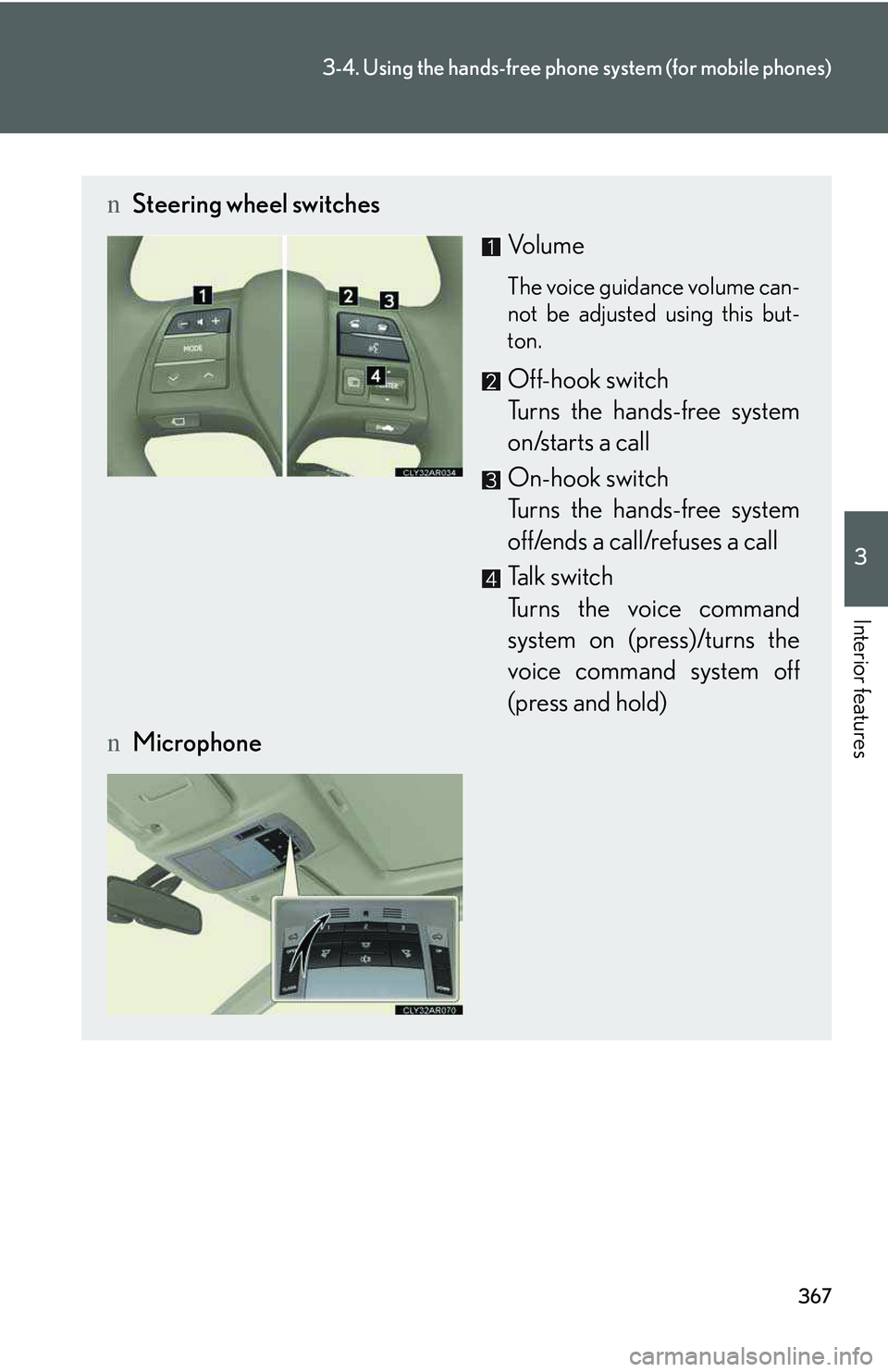
nSteering wheel switches
Vol u m e
The voice guidance volume can-
not be adjusted using this but-
ton.
Off-hook switch
Turns the hands-free system
on/starts a call
On-hook switch
Turns the hands-free system
off/ends a call/refuses a call
Talk switch
Turns the voice command
system on (press)/turns the
voice command system off
(press and hold)
nMicrophone
Page 477 of 821
407
3-6. Using the storage features
3
Interior features
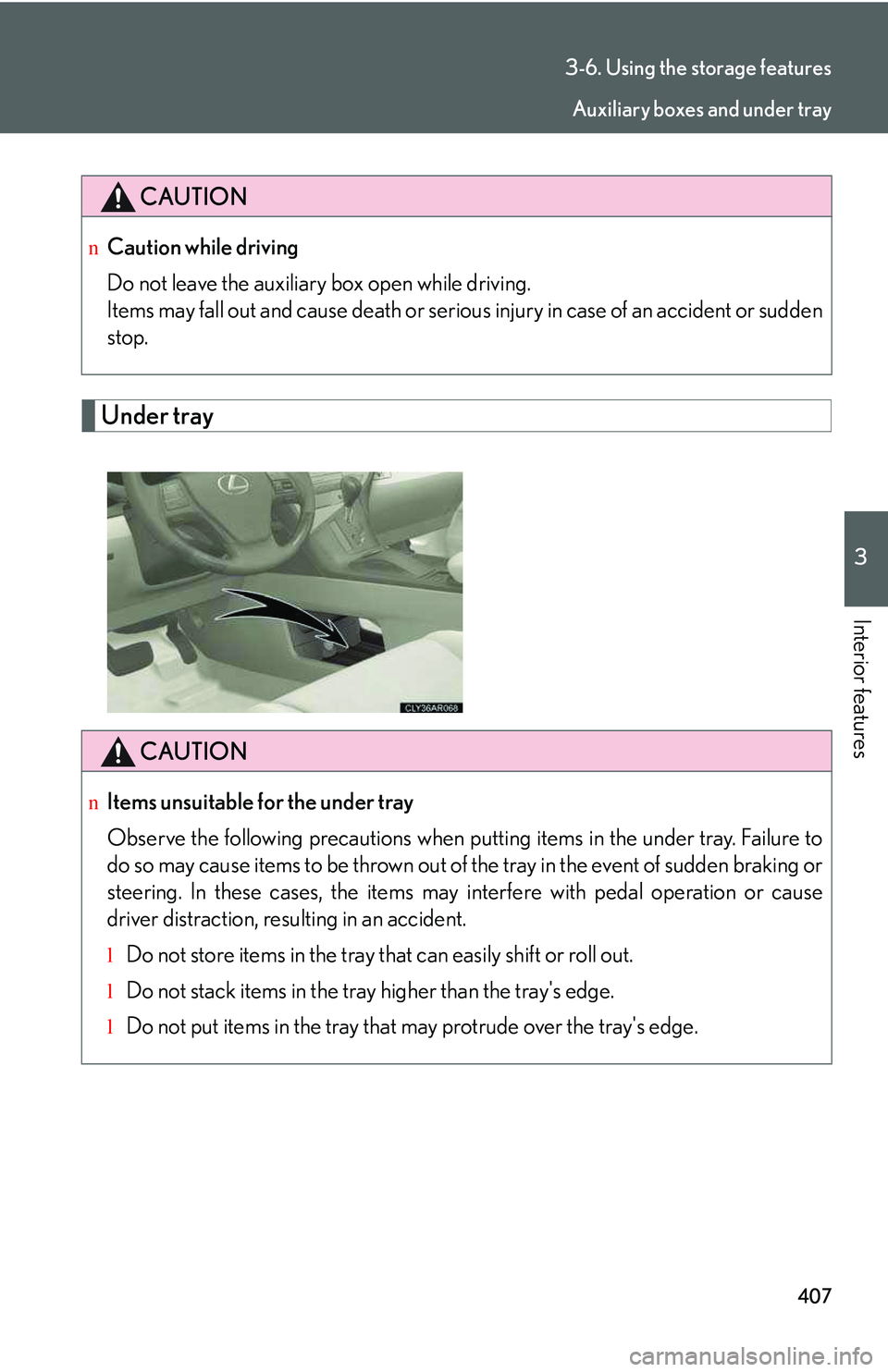
Under tray
CAUTION
nCaution while driving
Do not leave the auxiliary box open while driving.
Items may fall out and cause death or serious injury in case of an accident or sudden
stop.
CAUTION
nItems unsuitable for the under tray
Observe the following precautions when putting items in the under tray. Failure to
do so may cause items to be thrown out of the tray in the event of sudden braking or
steering. In these cases, the items may interfere with pedal operation or cause
driver distraction, resulting in an accident.
lDo not store items in the tray that can easily shift or roll out.
lDo not stack items in the tray higher than the tray's edge.
lDo not put items in the tray that may protrude over the tray's edge.
Auxiliary boxes and under tray
Page 572 of 821
502
4-3. Do-it-yourself maintenance
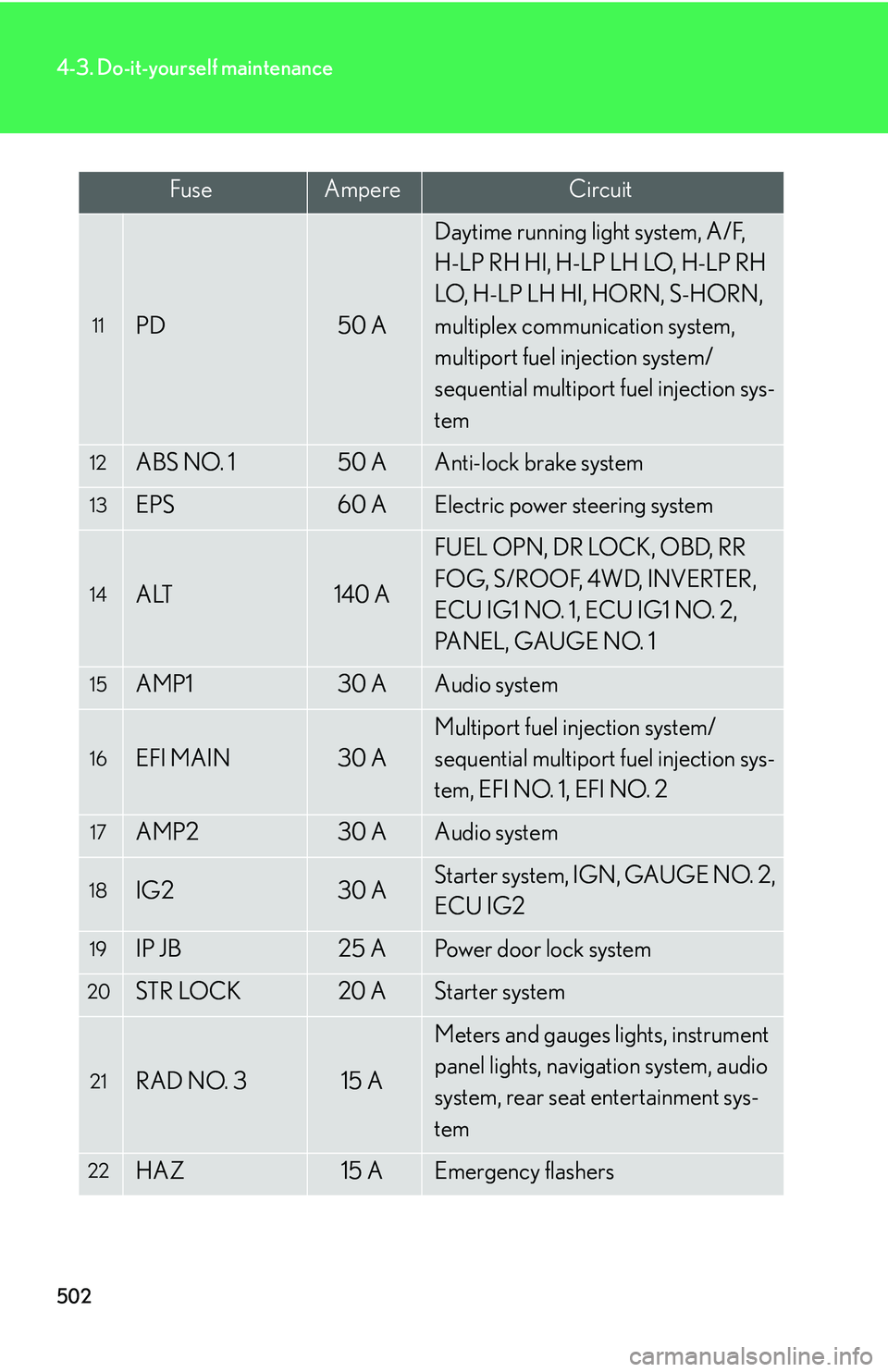
11PD50 A
Daytime running light system, A/F,
H-LP RH HI, H-LP LH LO, H-LP RH
LO, H-LP LH HI, HORN, S-HORN,
multiplex communication system,
multiport fuel injection system/
sequential multiport fuel injection sys-
tem
12ABS NO. 150 AAnti-lock brake system
13EPS60 AElectric power steering system
14ALT140 A
FUEL OPN, DR LOCK, OBD, RR
FOG, S/ROOF, 4WD, INVERTER,
ECU IG1 NO. 1, ECU IG1 NO. 2,
PANEL, GAUGE NO. 1
15AMP130 AAudio system
16EFI MAIN30 A
Multiport fuel injection system/
sequential multiport fuel injection sys-
tem, EFI NO. 1, EFI NO. 2
17AMP230 AAudio system
18IG230 AStarter system, IGN, GAUGE NO. 2,
ECU IG2
19IP JB25 APower door lock system
20STR LOCK20 AStarter system
21RAD NO. 315 A
Meters and gauges lights, instrument
panel lights, navigation system, audio
system, rear seat entertainment sys-
tem
22HAZ15 AEmergency flashers
FuseAmpereCircuit
Page 573 of 821
503
4-3. Do-it-yourself maintenance
4
Maintenance and care
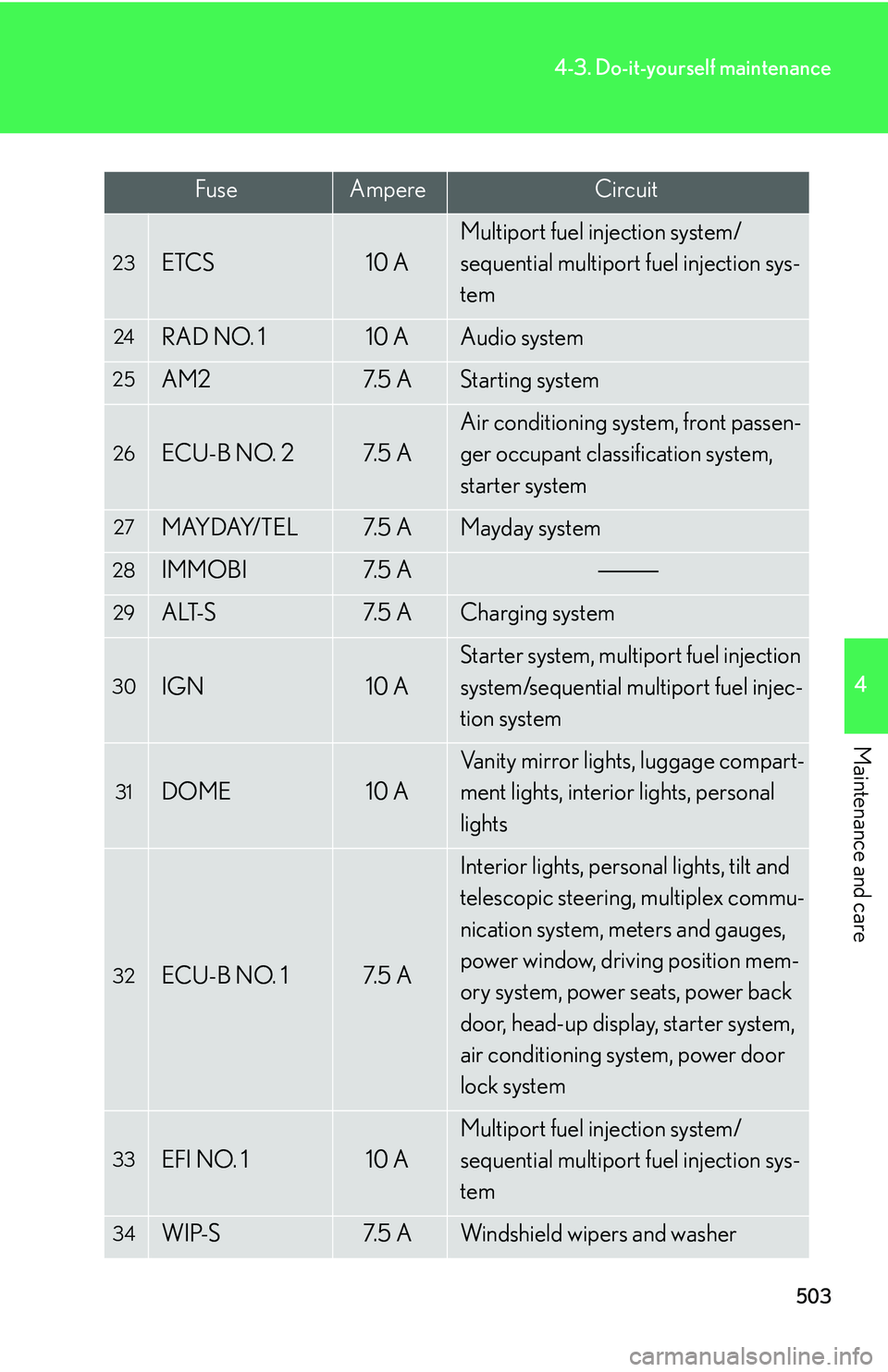
23ETCS10 A
Multiport fuel injection system/
sequential multiport fuel injection sys-
tem
24RAD NO. 110 AAudio system
25AM27. 5 AStarting system
26ECU-B NO. 27. 5 A
Air conditioning system, front passen-
ger occupant classification system,
starter system
27MAYDAY/TEL7. 5 AMayday system
28IMMOBI7. 5 A
29ALT-S7. 5 ACharging system
30IGN10 A
Starter system, multiport fuel injection
system/sequential multiport fuel injec-
tion system
31DOME10 A
Vanity mirror lights, luggage compart-
ment lights, interior lights, personal
lights
32ECU-B NO. 17. 5 A
Interior lights, personal lights, tilt and
telescopic steering, multiplex commu-
nication system, meters and gauges,
power window, driving position mem-
ory system, power seats, power back
door, head-up display, starter system,
air conditioning system, power door
lock system
33EFI NO. 110 A
Multiport fuel injection system/
sequential multiport fuel injection sys-
tem
34WIP-S7. 5 AWindshield wipers and washer
FuseAmpereCircuit
Page 576 of 821
506
4-3. Do-it-yourself maintenance
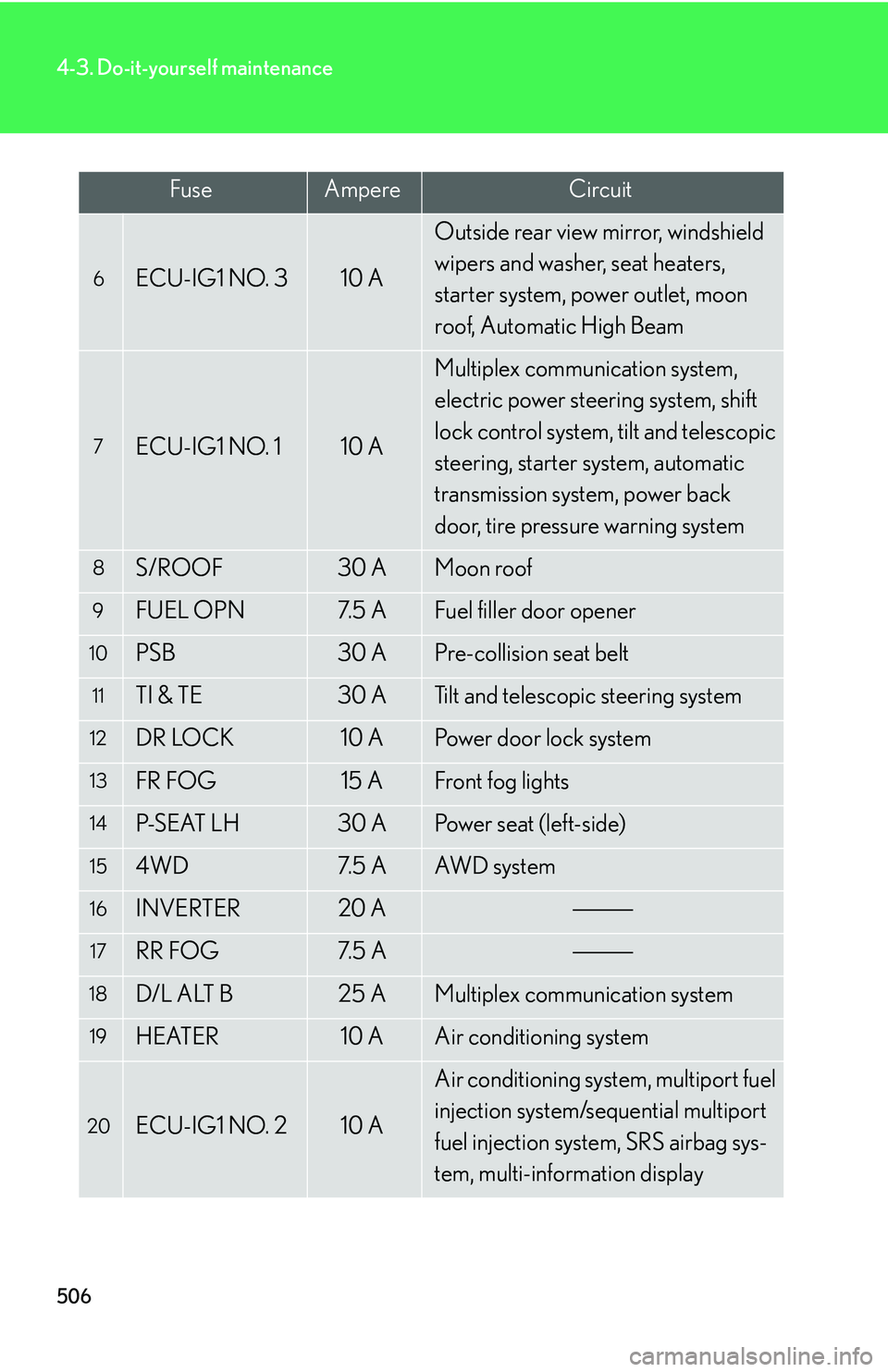
6ECU-IG1 NO. 310 A
Outside rear view mirror, windshield
wipers and washer, seat heaters,
starter system, power outlet, moon
roof, Automatic High Beam
7ECU-IG1 NO. 110 A
Multiplex communication system,
electric power steering system, shift
lock control system, tilt and telescopic
steering, starter system, automatic
transmission system, power back
door, tire pressure warning system
8S/ROOF30 AMoon roof
9FUEL OPN7. 5 AFuel filler door opener
10PSB30 APre-collision seat belt
11TI & TE30 ATilt and telescopic steering system
12DR LOCK10 APower door lock system
13FR FOG15 AFront fog lights
14P-S E AT L H30 APo w e r s e a t ( l e f t - s i d e )
154WD7. 5 AAW D s y s t e m
16INVERTER20 A
17RR FOG7. 5 A
18D/L ALT B25 AMultiplex communication system
19HEATER10 AAir conditioning system
20ECU-IG1 NO. 210 A
Air conditioning system, multiport fuel
injection system/sequential multiport
fuel injection system, SRS airbag sys-
tem, multi-information display
FuseAmpereCircuit