light LEXUS RX350 2015 Owners Manual
[x] Cancel search | Manufacturer: LEXUS, Model Year: 2015, Model line: RX350, Model: LEXUS RX350 2015Pages: 886, PDF Size: 11 MB
Page 278 of 886

2782-4. Using other driving systems
Pre-Collision System When the radar sensor detects the possib ility of a frontal collision, the pre-
collision system such as the brakes and seat belts are automatically
engaged to lessen impact as well as vehicle damage.
■ Pre-collision seat belts (front seat belts only) If the pre-collision sensor detects that a collision is unavoidable, the pre-
collision system will retract the seat belt before the collision occurs.
The same will happen if the driver makes an emergency braking or loses
control of the vehicle. ( P. 8 5 )
However, the system will not operate in the event of skidding when the
VSC system is disabled.
■ Pre-collision brake assist When there is a high possibility of a frontal collision, the system applies
greater braking force in relation to how strongly the brake pedal is
depressed. The system may not warn the driver using a warning light,
warning display and buzzer when the system detects and judges braking
operations.
■ Pre-collision braking When there is a high possibility of a frontal collision, the system warns the
driver using a warning light, warnin g display and buzzer. If the system
determines that a collision is unavoidable, the brakes are automatically
applied to reduce the collision speed. Pre-collision braking can be dis-
abled using the pre-collision braking off switch.
: If equipped
Page 279 of 886

2792-4. Using other driving systems
2
When driving Disabling pre-collision braking
Pre-collision braking disabled
Pre-collision braking enabled The pre-collision system warning
light turn on when pre-collision
braking is disabled.
Radar sensor
The radar sensor detects vehicles
or other obstacles on or near the
road ahead and determines
whether a collision is imminent
based on the posit ion, speed, and
heading of the obstacles.
Page 282 of 886

2822-4. Using other driving systems
■
Obstacles not detected
The sensor cannot detect plastic obstacles such as traffic cones. There may also be
occasions when the sensor cannot detect pedestrians, animals, bicycles, motorcy-
cles, trees, or snowdrifts. ■
Situations in which the pre-collision system does not function properly
The system may not function effectively in situations such as the following: ●
On roads with sharp be nds or uneven surfaces●
If a vehicle suddenly moves in front of your vehicle, such as at an intersection●
If a vehicle suddenly cuts in front of your vehicle, such as when overtaking●
In inclement weather such as heav y rain, fog, snow or sand storms●
When your vehicle is skiddi ng with the VSC system off●
When an extreme change in vehicle height occurs●
When the axis of the radar is out of adjustment■
Automatic cancelation of the pre-collision system
When a malfunction occurs due to sensor contamination, etc. that results in the
sensors being unable to detect obstacles, the pre-collision system will be automati-
cally disabled. In this case, the system will not activate even if there is a collision pos-
sibility.■
When there is a malfunction in the system, or if the system is temporarily unus-
able
Warning lights and/or warning messages will turn on or flash. ( P. 744, 754)
Page 285 of 886
2852-4. Using other driving systems
2
When driving CAUTION■
When the sensor may not be correctly detecting the vehicle ahead
Apply the brakes as necessary in any of the following situations: ●
When water or snow thrown up by the surrounding vehicles hinders the function-
ing of the sensor●
When your vehicle is pointing upwards (caused by a heavy load in the luggage
compartment etc.)●
Vehicles that cut in suddenly●
Vehicles with small rear ends (tra ilers with no load on board etc.)●
Motorcycles traveling in the same lane■
Handling the radar sensor
Observe the following to ensure the pre-collision system can function effectively: ●
Keep the sensor and front grille clean at all times.
Clean the sensor and front grille with a so ft cloth so you do not mark or damage
them.●
Do not subject the sensor or surrounding area to a strong impact.
If the sensor moves even slightly off po sition, the system may become inaccurate
or malfunction. If the sensor or surround ing area is subject to a strong impact,
always have the area inspected an d adjusted by your Lexus dealer.●
Do not disassemble the sensor.●
Do not attach accessories or stickers to the sensor, grille or surrounding area.●
Do not modify or paint the sensor and grille cover.
Page 290 of 886

2902-4. Using other driving systems
■
The outside rear view mirror indicators visibility
When under strong sunlight, the outside rear view mirror indicator may be difficult
to see.■
When there is a malfunction in the system
If a system malfunction is detected due to any of the following reasons, warning
message is displayed: ( P. 7 5 4 )●
There is a malfunction with the sensors●
The sensors have become dirty●
The outside temperature is extremely high or low●
The sensor voltage has become abnormal■
Certification for the Blind Spot Monitor
For vehicles sold in the U.S.A.
FCC ID: OAYSRR2A
This device complies with part 15 of the FCC Rules. Operation is subject to the fol-
lowing two conditions: (1) This device may not cause harmful interference, and (2)
this device must accept any interference received, including interference that may
cause undesired operation.
FCC WARNING
Changes or modifications not expressly approved by the party responsible for
compliance could void the user’s authority to operate the equipment.
For vehicles sold in Canada
Applicable law : Canada 310
This device complies with Industry Cana da licence-exempt RSS standard(s). Oper-
ation is subject to the following two conditions: (1) this device may not cause inter-
ference, and (2) this device must accept any interference, including interference
that may cause undesired operation of the device.
Frequency bands : 24.05 - 24.25GHz
Output power : less than 20 milliwatts
Page 291 of 886

2912-4. Using other driving systems
2
When driving CAUTION■
Cautions regarding the use of the system
The driver is solely responsible for safe driving. Always drive safely, taking care to
observe your surroundings.
The Blind Spot Monitor is a supplementary system which alerts the driver that a
vehicle is present in the blind spot. Do not overly rely on the Blind Spot Monitor. The
system cannot judge if it is safe to change lanes, therefore over reliance could cause
an accident resulting in death or serious injury. According to conditions, the system
may not function correctly. Therefore the driver’s own visual confirmation of safety
is necessary.■
Handling the radar sensor
One Blind Spot Monitor is installed inside the left and right side of the vehicle rear
bumper respectively. Observe the followin g to ensure the Blind Spot Monitor can
function correctly.
●
Do not subject the sensor or surrounding area on the bumper to a strong impact.
If the sensor moves even slightly off position, the system may malfunction and
vehicles that enter the detection area ma y not be detected. If the sensor or sur-
rounding area is subject to a strong impact, always have the area inspected by
your Lexus dealer.●
Do not disassemble the sensor.
●
Do not attach accessories or stickers to the sensor or surrounding area on the
bumper.
●
Do not modify the sensor or surrounding area on the bumper.
●
Do not paint the sensor or surrounding area on the bumper. ●
Keep the sensor and its surrounding area
on the bumper clean at all times.
Page 302 of 886
3022-5. Driving information
Winter driving tips Carry out the necessary preparations and inspections before driving the
vehicle in winter. Always drive the ve hicle in a manner appropriate to the
prevailing weather conditions.
■ Pre-winter preparations
● Use fluids that are appropria te to the prevailing outside tempera-
tures.
• Engine oil
• Engine coolant
• Washer fluid
● Have a service technician inspec t the condition of the battery.
● Have the vehicle fitted with four snow tires or purchase a set of
tire chains for the front tires. Ensure that all tires are the same size and brand, and that chains match
the size of the tires.
■ Before driving the vehicle
Perform the following accord ing to the driving conditions:
● Do not try to forcibly open a w indow or move a wiper that is fro-
zen. Pour warm water over the frozen area to melt the ice. Wipe
away the water immediately to prevent it from freezing.
● To ensure proper operation of the climate control system fan,
remove any snow that has accumu lated on the air inlet vents in
front of the windshield.
● Check for and remove any exce ss ice or snow that may have
accumulated on the exterior lights, vehicle's roof, chassis, around
the tires or on the brakes.
● Remove any snow or mud from the bottom of your shoes before
getting in the vehicle.
Page 312 of 886

3122-5. Driving information
Hitch
Trailer hitch assemblies have differ ent weight capacities. Lexus recom-
mends the use of Lexus hitch/bracket for your vehicle. For details, con-
tact your Lexus dealer.
● If you wish to install a trailer hitch, contact your Lexus dealer.
● Use only a hitch that conforms to the gross tr ailer weight requirement
of your vehicle.
● Follow the directions supplied by the hitch manufacturer.
● Lubricate the hitch ball with a light coating of grease.
● Remove the trailer hitch whenever you are not towing a trailer. After
removing the hitch, seal any mount ing hole in the vehicle body to pre-
vent entry of any substances into the vehicle.
Page 314 of 886
3142-5. Driving information
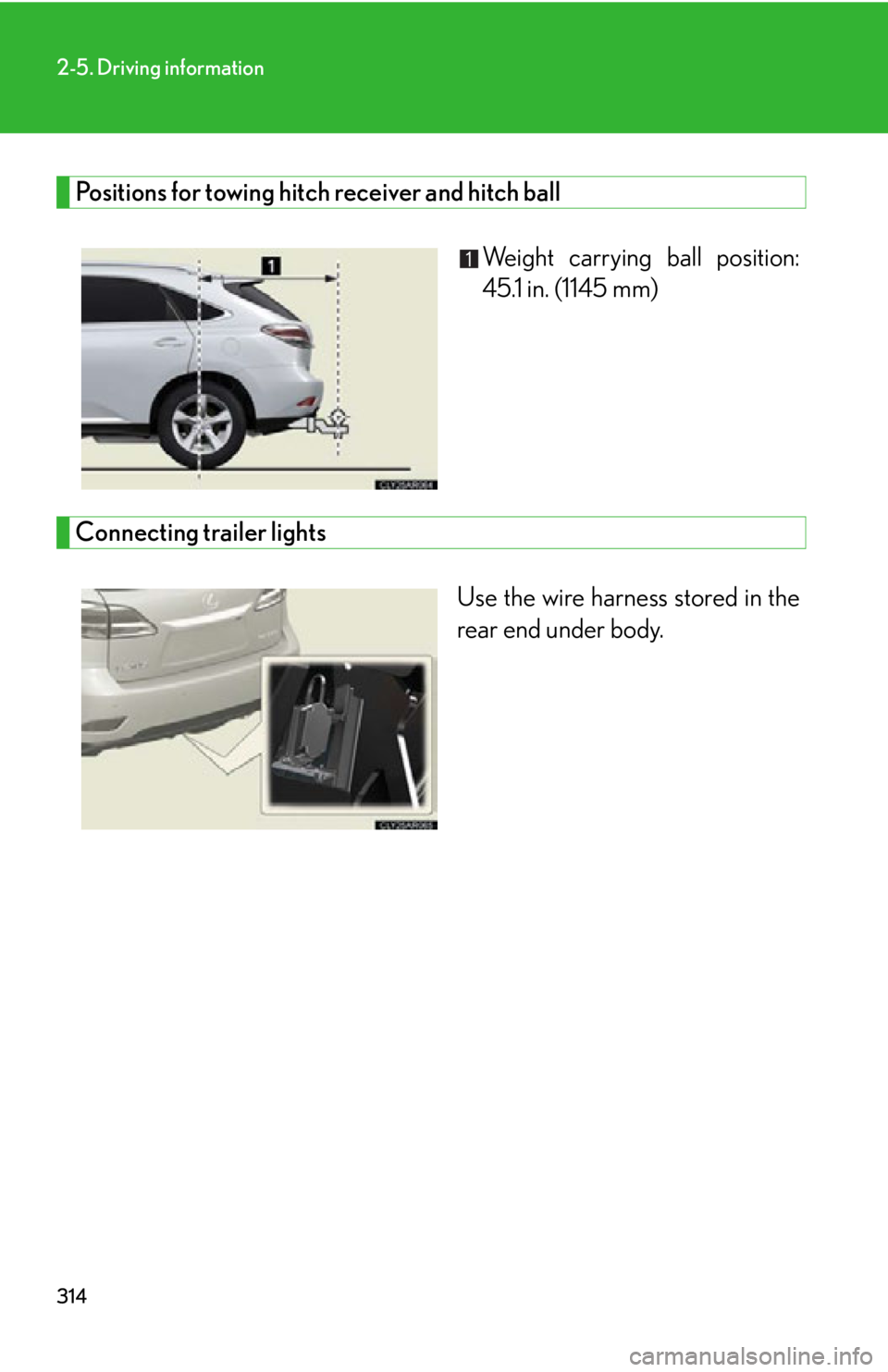
Positions for towing hitch receiver and hitch ball
Weight carrying ball position:
45.1 in. (1145 mm)
Connecting trailer lights
Use the wire harness stored in the
rear end under body.
Page 315 of 886

3152-5. Driving information
2
When driving ■
Auto current cut-off function
In case of over current, the auto cut-off function stops the power flowing to the
trailer lights to prevent damage to the vehicle’s electrical system.
This function is activated when the rated current of any of the following trailer light
circuit components is exceeded: ●
Tail lights: maximum 7.8 A ●
Stop/turn signal light (right): maximum 4.5 A●
Stop/turn signal light (left): maximum 4.5 A■
When the auto current cut function is activated
If a trailer light does not come on due to the activation of the auto current cut func-
tion, the light system will need to be reset.
Follow the reset procedure shown below. ●
If a tail light does not come on, turn off the headlight switch.●
If the right-side stop/turn signal light does not come on, put the turn signal in the
off position or remove foot from the brake pedal.●
If the left-side stop/turn signal light does not come on, put the turn signal in the
off position or remove foot from the brake pedal.
If the emergency flashers do not operate, press the emergency flasher switch to
turn them off.
After the light system is reset, operate the light switches again to see if the lights
operate normally.
If the lights do not operate normally, have the vehicle inspected by your Lexus
dealer.