light LEXUS RX350 2015 Workshop Manual
[x] Cancel search | Manufacturer: LEXUS, Model Year: 2015, Model line: RX350, Model: LEXUS RX350 2015Pages: 886, PDF Size: 11 MB
Page 170 of 886
1702-1. Driving procedures
NOTICE■
To prevent battery discharge ●
Do not leave the “ENGINE START STOP” switch in ACCESSORY or IGNI-
TION ON mode for long periods of time without the engine running.●
If the indicator on the “ENGINE START STOP” switch is illuminated, the
“ENGINE START STOP” switch is not off. When exiting the vehicle, always
check that the “ENGINE START STOP” switch is off.●
Do not stop the engine when the shift lever is in a position other than P. If the
engine is stopped in another shift lever position, the “ENGINE START STOP”
switch will not be turned off but instea d be turned to ACCESSORY mode. If the
vehicle is left in ACCESSORY mode, battery discharge may occur.■
When starting the engine ●
Do not race a cold engine.●
If the engine becomes difficult to start or stalls frequently, have your vehicle
checked by your Lexus dealer immediately.■
Symptoms indicating a malfunction with the “ENGINE START STOP” switch
If the “ENGINE START STOP” seems to be operating somewhat differently than
usual, such as the switch sticking slightly, there may be a malfunction. Contact your
Lexus dealer immediately.
Page 188 of 886
1882-1. Driving procedures
■
Turn signals can be operated when
The “ENGINE START STOP” switch is in IGNITION ON mode.■
If the indicators flash faster than usual
Check that a light bulb in the front or re ar turn signal lights has not burned out.■
If the turn signals stop flashing before a lane change has been performed
Operate the lever again.
■
To discontinue flashing of the tu rn signals during a lane change
Operate the lever in the opposite direction.
■
Customization
The number of times the turn signals flash during a lane change can be changed.
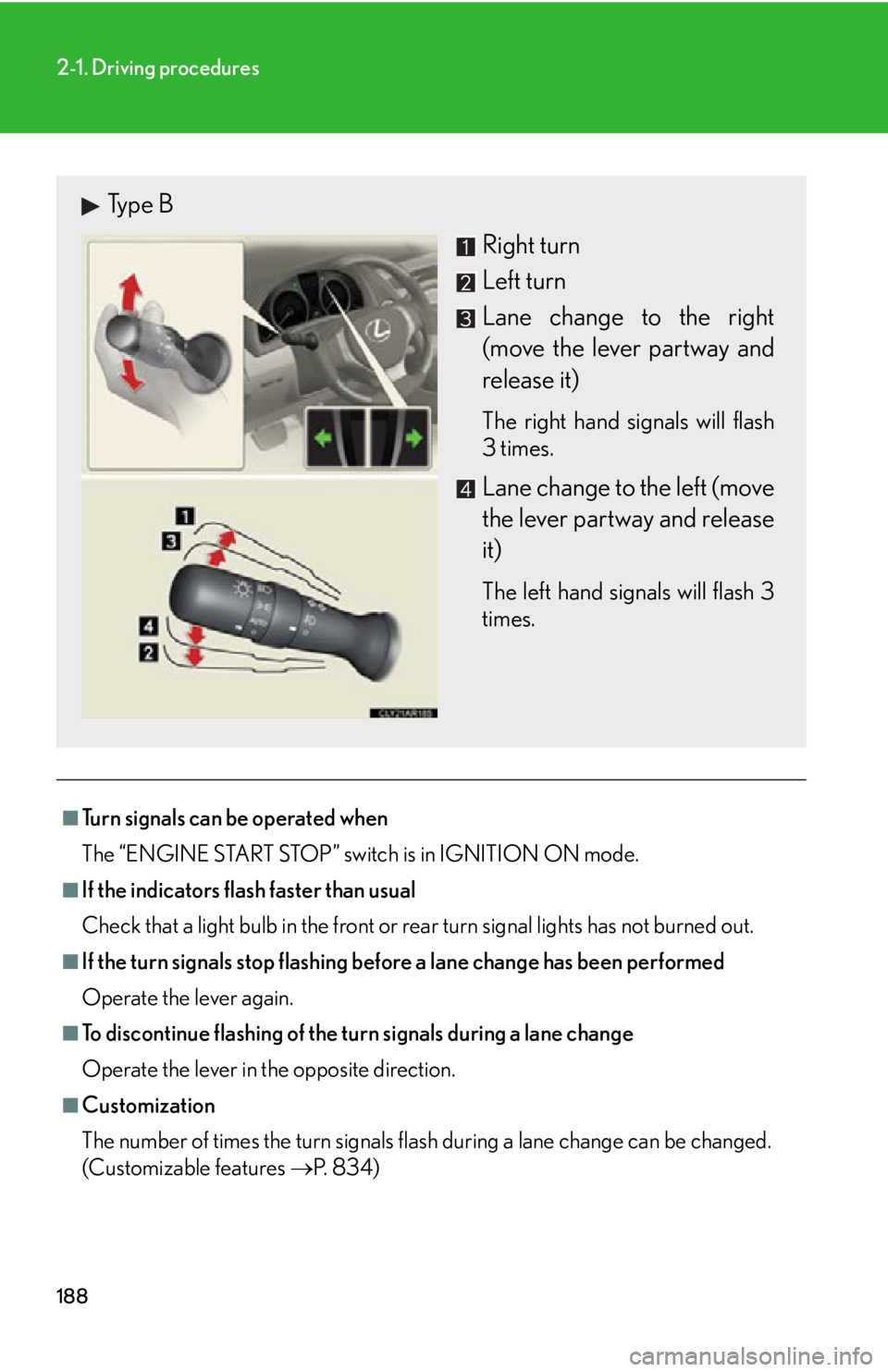
(Customizable features P. 8 3 4 )Type B
Right turn
Left turn
Lane change to the right
(move the lever partway and
release it) The right hand signals will flash
3 times.
Lane change to the left (move
the lever partway and release
it) The left hand signals will flash 3
times.
Page 192 of 886
1922-2. Instrument cluster
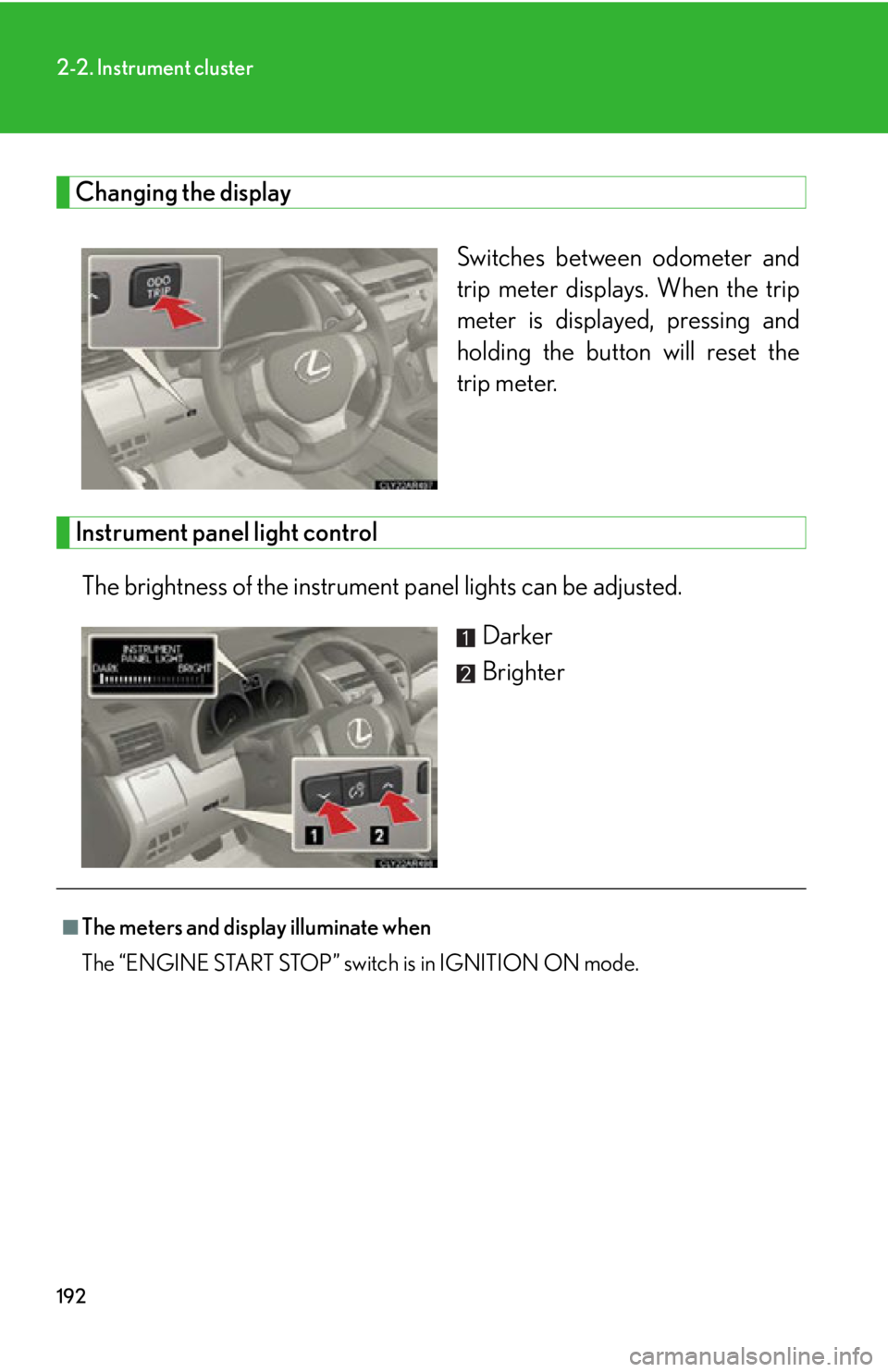
Changing the display
Switches between odometer and
trip meter displays. When the trip
meter is displayed, pressing and
holding the button will reset the
trip meter.
Instrument panel light control
The brightness of the instrument panel lights can be adjusted.
Darker
Brighter
■
The meters and displa y illuminate when
The “ENGINE START STOP” switch is in IGNITION ON mode.
Page 194 of 886
1942-2. Instrument cluster
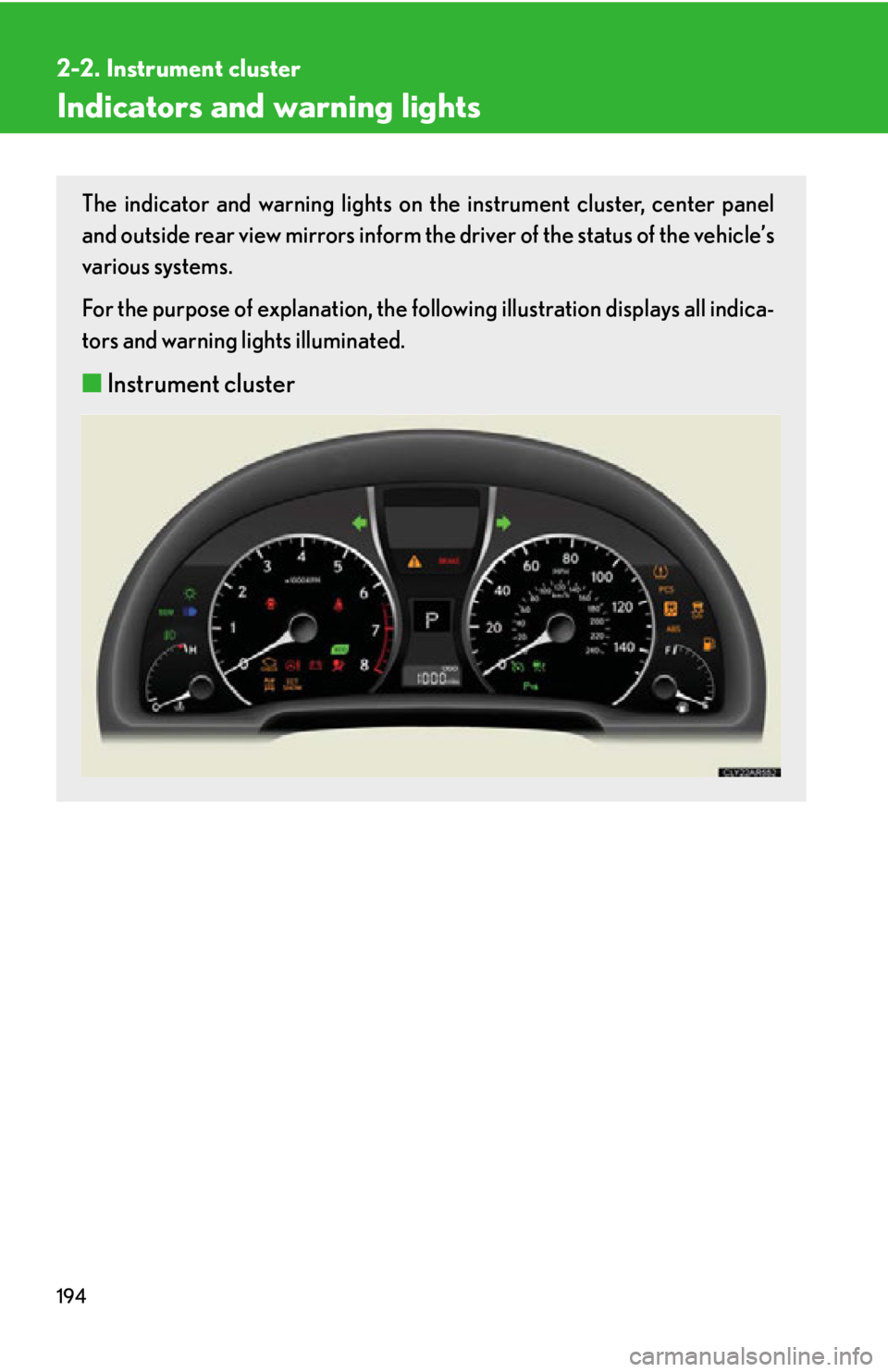
Indicators and warning lights The indicator and warning lights on th e instrument cluster, center panel
and outside rear view mirrors inform the driver of the status of the vehicle’s
various systems.
For the purpose of explanation, the following illustration displays all indica-
tors and warning lights illuminated.
■ Instrument cluster
Page 197 of 886
1972-2. Instrument cluster
2
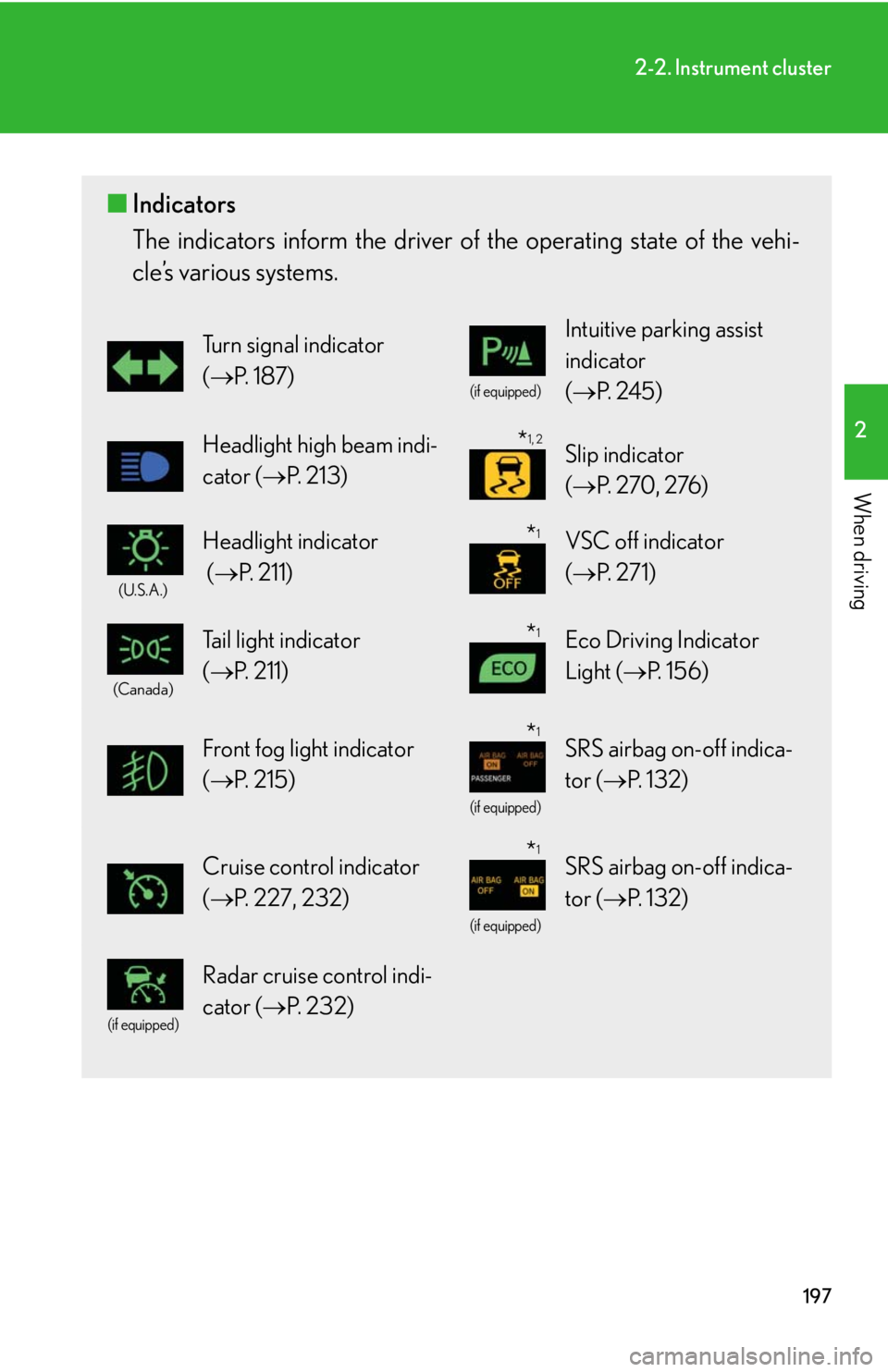
When driving ■ Indicators
The indicators inform the driver of th e operating state of the vehi-
cle’s various systems. Turn signal indicator
( P. 1 8 7 ) (if equipped)
Intuitive parking assist
indicator
( P. 2 4 5 )
Headlight high beam indi-
cator ( P. 2 1 3 ) Slip indicator
( P. 270, 276)(U.S.A.)
Headlight indicator
( P. 2 1 1 ) VSC off indicator
( P. 2 7 1 )(Canada)
Tail light indicator
( P. 211) Eco Driving Indicator
Light ( P. 1 5 6 )
Front fog light indicator
( P. 2 1 5 ) (if equipped)
SRS airbag on-off indica-
tor ( P. 1 3 2 )
Cruise control indicator
( P. 227, 232) (if equipped)
SRS airbag on-off indica-
tor ( P. 1 3 2 ) (if equipped)
Radar cruise control indi-
cator ( P. 232) * 1, 2
* 1
* 1
* 1
* 1
Page 198 of 886
1982-2. Instrument cluster
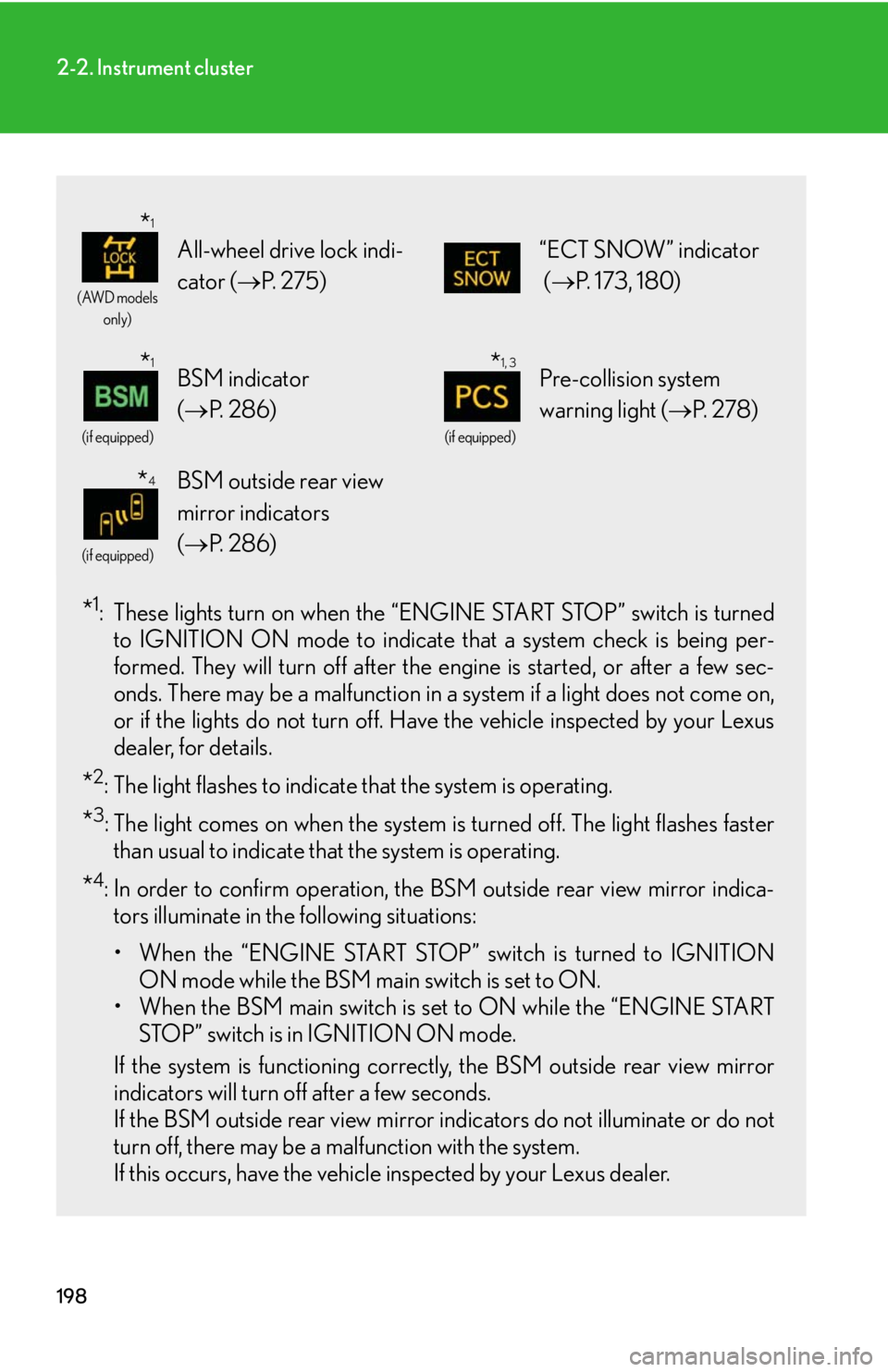
* 1
: These lights turn on when the “E NGINE START STOP” switch is turned
to IGNITION ON mode to indicate that a system check is being per-
formed. They will turn off after the en gine is started, or after a few sec-
onds. There may be a malfunction in a system if a light does not come on,
or if the lights do not turn off. Have the vehicle inspected by your Lexus
dealer, for details.
* 2
: The light flashes to indicate that the system is operating.
* 3
: The light comes on when the system is turned off. The light flashes faster
than usual to indicate that the system is operating.
* 4
: In order to confirm operation, the BSM outside rear view mirror indica-
tors illuminate in the following situations:
• When the “ENGINE START STOP” switch is turned to IGNITION
ON mode while the BSM main switch is set to ON.
• When the BSM main switch is set to ON while the “ENGINE START
STOP” switch is in IGNITION ON mode.
If the system is functioning correctly, the BSM outside rear view mirror
indicators will turn off after a few seconds.
If the BSM outside rear view mirror indicators do not illuminate or do not
turn off, there may be a malfunction with the system.
If this occurs, have the vehicle inspected by your Lexus dealer. (AWD models
only)
All-wheel drive lock indi-
cator ( P. 2 7 5 ) “ECT SNOW” indicator
( P. 173, 180) (if equipped)
BSM indicator
( P. 2 8 6 ) (if equipped)
Pre-collision system
warning light ( P. 2 7 8 )(if equipped)
BSM outside rear view
mirror indicators
( P. 2 8 6 )* 1
* 1
* 1, 3
* 4
Page 199 of 886
1992-2. Instrument cluster
2
When driving
CAUTION■
If a safety system warning light does not come on
Should a safety system light such as the ABS and SRS warning light not come on
when you start the engine, this could mean that these systems are not available to
help protect you in an accident, which could result in death or serious injury. Have
the vehicle inspected by your Lexus dealer immediately if this occurs.■ Warning lights
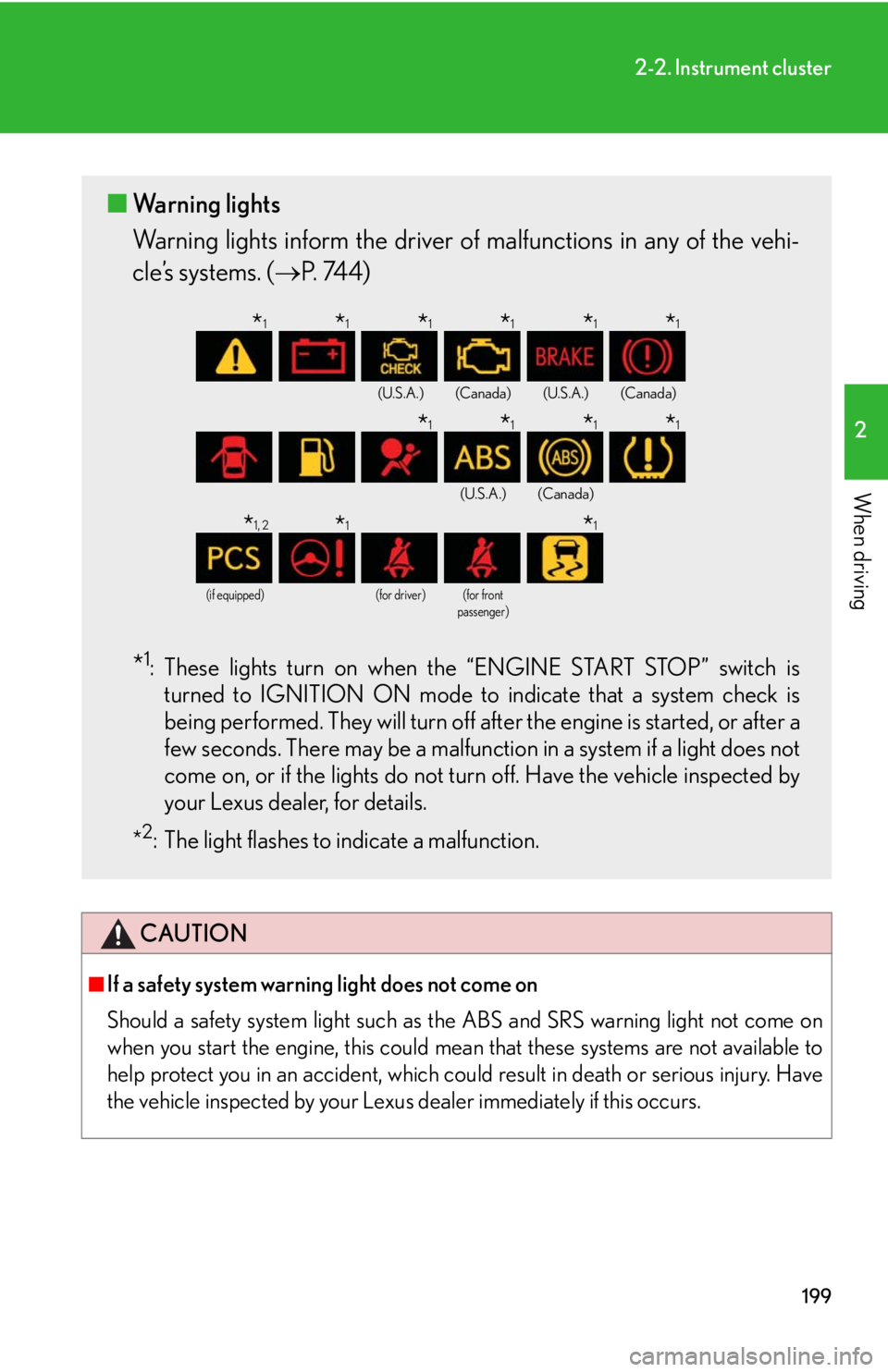
Warning lights inform the driver of malfunctions in any of the vehi-
cle’s systems. ( P. 74 4 )
* 1
: These lights turn on when the “ENGINE START STOP” switch is
turned to IGNITION ON mode to indicate that a system check is
being performed. They will turn off after the engine is started, or after a
few seconds. There may be a malfunctio n in a system if a light does not
come on, or if the lights do not turn off. Have the vehicle inspected by
your Lexus dealer, for details.
* 2
: The light flashes to indicate a malfunction. (U.S.A.) (Canada) (U.S.A.) (Canada)
(U.S.A.) (Canada)
(if equipped) (for driver) (for front
passenger)
* 1
* 1
* 1
* 1
* 1
* 1
* 1
* 1
* 1
* 1
* 1, 2
* 1
* 1
Page 202 of 886
2022-2. Instrument cluster
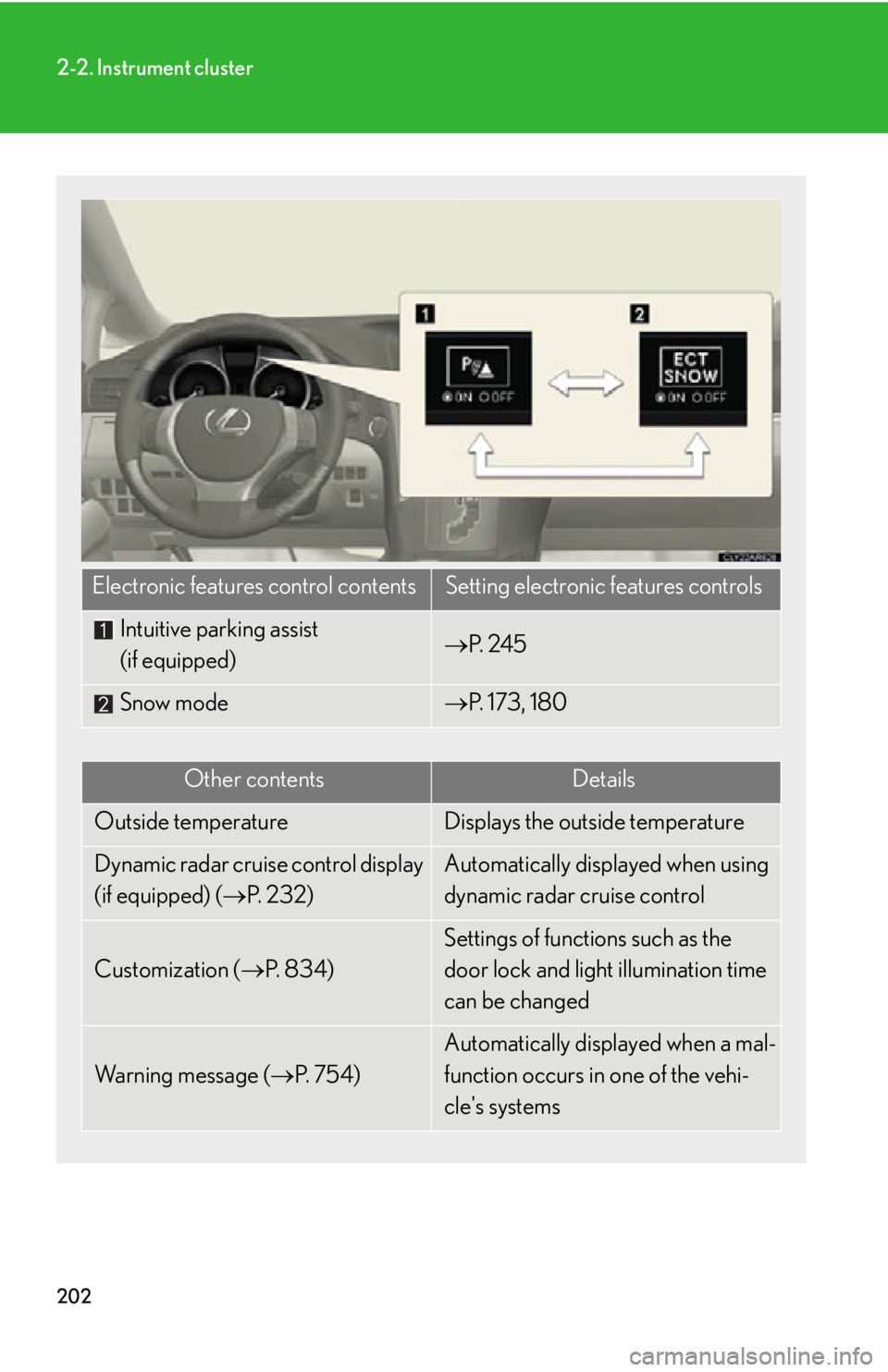
Electronic features control contents Setting electronic features controls
Intuitive parking assist
(if equipped) P. 2 4 5
Snow mode P. 173, 180
Other contents Details
Outside temperature Displays the outside temperature
Dynamic radar cruise control display
(if equipped) ( P. 232) Automatically displayed when using
dynamic radar cruise control
Customization ( P. 8 3 4 ) Settings of functions such as the
door lock and light illumination time
can be changed
Wa r n i n g m e s s a g e ( P. 7 5 4 ) Automatically displayed when a mal-
function occurs in one of the vehi-
cle's systems
Page 204 of 886
2042-2. Instrument cluster
■
Electronic features control can be turned on/off when
The “ENGINE START STOP” switch is in IGNITION ON mode.■
Conditions for ending electronic features control
In the following situations, the electronic features control will end: ●
The menu switch is pressed.●
The dynamic radar cruise control is operated (if equipped).●
Intuitive parking assist starts operating (if equipped).●
No action is performed for some time after the electronic features control
screen is displayed.●
A warning message appears after the electronic features control screen is dis-
played.■
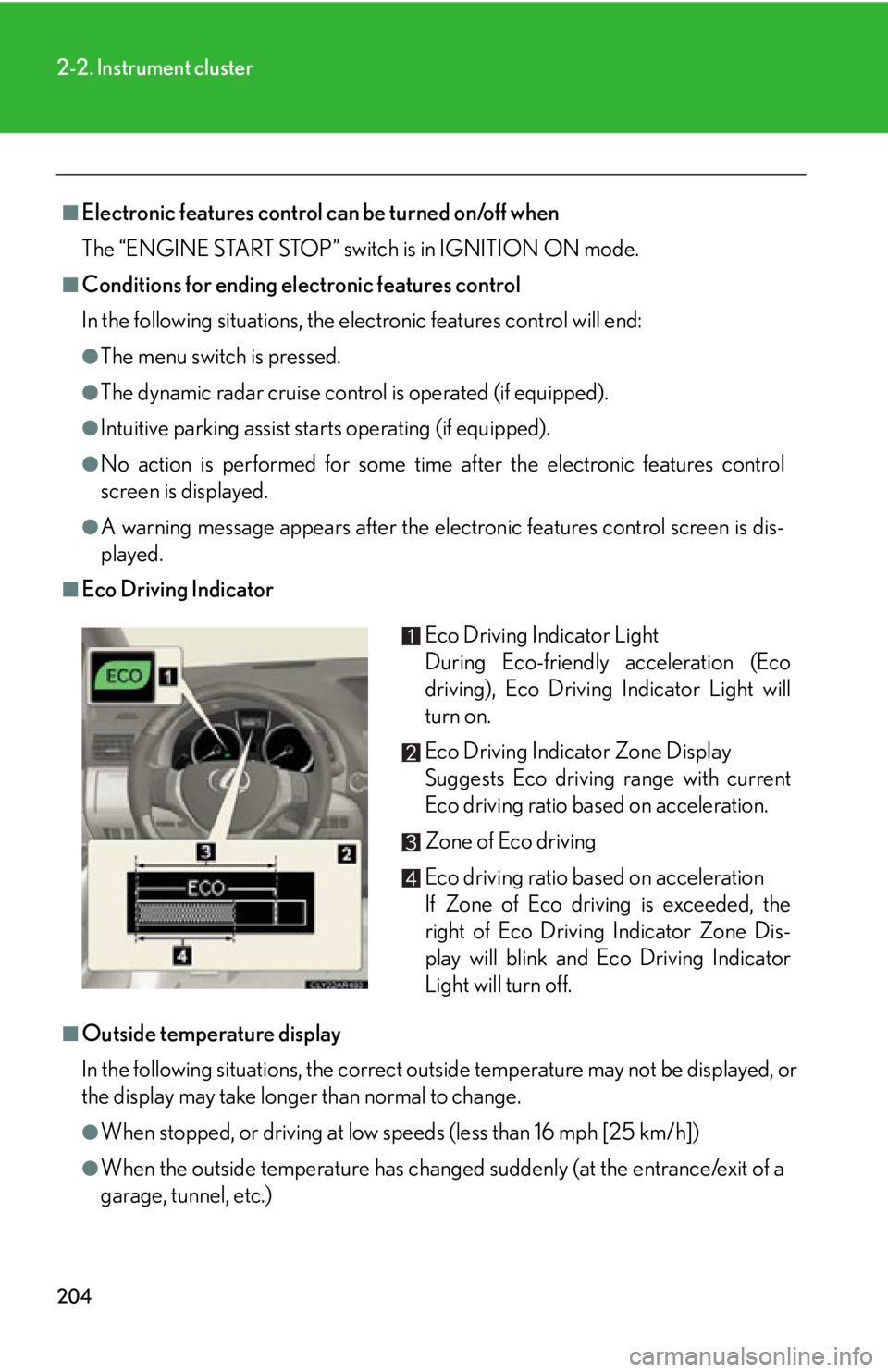
Eco Driving Indicator
■
Outside temperature display
In the following situations, the correct outside temperature may not be displayed, or
the display may take longer than normal to change.
●
When stopped, or driving at low speeds (less than 16 mph [25 km/h])
●
When the outside temperature has changed suddenly (at the entrance/exit of a
garage, tunnel, etc.) Eco Driving Indicator Light
During Eco-friendly acceleration (Eco
driving), Eco Driving Indicator Light will
turn on.
Eco Driving Indicator Zone Display
Suggests Eco driving range with current
Eco driving ratio based on acceleration.
Zone of Eco driving
Eco driving ratio based on acceleration
If Zone of Eco driving is exceeded, the
right of Eco Driving Indicator Zone Dis-
play will blink and Eco Driving Indicator
Light will turn off.
Page 209 of 886
2092-2. Instrument cluster
2
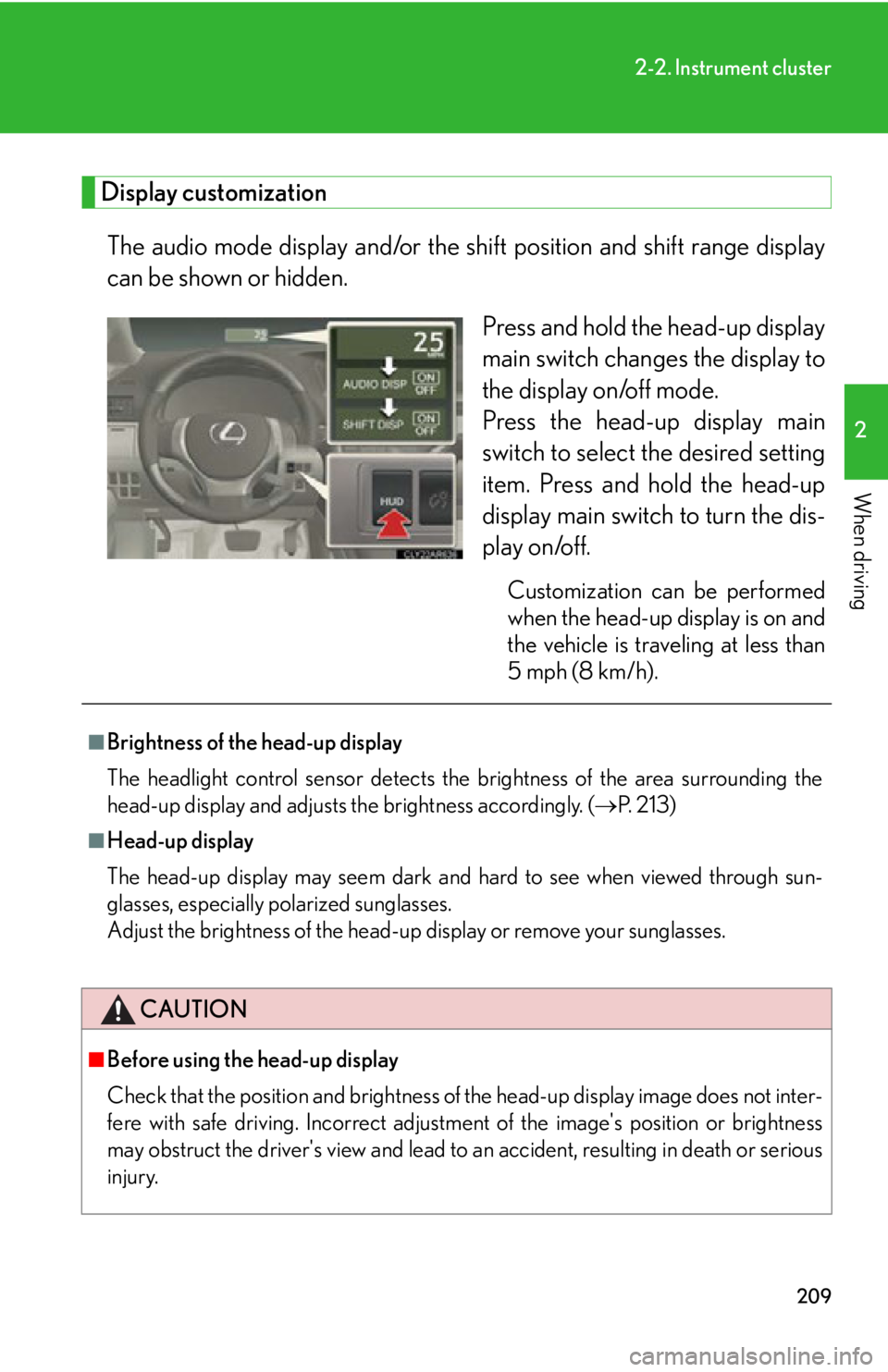
When driving Display customization
The audio mode display and/or the sh ift position and shift range display
can be shown or hidden.
Press and hold the head-up display
main switch change s the display to
the display on/off mode.
Press the head-up display main
switch to select the desired setting
item. Press and hold the head-up
display main switch to turn the dis-
play on/off. Customization can be performed
when the head-up display is on and
the vehicle is traveling at less than
5 mph (8 km/h).■
Brightness of the head-up display
The headlight control sensor detects the brightness of the area surrounding the
head-up display and adjusts th e brightness accordingly. ( P. 2 1 3 )■
Head-up display
The head-up display may seem dark and hard to see when viewed through sun-
glasses, especially polarized sunglasses.
Adjust the brightness of the head-up display or remove your sunglasses.
CAUTION
■
Before using the head-up display
Check that the position and brightness of the head-up display image does not inter-
fere with safe driving. Incorrect adjustme nt of the image's po sition or brightness
may obstruct the driver's view and lead to an accident, resulting in death or serious
injury.