ad blue LEXUS RX350 2015 User Guide
[x] Cancel search | Manufacturer: LEXUS, Model Year: 2015, Model line: RX350, Model: LEXUS RX350 2015Pages: 886, PDF Size: 11 MB
Page 372 of 886
3723-3. Using the Lexus Display Audio system
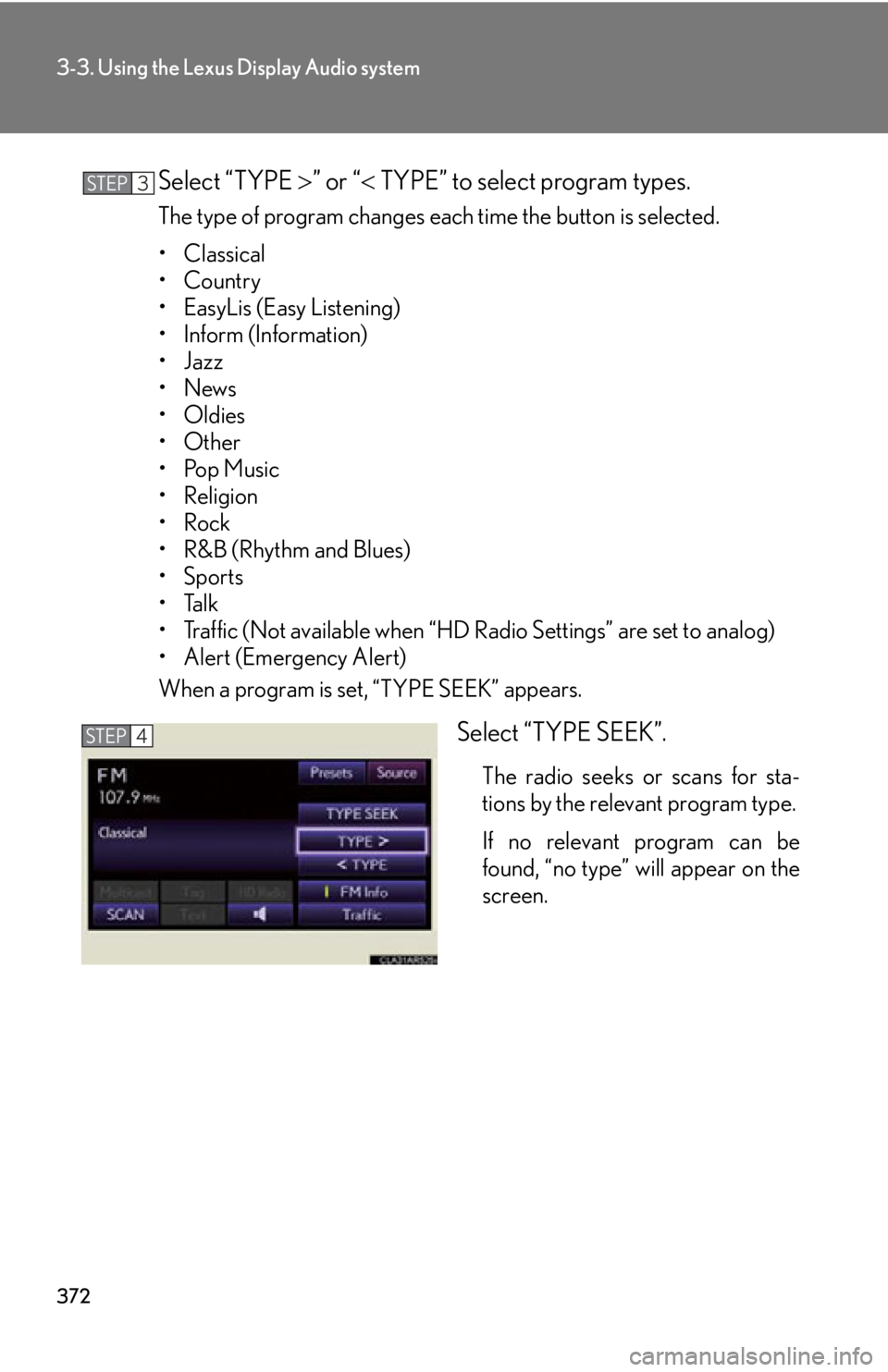
Select “TYPE ” or “ TYPE” to select program types.The type of program changes each time the button is selected.
• Classical
•Country
• EasyLis (Easy Listening)
• Inform (Information)
•Jazz
•News
• Oldies
•Other
•Pop Music
• Religion
•Rock
•R&B (Rhythm and Blues)
•Sports
•Talk
• Traffic (Not available when “HD Radio Settings” are set to analog)
• Alert (Emergency Alert)
When a program is set, “TYPE SEEK” appears.
Select “TYPE SEEK”. The radio seeks or scans for sta-
tions by the relevant program type.
If no relevant program can be
found, “no type” will appear on the
screen.STEP 3
STEP 4
Page 414 of 886
4143-3. Using the Lexus Display Audio system
Listening to Bluetooth ®
audioThe Bluetooth ®
audio system enables users to enjoy music played on a por-
table player from the vehicle speaker via wireless communication. This
audio system supports Bluetooth ®
, a wireless data system capable of play-
ing portable audio music without cables . If your portable player does not
support Bluetooth ®
, the Bluetooth ®
audio system will not function.
Press the “MEDIA” button or the “AUDIO” button on the Lexus Display
Audio controller and then select “Bluetooth*”.
*: Bluetooth is a registered trademark of Bluetooth SIG. Inc.
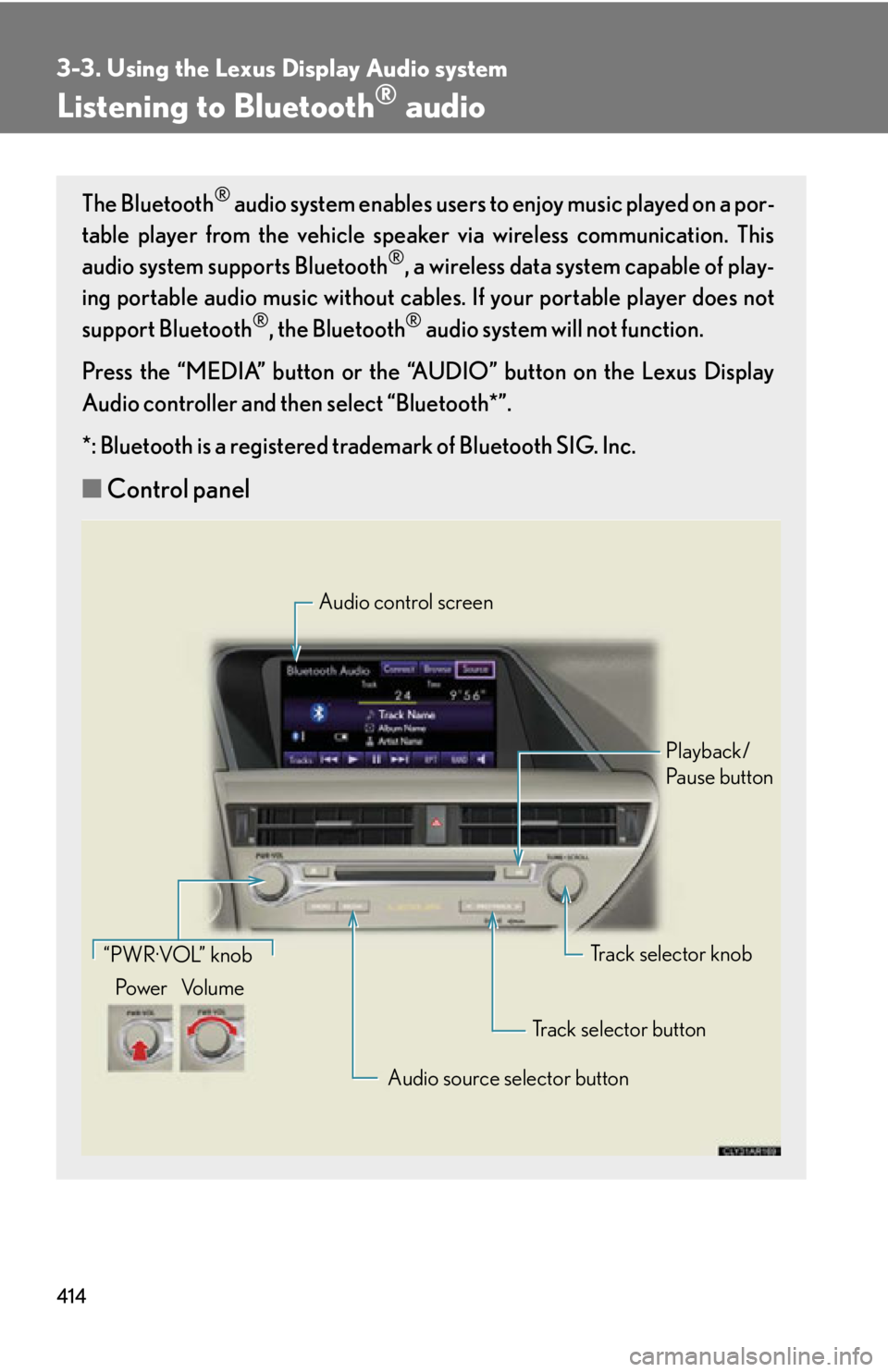
■ Control panel Audio control screen
Playback/
Pa u s e b u t t o n
Track selector knob
Track selector button
Audio source selector button“PWR·VOL” knob
Po w e r Vo l u m e
Page 415 of 886
4153-3. Using the Lexus Display Audio system
3
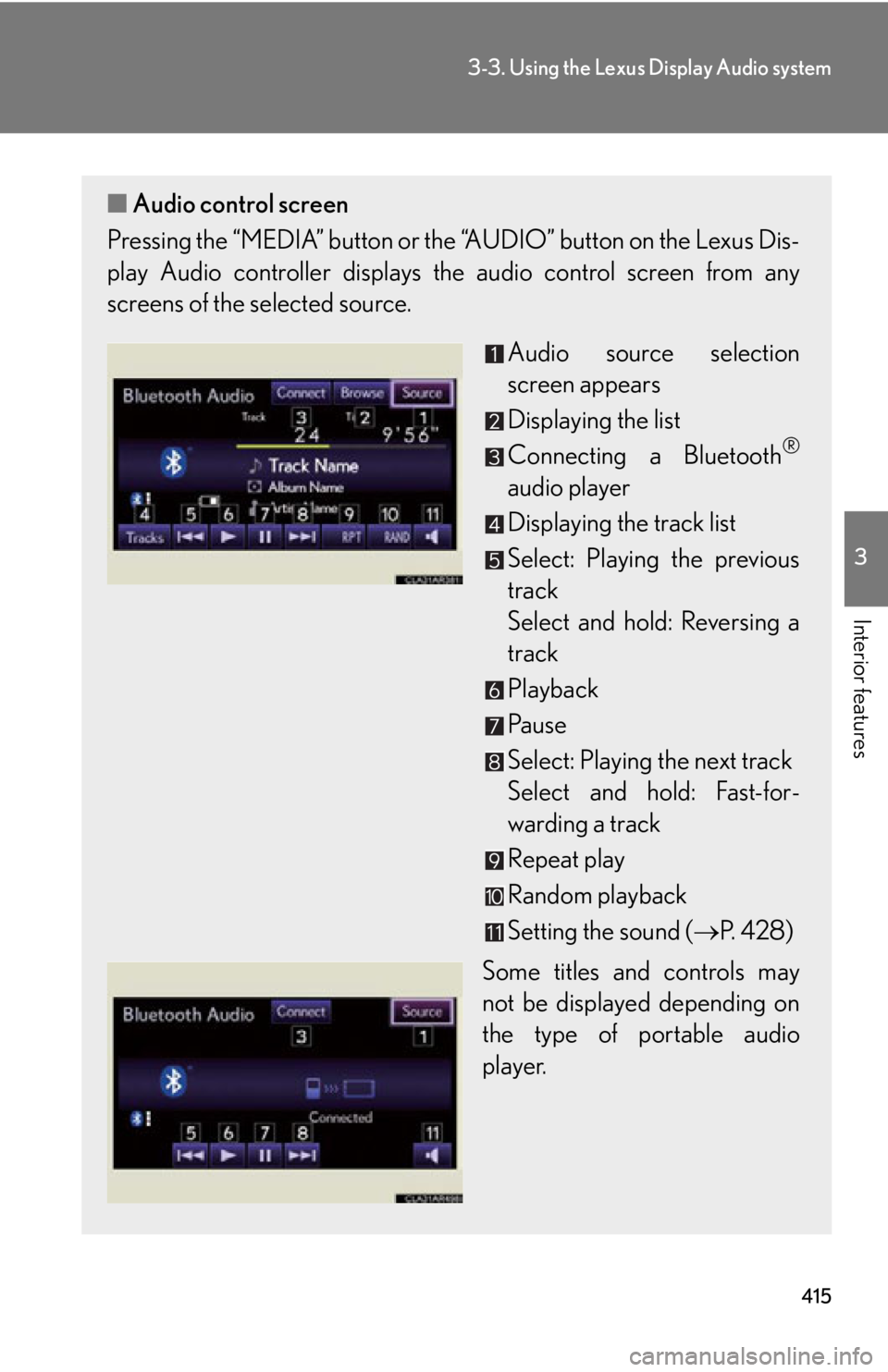
Interior features ■ Audio control screen
Pressing the “MEDIA” button or the “AUDIO” button on the Lexus Dis-
play Audio controller displays the audio control screen from any
screens of the selected source.
Audio source selection
screen appears
Displaying the list
Connecting a Bluetooth ®
audio player
Displaying the track list
Select: Playing the previous
track
Select and hold: Reversing a
track
Playback
Pa u s e
Select: Playing the next track
Select and hold: Fast-for-
warding a track
Repeat play
Random playback
Setting the sound ( P. 4 2 8 )
Some titles and controls may
not be displayed depending on
the type of portable audio
player.
Page 417 of 886
4173-3. Using the Lexus Display Audio system
3
Interior features Registering a Bluetooth ®
audio player
To use the Bluetooth ®
audio system, yo u need to register your portable
audio player into the system. Once re gistered, you can enjoy your music
on the vehicle’s audio system. You can register up to 5 devices in the system.
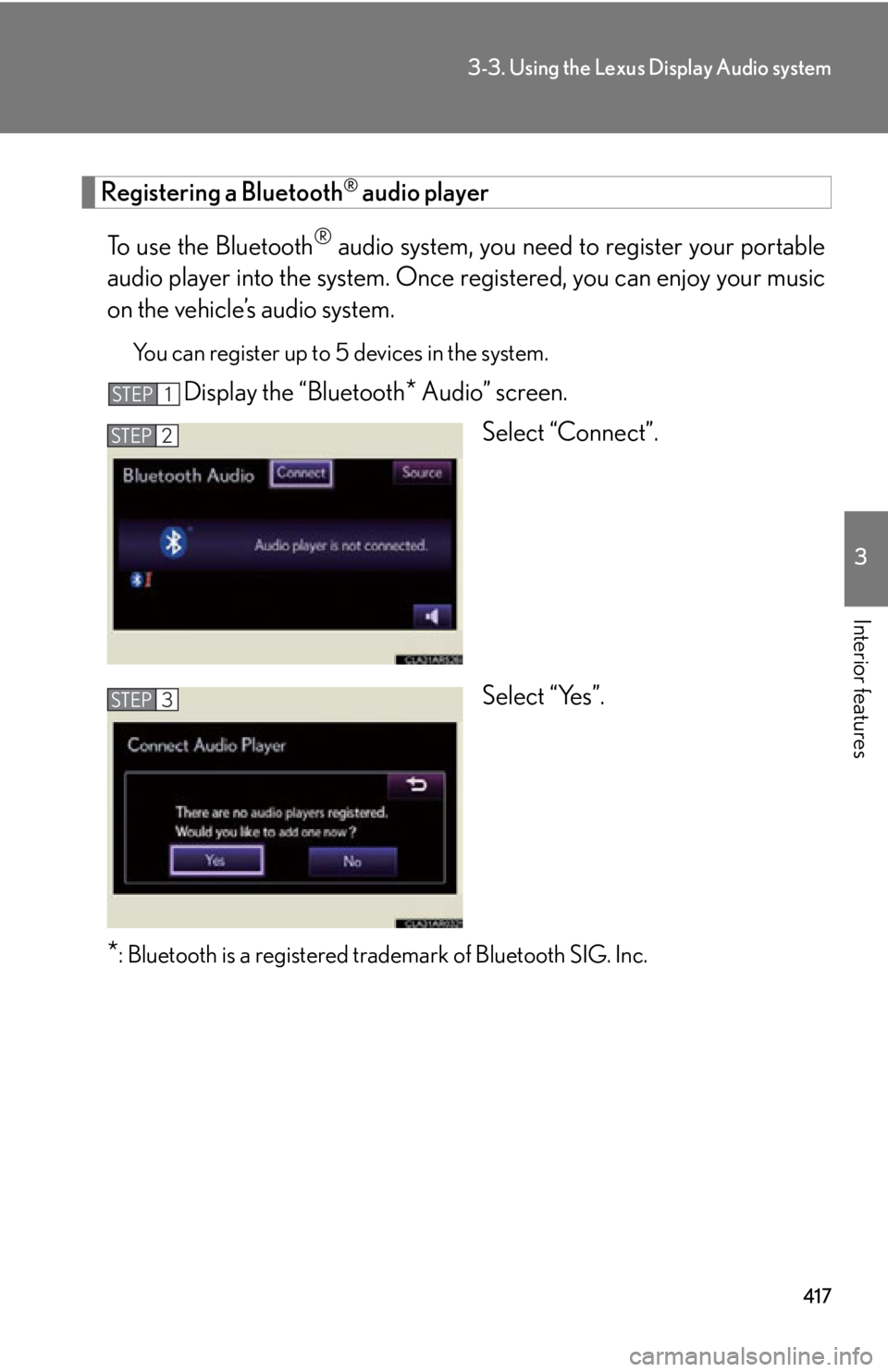
Display the “Bluetooth
* Audio” screen.
Select “Connect”.
Select “Yes”.
* : Bluetooth is a registered tr ademark of Bluetooth SIG. Inc.STEP 1
STEP 2
STEP 3
Page 418 of 886

4183-3. Using the Lexus Display Audio system
Input the passcode displayed on
the screen into your portable
audio player. For the operation of the portable
audio player, see the manual that
comes with your portable audio
player.
Passcodes are not required for SSP
(Secure Simple Pairing) compati-
ble Bluetooth ®
devices. Depend-
ing on the device, you may need to
select “Yes” to register, or “No” to
cancel on your Bluetooth ®
device.
If you want to cancel it, select
“Cancel”.
If a completion message is dis-
played, registration is complete.
If an error message is displayed,
follow the guidance on the screen
to try again.STEP 4
Page 419 of 886
4193-3. Using the Lexus Display Audio system
3
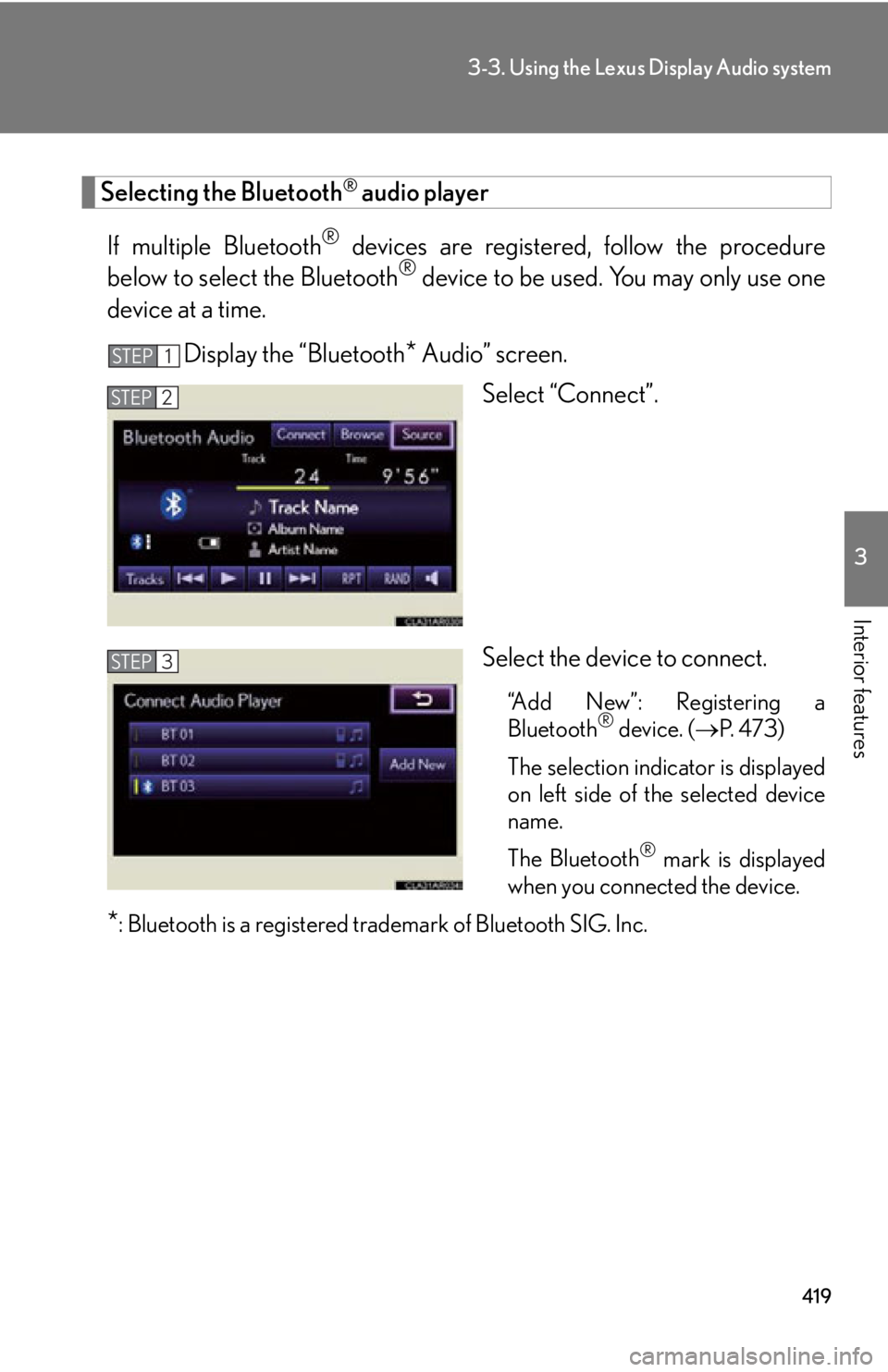
Interior features Selecting the Bluetooth ®
audio player
If multiple Bluetooth ®
devices are registered , follow the procedure
below to select the Bluetooth ®
device to be used. You may only use one
device at a time.
Display the “Bluetooth
* Audio” screen.
Select “Connect”.
Select the device to connect. “Add New”: Registering a
Bluetooth ®
device. ( P. 4 7 3 )
The selection indicator is displayed
on left side of the selected device
name.
The Bluetooth ®
mark is displayed
when you connected the device.
* : Bluetooth is a registered tr ademark of Bluetooth SIG. Inc.STEP 1
STEP 2
STEP 3
Page 420 of 886
4203-3. Using the Lexus Display Audio system
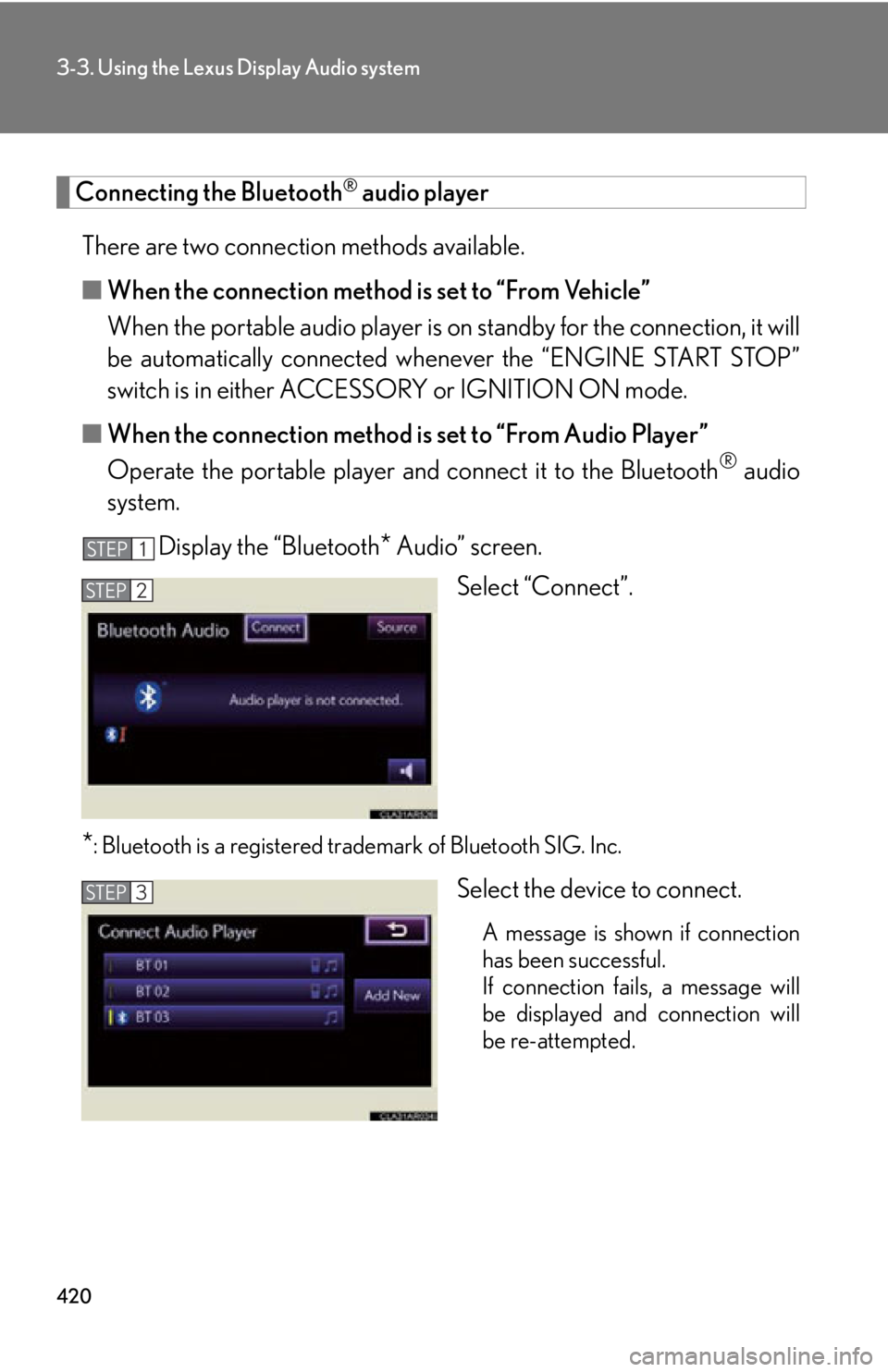
Connecting the Bluetooth ®
audio player
There are two connection methods available.
■ When the connection method is set to “From Vehicle”
When the portable audio player is on standby for the connection, it will
be automatically connected wh enever the “ENGINE START STOP”
switch is in either ACCESSORY or IGNITION ON mode.
■ When the connection method is set to “From Audio Player”
Operate the portable player and connect it to the Bluetooth ®
audio
system.
Display the “Bluetooth
* Audio” screen.
Select “Connect”.
* : Bluetooth is a registered tr ademark of Bluetooth SIG. Inc.
Select the device to connect.
A message is shown if connection
has been successful.
If connection fails, a message will
be displayed and connection will
be re-attempted.STEP 1
STEP 2
STEP 3
Page 423 of 886
4233-3. Using the Lexus Display Audio system
3
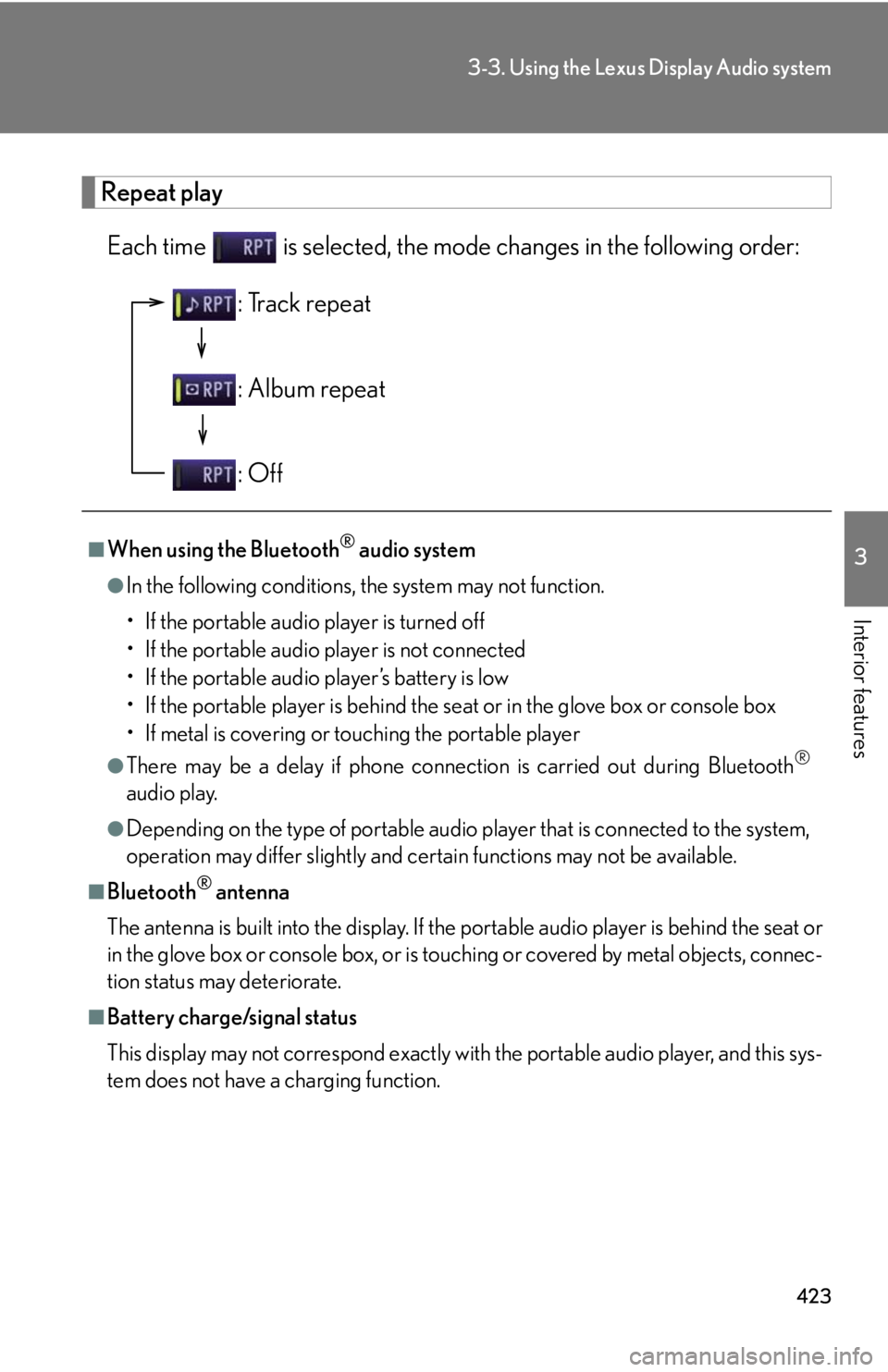
Interior features Repeat play
Each time is selected, the mode changes in the following order:
■
When using the Bluetooth ®
audio system●
In the following conditions, the system may not function.
• If the portable audio player is turned off
• If the portable audio player is not connected
• If the portable audio player’s battery is low
• If the portable player is behind the se at or in the glove box or console box
• If metal is covering or touching the portable player●
There may be a delay if phone connecti on is carried out during Bluetooth ®
audio play.●
Depending on the type of portable audio player that is connected to the system,
operation may differ slightly and ce rtain functions may not be available.■
Bluetooth ®
antenna
The antenna is built into the display. If the portable audio player is behind the seat or
in the glove box or console box, or is touching or covered by metal objects, connec-
tion status may deteriorate.■
Battery charge/signal status
This display may not correspond exactly with the portable audio player, and this sys-
tem does not have a charging function. : Track repeat
: Album repeat
: Off
Page 424 of 886
4243-3. Using the Lexus Display Audio system
■
About Bluetooth ®
■
Compatible models
Portable audio players must correspond to the specifications. ●
Bluetooth ®
specifications:
Ver. 1.1, or higher (Recommended: Ver. 2.1 + EDR or higher)●
Profiles:
• A2DP (Advanced Audio Distribution Profile) Ver. 1.0, or higher
(Recommended: Ver. 1.2 or higher)
This is a profile to transmit stereo audio or high quality sounds to the head-
phone.
• AVRCP (Audio/Video Remote Control Profile) Ver. 1.0 or higher
(Recommended: Ver. 1.4 or higher)
This is a profile to remote control the A/V equipment.
However, please note that some function s may be limited depending on the type of
portable audio player. Bluetooth is a registered trademark of
Bluetooth SIG. Inc.
Page 425 of 886
4253-3. Using the Lexus Display Audio system
3
Interior features ■
Certification for the Bluetooth ®
audio system
FCC ID: AJDK046
IC ID: 775E-K046
This device complies with Part 15 of FCC Rules and Indust ry Canada licence-
exempt RSS standard(s). Operation is subj ect to the following two conditions: (1)
this device may not cause interference, an d (2) this device must accept any inter-
ference, including interference that may cause undesired operation of this device.
Le présent appareil est conforme aux la partie 15 des règles de la FCC et CNR
d’Industrie Canada applicables aux appareils radio exempts de licence. L’exploita-
tion est autorisée aux deux conditions suivantes : (1) l’appareil ne doit pas produire
de brouillage, et (2) l’utilisateur de l’appareil doit accepter tout brouillage
radioélectrique subi, même si le brouilla ge est susceptible d’en compromettre le
fonctionnement.■
Reconnecting the portable audio player
If the portable audio player is disconnected with a poor reception when the
“ENGINE START STOP” switch is in AC CESSORY or IGNITION ON mode, the
system automatically reconnects the portable audio player.
If you have switched off the portable audio player yourself, follow the instructions
below to reconnect: ●
Select the portable audio player again●
Enter the portable audio player■
When you release your car
Be sure to initialize your data. ( P. 3 3 6 )