ad blue LEXUS RX350 2015 Owner's Guide
[x] Cancel search | Manufacturer: LEXUS, Model Year: 2015, Model line: RX350, Model: LEXUS RX350 2015Pages: 886, PDF Size: 11 MB
Page 441 of 886

4413-3. Using the Lexus Display Audio system
3
Interior features Using the Bluetooth ®
phone
Device name
Bluetooth ®
connection status ( P. 435)
Dialing from history ( P. 450)
Speed dialing ( P. 450)
Dialing from the phonebook ( P. 4 4 8 )
Dialing by inputting a number ( P. 4 4 7 )
Connecting a Bluetooth ®
phone ( P. 444)
To display the screen shown above, press on the steering wheel or
press the “MENU” button on the Le xus Display Audio controller and
then select “Phone” on the “Menu” screen.
Page 442 of 886
4423-3. Using the Lexus Display Audio system
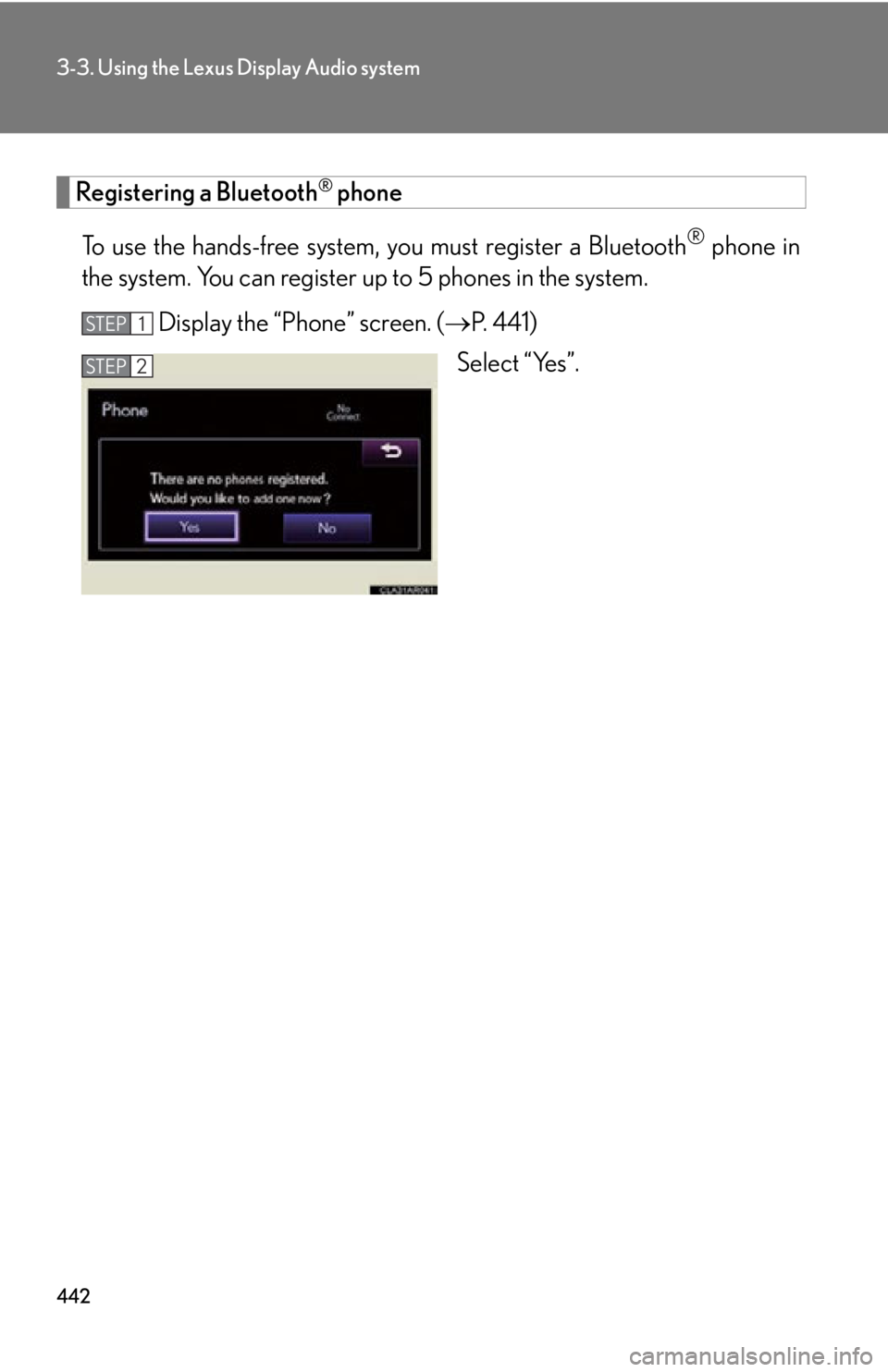
Registering a Bluetooth ®
phone
To use the hands-free system, you must register a Bluetooth ®
phone in
the system. You can register up to 5 phones in the system.
Display the “Phone” screen. ( P. 4 4 1 )
Select “Yes”.STEP 1
STEP 2
Page 443 of 886
4433-3. Using the Lexus Display Audio system
3
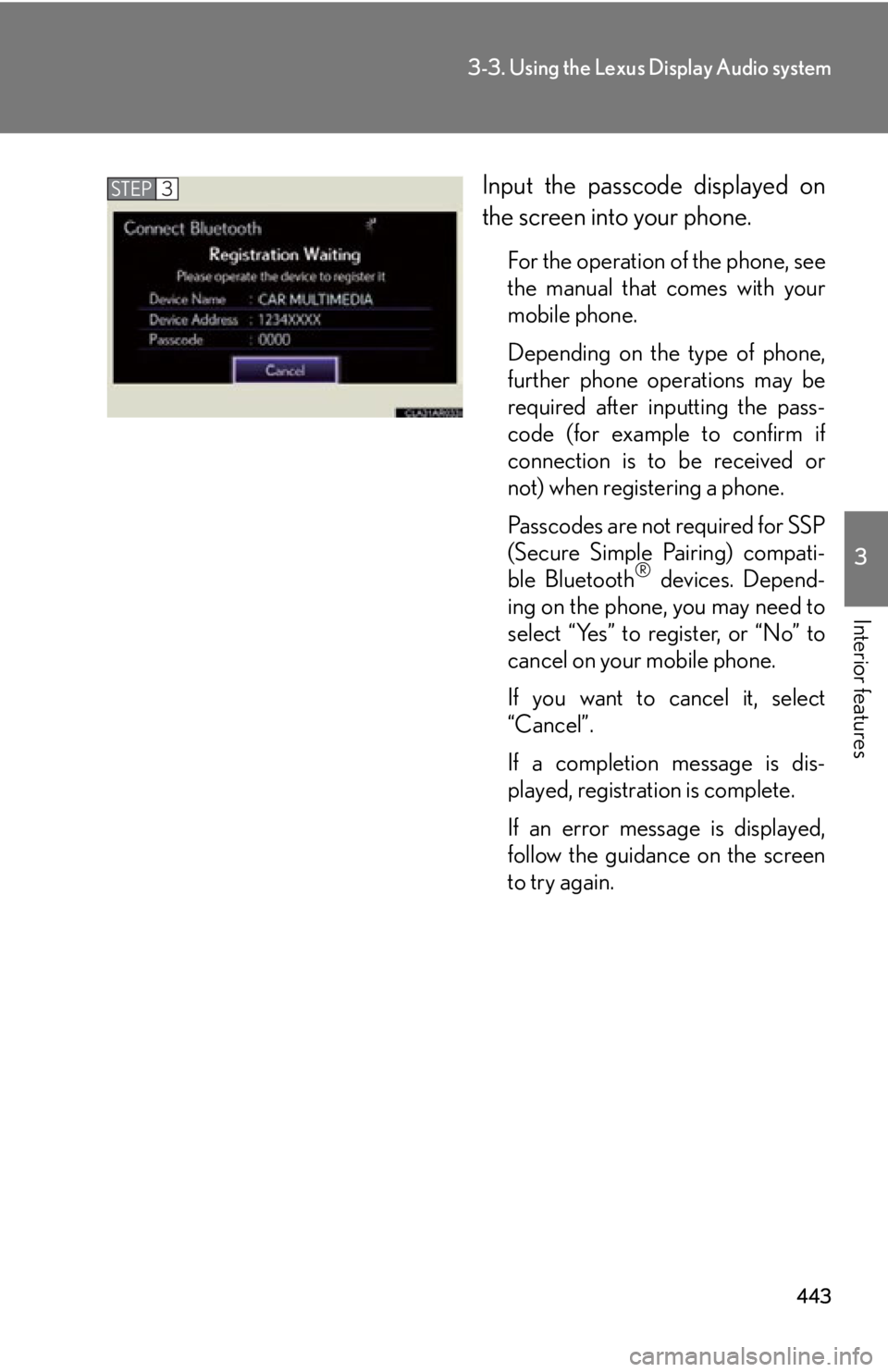
Interior features Input the passcode displayed on
the screen into your phone. For the operation of the phone, see
the manual that comes with your
mobile phone.
Depending on the type of phone,
further phone operations may be
required after inputting the pass-
code (for example to confirm if
connection is to be received or
not) when registering a phone.
Passcodes are not required for SSP
(Secure Simple Pairing) compati-
ble Bluetooth ®
devices. Depend-
ing on the phone, you may need to
select “Yes” to register, or “No” to
cancel on your mobile phone.
If you want to cancel it, select
“Cancel”.
If a completion message is dis-
played, registration is complete.
If an error message is displayed,
follow the guidance on the screen
to try again.STEP 3
Page 444 of 886
4443-3. Using the Lexus Display Audio system
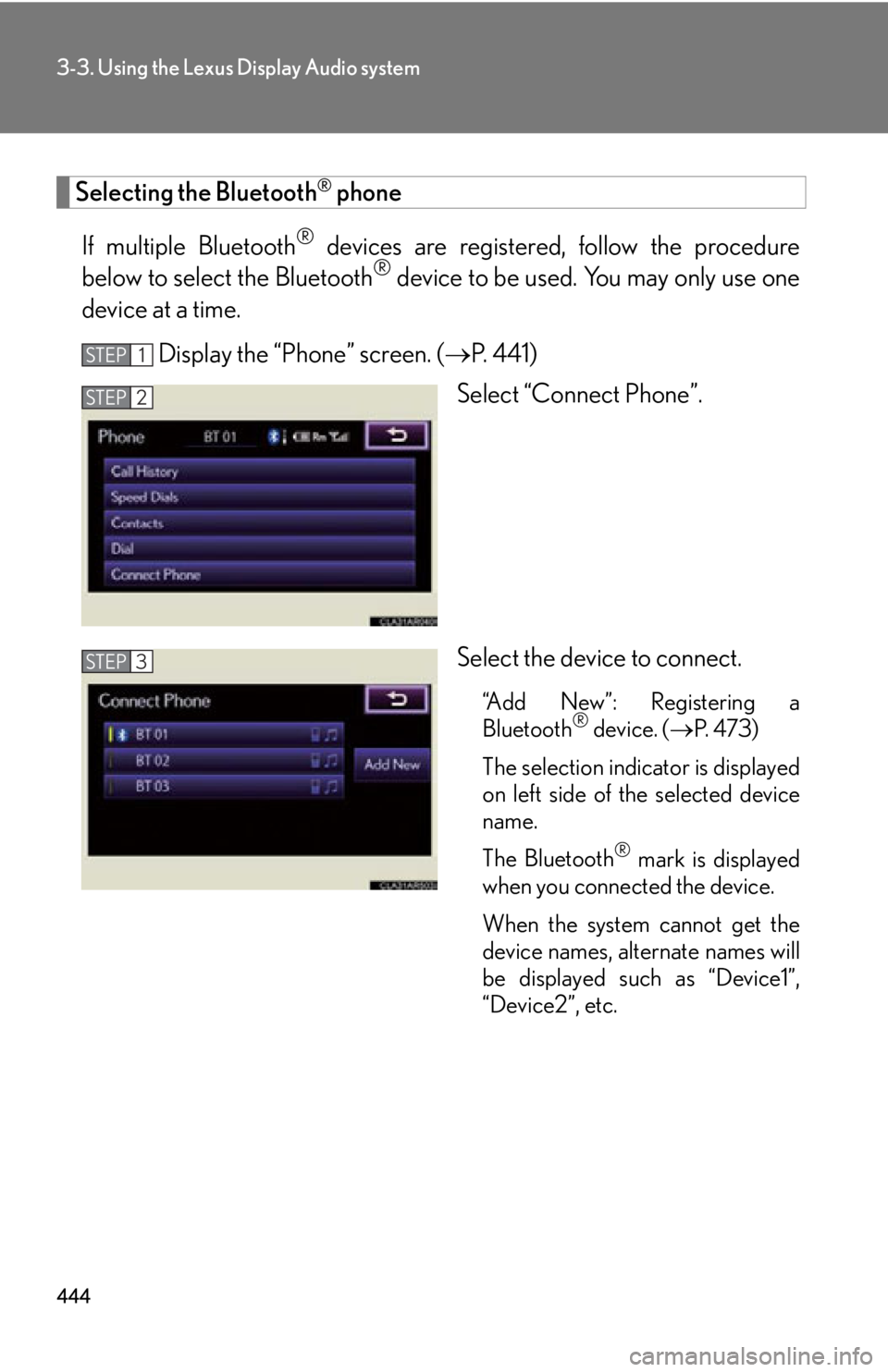
Selecting the Bluetooth ®
phone
If multiple Bluetooth ®
devices are registered , follow the procedure
below to select the Bluetooth ®
device to be used. You may only use one
device at a time.
Display the “Phone” screen. ( P. 4 4 1 )
Select “Connect Phone”.
Select the device to connect. “Add New”: Registering a
Bluetooth ®
device. ( P. 4 7 3 )
The selection indicator is displayed
on left side of the selected device
name.
The Bluetooth ®
mark is displayed
when you connected the device.
When the system cannot get the
device names, alternate names will
be displayed such as “Device1”,
“Device2”, etc.STEP 1
STEP 2
STEP 3
Page 445 of 886

4453-3. Using the Lexus Display Audio system
3
Interior features Connecting a Bluetooth ®
phone
There are two connecting methods av ailable-automatic and manual.
Automatic
When you register your phone, auto connection will be activated. Always
set it to this mode and leave the Bluetooth ®
phone in a place where con-
nection can be established.
When the “ENGINE START STOP” sw itch is turned to ACCESSORY or
IGNITION ON mode, the system will se arch for a nearby mobile phone
you have registered.
The system automatically connects with the most recent phone that was
connected. The connected result is displayed.
Depending on the type of phone, phone operations may be required (to
confirm if connection is to be receiv ed or not) even when automatically
connected.
Page 446 of 886
4463-3. Using the Lexus Display Audio system
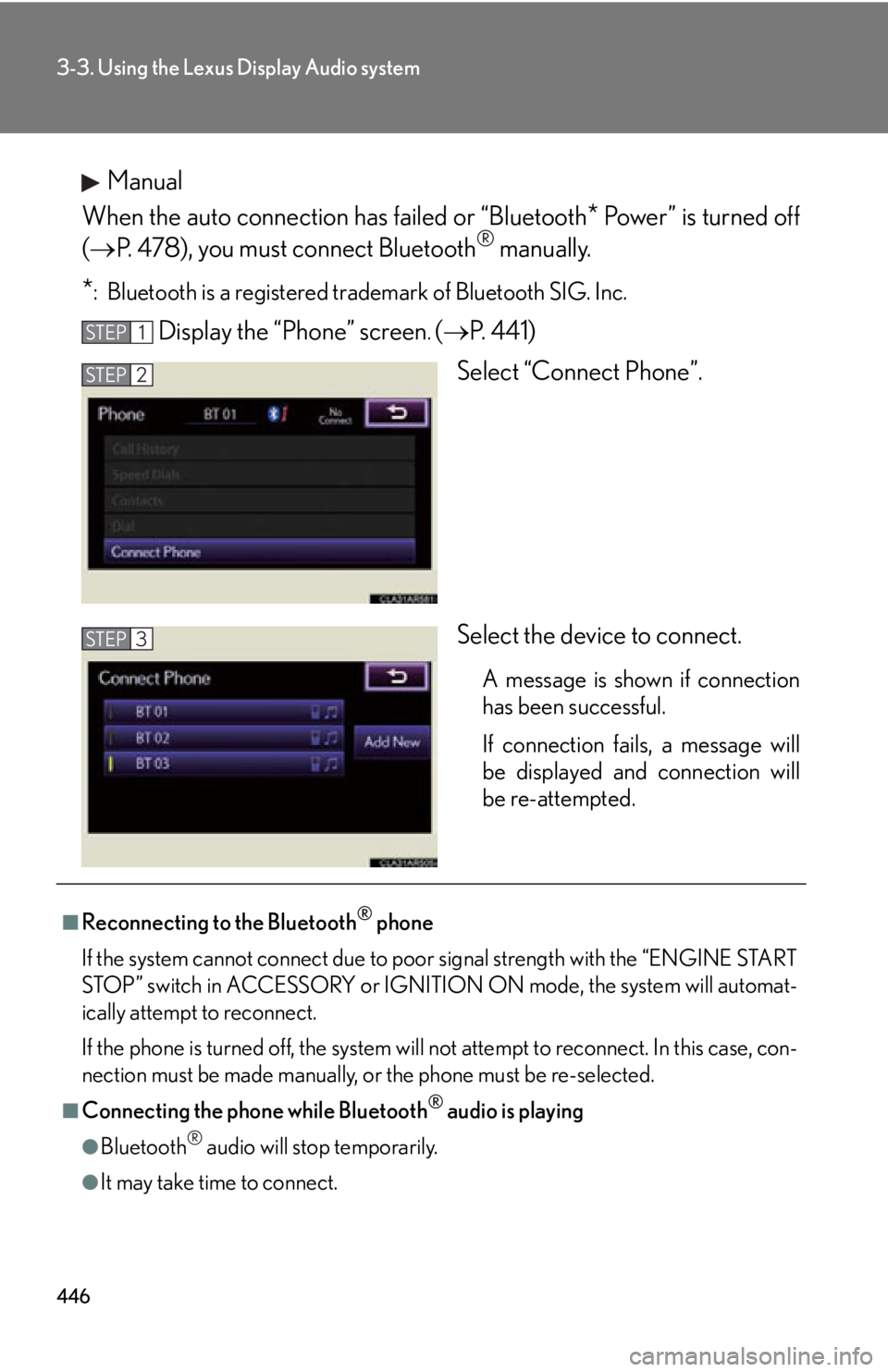
Manual
When the auto connection has failed or “Bluetooth
* Power” is turned off
( P. 478), you must connect Bluetooth ®
manually.
* : Bluetooth is a registered tr ademark of Bluetooth SIG. Inc.
Display the “Phone” screen .
( P. 4 4 1 )
Select “Connect Phone”.
Select the device to connect. A message is shown if connection
has been successful.
If connection fails, a message will
be displayed and connection will
be re-attempted.STEP 1
STEP 2
STEP 3
■
Reconnecting to the Bluetooth ®
phone
If the system cannot connect due to poor signal strength with the “ENGINE START
STOP” switch in ACCESSORY or IGNITION ON mode, the system will automat-
ically attempt to reconnect.
If the phone is turned off, the system will not attempt to reconnect. In this case, con-
nection must be made manually, or the phone must be re-selected.
■
Connecting the phone while Bluetooth ®
audio is playing
●
Bluetooth ®
audio will stop temporarily.
●
It may take time to connect.
Page 447 of 886
4473-3. Using the Lexus Display Audio system
3
Interior features Making a call
Once the Bluetooth ®
phone is registered, you can make a call using the
following procedure:
■ Dialing
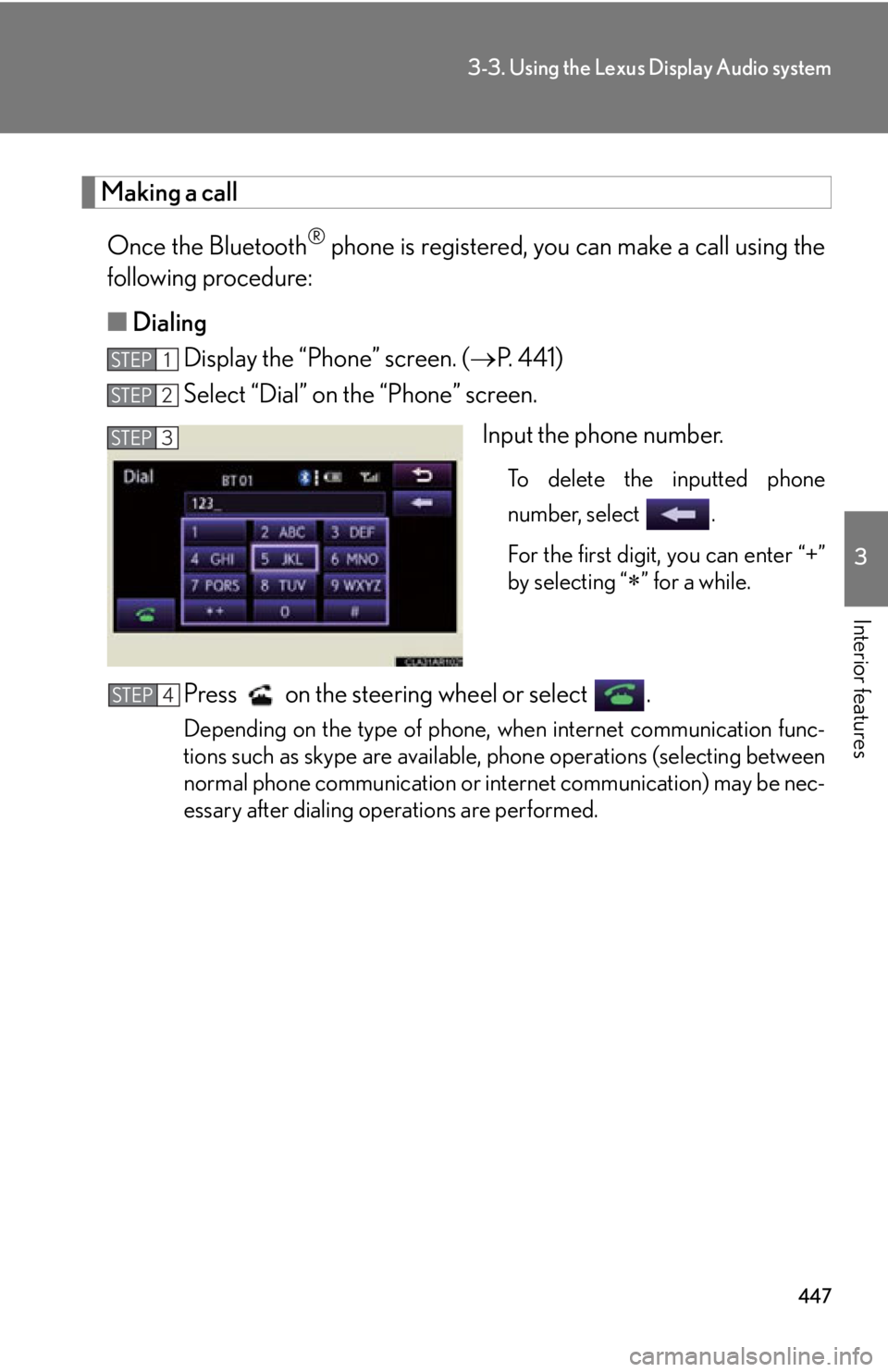
Display the “Phone” screen. ( P. 4 4 1 )
Select “Dial” on the “Phone” screen.
Input the phone number. To delete the inputted phone
number, select .
For the first digit, you can enter “+”
by selecting “
” for a while.
Press on the steering wheel or select . Depending on the type of phone, when internet communication func-
tions such as skype are available, phone operations (selecting between
normal phone communication or inte rnet communication) may be nec-
essary after dialing operations are performed.STEP 1
STEP 2
STEP 3
STEP 4
Page 449 of 886
4493-3. Using the Lexus Display Audio system
3
Interior features ● When the phonebook is empty
You can transfer the phone numbers in your Bluetooth ®
phone to the
system.
Operation methods differ between PBAP compatible and PBAP
incompatible Bluetooth ®
phones. If your mobile phone does not sup-
port either PBAP or OPP service, you cannot transfer contacts.
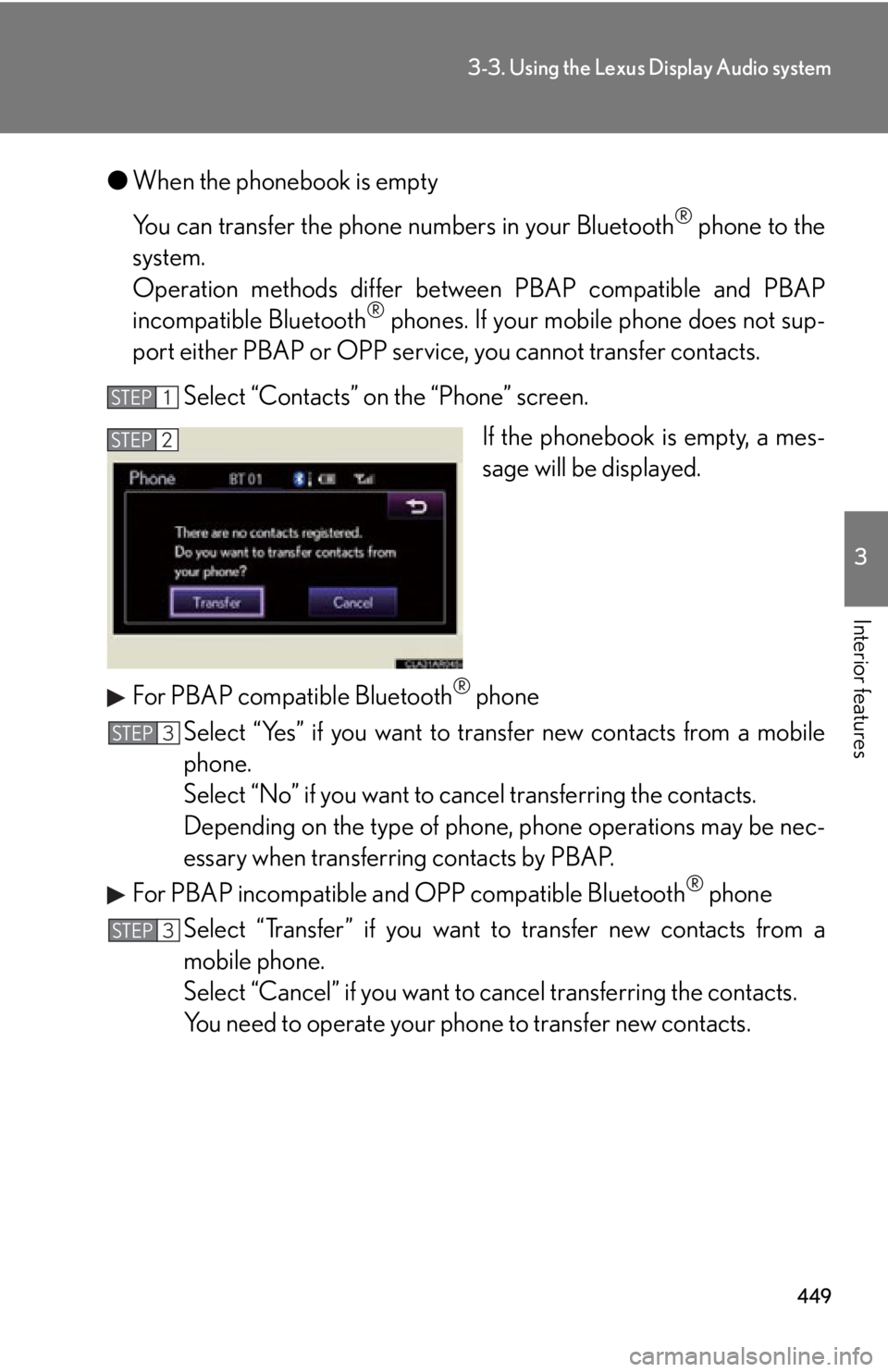
Select “Contacts” on the “Phone” screen.
If the phonebook is empty, a mes-
sage will be displayed.
For PBAP compatible Bluetooth ®
phone
Select “Yes” if you want to tr ansfer new contacts from a mobile
phone.
Select “No” if you want to cancel transferring the contacts.
Depending on the type of phone, phone operations may be nec-
essary when transferring contacts by PBAP.
For PBAP incompatible and OPP compatible Bluetooth ®
phone
Select “Transfer” if you want to transfer new contacts from a
mobile phone.
Select “Cancel” if you want to cancel transferring the contacts.
You need to operate your pho ne to transfer new contacts.STEP 1
STEP 2
STEP 3
STEP 3
Page 463 of 886
4633-3. Using the Lexus Display Audio system
3
Interior features ■ Managing the contacts
● Transferring a phone number
You can transfer the phone nu mbers in your Bluetooth
phone to the
system. Operation methods differ b etween PBAP compatible and PBAP
incompatible Bluetooth
phones. If your mobile phone does not support
either PBAP or OPP services, you cannot transfer contacts.
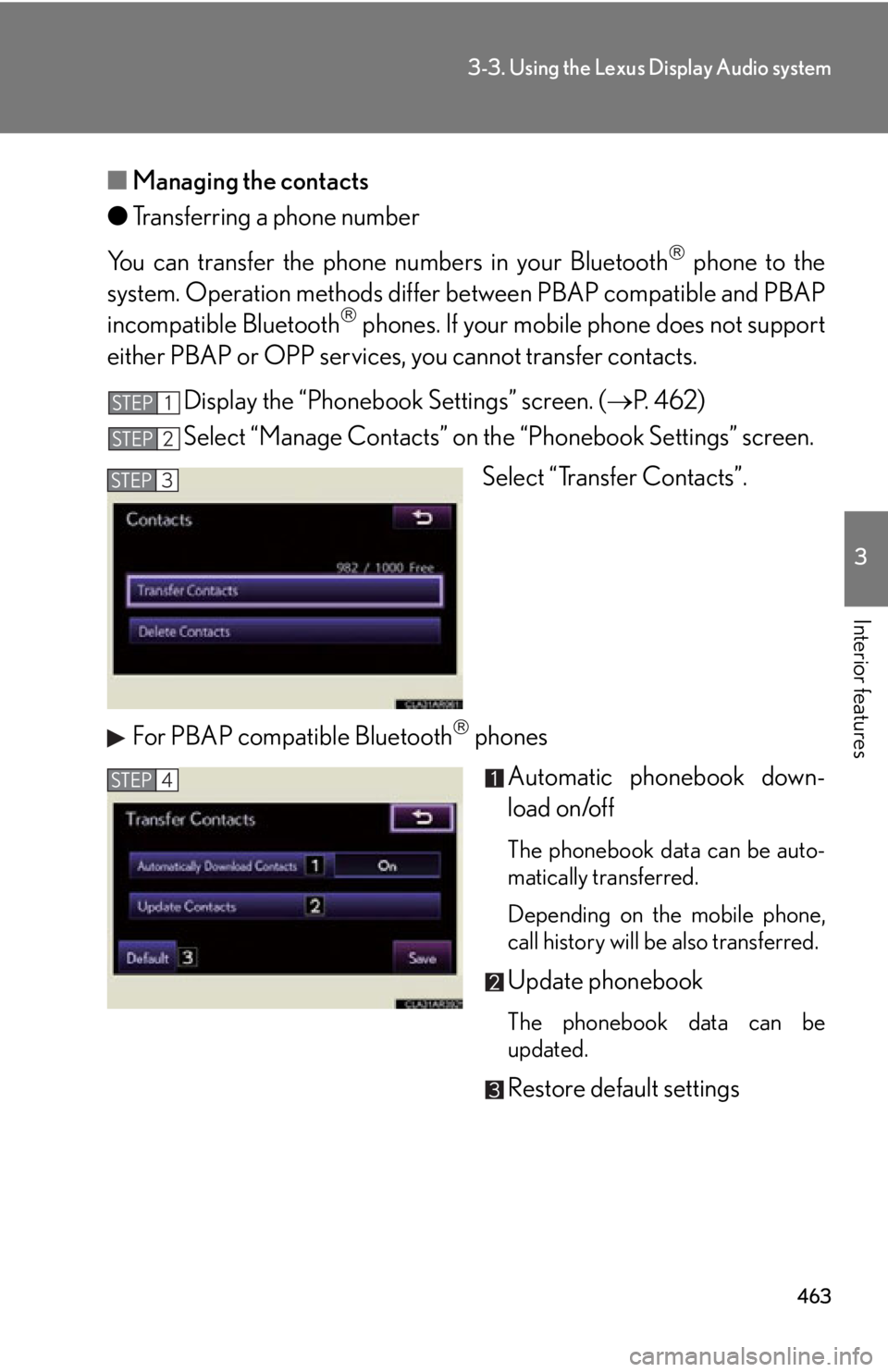
Display the “Phonebook Settings” screen. ( P. 4 6 2 )
Select “Manage Contacts” on th e “Phonebook Settings” screen.
Select “Transfer Contacts”.
For PBAP compatible Bluetooth
phones
Automatic phonebook down-
load on/off The phonebook data can be auto-
matically transferred.
Depending on the mobile phone,
call history will be also transferred.
Update phonebook
The phonebook data can be
updated.
Restore default settingsSTEP 1
STEP 2
STEP 3
STEP 4
Page 464 of 886
4643-3. Using the Lexus Display Audio system
For PBAP incompatible Bluetooth
phones
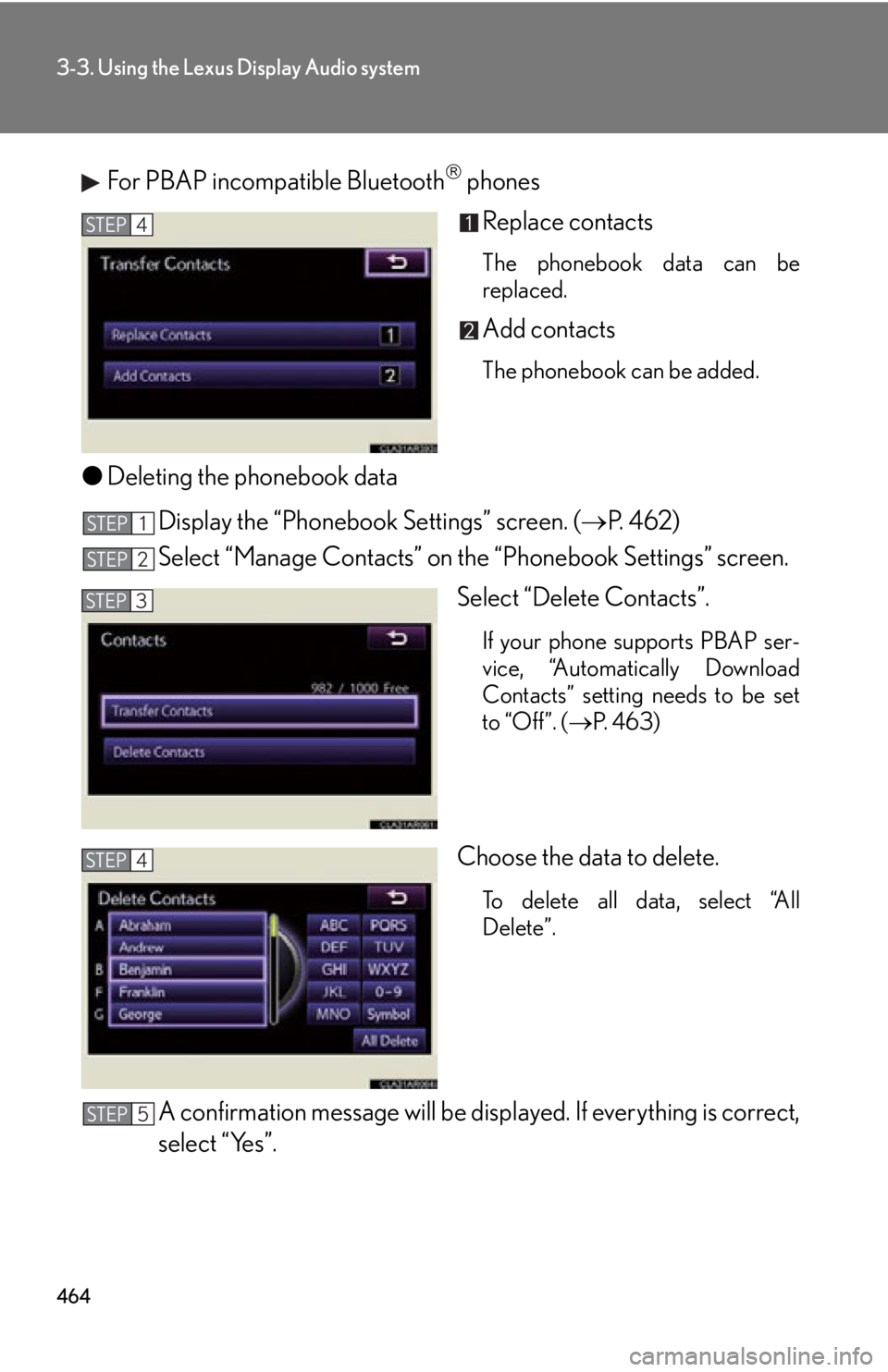
Replace contacts The phonebook data can be
replaced.
Add contacts The phonebook can be added.
● Deleting the phonebook data
Display the “Phonebook Settings” screen. ( P. 4 6 2 )
Select “Manage Contacts” on th e “Phonebook Settings” screen.
Select “Delete Contacts”. If your phone supports PBAP ser-
vice, “Automatically Download
Contacts” setting needs to be set
to “Off”. ( P. 4 6 3 )
Choose the data to delete.
To delete all data, select “All
Delete”.
A confirmation message will be disp layed. If everything is correct,
select “Yes”.STEP 4
STEP 1
STEP 2
STEP 3
STEP 4
STEP 5