air condition LEXUS RX350 2015 User Guide
[x] Cancel search | Manufacturer: LEXUS, Model Year: 2015, Model line: RX350, Model: LEXUS RX350 2015Pages: 886, PDF Size: 11 MB
Page 123 of 886
1231-7. Safety information
1
Before driving ●
Depending on the type of collision, it is possible that only the seat belt preten-
sioners will activate.●
The SRS front airbags for the front passenger will not activate if there is no pas-
senger sitting in the front passenger seat . However, the SRS front airbags for the
front passenger may deploy if luggage is put in the seat, even if the seat is unoc-
cupied. ( P. 1 3 2 )■
SRS airbag deployment conditions (SRS side airbags and curtain shield airbags)
The SRS side airbags and SRS curtain shield airbags will deploy in the event of an
impact that exceeds the set threshold level (the level of force corresponding to the
impact force produced by an approximately 3300 lb. [1500 kg] vehicle colliding
with the vehicle cabin from a direction perp endicular to the vehicle orientation at an
approximate speed of 12 - 18 mph [20 - 30 km/h]).
The SRS curtain shield airbags will deploy in the event of vehicle rollover.■
Conditions under which the SRS airbags may deploy (inflate), other than a colli-
sion (SRS front airbags)
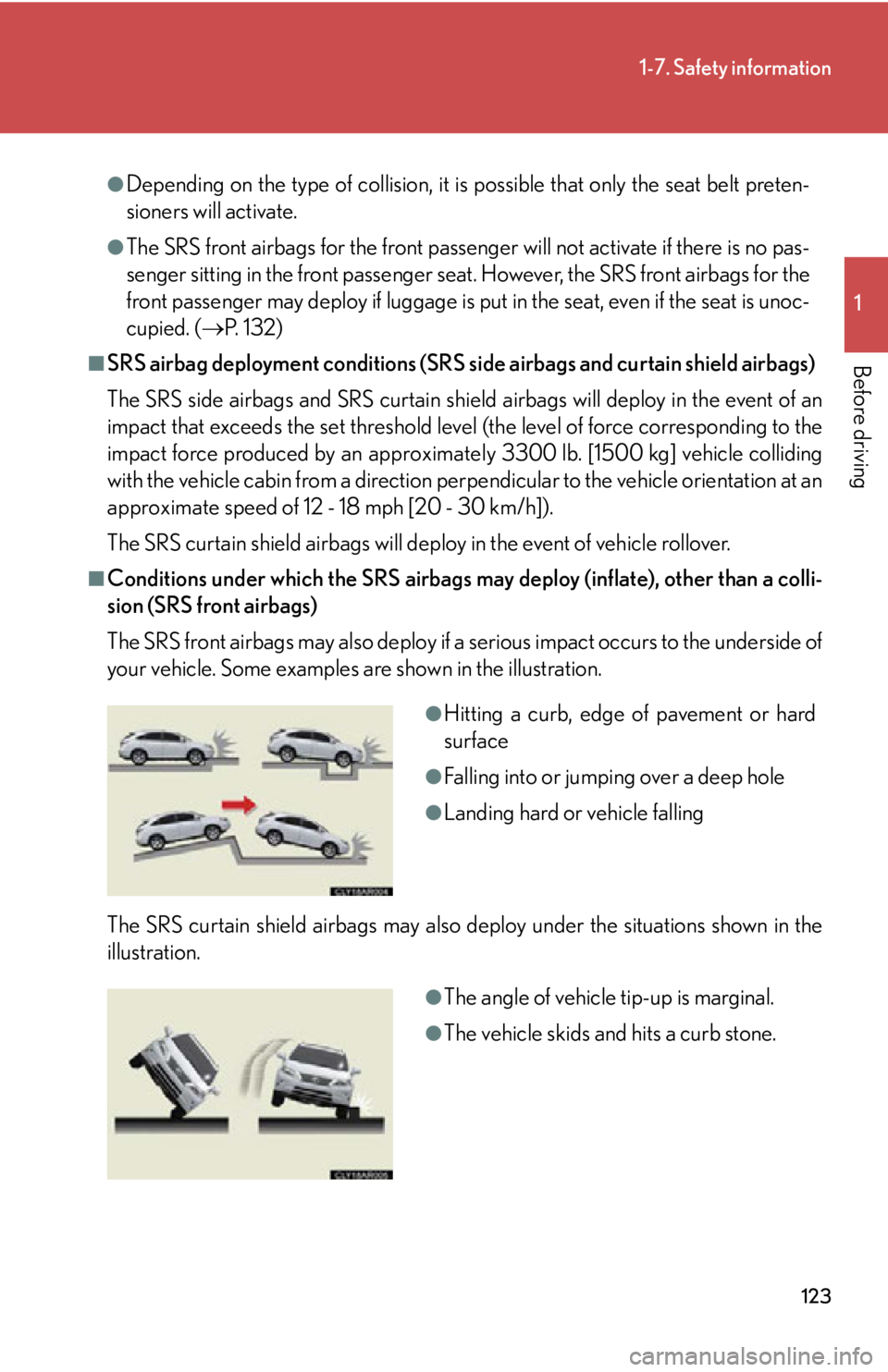
The SRS front airbags may also deploy if a serious impact occurs to the underside of
your vehicle. Some examples are shown in the illustration.
The SRS curtain shield airbags may also deploy under the situations shown in the
illustration. ●
Hitting a curb, edge of pavement or hard
surface ●
Falling into or jumping over a deep hole ●
Landing hard or vehicle falling
●
The angle of vehicle tip-up is marginal.
●
The vehicle skids and hits a curb stone.
Page 132 of 886
1321-7. Safety information
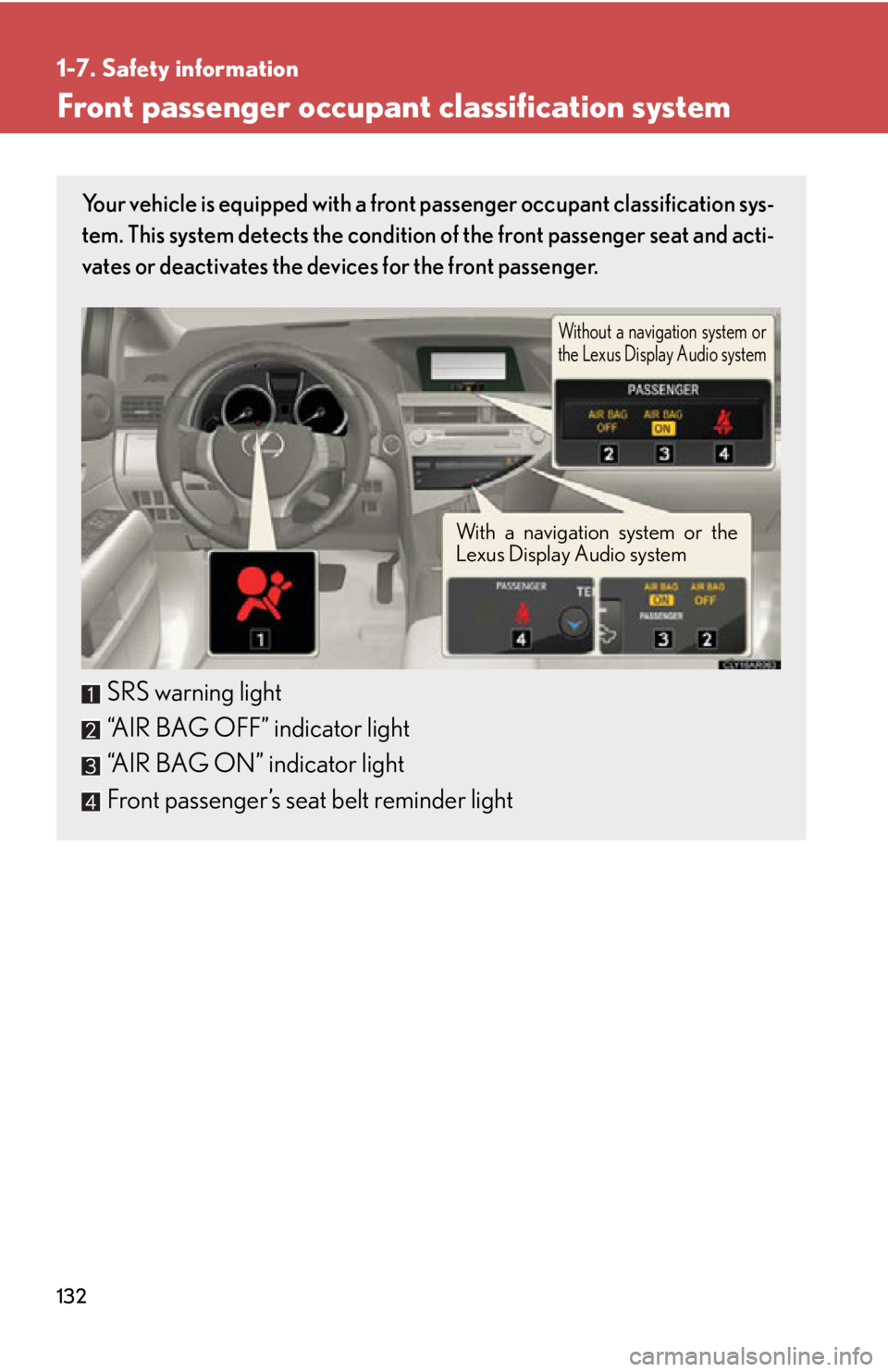
Front passenger occupant classification system Your vehicle is equipped with a front passenger occupant classification sys-
tem. This system detects the condition of the front passenger seat and acti-
vates or deactivates the devices for the front passenger.
SRS warning light
“AIR BAG OFF” indicator light
“AIR BAG ON” indicator light
Front passenger’s seat belt reminder light Without a navigation system or
the Lexus Display Audio system
With a navigation system or the
Lexus Display Audio system
Page 133 of 886

1331-7. Safety information
1
Before driving Condition and operation in the front passenger occupant classification system
■ Adult *1
■ Child *3
or child restraint system *4Indicator/
warning light “AIR BAG ON” and “AIR BAG OFF”
indicator lights “A I R B A G
ON”
SRS warning light Off
Front passenger’s seat belt reminder light
Flashing *2
Devices Front passenger airbag
ActivatedSide airbag on the front
passenger seats
Curtain shield airbag in the front passenger
side
Front passenger knee airbag
Front passenger’s seat belt pretensioner
Indicator/
warning light “AIR BAG ON” and “AIR BAG OFF”
indicator lights “A I R B A G
OFF” *5
SRS warning light Off
Front passenger’s seat belt reminder light
Flashing *2
Devices Front passenger airbag Deactivated
Side airbag on the front
passenger seats
Activated
Curtain shield airbag in the front passenger
side
Front passenger knee airbag Deactivated
Front passenger’s seat belt pretensioner Activated
Page 253 of 886

2532-4. Using other driving systems
2
When driving ■
Sensor detection information ●
Certain vehicle conditions and the su rrounding environment may affect the
ability of a sensor to correctly detect an obstacle. Particular instances where this
may occur are listed below.
• There is dirt, snow or ice on a sensor.
• A sensor is frozen.
• A sensor is covered in any way.
• The vehicle is leaning considerably to one side.
• On an extremely bumpy road, on an incline, on gravel, or on grass
• The vicinity of the vehicle is noisy due to vehicle horns, motorcycle engines,
air brakes of large vehicles, or other loud noises producing ultrasonic waves.
• There is another vehicle equipped with parking assist sensor s in the vicinity.
• A sensor is coated with a sheet of spray or heavy rain.
• The vehicle is equipped with a fender pole or radio antenna.
• Towing eyelets are installed.
• A bumper or sensor receives a strong impact.
• The vehicle is approaching a tall or right-angled curb.
• In harsh sunlight or intense cold weather.
• A non-genuine Lexus suspension (low ered suspension, etc.) is installed.
In addition to the examples above, there are instances in which, because of their
shapes, signs and other objects may be judg ed by a sensor to be closer than they
are. ●
The shape of the obstacle may prevent a sensor from detecting it. Pay particular
attention to the following obstacles:
• Wires, fences, ropes, etc.
• Cotton, snow and other materi als that absorb sound waves
• Sharply-angled objects
•Low obstacles
• Tall obstacles with upper sections projec ting outwards in the direction of your
vehicle
■
If a message is displayed
P. 7 5 4
Page 302 of 886
3022-5. Driving information
Winter driving tips Carry out the necessary preparations and inspections before driving the
vehicle in winter. Always drive the ve hicle in a manner appropriate to the
prevailing weather conditions.
■ Pre-winter preparations
● Use fluids that are appropria te to the prevailing outside tempera-
tures.
• Engine oil
• Engine coolant
• Washer fluid
● Have a service technician inspec t the condition of the battery.
● Have the vehicle fitted with four snow tires or purchase a set of
tire chains for the front tires. Ensure that all tires are the same size and brand, and that chains match
the size of the tires.
■ Before driving the vehicle
Perform the following accord ing to the driving conditions:
● Do not try to forcibly open a w indow or move a wiper that is fro-
zen. Pour warm water over the frozen area to melt the ice. Wipe
away the water immediately to prevent it from freezing.
● To ensure proper operation of the climate control system fan,
remove any snow that has accumu lated on the air inlet vents in
front of the windshield.
● Check for and remove any exce ss ice or snow that may have
accumulated on the exterior lights, vehicle's roof, chassis, around
the tires or on the brakes.
● Remove any snow or mud from the bottom of your shoes before
getting in the vehicle.
Page 317 of 886

3172-5. Driving information
2
When driving ● Avoid jerky steering and sharp turns, and slow down before making a
turn.
● Note that when making a turn, the tr ailer wheels will be closer than the
vehicle wheels to the inside of th e turn. Compensate by making a
wider than normal turning radius.
● Slow down before making a turn, in cross winds, on wet or slippery sur-
faces, etc.
Increasing vehicle speed can destabilize the trailer.
● Take care when passing other vehi cles. Passing requires considerable
distance. After passing a vehicle, do not forget the length of your
trailer, and be sure you have plenty of room before changing lanes.
● To maintain engine braking efficiency and charging system perfor-
mance when using engine braking, do not put the transmission in D.
● Instability happens more frequently when descending steep or long
downhill grades. Before descending, slow down and downshift. Do not
make sudden downshifts while descending steep or long downhill
grades.
● Avoid holding the brake pedal down too long or applying the brakes
too frequently. This could cause th e brakes to overheat and result in
reduced braking efficiency.
● Due to the added load of the trailer, your vehicle’s engine may overheat
on hot days (at temperatures over 85°F [30°C]) when driving up a
long or steep grade. If the eng ine coolant temperature gauge indicates
overheating, immediately turn off th e air conditioning (if in use), pull
your vehicle off the road and stop in a safe spot. ( P. 799)
Page 325 of 886
Interior features
3
3253-1. Lexus Display Audio
system
Lexus Display Audio
system..................................... 328
Display settings ...................... 332
Setup menu ............................. 334
Vehicle information............... 340
Mobile Assistant .................... 343
3-2. Using the air conditioning
system and defogger
Automatic air conditioning
system (with the Lexus
Display Audio system) ....... 345
Automatic air conditioning
system (without a
navigation system or the
Lexus Display Audio
system) ................................... 353
Rear window defogger
switch ....................................... 361
Windshield wiper de-icer .... 363
Page 329 of 886
3293-1. Lexus Display Audio system
3
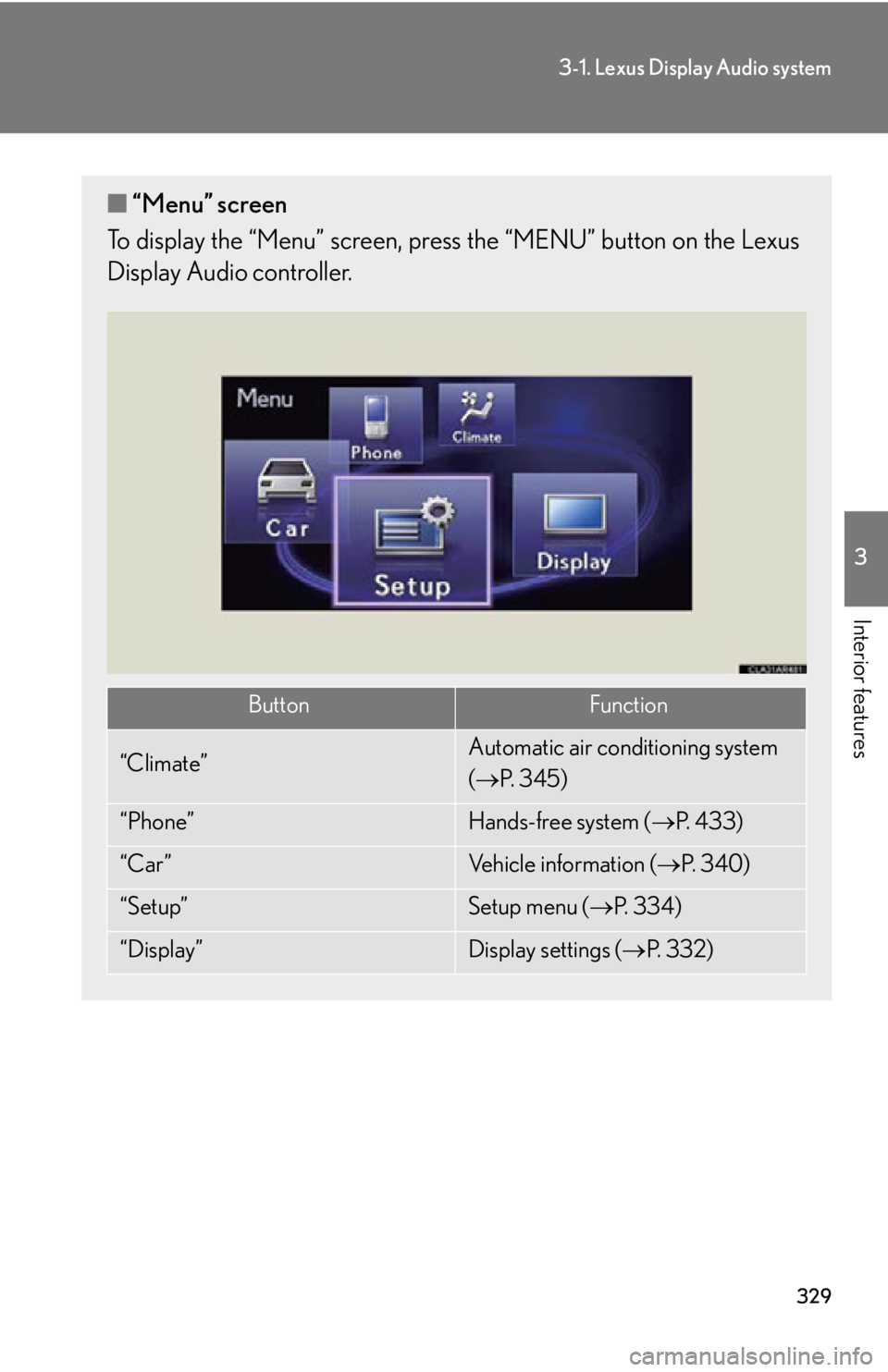
Interior features ■ “Menu” screen
To display the “Menu” screen, pres s the “MENU” button on the Lexus
Display Audio controller.
Button Function
“Climate” Automatic air conditioning system
( P. 3 4 5 )
“Phone” Hands-free system ( P. 4 3 3 )
“Car ” Vehicle information ( P. 3 4 0 )
“Setup” Setup menu ( P. 3 3 4 )
“Display” Display settings ( P. 3 3 2 )
Page 331 of 886
3313-1. Lexus Display Audio system
3
Interior features ■
When using the screen ●
Under extremely cold conditions, the Lexus Display Audio controller may react
slowly.●
If the screen is cold, the display may be dark, or the system may seem to be
operating slightly slower than normal.●
The screen may seem dark and hard to see when viewed through sunglasses.
Change your angle of viewing, adjust the display on the “Display Settings”
screen ( P. 332) or remove your sunglasses.
CAUTION■
Using the Lexus Display Audio controller ●
Do not allow fingers, fingernails or hair to become caught in the Lexus Display
Audio controller as this may cause an injury.●
Be careful when touching the Lexus Display Audio controller in extreme temper-
atures as it may become very hot or cold due to the temperature inside the vehi-
cle.
NOTICE■
To prevent the Lexus Display Audio controller malfunction ●
Do not allow the Lexus Display Audio controller to come into contact with food,
liquid, stickers or lit cigarettes as doing so may cause it to change color, emit a
strange odor or stop functioning.●
Do not subject the Lexus Display Audio controller to excessive pressure or
strong impact as the controller may bend or break off.●
Do not allow coins, contact lenses or other such items to become caught in the
Lexus Display Audio controller as this may cause it to stop functioning.
●
Items of clothing may rip if they become caught on the Lexus Display Audio con-
troller.
●
If your hand or any object is on the Lexus Display Audio controller when the
“ENGINE START STOP” switch is turned to ACCESSORY mode, the Lexus
Display Audio controller may not operate properly.
Page 344 of 886
3443-1. Lexus Display Audio system
■
Adjusting the volume
The volume of the Mobile Assist ant can be adjusted using the
“ PWR·VOL
” knob or
steering wheel volume switches. The Mobile Assistant and phone call volumes are
synchronized.■
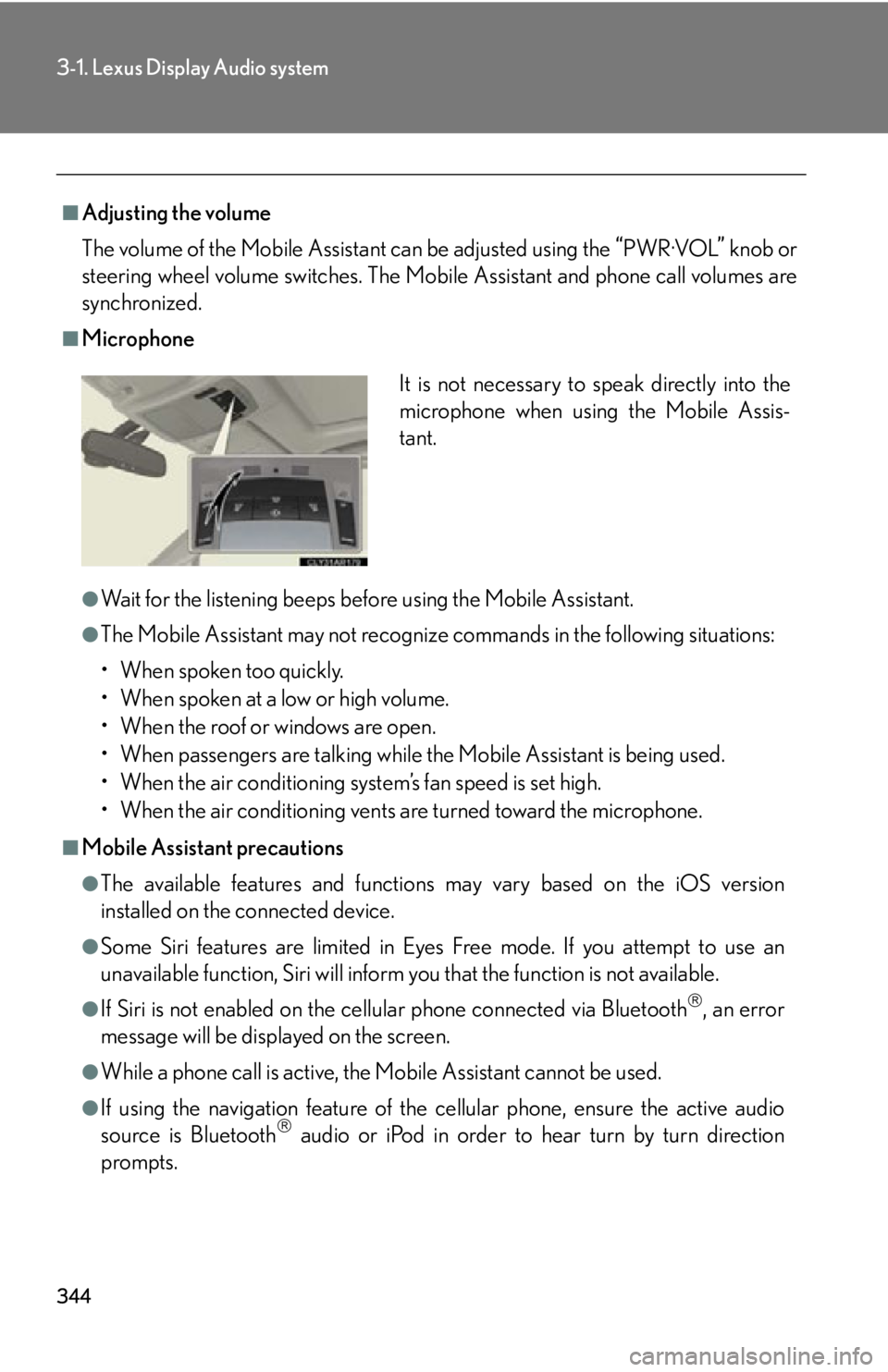
Microphone
●
Wait for the listening beeps befo re using the Mobile Assistant.●
The Mobile Assistant may not recognize commands in the following situations:
• When spoken too quickly.
• When spoken at a low or high volume.
• When the roof or windows are open.
• When passengers are talking while the Mobile Assistant is being used.
• When the air conditioning system’s fan speed is set high.
• When the air conditioning vents are turned toward the microphone.■
Mobile Assistant precautions ●
The available features and functions may vary based on the iOS version
installed on the connected device.●
Some Siri features are limited in Eyes Free mode. If you attempt to use an
unavailable function, Siri will inform you that the function is not available.●
If Siri is not enabled on the cell ular phone connected via Bluetooth
, an error
message will be displayed on the screen.
●
While a phone call is active, the Mo bile Assistant cannot be used.
●
If using the navigation feature of the cellular phone, ensure the active audio
source is Bluetooth
audio or iPod in order to hear turn by turn direction
prompts. It is not necessary to speak directly into the
microphone when using the Mobile Assis-
tant.