air condition LEXUS RX350 2015 Owner's Guide
[x] Cancel search | Manufacturer: LEXUS, Model Year: 2015, Model line: RX350, Model: LEXUS RX350 2015Pages: 886, PDF Size: 11 MB
Page 358 of 886
3583-2. Using the air conditio ning system and defogger
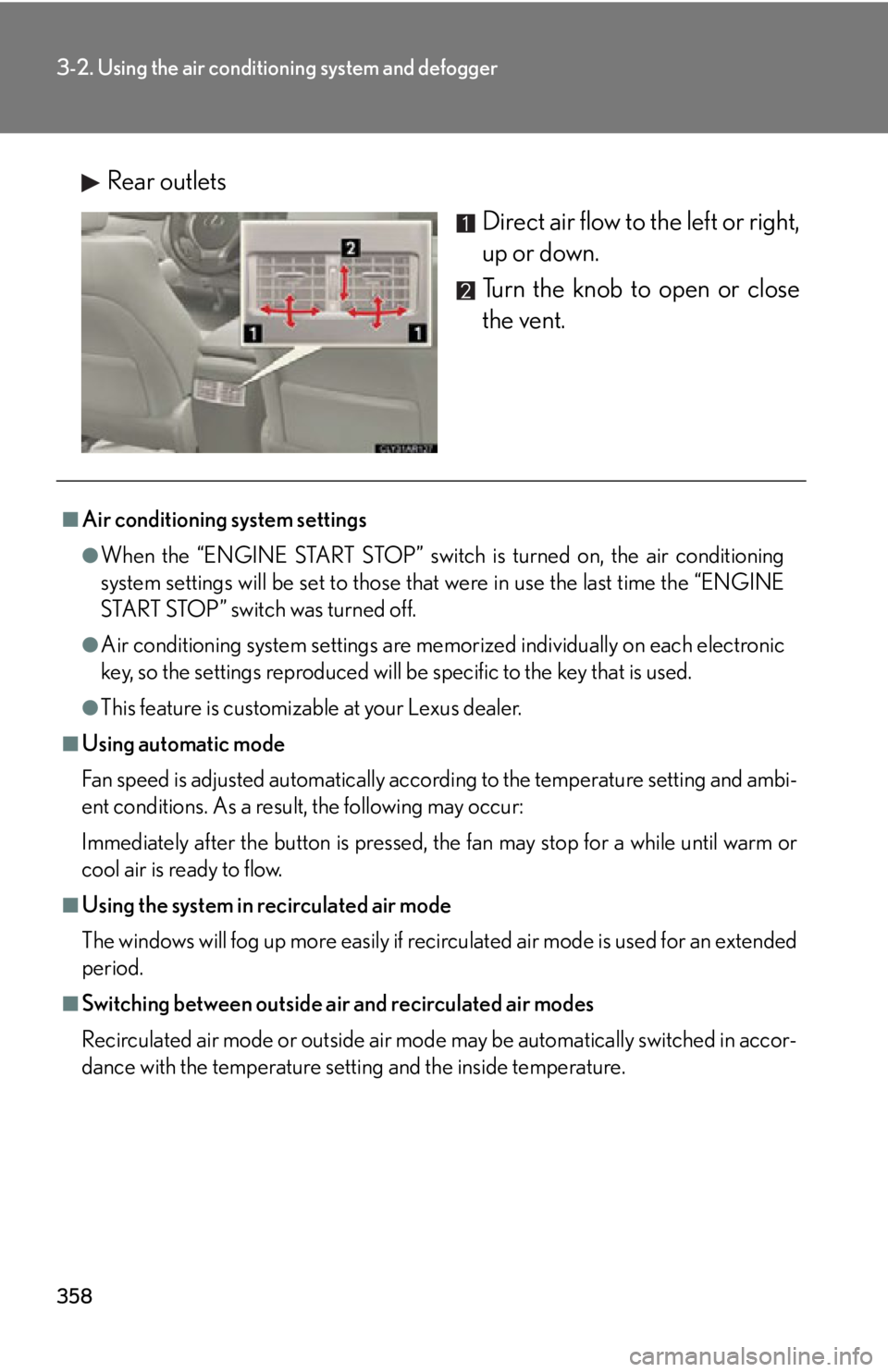
Rear outlets
Direct air flow to the left or right,
up or down.
Turn the knob to open or close
the vent.■
Air conditioning system settings ●
When the “ENGINE START STOP” switch is turned on, the air conditioning
system settings will be set to those that were in use the last time the “ENGINE
START STOP” switch was turned off.●
Air conditioning system settings are memorized individually on each electronic
key, so the settings repr oduced will be specific to the key that is used.●
This feature is customizable at your Lexus dealer.■
Using automatic mode
Fan speed is adjusted automatically accord ing to the temperature setting and ambi-
ent conditions. As a result, the following may occur:
Immediately after the button is pressed, the fan may stop for a while until warm or
cool air is ready to flow.■
Using the system in recirculated air mode
The windows will fog up more easily if recirculated air mode is used for an extended
period.■
Switching between outside air and recirculated air modes
Recirculated air mode or outside air mode may be automatically switched in accor-
dance with the temperature setting and the inside temperature.
Page 359 of 886
3593-2. Using the air conditio ning system and defogger
3
Interior features ■
When the outside temperature exceeds 75°F (24°C) and the air conditioning
system is on ●
In order to reduce the air conditioning power consumption, the air conditioning
system may switch to recirculated air mode automatically. This may also reduce
fuel consumption.●
Recirculated air mode is selected as a default mode when the “ENGINE START
STOP” switch is turned to IGNITION ON mode.●
It is possible to switch to outside air mode at any time by pressing .■
Window defogger feature
Recirculated air mode may automatically switch to outside air mode in situations
where the windows need to be defogged.■
When outside air temperature is below 32 F (0 C)
The cooling and dehumidification fu nction may not operate even when
is
pressed.■
When the indicator light on goes off
Press to turn on the cooling and dehumi dification function again. There may
be a problem in the air conditioning system if the indicator light goes off again
shortly after the button is pressed. Have it inspected by your Lexus dealer.■
Ventilation and air conditioning odors ●
To let fresh air in, set the air conditioning system to the outside air mode.●
During use, various odors from inside and outside the vehicle may enter into
and accumulate in the air conditioning sy stem. This may then cause odor to be
emitted from the vents.●
To reduce potential odors from occurring:
• It is recommended that the air conditioning system be set to outside air mode
prior to turning the vehicle off.
• The start timing of the blower may be delayed for a short period of time
immediately after the air conditioning system is started in automatic mode.
Page 360 of 886
3603-2. Using the air conditio ning system and defogger
CAUTION■
To prevent the windshield from fogging up
Do not use
during cool air operation in extremely humid weather. The differ-
ence between the temperature of the outside air and that of the windshield can
cause the outer surface of the windshield to fog up, blocking your vision.
NOTICE■
To prevent battery discharge
Do not leave the air conditioning system on longer than necessary when the engine
is off.
Page 362 of 886

3623-2. Using the air conditio ning system and defogger
■
Operating conditions
The “ENGINE START STOP” switch is in IGNITION ON mode.■
The outside rear vi ew mirror defoggers
Turning the rear window defogger on will turn the outside rear view mirror defog-
gers on.
CAUTION■
When the outside rear view mirror defoggers are on
Do not touch the outside surface of the rear view mirrors, as they can become very
hot and burn you.
Page 363 of 886
3633-2. Using the air conditio ning system and defogger
3
Interior features Windshield wiper de-icer
: If equippedThis feature is used to prevent ice fr om building up on the windshield and
wiper blades.
Vehicles with a navigation system
Owners of models equi pped with a navigation system should refer to
the “Navigation System Owner’s Manual”.
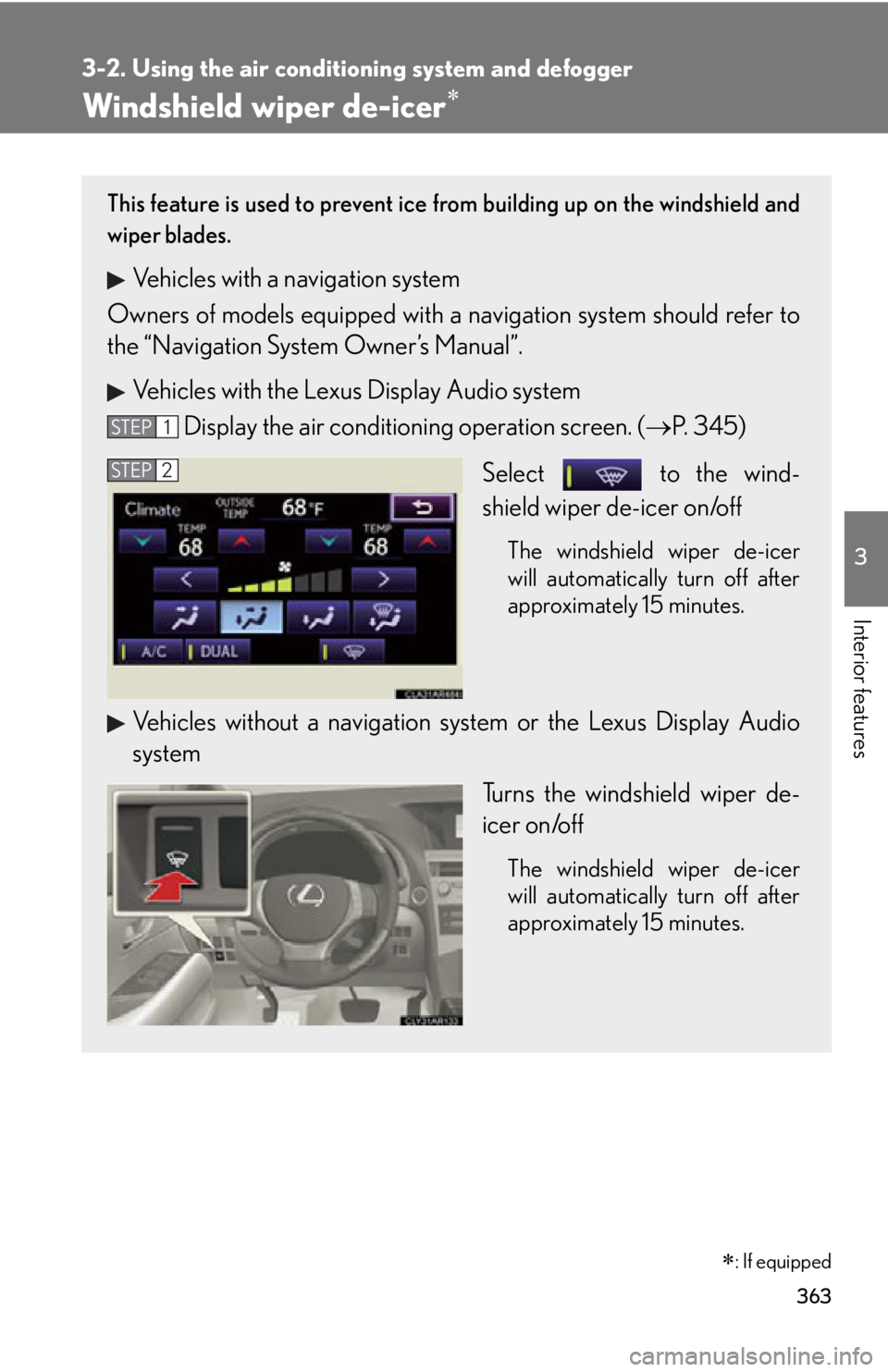
Vehicles with the Lexus Display Audio system
Display the air condition ing operation screen. ( P. 345)
Select to the wind-
shield wiper de-icer on/off The windshield wiper de-icer
will automatically turn off after
approximately 15 minutes.
Vehicles without a navigation sy stem or the Lexus Display Audio
system
Turns the windshield wiper de-
icer on/off The windshield wiper de-icer
will automatically turn off after
approximately 15 minutes.STEP 1
STEP 2
Page 364 of 886

3643-2. Using the air conditio ning system and defogger
■
Operating conditions
The “ENGINE START STOP” switch is in IGNITION ON mode.
CAUTION■
When the windshield wiper de-icer is on
Do not touch the lower part of the windshield or the side of the front pillars, as the
surfaces can become very hot and burn you.
Page 436 of 886

4363-3. Using the Lexus Display Audio system
■
When using the hands-free system ●
The audio system is muted when making a call.●
If both parties speak at the same time, it may be difficult to hear.●
If the received call volume is overly loud, an echo may be heard.
If the Bluetooth ®
phone is too close to the system, quality of the sound may
deteriorate and connecting condition may go down.●
In the following circumstances, it may be difficult to hear the other party:
• When driving on unpaved roads
• When driving at high speeds
• If a window is open
• If the air conditioning is blowing directly on the microphone
• There is an effect from the network of the mobile phone■
Conditions under which the system will not operate ●
If using a mobile phone that does not support Bluetooth ®
●
If the mobile phone is turned off●
If you are outside service range●
If the mobile phon e is not connected●
If the mobile phone’s battery is low●
When outgoing is controlled, due to heavy traffic on telephone lines, etc.●
When the mobile phone itself cannot be used●
When transferring the phonebook data from the mobile phone■
Bluetooth ®
antenna
The antenna is built into the display. If the mobile phone is behind the seat or in the
console box, or touching or covered by metal objects, connection status may dete-
riorate.
Page 539 of 886
5393-4. Using the audio system
3
Interior features ■
When using a voice command
For numbers, say a combination of si ngle digits from zero to nine.
Say the command correctly and clearly.■
Situations in which the system may not recognize your voice ●
When driving on rough roads●
When driving at high speeds●
When air is blowing out of the vents onto the microphone●
When the air conditioning fan emits a loud noise■
Operations that cannot be performed while driving●
Operating the system using ●
Registering a portable player to the system■
Changing the passkey
P. 5 4 9
Page 561 of 886
5613-4. Using the audio system
3
Interior features ■
Conditions under which the system will not operate ●
If using a mobile phone that does not support Bluetooth ®
●
If the mobile phone is switched off●
If you are outside service range●
If the mobile phon e is not connected●
If the mobile phon e's battery is low●
If the mobile phone is be hind the seat or in the glove box or console box●
If metal is covering or touching the phone■
When using the hands-free system ●
The audio system and voice guidance are muted when making a call.●
If both parties speak at the same time, it may be difficult to hear.●
If the incoming call volume is overly loud, an echo may be heard.●
Try to face toward the microphone as much as possible when speaking.●
In the following circumstances, it may be difficult to hear the other party:
• When driving on unpaved roads
• When driving at high speeds
• When a window is open
• When the air conditioning is blowing directly on the microphone
• When the air conditioning is set to high■
When transferring ownership of the vehicle
Be sure to initialize the system to prevent personal data from being improperly
accessed. ( P. 5 8 7 )■
About Bluetooth ®
Bluetooth is a registered trademark of
Bluetooth SIG. Inc.
Page 572 of 886
5723-4. Using the audio system
■
Automatic volume adjustment
When vehicle speed reaches 50 mph (80 km/h) or more, the volume automati-
cally increases. The volume returns to the previous volume setting when vehicle
speed drops to 43 mph (70 km/h) or less.■
When using a voice command
For numbers, say a combinatio n of single digits from zero to nine, # (pound),
(star), and + (plus).
Say the command correctly and clearly.■
Situations in which the system may not recognize your voice ●
When driving on rough roads●
When driving at high speeds●
When air is blowing out of the vents onto the microphone●
When the air conditioning fan emits a loud noise■
Operations that cannot be performed while driving
●
Operating the system using ●
Registering a mobile phone to the system■
Changing the passkey
P. 5 8 1