parking brake LEXUS RX350 2015 User Guide
[x] Cancel search | Manufacturer: LEXUS, Model Year: 2015, Model line: RX350, Model: LEXUS RX350 2015Pages: 886, PDF Size: 11 MB
Page 163 of 886

1632-1. Driving procedures
2
When driving CAUTION■
If the vehicle becomes stuck
Do not spin the wheels excessively when any of the tires is up in the air, or the vehi-
cle is stuck in sand, mud, etc. This may damage the driveline components or propel
the vehicle forward or backward, causing an accident.
NOTICE■
When driving the vehicle ●
Do not depress the accelerator and brake pe dals at the same time during driving,
as this may restrain driving torque.●
Do not use the accelerator pedal or depress the accelerator and brake pedals at
the same time to hold the vehicle on a hill.■
When parking the vehicle
Always shift the shift lever to P. Failure to do so may cause the vehicle to move or the
vehicle may accelerate suddenly if the accel erator pedal is accidentally depressed.■
Avoiding damage to vehicle parts ●
Do not turn the steering wheel fully in either direction and hold it there for an
extended period of time.
Doing so may damage the power steering motor.●
When driving over bumps in the road, drive as slowly as possible to avoid damag-
ing the wheels, underside of the vehicle, etc. ■
If you get a flat tire while driving
A flat or damaged tire may cause the following situations. Hold the steering wheel
firmly and gradually depress the brak e pedal to slow down the vehicle.●
It may be difficult to control your vehicle.
●
The vehicle will make abnormal sounds.
●
The vehicle will behave abnormally.
Information on what to do in case of a flat tire ( P. 7 74 )
Page 165 of 886
1652-1. Driving procedures
2
When driving Engine (ignition) switch Performing the following operations when carrying the electronic key on
your person starts the engine or changes “ENGINE START STOP” switch
modes.
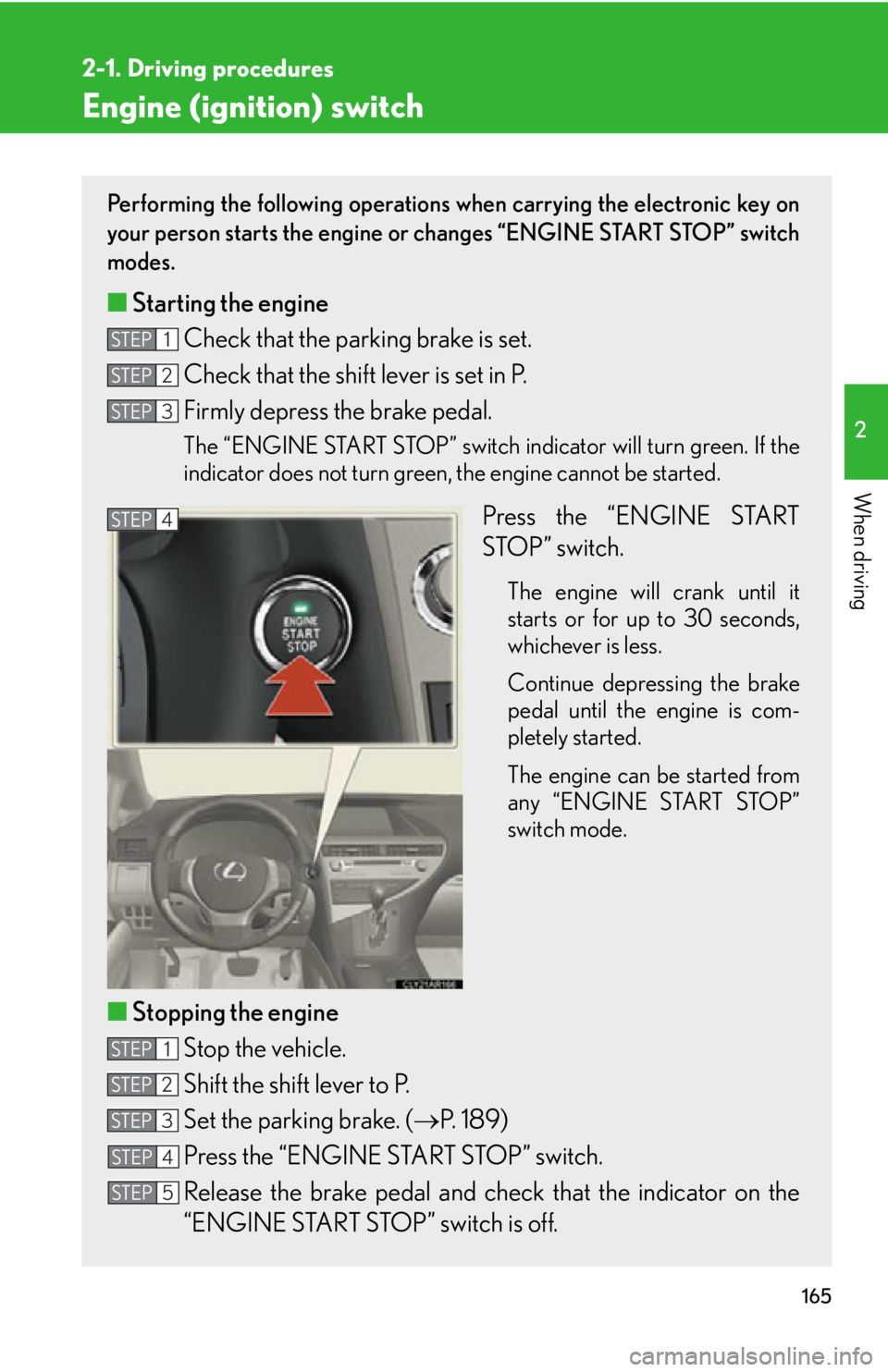
■ Starting the engine
Check that the parking brake is set.
Check that the shift lever is set in P.
Firmly depress the brake pedal. The “ENGINE START STOP” switch indicator will turn green. If the
indicator does not turn green, the engine cannot be started.
Press the “ENGINE START
STOP” switch. The engine will crank until it
starts or for up to 30 seconds,
whichever is less.
Continue depressing the brake
pedal until the engine is com-
pletely started.
The engine can be started from
any “ENGINE START STOP”
switch mode.
■ Stopping the engine
Stop the vehicle.
Shift the shift lever to P.
Set the parking brake. ( P. 1 8 9 )
Press the “ENGINE START STOP” switch.
Release the brake pedal and chec k that the indicator on the
“ENGINE START STOP” switch is off.STEP 1
STEP 2
STEP 3
STEP 4
STEP 1
STEP 2
STEP 3
STEP 4
STEP 5
Page 167 of 886

1672-1. Driving procedures
2
When driving When stopping the engine with the shift lever in a position other than P
If the engine is stopped with the shift lever in a position other than P, the
“ENGINE START STOP” switch will not be turned off but instead be
turned to ACCESSORY mode. Perfor m the following procedure to turn
the switch off:
Check that the parking brake is set.
Shift the shift lever to P.
Check that the indicator on the “ENGINE START STOP” switch
is illuminated in amber and th en press the “ENGINE START
STOP” switch once.
Check that the indicator on the “ENGINE START STOP” switch
is off.■
Auto power off function
When the shift lever is in P, if the vehicle is left in ACCESSORY or IGNITION ON
mode with the engine not running for more than 20 minutes (ACCESSORY mode)
or one hour (IGNITION ON mode), the “ENGINE START STOP” switch will auto-
matically turn off. However, this function cannot entirely prevent battery discharge.
Do not leave the vehicle with the “ENGINE START STOP” switch in ACCESSORY
or IGNITION ON mode for lo ng periods of time when the engine is not running.■
Operation of the “ENGINE START STOP” switch
When operating the “ENGINE START STOP” switch, one short, firm press is
enough. If the switch is pressed improperly, the engine may not start or the
“ENGINE START STOP” switch mode may not change. It is not necessary to press
and hold the switch.■
Electronic key battery depletion
P. 4 5
■
Conditions affecting operation
P. 4 2
■
Note for the entry function
P. 4 3STEP 1
STEP 2
STEP 3
STEP 4
Page 178 of 886
1782-1. Driving procedures
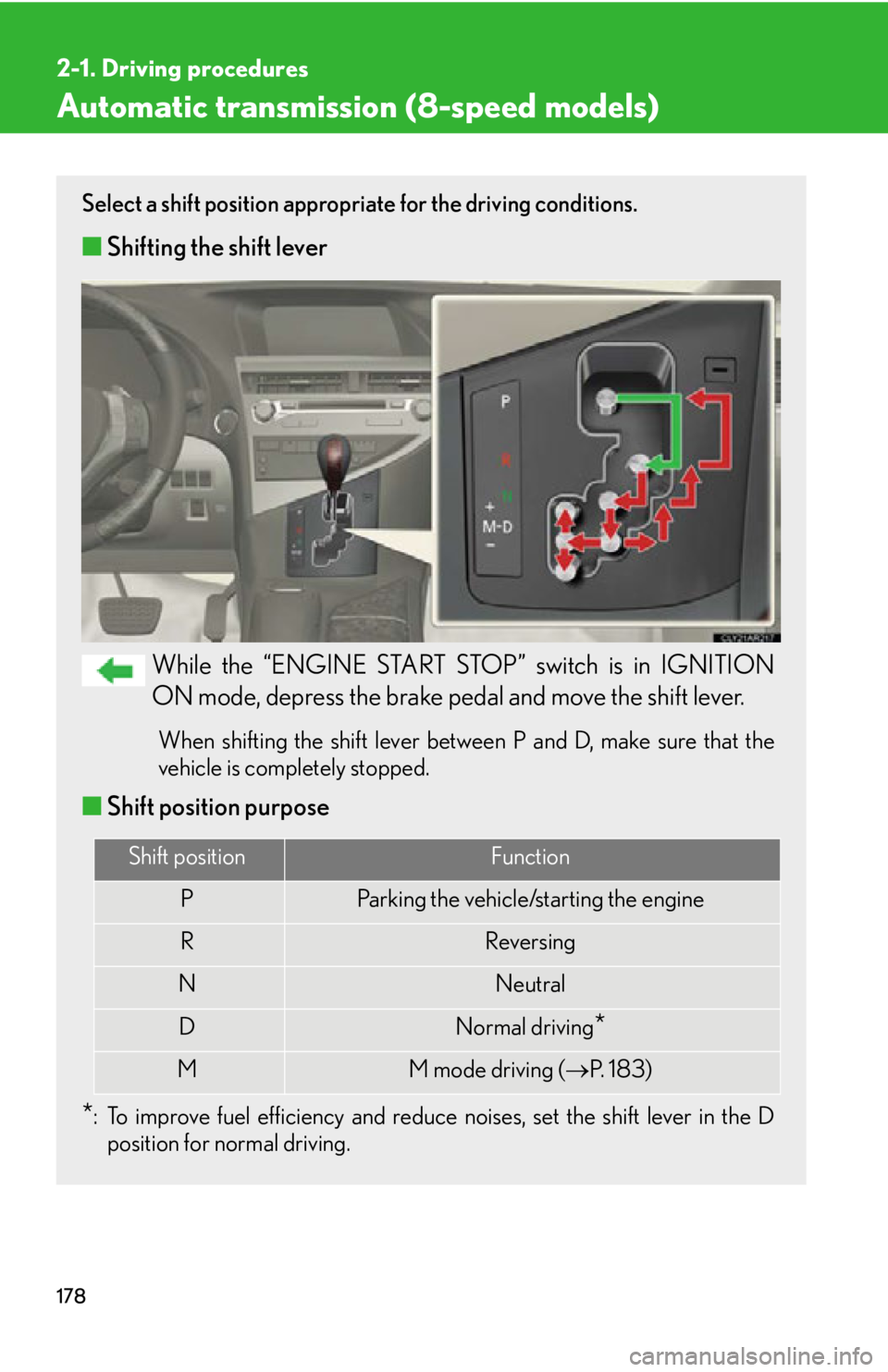
Automatic transmission (8-speed models) Select a shift position appropriate for the driving conditions.
■ Shifting the shift lever
While the “ENGINE START STOP” switch is in IGNITION
ON mode, depress the brake pedal and move the shift lever. When shifting the shift lever between P and D, make sure that the
vehicle is completely stopped.
■ Shift position purpose
* : To improve fuel efficiency and reduce noises, set the shift lever in the D
position for normal driving. Shift position Function
P Parking the vehicle/starting the engine
R Reversing
N Neutral
D Normal driving
*M M mode driving ( P. 1 8 3 )
Page 189 of 886
1892-1. Driving procedures
2
When driving Parking brake ■
Usage in winter time
P. 3 0 2
NOTICE■
Before driving
Fully release the parking brake.
Driving the vehicle with the parking brake set will lead to brake components over-
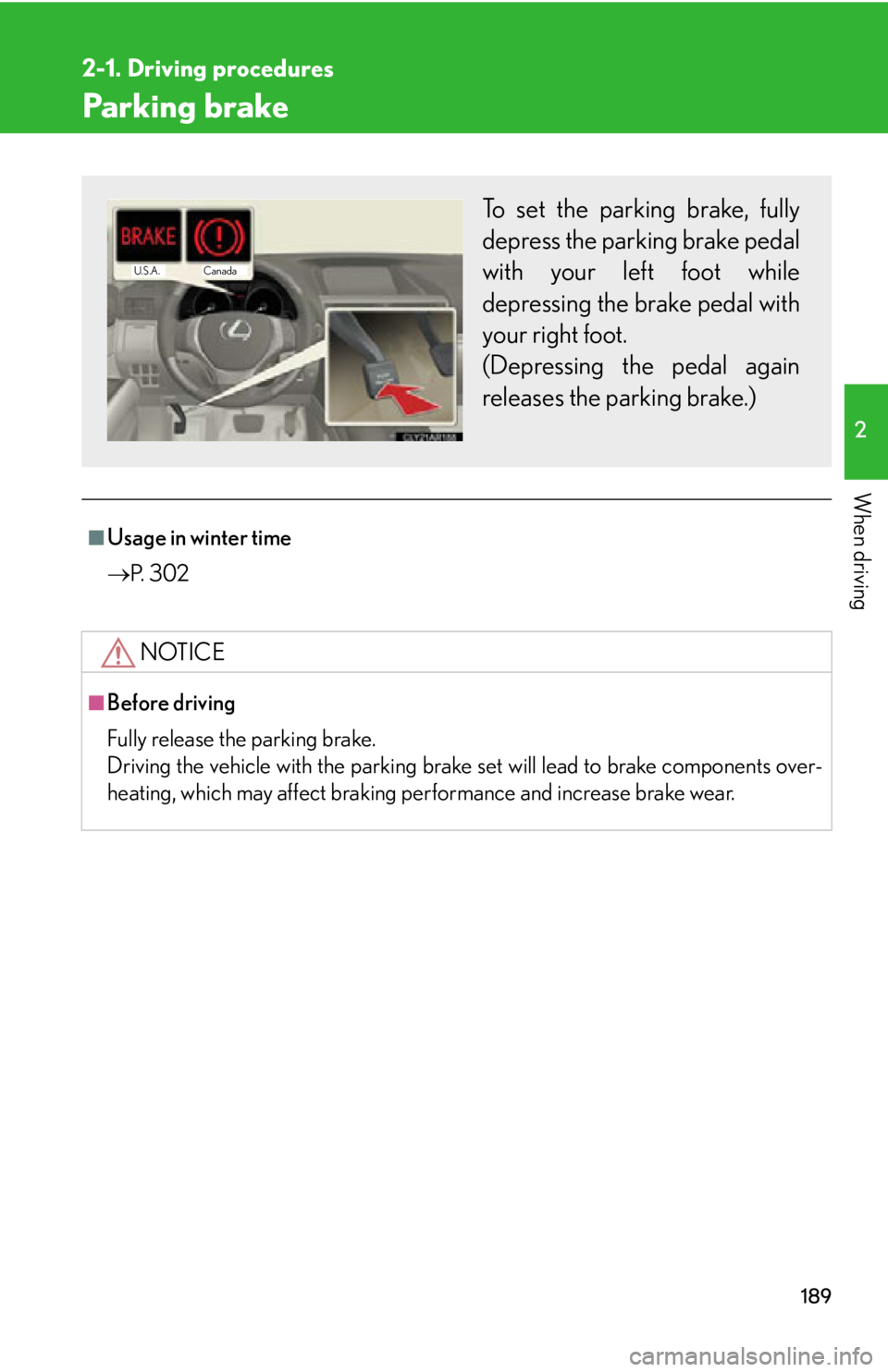
heating, which may affect braking performance and increase brake wear. To set the parking brake, fully
depress the parking brake pedal
with your left foot while
depressing the brake pedal with
your right foot.
(Depressing the pedal again
releases the parking brake.) Canada
U.S.A.
Page 213 of 886

2132-3. Operating the light s and windshield wipers
2
When driving Turning on the high beam headlights
With the headlights on, push the
lever away from you to turn on
the high beams. Pull the lever toward you to the
center position to turn the high
beams off.
Pull the lever toward you to turn
on the high beams. Release the lever to turn them off.
You can flash the high beams with
the headlights on or off.■
Daytime running light system ●
To make your vehicle more visible to other drivers, the daytime running lights
turn on automatically whenever the engine is started and the parking brake is
released. Daytime running lights ar e not designed for use at night.
Type A: Daytime running lights can be turned off by operating the switch.●
Compared to turning on th e headlights, the daytime running light system offers
greater durability and consumes less electricity, so it can help improve fuel
economy.■
Headlight control sensor
The sensor may not function properly if an
object is placed on the sensor, or anything
that blocks the sensor is affixed to the wind-
shield.
Doing so interferes with the sensor detecting
the level of ambient light and may cause the
automatic headlight system to malfunction.
Page 253 of 886

2532-4. Using other driving systems
2
When driving ■
Sensor detection information ●
Certain vehicle conditions and the su rrounding environment may affect the
ability of a sensor to correctly detect an obstacle. Particular instances where this
may occur are listed below.
• There is dirt, snow or ice on a sensor.
• A sensor is frozen.
• A sensor is covered in any way.
• The vehicle is leaning considerably to one side.
• On an extremely bumpy road, on an incline, on gravel, or on grass
• The vicinity of the vehicle is noisy due to vehicle horns, motorcycle engines,
air brakes of large vehicles, or other loud noises producing ultrasonic waves.
• There is another vehicle equipped with parking assist sensor s in the vicinity.
• A sensor is coated with a sheet of spray or heavy rain.
• The vehicle is equipped with a fender pole or radio antenna.
• Towing eyelets are installed.
• A bumper or sensor receives a strong impact.
• The vehicle is approaching a tall or right-angled curb.
• In harsh sunlight or intense cold weather.
• A non-genuine Lexus suspension (low ered suspension, etc.) is installed.
In addition to the examples above, there are instances in which, because of their
shapes, signs and other objects may be judg ed by a sensor to be closer than they
are. ●
The shape of the obstacle may prevent a sensor from detecting it. Pay particular
attention to the following obstacles:
• Wires, fences, ropes, etc.
• Cotton, snow and other materi als that absorb sound waves
• Sharply-angled objects
•Low obstacles
• Tall obstacles with upper sections projec ting outwards in the direction of your
vehicle
■
If a message is displayed
P. 7 5 4
Page 276 of 886
2762-4. Using other driving systems
Hill-start assist control
■
Hill-start assist control can be operated when ●
The shift lever is in a position other than P.●
The parking brake is not applied.●
The accelerator peda l is not depressed.■
Hill-start assist control ●
While hill-start assist control is operating, the brakes remain automatically
applied after the driver releases the br ake pedal. The stop lights and the high
mounted stoplight turn on.●
Hill-start assist control operates for about 2 seconds after the brake pedal is
released.●
If the slip indicator does not flash and the buzzer does not sound when the brake
pedal is further depressed, slightly redu ce the pressure on the brake pedal (do
not allow the vehicle to roll backward) and then firmly depress it again. If the sys-
tem still does not operate, check if th e operating conditions explained above
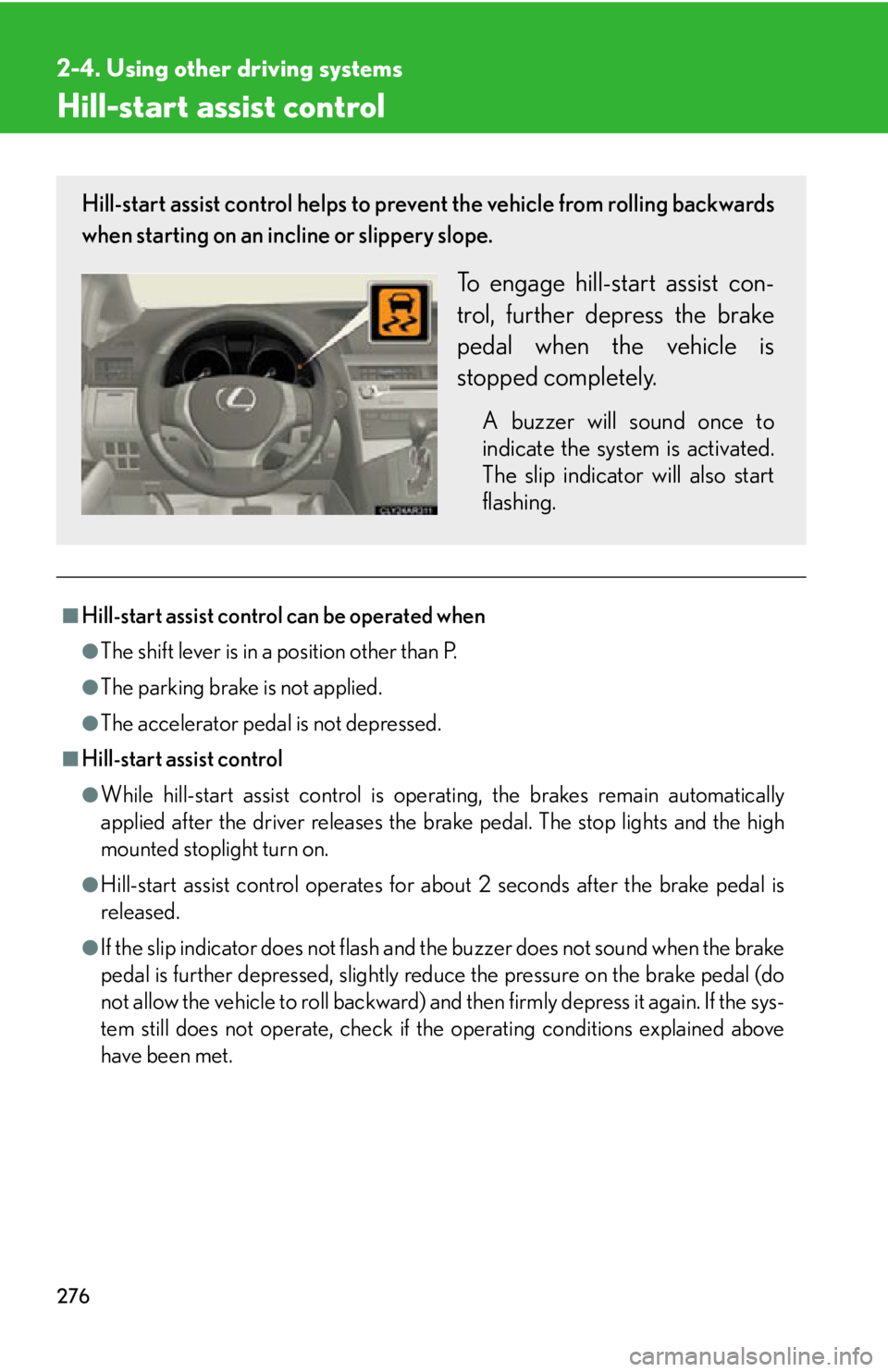
have been met.Hill-start assist control helps to prevent the vehicle from rolling backwards
when starting on an incline or slippery slope.
To engage hill-start assist con-
trol, further depress the brake
pedal when the vehicle is
stopped completely. A buzzer will sound once to
indicate the system is activated.
The slip indicator will also start
flashing.
Page 277 of 886
2772-4. Using other driving systems
2
When driving ■
Hill-start assist control buzzer ●
When hill-start assist control is act ivated, the buzzer will sound once.●
In the following situations, hill-start assist control will be canceled and the
buzzer will sound twice.
• No attempt is made to drive the vehi cle within approximately 2 seconds of
releasing the brake pedal.
• The shift lever is moved to P.
• The parking brake is applied.
• The brake pedal is depressed again.
• The brake pedal has been depressed for more than approximately 3 minutes.●
If a buzzer other than the hill-start assist control buzzer is sounding, the hill-start
assist control buzzer may not sound when the system is activated or canceled.■
If the slip indicator comes on
It may indicate a malfunction in th e system. Contact your Lexus dealer.
CAUTION■
Hill-start assist control ●
Do not overly rely on hill-start assist cont rol. Hill-start assist control may not oper-
ate effectively on extremely steep inclines or roads covered in ice.●
Unlike the parking brake, hill-start assist control is not intended to hold the vehi-
cle stationary for an extended period of time. Do not attempt to use hill-start
assist control to hold the vehicle on an incline for an extended period of time, as
doing so may lead to an accident.
Page 303 of 886
3032-5. Driving information
2
When driving
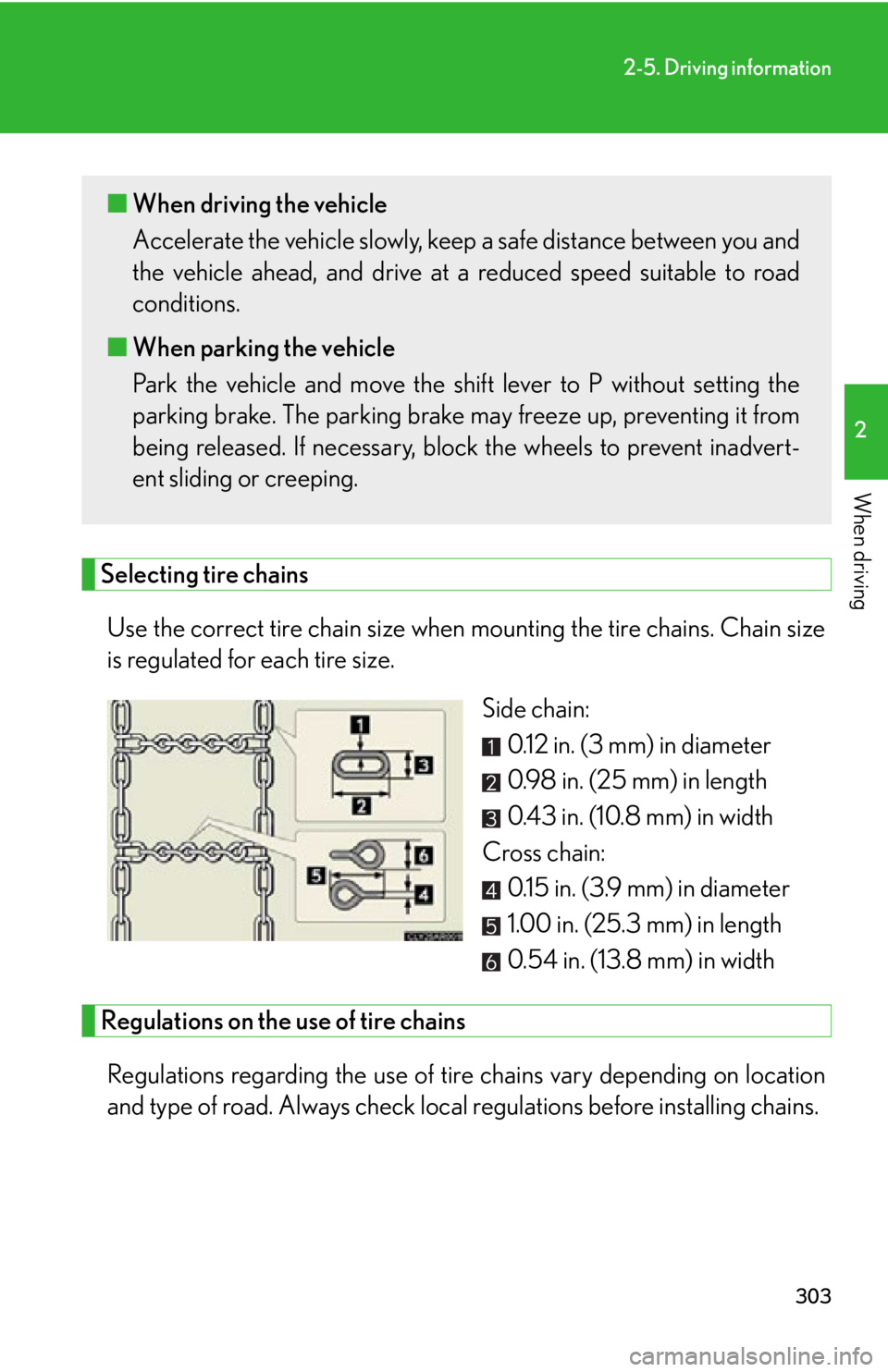
Selecting tire chains
Use the correct tire chain size when mounting the tire chains. Chain size
is regulated for each tire size.
Side chain:
0.12 in. (3 mm) in diameter
0.98 in. (25 mm) in length
0.43 in. (10.8 mm) in width
Cross chain:
0.15 in. (3.9 mm) in diameter
1.00 in. (25.3 mm) in length
0.54 in. (13.8 mm) in width
Regulations on the use of tire chains
Regulations regarding the use of tire chains vary depending on location
and type of road. Always check local regulations before installing chains. ■ When driving the vehicle
Accelerate the vehicle slowly, keep a safe distance between you and
the vehicle ahead, and drive at a reduced speed suitable to road
conditions.
■ When parking the vehicle
Park the vehicle and move the shif t lever to P without setting the
parking brake. The parking brake may freeze up, preventing it from
being released. If necessary, bl ock the wheels to prevent inadvert-
ent sliding or creeping.