tow LEXUS RX350 2015 User Guide
[x] Cancel search | Manufacturer: LEXUS, Model Year: 2015, Model line: RX350, Model: LEXUS RX350 2015Pages: 886, PDF Size: 11 MB
Page 129 of 886
1291-7. Safety information
1
Before driving CAUTION■
SRS airbag precautions ●
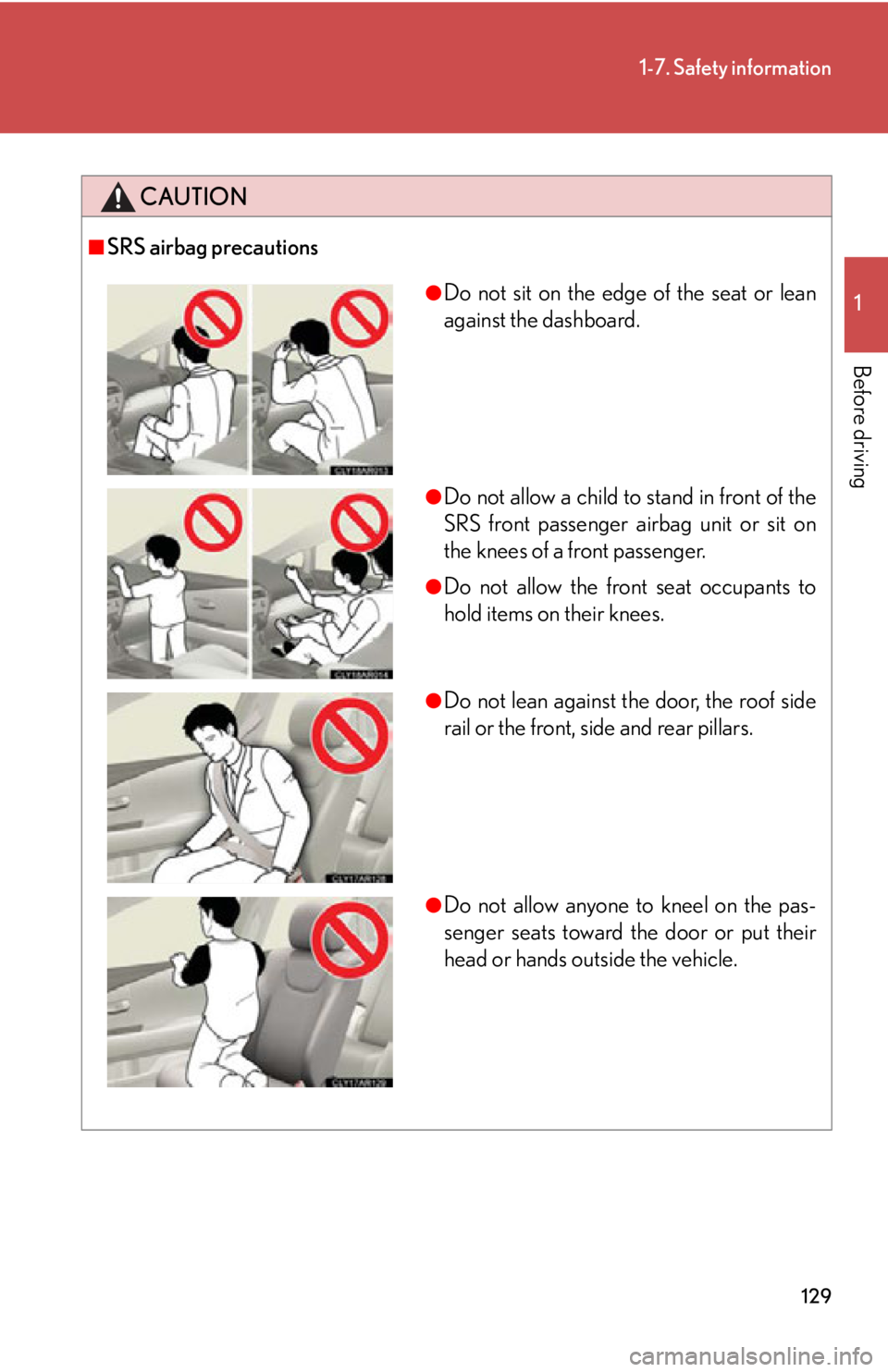
Do not sit on the edge of the seat or lean
against the dashboard.
●
Do not allow a child to stand in front of the
SRS front passenger ai rbag unit or sit on
the knees of a front passenger. ●
Do not allow the front seat occupants to
hold items on their knees.
●
Do not lean against the door, the roof side
rail or the front, side and rear pillars.
●
Do not allow anyone to kneel on the pas-
senger seats toward the door or put their
head or hands outside the vehicle.
Page 153 of 886
When driving
2
1532-1. Driving procedures
Driving the vehicle.................. 154
Engine (ignition) switch ......... 165
Automatic transmission
(6-speed models) .................. 171
Automatic transmission
(8-speed models) ................. 178
Turn signal lever ....................... 187
Parking brake ........................... 189
Horn ............................................ 190
2-2. Instrument cluster
Gauges and meters ................. 191
Indicators and warning
lights ......................................... 194
Multi-information
display .................................... 200
Head-up display ..................... 206
2-3. Operating the lights and
windshield wipers
Headlight switch....................... 211
Fog light switch ........................ 215
Windshield wipers and
washer ..................................... 217
Rear window wiper and
washer .................................... 224
Headlight cleaner switch..... 226 2-4. Using other driving
systems
Cruise control......................... 227
Dynamic radar cruise
control .................................... 232
Intuitive parking assist .......... 245
Rear view monitor system
(rear view mirror-attached
type) ........................................ 255
Rear view monitor system
(vehicles with the Lexus
Display Audio system) ....... 264
Driving assist systems ........... 269
All-wheel drive lock
switch ....................................... 275
Hill-start assist control .......... 276
Pre-Collision System ............ 278
BSM
(Blind Spot Monitor) .......... 286
2-5. Driving information
Utility vehicle
precautions ........................... 292
Cargo and luggage ............... 296
Vehicle load limits ................... 301
Winter driving tips ................. 302
Trailer towing .......................... 306
Dinghy towing ......................... 323
Page 155 of 886

1552-1. Driving procedures
2
When driving ■
When starting off on an uphill
The hill-start assist control is available. ( P. 2 76 )■
Driving in the rain ●
Drive carefully when it is raining, becaus e visibility will be reduced, the windows
may become fogged-up, and the road will be slippery.●
Drive carefully when it starts to rain, be cause the road surface will be especially
slippery.●
Refrain from high speeds when driving on an expressway in the rain, because
there may be a layer of water between th e tires and the road surface, preventing
the steering and brakes from operating properly.■
Engine speed while driving
In the following conditions, the engine speed may become high while driving. This is
due to automatic up-shifting control or down-shifting implementation to meet driv-
ing conditions. It does not indicate sudden acceleration.●
The vehicle is judged to be driving uphill or downhill●
When the accelerator pedal is released■
Breaking in your new Lexus
To extend the life of the vehicle, observing the following precautions is recom-
mended: ●
For the first 200 miles (300 km):
Avoid sudden stops.●
For the first 500 miles (800 km):
Do not tow a trailer.●
For the first 1000 miles (1600 km):
• Do not drive at extremely high speeds.
• Avoid sudden acceleration.
• Do not drive continuously in low gears.
• Do not drive at a constant speed for extended periods.
Page 176 of 886

1762-1. Driving procedures
■
When the “-” paddle shift switch is operated in the D position (vehicles with pad-
dle shift switches)
When the “-” paddle shift switch is operat ed in the D position, a shift range will be
automatically selected. The highest gear of the first shift range will be one gear
lower than the gear in use during normal D position driving.■
Automatic deactivation of shift range selection in the D position (vehicles with
paddle shift switches)
Shift range selection in the D position will be deactivated in the following situations: ●
When the vehicle comes to a stop●
When range 6 is selected and the accelerator pedal is depressed●
If the accelerator pedal is depressed for more than a certain period of time■
Snow mode automatic deactivation
Snow mode is automatically deactivated if the “ENGINE START STOP” switch is
turned off after driving in snow mode. ■
S mode ●
When the shift range is “5” or lower, holding the shift lever toward “+” sets the
shift range to “6”.●
To prevent the engine from over-revving, upshifting may automatically occur.●
To protect the automatic transmission, a function is adopted that automatically
selects a higher shift range when the fluid temperature is high.■
AI-SHIFT
AI-SHIFT automatically selects the suitable gear according to driver performance
and driving conditions.
The AI-SHIFT automatically operates when th e shift lever is in the D position. (Shift-
ing the shift lever to the S position cancels the function.)
Page 213 of 886

2132-3. Operating the light s and windshield wipers
2
When driving Turning on the high beam headlights
With the headlights on, push the
lever away from you to turn on
the high beams. Pull the lever toward you to the
center position to turn the high
beams off.
Pull the lever toward you to turn
on the high beams. Release the lever to turn them off.
You can flash the high beams with
the headlights on or off.■
Daytime running light system ●
To make your vehicle more visible to other drivers, the daytime running lights
turn on automatically whenever the engine is started and the parking brake is
released. Daytime running lights ar e not designed for use at night.
Type A: Daytime running lights can be turned off by operating the switch.●
Compared to turning on th e headlights, the daytime running light system offers
greater durability and consumes less electricity, so it can help improve fuel
economy.■
Headlight control sensor
The sensor may not function properly if an
object is placed on the sensor, or anything
that blocks the sensor is affixed to the wind-
shield.
Doing so interferes with the sensor detecting
the level of ambient light and may cause the
automatic headlight system to malfunction.
Page 222 of 886

2222-3. Operating the lights and windshield wipers
■
Raindrop sensor (vehicles with rain-sensing windshield wipers)
●
If the wiper switch is turned to the position while the “ENGINE START
STOP” switch is in IGNITION ON mode, the wipers will operate once to show
that AUTO mode is activated.●
When the sensor sensitivity ring is turn ed toward high while in AUTO mode, the
wipers will operate once to indicate that the sensor sensitivity is enhanced.●
If the temperature of the raindrop sensor is 194 F (90 C) or higher, or 5 F
(-15 C) or lower, automatic operation may not occur.
In this case, operate the wipers in any mode other than AUTO.■
If no windshield washer fluid sprays
Check that the washer nozzles are not blocked if there is washer fluid in the wind-
shield washer fluid reservoir.
CAUTION■
Caution regarding the use of windshield wipers in AUTO mode (vehicles with
rain-sensing windshield wipers)
The windshield wipers may operate unexpect edly if the sensor is touched or the
windshield is subject to vibration in AUTO mode. Take care that your fingers or any-
thing else do not become caugh t in the windshield wipers.
■
Caution regarding the use of washer fluid
When it is cold, do not use the washer fluid until the windshield becomes warm. The
fluid may freeze on the windshield and cause low visibility. This may lead to an acci-
dent, resulting in death or serious injury. ●
The raindrop sensor judges the amount
of raindrops.
An optical sensor is adopted. It may not
operate properly when sunlight from the
rising or setting of the sun intermittently
strikes the windshield, or if bugs etc. are
present on the windshield.
Page 223 of 886

2232-3. Operating the light s and windshield wipers
2
When driving NOTICE■
When the windshield is dry
Do not use the wipers, as they may damage the windshield.■
When the washer fluid tank is empty
Damage to the washer fluid pump may be caused if the lever is pulled toward you
and held continually. ■
When a nozzle becomes blocked
In this case, contact your Lexus dealer.
Do not try to clear it with a pin or other object. The nozzle will be damaged.
Page 229 of 886
2292-4. Using other driving systems
2
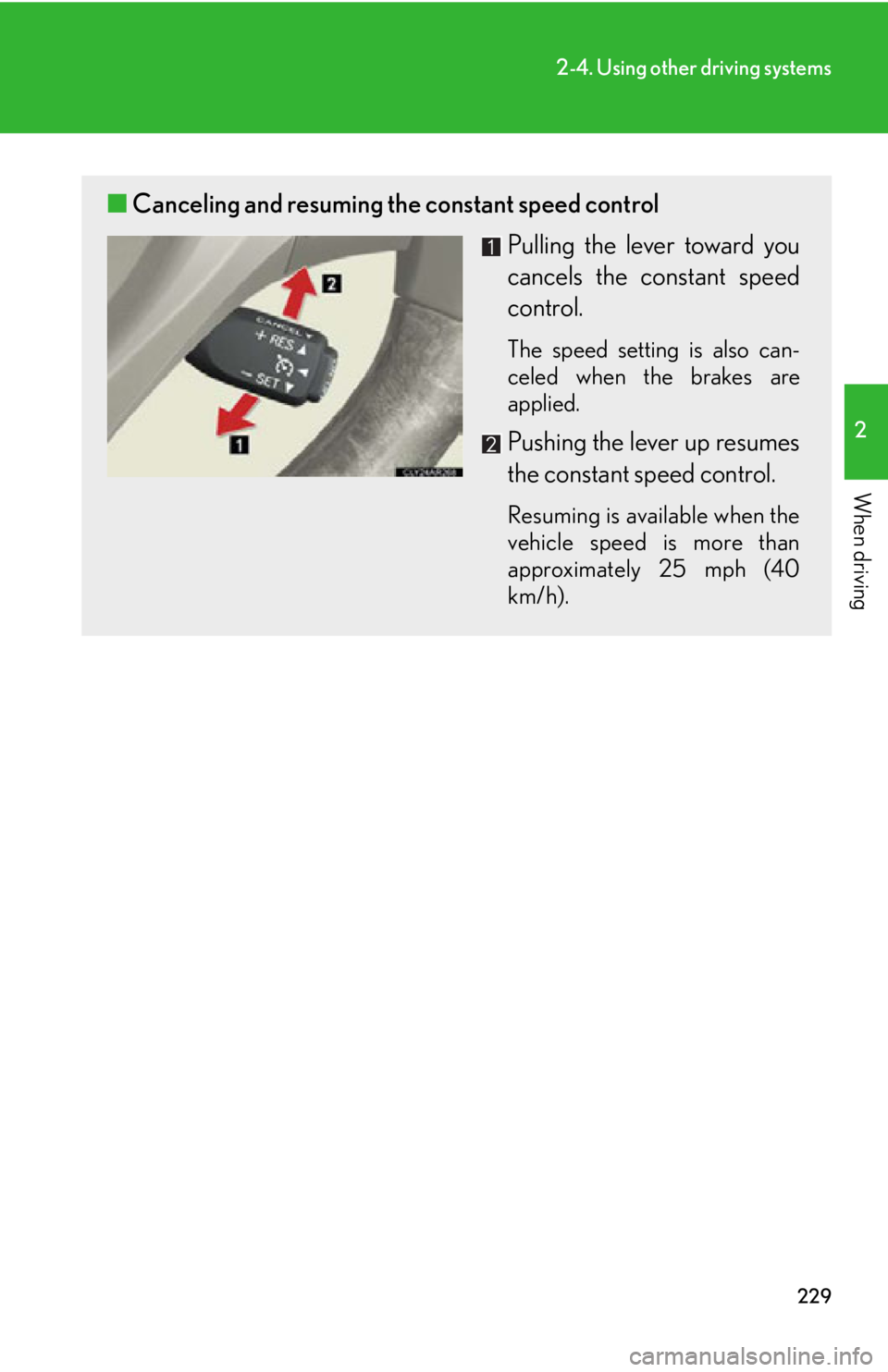
When driving ■ Canceling and resuming the constant speed control
Pulling the lever toward you
cancels the constant speed
control. The speed setting is also can-
celed when the brakes are
applied.
Pushing the lever up resumes
the constant speed control. Resuming is available when the
vehicle speed is more than
approximately 25 mph (40
km/h).
Page 231 of 886

2312-4. Using other driving systems
2
When driving CAUTION■
To avoid operating the cruise control by mistake
Switch the cruise control off using the “ON-OFF” button when not in use.■
Situations unsuitable for cruise control
Do not use cruise control in any of the following situations.
Doing so may result in loss of control and could cause an accident resulting in death
or serious injury. ●
In heavy traffic●
On roads with sharp bends●
On winding roads●
On slippery roads, such as thos e covered with rain, ice or snow●
On steep hills
Vehicle speed may exceed the set speed when driving down a steep hill.●
When your vehicle is towing a trailer or during emergency towing
Page 235 of 886
2352-4. Using other driving systems
2
When driving ■ Vehicle-to-vehicle distance settings
Select a distance from the tabl e below. Note that the distances
shown correspond to a vehicle sp eed of 50 mph (80 km/h). Vehi-
cle-to-vehicle distance increases/decreases in accordance with
vehicle speed.
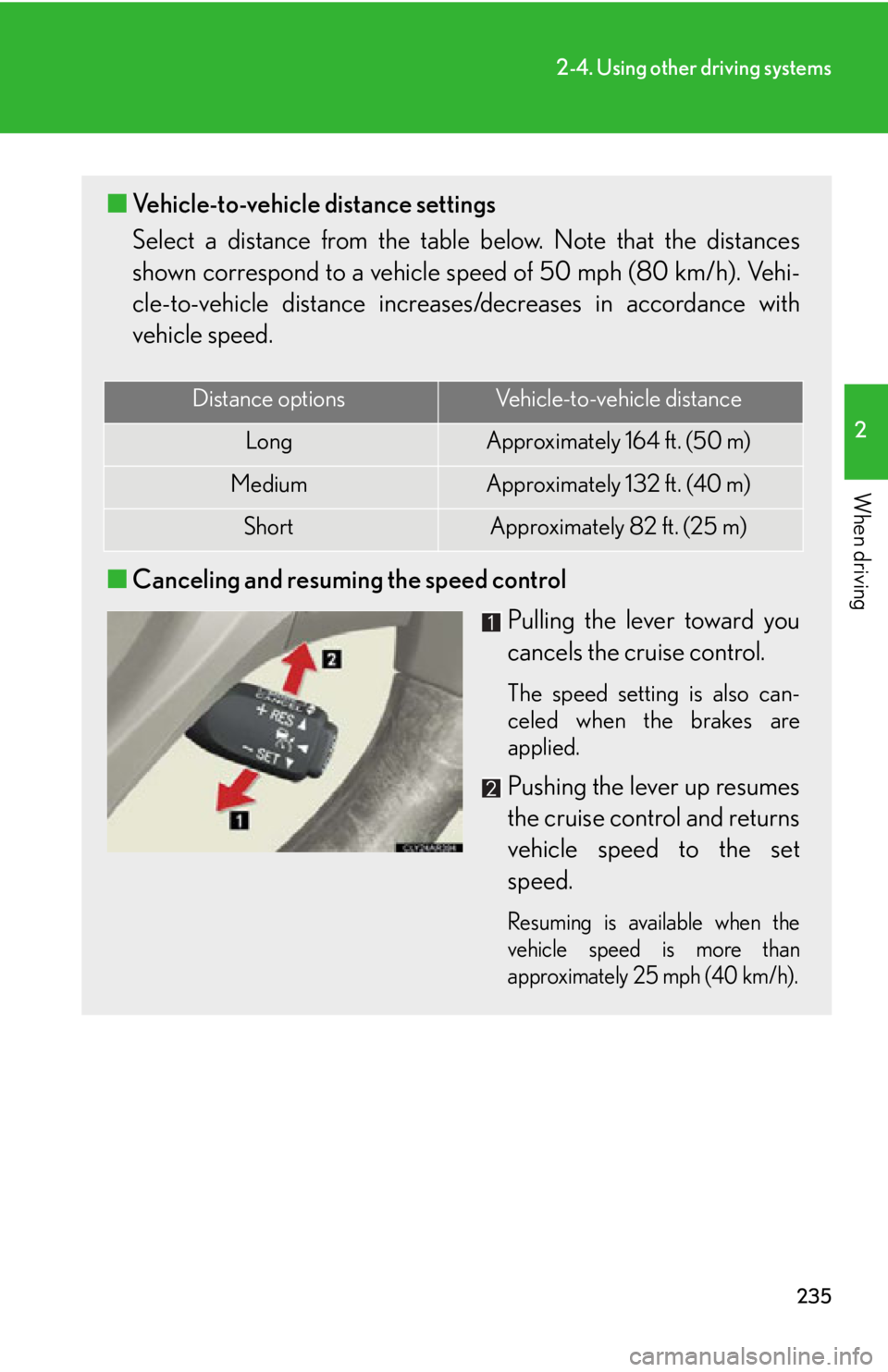
■ Canceling and resuming the speed control
Pulling the lever toward you
cancels the cruise control. The speed setting is also can-
celed when the brakes are
applied.
Pushing the lever up resumes
the cruise control and returns
vehicle speed to the set
speed. Resuming is available when the
vehicle speed is more than
approximately 25 mph (40 km/h).Distance options Vehicle-to-vehicle distance
Long Approximately 164 f t. (50 m)
Medium Approximately 132 ft. (40 m)
Short Approximately 82 ft. (25 m)