ECO mode LEXUS RX350 2015 Owner's Manual
[x] Cancel search | Manufacturer: LEXUS, Model Year: 2015, Model line: RX350, Model: LEXUS RX350 2015Pages: 886, PDF Size: 11 MB
Page 238 of 886
2382-4. Using other driving systems
Selecting conventional constant speed control mode
Constant speed control mode differs from vehicle-to-vehicle distance
control mode. When constant speed control mode is selected, your vehi-
cle will maintain a set speed regardless of whether or not there are other
vehicles in the lane ahead.
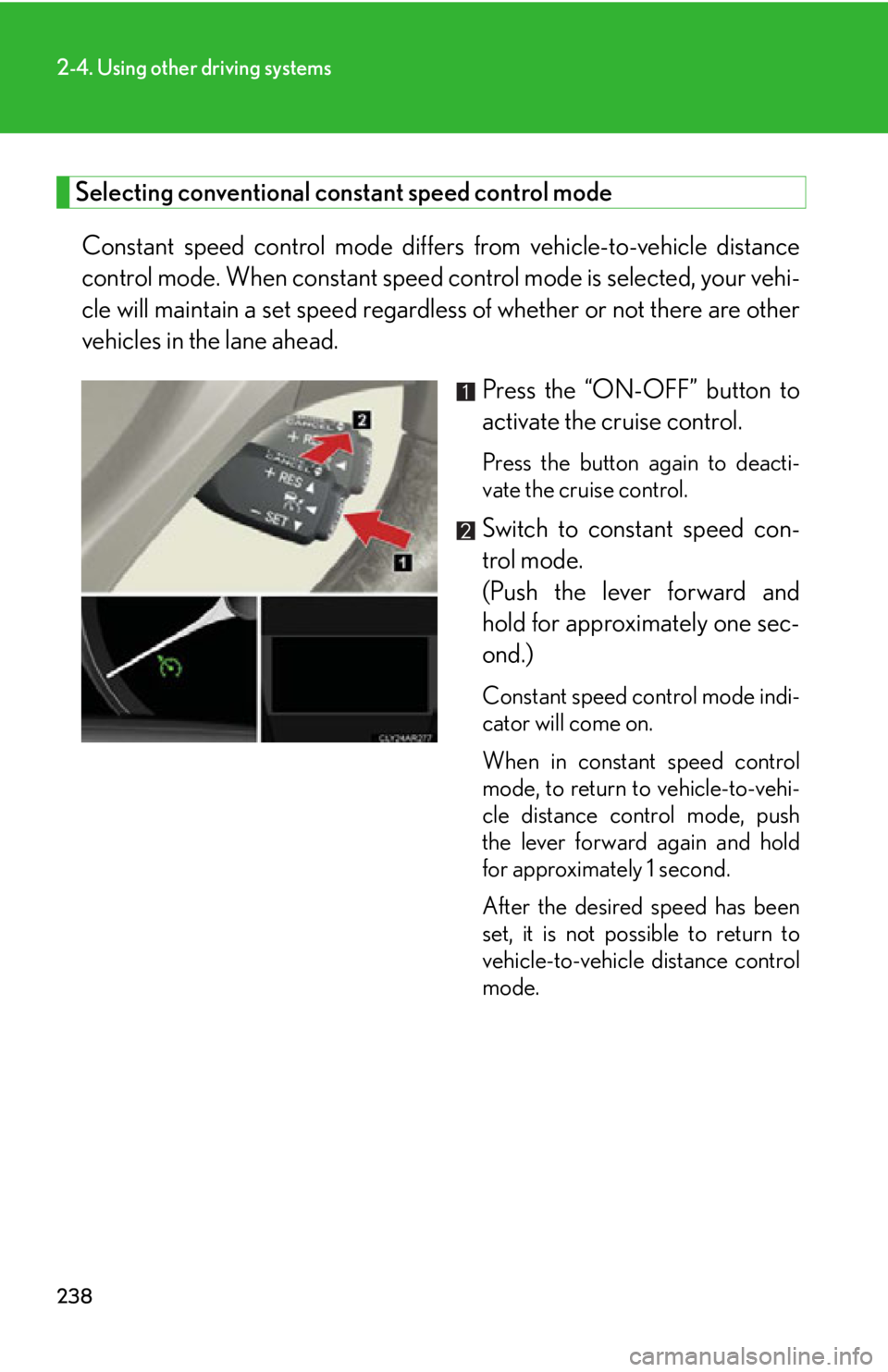
Press the “ON-OFF” button to
activate the cruise control. Press the button again to deacti-
vate the cruise control.
Switch to constant speed con-
trol mode.
(Push the lever forward and
hold for approximately one sec-
ond.) Constant speed control mode indi-
cator will come on.
When in constant speed control
mode, to return to vehicle-to-vehi-
cle distance control mode, push
the lever forward again and hold
for approximately 1 second.
After the desired speed has been
set, it is not possible to return to
vehicle-to-vehicle distance control
mode.
Page 256 of 886
2562-4. Using other driving systems
■
The rear view monitor system can be operated when
The shift lever is in R, the “ENGINE START STOP” switch is in IGNITION ON
mode.■
Changing display modes
The rear view monitor display mode ca n be changed while the screen is on.●
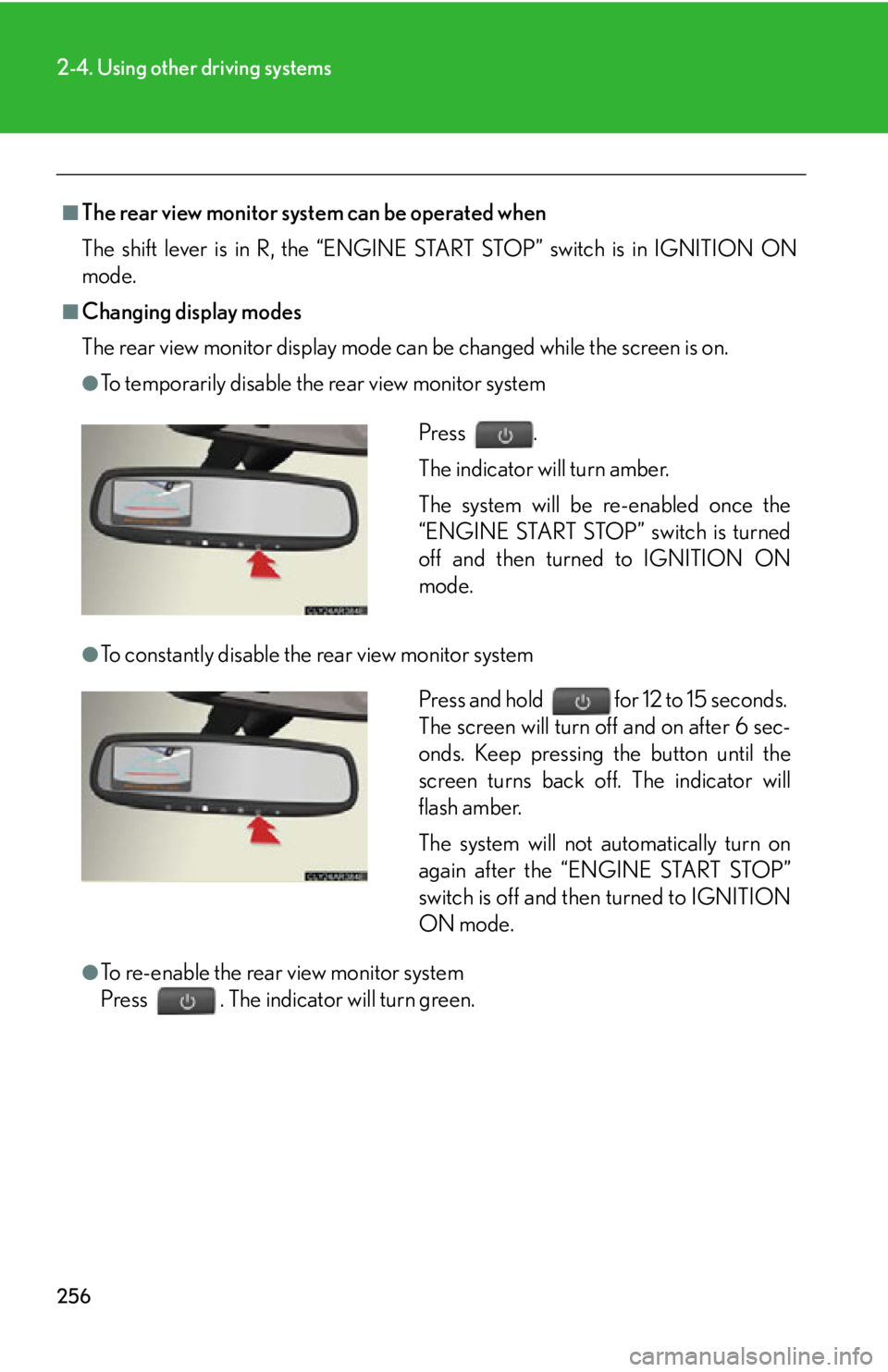
To temporarily disable the rear view monitor system
●
To constantly disable the rear view monitor system
●
To re-enable the rear view monitor system
Press . The indicator will turn green. Press .
The indicator will turn amber.
The system will be re-enabled once the
“ENGINE START STOP” switch is turned
off and then turned to IGNITION ON
mode.
Press and hold for 12 to 15 seconds.
The screen will turn off and on after 6 sec-
onds. Keep pressing the button until the
screen turns back off. The indicator will
flash amber.
The system will not automatically turn on
again after the “ENGINE START STOP”
switch is off and then turned to IGNITION
ON mode.
Page 331 of 886
3313-1. Lexus Display Audio system
3
Interior features ■
When using the screen ●
Under extremely cold conditions, the Lexus Display Audio controller may react
slowly.●
If the screen is cold, the display may be dark, or the system may seem to be
operating slightly slower than normal.●
The screen may seem dark and hard to see when viewed through sunglasses.
Change your angle of viewing, adjust the display on the “Display Settings”
screen ( P. 332) or remove your sunglasses.
CAUTION■
Using the Lexus Display Audio controller ●
Do not allow fingers, fingernails or hair to become caught in the Lexus Display
Audio controller as this may cause an injury.●
Be careful when touching the Lexus Display Audio controller in extreme temper-
atures as it may become very hot or cold due to the temperature inside the vehi-
cle.
NOTICE■
To prevent the Lexus Display Audio controller malfunction ●
Do not allow the Lexus Display Audio controller to come into contact with food,
liquid, stickers or lit cigarettes as doing so may cause it to change color, emit a
strange odor or stop functioning.●
Do not subject the Lexus Display Audio controller to excessive pressure or
strong impact as the controller may bend or break off.●
Do not allow coins, contact lenses or other such items to become caught in the
Lexus Display Audio controller as this may cause it to stop functioning.
●
Items of clothing may rip if they become caught on the Lexus Display Audio con-
troller.
●
If your hand or any object is on the Lexus Display Audio controller when the
“ENGINE START STOP” switch is turned to ACCESSORY mode, the Lexus
Display Audio controller may not operate properly.
Page 344 of 886
3443-1. Lexus Display Audio system
■
Adjusting the volume
The volume of the Mobile Assist ant can be adjusted using the
“ PWR·VOL
” knob or
steering wheel volume switches. The Mobile Assistant and phone call volumes are
synchronized.■
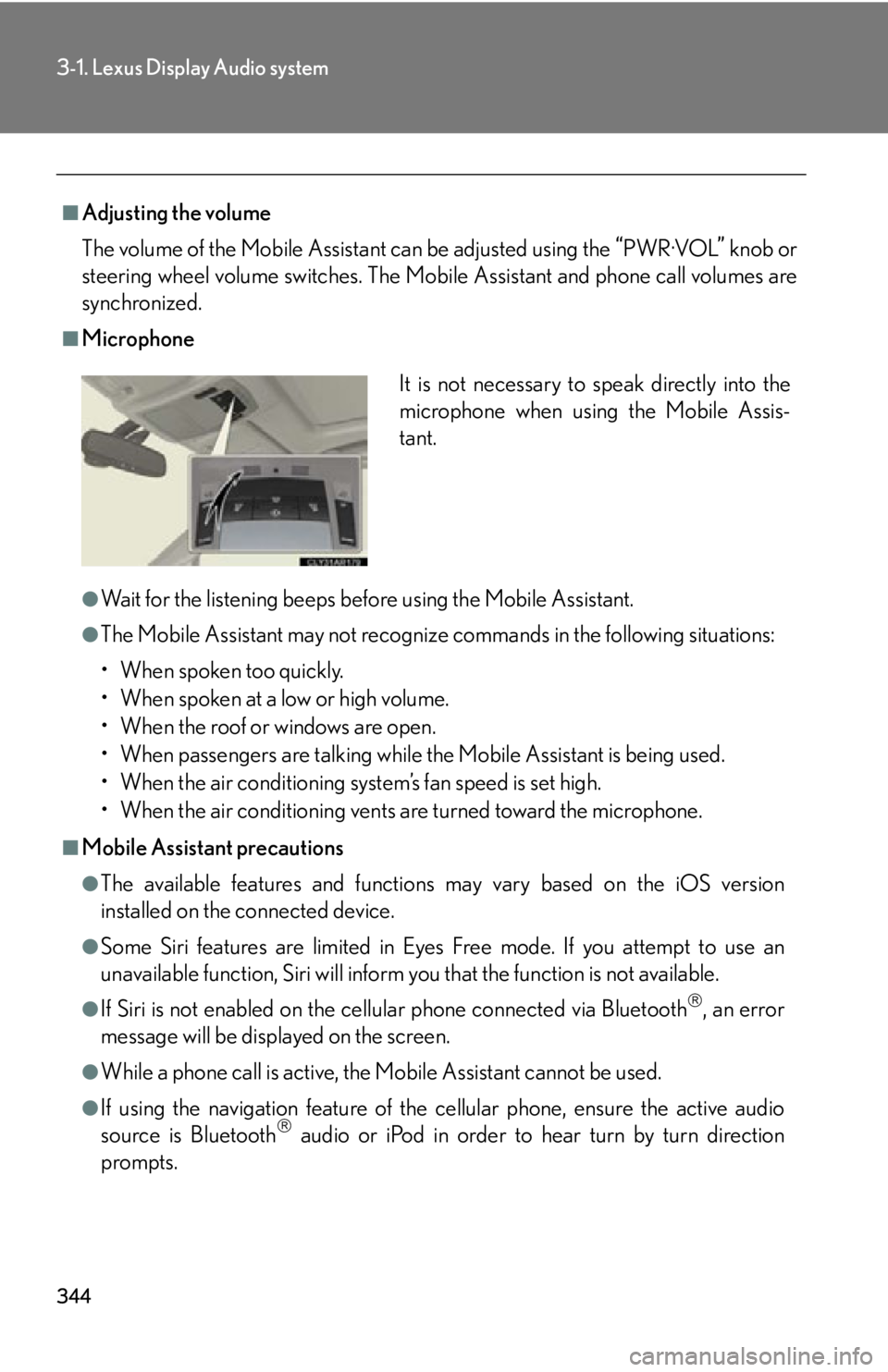
Microphone
●
Wait for the listening beeps befo re using the Mobile Assistant.●
The Mobile Assistant may not recognize commands in the following situations:
• When spoken too quickly.
• When spoken at a low or high volume.
• When the roof or windows are open.
• When passengers are talking while the Mobile Assistant is being used.
• When the air conditioning system’s fan speed is set high.
• When the air conditioning vents are turned toward the microphone.■
Mobile Assistant precautions ●
The available features and functions may vary based on the iOS version
installed on the connected device.●
Some Siri features are limited in Eyes Free mode. If you attempt to use an
unavailable function, Siri will inform you that the function is not available.●
If Siri is not enabled on the cell ular phone connected via Bluetooth
, an error
message will be displayed on the screen.
●
While a phone call is active, the Mo bile Assistant cannot be used.
●
If using the navigation feature of the cellular phone, ensure the active audio
source is Bluetooth
audio or iPod in order to hear turn by turn direction
prompts. It is not necessary to speak directly into the
microphone when using the Mobile Assis-
tant.
Page 352 of 886
3523-2. Using the air conditio ning system and defogger
■
When outside air temperature is below 32 F (0 C)
The cooling and dehumidification function may not operate even when
is
on.■
Ventilation and air conditioning odors ●
To let fresh air in, set the air conditioning system to the outside air mode.●
During use, various odors from inside and outside the vehicle may enter into
and accumulate in the air conditioning sy stem. This may then cause odor to be
emitted from the vents.●
To reduce potential odors from occurring:
• It is recommended that the air conditioning system be set to outside air mode
prior to turning the vehicle off.
• The start timing of the blower may be delayed for a short period of time
immediately after the air conditioning system is started in automatic mode.
CAUTION■
To prevent the windshield from fogging up
Do not use
during cool air operation in ex tremely humid weather. The dif-
ference between the temperature of the outside air and that of the windshield can
cause the outer surface of the windshield to fog up, blocking your vision.
NOTICE■
To prevent battery discharge
Do not leave the air conditioning system on longer than necessary when the engine
is off.
Page 359 of 886
3593-2. Using the air conditio ning system and defogger
3
Interior features ■
When the outside temperature exceeds 75°F (24°C) and the air conditioning
system is on ●
In order to reduce the air conditioning power consumption, the air conditioning
system may switch to recirculated air mode automatically. This may also reduce
fuel consumption.●
Recirculated air mode is selected as a default mode when the “ENGINE START
STOP” switch is turned to IGNITION ON mode.●
It is possible to switch to outside air mode at any time by pressing .■
Window defogger feature
Recirculated air mode may automatically switch to outside air mode in situations
where the windows need to be defogged.■
When outside air temperature is below 32 F (0 C)
The cooling and dehumidification fu nction may not operate even when
is
pressed.■
When the indicator light on goes off
Press to turn on the cooling and dehumi dification function again. There may
be a problem in the air conditioning system if the indicator light goes off again
shortly after the button is pressed. Have it inspected by your Lexus dealer.■
Ventilation and air conditioning odors ●
To let fresh air in, set the air conditioning system to the outside air mode.●
During use, various odors from inside and outside the vehicle may enter into
and accumulate in the air conditioning sy stem. This may then cause odor to be
emitted from the vents.●
To reduce potential odors from occurring:
• It is recommended that the air conditioning system be set to outside air mode
prior to turning the vehicle off.
• The start timing of the blower may be delayed for a short period of time
immediately after the air conditioning system is started in automatic mode.
Page 362 of 886

3623-2. Using the air conditio ning system and defogger
■
Operating conditions
The “ENGINE START STOP” switch is in IGNITION ON mode.■
The outside rear vi ew mirror defoggers
Turning the rear window defogger on will turn the outside rear view mirror defog-
gers on.
CAUTION■
When the outside rear view mirror defoggers are on
Do not touch the outside surface of the rear view mirrors, as they can become very
hot and burn you.
Page 364 of 886

3643-2. Using the air conditio ning system and defogger
■
Operating conditions
The “ENGINE START STOP” switch is in IGNITION ON mode.
CAUTION■
When the windshield wiper de-icer is on
Do not touch the lower part of the windshield or the side of the front pillars, as the
surfaces can become very hot and burn you.
Page 370 of 886
3703-3. Using the Lexus Display Audio system
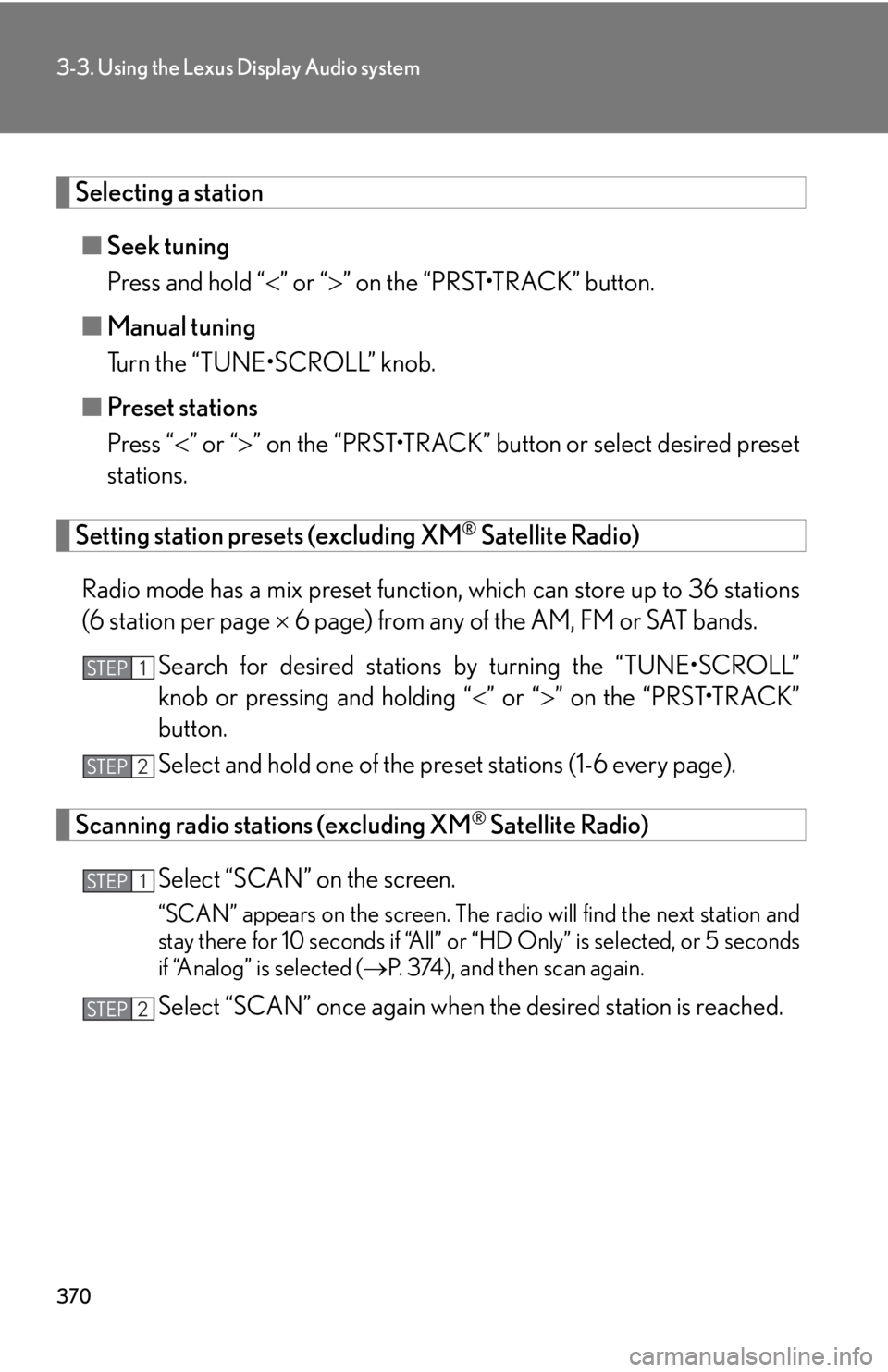
Selecting a station
■ Seek tuning
Press and hold “ ” or “ ” on the “PRST•TRACK” button.
■ Manual tuning
Turn the “TUNE•SCROLL” knob.
■ Preset stations
Press “ ” or “ ” on the “PRST•TRACK” butto n or select desired preset
stations.
Setting station presets (excluding XM ®
Satellite Radio)
Radio mode has a mix preset function, which can store up to 36 stations
(6 station per page 6 page) from any of the AM, FM or SAT bands.
Search for desired stations by turning the “TUNE•SCROLL”
knob or pressing and holding “ ” or “ ” on the “PRST•TRACK”
button.
Select and hold one of the preset stations (1-6 every page).
Scanning radio stations (excluding XM ®
Satellite Radio)
Select “SCAN” on the screen. “SCAN” appears on the screen. The radio will find the next station and
stay there for 10 seconds if “All” or “HD Only” is selected, or 5 seconds
if “Analog” is selected ( P. 374), and then scan again.
Select “SCAN” once again when the desired station is reached.STEP 1
STEP 2
STEP 1
STEP 2
Page 377 of 886
3773-3. Using the Lexus Display Audio system
3
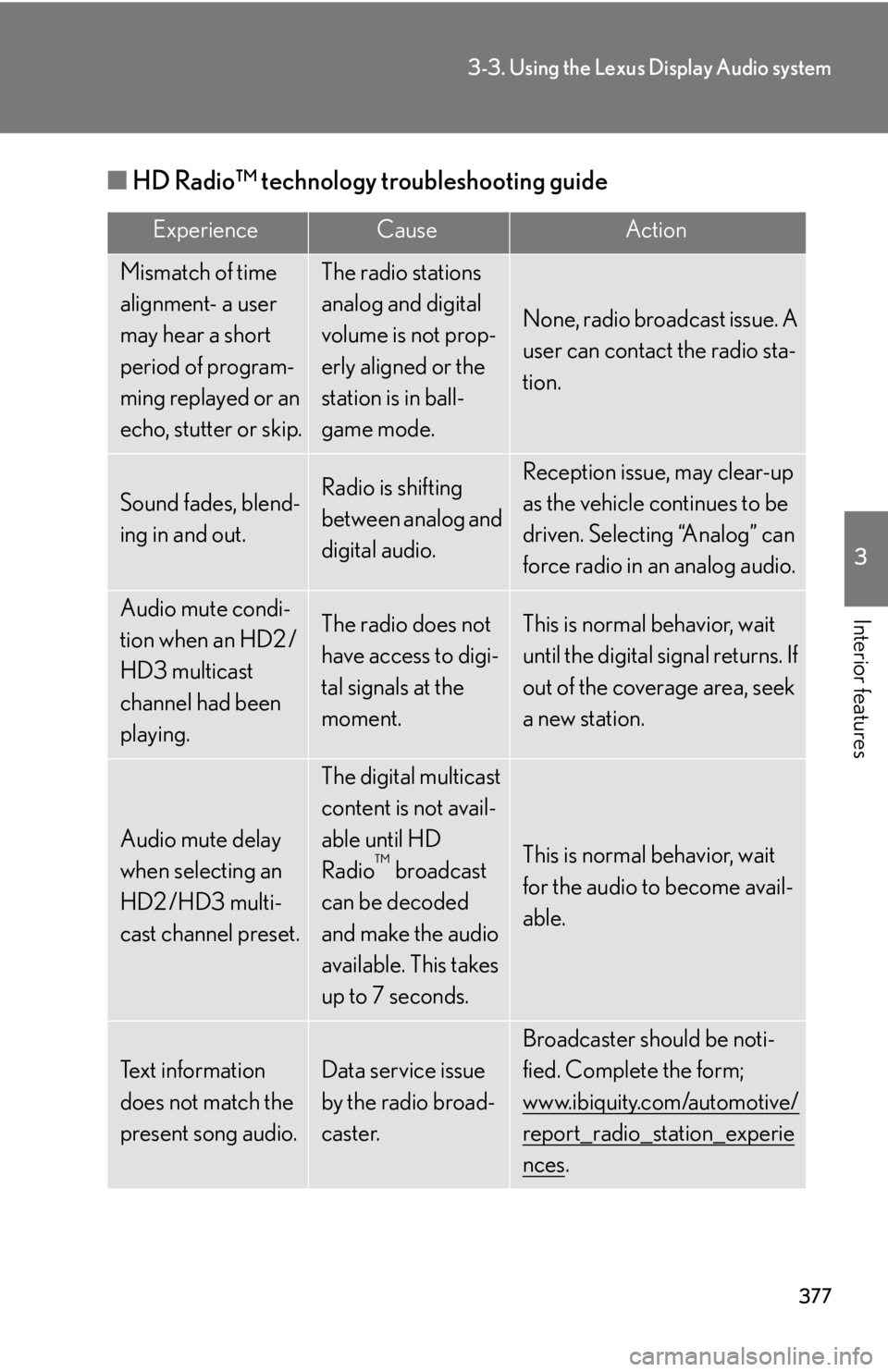
Interior features ■ HD Radio™ technology troubleshooting guide Experience Cause Action
Mismatch of time
alignment- a user
may hear a short
period of program-
ming replayed or an
echo, stutter or skip. The radio stations
analog and digital
volume is not prop-
erly aligned or the
station is in ball-
game mode. None, radio broadcast issue. A
user can contact the radio sta-
tion.
Sound fades, blend-
ing in and out. Radio is shifting
between analog and
digital audio. Reception issue, may clear-up
as the vehicle continues to be
driven. Selecting “Analog” can
force radio in an analog audio.
Audio mute condi-
tion when an HD2 /
HD3 multicast
channel had been
playing. The radio does not
have access to digi-
tal signals at the
moment. This is normal behavior, wait
until the digital signal returns. If
out of the coverage area, seek
a new station.
Audio mute delay
when selecting an
HD2 /HD3 multi-
cast channel preset. The digital multicast
content is not avail-
able until HD
Radio ™
broadcast
can be decoded
and make the audio
available. This takes
up to 7 seconds. This is normal behavior, wait
for the audio to become avail-
able.
Text information
does not match the
present song audio. Data service issue
by the radio broad-
caster. Broadcaster should be noti-
fied. Complete the form;
www.ibiquity.com/automotive/
report_radio_station_experie
nces .