service LEXUS RX350 2015 Owner's Manual
[x] Cancel search | Manufacturer: LEXUS, Model Year: 2015, Model line: RX350, Model: LEXUS RX350 2015Pages: 886, PDF Size: 11 MB
Page 466 of 886
4663-3. Using the Lexus Display Audio system
■ Managing the speed dials
● Registering the speed dial from contacts
You can register the desired phone number from phonebook. Up to 18
numbers per phone can be registered.
Display the “Phonebook Settings” screen. ( P. 4 6 2 )
Select “Manage Speed Dials” on the “Phonebook Settings”
screen.
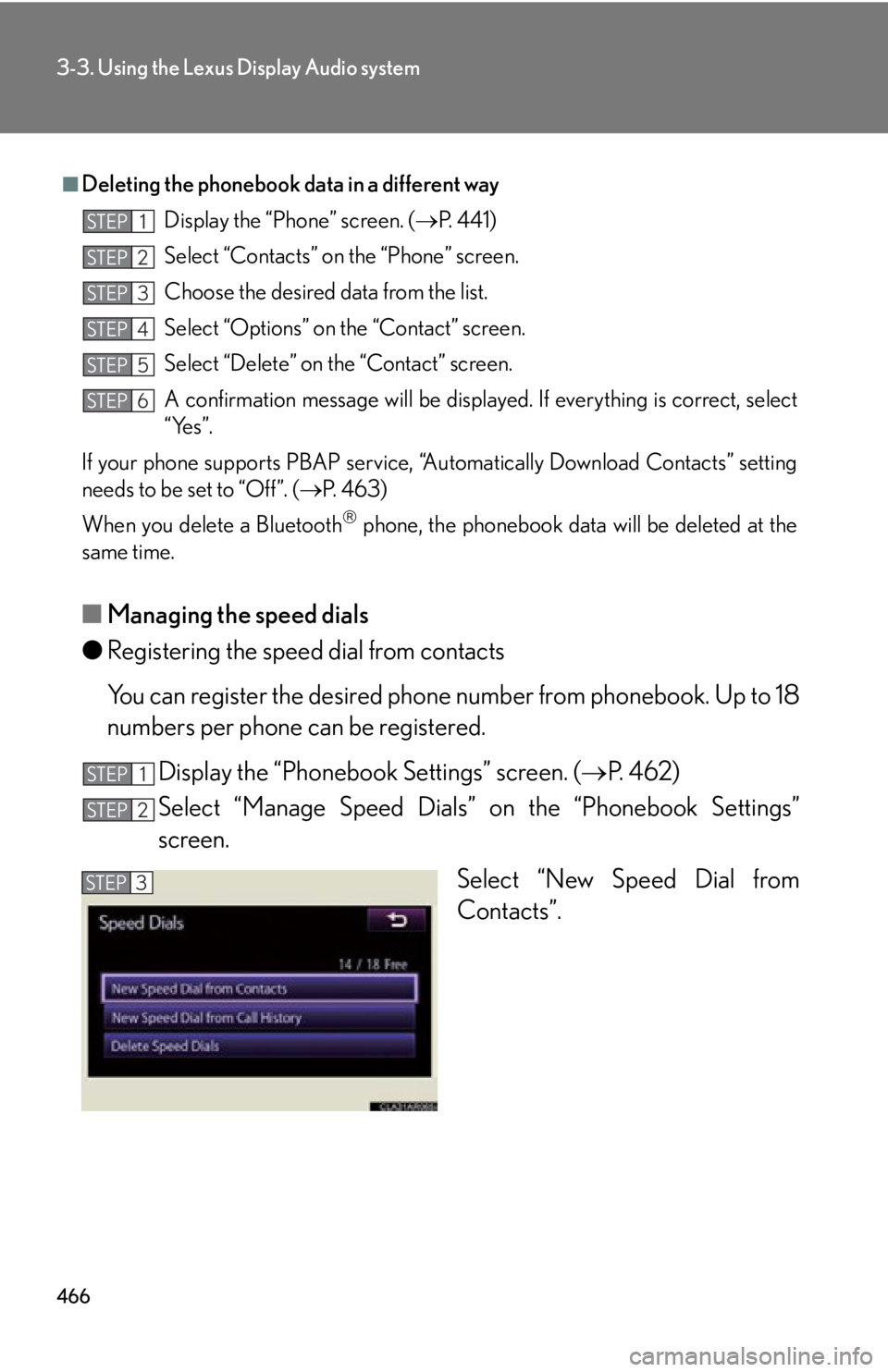
Select “New Speed Dial from
Contacts”.■
Deleting the phonebook da ta in a different way
Display the “Phone” screen. ( P. 441)
Select “Contacts” on the “Phone” screen.
Choose the desired data from the list.
Select “Options” on the “Contact” screen.
Select “Delete” on the “Contact” screen.
A confirmation message will be displayed. If everything is correct, select
“Yes”.
If your phone supports PBAP service, “Automatically Download Contacts” setting
needs to be set to “Off”. ( P. 4 6 3 )
When you delete a Bluetooth
phone, the phonebook data will be deleted at the
same time. STEP 1
STEP 2
STEP 3
STEP 4
STEP 5
STEP 6
STEP 1
STEP 2
STEP 3
Page 471 of 886
4713-3. Using the Lexus Display Audio system
3
Interior features ■ Deleting the call history
Display the “Phonebook Settings” screen. ( P. 4 6 2 )
Select “Delete Call History” on the “Phonebook Settings” screen.If your phone supports PBAP service, the “Automatically Download
Contacts” setting needs to be set to “Off”. ( P. 4 6 3 )
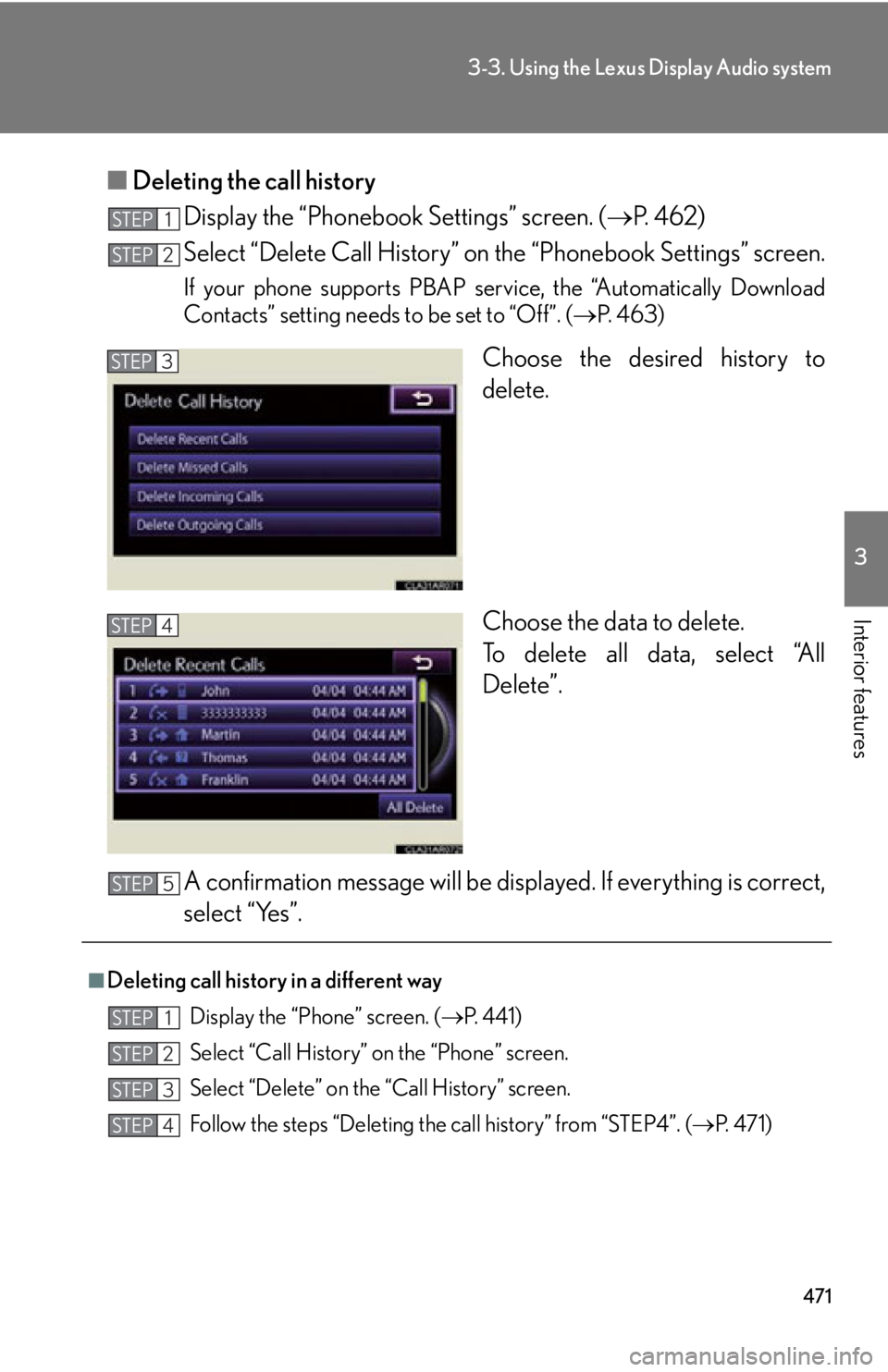
Choose the desired history to
delete.
Choose the data to delete.
To delete all data, select “All
Delete”.
A confirmation message will be disp layed. If everything is correct,
select “Yes”.STEP 1
STEP 2
STEP 3
STEP 4
■
Deleting call history in a different way
Display the “Phone” screen. ( P. 441)
Select “Call History” on the “Phone” screen.
Select “Delete” on the “Call History” screen.
Follow the steps “Deleting the call history” from “STEP4”. ( P. 4 7 1 )STEP 5
STEP 1
STEP 2
STEP 3
STEP 4
Page 489 of 886
4893-4. Using the audio system
3
Interior features ■
When the battery is disconnected
All preset stations are erased.■
Reception sensitivity ●
Cargo loaded on the roof luggage carrier, especially metal objects, may
adversely affect the reception of XM ®
Satellite Radio.●
It is difficult to maintain perfect radio re ception at all times due to the continually
changing position of the an tenna, differences in signal strength and surrounding
objects, such as trains and transmitters.●
The radio antenna is mounted inside th e rear spoiler and the rear window. To
maintain clear radio reception, do not attach metallic window tinting or other
metallic objects to the antenna wire mounted inside the rear window.■
Receiving XM ®
Satellite Radio
An XM ®
Satellite Radio is a tuner designed exclusively to receive broadcasts pro-
vided under a separate subscription. Availa bility is limited to the 48 contiguous
states and 10 Canadian provinces. ●
XM ®
subscriptions
For detailed information about XM ®
Satellite Radio or to subscribe:
U.S.A.
Visit on the web at www.siriusxm.com or call 1-877-515-3987.
Canada
Visit on the web at www.xmradio.ca or call 1-877-438-9677.●
Radio ID
You will need the radio ID when activating XM ®
service or reporting a problem.
Select “CH000” using , and the rece iver's 8-character ID number will
appear.
●
Satellite tuner
The tuner supports only Audio Services (Music and Talk) and the accompanying
Text Information of XM ®
Satellite Radio.
Page 561 of 886
5613-4. Using the audio system
3
Interior features ■
Conditions under which the system will not operate ●
If using a mobile phone that does not support Bluetooth ®
●
If the mobile phone is switched off●
If you are outside service range●
If the mobile phon e is not connected●
If the mobile phon e's battery is low●
If the mobile phone is be hind the seat or in the glove box or console box●
If metal is covering or touching the phone■
When using the hands-free system ●
The audio system and voice guidance are muted when making a call.●
If both parties speak at the same time, it may be difficult to hear.●
If the incoming call volume is overly loud, an echo may be heard.●
Try to face toward the microphone as much as possible when speaking.●
In the following circumstances, it may be difficult to hear the other party:
• When driving on unpaved roads
• When driving at high speeds
• When a window is open
• When the air conditioning is blowing directly on the microphone
• When the air conditioning is set to high■
When transferring ownership of the vehicle
Be sure to initialize the system to prevent personal data from being improperly
accessed. ( P. 5 8 7 )■
About Bluetooth ®
Bluetooth is a registered trademark of
Bluetooth SIG. Inc.
Page 577 of 886
5773-4. Using the audio system
3
Interior features ■
Call waiting ●
If your phone does not support HFP Ver. 1.5, this function cannot be used.●
Call waiting operation may differ depend ing on your mobile phone and service
provider.■
Call history
Up to 5 numbers can be stored in each of the outgoing and incoming call history
memories.■
When talking on the phone ●
Do not talk at the same time as the other party.●
Keep the volume of the incoming voice down. Otherwise, voice echo will
increase.
Page 642 of 886
6423-7. Other interior features
Safety Connect
: If equippedSafety Connect is a subscription-based telematics service that uses Global
Positioning System (GPS) data and emb edded cellular technology to pro-
vide safety and security features to subscribers. Safety Connect is sup-
ported by Lexus’ designated response center, which operates 24 hours per
day, 7 days per week.
Safety Connect service is available by subscription on select, telematics
hardware-equipped vehicles.
By using the Safety Connect service, you are agreeing to be bound by the
Telematics Subscription Service Agreement and its Terms and Conditions,
as in effect and amended from time to time, a current copy of which is avail-
able at Lexus.com. All use of the Safety Connect service is subject to such
then-applicable Terms and Conditions.
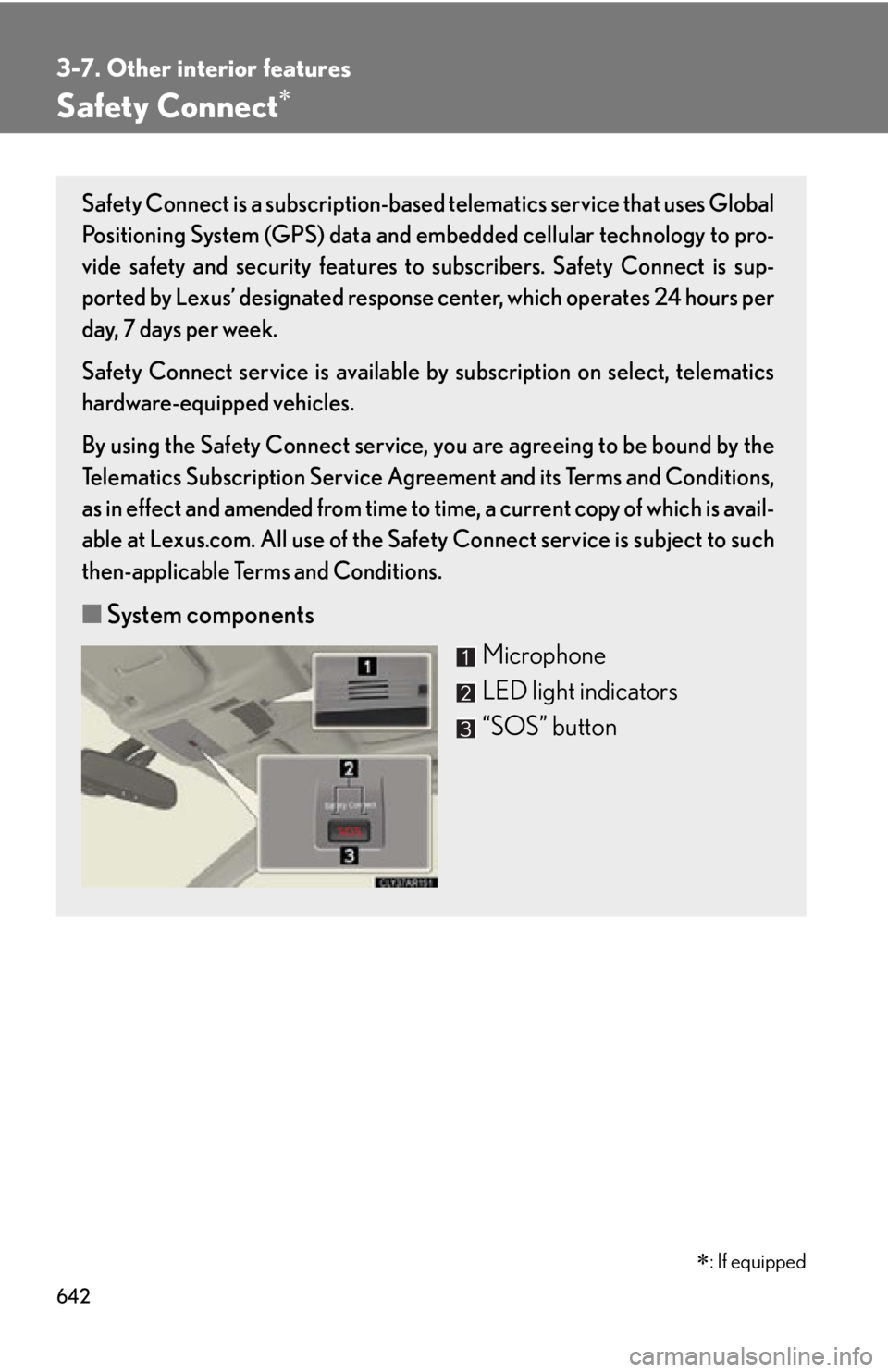
■ System components
Microphone
LED light indicators
“SOS” button
Page 643 of 886
6433-7. Other interior features
3
Interior features ■ Services
Subscribers have the following Safety Connect services available:
● Automatic Collision Notification
*Helps drivers receive necessary response from emergency ser-
vice providers. ( P. 645)
* : U.S. Patent No. 7,508,298 B2
● Stolen Vehicle Location
Helps drivers in the event of vehicle theft. ( P. 646)
● Emergency Assistance Button (SOS)
Connects drivers to response-center support. ( P. 646)
● Enhanced Roadside Assistance
Provides drivers various on-road assistance. ( P. 646)
■ Subscription
After you have signed the Telemati cs Subscription Service Agree-
ment and are enrolled, you can begin receiving services.
A variety of subscription terms is available for purchase. Contact
your Lexus dealer, call 1-800-25-LEXUS (1-800-255-3987) or
push the “SOS” button in your ve hicle for further subscription
details.
Page 644 of 886
6443-7. Other interior features
■
Safety Connect Services Information ●
Phone calls using the vehicles Bluetooth ®
technology will not be possible dur-
ing Safety Connect.●
Safety Connect is available beginning Fall 2009 on select Lexus models. Con-
tact with the Safety Connect response center is dependent upon the telematics
device being in operative condition, ce llular connection availability, and GPS
satellite signal reception, which can limit the ability to reach the response center
or receive emergency service support. Enrollment and Telema tics Subscription
Service Agreement required. A variety of subscription terms is available;
charges vary by subscription term selected.●
Automatic Collision Notification, Emergency Assistance and Stolen Vehicle
Location will function in the United States, including Hawaii and Alaska, and in
Canada, and Enhanced Roadside Assistance will function in the United States
(except Hawaii) and in Canada. No Safety Connect services will function out-
side of the United States in countries other than Canada.●
Safety Connect services ar e not subject to section 255 of the Telecommunica-
tions Act and the device is not TTY compatible.■
Languages
The Safety Connect response center will offer support in multiple languages. The
Safety Connect system will offer voice prompts in English and Spanish. Please indi-
cate your language of choice when enrolling.■
When contacting th e response center
You may be unable to contact the response center if the network is busy.
Page 645 of 886
6453-7. Other interior features
3
Interior features Safety Connect LED light Indicators
● When the “ENGINE START STOP” switch is turned to IGNITION
ON mode, the red indicator light co mes on for 2 seco nds then turns
off. Afterward, the green indicator light comes on, indicating that the
service is active.
● The following indicator light patterns indica te specific system usage
conditions:
• Green indicator light on = Active service
• Green indicator light flashing = Safety Connect call in process
• Red indicator light (except at vehicle start-up) = System malfunction
(contact your Lexus dealer)
• No indicator light (off) = Saf ety Connect service not active
Safety Connect services
■ Automatic Collision Notification
In case of either airbag deployment or severe rear-end collision, the
system is designed to automatically call the response center. The
responding agent receives the vehicl e’s location and attempts to speak
with the vehicle occupants to asse ss the level of emergency. If the
occupants are unable to communicate, the agent automatically treats
the call as an emergency, contacts the nearest emergency services
provider to describe the situation, and requests that assistance be sent
to the location.
Page 646 of 886

6463-7. Other interior features
■ Stolen Vehicle Location
If your vehicle is stolen, Safety Co nnect can work with local authorities
to assist them in locating and re covering the vehicle. After filing a
police report, call the Safety Conn ect response center at 1-800-25-
LEXUS (1-800-255-3987) and follo w the prompts for Safety Con-
nect to initiate this service.
In addition to assisting law enforcemen t with recovery of a stolen vehi-
cle, Safety-Connect-equipped vehicl e location data may, under cer-
tain circumstances, be shared with third parties to locate your vehicle.
Further information is available at Lexus.com.
■ Emergency Assistance Button (“SOS”)
In the event of an emergency on the road, push the “SOS” button to
reach the Safety Connect response center. The answering agent will
determine your vehicle’s location, assess the emergency, and dispatch
the necessary assistance required. If you accidentally press the “SOS” bu tton, tell the response-center agent
that you are not experiencing an emergency.
■ Enhanced Roadside Assistance
Enhanced Roadside Assistance ad ds GPS data to the already
included warranty-based Lexus roadside service.
Subscribers can press the “SOS” button to reach a Safety Connect
response-center agent, who can help with a wide range of needs, such
as: towing, flat tire, fuel delivery, etc. For a descriptio n of the Enhanced
Roadside Assistance services and th eir limitations, please see the
Safety Connect Terms and Conditions, which are available at
Lexus.com.