door lock LEXUS RX350 2015 Workshop Manual
[x] Cancel search | Manufacturer: LEXUS, Model Year: 2015, Model line: RX350, Model: LEXUS RX350 2015Pages: 886, PDF Size: 11 MB
Page 161 of 886
1612-1. Driving procedures
2
When driving CAUTION■
When the vehicle is parked ●
Do not leave glasses, cigarett e lighters, spray cans, or soft drink cans in the vehi-
cle when it is in the sun.
Doing so may result in the following:
• Gas may leak from a cigarette lighter or spray can, and may lead to a fire.
• The temperature inside the vehicle may cause the plastic lenses and plastic
material of glasses to deform or crack.
• Soft drink cans may fracture, causing the contents to spray over the interior of
the vehicle, and may also cause a short circuit in the vehicle's electrical com-
ponents.●
Do not leave cigarette lighters in the vehicle. If a cigarette lighter is in a place such
as the glove box or on the floor, it may be lit accidentally when luggage is loaded
or the seat is adjusted, causing a fire.●
Do not attach adhesive discs to the wind shield or windows. Do not place contain-
ers such as air fresheners on the instru ment panel or dashboard. Adhesive discs
or containers may act as lenses, causing a fire in the vehicle.●
Do not leave a door or window open if the curved glass is coated with a metal-
lized film such as a silver-colored one. Reflected sunlight may cause the glass to
act as a lens, causing a fire.●
Always apply the parking brake, shift the shift lever to P, stop the engine and lock
the vehicle.
Do not leave the vehicle unattend ed while the engine is running.●
Do not touch the exhaust pipes while the engine is running or immediately after
turning the engine off.
Doing so may cause burns.●
Do not leave the engine running in an area with snow build-up, or where it is
snowing. If snowbanks build up around the vehicle while the engine is running,
exhaust gases may collect and enter the vehi cle. This may lead to death or a seri-
ous health hazard.
Page 168 of 886
1682-1. Driving procedures
■
If the engine does not start
The engine immobilizer system may not have been deactivated. ( P. 1 1 0 )
Contact your Lexus dealer.■
Steering lock
After turning the “ENGINE START STOP” switch off and opening and closing the
doors, the steering wheel will be locked due to the steering lock function. Operat-
ing the “ENGINE START STOP” switch again automatically cancels the steering
lock.■
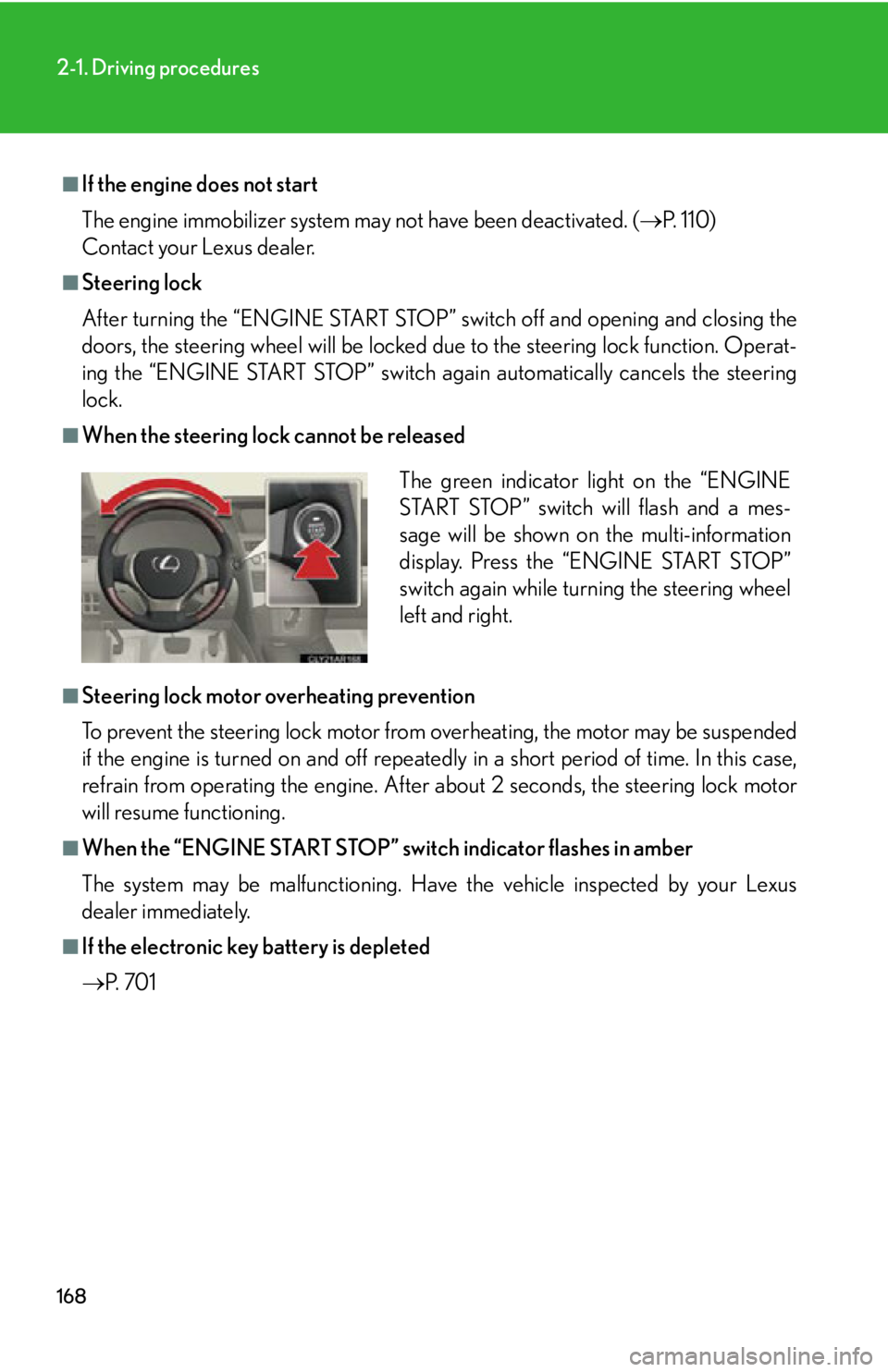
When the steering lock cannot be released
■
Steering lock motor overheating prevention
To prevent the steering lock motor from overheating, the motor may be suspended
if the engine is turned on and off repeatedly in a short period of time. In this case,
refrain from operating the engine. After about 2 seconds, the steering lock motor
will resume functioning.■
When the “ENGINE START STOP” switch indicator flashes in amber
The system may be malfunctioning. Have the vehicle inspected by your Lexus
dealer immediately.■
If the electronic key battery is depleted
P. 7 0 1 The green indicator light on the “ENGINE
START STOP” switch will flash and a mes-
sage will be shown on the multi-information
display. Press the “ENGINE START STOP”
switch again while turning the steering wheel
left and right.
Page 169 of 886

1692-1. Driving procedures
2
When driving CAUTION■
When starting the engine
Always start the engine while sitting in th e driver’s seat. Do not depress the acceler-
ator pedal while starting the engine under any circumstances.
Doing so may cause an accident resu lting in death or serious injury.■
Caution while driving
If the vehicle begins to slide due to engine failure or other circumstances, do not
lock or open the doors until the vehicle reaches a safe and complete stop. Activa-
tion of the steering lock in this circumstance may lead to an accident, resulting in
death or serious injury.■
Stopping the engine in an emergency
If you want to stop the engine in an emergency while driving the vehicle, press and
hold the “ENGINE START STOP” switch for more than 2 seconds, or press it
briefly 3 times or more in succession. ( P. 8 0 4 )
However, do not touch the “ENGINE START STOP” switch while driving except in
an emergency. Turning the engine off while driving will not cause loss of steering or
braking control, but the power assist to these systems will be lost. This will make it
more difficult to steer and brake, so you should pull over and stop the vehicle as
soon as it is safe to do so.
Page 202 of 886
2022-2. Instrument cluster
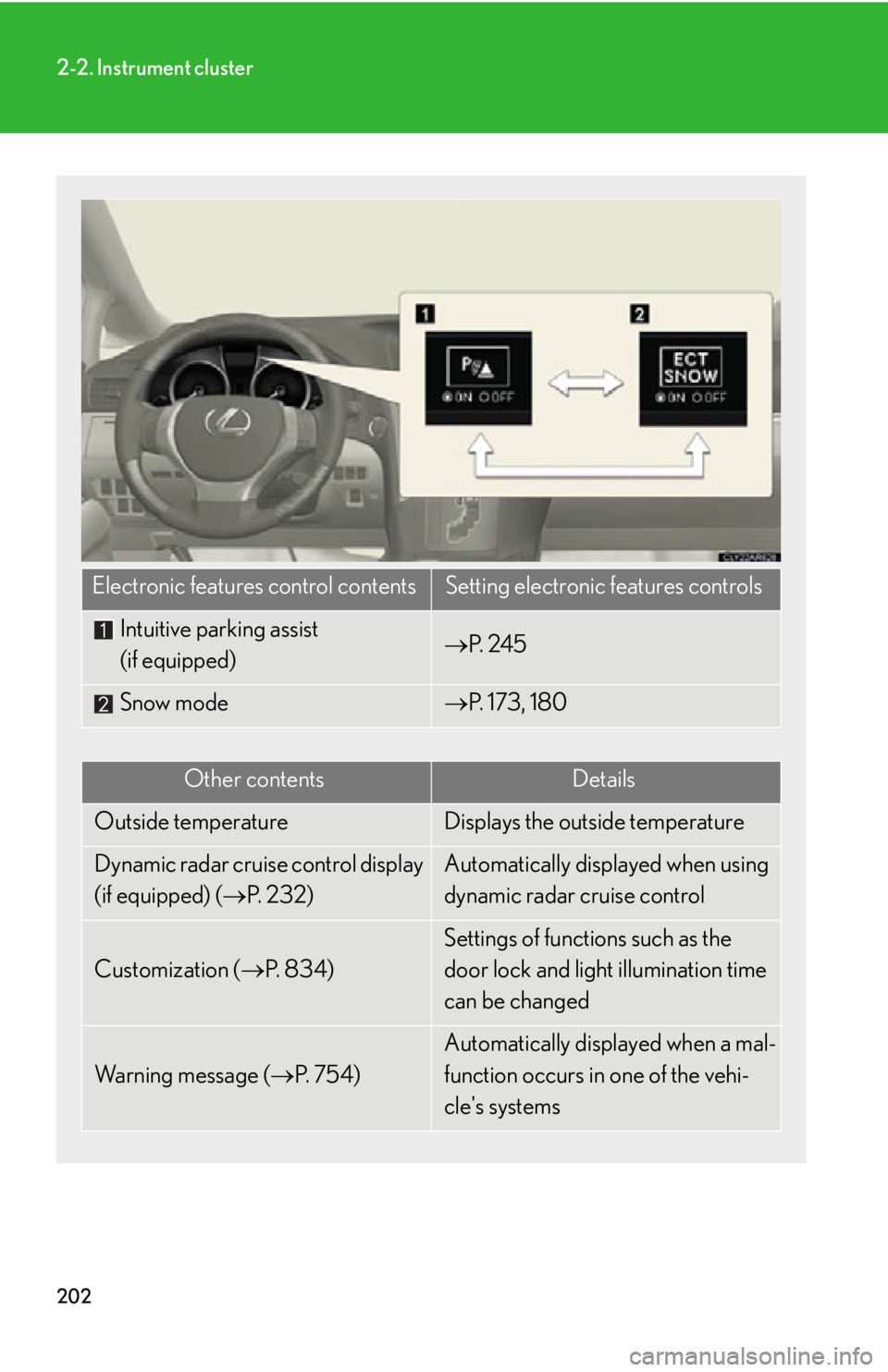
Electronic features control contents Setting electronic features controls
Intuitive parking assist
(if equipped) P. 2 4 5
Snow mode P. 173, 180
Other contents Details
Outside temperature Displays the outside temperature
Dynamic radar cruise control display
(if equipped) ( P. 232) Automatically displayed when using
dynamic radar cruise control
Customization ( P. 8 3 4 ) Settings of functions such as the
door lock and light illumination time
can be changed
Wa r n i n g m e s s a g e ( P. 7 5 4 ) Automatically displayed when a mal-
function occurs in one of the vehi-
cle's systems
Page 214 of 886

2142-3. Operating the lights and windshield wipers
■
Automatic light off system ●
When the headlights are on: The headlights and tail lights turn off 30 seconds
after a door is opened and closed if the “ENGINE START STOP” switch is
turned to ACCESSORY mode or turned off. (The lights turn off immediately
if on the key is pressed after all the doors are locked.)●
When only the tail lights ar e on: The tail lights turn off automatically if the
“ENGINE START STOP” switch is turned to ACCESSORY mode or turned off
and the driver’s door is opened.
To turn the lights on again, turn the “ENGINE START STOP” switch to IGNITION
ON mode, or turn the light switch off once and then back to or .
If any of the doors is kept open, the ligh ts automatically turn off after 20 minutes.■
Automatic headlight leveling system (if equipped)
The level of the headlights is automatica lly adjusted according to the number of
passengers and the loading condition of the vehicle to ensure that the headlights do
not interfere with other road users. ■
Light reminder buzzer (headlights)
A buzzer sounds when the “ENGINE START STOP” switch is turned off or turned
to ACCESSORY mode and the driver's door is opened while the headlights are
turned on.■
Illuminated entry system
If the wireless remote control switch is used to unlock the vehicle when the light
switch is in and the surrounding area is dark, the parking light turns on.■
Customization
Settings (e.g. light sensor sensitivity) can be changed.
(Customizable features P. 8 3 4 )
NOTICE
■
To prevent battery discharge
Do not leave the lights on longer than necessary when the engine is off.
Page 327 of 886
Interior features
3
327Using the hands-free system
(for mobile phones)............. 565
Making a phone call .............. 573
Setting a mobile phone......... 578
Security and system
setup ....................................... 584
Using the phone book.......... 588
3-5. Using the interior lights
Interior lights list ..................... 595
• Interior lights ........................ 596
• Personal lights ...................... 596
3-6. Using the storage
features
List of storage features ......... 598
• Glove box .............................. 599
• Bottle holders/
door pockets ........................ 600
• Cup holders ........................... 601
• Console box .......................... 604
• Coin holder ........................... 606
• Auxiliary boxes .................... 606
• Under tray ............................ 608 3-7. Other interior features
Sun visors ................................. 609
Vanity mirrors .......................... 610
Clock ............................................ 611
Outside temperature
display...................................... 613
Multi-display light control ..... 615
Power outlets ............................ 616
Heated steering wheel .......... 619
Seat heaters and
ventilators ............................. 620
Armrest .................................... 622
Coat hooks .............................. 623
Assist grips ................................ 624
Floor mat .................................. 625
Luggage compartment
features ................................... 627
Garage door opener ............ 632
Compass .................................. 638
Safety Connect ...................... 642
Page 597 of 886
5973-5. Using the interior lights
3
Interior features ■
Illuminated entry system
The lights automatically turn on/off according to “ENGINE START STOP” switch
mode, the presence of the electronic key, whether the doors are locked/unlocked,
and whether the doors are open/closed.■
To prevent battery discharge
When the “ENGINE START STOP” switch is turned off, the lights will go off auto-
matically after 20 minutes. ●
Personal lights●
Interior lights●
Door courtesy lights●
Scuff lights (if equipped)●
Footwell lights■
Customization
Settings (e.g. the time elapsed before the lights turn off) can be changed.
(Customizable features P. 8 3 4 ) Interior lights and personal lights
Page 599 of 886
5993-6. Using the storage features
3
Interior features Glove box
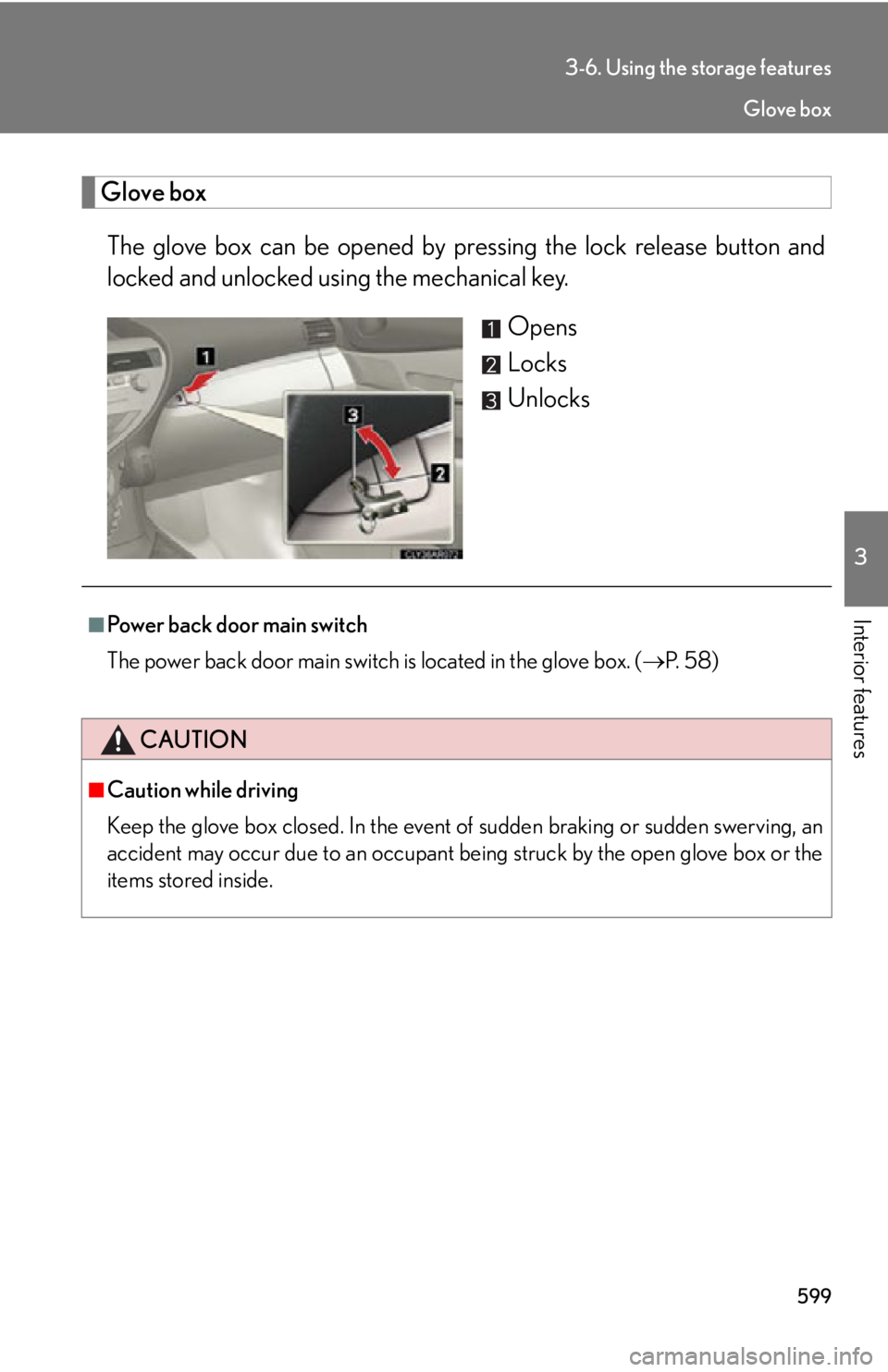
The glove box can be opened by pr essing the lock release button and
locked and unlocked u sing the mechanical key.
Opens
Locks
Unlocks
■
Power back door main switch
The power back door main switch is located in the glove box. ( P. 5 8 )
CAUTION■
Caution while driving
Keep the glove box closed. In the event of sudden braking or sudden swerving, an
accident may occur due to an occupant being struck by the open glove box or the
items stored inside. Glove box
Page 630 of 886
6303-7. Other interior features
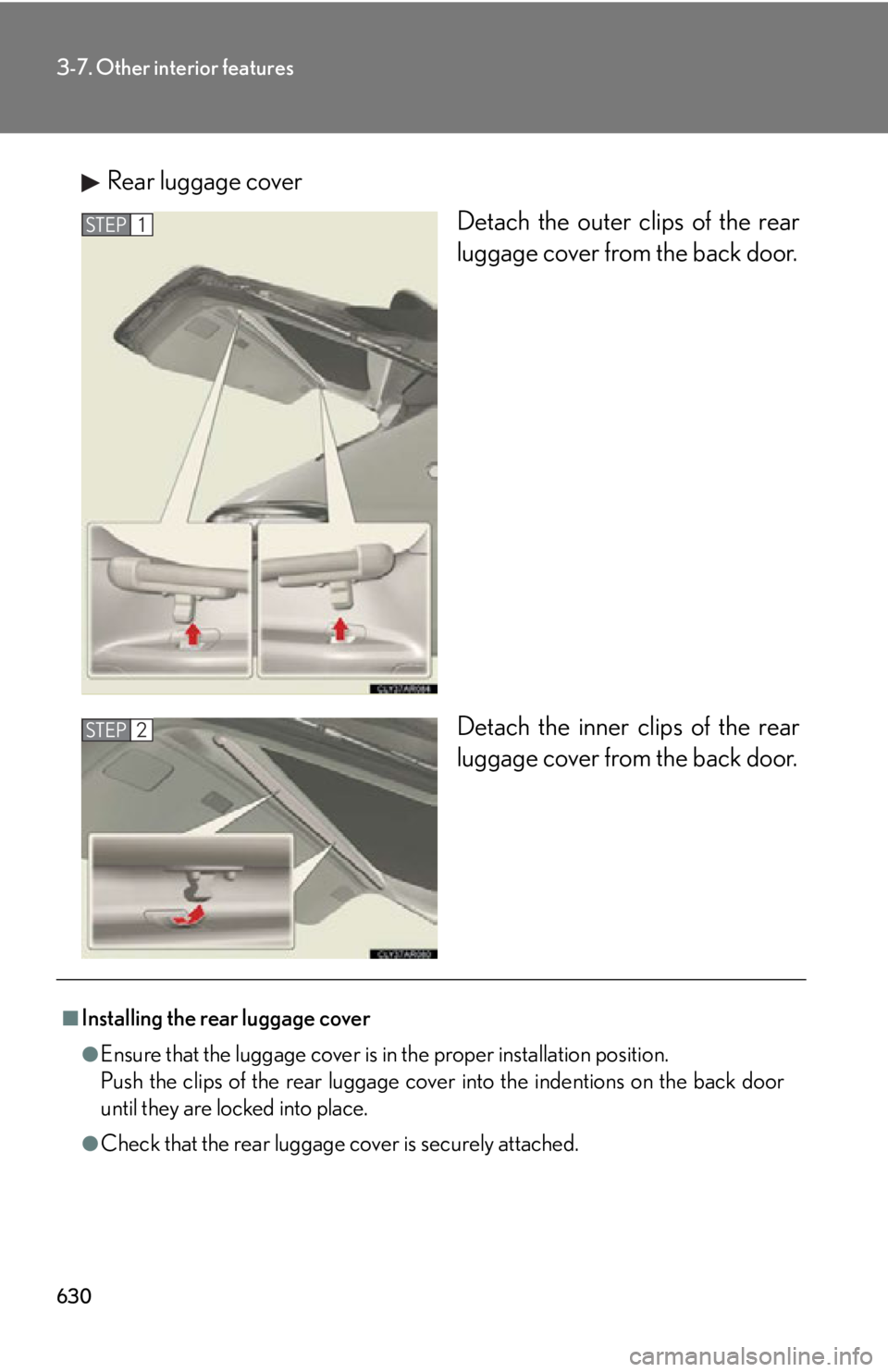
Rear luggage cover
Detach the outer clips of the rear
luggage cover from the back door.
Detach the inner clips of the rear
luggage cover from the back door.STEP 1
STEP 2
■
Installing the rear luggage cover
●
Ensure that the luggage cover is in the proper installation position.
Push the clips of the rear luggage cove r into the indentions on the back door
until they are locked into place.
●
Check that the rear luggage cover is securely attached.
Page 632 of 886
6323-7. Other interior features
Garage door opener The garage door opener (HomeLink
Universal Transceiver) is manufactured
under license from HomeLink
.
Programming the HomeLink
(for U.S.A. owners)
The HomeLink
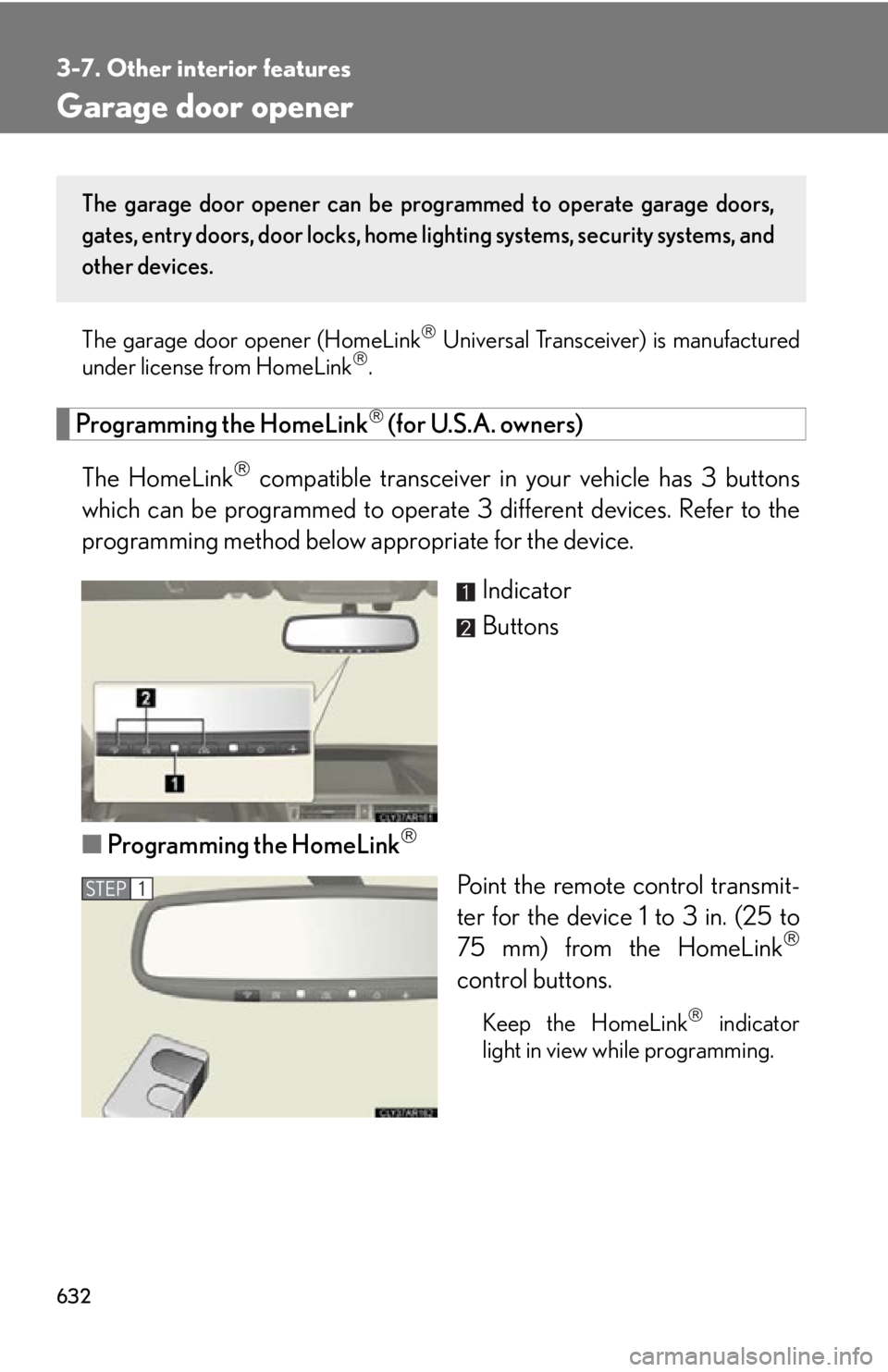
compatible transceiver in your vehicle has 3 buttons
which can be programmed to operate 3 different devices. Refer to the
programming method below appropriate for the device.
Indicator
Buttons
■ Programming the HomeLink
Point the remote control transmit-
ter for the device 1 to 3 in. (25 to
75 mm) from the HomeLink
control buttons.
Keep the HomeLink
indicator
light in view while programming.The garage door opener can be pr ogrammed to operate garage doors,
gates, entry doors, door locks, home lighting systems, security systems, and
other devices.
STEP 1