lock LEXUS RX350 2015 Workshop Manual
[x] Cancel search | Manufacturer: LEXUS, Model Year: 2015, Model line: RX350, Model: LEXUS RX350 2015Pages: 886, PDF Size: 11 MB
Page 74 of 886
741-3. Adjustable components (s eats, mirrors, steering wheel)
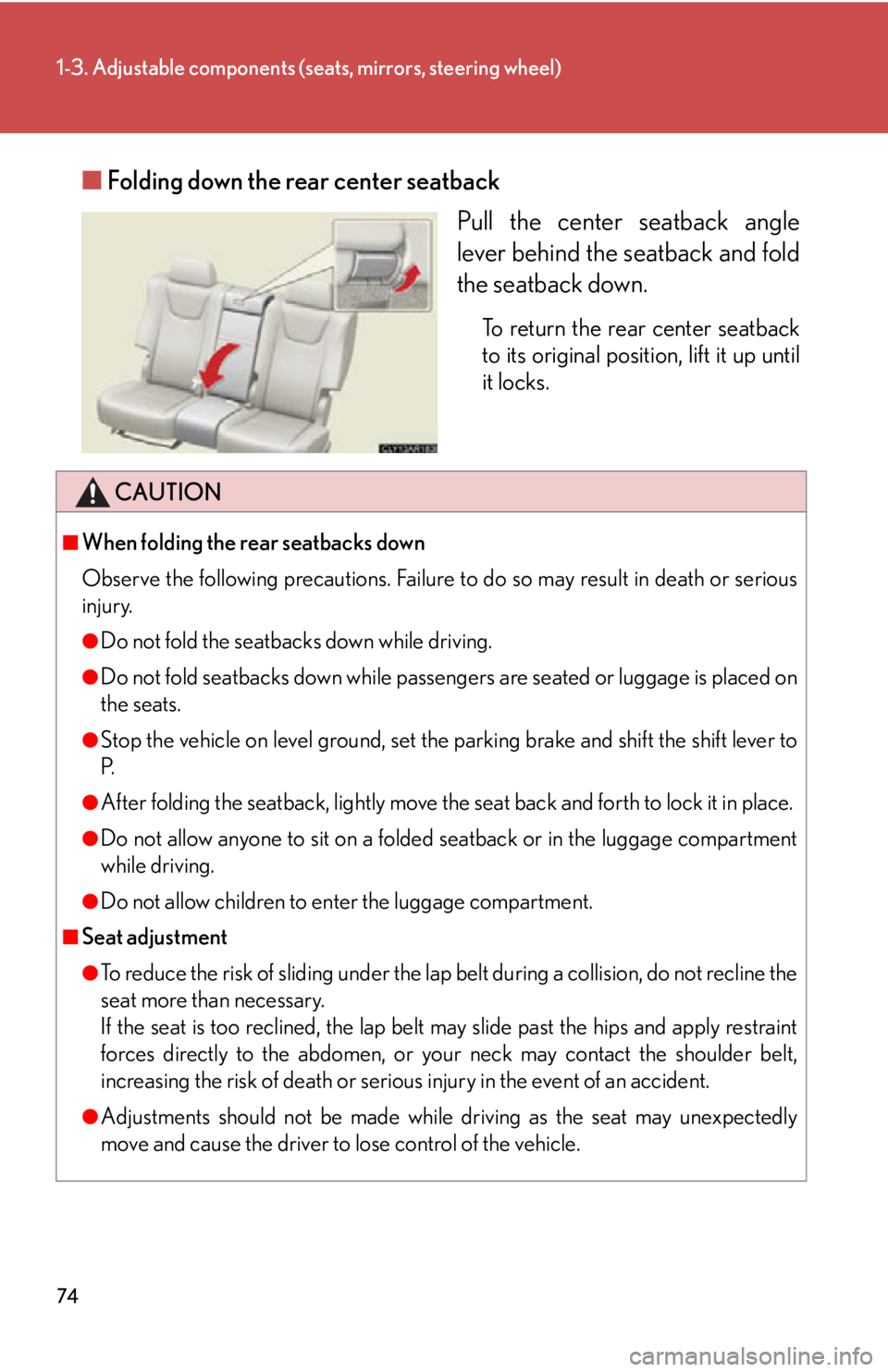
■ Folding down the rear center seatback
Pull the center seatback angle
lever behind the seatback and fold
the seatback down. To return the rear center seatback
to its original position, lift it up until
it locks.
CAUTION■
When folding the rear seatbacks down
Observe the following precautions. Failure to do so may result in death or serious
injury. ●
Do not fold the seatbacks down while driving.●
Do not fold seatbacks down while passenge rs are seated or luggage is placed on
the seats.●
Stop the vehicle on level ground, set the parking brake and shift the shift lever to
P.●
After folding the seatback, lightly move the seat back and forth to lock it in place.●
Do not allow anyone to sit on a folded seatback or in the luggage compartment
while driving.●
Do not allow children to en ter the luggage compartment.■
Seat adjustment ●
To reduce the risk of sliding under the lap belt during a collision, do not recline the
seat more than necessary.
If the seat is too reclined, the lap belt may slide past the hips and apply restraint
forces directly to the abdomen, or yo ur neck may contact the shoulder belt,
increasing the risk of death or seriou s injury in the event of an accident.
●
Adjustments should not be made while driving as the seat may unexpectedly
move and cause the driver to lose control of the vehicle.
Page 75 of 886
751-3. Adjustable components (seats, mirrors, steering wheel)
1
Before driving CAUTION■
After returning the rear seatback to the upright position
Observe the following precautions. Failure to do so may result in death or serious
injury. ●
Make sure the seatback is securely locked by pushing it forward and rearward on
the top.●
Check that the seat belts are not tw isted or caught in the seatback.
NOTICE■
Stowing the center seat belt buckle
Before folding down the rear seatbacks, stow the center seat belt buckle to prevent
it from becoming caught in the seatbacks.
Page 76 of 886
761-3. Adjustable components (seats, mirrors, steering wheel)
Driving position memory Your preferred driving position (the po sition of the driver's seat, steering
wheel and outside rear view mirrors) can be memorized and recalled with
the touch of a button. It is also possible to set this function to activate auto-
matically when the doors are unlocked.
Three different driving positions can be entered into memory.
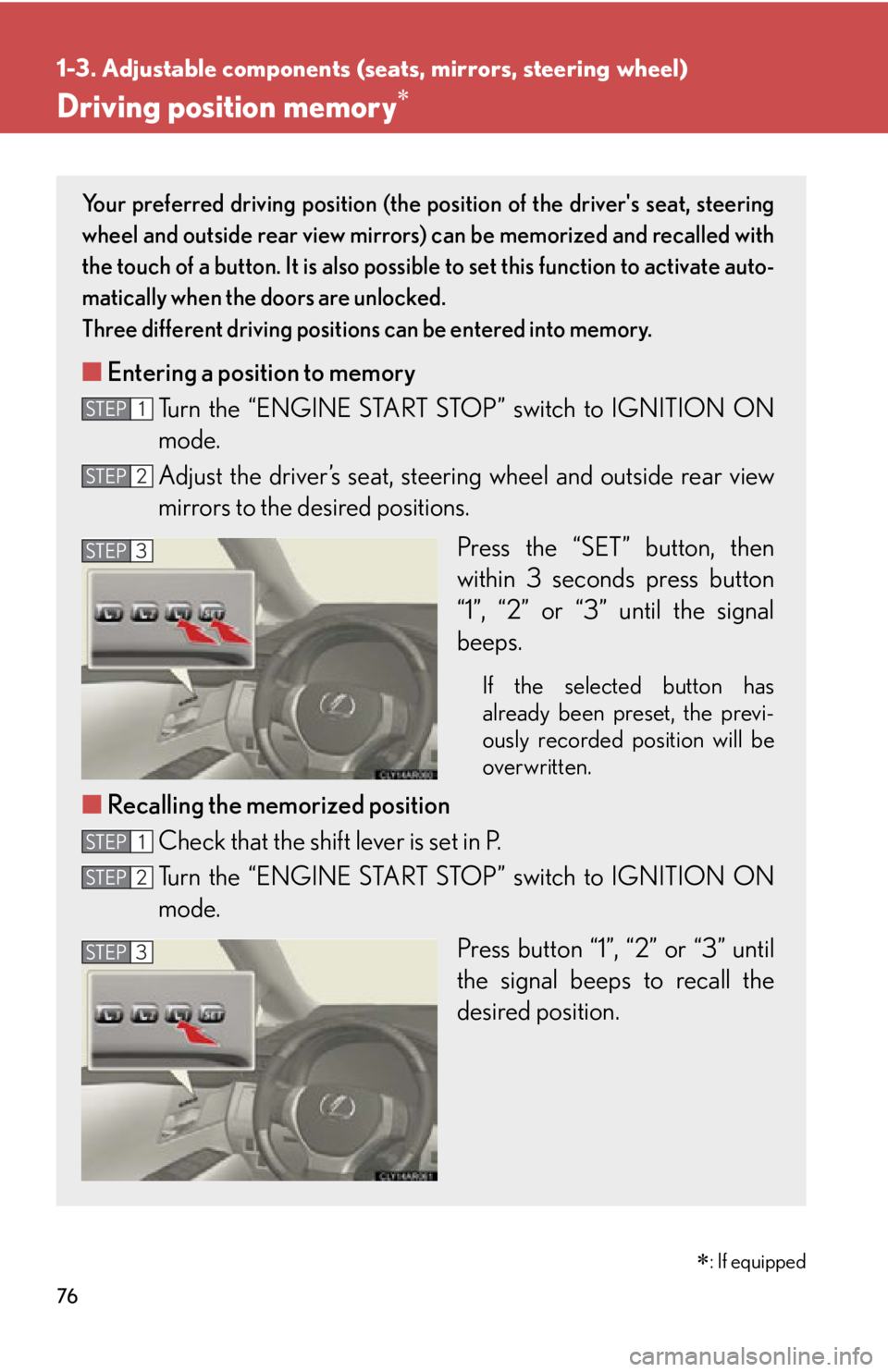
■ Entering a position to memory
Turn the “ENGINE START STOP ” switch to IGNITION ON
mode.
Adjust the driver’s seat, steer ing wheel and outside rear view
mirrors to the desired positions.
Press the “SET” button, then
within 3 seconds press button
“1”, “2” or “3” until the signal
beeps. If the selected button has
already been preset, the previ-
ously recorded position will be
overwritten.
■ Recalling the memorized position
Check that the shift lever is set in P.
Turn the “ENGINE START STOP ” switch to IGNITION ON
mode.
Press button “1”, “2” or “3” until
the signal beeps to recall the
desired position.STEP 1
STEP 2
STEP 3
STEP 1
STEP 2
STEP 3
: If equipped
Page 77 of 886
771-3. Adjustable components (seats, mirrors, steering wheel)
1
Before driving Linking driving position memory with door unlock operation
Record your driving position to butto n “1”, “2” or “3” before performing
the following:
Carry only the key (including the card key) to which you want to link the
driving position. If 2 or more keys are in the vehi cle, the driving position
cannot be linked properly.
Shift the shift lever to P and cl ose the driver's door. Turn the
“ENGINE START STOP” switch to IGNITION ON mode.
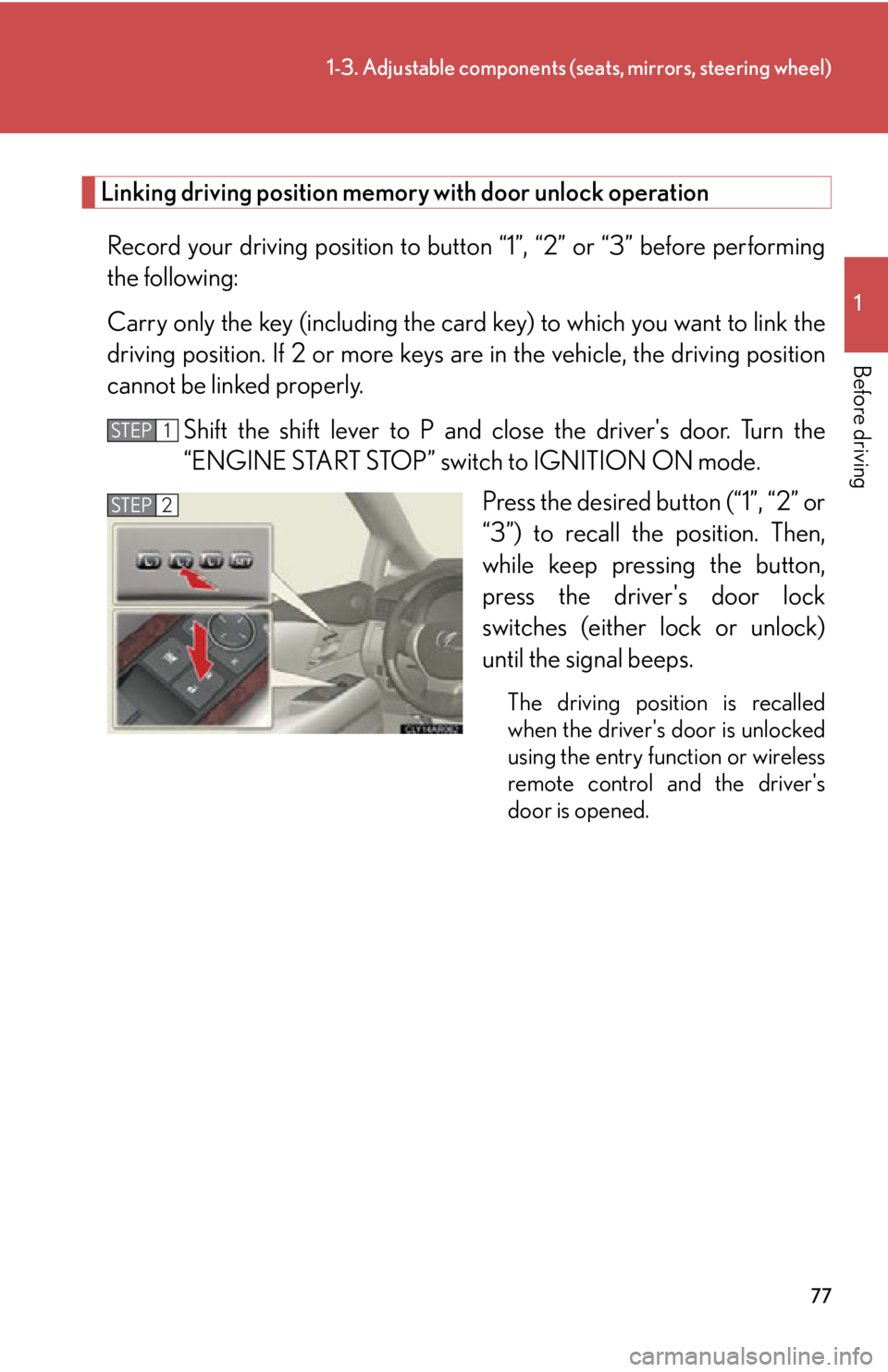
Press the desired button (“1”, “2” or
“3”) to recall the position. Then,
while keep pressing the button,
press the driver's door lock
switches (either lock or unlock)
until the signal beeps. The driving position is recalled
when the driver's door is unlocked
using the entry function or wireless
remote control and the driver's
door is opened. STEP 1
STEP 2
Page 79 of 886
791-3. Adjustable components (seats, mirrors, steering wheel)
1
Before driving ■
When driving position memory is li nked with door unlock operation
If the driver’s door is opened, the driver’s seat will move toward the memorized
position but stop slightly beforehand to allow easy access to the vehicle.
Turning the “ENGINE START STOP” switch to ACCESSORY mode or fastening
the driver’s seat belt moves the seat fully into the memorized position.■
Canceling the linked do or unlock operation
Turn the “ENGINE START STOP” swit ch to IGNITION ON mode and
close the driver's door.
While pressing the “SET” button, press the driver’s door lock switches
(either lock or unlock) until the signal beeps.■
Operating the driving position memory after turning the “ENGINE START
STOP” switch off
Memorized positions (except for the steering wheel position) can be activated up
to 180 seconds after the driver’s door is opened and another 60 seconds after it is
closed again, even after turning the “ENGINE START STOP” switch off.■
Stopping seat position op eration part-way through
Perform any of the following operations: ●
Press the “SET” button.●
Press button “1”, “2” or “3”.●
Adjust the seat using the switches (only cancels seat position recall).●
Adjust the steering wheel using the tilt and telescopic steering control switch
(only cancels steering wheel position recall).■
Correct seat position
When the seat is in the most forward or most backward posi tion, and the seat is
being moved in those directions, the system may not correctly recognize the cur-
rent position and the memorized posi tion will not be correctly recalled.
■
The auto away function for exiting the driver seat
If the seat is already close to the rearmost position, the auto away function may not
operate when the driver exits the vehicle.
■
Customization
The distance that the driver’s seat move s backward during the auto away function
can be changed. (Customizable features P. 8 3 4 )STEP 1
STEP 2
Page 81 of 886
8111-3. Adjustable components (seats, mirrors, steering wheel)
Before driving Head restraints
■
Removing the head restraints
■
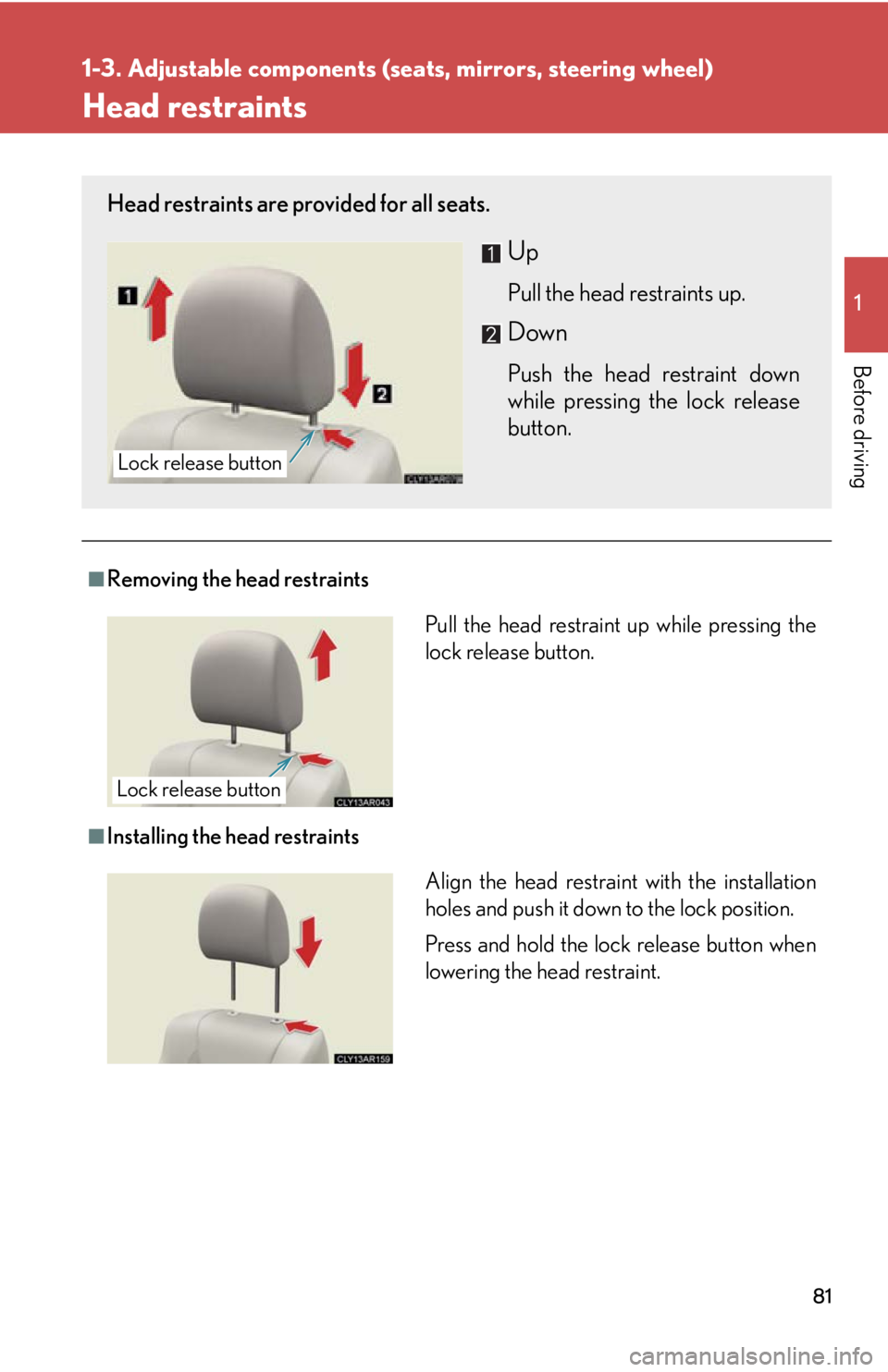
Installing the head restraintsHead restraints are provided for all seats.
Up Pull the head restraints up.
Down Push the head restraint down
while pressing the lock release
button.Lock release button
Pull the head restraint up while pressing the
lock release button.
Lock release button
Align the head restrain t with the installation
holes and push it down to the lock position.
Press and hold the lock release button when
lowering the head restraint.
Page 82 of 886
821-3. Adjustable components (s eats, mirrors, steering wheel)
■
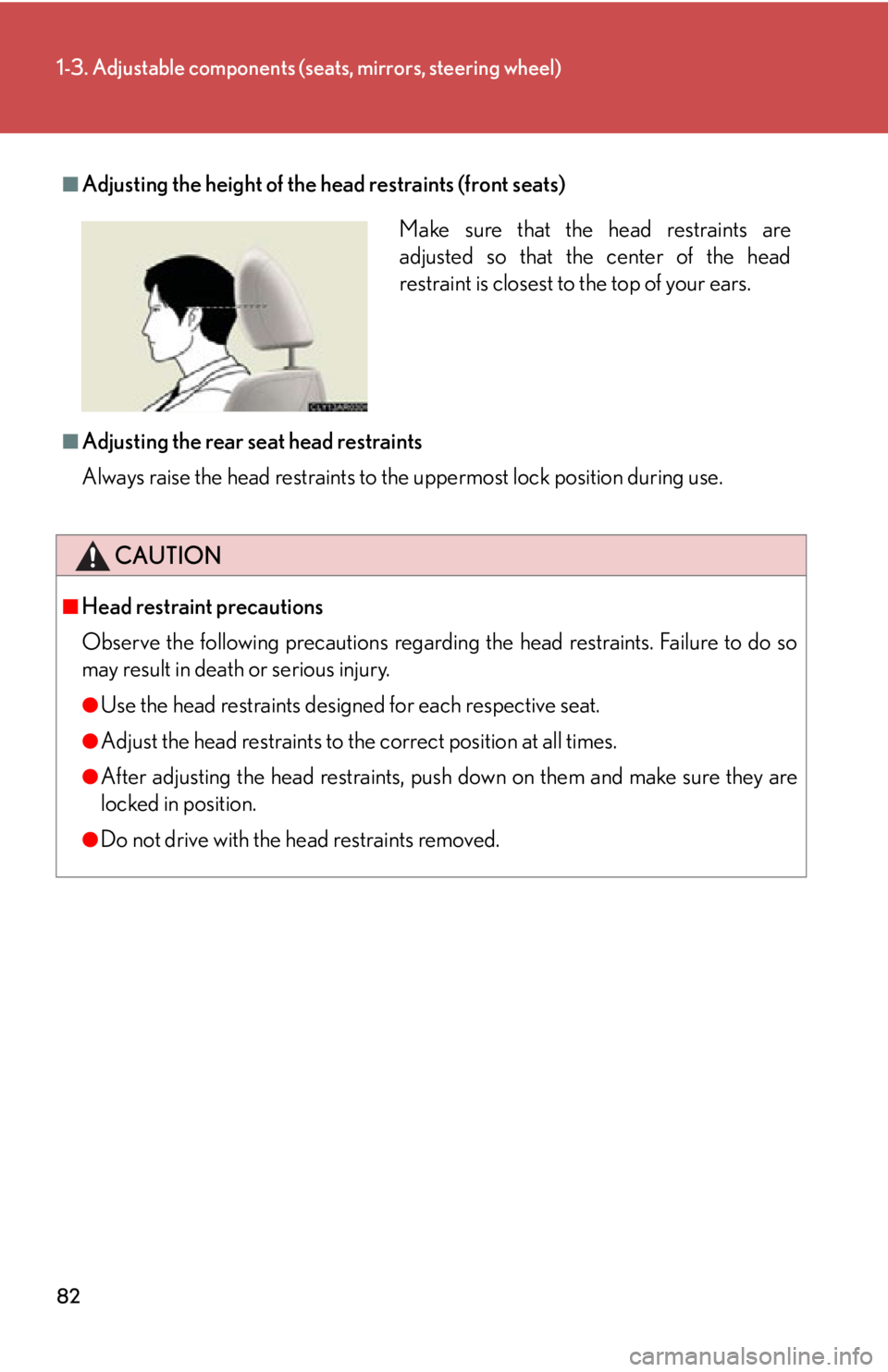
Adjusting the height of the head restraints (front seats)
■
Adjusting the rear seat head restraints
Always raise the head restraints to th e uppermost lock position during use.
CAUTION■
Head restraint precautions
Observe the following precautions regarding the head restraints. Failure to do so
may result in death or serious injury. ●
Use the head restraints design ed for each respective seat.●
Adjust the head restraints to the correct position at all times.●
After adjusting the head restraints, push down on them and make sure they are
locked in position.●
Do not drive with the head restraints removed. Make sure that the head restraints are
adjusted so that the center of the head
restraint is closest to the top of your ears.
Page 85 of 886
851-3. Adjustable components (seats, mirrors, steering wheel)
1
Before driving Pre-collision seat belts (front seats of vehicles with a pre-collision system)
If the system determines that a collision is unavoidable, the front seat belts
will retract before the collision. ( P. 2 7 8 )■
Emergency locking retractor (ELR)
The retractor will lock the belt during a sudd en stop or on impact. It may also lock if
you lean forward too quickly. To allow the belt to extend, retract the belt and then
pull it slowly.■
Automatic locking retractor (ALR)
When a passenger's shoulder belt is completely extended and then retracted even
slightly, the belt is locked in that position and cannot be extended. This feature is
used to hold the child restraint system (CRS) firmly. To free the belt again, fully
retract the belt and then pull the belt out once more. ( P. 141)■
Child seat belt usage
The seat belts of your vehicle were princi pally designed for persons of adult size. ●
Use a child restraint system appropriate for the child, until the child becomes
large enough to properly wear the vehicle's seat belt. ( P. 1 3 7 )●
When the child becomes large enough to properly wear the vehicle's seat belt,
follow the instructions on P. 83 regarding seat belt usage.■
Replacing the belt after the pretensioner has been activated
If the vehicle is involved in multiple collisions, the pretensioner will activate for the
first collision, but will not activate for the second or subsequent collisions.
Page 96 of 886
961-3. Adjustable components (s eats, mirrors, steering wheel)
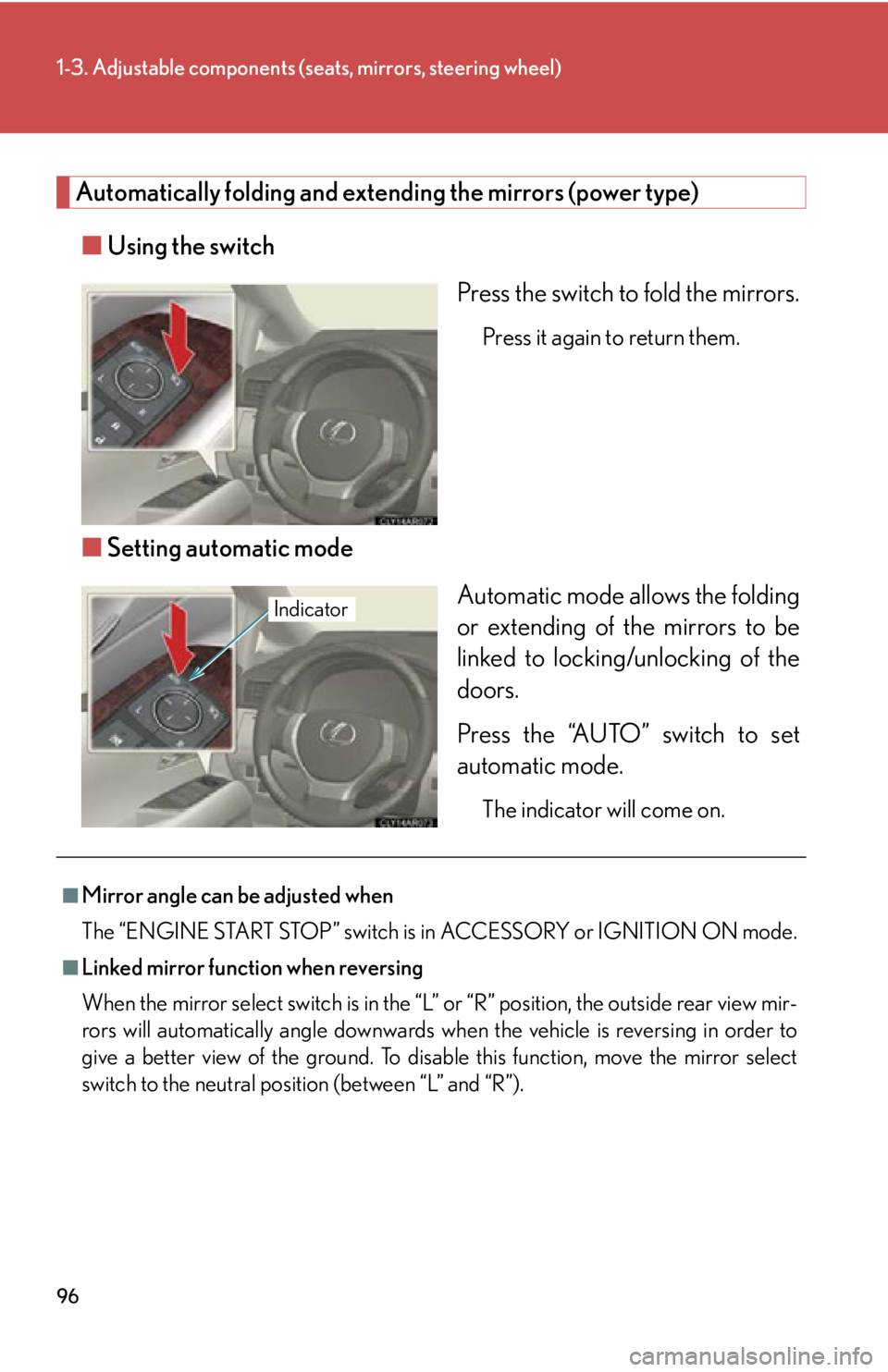
Automatically folding and extending the mirrors (power type)
■ Using the switch
Press the switch to fold the mirrors. Press it again to return them.
■ Setting automatic mode
Automatic mode allows the folding
or extending of the mirrors to be
linked to locking/unlocking of the
doors.
Press the “AUTO” switch to set
automatic mode. The indicator will come on.Indicator
■
Mirror angle can be adjusted when
The “ENGINE START STOP” switch is in ACCESSORY or IGNITION ON mode.■
Linked mirror function when reversing
When the mirror select switch is in the “L ” or “R” position, the outside rear view mir-
rors will automatically angl e downwards when the vehicle is reversing in order to
give a better view of the ground. To disable this function, move the mirror select
switch to the neutral positi on (between “L” and “R”).
Page 98 of 886
981-4. Opening and closing th e windows and moon roof
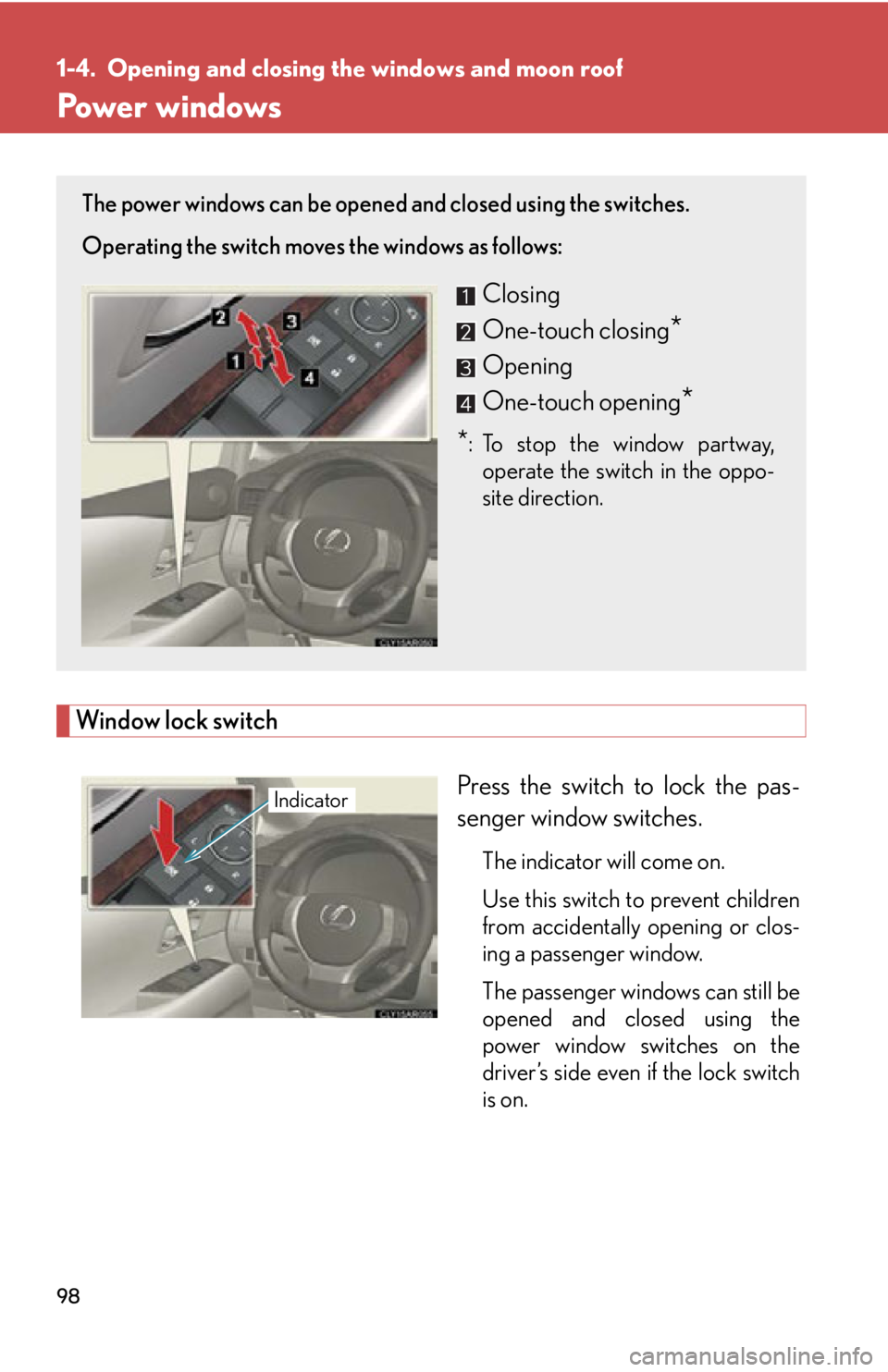
Power windows
Window lock switch
Press the switch to lock the pas-
senger window switches. The indicator will come on.
Use this switch to prevent children
from accidentally opening or clos-
ing a passenger window.
The passenger windows can still be
opened and closed using the
power window switches on the
driver’s side even if the lock switch
is on.The power windows can be opened and closed using the switches.
Operating the switch moves the windows as follows:
Closing
One-touch closing
*Opening
One-touch opening
** :To stop the window partway,
operate the switch in the oppo-
site direction.
Indicator