lock LEXUS RX350 2015 Owners Manual
[x] Cancel search | Manufacturer: LEXUS, Model Year: 2015, Model line: RX350, Model: LEXUS RX350 2015Pages: 886, PDF Size: 11 MB
Page 281 of 886

2812-4. Using other driving systems
2
When driving ■
Conditions that may trigger the system even if there is no possibility of collision ●
When there is an object by the roadside at the entrance to a curve●
When passing an oncoming vehicle on a curve●
When driving over a narrow iron bridge●
When there is a metal object on the road surface●
When driving on an uneven road surface●
When passing an oncoming vehicle on a left-turn●
When your vehicle rapidly closes on the vehicle in front●
When a grade separation/interchange, sign, billboard, or other structure
appears to be directly in the vehicle's line of travel●
When climbing a steep hill causes an over head billboard or ot her metallic struc-
ture to appear directly in the vehicle's line of travel●
When an extreme change in vehicle height occurs●
When the axis of the radar is out of adjustment●
When passing through certain toll gates●
When driving on a bridge●
When passing through a tunnel
When the system is activated in the situations described above, there is also a possi-
bility that the seat belts will retract quickly and the brakes will be applied with a force
greater than normal. When the seat belt is locked in the retracted position, stop the
vehicle in a safe place, release the seat belt and refasten it.
Page 294 of 886
2942-5. Driving information
CAUTION■
Off-road driving precautions
Always observe the following precautions to minimize the risk of death or serious
injury or damage to your vehicle: ●
Drive carefully when off the road. Do not take unnecessary risks by driving in
dangerous places.●
Do not grip the steering wheel spokes wh en driving off-road. A bad bump could
jerk the wheel and injure your hands. Keep both hands and especially your
thumbs on the outside of the rim.●
Always check your brakes for effectiveness immediately after driving in sand,
mud, water or snow.●
After driving through tall grass, mud, rock , sand, water, etc., check that there is no
grass, bush, paper, rags, stone, sand, etc. adhering or trapped to the underbody.
Clear off any such matter from the underbody. If the vehicle is used with these
materials trapped or adhering to the underbody, a breakdown or fire could occur.●
When driving off-road or in rugged te rrain, do not drive at excessive speeds,
jump, make sharp turns, strike objects, etc. This may cause loss of control or vehi-
cle rollover causing death or serious injury. You are also risking expensive dam-
age to your vehicle’s suspension and chassis.
NOTICE■
To prevent water damage
Take all necessary safety measures to ensure that water damage to the engine or
other components does not occur. ●
Water entering the engine air intake will cause severe engine damage. ●
Water entering the automatic transmission will cause deterioration in shift quality,
locking up of your transmission accompanied by vibration, and ultimately dam-
age.
●
Water can wash the grease from wheel bearings, causing rusting and premature
failure, and may also enter the differentials, transmission and transfer case, reduc-
ing the gear oil’s lubricating qualities.
Page 298 of 886
2982-5. Driving information
As shown in the example above, if the number of occupants increases,
the cargo and luggage load will be re duced by an amount that equals the
increased weight due to the addition al occupants. In other words, if an
increase in the number of occupants ca uses an excess of the total load
capacity (combined weight of occupants plus cargo and luggage load),
you must reduce the cargo and luggage on your vehicle. CAUTION■
Things that must not be carri ed in the luggage compartment
The following things may cause a fire if loaded in the luggage compartment: ●
Receptacles containing gasoline●
Aerosol cans■
Storage precautions
Observe the following precautions.
Failure to do so may result in death or serious injury. ●
Stow cargo and luggage in the lugga ge compartment whenever possible.●
Do not stack cargo and luggage in the luggage compartment higher than the
seatbacks.
Such items may be thrown about and possib ly injure people in the vehicle in the
event of sudden braking or in an accident.●
Do not place cargo or luggage in or on the following locations as the items may
get under the brake or accelerator pedal and prevent the pedals from being
depressed properly, block the driver’s vision, or hit the driver or passengers,
causing an accident:
• At the feet of the driver
• On the front passenger or rear seats (when stacking items)
• On the luggage cover
• On the instrument panel
•On the dashboard
●
Secure all items in the occupant compartment, as they may shift and injure some-
one in the event of sudden braking, sudden swerving or an accident.
Page 313 of 886
3132-5. Driving information
2
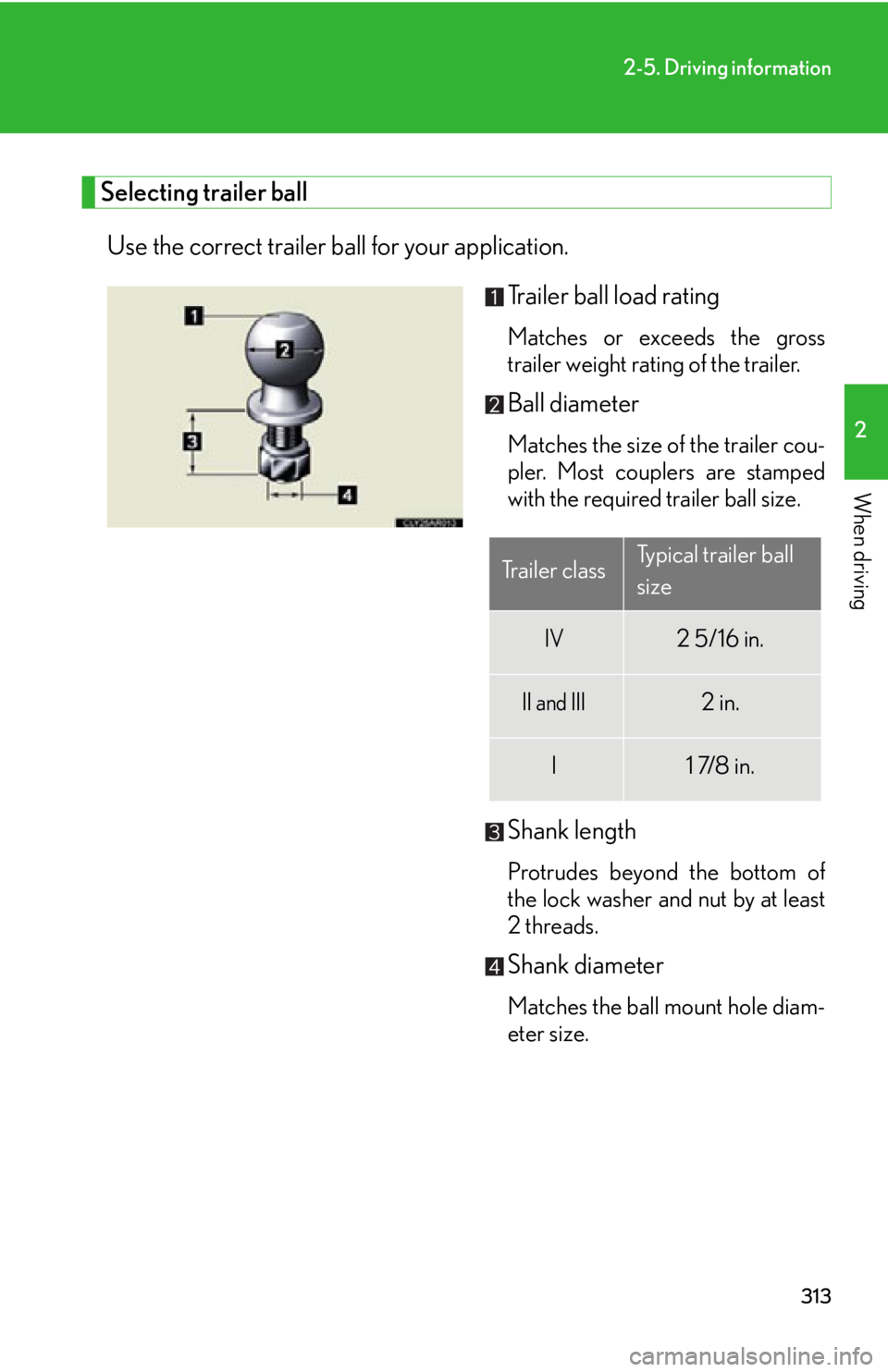
When driving Selecting trailer ball
Use the correct trailer ball for your application.
Trailer ball load rating Matches or exceeds the gross
trailer weight rating of the trailer.
Ball diameter Matches the size of the trailer cou-
pler. Most couplers are stamped
with the required trailer ball size.
Shank length Protrudes beyond the bottom of
the lock washer and nut by at least
2 threads.
Shank diameter
Matches the ball mount hole diam-
eter size.Trailer class Typical trailer ball
size
IV 2 5/16 in.
II and III 2 in.
I 1 7/8 in.
Page 318 of 886
3182-5. Driving information
● Always place wheel bloc ks under both the vehi cle’s and the trailer’s
wheels when parking. Apply the pa rking brake firmly, and put the
transmission in P. Avoid parking on a slope, but if unavoidable, do so
only after performing the following:
Apply the brakes and keep them applied.
Have someone place wheel blocks under both the vehicle’s and
trailer’s wheels.
When the wheel blocks are in pl ace, release the brakes slowly
until the blocks absorb the load.
Apply the parking brake firmly.
Shift into P and turn off the engine.
● When restarting after parking on a slope:
With the transmission in P, start th e engine. Be sure to keep the
brake pedal depressed.
Shift into a forward gear. If reversing, shift into R.
Release the parking brake and br ake pedal, and slowly pull or
back away from the wheel blocks. Stop and apply the brakes.
Have someone retrieve the blocks.STEP 1
STEP 2
STEP 3
STEP 4
STEP 5
STEP 1
STEP 2
STEP 3
STEP 4
Page 327 of 886
Interior features
3
327Using the hands-free system
(for mobile phones)............. 565
Making a phone call .............. 573
Setting a mobile phone......... 578
Security and system
setup ....................................... 584
Using the phone book.......... 588
3-5. Using the interior lights
Interior lights list ..................... 595
• Interior lights ........................ 596
• Personal lights ...................... 596
3-6. Using the storage
features
List of storage features ......... 598
• Glove box .............................. 599
• Bottle holders/
door pockets ........................ 600
• Cup holders ........................... 601
• Console box .......................... 604
• Coin holder ........................... 606
• Auxiliary boxes .................... 606
• Under tray ............................ 608 3-7. Other interior features
Sun visors ................................. 609
Vanity mirrors .......................... 610
Clock ............................................ 611
Outside temperature
display...................................... 613
Multi-display light control ..... 615
Power outlets ............................ 616
Heated steering wheel .......... 619
Seat heaters and
ventilators ............................. 620
Armrest .................................... 622
Coat hooks .............................. 623
Assist grips ................................ 624
Floor mat .................................. 625
Luggage compartment
features ................................... 627
Garage door opener ............ 632
Compass .................................. 638
Safety Connect ...................... 642
Page 352 of 886
3523-2. Using the air conditio ning system and defogger
■
When outside air temperature is below 32 F (0 C)
The cooling and dehumidification function may not operate even when
is
on.■
Ventilation and air conditioning odors ●
To let fresh air in, set the air conditioning system to the outside air mode.●
During use, various odors from inside and outside the vehicle may enter into
and accumulate in the air conditioning sy stem. This may then cause odor to be
emitted from the vents.●
To reduce potential odors from occurring:
• It is recommended that the air conditioning system be set to outside air mode
prior to turning the vehicle off.
• The start timing of the blower may be delayed for a short period of time
immediately after the air conditioning system is started in automatic mode.
CAUTION■
To prevent the windshield from fogging up
Do not use
during cool air operation in ex tremely humid weather. The dif-
ference between the temperature of the outside air and that of the windshield can
cause the outer surface of the windshield to fog up, blocking your vision.
NOTICE■
To prevent battery discharge
Do not leave the air conditioning system on longer than necessary when the engine
is off.
Page 360 of 886
3603-2. Using the air conditio ning system and defogger
CAUTION■
To prevent the windshield from fogging up
Do not use
during cool air operation in extremely humid weather. The differ-
ence between the temperature of the outside air and that of the windshield can
cause the outer surface of the windshield to fog up, blocking your vision.
NOTICE■
To prevent battery discharge
Do not leave the air conditioning system on longer than necessary when the engine
is off.
Page 394 of 886
3943-3. Using the Lexus Display Audio system
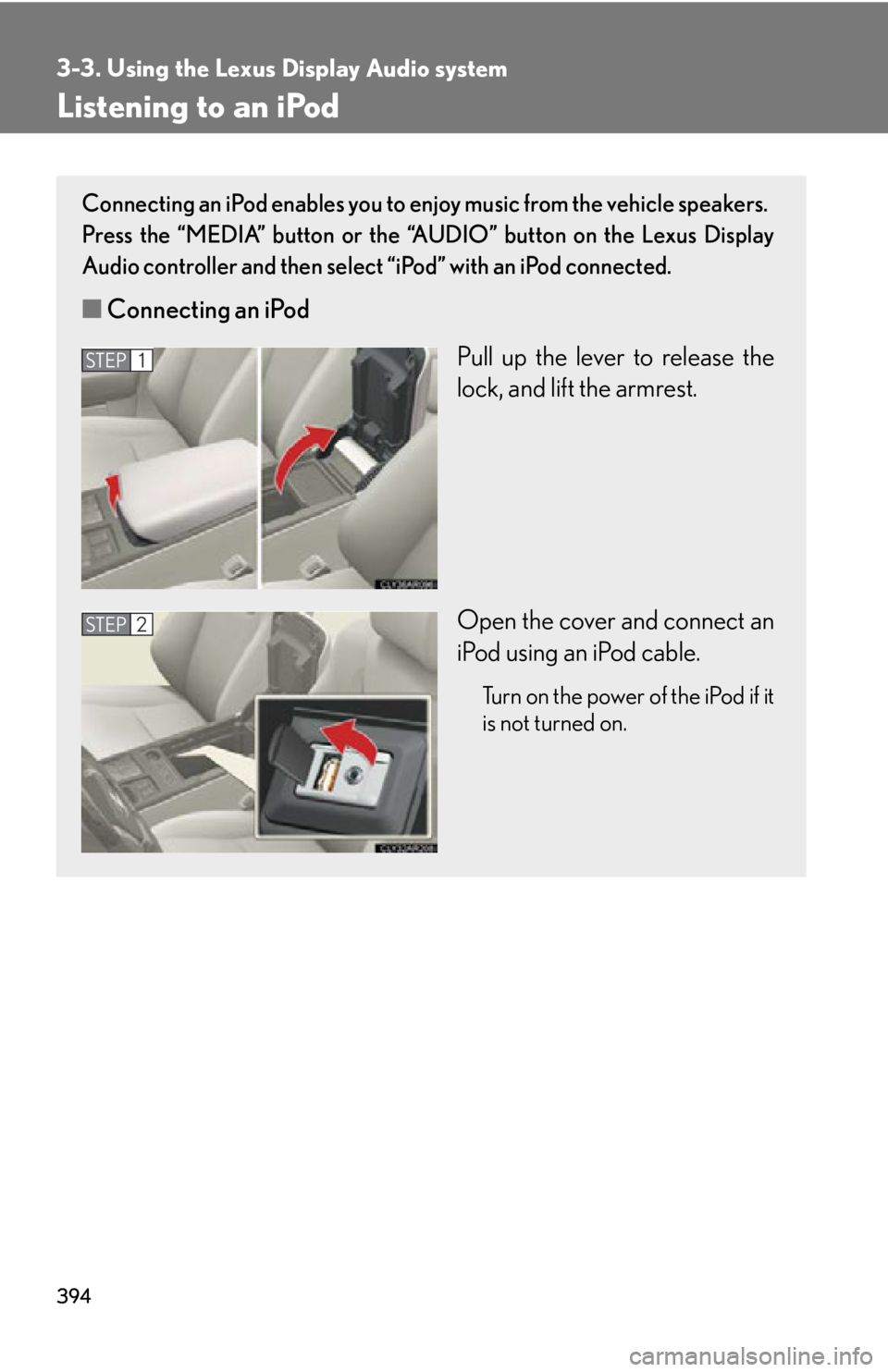
Listening to an iPod Connecting an iPod enables you to enjoy music from the vehicle speakers.
Press the “MEDIA” button or the “AUDIO” button on the Lexus Display
Audio controller and then select “iPod” with an iPod connected.
■ Connecting an iPod
Pull up the lever to release the
lock, and lift the armrest.
Open the cover and connect an
iPod using an iPod cable. Turn on the power of the iPod if it
is not turned on.STEP 1
STEP 2
Page 402 of 886
4023-3. Using the Lexus Display Audio system
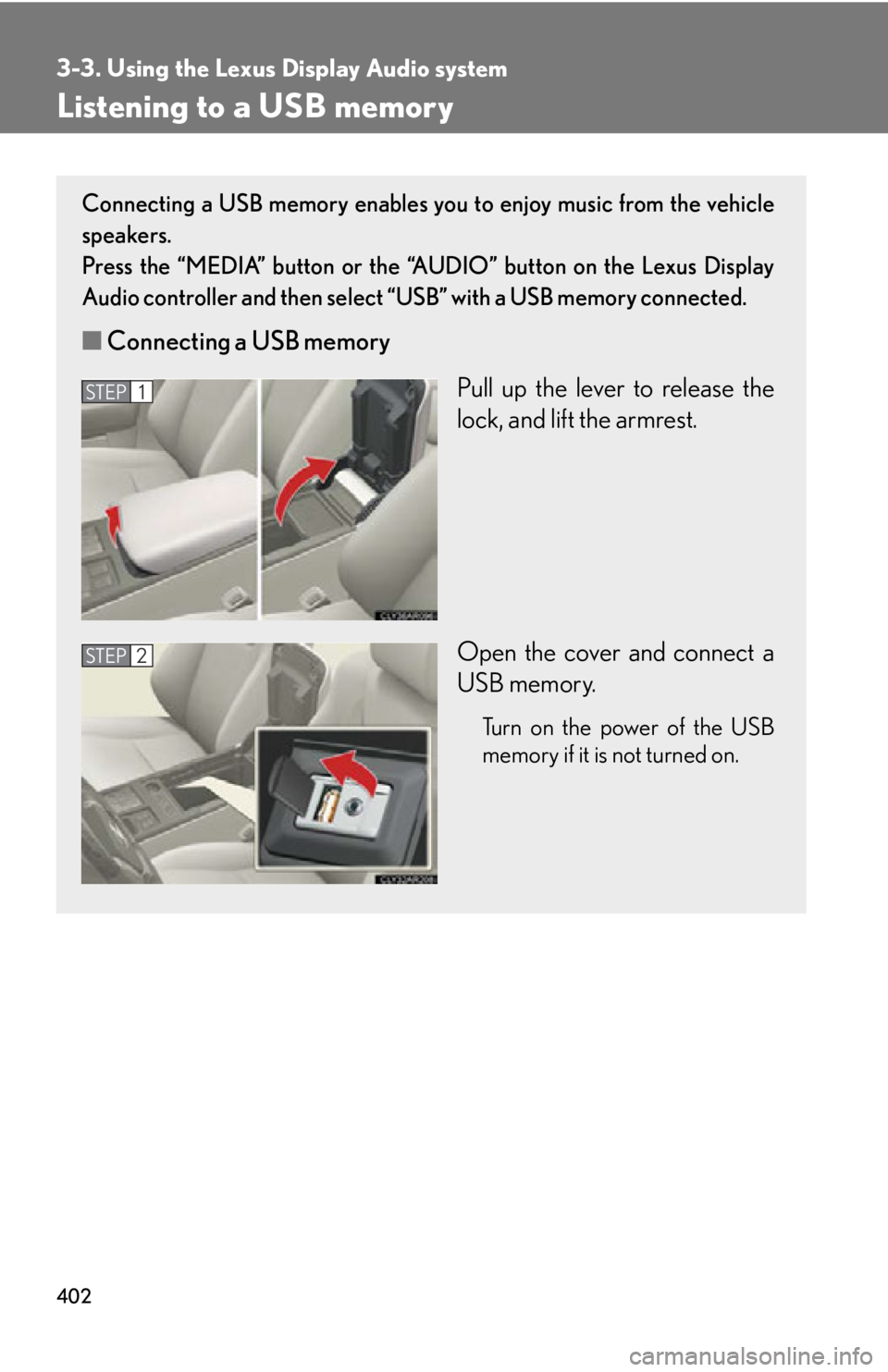
Listening to a USB memory Connecting a USB memory enables you to enjoy music from the vehicle
speakers.
Press the “MEDIA” button or the “AUDIO” button on the Lexus Display
Audio controller and then select “USB” with a USB memory connected.
■ Connecting a USB memory
Pull up the lever to release the
lock, and lift the armrest.
Open the cover and connect a
USB memory. Turn on the power of the USB
memory if it is not turned on.STEP 1
STEP 2