stop start LEXUS RX350 2015 Workshop Manual
[x] Cancel search | Manufacturer: LEXUS, Model Year: 2015, Model line: RX350, Model: LEXUS RX350 2015Pages: 886, PDF Size: 11 MB
Page 256 of 886
2562-4. Using other driving systems
■
The rear view monitor system can be operated when
The shift lever is in R, the “ENGINE START STOP” switch is in IGNITION ON
mode.■
Changing display modes
The rear view monitor display mode ca n be changed while the screen is on.●
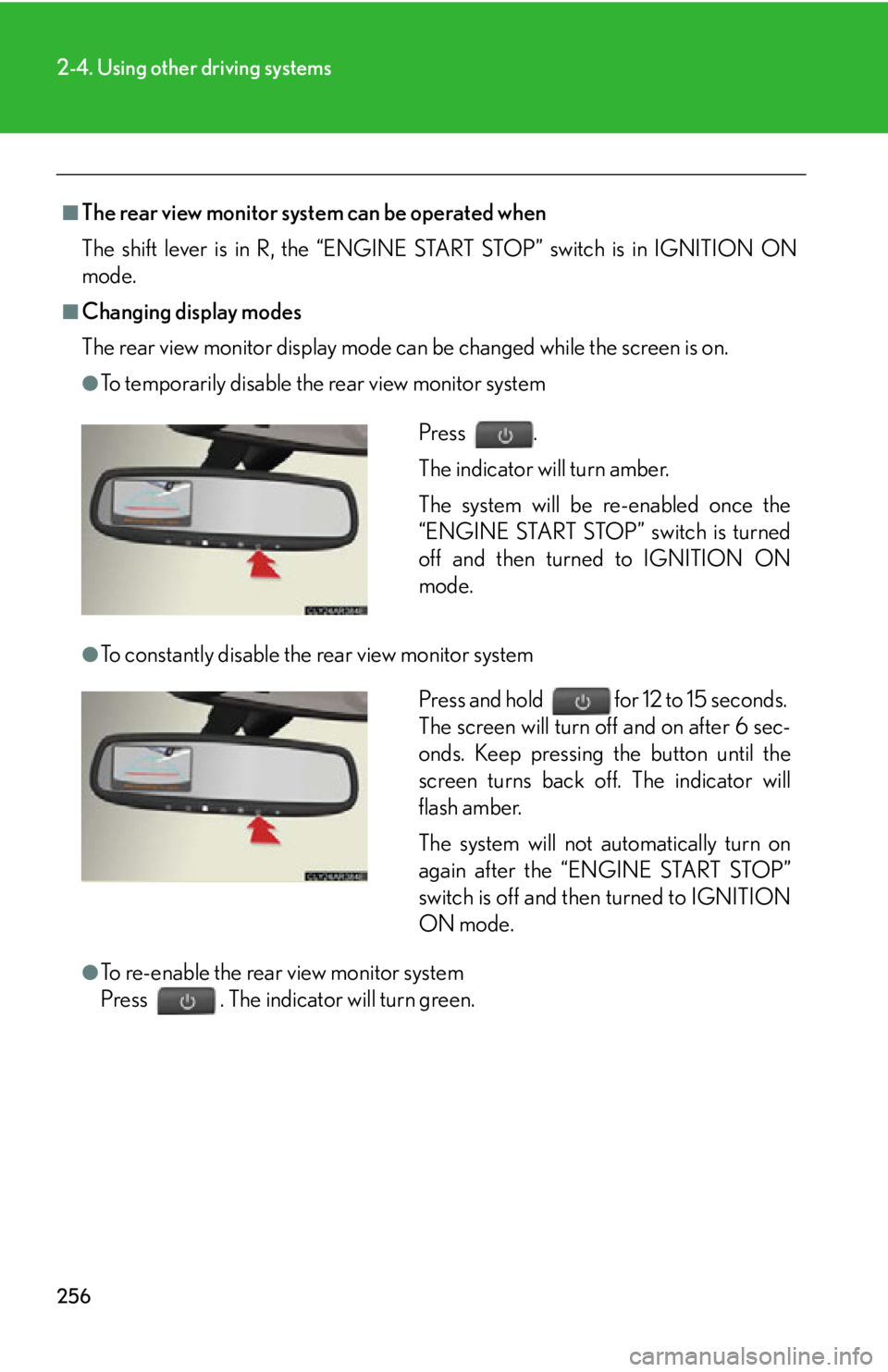
To temporarily disable the rear view monitor system
●
To constantly disable the rear view monitor system
●
To re-enable the rear view monitor system
Press . The indicator will turn green. Press .
The indicator will turn amber.
The system will be re-enabled once the
“ENGINE START STOP” switch is turned
off and then turned to IGNITION ON
mode.
Press and hold for 12 to 15 seconds.
The screen will turn off and on after 6 sec-
onds. Keep pressing the button until the
screen turns back off. The indicator will
flash amber.
The system will not automatically turn on
again after the “ENGINE START STOP”
switch is off and then turned to IGNITION
ON mode.
Page 269 of 886
2692-4. Using other driving systems
2
When driving Driving assist systems To help enhance driving safety and performance, the following systems
operate automatically in response to various driving situations. Be aware,
however, that these systems are supplementary and should not be relied
upon too heavily when operating the vehicle.
■ ABS (Anti-lock Brake System) Helps to prevent wheel lock when the brakes are applied suddenly, or if
the brakes are applied while driving on a slippery road surface
■ Brake assist Generates an increased level of braking force after the brake pedal is
depressed, when the system detects a panic stop situation
■ VSC (Vehicle Stability Control) Helps the driver to control skidding when swerving suddenly or turning on
slippery road surfaces
■ TRAC (Traction Control) Helps to maintain drive power and prevent the drive wheels from spinning
when starting the vehicle or accelerating on slippery roads
■ Hill-start assist control P. 2 76
■ EPS (Electric Power Steering) Employs an electric motor to reduce the amount of effort needed to turn
the steering wheel
■ Active Torque Control 4WD system (AWD models) Automatically switches from front-wheel drive to AWD (All-Wheel Drive)
according to driving conditions, help ing to ensure reliable handling and
stability. Examples of conditions wher e the system will switch to AWD are
when cornering, going uphill, starti ng off or accelerating, and when the
road surface is slippery due to snow or rain etc.
Page 272 of 886

2722-4. Using other driving systems
■
When the message is displayed on the multi-information display showing that
TRAC has been disabled even if the VSC off switch has not been pressed
TRAC and hill-start assist control cannot be operated. Contact your Lexus dealer.■
Sounds and vibrations caused by th e ABS, VSC, TRAC and brake assist ●
A sound may be heard from the engi ne compartment when the engine is
started or just after the vehicle begins to move. This sound does not indicate that
a malfunction has occurred in any of these systems. ●
Any of the following conditions may occur when the above systems are operat-
ing. None of these indicates that a malfunction has occurred.
• Vibrations may be felt through the vehicle body and steering.
• A motor sound may be heard after the vehicle comes to a stop.
• The brake pedal may pulsate slightly after the ABS is activated.
• The brake pedal may move down slightly after the ABS is activated.■
EPS operation sound
When the steering wheel is operated, a motor sound (whirring sound) may be
heard. This does not indicate a malfunction.■
Reactivation of the TRAC /VSC systems
Turning off the engine after turning off the TRAC/VSC systems will automatically
reactivate them.■
Reactivation of the TRAC sy stem linked to vehicle speed
When only the TRAC system is turned off, the TRAC system will turn on when vehi-
cle speed increases. However, when both TRAC and VSC systems are turned off,
the systems will not turn on even when vehicle speed increases.■
Reduced effectiveness of the EPS system
The effectiveness of the EPS system is reduced to prevent the system from over-
heating when there is frequent steering in put over an extended period of time. The
steering wheel may feel heavy as a result. Should this occur, refrain from excessive
steering input or stop the vehicle and turn the engine off. The EPS system should
return to normal within 10 minutes.
Page 276 of 886
2762-4. Using other driving systems
Hill-start assist control
■
Hill-start assist control can be operated when ●
The shift lever is in a position other than P.●
The parking brake is not applied.●
The accelerator peda l is not depressed.■
Hill-start assist control ●
While hill-start assist control is operating, the brakes remain automatically
applied after the driver releases the br ake pedal. The stop lights and the high
mounted stoplight turn on.●
Hill-start assist control operates for about 2 seconds after the brake pedal is
released.●
If the slip indicator does not flash and the buzzer does not sound when the brake
pedal is further depressed, slightly redu ce the pressure on the brake pedal (do
not allow the vehicle to roll backward) and then firmly depress it again. If the sys-
tem still does not operate, check if th e operating conditions explained above
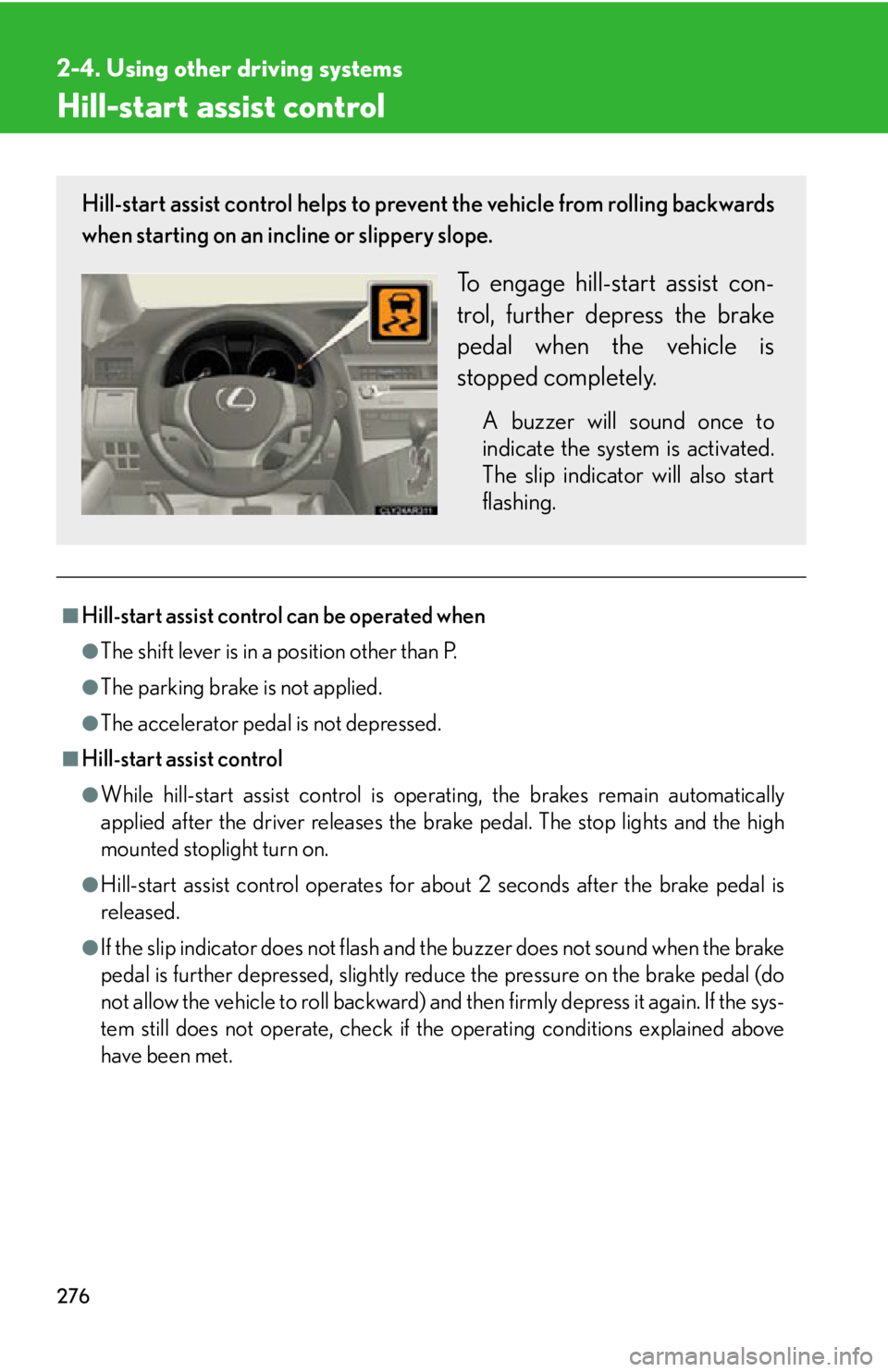
have been met.Hill-start assist control helps to prevent the vehicle from rolling backwards
when starting on an incline or slippery slope.
To engage hill-start assist con-
trol, further depress the brake
pedal when the vehicle is
stopped completely. A buzzer will sound once to
indicate the system is activated.
The slip indicator will also start
flashing.
Page 299 of 886
2992-5. Driving information
2
When driving CAUTION●
Never allow anyone to ride in the luggage compartment. It is not designed for
passengers. They should ride in their seat s with their seat belt s properly fastened.
Otherwise, they are much more likely to suffer death or serious bodily injury, in
the event of sudden braking, sudden swerving or an accident.■
Capacity and distribution ●
Do not exceed the maximum axle weight ra ting or the total vehicle weight rating. ●
Even if the total load of occupant's weight and the cargo load is less than the total
load capacity, do not apply the load unevenly. Improper loading may cause dete-
rioration of steering or braking control which may cause death or serious injury.■
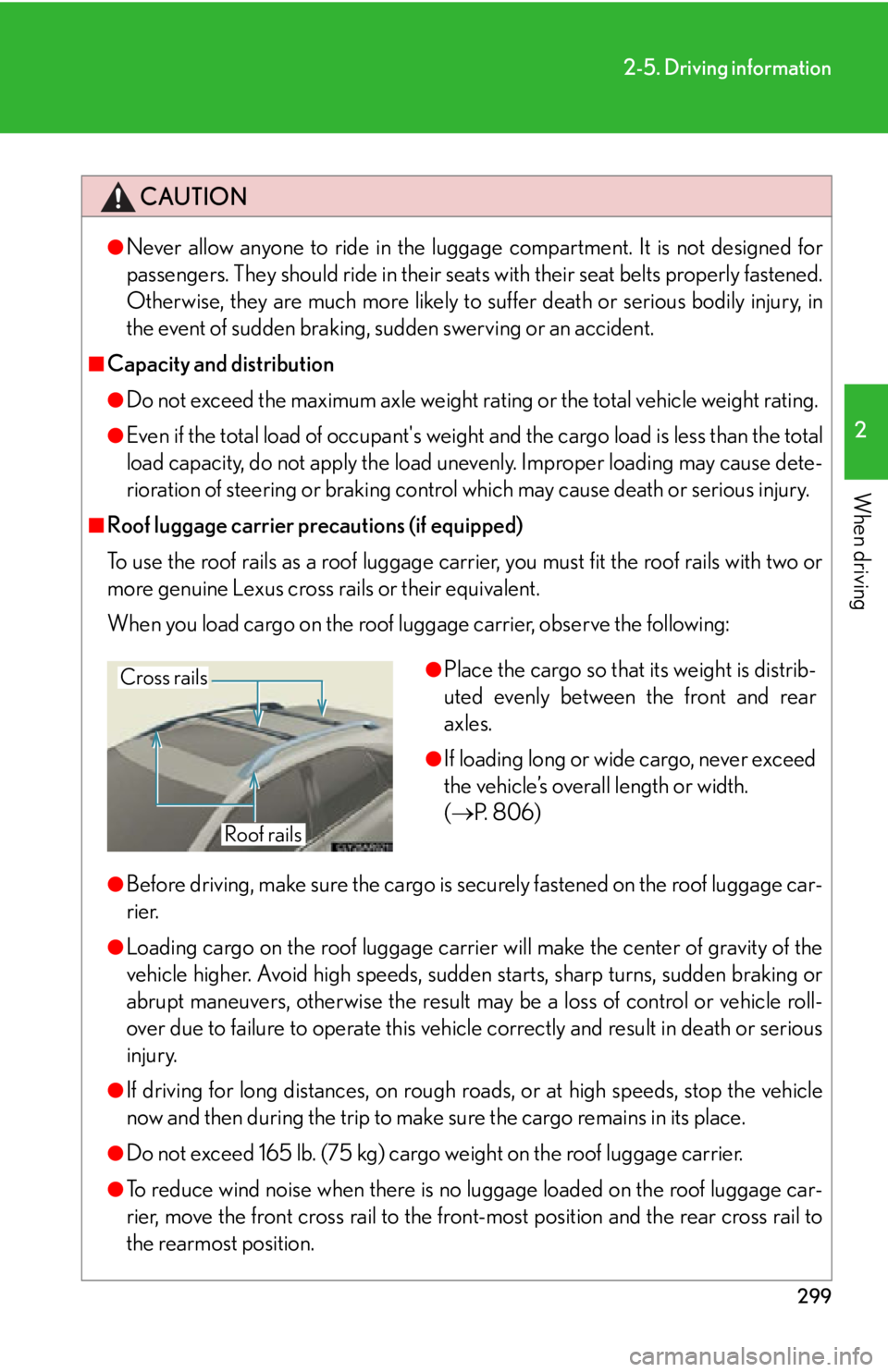
Roof luggage carrier precautions (if equipped)
To use the roof rails as a roof luggage carrier, you must fit the roof rails with two or
more genuine Lexus cross rails or their equivalent.
When you load cargo on the roof luggage carrier, observe the following:
●
Before driving, make sure the cargo is securely fastened on the roof luggage car-
rier.●
Loading cargo on the roof luggage carrier will make the center of gravity of the
vehicle higher. Avoid high speeds, sudden starts, sharp turns, sudden braking or
abrupt maneuvers, otherwise the result may be a loss of control or vehicle roll-
over due to failure to operate this vehicl e correctly and result in death or serious
injury.
●
If driving for long distances, on rough ro ads, or at high spee ds, stop the vehicle
now and then during the trip to make sure the cargo remains in its place.
●
Do not exceed 165 lb. (75 kg) cargo weight on the roof luggage carrier.
●
To reduce wind noise when there is no luggage loaded on the roof luggage car-
rier, move the front cross rail to the front-most position and the rear cross rail to
the rearmost position. ●
Place the cargo so that its weight is distrib-
uted evenly between the front and rear
axles. ●
If loading long or wide cargo, never exceed
the vehicle’s overall length or width.
( P. 8 0 6 )Cross rails
Roof rails
Page 316 of 886

3162-5. Driving information
Trailer towing tips
Your vehicle will handle differently when towing a trailer. Help to avoid an
accident, death or serious injury, keep the following in mind when towing:
● Speed limits for towing a trailer va ry by state or province. Do not
exceed the posted towing speed limit.
● Lexus recommends that the vehicle-trailer speed limit is 65 mph (104
km/h) on a flat, straight, dry road. Do not exceed this limit, the posted
towing speed limit or the speed limit for your trailer as set forth in your
trailer owner’s manual, whichever is lowest. Instability of the towing
vehicle-trailer combination (trailer sway) increases as speed increases.
Exceeding speed limits may cause loss of control.
● Before starting out, check the trailer lights, tires and the vehicle-trailer
connections. Recheck after driving a short distance.
● Practice turning, stopping and reversing with th e trailer attached in an
area away from traffic until you be come accustomed to the feel of the
vehicle-trailer combination.
● Reversing with a trailer attached is difficult and requires practice. Grip
the bottom of the steering wheel and move your hand to the left to
move the trailer to the left. Move yo ur hand to the right to move the
trailer to the right. (This is gene rally opposite to reversing without a
trailer attached.) Avoid sharp or prolonged turning. Have someone
guide you when reversing to redu ce the risk of an accident.
● As stopping distance is increased when towing a trailer, vehicle-to-
vehicle distance should be increas ed. For each 10 mph (16 km/h) of
speed, allow at least one vehicle and trailer length.
● Avoid sudden braking as you may skid, resulting in the trailer jackknif-
ing and a loss of vehicle control. Th is is especially true on wet or slip-
pery surfaces.
● Avoid jerky starts or sudden acceleration.
Page 318 of 886
3182-5. Driving information
● Always place wheel bloc ks under both the vehi cle’s and the trailer’s
wheels when parking. Apply the pa rking brake firmly, and put the
transmission in P. Avoid parking on a slope, but if unavoidable, do so
only after performing the following:
Apply the brakes and keep them applied.
Have someone place wheel blocks under both the vehicle’s and
trailer’s wheels.
When the wheel blocks are in pl ace, release the brakes slowly
until the blocks absorb the load.
Apply the parking brake firmly.
Shift into P and turn off the engine.
● When restarting after parking on a slope:
With the transmission in P, start th e engine. Be sure to keep the
brake pedal depressed.
Shift into a forward gear. If reversing, shift into R.
Release the parking brake and br ake pedal, and slowly pull or
back away from the wheel blocks. Stop and apply the brakes.
Have someone retrieve the blocks.STEP 1
STEP 2
STEP 3
STEP 4
STEP 5
STEP 1
STEP 2
STEP 3
STEP 4
Page 320 of 886

3202-5. Driving information
■
Break-in schedule
If your vehicle is new or equipped with any new power train components (such as
an engine, transmission, differential or wheel bearing), Lexus recommends that you
do not tow a trailer until the vehicle has been driven for over 500 miles (800 km).
After the vehicle has been driven for over 500 miles (800 km), you can start tow-
ing. However, for the next 500 miles (800 km), drive the vehicle at a speed of less
than 50 mph (80 km/h) when towing a trailer, and avoid full throttle acceleration.■
Maintenance ●
If you tow a trailer, your vehicle will require more frequent maintenance due to
the additional load. (See “Warranty and Services Guide”, “Owner's Manual
Supplement” or “Scheduled Maintenance”.)●
Retighten the fixing bolts of the towing ball and bracket after approximately
600 miles (1000 km) of trailer towing.■
If trailer sway occurs
One or more factors (crosswinds, passing vehicles, rough roads, etc.) can adversely
affect handling of your vehicle and trailer, causing instability. ●
If trailer swaying occurs:
• Firmly grip the steering wheel. Steer straight ahead.
Do not try to control trailer sway ing by turning the steering wheel.
• Begin releasing the accelerator peda l immediately but very gradually to
reduce speed.
Do not increase speed. Do not apply vehicle brakes.
If you make no extreme correction with the steering or brakes, your vehicle and
trailer should stabilize. ●
After the trailer swaying has stopped:
• Stop in a safe place. Get all occupants out of the vehicle.
• Check the tires of the vehicle and the trailer.
• Check the load in the trailer.
Make sure the load has not shifted.
Make sure the tongue weight is appropriate, if possible.
• Check the load in the vehicle.
Make sure the vehicle is not ov erloaded after occupants get in.
If you cannot find any problems, the speed at which trailer swaying occurred is
beyond the limit of your particular vehicle-trailer combination.
Drive at a lower speed to prevent instability. Remember that swaying of the towing
vehicle-trailer increases as speed increases.
Page 331 of 886
3313-1. Lexus Display Audio system
3
Interior features ■
When using the screen ●
Under extremely cold conditions, the Lexus Display Audio controller may react
slowly.●
If the screen is cold, the display may be dark, or the system may seem to be
operating slightly slower than normal.●
The screen may seem dark and hard to see when viewed through sunglasses.
Change your angle of viewing, adjust the display on the “Display Settings”
screen ( P. 332) or remove your sunglasses.
CAUTION■
Using the Lexus Display Audio controller ●
Do not allow fingers, fingernails or hair to become caught in the Lexus Display
Audio controller as this may cause an injury.●
Be careful when touching the Lexus Display Audio controller in extreme temper-
atures as it may become very hot or cold due to the temperature inside the vehi-
cle.
NOTICE■
To prevent the Lexus Display Audio controller malfunction ●
Do not allow the Lexus Display Audio controller to come into contact with food,
liquid, stickers or lit cigarettes as doing so may cause it to change color, emit a
strange odor or stop functioning.●
Do not subject the Lexus Display Audio controller to excessive pressure or
strong impact as the controller may bend or break off.●
Do not allow coins, contact lenses or other such items to become caught in the
Lexus Display Audio controller as this may cause it to stop functioning.
●
Items of clothing may rip if they become caught on the Lexus Display Audio con-
troller.
●
If your hand or any object is on the Lexus Display Audio controller when the
“ENGINE START STOP” switch is turned to ACCESSORY mode, the Lexus
Display Audio controller may not operate properly.
Page 332 of 886
3323-1. Lexus Display Audio system
Display settings
Changing between day mode and night mode
When the headlights are turned on, the screen dims.
However, the screen can be switch ed to day mode by selecting “Day
Mode”.
If the screen is set in day mode with th e headlight switch turned on, this condi-
tion is memorized even with the “ENGINE START STOP” switch is turned
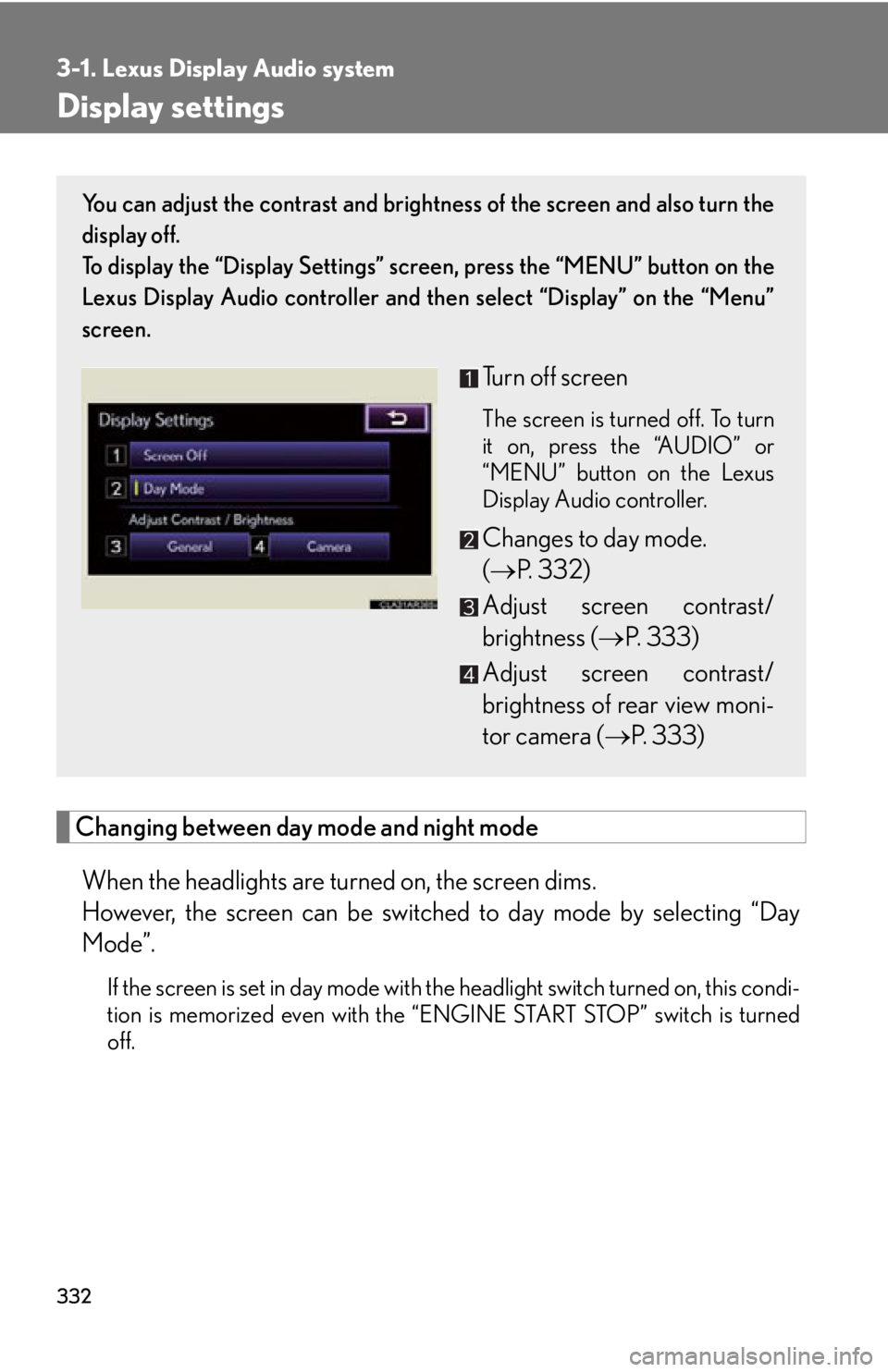
off. You can adjust the contrast and brightness of the screen and also turn the
display off.
To display the “Display Settings” sc reen, press the “MENU” button on the
Lexus Display Audio controller and then select “Display” on the “Menu”
screen.
Turn off screen The screen is turned off. To turn
it on, press the “AUDIO” or
“MENU” button on the Lexus
Display Audio controller.
Changes to day mode.
( P. 3 3 2 )
Adjust screen contrast/
brightness ( P. 333)
Adjust screen contrast/
brightness of rear view moni-
tor camera ( P. 333)