stop start LEXUS RX350 2015 Repair Manual
[x] Cancel search | Manufacturer: LEXUS, Model Year: 2015, Model line: RX350, Model: LEXUS RX350 2015Pages: 886, PDF Size: 11 MB
Page 351 of 886
3513-2. Using the air conditio ning system and defogger
3
Interior features ■
Air conditioning system settings ●
When the “ENGINE START STOP” switch is turned on, the air conditioning
system settings will be set to those that were in use the last time the “ENGINE
START STOP” switch was turned off.●
Air conditioning system settings are memorized individually on each electronic
key, so the settings repr oduced will be specific to the key that is used.●
This feature is customizable at your Lexus dealer.■
Using automatic mode
Fan speed is adjusted automatically accord ing to the temperature setting and ambi-
ent conditions. As a result, the following may occur:
Immediately after the button is pressed, the fan may stop for a while until warm or
cool air is ready to flow.■
Using the system in recirculated air mode
The windows will fog up more easily if recirculated air mode is used for an extended
period.■
Switching between outside air and recirculated air modes
Recirculated air mode or outside air mode may be automatically switched in accor-
dance with the temperature setting and the inside temperature.■
When the outside temperature exceeds 75°F (24°C) and the air conditioning
system is on ●
In order to reduce the air conditioning power consumption, the air conditioning
system may switch to recirculated air mode automatically. This may also reduce
fuel consumption.●
Recirculated air mode is selected as a default mode when the “ENGINE START
STOP” switch is turned to IGNITION ON mode.●
It is possible to switch to outside air mode at any time by pressing .
■
Window defogger feature
Recirculated air mode may automatically switch to outside air mode in situations
where the windows need to be defogged.
Page 358 of 886
3583-2. Using the air conditio ning system and defogger
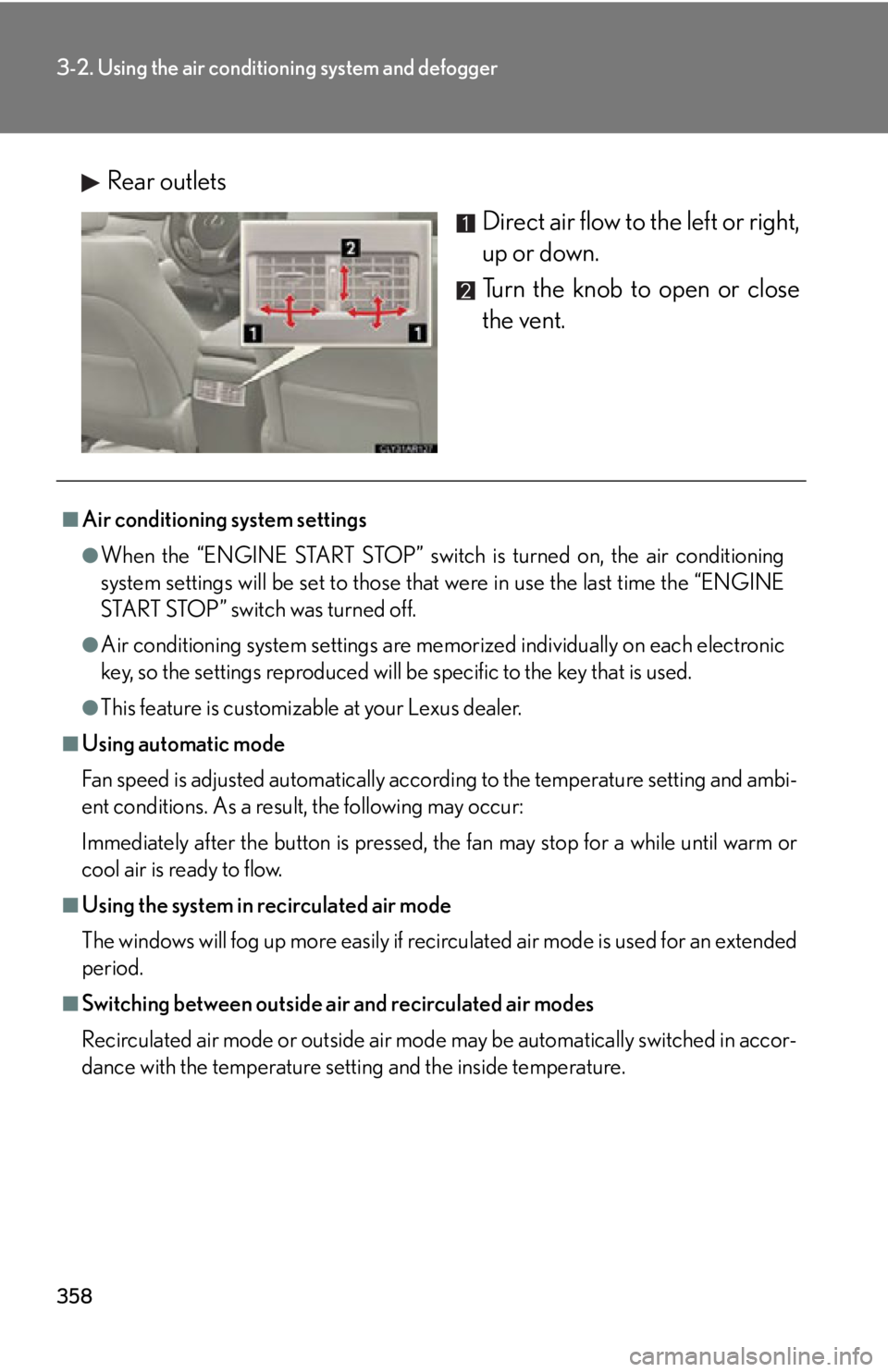
Rear outlets
Direct air flow to the left or right,
up or down.
Turn the knob to open or close
the vent.■
Air conditioning system settings ●
When the “ENGINE START STOP” switch is turned on, the air conditioning
system settings will be set to those that were in use the last time the “ENGINE
START STOP” switch was turned off.●
Air conditioning system settings are memorized individually on each electronic
key, so the settings repr oduced will be specific to the key that is used.●
This feature is customizable at your Lexus dealer.■
Using automatic mode
Fan speed is adjusted automatically accord ing to the temperature setting and ambi-
ent conditions. As a result, the following may occur:
Immediately after the button is pressed, the fan may stop for a while until warm or
cool air is ready to flow.■
Using the system in recirculated air mode
The windows will fog up more easily if recirculated air mode is used for an extended
period.■
Switching between outside air and recirculated air modes
Recirculated air mode or outside air mode may be automatically switched in accor-
dance with the temperature setting and the inside temperature.
Page 359 of 886
3593-2. Using the air conditio ning system and defogger
3
Interior features ■
When the outside temperature exceeds 75°F (24°C) and the air conditioning
system is on ●
In order to reduce the air conditioning power consumption, the air conditioning
system may switch to recirculated air mode automatically. This may also reduce
fuel consumption.●
Recirculated air mode is selected as a default mode when the “ENGINE START
STOP” switch is turned to IGNITION ON mode.●
It is possible to switch to outside air mode at any time by pressing .■
Window defogger feature
Recirculated air mode may automatically switch to outside air mode in situations
where the windows need to be defogged.■
When outside air temperature is below 32 F (0 C)
The cooling and dehumidification fu nction may not operate even when
is
pressed.■
When the indicator light on goes off
Press to turn on the cooling and dehumi dification function again. There may
be a problem in the air conditioning system if the indicator light goes off again
shortly after the button is pressed. Have it inspected by your Lexus dealer.■
Ventilation and air conditioning odors ●
To let fresh air in, set the air conditioning system to the outside air mode.●
During use, various odors from inside and outside the vehicle may enter into
and accumulate in the air conditioning sy stem. This may then cause odor to be
emitted from the vents.●
To reduce potential odors from occurring:
• It is recommended that the air conditioning system be set to outside air mode
prior to turning the vehicle off.
• The start timing of the blower may be delayed for a short period of time
immediately after the air conditioning system is started in automatic mode.
Page 362 of 886
3623-2. Using the air conditio ning system and defogger
■
Operating conditions
The “ENGINE START STOP” switch is in IGNITION ON mode.■
The outside rear vi ew mirror defoggers
Turning the rear window defogger on will turn the outside rear view mirror defog-
gers on.
CAUTION■
When the outside rear view mirror defoggers are on
Do not touch the outside surface of the rear view mirrors, as they can become very
hot and burn you.
Page 364 of 886

3643-2. Using the air conditio ning system and defogger
■
Operating conditions
The “ENGINE START STOP” switch is in IGNITION ON mode.
CAUTION■
When the windshield wiper de-icer is on
Do not touch the lower part of the windshield or the side of the front pillars, as the
surfaces can become very hot and burn you.
Page 420 of 886
4203-3. Using the Lexus Display Audio system
Connecting the Bluetooth ®
audio player
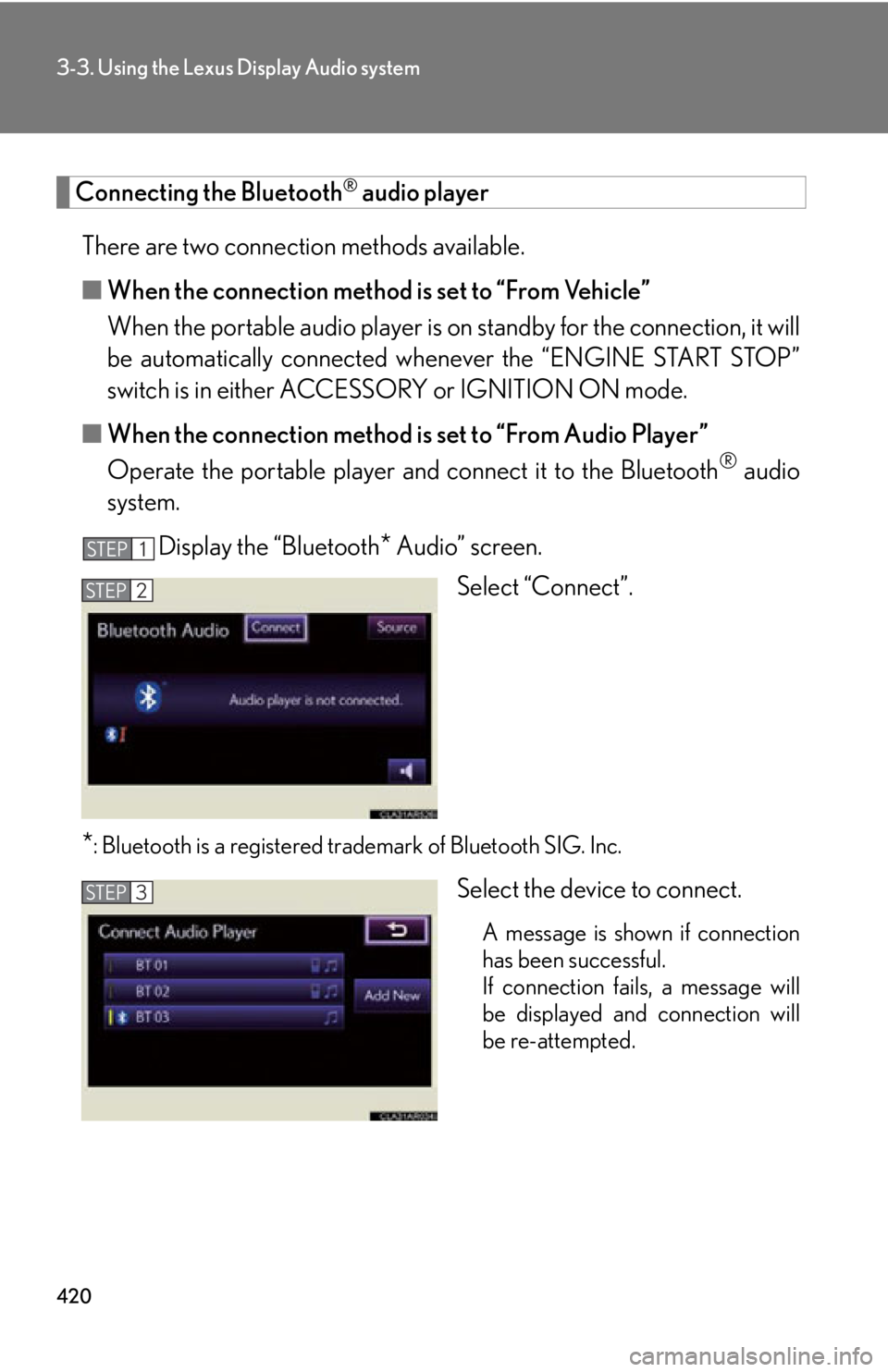
There are two connection methods available.
■ When the connection method is set to “From Vehicle”
When the portable audio player is on standby for the connection, it will
be automatically connected wh enever the “ENGINE START STOP”
switch is in either ACCESSORY or IGNITION ON mode.
■ When the connection method is set to “From Audio Player”
Operate the portable player and connect it to the Bluetooth ®
audio
system.
Display the “Bluetooth
* Audio” screen.
Select “Connect”.
* : Bluetooth is a registered tr ademark of Bluetooth SIG. Inc.
Select the device to connect.
A message is shown if connection
has been successful.
If connection fails, a message will
be displayed and connection will
be re-attempted.STEP 1
STEP 2
STEP 3
Page 425 of 886

4253-3. Using the Lexus Display Audio system
3
Interior features ■
Certification for the Bluetooth ®
audio system
FCC ID: AJDK046
IC ID: 775E-K046
This device complies with Part 15 of FCC Rules and Indust ry Canada licence-
exempt RSS standard(s). Operation is subj ect to the following two conditions: (1)
this device may not cause interference, an d (2) this device must accept any inter-
ference, including interference that may cause undesired operation of this device.
Le présent appareil est conforme aux la partie 15 des règles de la FCC et CNR
d’Industrie Canada applicables aux appareils radio exempts de licence. L’exploita-
tion est autorisée aux deux conditions suivantes : (1) l’appareil ne doit pas produire
de brouillage, et (2) l’utilisateur de l’appareil doit accepter tout brouillage
radioélectrique subi, même si le brouilla ge est susceptible d’en compromettre le
fonctionnement.■
Reconnecting the portable audio player
If the portable audio player is disconnected with a poor reception when the
“ENGINE START STOP” switch is in AC CESSORY or IGNITION ON mode, the
system automatically reconnects the portable audio player.
If you have switched off the portable audio player yourself, follow the instructions
below to reconnect: ●
Select the portable audio player again●
Enter the portable audio player■
When you release your car
Be sure to initialize your data. ( P. 3 3 6 )
Page 445 of 886

4453-3. Using the Lexus Display Audio system
3
Interior features Connecting a Bluetooth ®
phone
There are two connecting methods av ailable-automatic and manual.
Automatic
When you register your phone, auto connection will be activated. Always
set it to this mode and leave the Bluetooth ®
phone in a place where con-
nection can be established.
When the “ENGINE START STOP” sw itch is turned to ACCESSORY or
IGNITION ON mode, the system will se arch for a nearby mobile phone
you have registered.
The system automatically connects with the most recent phone that was
connected. The connected result is displayed.
Depending on the type of phone, phone operations may be required (to
confirm if connection is to be receiv ed or not) even when automatically
connected.
Page 446 of 886
4463-3. Using the Lexus Display Audio system
Manual
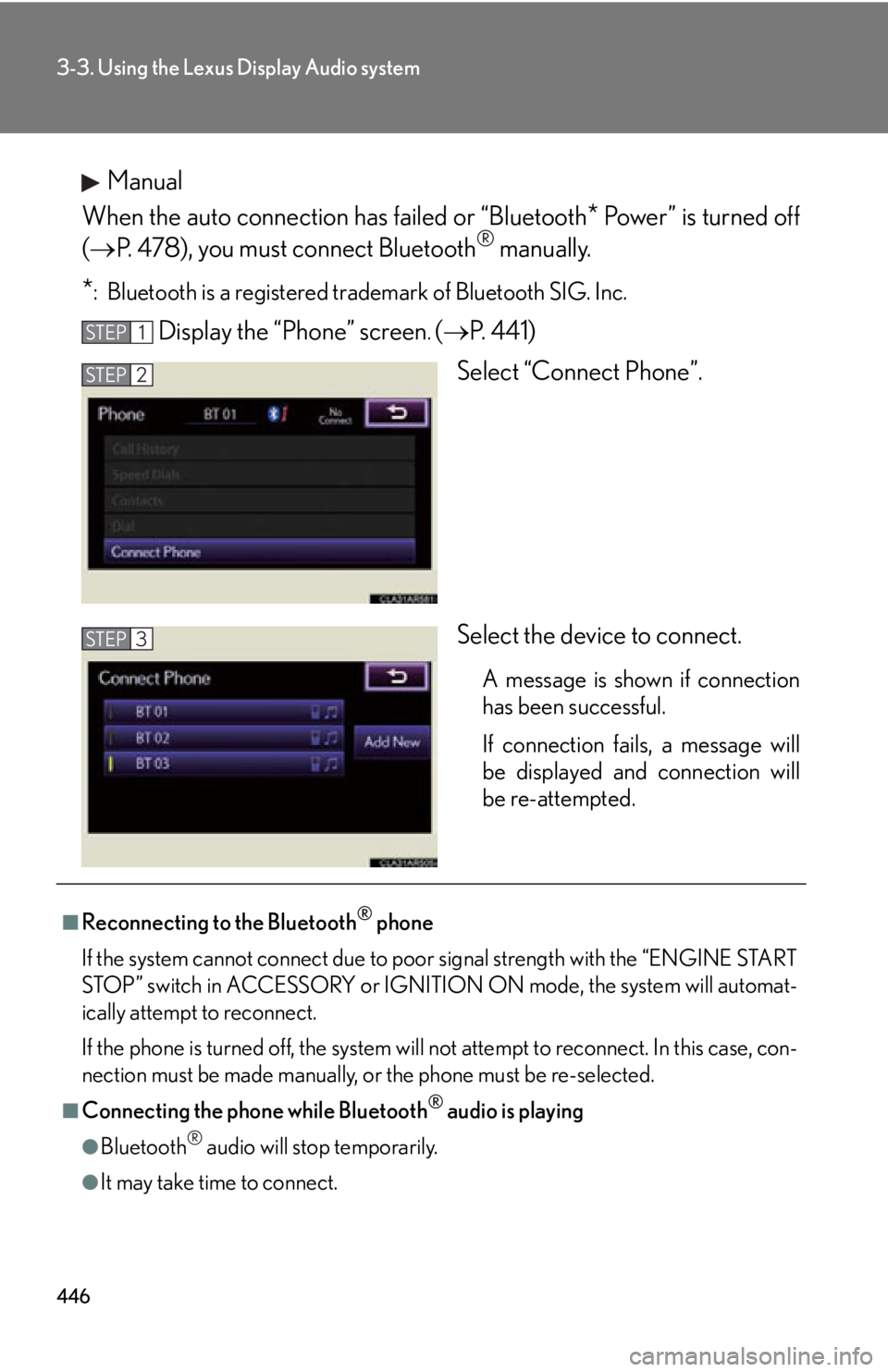
When the auto connection has failed or “Bluetooth
* Power” is turned off
( P. 478), you must connect Bluetooth ®
manually.
* : Bluetooth is a registered tr ademark of Bluetooth SIG. Inc.
Display the “Phone” screen .
( P. 4 4 1 )
Select “Connect Phone”.
Select the device to connect. A message is shown if connection
has been successful.
If connection fails, a message will
be displayed and connection will
be re-attempted.STEP 1
STEP 2
STEP 3
■
Reconnecting to the Bluetooth ®
phone
If the system cannot connect due to poor signal strength with the “ENGINE START
STOP” switch in ACCESSORY or IGNITION ON mode, the system will automat-
ically attempt to reconnect.
If the phone is turned off, the system will not attempt to reconnect. In this case, con-
nection must be made manually, or the phone must be re-selected.
■
Connecting the phone while Bluetooth ®
audio is playing
●
Bluetooth ®
audio will stop temporarily.
●
It may take time to connect.
Page 547 of 886
5473-4. Using the audio system
3
Interior features Pattern A
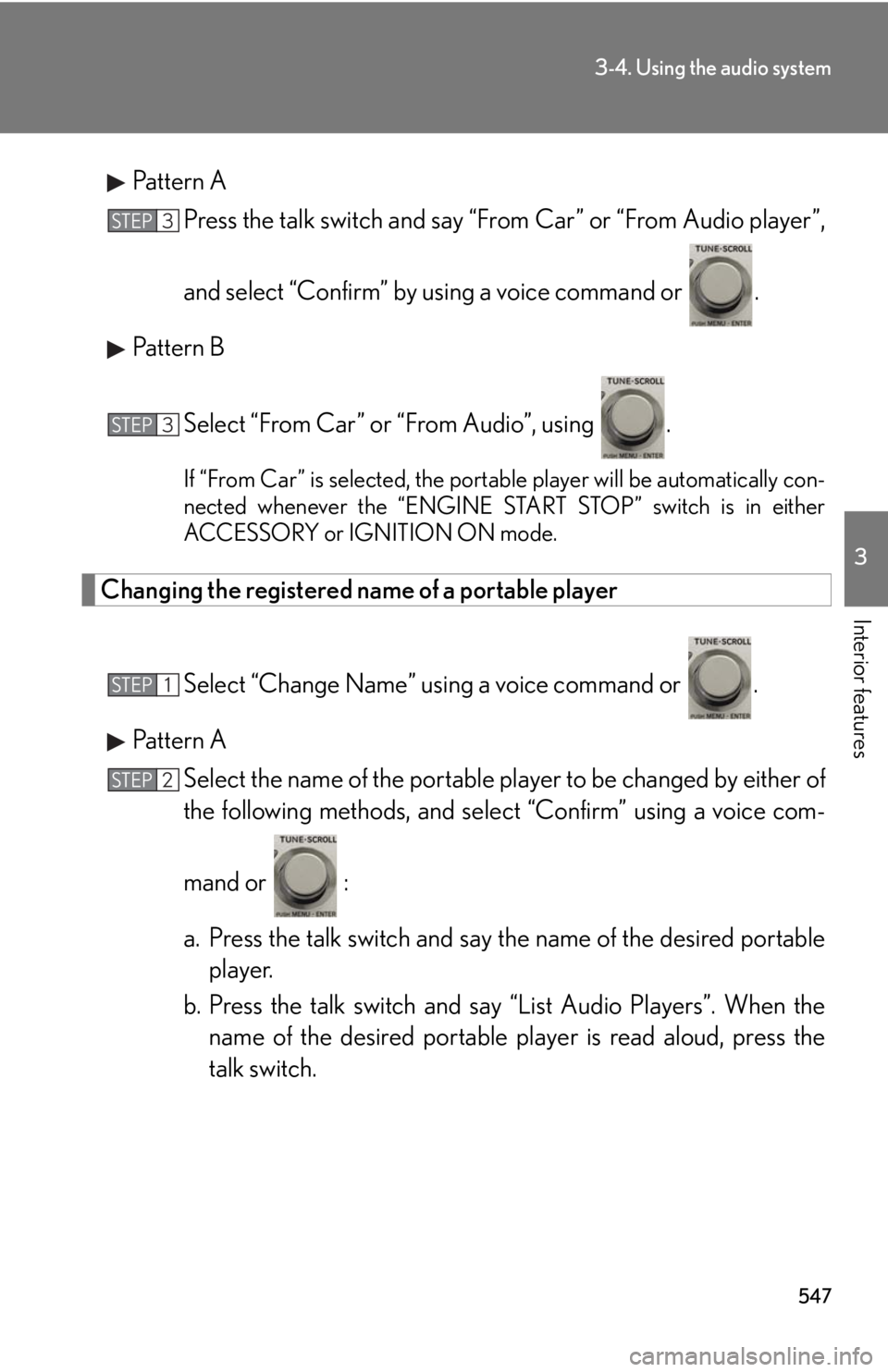
Press the talk switch and say “From Car” or “From Audio player”,
and select “Confirm” by using a voice command or .
Pattern B
Select “From Car” or “From Audio”, using . If “From Car” is selected, the portable player will be automatically con-
nected whenever the “ENGINE START STOP” switch is in either
ACCESSORY or IGNITION ON mode.
Changing the registered name of a portable player
Select “Change Name” using a voice command or .
Pattern A
Select the name of the portable player to be changed by either of
the following methods, and sele ct “Confirm” using a voice com-
mand or :
a. Press the talk switch and say the name of the desired portable
player.
b. Press the talk switch and sa y “List Audio Players”. When the
name of the desired portable pl ayer is read aloud, press the
talk switch.STEP 3
STEP 3
STEP 1
STEP 2