battery LEXUS RX350 2015 Repair Manual
[x] Cancel search | Manufacturer: LEXUS, Model Year: 2015, Model line: RX350, Model: LEXUS RX350 2015Pages: 886, PDF Size: 11 MB
Page 793 of 886
5
When trouble arises
7935-2. Steps to take in an emergency
If the electronic key do es not operate properly
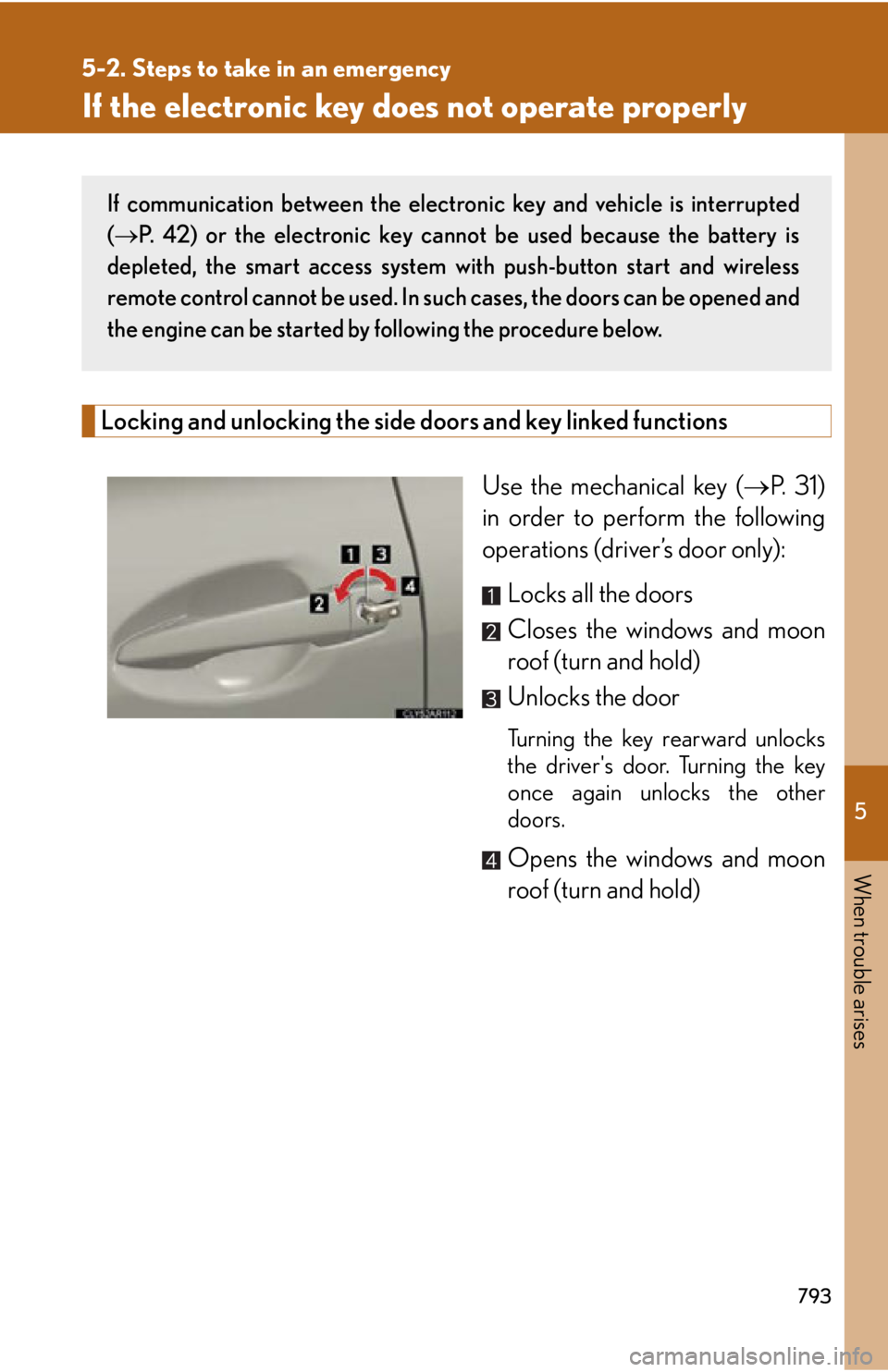
Locking and unlocking the side doors and key linked functions
Use the mechanical key ( P. 31)
in order to perform the following
operations (driver’s door only):
Locks all the doors
Closes the windows and moon
roof (turn and hold)
Unlocks the door Turning the key rearward unlocks
the driver's door. Turning the key
once again unlocks the other
doors.
Opens the windows and moon
roof (turn and hold)If communication between the electron ic key and vehicle is interrupted
( P. 42) or the electronic key cannot be used because the battery is
depleted, the smart access system with push-button start and wireless
remote control cannot be used. In such cases, the doors can be opened and
the engine can be started by following the procedure below.
Page 795 of 886
5
When trouble arises
7955-2. Steps to take in an emergency
■
Stopping the engine
Shift the shift lever to P and press the “ENGINE START STOP” switch as you nor-
mally do when stopping the engine.■
Replacing the key battery
As the above procedure is a temporary measure, it is recommended that the elec-
tronic key battery be replaced immediately when the battery is depleted.
( P. 7 0 1 )■
Changing “ENGINE START STOP” switch modes
Within 10 seconds of the buzzer sounding, release the brake pedal and press the
“ENGINE START STOP” switch.
The engine does not start and modes will be changed each time the switch is
pressed. ( P. 166)
Page 796 of 886
7965-2. Steps to take in an emergency
If the vehicle battery is discharged The following procedures may be used to start the engine if the vehicle’s
battery is discharged.
You can also call your Lexus dealer or a qualified repair shop.
If you have a set of jumper (or booster) cables and a second vehicle
with a battery, you can jump start yo ur vehicle by following the steps
below.
Open the hood. Remove the battery cover. ( P. 6 7 3 )
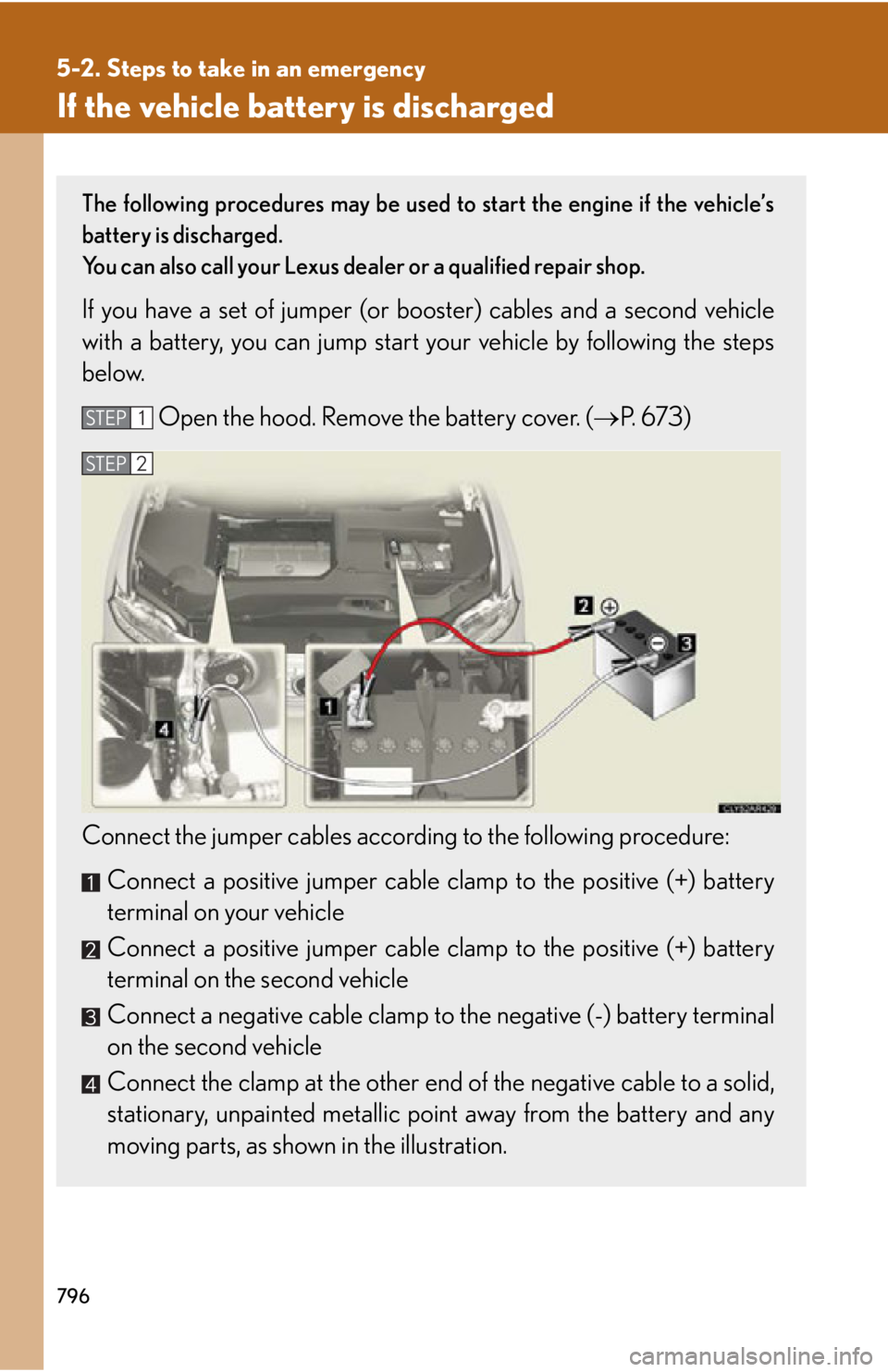
Connect the jumper cables according to the following procedure:
Connect a positive jumper cable cl amp to the positive (+) battery
terminal on your vehicle
Connect a positive jumper cable cl amp to the positive (+) battery
terminal on the second vehicle
Connect a negative cable clamp to the negative (-) battery terminal
on the second vehicle
Connect the clamp at the other end of the negative cable to a solid,
stationary, unpainted metallic point away from the battery and any
moving parts, as shown in the illustration. STEP 1
STEP 2
Page 797 of 886
5
When trouble arises
7975-2. Steps to take in an emergency
■
Starting the engine when the battery is discharged
The engine cannot be started by push-starting.■
To prevent battery discharge ●
Turn off the headlights and the audio system while the engine is off.●
Turn off any unnecessary electrical compon ents when the vehicle is running at a
low speed for an extended period, such as in heavy traffic.■
When the battery is removed or discharged ●
The power back door must be initialized.
( P. 8 4 7 )●
Make sure that the key is not inside th e vehicle when recharging or replacing
the battery. The key may be locked in the vehicle if the alarm is activated.
( P. 114)■
Charging the battery
The electricity stored in the battery will discharge gradually even when the vehi-
cle is not in use, due to natural discharge and the draining effects of certain
electrical appliances. If the vehicle is left for a long time, the battery may dis-
charge, and the engine may be unable to start. (The battery recharges automat-
ically during driving.) Start the engine of the second vehicle. Increase the engine
speed slightly and maintain that level for approximately 5 min-
utes to recharge the battery of your vehicle.
Open and close any of the do ors with the “ENGINE START
STOP” switch off.
Maintain the engine sp eed of the second ve hicle and start the
engine of your vehicle by tu rning the “ENGINE START STOP”
switch to IGNITION ON mode.
Once the vehicle’s engine ha s started, remove the jumper
cables in the exact reverse ord er from which they were con-
nected.
Once the engine starts, have th e vehicle inspected at your Lexus
dealer as soon as possible. STEP 3
STEP 4
STEP 5
STEP 6
Page 798 of 886
7985-2. Steps to take in an emergency
CAUTION■
Avoiding battery fires or explosions
Observe the following precautions to prevent accidentally igniting the flammable
gas that may be emitted from the battery: ●
Make sure each jumper cable is connecte d to the correct terminal and that it is
not unintentionally in contact with an y other than the intended terminal.●
Do not allow the + and - clamps of the jumper cables to come into contact with
each other.●
Do not smoke, use matches, cigarette lighters or allow open flame near the bat-
tery.■
Battery precautions
The battery contains poisonous and corrosive acidic electrolyte, while related parts
contain lead and lead compounds. Observe the following precautions when han-
dling the battery: ●
When working with the battery, always we ar safety glasses and take care not to
allow any battery fluids (acid) to come into contact with skin, clothing or the vehi-
cle body.●
Do not lean over the battery.●
In the event that battery fluid comes into contact with the skin or eyes, immedi-
ately wash the affected area with water and seek medical attention.
Place a wet sponge or cloth over the affected area until medical attention can be
received.●
Always wash your hands after handling the battery support, terminals, and other
battery-related parts.●
Do not allow children near the battery.
NOTICE
■
When handling jumper cables
When connecting the jumper cables, ensure that they do not become entangled in
the cooling fans or belt.
Page 814 of 886
8126-1. Specifications
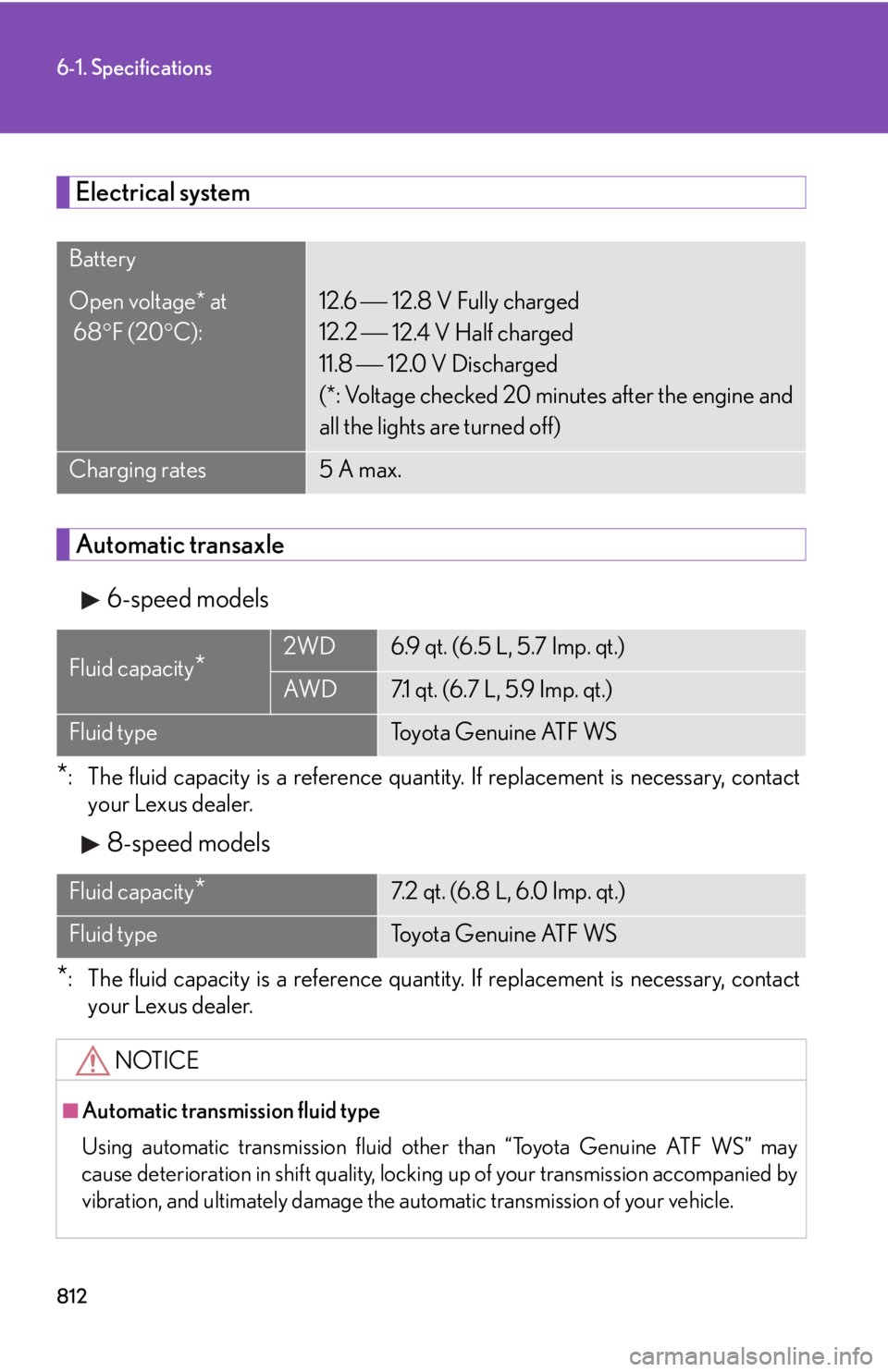
Electrical system
Automatic transaxle
6-speed models
* : The fluid capacity is a reference quantity. If replacement is necessary, contact
your Lexus dealer.
8-speed models
* : The fluid capacity is a reference quantity. If replacement is necessary, contact
your Lexus dealer.Battery
Open voltage* at
68 F (20 C): 12.6
12.8 V Fully charged
12.2
12.4 V Half charged
11.8
12.0 V Discharged
(*: Voltage checked 20 minutes after the engine and
all the lights are turned off)
Charging rates 5 A max.
Fluid capacity
* 2WD 6.9 qt. (6.5 L, 5.7 Imp. qt.)
AW D 7.1 qt. (6.7 L, 5.9 Imp. qt.)
Fluid type Toyota Genuine ATF WS
Fluid capacity
* 7.2 qt. (6.8 L, 6.0 Imp. qt.)
Fluid type Toyota Genuine ATF WS
NOTICE
■
Automatic transmission fluid type
Using automatic transmission fluid other than “Toyota Genuine ATF WS” may
cause deterioration in shift quality, lockin g up of your transmission accompanied by
vibration, and ultimately damage the automatic transm ission of your vehicle.
Page 831 of 886
8296-1. Specifications
6
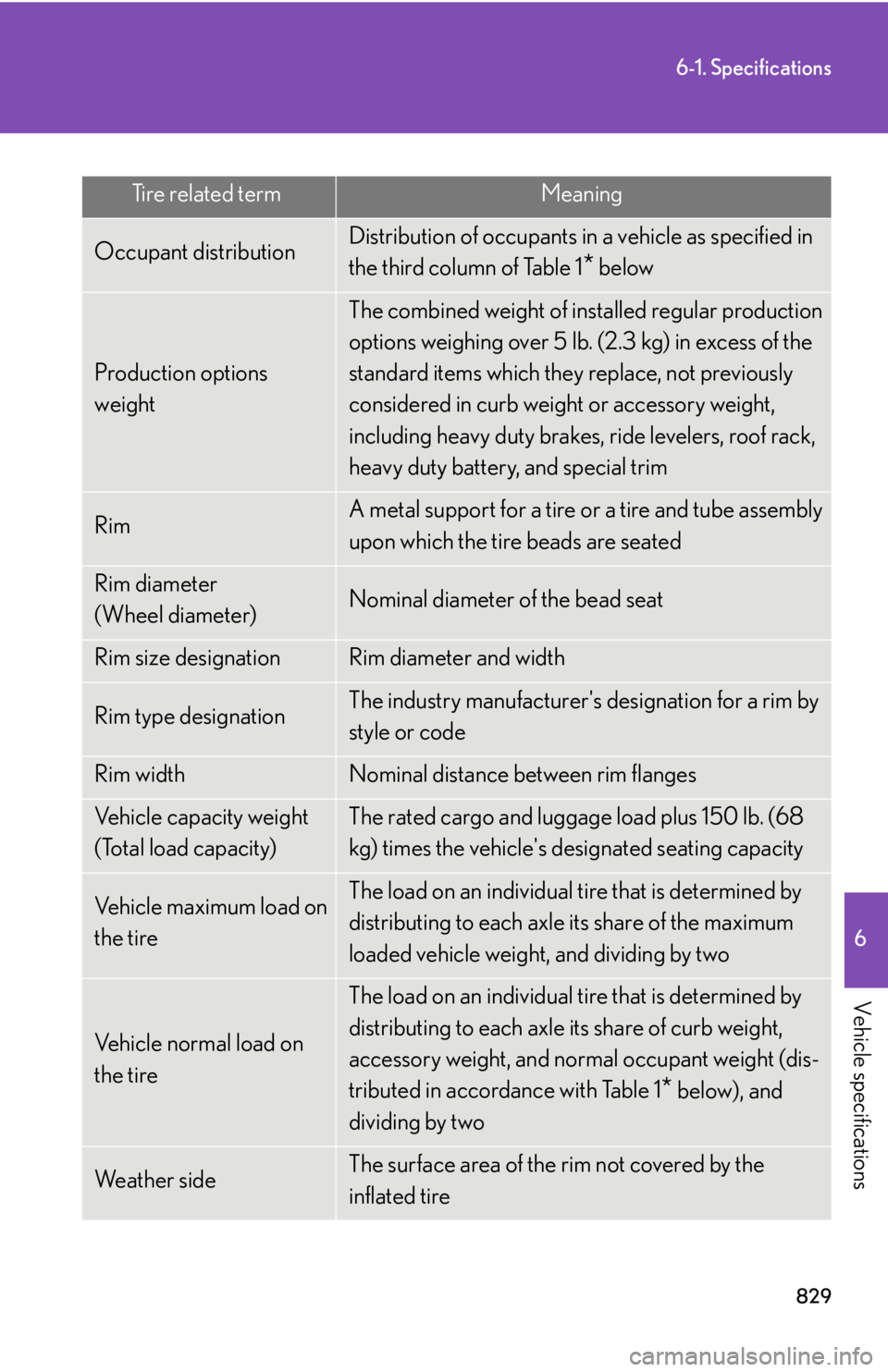
Vehicle specifications Tire related term Meaning
Occupant distribution Distribution of occupants in a vehicle as specified in
the third column of Table 1
* below
Production options
weight The combined weight of installed regular production
options weighing over 5 lb. (2.3 kg) in excess of the
standard items which they replace, not previously
considered in curb weight or accessory weight,
including heavy duty brakes, ride levelers, roof rack,
heavy duty battery, and special trim
Rim A metal support for a tire or a tire and tube assembly
upon which the tire beads are seated
Rim diameter
(Wheel diameter) Nominal diameter of the bead seat
Rim size designation Rim diameter and width
Rim type designation The industry manufacturer's designation for a rim by
style or code
Rim width Nominal distance between rim flanges
Vehicle capacity weight
(Total load capacity) The rated cargo and luggage load plus 150 lb. (68
kg) times the vehicle's designated seating capacity
Vehicle maximum load on
the tire The load on an individual tire that is determined by
distributing to each axle its share of the maximum
loaded vehicle weight, and dividing by two
Vehicle normal load on
the tire The load on an individual tire that is determined by
distributing to each axle its share of curb weight,
accessory weight, and normal occupant weight (dis-
tributed in accordance with Table 1
* below), and
dividing by two
We a t h e r s i d e The surface area of the rim not covered by the
inflated tire
Page 848 of 886
8466-2. Customization
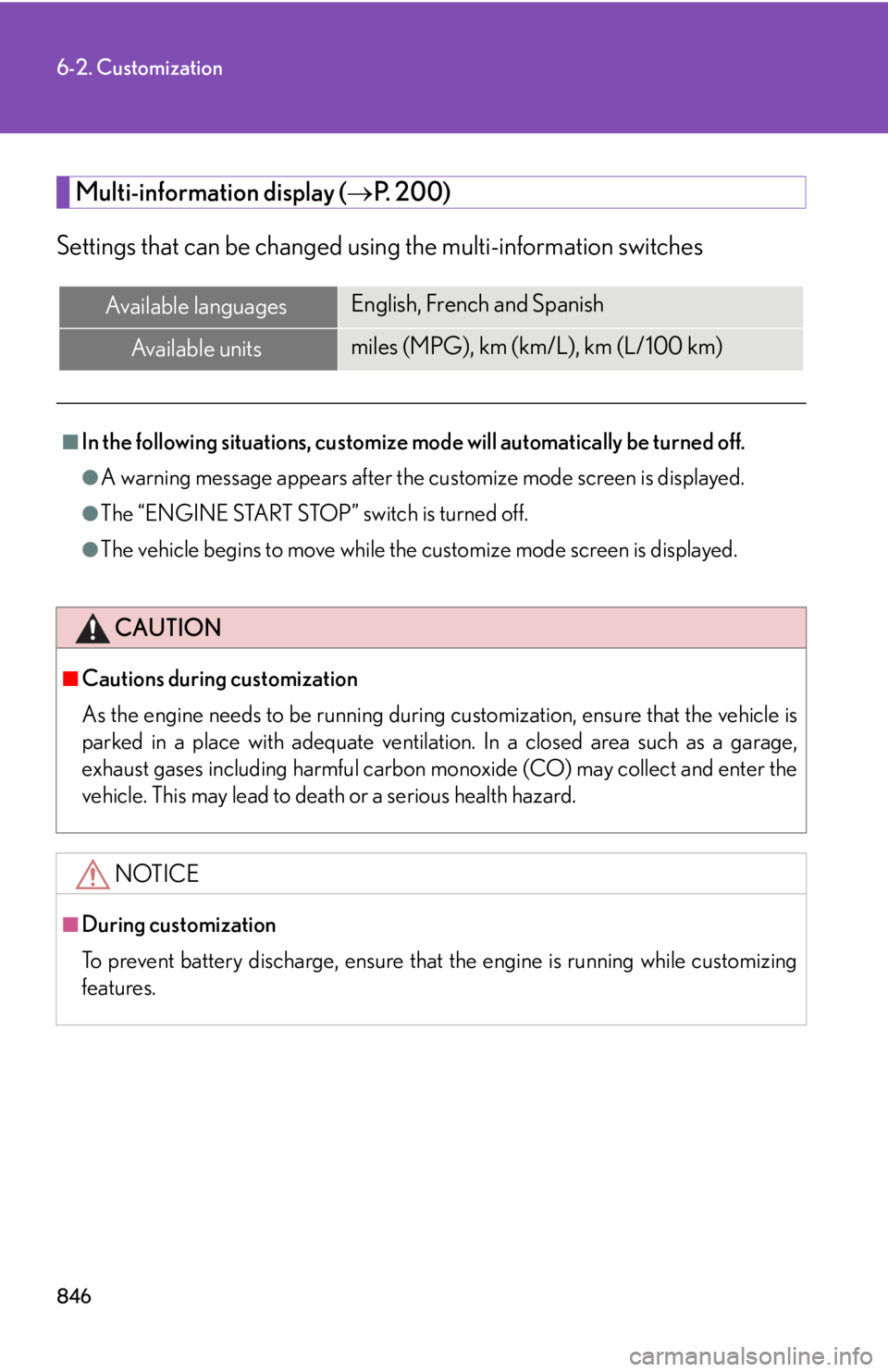
Multi-information display ( P. 200)
Settings that can be changed usin g the multi-information switchesAvailable languages English, French and Spanish
Available units miles (MPG), km (km/L), km (L/100 km)■
In the following situations, customize mo de will automatically be turned off.●
A warning message appears after the customize mode screen is displayed.●
The “ENGINE START STOP” switch is turned off.●
The vehicle begins to move while the customize mode screen is displayed.
CAUTION■
Cautions during customization
As the engine needs to be running during customization, ensure that the vehicle is
parked in a place with adequate ventilatio n. In a closed area such as a garage,
exhaust gases including harmful carbon mo noxide (CO) may collect and enter the
vehicle. This may lead to death or a serious health hazard.
NOTICE■
During customization
To prevent battery discharge, ensure that the engine is running while customizing
features.
Page 849 of 886
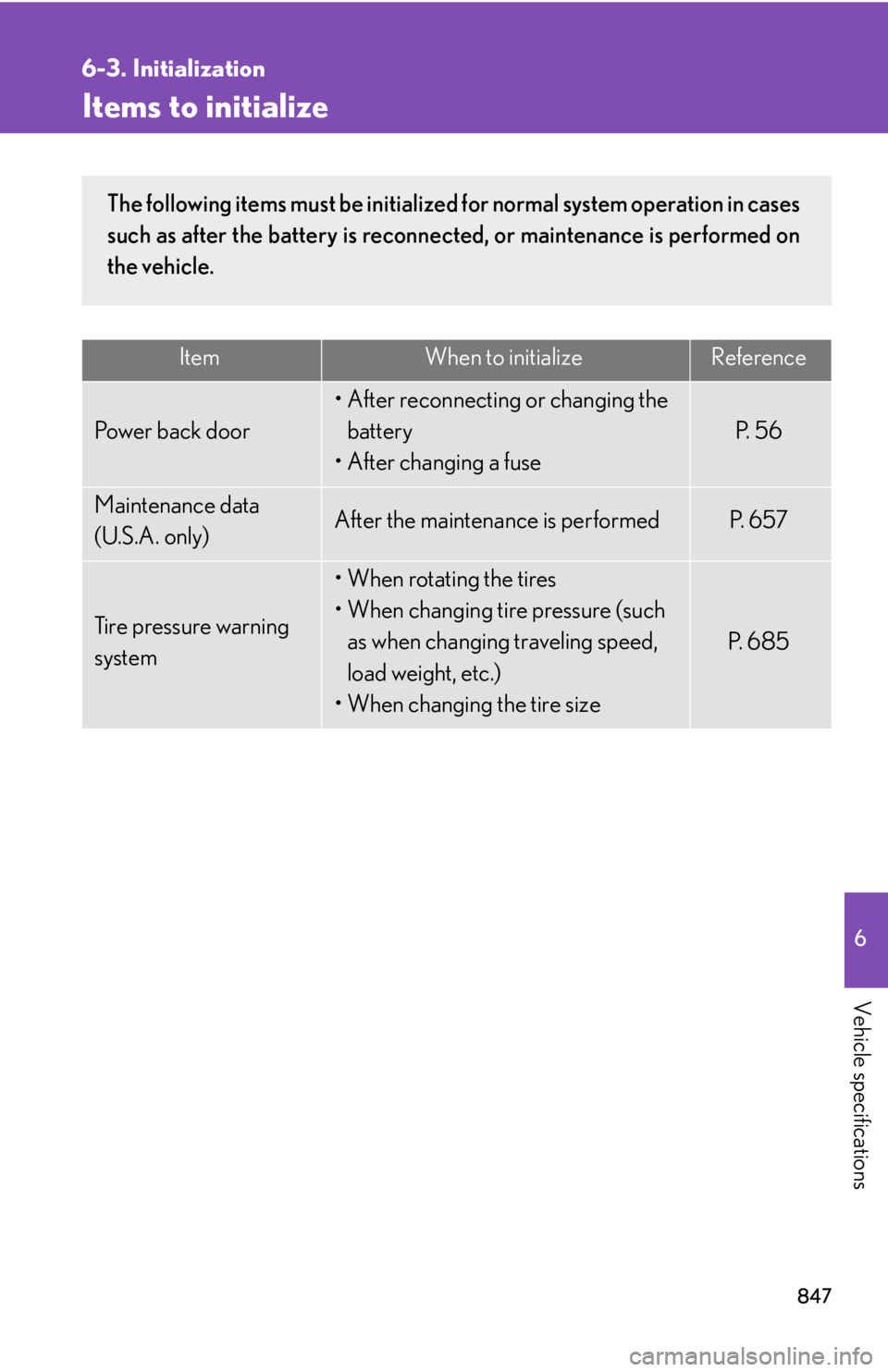
8476
Vehicle specifications 6-3. Initialization
Items to initialize Item When to initialize Reference
Power back door • After reconnecting or changing the
battery
• After changing a fuse P. 5 6
Maintenance data
(U.S.A. only) After the maintenance is performed P. 6 5 7
Tire pressure warning
system • When rotating the tires
• When changing tire pressure (such
as when changing traveling speed,
load weight, etc.)
• When changing the tire size P. 6 8 5The following items must be initialized for normal system operation in cases
such as after the battery is reconnected, or maintenance is performed on
the vehicle.
Page 873 of 886
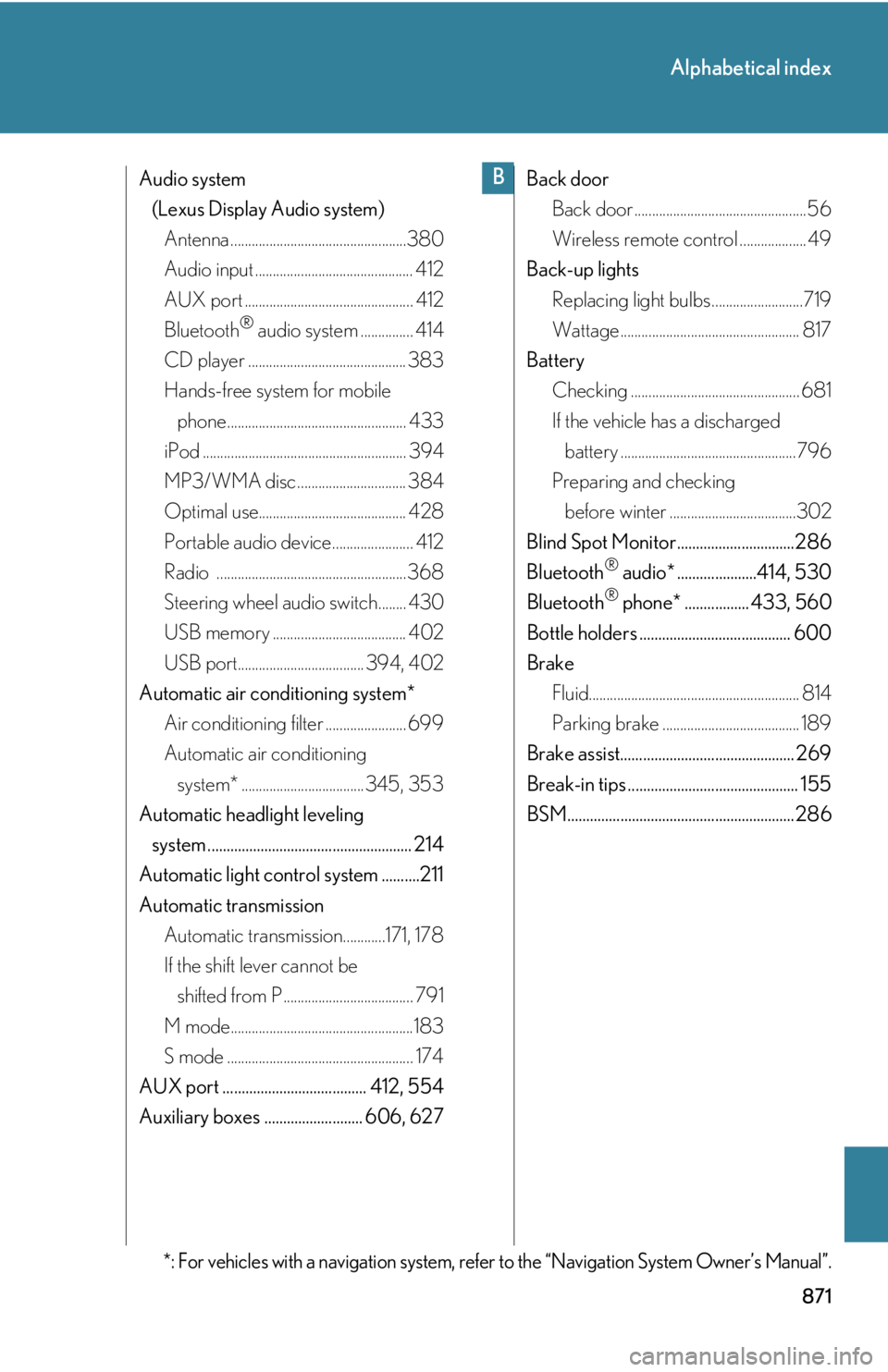
871Alphabetical index
Audio system
(Lexus Display Audio system)
Antenna ..................................................380
Audio input ............................................. 412
AUX port ................................................ 412
Bluetooth ®
audio system ............... 414
CD player ............................................. 383
Hands-free system for mobile
phone................................................... 433
iPod .......................................................... 394
MP3/WMA disc ............................... 384
Optimal use.......................................... 428
Portable audio device....................... 412
Radio ...................................................... 368
Steering wheel audio switch........ 430
USB memory ...................................... 402
USB port.................................... 394, 402
Automatic air conditioning system*
Air conditioning filter ....................... 699
Automatic air conditioning
system* ...................................345, 353
Automatic headlight leveling
system ...................................................... 214
Automatic light control system ..........211
Automatic transmission
Automatic transmission............171, 178
If the shift lever cannot be
shifted from P ..................................... 791
M mode....................................................183
S mode ..................................................... 174
AUX port ...................................... 412, 554
Auxiliary boxes .......................... 606, 627 Back door
Back door .................................................56
Wireless remote control ................... 49
Back-up lights
Replacing light bulbs ..........................719
Wattage ................................................... 817
Battery
Checking ................................................ 681
If the vehicle has a discharged
battery ..................................................796
Preparing and checking
before winter ....................................302
Blind Spot Monitor...............................286
Bluetooth ®
audio* .....................414, 530
Bluetooth ®
phone* ................. 433, 560
Bottle holders ........................................ 600
Brake
Fluid............................................................ 814
Parking brake ....................................... 189
Brake assist.............................................. 269
Break-in tips ............................................. 155
BSM............................................................286
*: For vehicles with a navigation system, refer to the “Navigation System Owner’s Manual”. B