lock LEXUS RX350 2016 Owners Manual
[x] Cancel search | Manufacturer: LEXUS, Model Year: 2016, Model line: RX350, Model: LEXUS RX350 2016Pages: 748, PDF Size: 12.36 MB
Page 407 of 748
407 5-2. Setup
5
Lexus Display Audio system
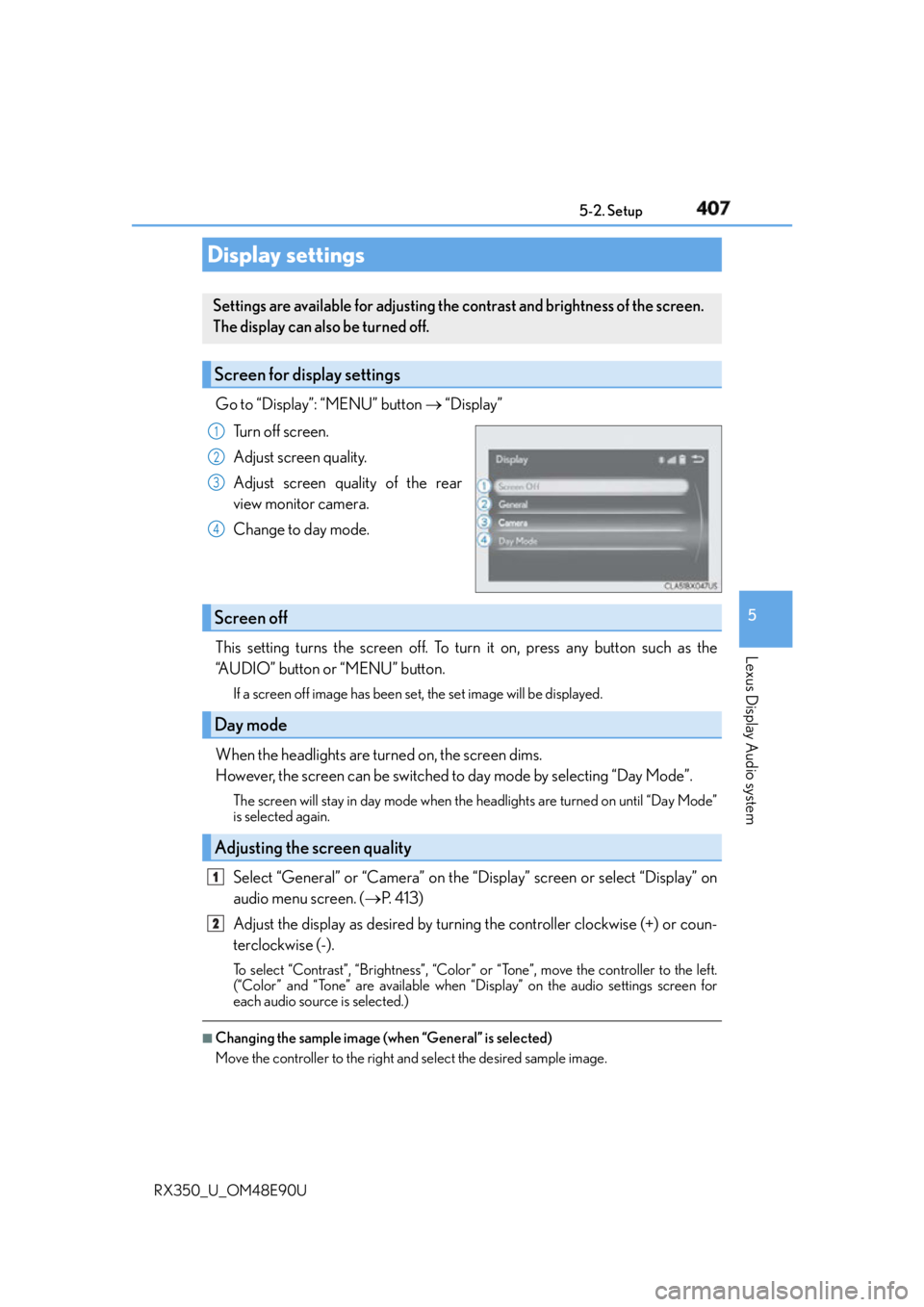
RX350_U_OM48E90U Go to “Display”: “MENU” button “Display”
Turn off screen.
Adjust screen quality.
Adjust screen quality of the rear
view monitor camera.
Change to day mode.
This setting turns the screen off. To turn it on, press any button such as the
“AUDIO” button or “MENU” button. If a screen off image has been set, the set image will be displayed.
When the headlights are turned on, the screen dims.
However, the screen can be switched to day mode by selecting “Day Mode”. The screen will stay in day mode when the headlights are turned on until “Day Mode”
is selected again.
Select “General” or “Camera” on the “Display” screen or select “Display” on
audio menu screen. ( P. 4 1 3 )
Adjust the display as desired by turning the controller clockwise (+) or coun-
terclockwise (-). To select “Contrast”, “Brightness”, “Color” or “Tone”, move the controller to the left.
(“Color” and “Tone” are available when “Display” on the audio settings screen for
each audio source is selected.) ■
Changing the sample image (when “General” is selected)
Move the controller to the right and select the desired sample image.Display settings Settings are available for adjusting the contrast and brightness of the screen.
The display can also be turned off.
Screen for display settings 1
2
3
4
Screen off
Day mode
Adjusting the screen quality 1
2
Page 420 of 748

420 5-4. Using the radio
RX350_U_OM48E90U ■
XM Radio Services — Descriptions ●
Radio and Entertainment
XM offers more than 170 satellite radio channels of commercial-free music and pre-
mier sports, news, talk, and entertainment. XM is broadcast via satellites to millions of
listeners across the continental United States . XM subscribers listen to XM on satellite
radio receivers for the car, home, and port able use. More information about XM is
available online at www.siriusxm.com
(U.S.A.) or www.siriusxm.ca (Canada).●
Satellite tuner
The tuner supports only Audio Services (M usic and Talk) and the accompanying Text
Information of XM ®
Satellite Radio.■
XM Radio Services — Subscription Instructions
For XM Services requiring a subscription (s uch as XM Radio), the following paragraph
shall be included.
Required XM Radio monthly subscriptions sold separately after tr ial period. Subscrip-
tion fee is consumer only. All fees and prog ramming subject to change. Subscriptions are
subject to the Customer Agreement available at www.siriusxm.com
(U.S.A.) or
www.siriusxm.ca (Canada) XM service only availa ble in the 48 contiguous United
States and 10 Canadian provinces. © 2011 Sirius XM Radio Inc. Sirius, XM and all
related marks and logos are trademarks of Sirius XM Radio Inc. All other marks, channel
names and logos are the property of their respective owners.
For more information, program schedules, and to subscribe or extend subscription after
complimentary trial period; more information is available at:
U.S.A. Customers:
Visit w w w.siriusxm.com or call 1-877-447-0011
Canadian Customers:
Visit w w w.siriusxm.ca or call 1-877-438-9677●
Radio ID
You will need the radio ID when activating XM service or reporting a problem. If
“Ch000” is selected using the “TUNE•SCRO LL” knob, the ID code, which is 8 alpha-
numeric characters, will be displayed. If anot her channel is selected , the ID code will no
longer be displayed. The channel (000) alte rnates between displaying the radio ID and
the specific radio code. ■
XM Radio Services — Legal Disclaimers and Warnings ●
Fees and Taxes — Subscription fee, taxes, on e time activation fee, and other fees may
apply. Subscription fee is consumer only. All fees and programming subject to change.
Subscriptions subject to Customer Agreement available at www.siriusxm.com (U.S.A.)
or www.siriusxm.ca (Canada) XM service only available in the 48 contiguous United
States and Canada
* .
* : Canada — some deterioration of service may occur in extreme northern latitudes.
This is beyond the control of XM Satellite Radio.
Explicit Language Notice — Channels with frequent explicit la nguage are indicated
with an “XL” preceding the channel name. Channel blocking is available for XM Satel-
lite Radio receivers by notifying XM at;
U.S.A. Customers:
Visit www.siriusxm.com or calling 1-877-447-0011
Canadian Customers:
Visit www.siriusxm.ca or calling 1-877-438-9677
Page 487 of 748
487
6Interior features
RX350_U_OM48E90U 6-1. Basic operation of the
Remote Touch screen
Remote Touch............................. 488
12.3-inch display......................... 492
6-2. Using the air conditioning
system and defogger
Lexus Climate Concierge ...... 494
Automatic air conditioning
system .......................................... 495
Heated steering wheel/
seat heaters/
seat ventilators......................... 505
6-3. Using the interior lights
Interior lights list......................... 508
• Interior lights ......................... 509
• Personal lights......................... 510
6-4. Using the storage features
List of storage features.............. 512
• Glove box................................. 513
• Console box ............................ 513
• Cup holders............................. 514
• Door pockets .......................... 515
• Bottle holders ......................... 515
• Coin box ................................... 516
• Auxiliary boxes....................... 517
Luggage compartment
features ......................................... 518 6-5. Using the other interior
features
Other interior features ............ 523
• Sun visors ................................ 523
• Vanity mirrors ........................ 523
• Clock ........................................ 524
• Wireless charger.................. 524
• Power outlets
(12 VDC) .................................. 531
• Power outlet
(120 VAC) .............................. 532
• Front passenger footwell
hooks......................................... 533
• Rear door sunshades ......... 534
• Armrest ....................................534
• Assist grips.............................. 535
• Coat hooks ............................. 535
Garage door opener................ 536
Compass ....................................... 543
LEXUS Enform Safety
Connect ...................................... 547
LEXUS Enform Remote ......... 552
LEXUS Enform Service
Connect ...................................... 554
Page 502 of 748
502 6-2. Using the air conditio ning system and defogger
RX350_U_OM48E90U ■
Registering air conditioning settings to elec tronic keys (vehicles with driving position
memory) ●
Unlocking the vehicle using an electronic ke y and turning the engine switch to IGNI-
TION ON mode will recall that key’s registered air conditioning settings. ●
When the engine switch is tu rned off, the current air conditioning settings will automat-
ically be registered to the electronic key that was used to unlock the vehicle.●
The system may not operate correctly if more th an one electronic key is in the vicinity or
if the smart access system with push-button start is used to unlock a passenger door. ●
The doors that can recall the air conditioni ng setting when unlocked using the smart
access system with push-b utton start can be changed.
* For details, contact your Lexus
dealer.
* : The doors that can recall the driving positi on memory are changed at the same time.■
Using automatic mode
Fan speed is adjusted automatically accordin g to the temperature setting and the ambi-
ent conditions.
Therefore, the fan may stop for a while until warm or cool air is ready to flow immediately
after the “AUTO” button is pr essed or “AUTO” is selected.■
Operation of S-FLOW mode
In automatic mode, S-FLOW mode will be turned off if a rear door has been opened and
closed. To activate S-FLOW mode again, press . ■
Using the voice command system (veh icles with a navigation system)
Air conditioning system can be operated usin g voice commands. For details, refer to the
“NAVIGATION SYSTEM OWNER’S MANUAL”. ■
When the outside temperature exceeds 75 F (24 C) and the air conditioning system
is on ●
In order to reduce the air conditioning po wer consumption, the ai r conditioning system
may switch to recirculated air mode automatically.
This may also reduce fuel consumption. ●
Recirculated air mode is selected as a defaul t mode when the engine switch is turned to
IGNITION ON mode. ●
It is possible to switch to outside air mode at any time by pressing the outside/recircu-
lated air mode button. ■
Automatic mode for air intake control (if equipped)
In automatic mode, the system detects exhaust gas and other pollutants and automati-
cally switches between outside air and recirculated air modes.
When the dehumidification function is off, and the fan is operating, turning automatic
mode on will activate the dehumidification function.■
Fogging up of the windows ●
The windows will easily fog up when the humidi ty in the vehicle is high. Selecting “A/C”
will dehumidify the air from the outlet s and defog the windshield effectively. ●
If you turn “A/C” off, the windows may fog up more easily. ●
The windows may fog up if the recirculated air mode is used.
Page 504 of 748
504 6-2. Using the air conditio ning system and defogger
RX350_U_OM48E90U WA R N I N G ■
To prevent the windshield from fogging up ●
Do not use during cool air operation in extremely humid weather. The differ-
ence between the temperature of the outside air and that of the windshield can cause
the outer surface of the windshield to fog up, blocking your vision.
■
To prevent burns ●
Do not touch the rear view mirror surfaces when the outside rear view mirror defog-
gers are on. ●
Do not touch the glass at lower part of the wi ndshield or to the si de of the front pillars
when the windshield wiper de-icer is on. (if equipped)
NOTICE ■
To prevent battery discharge
Do not leave the air conditioning system on longer than necessary when the engine is
off. ●
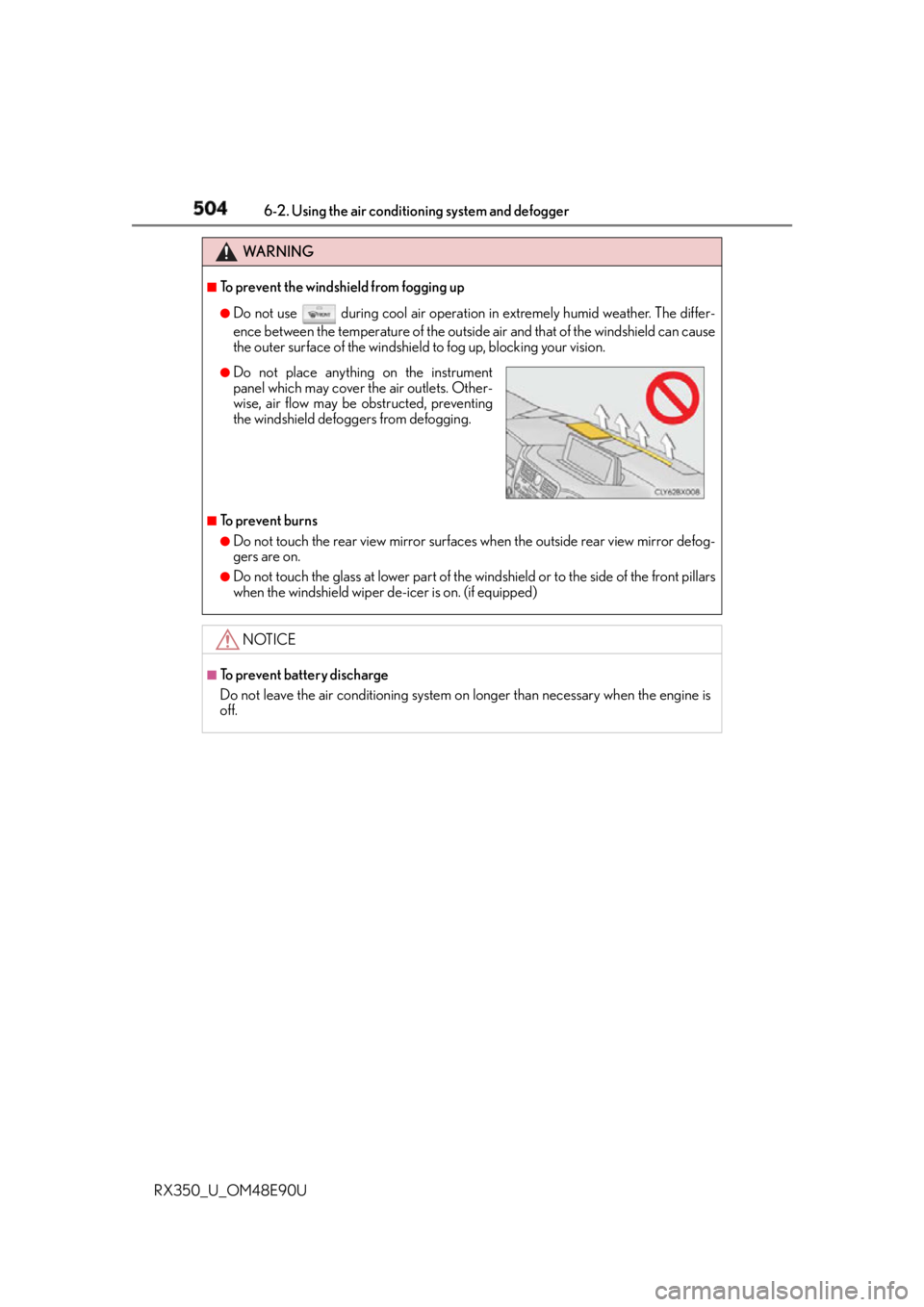
Do not place anything on the instrument
panel which may cover th e air outlets. Other-
wise, air flow may be obstructed, preventing
the windshield defoggers from defogging.
Page 511 of 748
5116-3. Using the interior lights
6
Interior features
RX350_U_OM48E90U ●
Illuminated entry system: The lights automa tically turn on/off according to engine
switch mode, the presence of the electronic key, whether the doors are locked/
unlocked, and whether the doors are opened/closed. ●
If the interior lights remain on when the engine switch is turned off, the lights will go off
automatically after 20 minutes. ●
In the following cases, the interior lights and front personal lights may not respond as
normal.
• When water, dirt, etc., have adhered to the lens surface
• When operated with a wet hand
• When wearing gloves, etc. ●
Some functions can be customized. ( P. 699)
NOTICE ●
Never remove the lens for the front interior light and front personal lights. Otherwise,
the lights will be damaged. If the lens ne ed to remove, contact your Lexus dealer.●
To prevent battery discharge, do not leav e the lights on longer than necessary when
the engine is off.
Page 513 of 748
5136-4. Using the storage features
6
Interior features
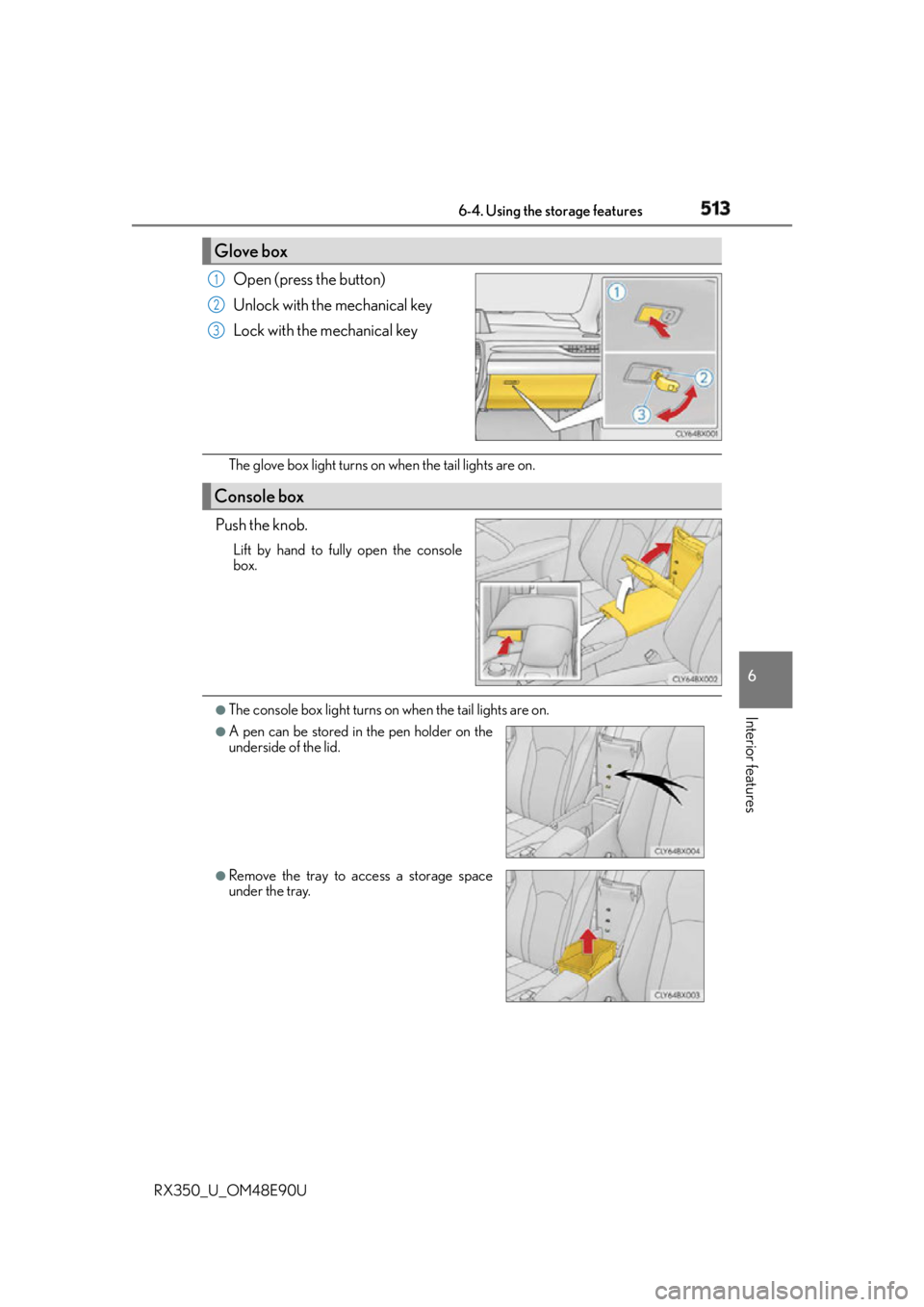
RX350_U_OM48E90U Open (press the button)
Unlock with the mechanical key
Lock with the mechanical key
The glove box light turns on when the tail lights are on.
Push the knob. Lift by hand to fully open the console
box.
●
The console box light turns on when the tail lights are on.Glove box 1
2
3
Console box ●
A pen can be stored in the pen holder on the
underside of the lid.
●
Remove the tray to access a storage space
under the tray.
Page 517 of 748
5176-4. Using the storage features
6
Interior features
RX350_U_OM48E90U Auxiliary boxes
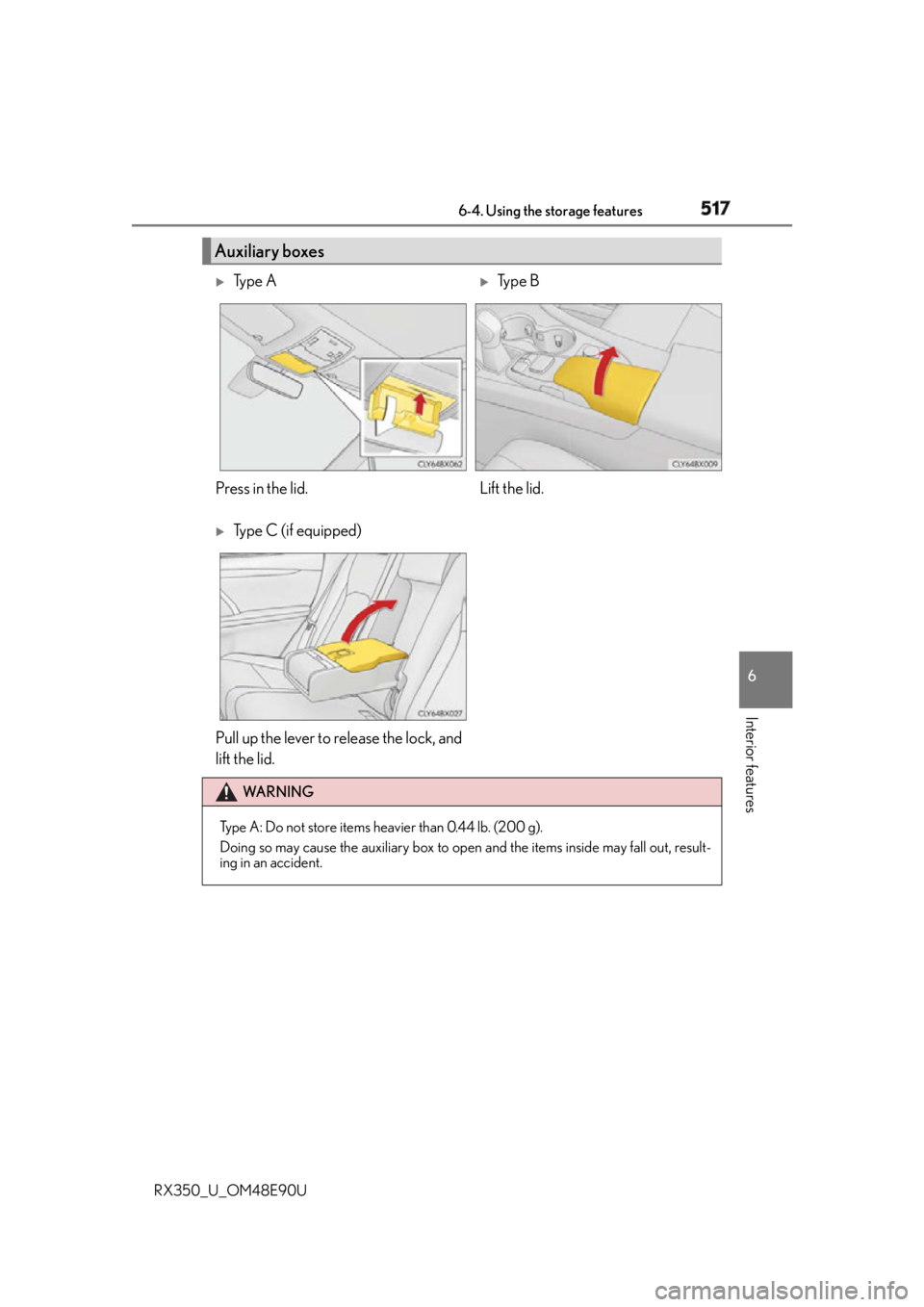
Ty p e A
Ty p e B
Press in the lid. Lift the lid.
Type C (if equipped)
Pull up the lever to release the lock, and
lift the lid. WA R N I N G
Type A: Do not store items heavier than 0.44 lb. (200 g).
Doing so may cause the auxiliary box to open and the items inside may fall out, result-
ing in an accident.
Page 524 of 748
524 6-5. Using the other interior features
RX350_U_OM48E90U
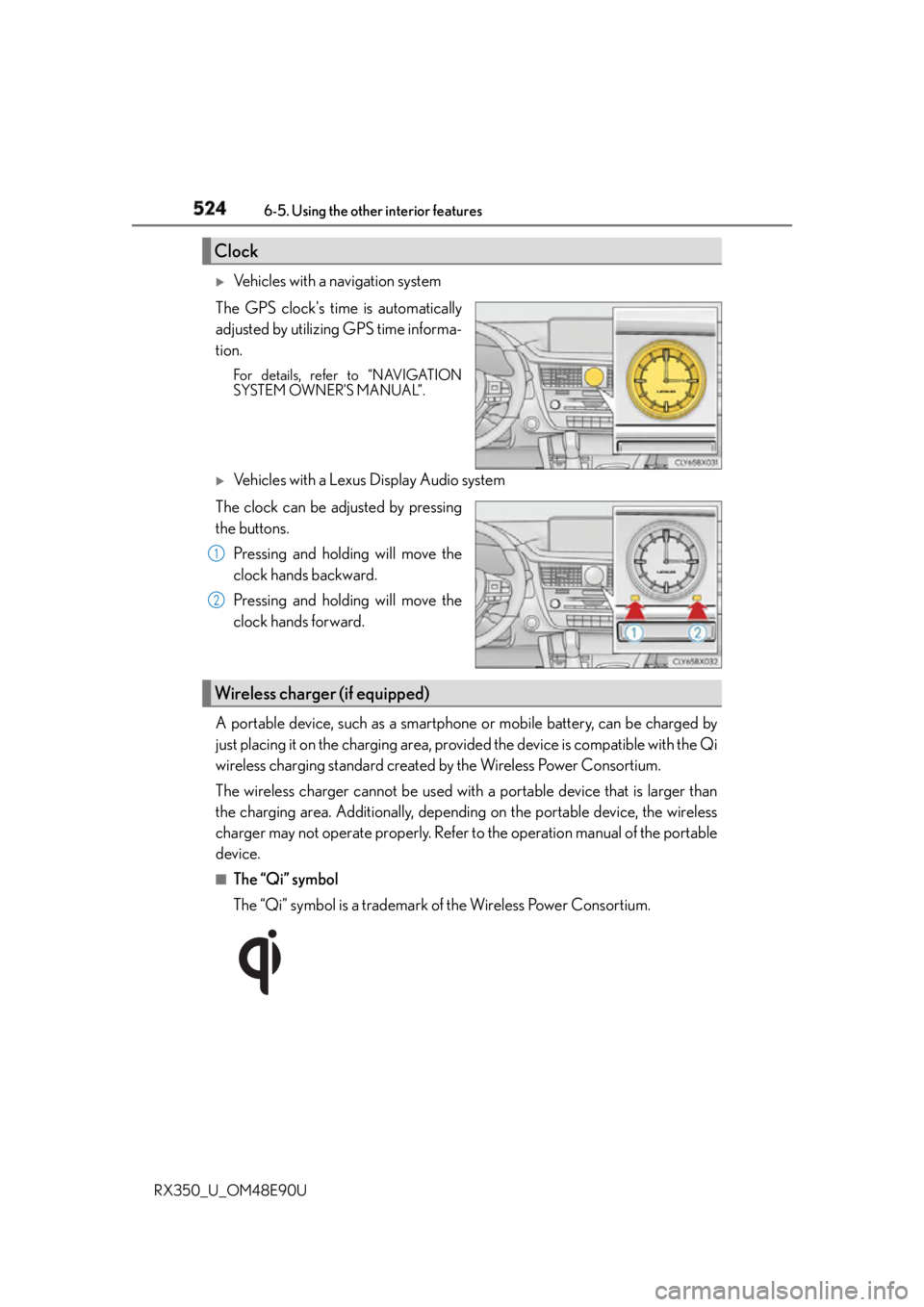
Vehicles with a navigation system
The GPS clock's time is automatically
adjusted by utilizing GPS time informa-
tion. For details, refer to “NAVIGATION
SYSTEM OWNER’S MANUAL”.
Vehicles with a Lexus Display Audio system
The clock can be adjusted by pressing
the buttons.
Pressing and holding will move the
clock hands backward.
Pressing and holding will move the
clock hands forward.
A portable device, such as a smartphone or mobile battery, can be charged by
just placing it on the charging area, provided the device is compatible with the Qi
wireless charging standard created by the Wireless Power Consortium.
The wireless charger cannot be used with a portable device that is larger than
the charging area. Additionally, depending on the portable device, the wireless
charger may not operate properly. Refer to the operation manual of the portable
device. ■
The “Qi” symbol
The “Qi” symbol is a trademark of the Wireless Power Consortium.Clock
1
2
Wireless charger (if equipped)
Page 536 of 748
536 6-5. Using the other interior features
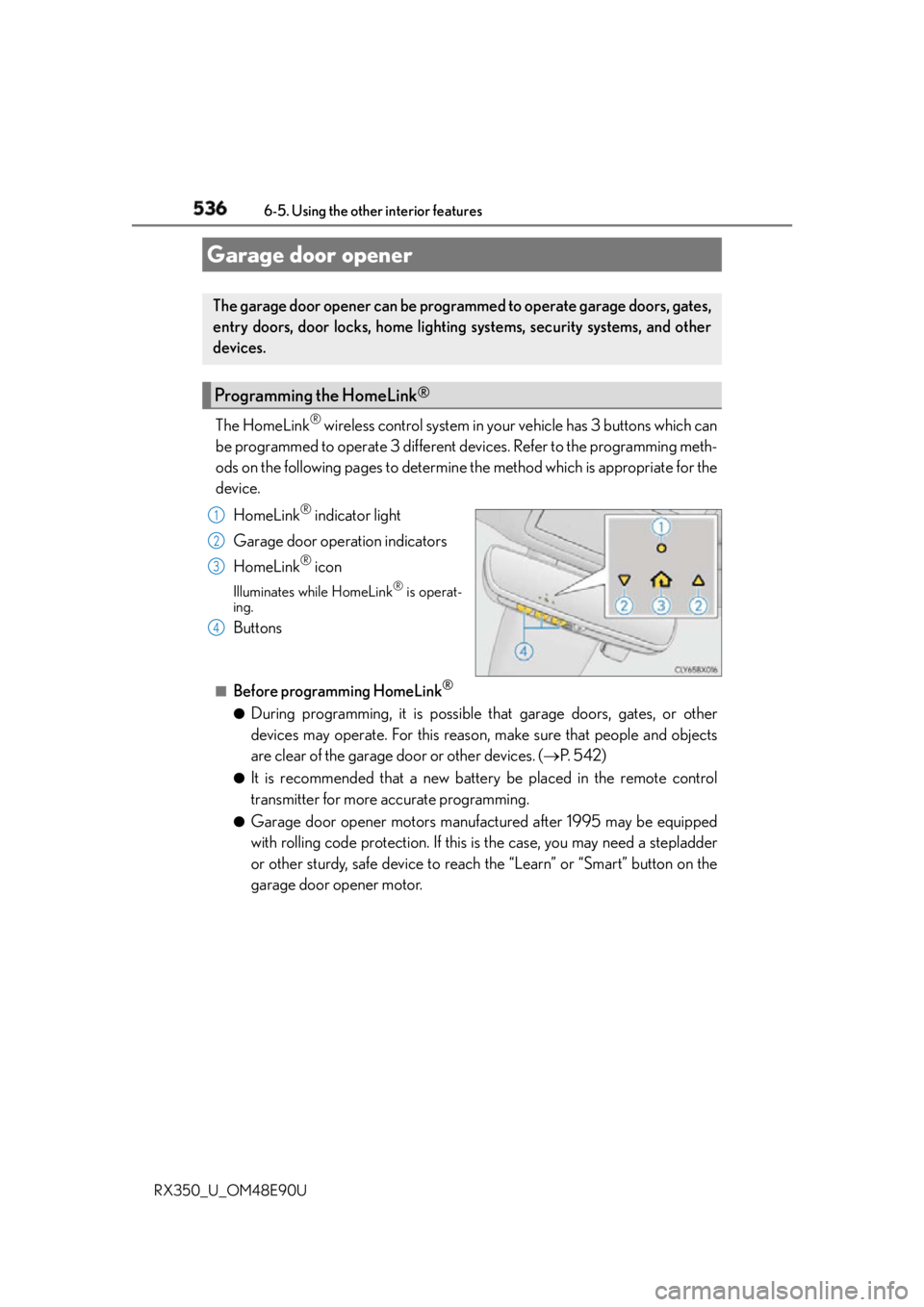
RX350_U_OM48E90U The HomeLink ®
wireless control system in your vehicle has 3 buttons which can
be programmed to operate 3 different devices. Refer to the programming meth-
ods on the following pages to determine the method which is appropriate for the
device.
HomeLink ®
indicator light
Garage door operation indicators
HomeLink ®
iconIlluminates while HomeLink ®
is operat-
ing.
Buttons ■
Before programming HomeLink ®
●
During programming, it is possible th at garage doors, gates, or other
devices may operate. For this reason, make sure that people and objects
are clear of the garage door or other devices. ( P. 5 4 2 )●
It is recommended that a new battery be placed in the remote control
transmitter for more accurate programming. ●
Garage door opener motors manufactured after 1995 may be equipped
with rolling code protection. If this is the case, you may need a stepladder
or other sturdy, safe device to reach the “Learn” or “Smart” button on the
garage door opener motor.Garage door opener The garage door opener can be programmed to operate garage doors, gates,
entry doors, door locks, home lighting systems, security systems, and other
devices.
Programming the HomeLink ®
1
2
3
4