lock LEXUS RX350 2016 Owners Manual
[x] Cancel search | Manufacturer: LEXUS, Model Year: 2016, Model line: RX350, Model: LEXUS RX350 2016Pages: 748, PDF Size: 12.36 MB
Page 666 of 748
666 8-2. Steps to take in an emergency
RX350_U_OM48E90U Connect the clamp at the other end of the negative cable to a solid, station-
ary, unpainted metallic point away from the battery and any moving parts,
as shown in the illustration.
Start the engine of the second vehicle. Increase the engine speed slightly and
maintain at that level for approximately 5 minutes to recharge the battery of
your vehicle.
Open and close any of the doors of your vehicle with the engine switch off.
Maintain the engine speed of the second vehicle and start the engine of your
vehicle by turning the engine switch to IGNITION ON mode.
Once the vehicle’s engine has started, remove the jumper cables in the exact
reverse order from which they were connected.
Once the engine starts, have the vehicle inspected at your Lexus dealer as soon
as possible. ■
Starting the engine when the battery is discharged
The engine cannot be started by push-starting. ■
To prevent battery discharge ●
Turn off the headlights and the audio system while the engine is off. ●
Turn off any unnecessary electrical components when the vehicle is running at a low
speed for an extended period, such as in heavy traffic. ■
Charging the battery
The electricity stored in the battery will discharge gradually even when the vehicle is not
in use, due to natural discharg e and the draining effects of certain electrical appliances. If
the vehicle is left for a long time, the battery may discharge, and the engine may be
unable to start. (The battery recharges automatically during driving.) ■
When the battery is removed or discharged ●
In some cases, it may not be possible to unlock the doors using the smart access system
with push-button start when the battery is discharged. Use the wireless remote control
or the mechanical key to lock or unlock the doors. ●
The engine may not start on the first attempt after the battery has recharged but will
start normally after the second attempt. This is not a malfunction. ●
The engine switch mode is memorized by the vehicle. When the battery is recon-
nected, the system will return to the mode it was in before the battery was discharged.
Before disconnecting the battery, turn the engine switch off.
If you are unsure what mode the engine switch was in before the battery discharged, be
especially careful when reconnecting the battery. ●
The power back door must be initialized. ( P. 1 3 8 )4
4
5
6
7
Page 671 of 748
6718-2. Steps to take in an emergency
8
When trouble arises
RX350_U_OM48E90U Stop the engine. Shift the shift lever to P and set the parking brake.
Remove the mud, snow or sand from around the front wheels.
Place wood, stones or some other material under the front wheels to help pro-
vide traction.
Restart the engine.
AWD models: Activate all-wheel drive lock mode. ( P. 3 7 3 )
Shift the shift lever to D or R and release the parking brake. Then, while exer-
cising caution, depress the accelerator pedal. ■
When it is difficult to free the vehicle
If the vehicle becomes stuck Carry out the following procedures if the tires spin or the vehicle becomes
stuck in mud, dirt or snow:
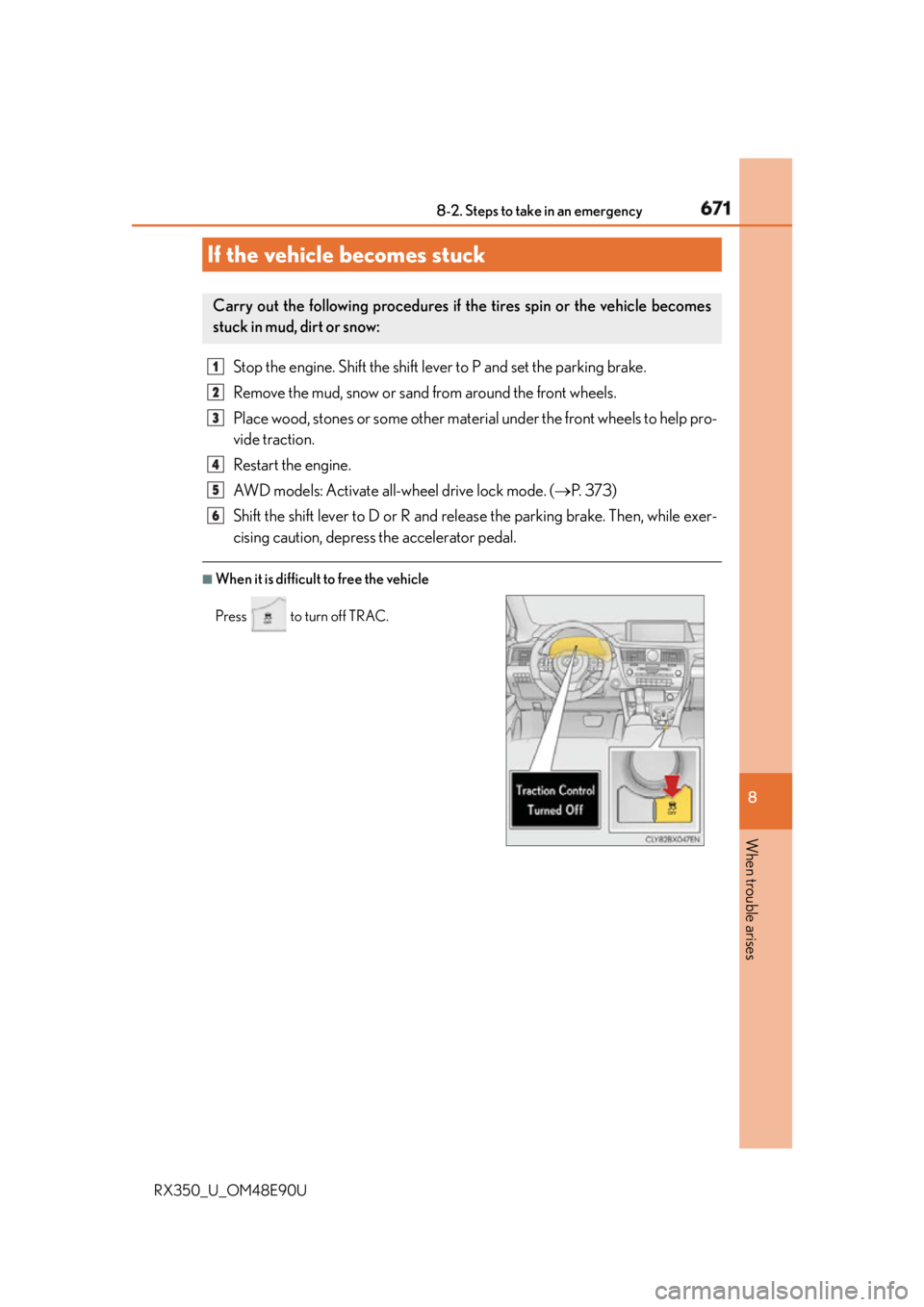
Press to turn off TRAC. 1
2
3
4
5
6
Page 676 of 748
676 9-1. Specifications
RX350_U_OM48E90U ■
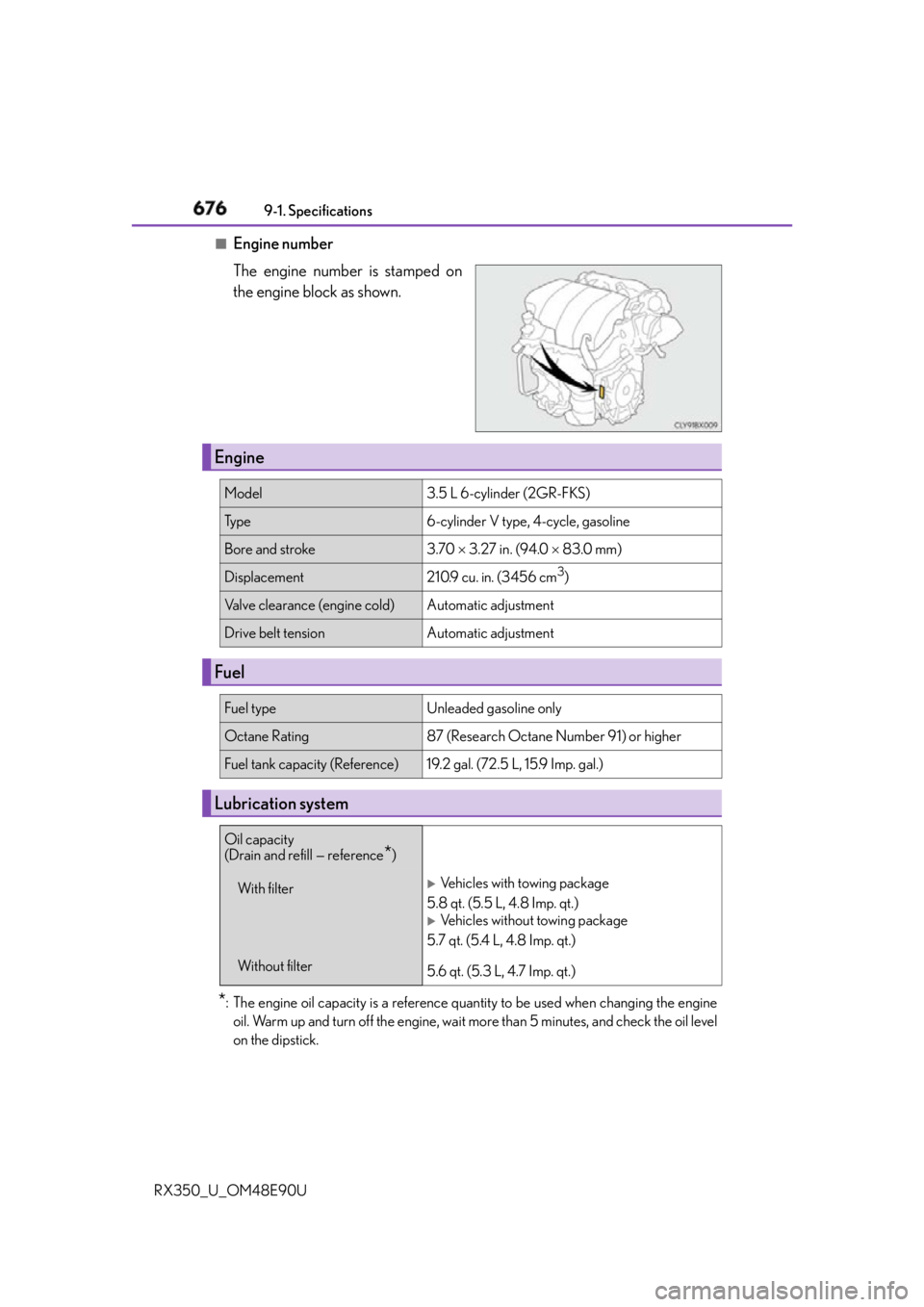
Engine number
The engine number is stamped on
the engine block as shown.
* : The engine oil capacity is a reference quantity to be used when changing the engine
oil. Warm up and turn off the engine, wait more than 5 minutes, and check the oil level
on the dipstick.Engine Model 3.5 L 6-cylinder (2GR-FKS)
Ty p e 6-cylinder V type, 4-cycle, gasoline
Bore and stroke 3.70 3.27 in. (94.0 83.0 mm)
Displacement 210.9 cu. in. (3456 cm 3
)
Valve clearance (engine cold) Automatic adjustment
Drive belt tension Automatic adjustment
Fuel Fuel type Unleaded gasoline only
Octane Rating 87 (Research Octane Number 91) or higher
Fuel tank capacity (Reference) 19.2 gal. (72.5 L, 15.9 Imp. gal.)
Lubrication system Oil capacity
(Drain and refill — reference
* )
With filter
Without filter
Vehicles with towing package
5.8 qt. (5.5 L, 4.8 Imp. qt.)
Vehicles without towing package
5.7 qt. (5.4 L, 4.8 Imp. qt.)
5.6 qt. (5.3 L, 4.7 Imp. qt.)
Page 679 of 748
6799-1. Specifications
9
Vehicle specifications
RX350_U_OM48E90U * : The fluid capacity is a reference quantity.
If replacement is necessary, contact your Lexus dealer.
Your Lexus vehicle is filled with “Toyota Genuine Differential Gear Oil” at the
factory.
Use Lexus approved “Toyota Genuine Differential Gear Oil” or an equivalent of
matching quality to satisfy the above sp ecification. Please contact your Lexus
dealer for further details.
Your Lexus vehicle is filled with “Toyota Genuine Differential Gear Oil” at the
factory.
Use Lexus approved “Toyota Genuine Differential Gear Oil” or an equivalent of
matching quality to satisfy the above sp ecification. Please contact your Lexus
dealer for further details.Automatic transmission Fluid capacity
* 7.2 qt. (6.8 L, 6.0 Imp. qt.)
Fluid type To y o t a G e n u i n e AT F W S
NOTICE ■
Transmission fluid type
Using transmission fluid other than “Toyot a Genuine ATF WS” may cause deterioration
in shift quality, locking up of your transm ission accompanied by vibration, and ulti-
mately damage the transmission of your vehicle.
Transfer (AWD models) Oil capacity 0.8 qt. (0.8 L, 0.7 Imp. qt.)
Oil type and viscosity Toyota Genuine Differential gear oil LT
75W-85 GL-5 or equivalent
Rear differential (AWD models) Oil capacity 0.5 qt. (0.5 L, 0.4 Imp. qt.)
Oil type and viscosity Toyota Genuine Differential gear oil LT
75W-85 GL-5 or equivalent
Page 701 of 748
7019-2. Customization
9
Vehicle specifications
RX350_U_OM48E90U ■
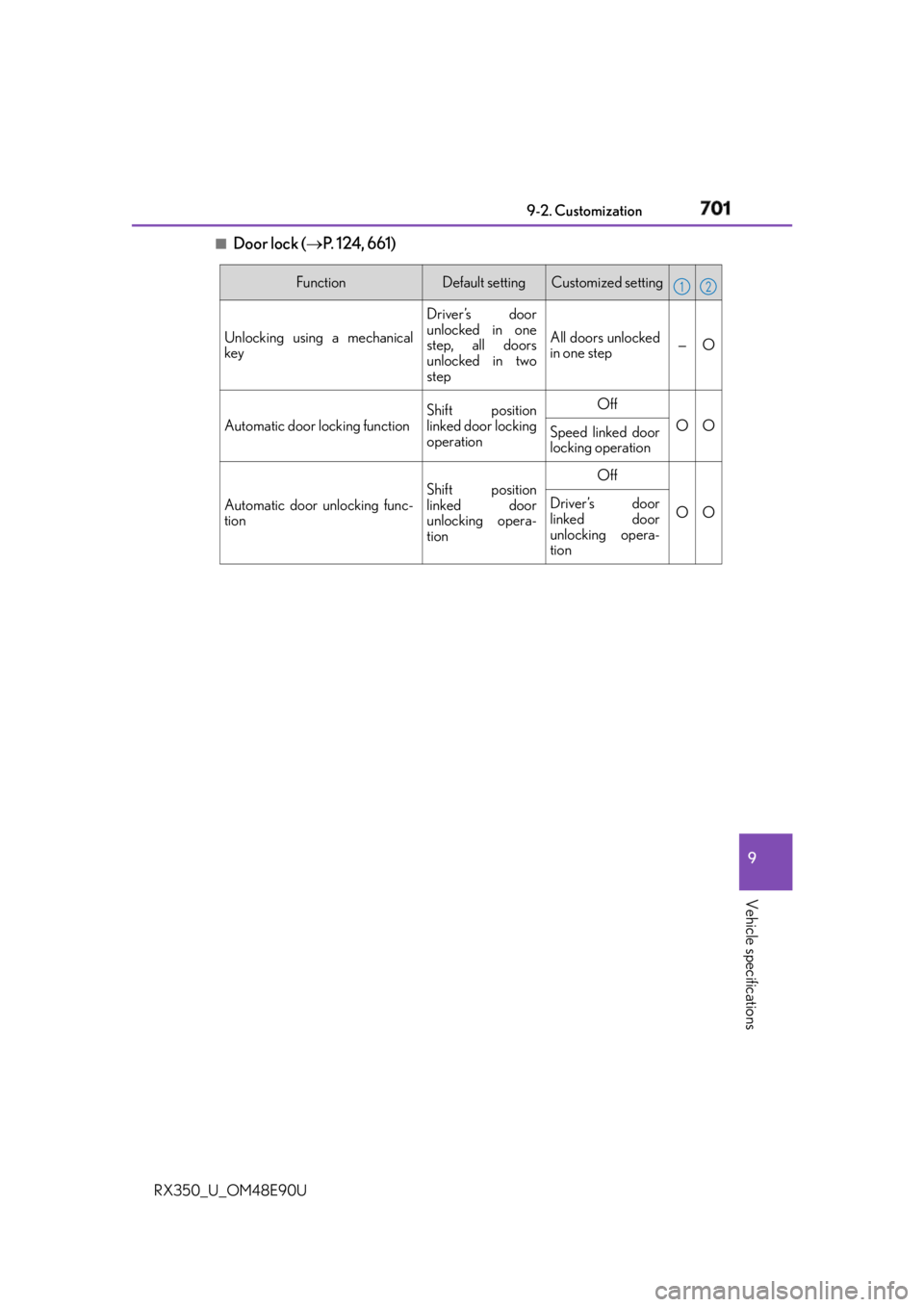
Door lock ( P. 124, 661) Function Default setting Customized setting
Unlocking using a mechanical
key Driver’s door
unlocked in one
step, all doors
unlocked in two
step All doors unlocked
in one step — O
Automatic door locking function Shift position
linked door locking
operation Off
O O
Speed linked door
locking operation
Automatic door unlocking func-
tion Shift position
linked door
unlocking opera-
tion Off
O ODriver’s door
linked door
unlocking opera-
tion 1 2
Page 703 of 748
7039-2. Customization
9
Vehicle specifications
RX350_U_OM48E90U ■
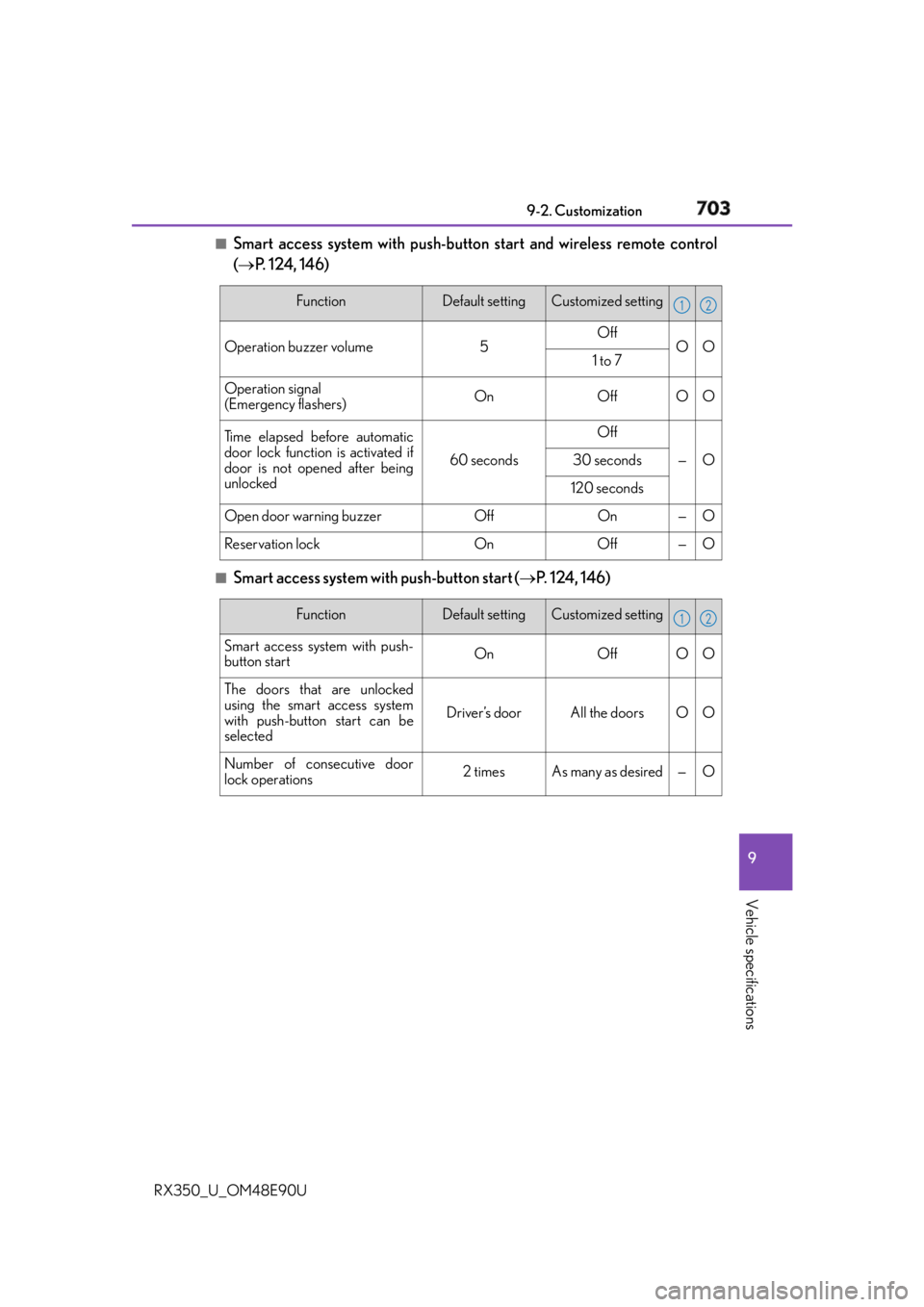
Smart access system with push-button start and wireless remote control
( P. 124, 146)
■
Smart access system with push-button start
( P. 124, 146)Function Default setting Customized setting
Operation buzzer volume 5 Off
O O
1 to 7
Operation signal
(Emergency flashers) On Off O O
Ti m e e l a p s e d b e f o r e a u t o m a t i c
door lock function is activated if
door is not opened after being
unlocked 60 seconds Off
— O30 seconds
120 seconds
Open door warning buzzer Off On — O
Reservation lock On Off — O 1 2
Function Default setting Customized setting
Smart access system with push-
button start On Off O O
The doors that are unlocked
using the smart access system
with push-button start can be
selected Driver’s door All the doors O O
Number of consecutive door
lock operations 2 times As many as desired — O 1 2
Page 704 of 748
704 9-2. Customization
RX350_U_OM48E90U ■
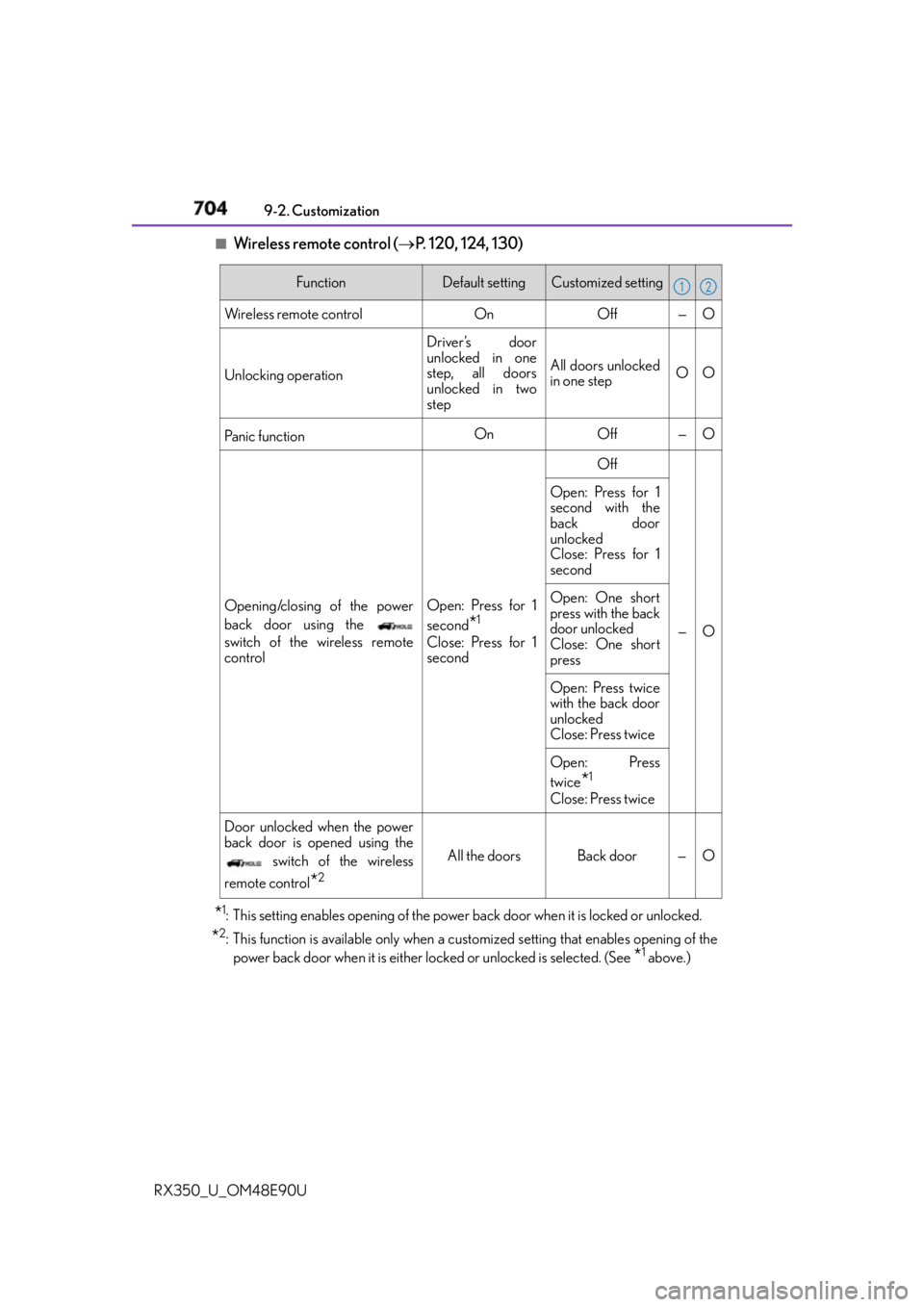
Wireless remote control ( P. 120, 124, 130)
* 1
: This setting enables opening of the power back door when it is locked or unlocked.
* 2
: This function is available only when a cust omized setting that en ables opening of the
power back door when it is either lo cked or unlocked is selected. (See
* 1
above.)Function Default setting Customized setting
Wireless remote control On Off — O
Unlocking operation Driver’s door
unlocked in one
step, all doors
unlocked in two
step All doors unlocked
in one step OO
Pa n i c f u n c t i o n On Off — O
Opening/closing of the power
back door using the
switch of the wireless remote
control Open: Press for 1
second
* 1
Close: Press for 1
second Off
—OOpen: Press for 1
second with the
back door
unlocked
Close: Press for 1
second
Open: One short
press with the back
door unlocked
Close: One short
press
Open: Press twice
with the back door
unlocked
Close: Press twice
Open: Press
twice
* 1
Close: Press twice
Door unlocked when the power
back door is opened using the
switch of the wireless
remote control
* 2
All the doors Back door — O 1 2
Page 705 of 748
7059-2. Customization
9
Vehicle specifications
RX350_U_OM48E90U ■
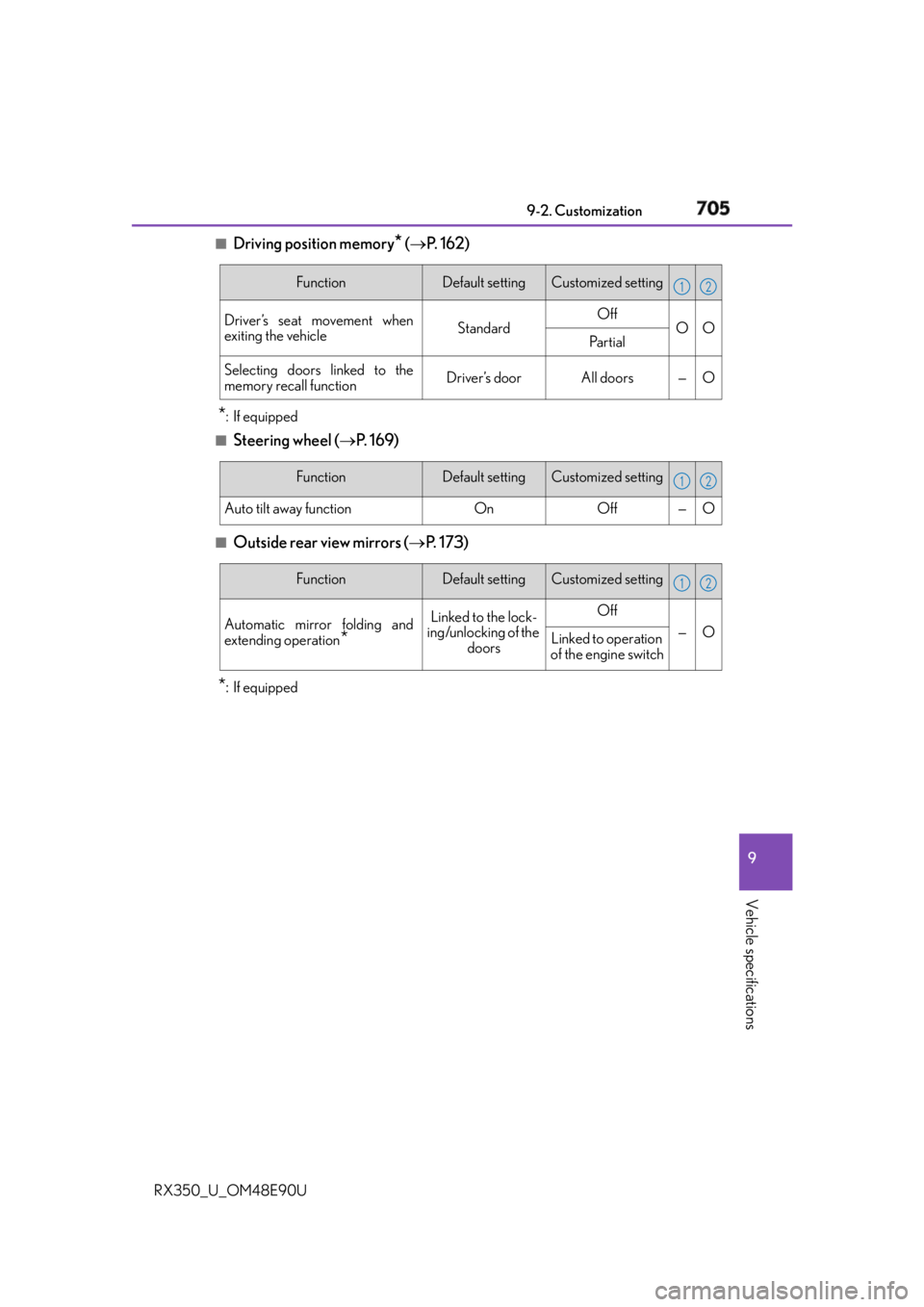
Driving position memory
* ( P. 1 6 2 )
* :If equipped ■
Steering wheel ( P. 1 6 9 )■
Outside rear view mirrors ( P. 1 7 3 )
* : If equipped Function Default setting Customized setting
Driver’s seat movement when
exiting the vehicle Standard Off
O O
Pa r t i a l
Selecting doors linked to the
memory recall function Driver’s door All doors — O 1 2
Function Default setting Customized setting
Auto tilt away function On Off — O 1 2
Function Default setting Customized setting
Automatic mirror folding and
extending operation
* Linked to the lock-
ing/unlocking of the
doors Off
— O
Linked to operation
of the engine switch 1 2
Page 710 of 748
710 9-2. Customization
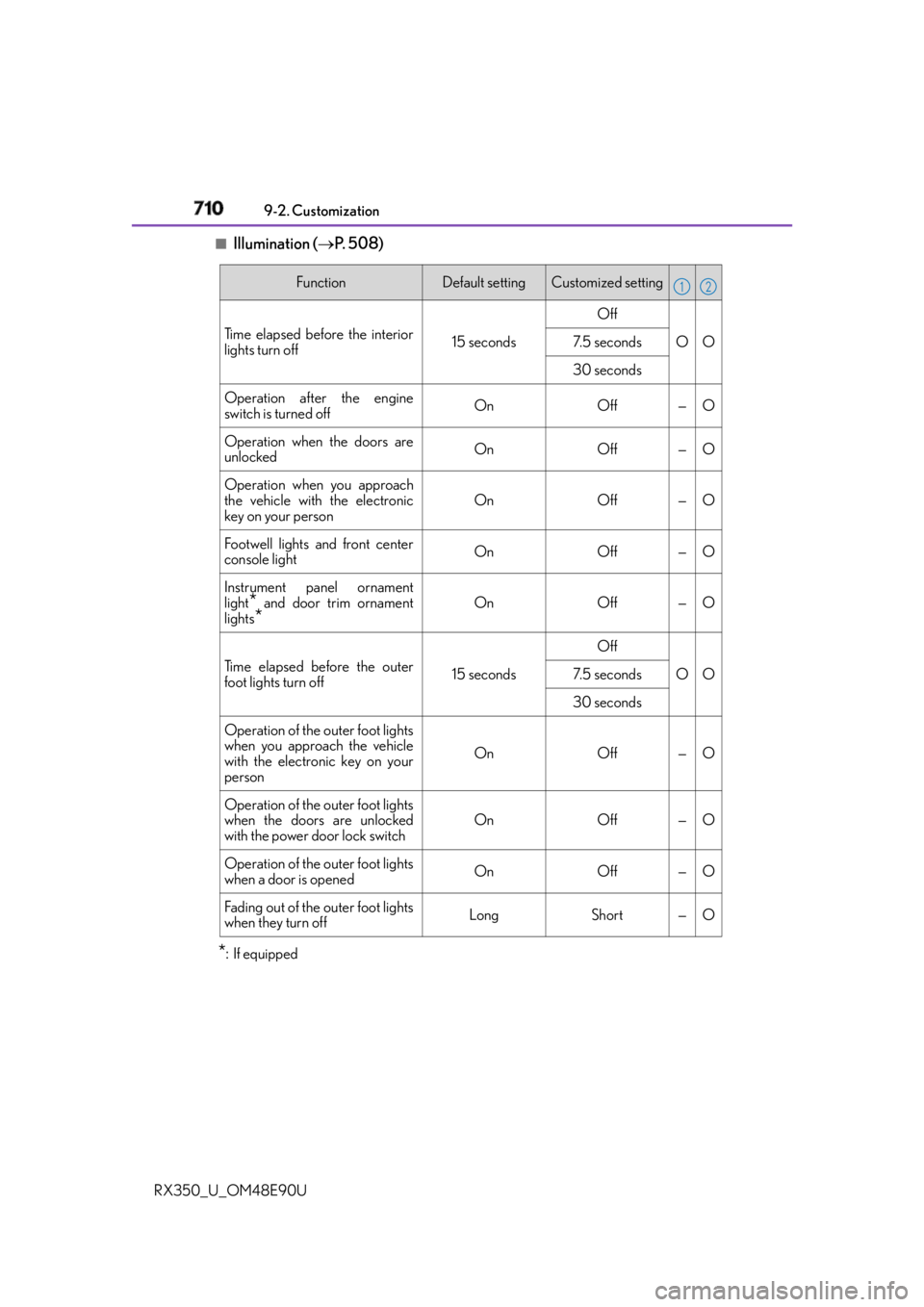
RX350_U_OM48E90U ■
Illumination ( P. 5 0 8 )
* : If equipped Function Default setting Customized setting
Time elapsed before the interior
lights turn off 15 seconds Off
O O7. 5 s e c o n d s
30 seconds
Operation after the engine
switch is turned off On Off — O
Operation when the doors are
unlocked On Off — O
Operation when you approach
the vehicle with the electronic
key on your person On Off — O
Footwell lights and front center
console light On Off — O
Instrument panel ornament
light
* and door trim ornament
lights
* On Off — O
Time elapsed before the outer
foot lights turn off 15 seconds Off
O O7. 5 s e c o n d s
30 seconds
Operation of the outer foot lights
when you approach the vehicle
with the electronic key on your
person On Off — O
Operation of the outer foot lights
when the doors are unlocked
with the power door lock switch On Off — O
Operation of the outer foot lights
when a door is opened On Off — O
Fading out of the outer foot lights
when they turn off Long Short — O 1 2
Page 711 of 748
7119-2. Customization
9
Vehicle specifications
RX350_U_OM48E90U ■
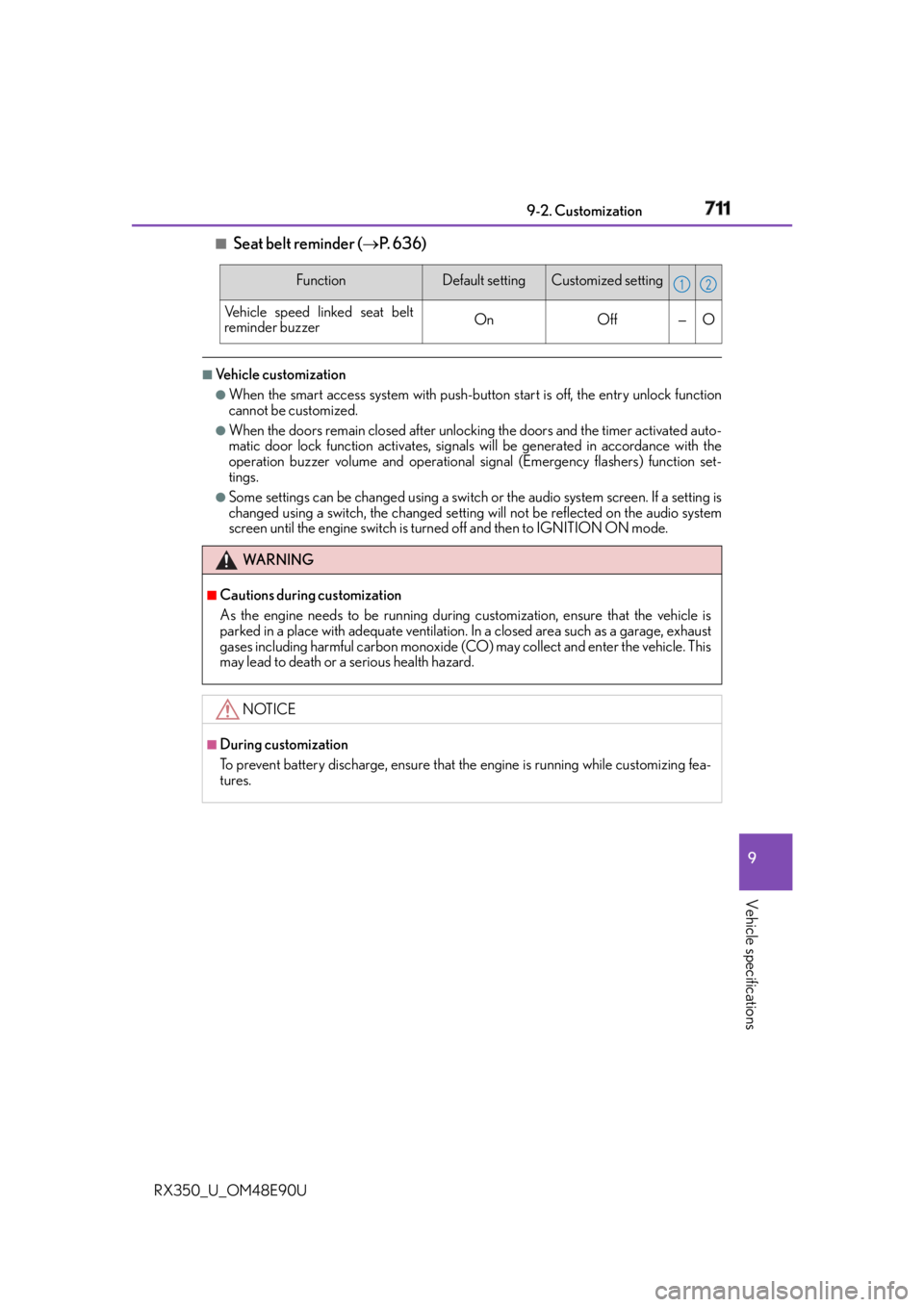
Seat belt reminder ( P. 636)■
Vehicle customization ●
When the smart access system with push-but ton start is off, the entry unlock function
cannot be customized. ●
When the doors remain closed after unlocking the doors and the timer activated auto-
matic door lock function activates, signals will be generated in accordance with the
operation buzzer volume and operational si gnal (Emergency flashers) function set-
tings. ●
Some settings can be changed using a switch or the audio system screen. If a setting is
changed using a switch, the changed setting will not be reflected on the audio system
screen until the engine switch is turn ed off and then to IGNITION ON mode.Function Default setting Customized setting
Vehicle speed linked seat belt
reminder buzzer On Off — O
WA R N I N G ■
Cautions during customization
As the engine needs to be running during customization, ensure that the vehicle is
parked in a place with adequate ventilation. In a closed area such as a garage, exhaust
gases including harmful carbon monoxide (CO) may collect and enter the vehicle. This
may lead to death or a serious health hazard.
NOTICE ■
During customization
To prevent battery discharge, ensure that the engine is running while customizing fea-
tures. 1 2