light LEXUS RX350 2016 Owners Manual
[x] Cancel search | Manufacturer: LEXUS, Model Year: 2016, Model line: RX350, Model: LEXUS RX350 2016Pages: 748, PDF Size: 12.36 MB
Page 511 of 748
5116-3. Using the interior lights
6
Interior features
RX350_U_OM48E90U ●
Illuminated entry system: The lights automa tically turn on/off according to engine
switch mode, the presence of the electronic key, whether the doors are locked/
unlocked, and whether the doors are opened/closed. ●
If the interior lights remain on when the engine switch is turned off, the lights will go off
automatically after 20 minutes. ●
In the following cases, the interior lights and front personal lights may not respond as
normal.
• When water, dirt, etc., have adhered to the lens surface
• When operated with a wet hand
• When wearing gloves, etc. ●
Some functions can be customized. ( P. 699)
NOTICE ●
Never remove the lens for the front interior light and front personal lights. Otherwise,
the lights will be damaged. If the lens ne ed to remove, contact your Lexus dealer.●
To prevent battery discharge, do not leav e the lights on longer than necessary when
the engine is off.
Page 512 of 748
512
RX350_U_OM48E90U 6-4. Using the storage features
List of storage features
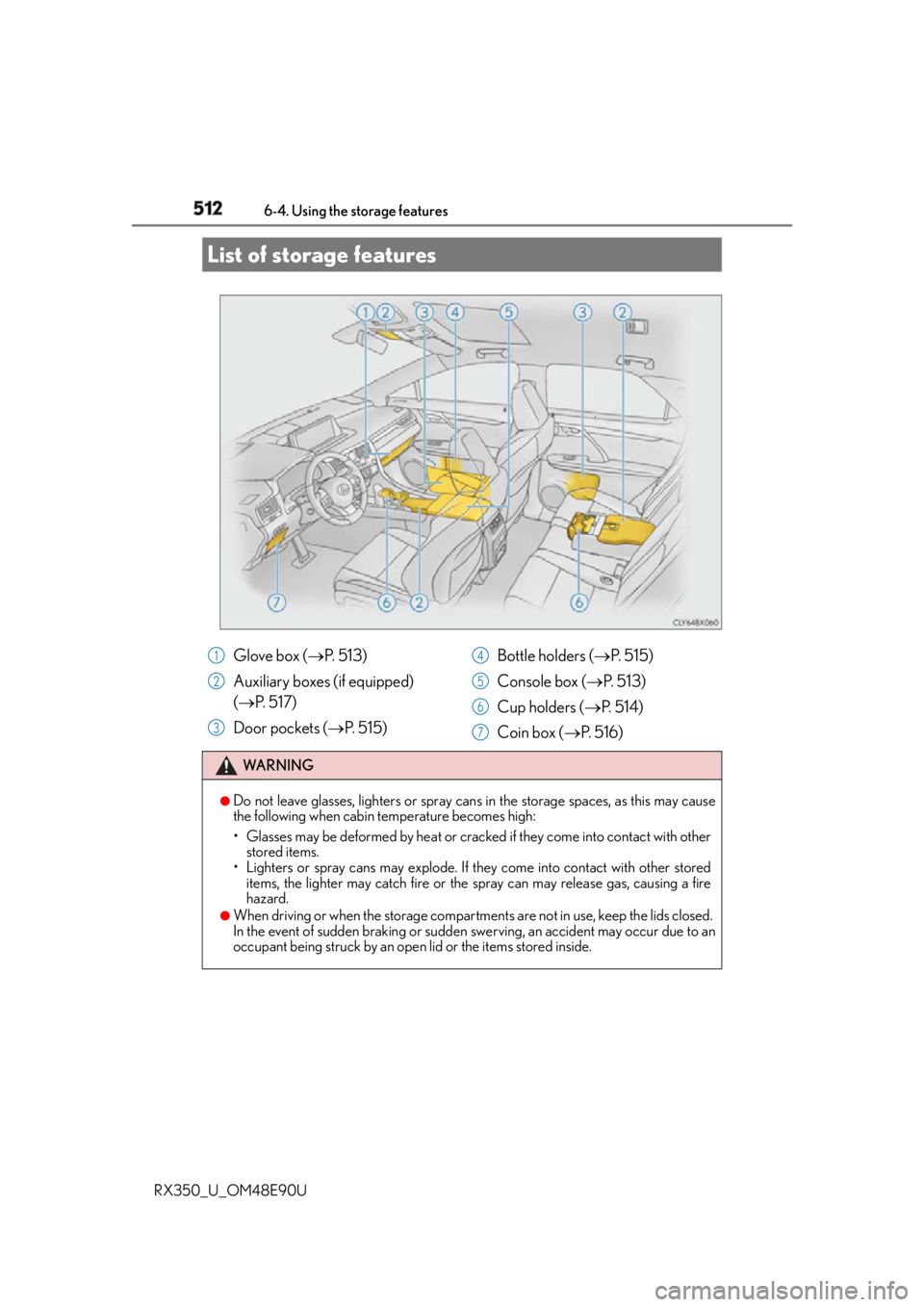
Glove box ( P. 5 1 3 )
Auxiliary boxes (if equipped)
( P. 5 1 7 )
Door pockets ( P. 5 1 5 ) Bottle holders ( P. 5 1 5 )
Console box ( P. 5 1 3 )
Cup holders ( P. 5 1 4 )
Coin box ( P. 5 1 6 )WA R N I N G ●
Do not leave glasses, lighters or spray cans in the storage spaces, as this may cause
the following when cabin temperature becomes high:
• Glasses may be deformed by heat or cracked if they come into contact with other
stored items.
• Lighters or spray cans may explode. If they come into contact with other stored
items, the lighter may catch fire or the spray can may release gas, causing a fire
hazard. ●
When driving or when the storage compartmen ts are not in use, keep the lids closed.
In the event of sudden braking or sudden swerving, an accident may occur due to an
occupant being struck by an open lid or the items stored inside. 1
2
3 4
5
6
7
Page 513 of 748
5136-4. Using the storage features
6
Interior features
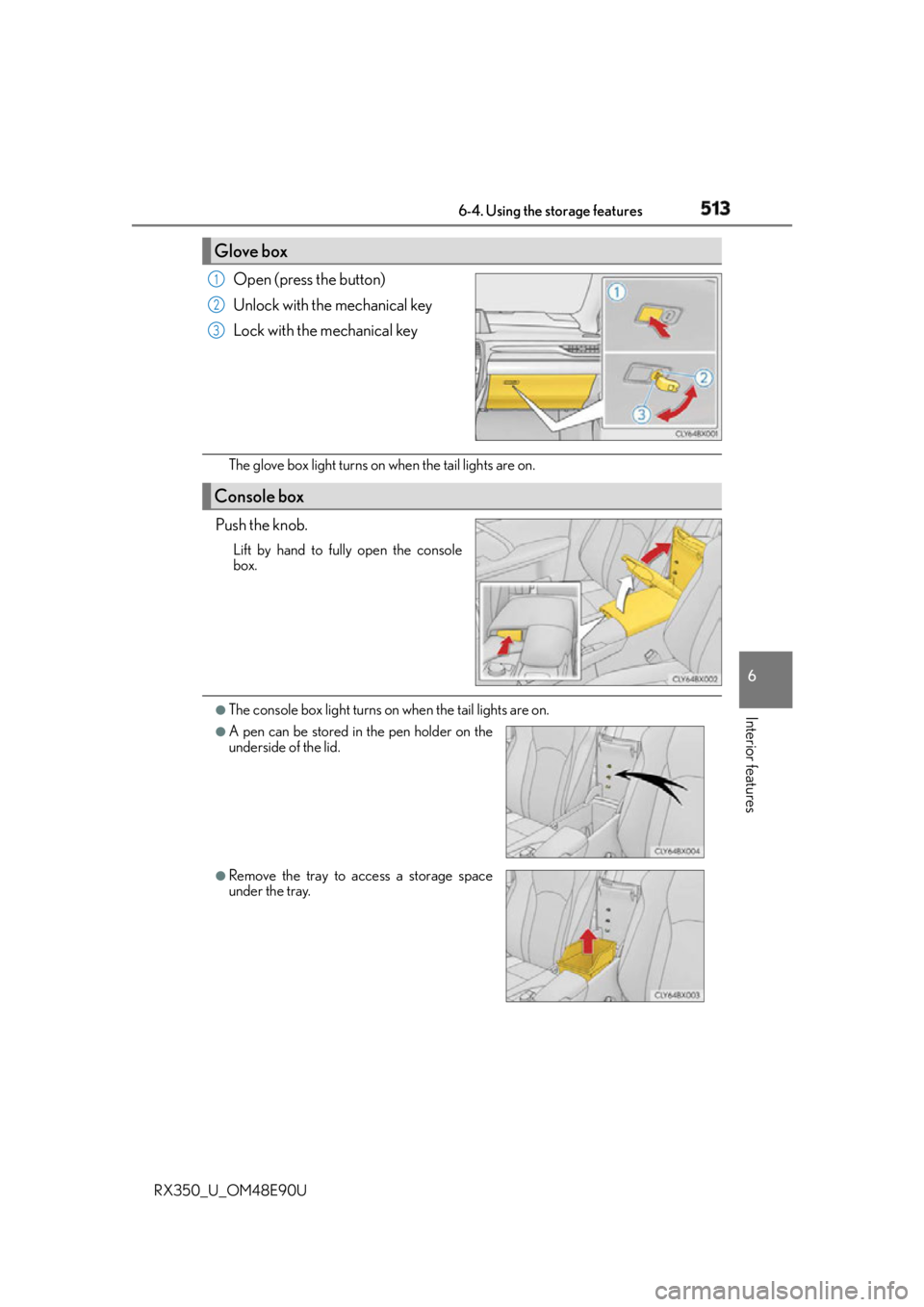
RX350_U_OM48E90U Open (press the button)
Unlock with the mechanical key
Lock with the mechanical key
The glove box light turns on when the tail lights are on.
Push the knob. Lift by hand to fully open the console
box.
●
The console box light turns on when the tail lights are on.Glove box 1
2
3
Console box ●
A pen can be stored in the pen holder on the
underside of the lid.
●
Remove the tray to access a storage space
under the tray.
Page 523 of 748
523
RX350_U_OM48E90U 6
Interior features 6-5. Using the other interior features
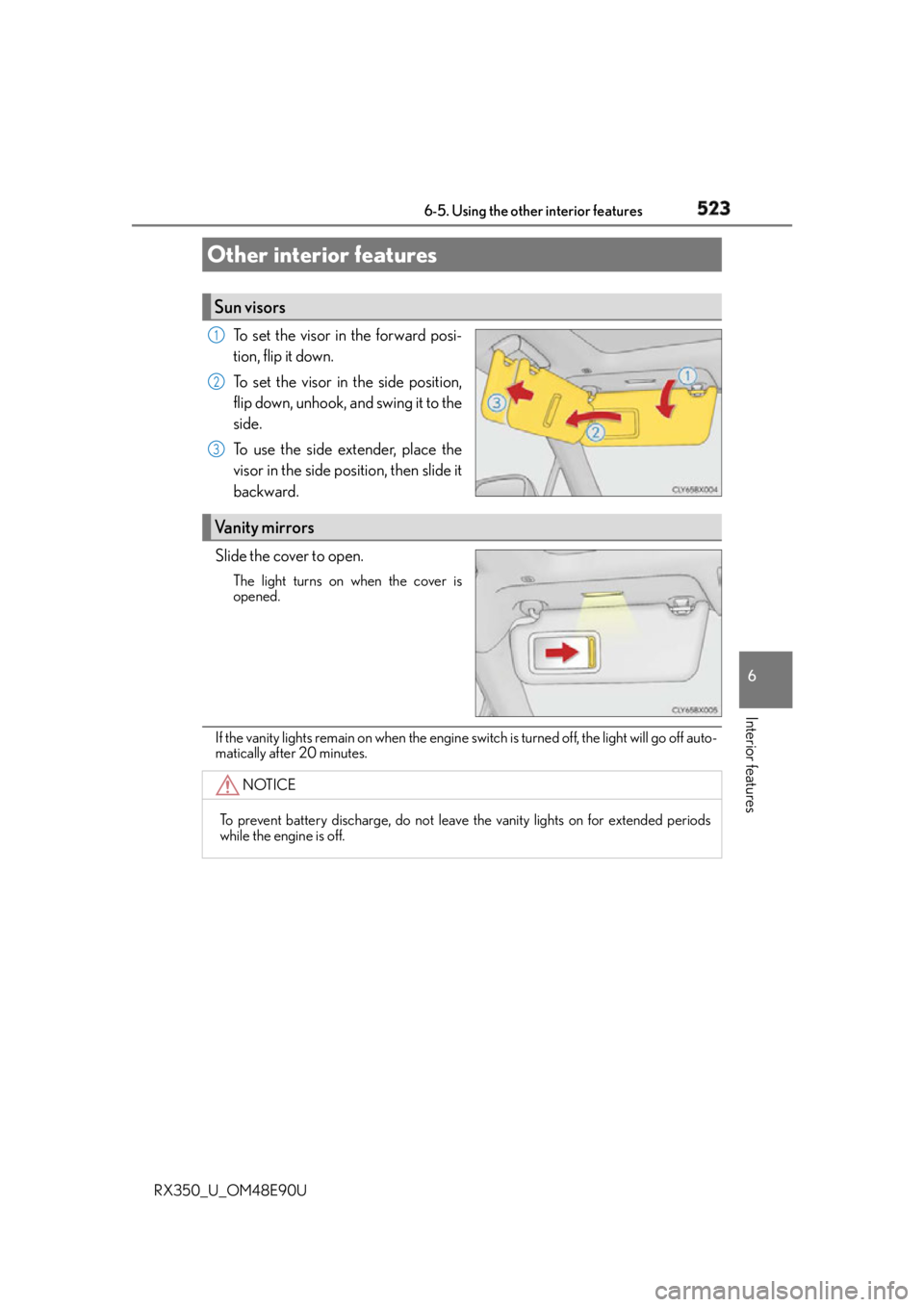
To set the visor in the forward posi-
tion, flip it down.
To set the visor in the side position,
flip down, unhook, and swing it to the
side.
To use the side extender, place the
visor in the side position, then slide it
backward.
Slide the cover to open. The light turns on when the cover is
opened.
If the vanity lights remain on when the engine switch is turned off, the light will go off auto-
matically after 20 minutes.Other interior features Sun visors 1
2
3
Vanity mirrors
NOTICE
To prevent battery discharge, do not leave the vanity lights on for extended periods
while the engine is off.
Page 525 of 748
5256-5. Using the other interior features
6
Interior features
RX350_U_OM48E90U ■
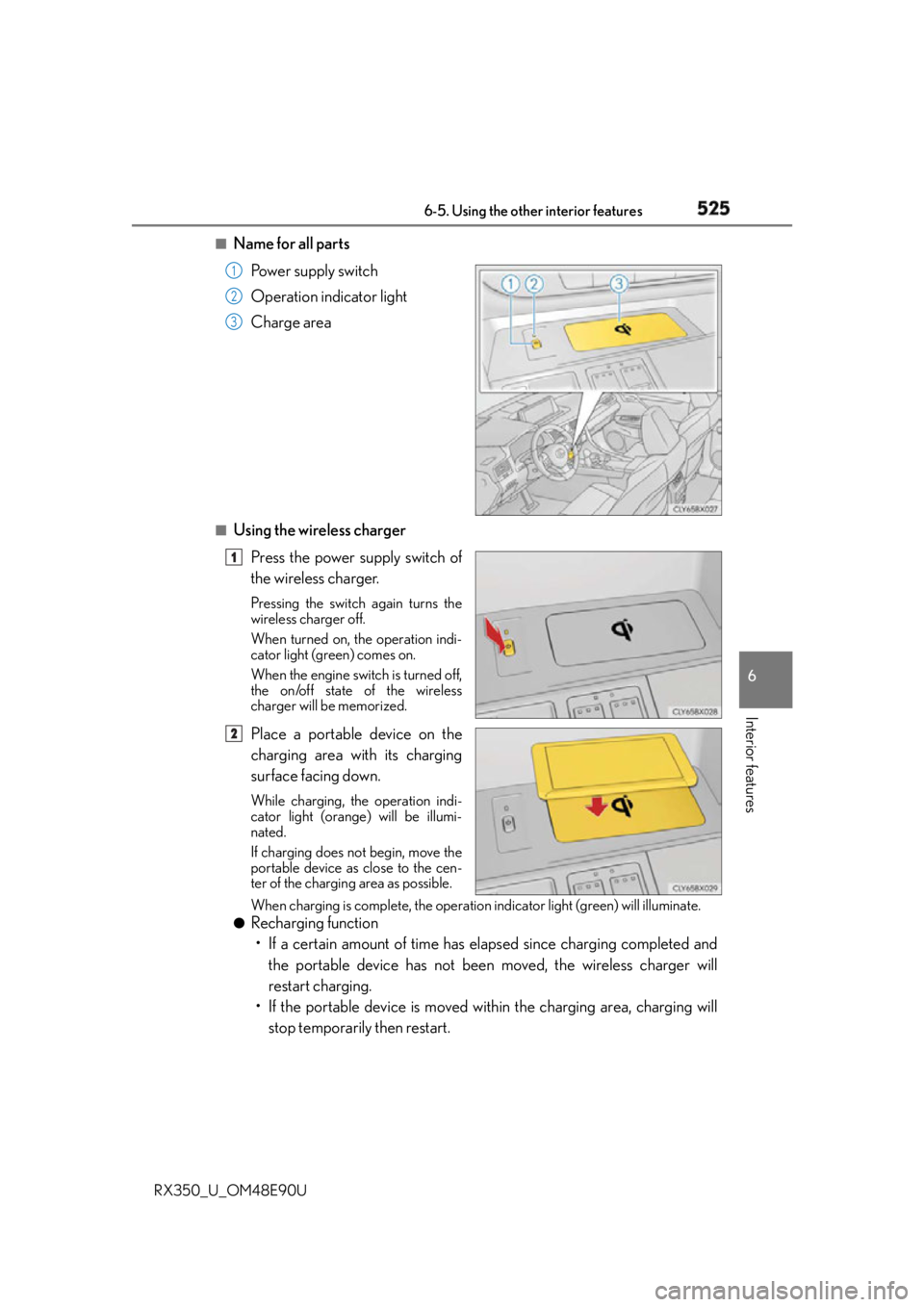
Name for all parts
Power supply switch
Operation indicator light
Charge area
■
Using the wireless charger
Press the power supply switch of
the wireless charger. Pressing the switch again turns the
wireless charger off.
When turned on, the operation indi-
cator light (green) comes on.
When the engine switch is turned off,
the on/off state of the wireless
charger will be memorized.
Place a portable device on the
charging area with its charging
surface facing down. While charging, the operation indi-
cator light (orange) will be illumi-
nated.
If charging does not begin, move the
portable device as close to the cen-
ter of the charging area as possible.
When charging is complete, the operation indicator light (green) will illuminate.●
Recharging function
• If a certain amount of time has elapsed since charging completed and
the portable device has not been moved, the wireless charger will
restart charging.
• If the portable device is moved with in the charging area, charging will
stop temporarily then restart. 1
2
3
1
2
Page 526 of 748
526 6-5. Using the other interior features
RX350_U_OM48E90U ■
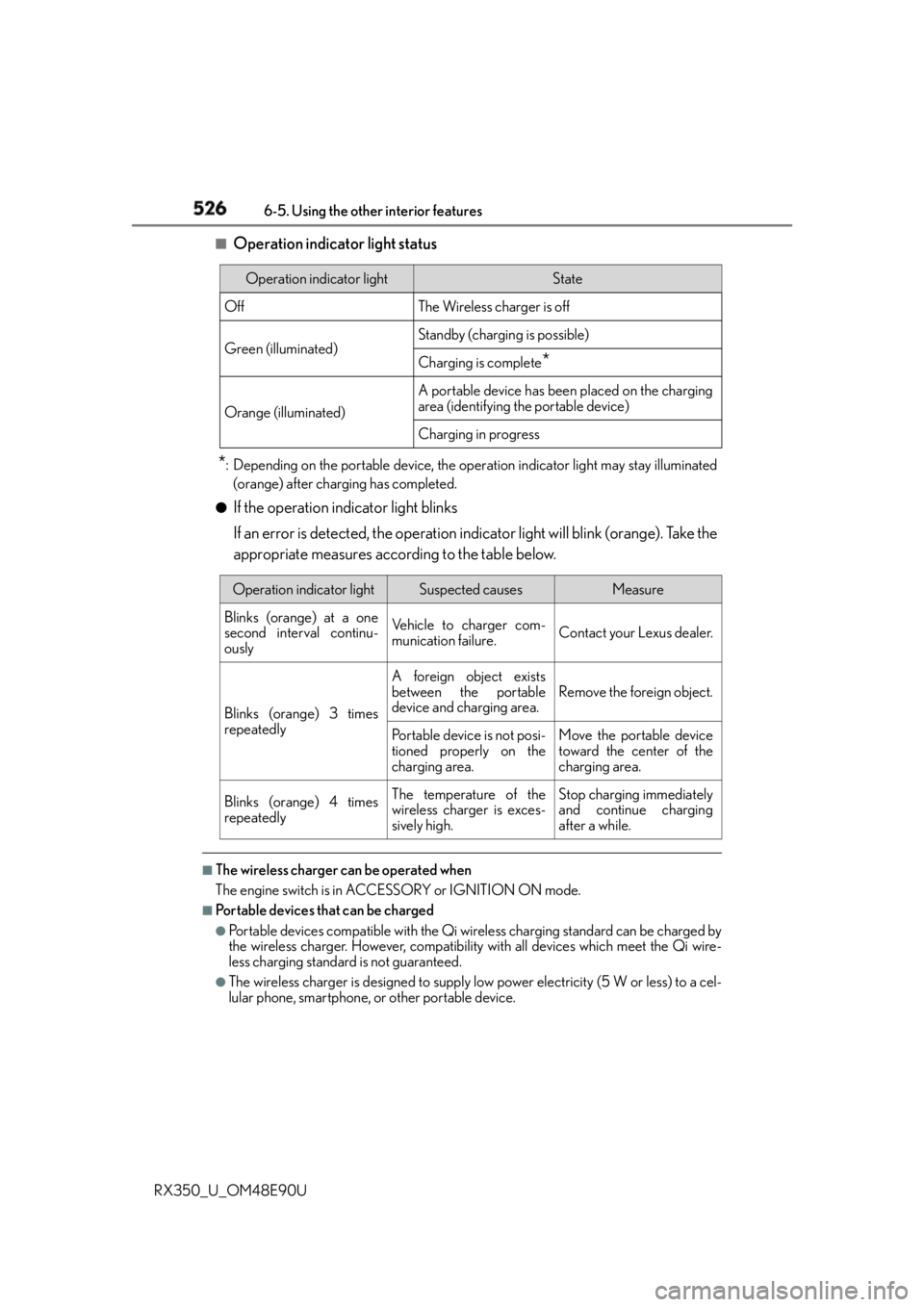
Operation indicator light status
* : Depending on the portable device, the oper ation indicator light may stay illuminated
(orange) after charging has completed.●
If the operation indicator light blinks
If an error is detected, the operation in dicator light will blink (orange). Take the
appropriate measures according to the table below.
■
The wireless charger can be operated when
The engine switch is in ACCESSORY or IGNITION ON mode. ■
Portable devices that can be charged ●
Portable devices compatible with the Qi wi reless charging standard can be charged by
the wireless charger. However, compatibility with all devices which meet the Qi wire-
less charging standard is not guaranteed. ●
The wireless charger is designed to supply low power electricity (5 W or less) to a cel-
lular phone, smartphone, or other portable device. Operation indicator light State
Off The Wireless charger is off
Green (illuminated) Standby (charging is possible)
Charging is complete
*Orange (illuminated) A portable device has been placed on the charging
area (identifying the portable device)
Charging in progress
Operation indicator light Suspected causes Measure
Blinks (orange) at a one
second interval continu-
ously Vehicle to charger com-
munication failure. Contact your Lexus dealer.
Blinks (orange) 3 times
repeatedly A foreign object exists
between the portable
device and charging area. Remove the foreign object.
Portable device is not posi-
tioned properly on the
charging area. Move the portable device
toward the center of the
charging area.
Blinks (orange) 4 times
repeatedly The temperature of the
wireless charger is exces-
sively high. Stop charging immediately
and continue charging
after a while.
Page 527 of 748
5276-5. Using the other interior features
6
Interior features
RX350_U_OM48E90U ■
If a cover or accessory is attached to the portable device
Do not charge a portable device if a cover or accessory which is not Qi compatible is
attached. Depending on the type of cover and/or accessory attached, it may not be pos-
sible to charge the portable device. If the portable device is placed on the charging area
and does not charge, remove the cover and/or accessories. ■
If interference is heard in AM radio broadcasts while charging
Turn off the wireless charger and check if the noise is reduced. If noise is reduced, press
and hold the power supply switch of the wire less charger for 2 seconds. The frequency of
the wireless charger is changed and noise may be reduced. When the frequency is
changed, the operation indicator light will blink (orange) 2 times.■
Charging precautions ●
If the electronic key cannot be detected in the cabin, charging cannot be performed.
When a door is opened and closed, ch arging may be temporarily suspended.●
While charging, the wireless charger and the portable device will become warm. This is
not a malfunction.
If a portable device becomes warm while ch arging and charging stops due to the pro-
tection function of the portable device, wait until the portable device cools down and
charge it again. ■
Sound generated du ring operation
When the power supply switch is turned on or while a portable device is being identified,
operation sounds may be heard. This is not a malfunction. ■
Cleaning the wireless charger
P. 5 6 2 ■
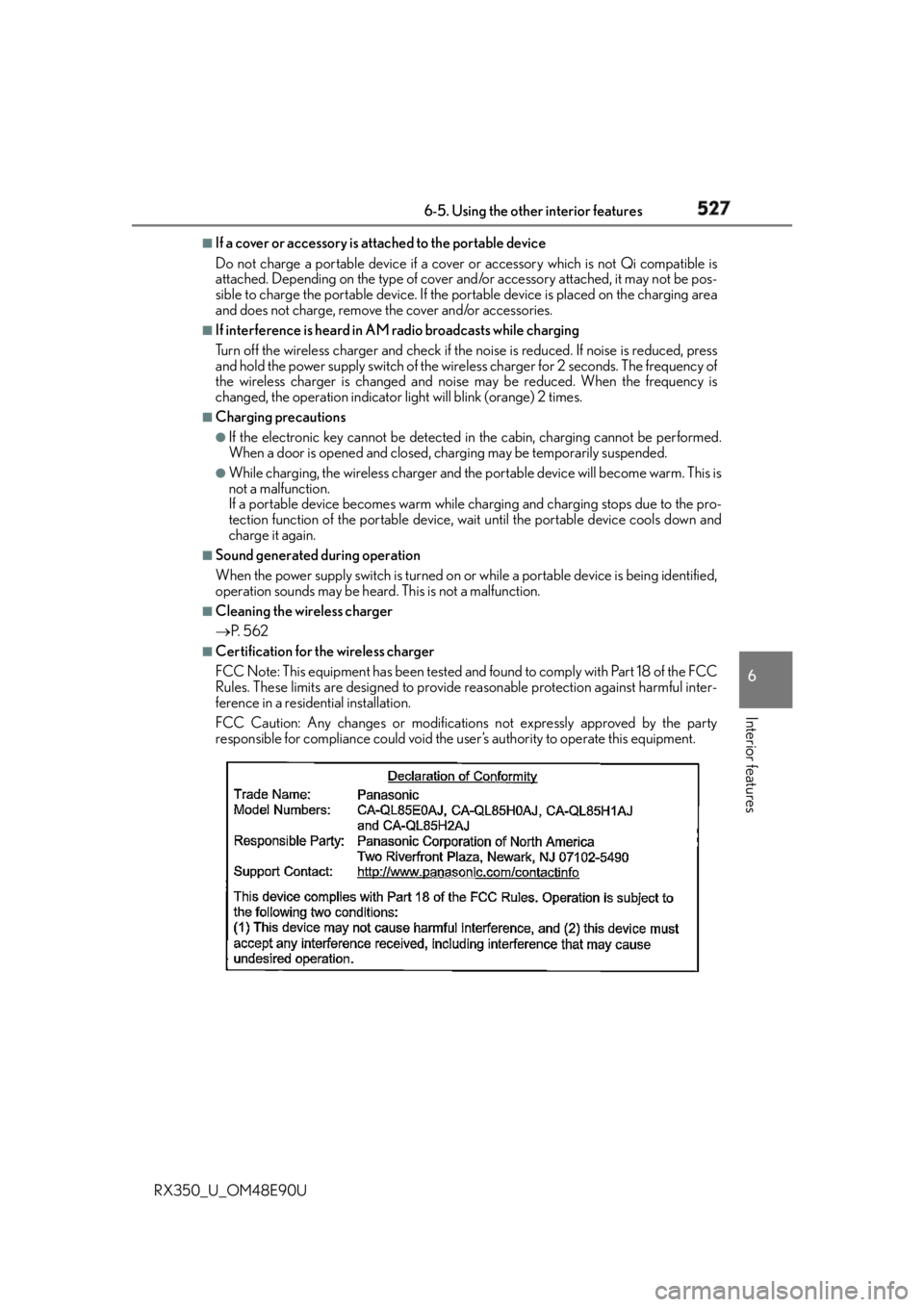
Certification for the wireless charger
FCC Note: This equipment has been tested and found to comply with Part 18 of the FCC
Rules. These limits are designed to provide reasonable protection against harmful inter-
ference in a residential installation.
FCC Caution: Any changes or modification s not expressly approved by the party
responsible for compliance could void the user’s authority to operate this equipment.
Page 530 of 748
530 6-5. Using the other interior features
RX350_U_OM48E90U NOTICE ■
Conditions in which the wireless charger may not operate correctly
In the following situations, the wireless charger may not operate correctly: ●
When a portable device is fully charged ●
When there is a foreign object between the charging area and portable device●
When a portable device becomes hot while charging ●
When a portable device is placed on the wireless area with its charging surface fac-
ing up ●
When a portable device is not centered on the charging area ●
When the vehicle is near a TV tower, electric power plant, gas station, radio station,
large display, airport or other facility that generates strong radio waves or electrical
noise ●
When the portable device is in contact with, or is covered by any of the following
metallic objects
• Cards to which aluminum foil is attached
• Cigarette boxes that have aluminum foil inside
• Metallic wallets or bags
•Coins
• Metal hand warmers
• Media such as CDs and DVDs ●
When wireless keys (that emit radio waves) other than those of your vehicle are being
used nearby.
If in situations other than above the wirele ss charger does not op erate properly or the
operation indicator light is blinking, the wireless charge r may be malfunctioning. Con-
tact your Lexus dealer. ■
To prevent failure or damage to data ●
Do not bring magnetic cards, such as a credit card, or magnetic recording media,
close to the wireless charger while chargi ng. Otherwise, data may be erased due to
the influence of magnetism.
Additionally, do not bring precision instrume nts such as wrist watches, close to the
wireless charger, as such objects may malfunction. ●
Do not leave portable devices in the cab in. The temperature inside the cabin may
become high when parked in the su n, and cause damage to the device.■
To prevent battery discharge
Do not use the wireless charger for a long period of time with the engine is stopped.
Page 534 of 748
534 6-5. Using the other interior features
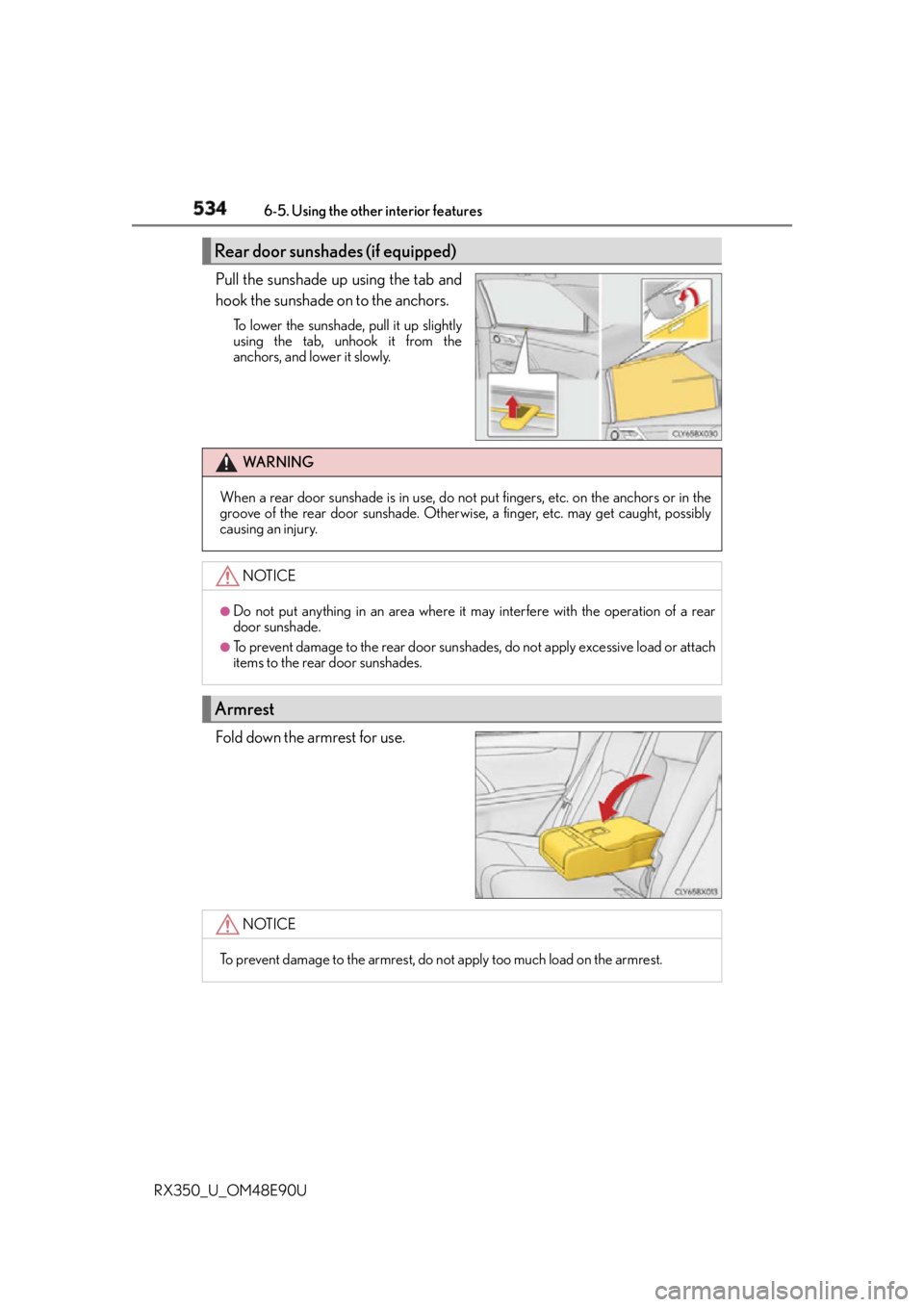
RX350_U_OM48E90U Pull the sunshade up using the tab and
hook the sunshade on to the anchors. To lower the sunshade, pull it up slightly
using the tab, unhook it from the
anchors, and lower it slowly.
Fold down the armrest for use.Rear door sunshades (if equipped)
WA R N I N G
When a rear door sunshade is in use, do not put fingers, etc. on the anchors or in the
groove of the rear door sunshade. Otherwis e, a finger, etc. may get caught, possibly
causing an injury.
NOTICE ●
Do not put anything in an area where it may interfere with the operation of a rear
door sunshade. ●
To prevent damage to the rear door sunsha des, do not apply excessive load or attach
items to the rear door sunshades.
Armrest
NOTICE
To prevent damage to the armrest, do not apply too much load on the armrest.
Page 536 of 748
536 6-5. Using the other interior features
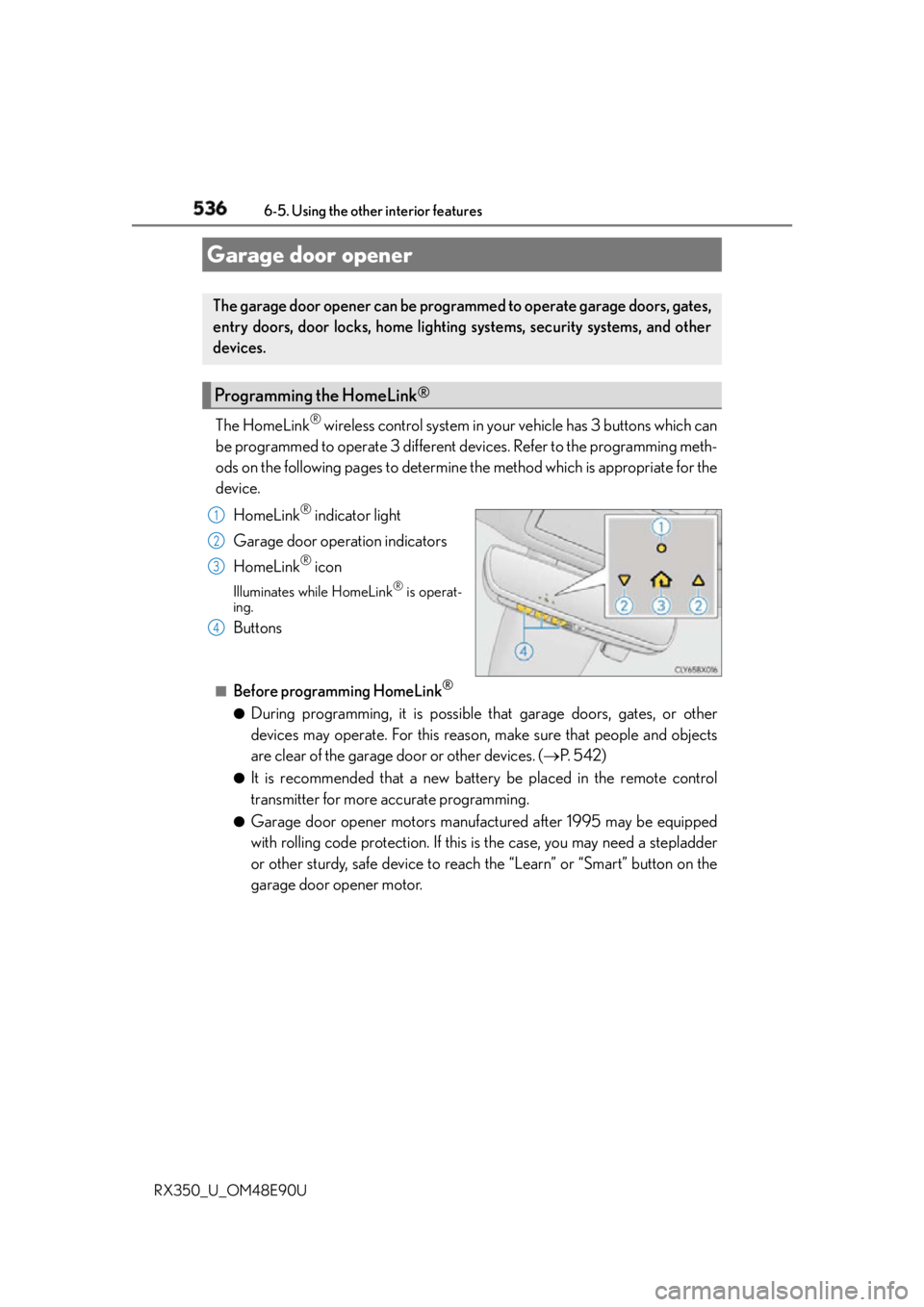
RX350_U_OM48E90U The HomeLink ®
wireless control system in your vehicle has 3 buttons which can
be programmed to operate 3 different devices. Refer to the programming meth-
ods on the following pages to determine the method which is appropriate for the
device.
HomeLink ®
indicator light
Garage door operation indicators
HomeLink ®
iconIlluminates while HomeLink ®
is operat-
ing.
Buttons ■
Before programming HomeLink ®
●
During programming, it is possible th at garage doors, gates, or other
devices may operate. For this reason, make sure that people and objects
are clear of the garage door or other devices. ( P. 5 4 2 )●
It is recommended that a new battery be placed in the remote control
transmitter for more accurate programming. ●
Garage door opener motors manufactured after 1995 may be equipped
with rolling code protection. If this is the case, you may need a stepladder
or other sturdy, safe device to reach the “Learn” or “Smart” button on the
garage door opener motor.Garage door opener The garage door opener can be programmed to operate garage doors, gates,
entry doors, door locks, home lighting systems, security systems, and other
devices.
Programming the HomeLink ®
1
2
3
4