light LEXUS RX350 2016 Owners Manual
[x] Cancel search | Manufacturer: LEXUS, Model Year: 2016, Model line: RX350, Model: LEXUS RX350 2016Pages: 748, PDF Size: 12.36 MB
Page 253 of 748

2534-3. Operating the lights and wipers
4
Driving
RX350_U_OM48E90U ■
Front door opening linked windshield wiper stop function (vehicles with rain-sensing
windshield wipers)
When “AUTO” is selected and the windshield wipers are operating, if a front door is
opened, the operation of the windshield wipe rs will be stopped to prevent anyone near
the vehicle from being sprayed by water from the wipers, provided the vehicle is stopped
with the parking brake applied or the shift lever in P. When th e front door is closed, wiper
operation will resume. ■
Customization
Some functions can be customized. ( P. 6 9 9 )
WA R N I N G ■
Caution regarding the use of windshield wi pers in AUTO mode (vehicles with rain-
sensing windshield wipers)
The windshield wipers may operate unexpectedly if the sensor is touched or the wind-
shield is subject to vibration in AUTO mode. Take care that your fingers, etc. do not
become caught in the windshield wipers. ■
Caution regarding the use of washer fluid
When it is cold, do not use the washer fluid until the windshield becomes warm. The
fluid may freeze on the windshield and cause lo w visibility. This may lead to an accident,
resulting in death or serious injury.
NOTICE ■
When the windshield is dry
Do not use the wipers, as they may damage the windshield. ■
When the washer fluid tank is empty
Do not operate the switch continually as the washer fluid pump may overheat. ■
When a nozzle becomes blocked
In this case, contact your Lexus dealer.
Do not try to clear it with a pin or other object. The nozzle will be damaged.
Page 254 of 748
254 4-3. Operating the lights and wipers
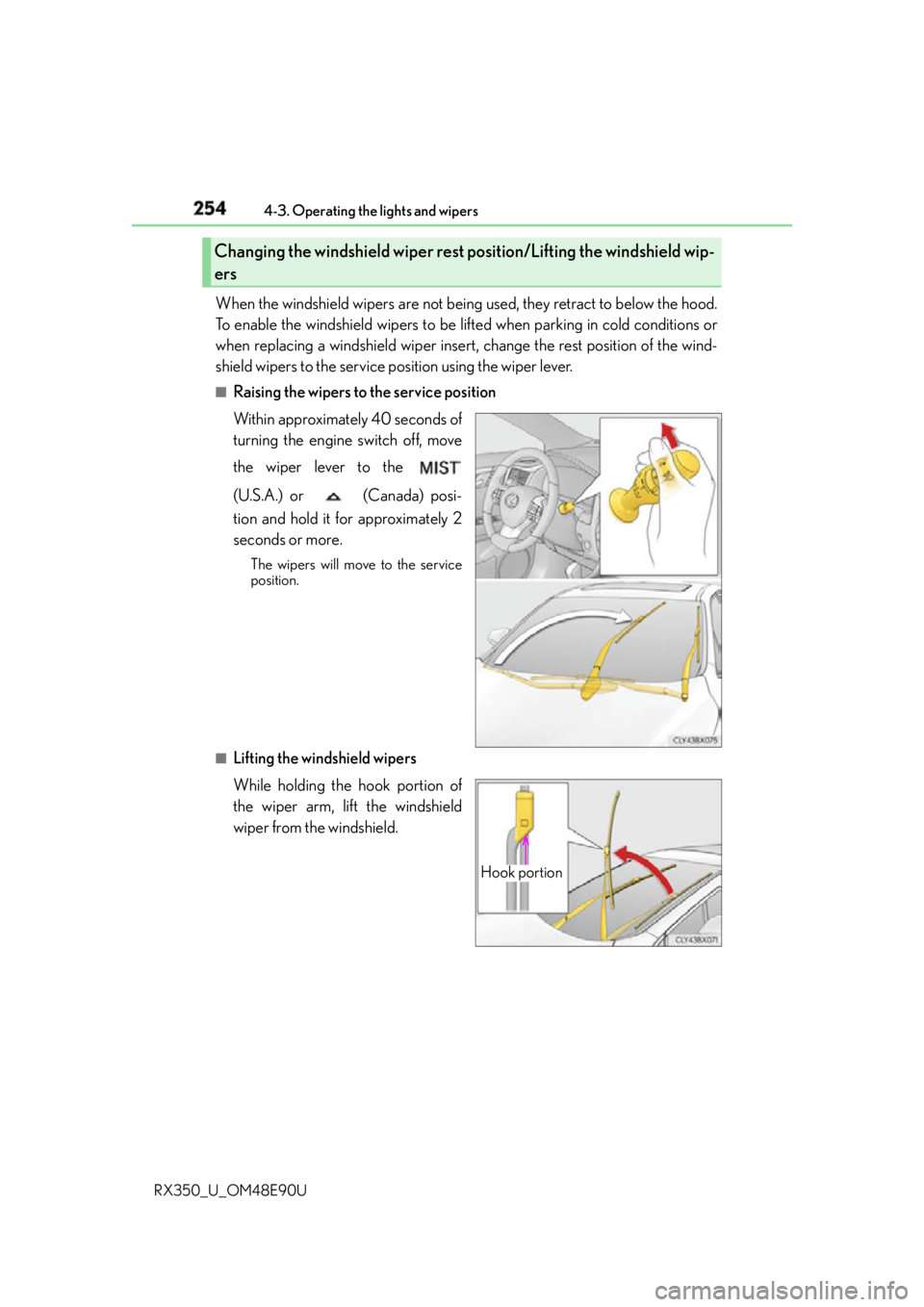
RX350_U_OM48E90U When the windshield wipers are not being used, they retract to below the hood.
To enable the windshield wipers to be lifted when parking in cold conditions or
when replacing a windshield wiper insert, change the rest position of the wind-
shield wipers to the service position using the wiper lever. ■
Raising the wipers to the service position
Within approximately 40 seconds of
turning the engine switch off, move
the wiper lever to the
(U.S.A.) or (Canada) posi-
tion and hold it for approximately 2
seconds or more. The wipers will move to the service
position.
■
Lifting the windshield wipers
While holding the hook portion of
the wiper arm, lift the windshield
wiper from the windshield.Changing the windshield wiper rest position/Lifting the windshield wip-
ers
Hook portion
Page 255 of 748
2554-3. Operating the lights and wipers
4
Driving
RX350_U_OM48E90U ■
Lowering the windshield wipe rs to the retracted position
With the windshield wipers placed on the wi ndshield, turn the engine switch to IGNI-
TION ON mode and then move the wiper lever to an operating position. When the
wiper switch is turned off, the windshield wipers will st op at the retracted position.
NOTICE ■
When lifting the windshield wipers ●
Do not lift the windshield wipers when they are in the retracted position below the
hood. Otherwise, they may contact the hood, possibly resulting in damage to a wind-
shield wiper and/or the hood.
●
Do not operate the wiper lever when the wind shield wipers are lifted. Otherwise, the
windshield wipers may contac t the hood, possibly resultin g in damage to the wind-
shield wipers and/or hood. ●
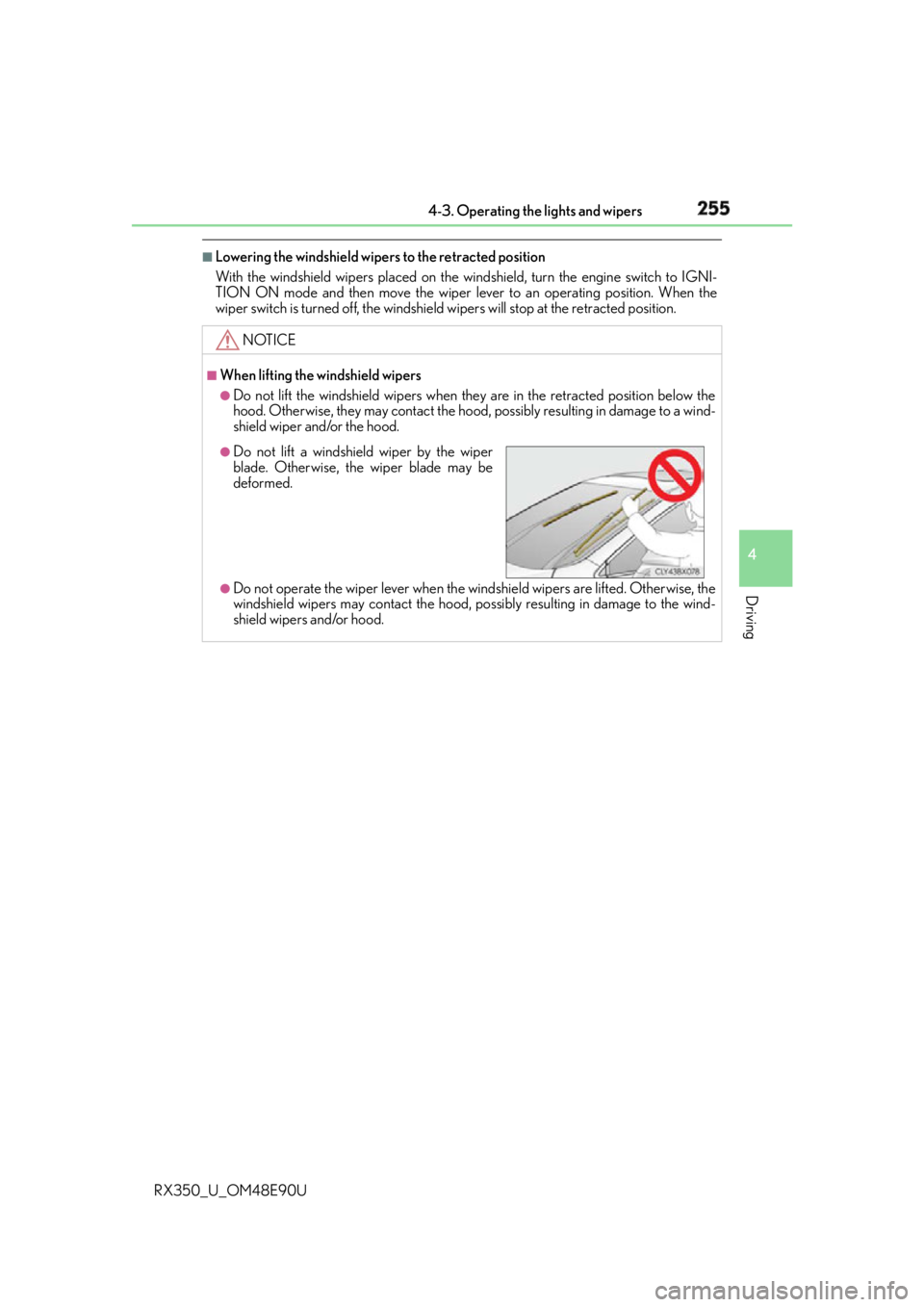
Do not lift a windshield wiper by the wiper
blade. Otherwise, the wiper blade may be
deformed.
Page 256 of 748
256 4-3. Operating the lights and wipers
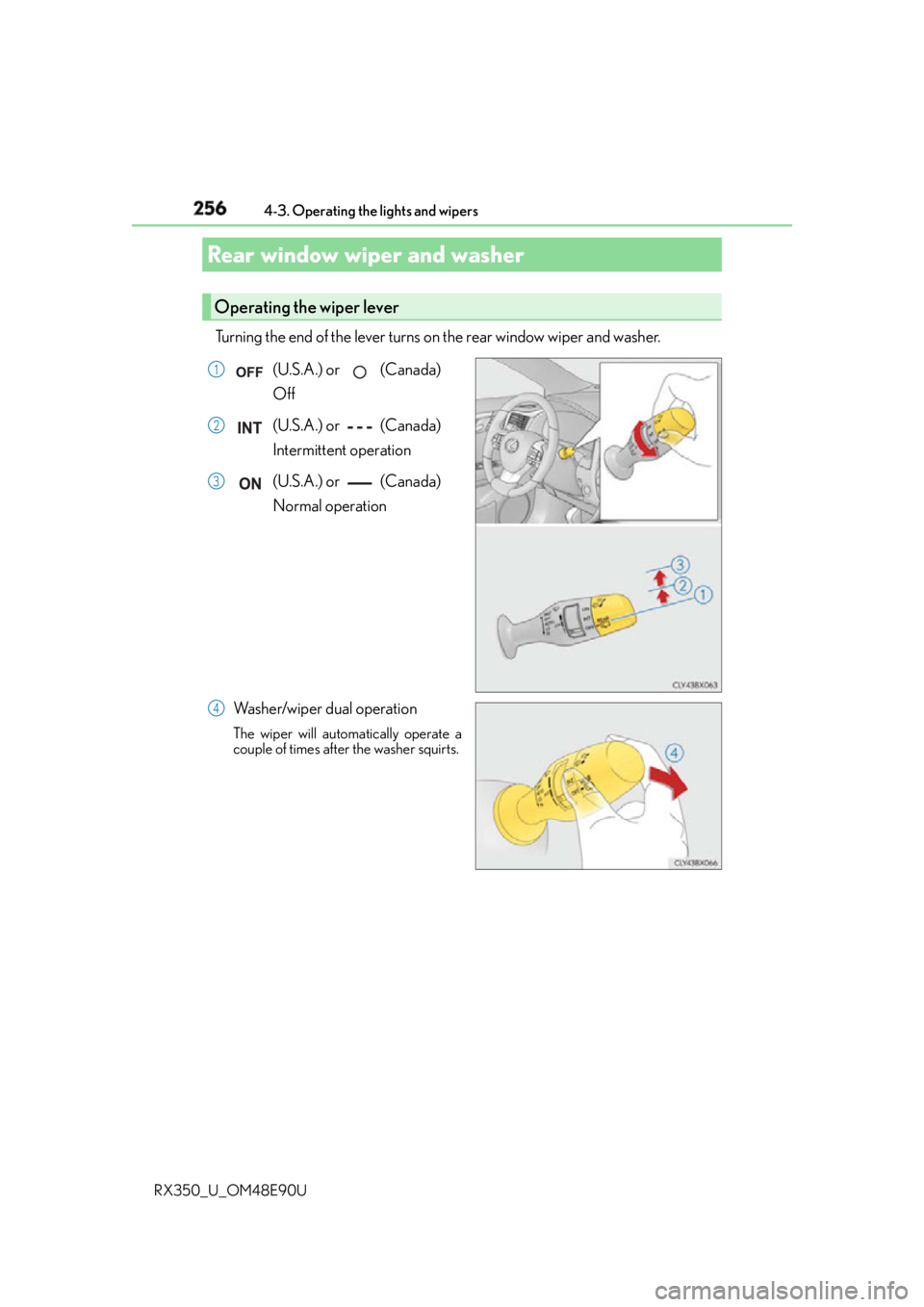
RX350_U_OM48E90U Turning the end of the lever turns on the rear window wiper and washer.
(U.S.A.) or (Canada)
Off
(U.S.A.) or (Canada)
Intermittent operation
(U.S.A.) or (Canada)
Normal operation
Washer/wiper dual operation The wiper will automatically operate a
couple of times after the washer squirts.Rear window wiper and washer Operating the wiper lever 1
2
3
4
Page 257 of 748

2574-3. Operating the lights and wipers
4
Driving
RX350_U_OM48E90U ■
The rear window wiper and washer can be operated when
The engine switch is in IGNITION ON mode. ■
If no washer fluid sprays
Check that the washer nozzle is not blocked if there is washer fluid in the washer fluid
tank.
NOTICE ■
When the rear window is dry
Do not use the wiper, as it may damage the rear window. ■
When the washer fluid tank is empty
Do not operate the switch continually as the washer fluid pump may overheat. ■
When a nozzle becomes blocked
In this case, contact your Lexus dealer.
Do not try to clear it with a pin or other object. The nozzle will be damaged.
Page 260 of 748
260 4-4. Refueling
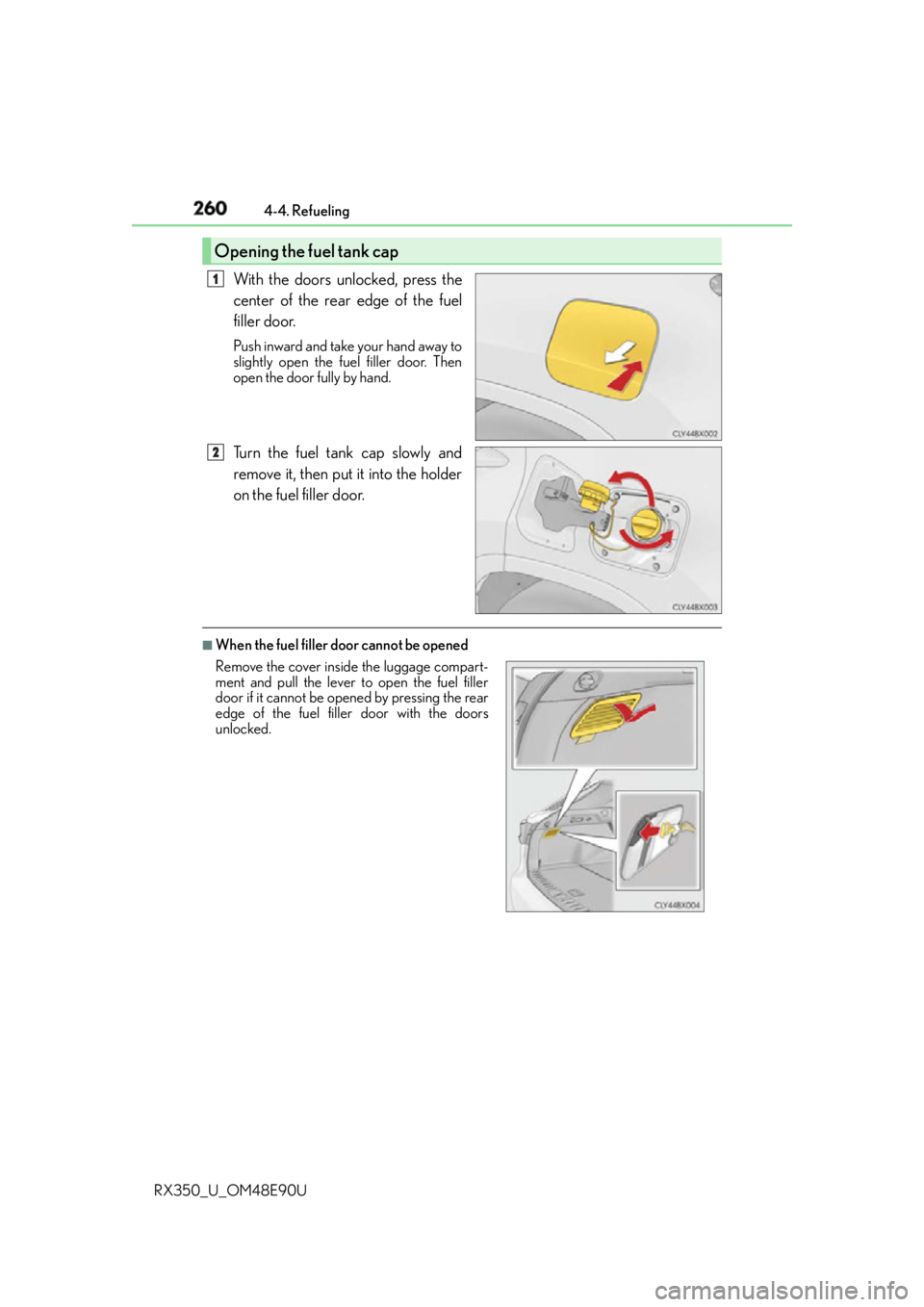
RX350_U_OM48E90U With the doors unlocked, press the
center of the rear edge of the fuel
filler door. Push inward and take your hand away to
slightly open the fuel filler door. Then
open the door fully by hand.
Turn the fuel tank cap slowly and
remove it, then put it into the holder
on the fuel filler door. ■
When the fuel filler door cannot be openedOpening the fuel tank cap 1
2
Remove the cover inside the luggage compart-
ment and pull the lever to open the fuel filler
door if it cannot be opened by pressing the rear
edge of the fuel filler door with the doors
unlocked.
Page 261 of 748
2614-4. Refueling
4
Driving
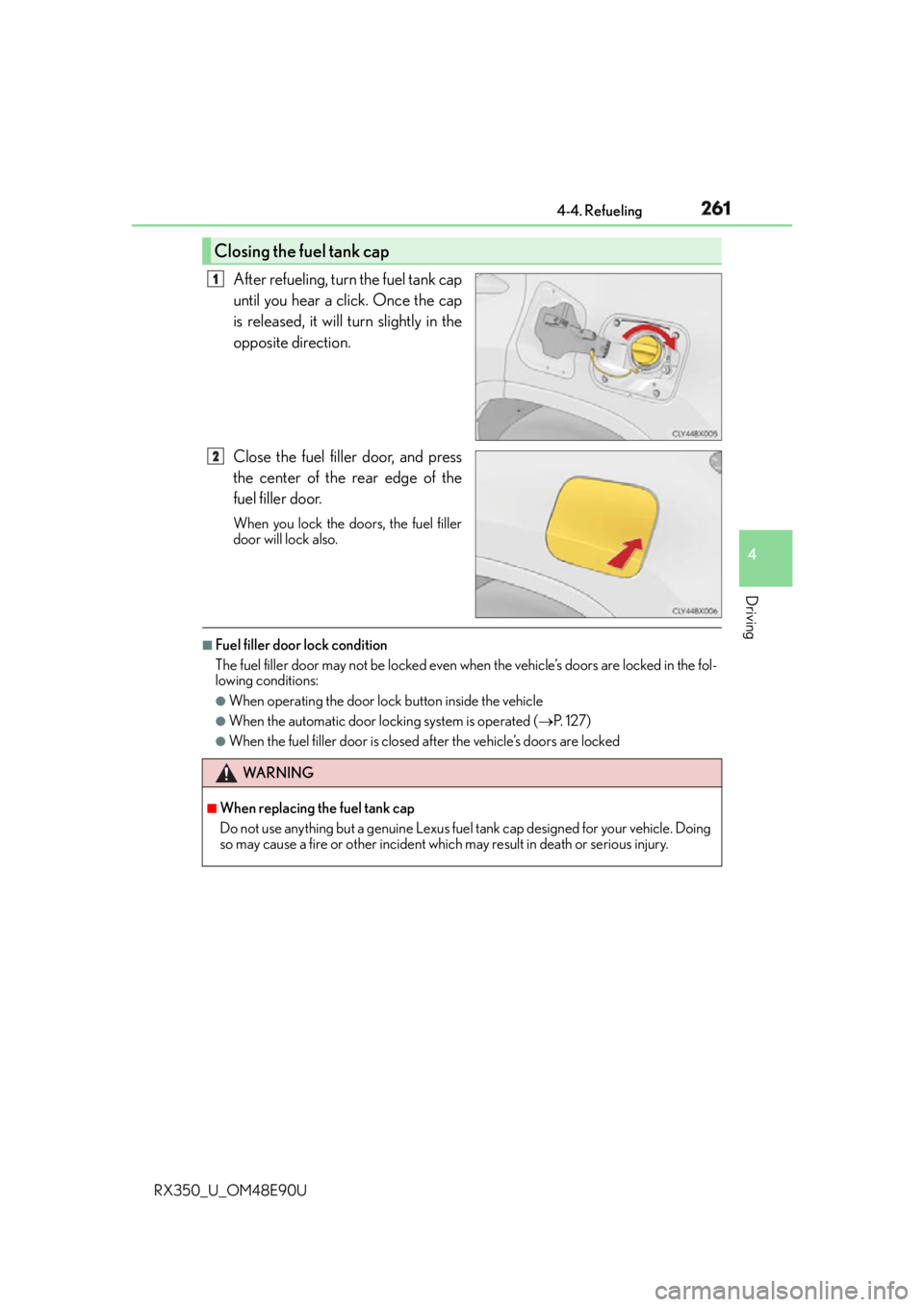
RX350_U_OM48E90U After refueling, turn the fuel tank cap
until you hear a click. Once the cap
is released, it will turn slightly in the
opposite direction.
Close the fuel filler door, and press
the center of the rear edge of the
fuel filler door. When you lock the doors, the fuel filler
door will lock also. ■
Fuel filler door lock condition
The fuel filler door may not be locked even wh en the vehicle’s doors are locked in the fol-
lowing conditions: ●
When operating the door lock button inside the vehicle ●
When the automatic door locking system is operated ( P. 1 2 7 )●
When the fuel filler door is closed after the vehicle’s doors are lockedClosing the fuel tank cap 1
2
WA R N I N G ■
When replacing the fuel tank cap
Do not use anything but a genuine Lexus fuel tank cap designed for your vehicle. Doing
so may cause a fire or other incident whic h may result in death or serious injury.
Page 266 of 748
266 4-5. Using the driving support systems
RX350_U_OM48E90U WA R N I N G ■
To avoid malfunction of the camera sensor
Observe the following precautions.
Otherwise, the camera sensor may not operat e properly, possibly leading to an acci-
dent resulting in death or serious injury. ●
Keep the windshield clean at all times.
• If the windshield is dirty or covered with an oily film, water droplets, snow, etc.,
clear the windshield.
• If a glass coating agent is applied to the windshield, it will still be necessary to use
the windshield wipers to remove water drop lets from the area of the windshield in
front of the camera sensor.
• If the inner side of the windshield where th e camera sensor is installed is dirty, con-
tact your Lexus dealer.
●
If the part of the windshield in front of th e camera sensor is fogged up or covered with
condensation or ice, use the windshield defogger to remove the fog, condensation or
ice. ( P. 500)●
If water droplets cannot be properly remove d from the area of the windshield in front
of the camera sensor by the windshield wipers, replace the wiper insert or wiper
blade.
• To replace the wiper insert: P. 6 0 1
• If the wiper blades need to be replaced, contact your Lexus dealer. ●
Do not attach window tinting to the windshield. ●
Replace the windshield if it is damaged or cracked.
If the windshield needs to be re placed, contact your Lexus dealer.●
Do not get the camera sensor wet. ●
Do not allow bright lights to shine into the camera sensor. ●
Do not dirty or damage the camera sensor.
When cleaning the inside of the windshield , do not allow glass cleaner to contact the
lens. Also, do not touch the lens.
If the lens is dirty or damage d, contact your Lexus dealer.●
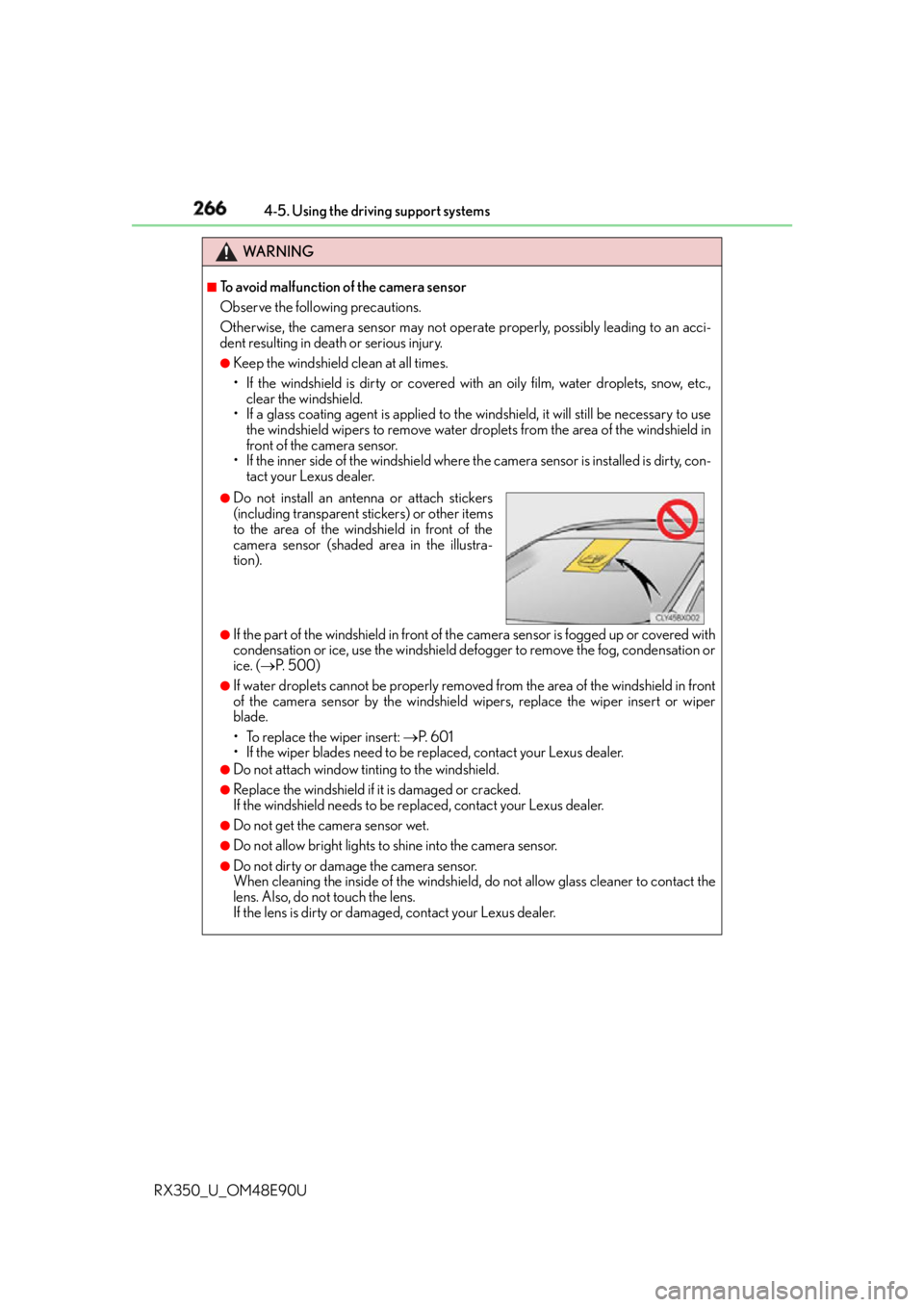
Do not install an antenna or attach stickers
(including transparent stickers) or other items
to the area of the windshield in front of the
camera sensor (shaded area in the illustra-
tion).
Page 267 of 748

2674-5. Using the driving support systems
4
Driving
RX350_U_OM48E90U WA R N I N G ●
Do not subject the camera sensor to a strong impact. ●
Do not change the installation position or di rection of the camera sensor or remove it.●
Do not disassemble the camera sensor. ●
Do not install an electronic de vice or device that emits strong electric waves near the
camera sensor. ●
Do not modify any components of the vehicle around the camera sensor (inside rear
view mirror, sun visors, etc.) or ceiling. ●
Do not attach any accessories that may obst ruct the camera sensor to the hood, front
grille or front bumper. Contact your Lexus dealer for details. ●
If a surfboard or other long object is to be mounted on the roof, make sure that it will
not obstruct the camera sensor. ●
Do not modify the headlights or other lights.
Page 274 of 748
274 4-5. Using the driving support systems
RX350_U_OM48E90U ■
Enabling/disabling the pre-collision system
The pre-collision system can be enabled/disabled on ( P. 9 6 ) o f t h e
multi-information display. The system is automatically enabled each time the engine switch is turned to IGNI-
TION ON mode.
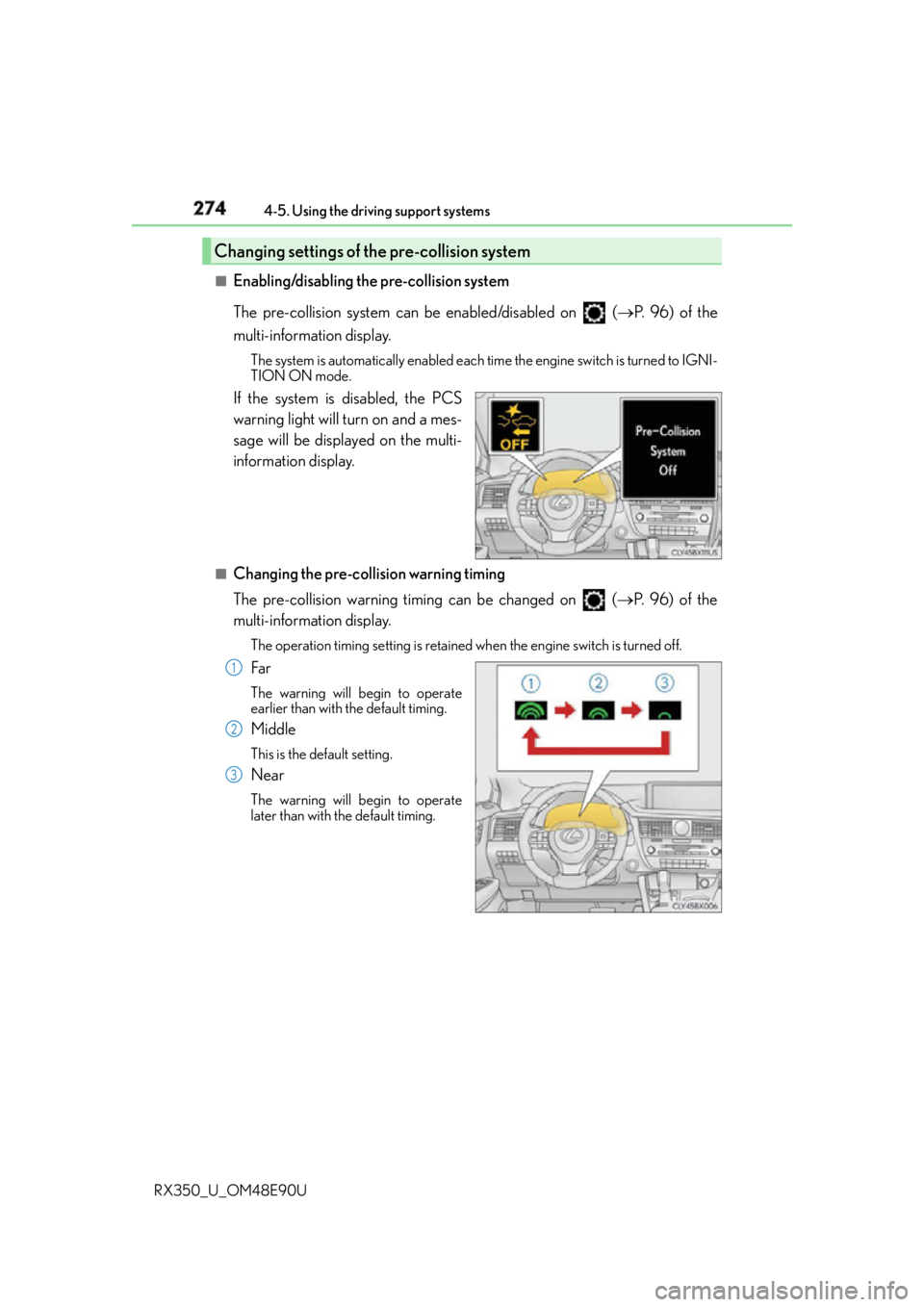
If the system is disabled, the PCS
warning light will turn on and a mes-
sage will be displayed on the multi-
information display. ■
Changing the pre-col lision warning timing
The pre-collision warning timing can be changed on ( P. 9 6 ) o f t h e
multi-information display. The operation timing setting is retained when the engine switch is turned off.
Far The warning will begin to operate
earlier than with the default timing.
Middle This is the default setting.
Near The warning will begin to operate
later than with the default timing.Changing settings of the pre-collision system
1
2
3