steering wheel LEXUS RX350 2016 User Guide
[x] Cancel search | Manufacturer: LEXUS, Model Year: 2016, Model line: RX350, Model: LEXUS RX350 2016Pages: 748, PDF Size: 12.36 MB
Page 47 of 748
471-1. For safe use
1
For safety and security
RX350_U_OM48E90U ■
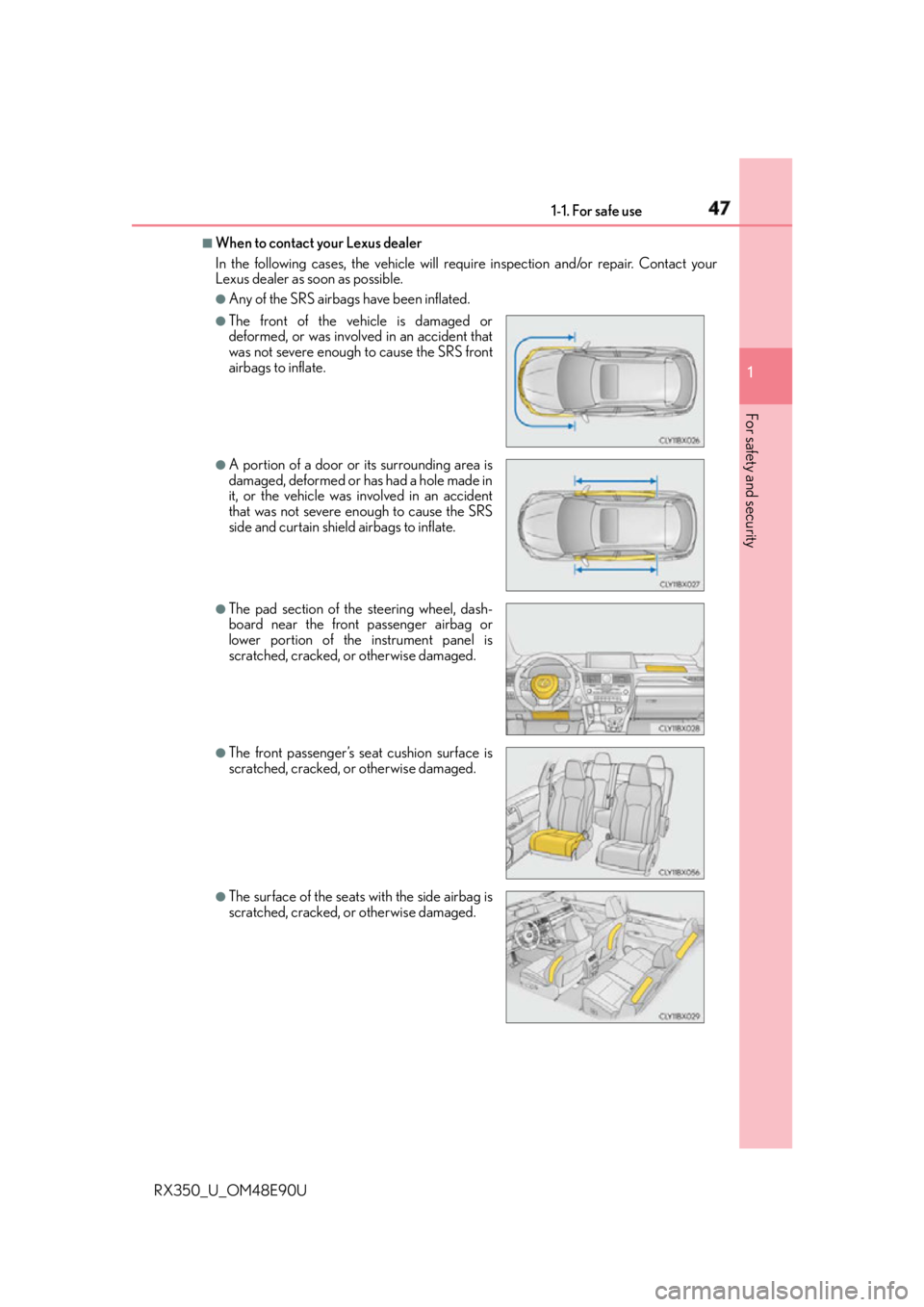
When to contact your Lexus dealer
In the following cases, the vehicle will re quire inspection and/or repair. Contact your
Lexus dealer as soon as possible. ●
Any of the SRS airbags have been inflated.●
The front of the vehicle is damaged or
deformed, or was involv ed in an accident that
was not severe enough to cause the SRS front
airbags to inflate. ●
A portion of a door or its surrounding area is
damaged, deformed or has had a hole made in
it, or the vehicle was in volved in an accident
that was not severe enough to cause the SRS
side and curtain shield airbags to inflate. ●
The pad section of the steering wheel, dash-
board near the front passenger airbag or
lower portion of the instrument panel is
scratched, cracked, or otherwise damaged. ●
The front passenger’s seat cushion surface is
scratched, cracked, or otherwise damaged.
●
The surface of the seats with the side airbag is
scratched, cracked, or otherwise damaged.
Page 94 of 748

94 2. Instrument cluster
RX350_U_OM48E90U * 1
: Resetting: P. 9 1
* 2
: Use the displayed fuel consumption as a reference.
* 3
: When only a small amount of fuel is added to the tank, the display may not be
updated.
When refueling, turn the engine switch off. If the vehicle is refueled without turning the
engine switch off, the display may not be updated.
* 4
: This distance is computed based on your average fuel consumption. As a result, the
actual distance that can be driven may differ from that displayed.■
Eco Driving Indicator
P. 1 0 4■
Sway warning (if equipped)
Detects the sway of the vehicle within a lane, which is often associated with a
decrease in the driver's attention level, and displays the decrease in attention
using a bar display.
The shorter the bar length, the more the driver may need to rest. This display is a part of the LDA (Lane Departure Alert with steering control)/LKA
(Lane-Keeping Assist) system. The displa y is enabled when the operating condi-
tions of the vehicle sway warning are met. ( P. 283, 293)■
AWD Control (if equipped)
Displays the driving force applie d to each wheel using segments.
The greater the number of segments displayed, the greater the driving force
applied.
Page 96 of 748
96 2. Instrument cluster
RX350_U_OM48E90U ◆ Changing settings
Use the meter control switches on the steering wheel to change settings.
Press or to select .
Operate the switches to select a desired item.
Change the setting by referring to the message displayed on the screen.
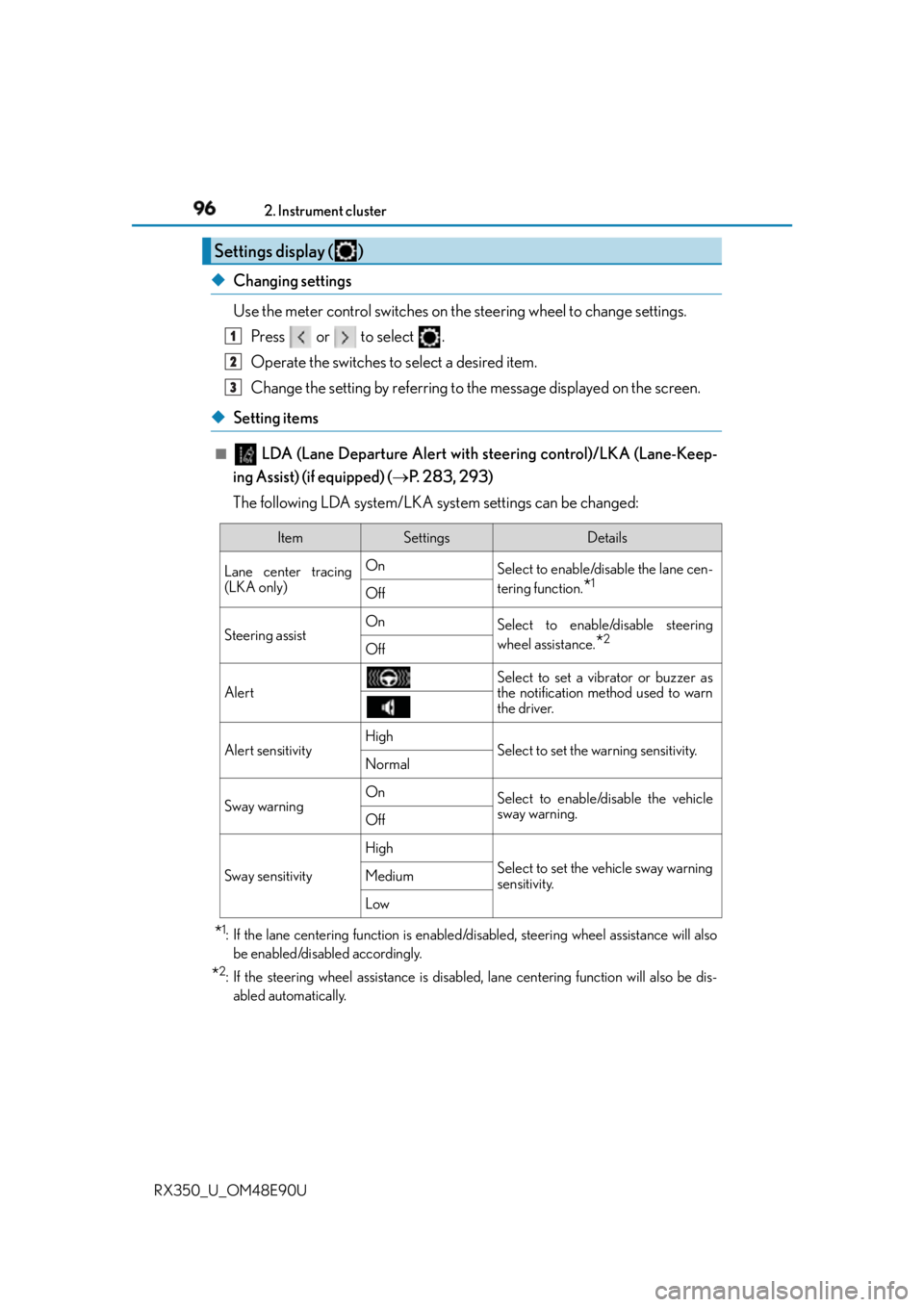
◆ Setting items ■
LDA (Lane Departure Alert with steering control)/LKA (Lane-Keep-
ing Assist) (if equipped) ( P. 2 8 3 , 2 9 3 )
The following LDA system/LKA system settings can be changed:
* 1
: If the lane centering function is enabled/disabled, steeri ng wheel assistance will also
be enabled/disabled accordingly.
* 2
: If the steering wheel assistance is disabled, lane cent ering function will also be dis-
abled automatically.Settings display ( ) 1
2
3
Item Settings Details
Lane center tracing
(LKA only) On
Select to enable/dis able the lane cen-
tering function.
* 1
Off
Steering assist On
Select to enable/disable steering
wheel assistance.
* 2
Off
Alert Select to set a vibrator or buzzer as
the notification method used to warn
the driver.
Alert sensitivity High
Select to set the warning sensitivity.
Normal
Sway warning On
Select to enable/disable the vehicle
sway warning.
Off
Sway sensitivity High
Select to set the vehicle sway warning
sensitivity.Medium
Low
Page 119 of 748
119
3 Operation of
each component
RX350_U_OM48E90U 3-1. Key information
Keys .................................................. 120
3-2. Opening, closing and
locking the doors
Side doors ....................................... 124
Power back door ......................... 130
Smart access system with
push-button start...................... 146
3-3. Adjusting the seats
Front seats .......................................152
Rear seats ....................................... 153
Driving position memory ..........162
Head restraints ............................. 167
3-4. Adjusting the steering
wheel and mirrors
Steering wheel ..............................169
Inside rear view mirror................ 171
Outside rear view mirrors ........ 173
3-5. Opening, closing
the windows and
moon roof
Power windows ............................. 177
Moon roof ........................................181
Panoramic moon roof ............... 185
Page 162 of 748

162 3-3. Adjusting the seats
RX350_U_OM48E90U The seat and steering wheel are automati cally adjusted to allow the driver to
enter and exit the vehicle easily.
When all of the following have been
performed, the seat and steering wheel
are automatically adjusted to a position
that allows driver to enter and exit the
vehicle easily.
• The shift lever has been shifted to P.
• The engine switch has been turned
off.
• The driver’s seat belt has been unfastened.
When any of the following has been performed, the seat and steering wheel
automatically return to their original positions.
• The engine switch has been turn ed to ACCESSORY mode or IGNITION
ON mode.
• The driver’s seat belt has been fastened. ■
Operation of the power easy access system
When exiting the vehicle, the power easy acc ess system may not operate if the seat is
already close to the rearmost position, etc. ■
Customization
Some functions can be customized. ( P. 6 9 9 )Driving position memory
: If equippedThis feature automatically adjusts the dr iver’s seat (on some models), steering
wheel and outside rear view mirrors to make entering and exiting the vehicle
easier or to suit your preferences.
Power easy access system (driver’s side only)
Page 163 of 748
1633-3. Adjusting the seats
3
Operation of each component
RX350_U_OM48E90U Your preferred driving position (the posi tion of the driver’s seat, steering wheel
and outside rear view mirrors) can be recorded and recalled by pressing a but-
ton.
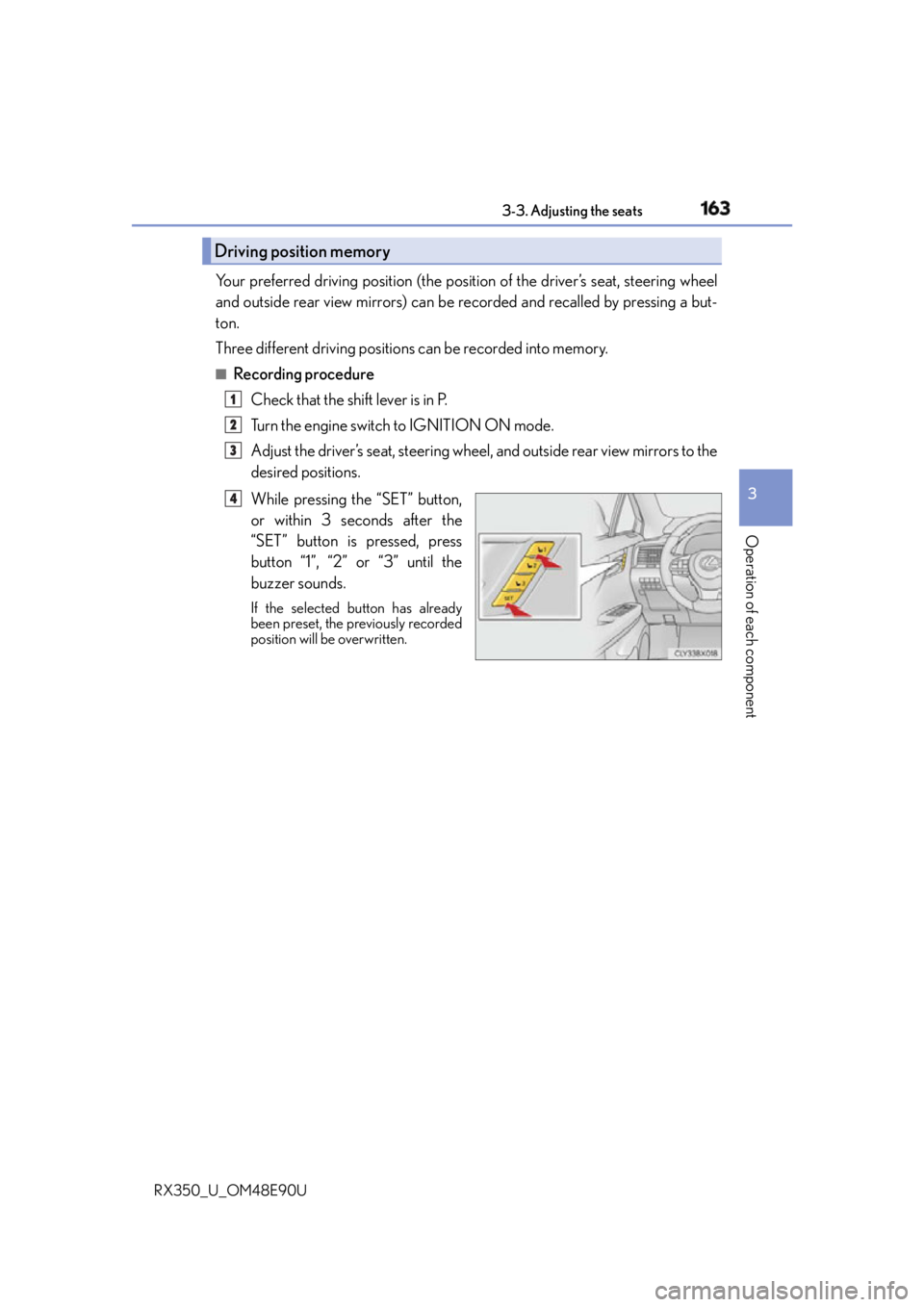
Three different driving positions can be recorded into memory. ■
Recording procedure
Check that the shift lever is in P.
Turn the engine switch to IGNITION ON mode.
Adjust the driver’s seat, steering wheel, and outside rear view mirrors to the
desired positions.
While pressing the “SET” button,
or within 3 seconds after the
“SET” button is pressed, press
button “1”, “2” or “3” until the
buzzer sounds. If the selected button has already
been preset, the previously recorded
position will be overwritten.Driving position memory 1
2
3
4
Page 164 of 748
164 3-3. Adjusting the seats
RX350_U_OM48E90U ■
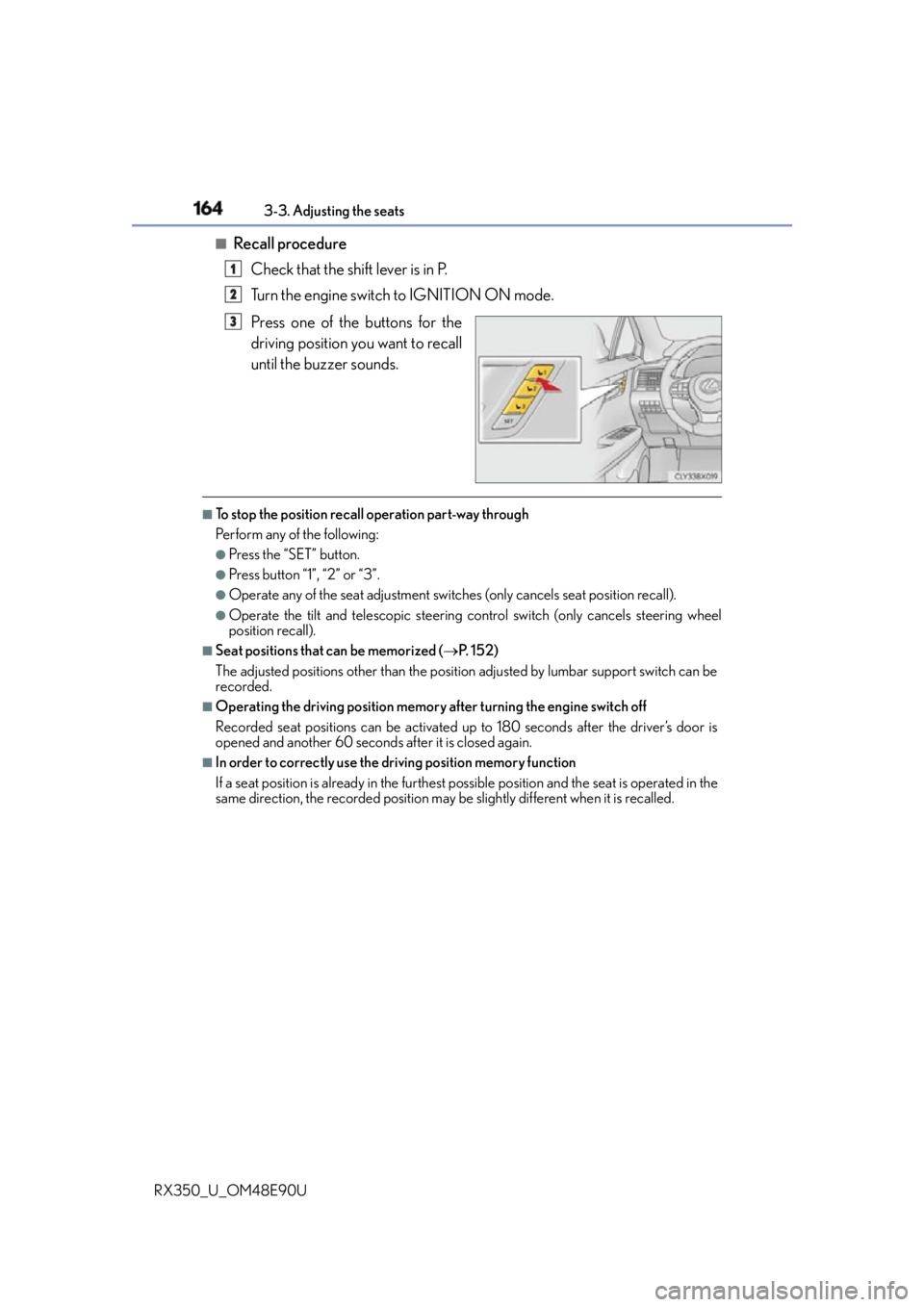
Recall procedure
Check that the shift lever is in P.
Turn the engine switch to IGNITION ON mode.
Press one of the buttons for the
driving position you want to recall
until the buzzer sounds. ■
To stop the position recall operation part-way through
Perform any of the following: ●
Press the “SET” button. ●
Press button “1”, “2” or “3”. ●
Operate any of the seat adjustment switch es (only cancels seat position recall).●
Operate the tilt and telescopic steering co ntrol switch (only ca ncels steering wheel
position recall). ■
Seat positions that can be memorized ( P. 1 5 2 )
The adjusted positions other than the position adjusted by lumbar support switch can be
recorded. ■
Operating the driving position memory after turning the engine switch off
Recorded seat positions can be activated up to 180 seconds after the driver’s door is
opened and another 60 seconds after it is closed again. ■
In order to correctly use the dr iving position memory function
If a seat position is already in the furthest po ssible position and the seat is operated in the
same direction, the recorded position may be slightly different when it is recalled.1
2
3
Page 165 of 748
1653-3. Adjusting the seats
3
Operation of each component
RX350_U_OM48E90U Each electronic key can be registered to recall your preferred driving position.■
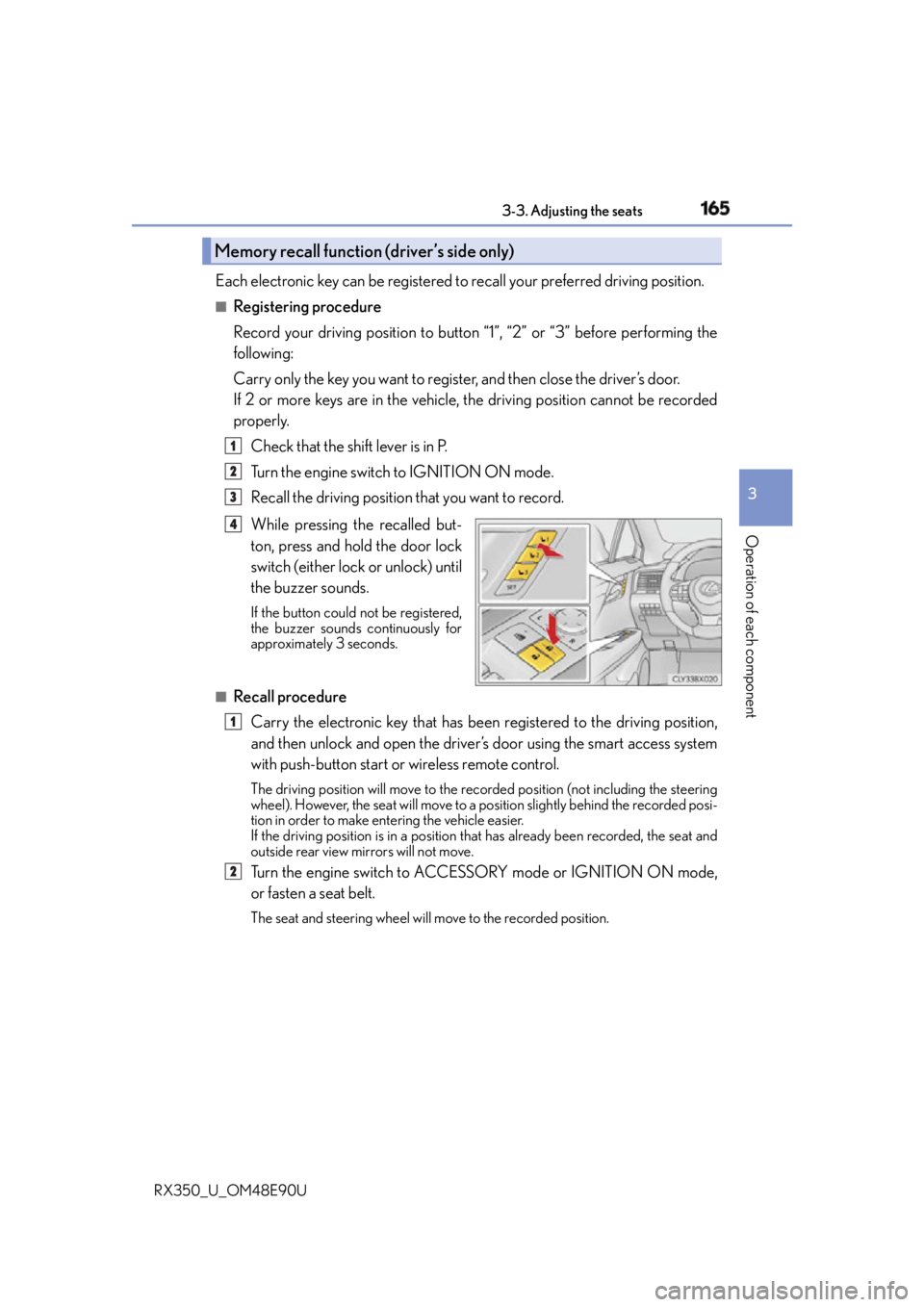
Registering procedure
Record your driving position to button “1”, “2” or “3” before performing the
following:
Carry only the key you want to regist er, and then close the driver’s door.
If 2 or more keys are in the vehicle, the driving position cannot be recorded
properly.
Check that the shift lever is in P.
Turn the engine switch to IGNITION ON mode.
Recall the driving position that you want to record.
While pressing the recalled but-
ton, press and hold the door lock
switch (either lock or unlock) until
the buzzer sounds. If the button could not be registered,
the buzzer sounds continuously for
approximately 3 seconds.
■
Recall procedure
Carry the electronic key that has been registered to the driving position,
and then unlock and open the driver’s door using the smart access system
with push-button start or wireless remote control. The driving position will move to the reco rded position (not including the steering
wheel). However, the seat will move to a po sition slightly behind the recorded posi-
tion in order to make entering the vehicle easier.
If the driving position is in a position th at has already been recorded, the seat and
outside rear view mirrors will not move.
Turn the engine switch to ACCESSORY mode or IGNITION ON mode,
or fasten a seat belt. The seat and steering wheel will move to the recorded position.Memory recall function (driver’s side only) 1
2
3
4
1
2
Page 166 of 748
166 3-3. Adjusting the seats
RX350_U_OM48E90U ■
Cancelation procedure
Carry only the key you want to cancel and then close the driver’s door.
If 2 or more keys are in the vehicle, the driving position cannot be canceled
properly.
Turn the engine switch to IGNITION ON mode.
While pressing the “SET” button, press and hold the door lock switch
(either lock or unlock) unt il the buzzer sounds twice.If it button could not be canceled, the buzzer sounds continuously for approxi-
mately 3 seconds.■
Recalling the driving position using the memory recall function ●
Different driving positions can be registered for each electronic key. Therefore, the
driving position that is recalled may be different depending on the key being carried. ●
If a door other than the driver’s door is unlocked with the smart access system with
push-button start, the driving position cannot be recalled. In this case, press the driving
position button which has been set. ■
Customization
Some functions can be customized. ( P. 6 9 9 )
WA R N I N G ■
Seat adjustment caution
Take care during seat adjustment so that th e seat does not strike the rear passenger or
squeeze your body against the steering wheel. 1
2
Page 169 of 748
169
3
Operation of each component
RX350_U_OM48E90U 3-4. Adjusting the steering wheel and mirrors
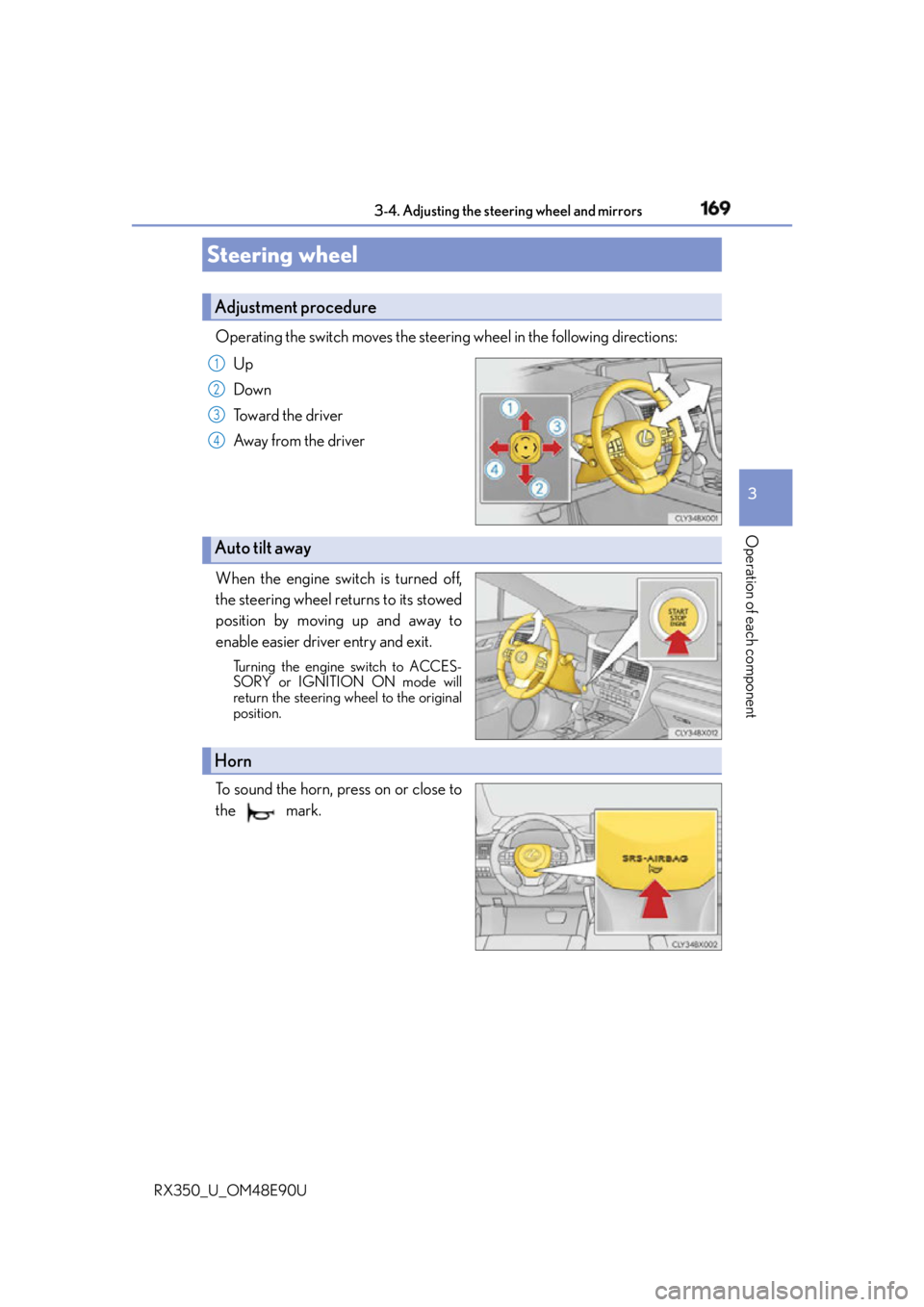
Operating the switch moves the steering wheel in the following directions:
Up
Down
Toward the driver
Away from the driver
When the engine switch is turned off,
the steering wheel returns to its stowed
position by moving up and away to
enable easier driver entry and exit. Turning the engine switch to ACCES-
SORY or IGNITION ON mode will
return the steering wheel to the original
position.
To sound the horn, press on or close to
the mark.Steering wheel Adjustment procedure 1
2
3
4
Auto tilt away
Horn