display LEXUS RX350 2016 Owners Manual
[x] Cancel search | Manufacturer: LEXUS, Model Year: 2016, Model line: RX350, Model: LEXUS RX350 2016Pages: 748, PDF Size: 12.36 MB
Page 473 of 748

4735-11. Bluetooth ®
5
Lexus Display Audio system
RX350_U_OM48E90U ■
Compatible models
The Bluetooth ®
audio system supports portable audi o players with the following specifi-
cations ●
Bluetooth ®
specifications:
Ver. 2.0 or higher (Recommended: Ver. 3.0 +EDR or higher) ●
Profiles:
• A2DP (Advanced Audio Distribution Profile) Ver. 1.0, or higher
(Recommended: Ver. 1.3 or higher)
This is a profile to transmit stereo audio or high quality sound to the audio system.
• AVRCP (Audio/Video Remote Control Profile) Ver. 1.0 or higher
(Recommended: Ver. 1.5 or higher)
This is a profile to allow remote control the A/V equipment.
However, please note that some functions may be limited depending on the type of por-
table audio player connected.
The hands-free system supports cellular phones with the following specifications. ●
Bluetooth ®
specification:
Ver. 2.0 or higher (Recommended: Ver. 3.0 +EDR or higher) ●
Profiles:
• HFP (Hands Free Profile) Ver. 1.0 or higher (Recommended: Ver. 1.6 or higher)
This is a profile to allow ha nds-free phone calls using a cellular phone or head set. It
has outgoing and incoming call functions.
• OPP (Object Push Profile) Ver. 1.1 or higher (Recommended: Ver. 1.2)
This is a profile to transfer phonebook data. When a Bluetooth ®
compatible cellular
phone has both PBAP and OPP, OPP cannot be used.
• PBAP (Phone Book Access Profile) Ver. 1.0 or higher (Recommended: Ver. 1.1)
This is a profile to tr ansfer phonebook data.
• MAP (Message Access Profile) Ver.1.0 or higher
This is a profile to using phone message.
If the cellular phone does not support HFP, you cannot register it with the hands-free sys-
tem. OPP, PBAP or MAP services must be selected individually.■
Reconnecting the portable audio player
If the portable audio player is disconnected due to poor reception when the engine
switch is in ACCESSORY or IGNITION ON mode, the system automatically recon-
nects the portable audio player.
If you have switched off the portable audio player yourself, follow the instructions below
to reconnect: ●
Select the portable audio player again ●
Enter the portable audio player ■
When you sell your car
Be sure to delete your personal data. ( P. 4 0 5 )
Page 475 of 748
4755-11. Bluetooth ®
5
Lexus Display Audio system
RX350_U_OM48E90U WA R N I N G ■
While driving
Do not operate the portable audio player, cellular phone or connect a device to the
Bluetooth ®
system.■
Caution regarding interference with electronic devices ●
Your audio unit is fitted with Bluetooth ®
antennas. People with implantable cardiac
pacemakers, cardiac resynchronization ther apy-pacemakers or implantable cardio-
verter defibrillators should maintain a re asonable distance between themselves and
the Bluetooth ®
antennas. The radio waves may affect the operation of such devices.●
Before using Bluetooth ®
devices, users of any electrical medical device other than
implantable cardiac pacemakers, cardiac resynchronization therapy-pacemakers or
implantable cardioverter defibrillators shou ld consult the manufacturer of the device
for information about its operation under th e influence of radio waves. Radio waves
could have unexpected effects on th e operation of such medical devices.
NOTICE ■
When leaving the vehicle
Do not leave your portable audio player or cellular phone in the vehicle. The inside of
the vehicle may become hot, causing damage to the portable audio player or cellular
phone.
Page 476 of 748
476
RX350_U_OM48E90U 5-12. Other function
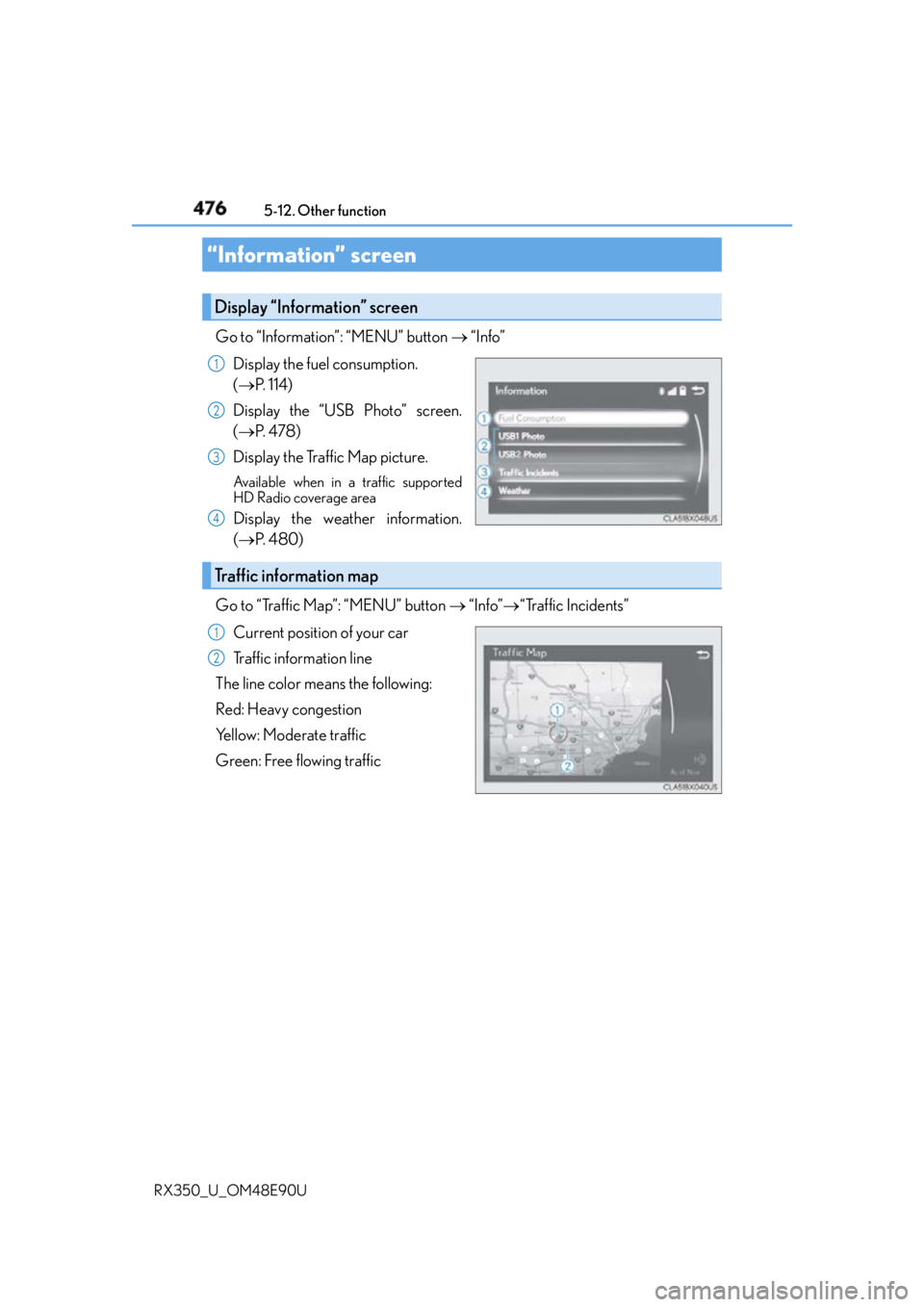
Go to “Information”: “MENU” button “Info”
Display the fuel consumption.
( P. 1 1 4 )
Display the “USB Photo” screen.
( P. 4 7 8 )
Display the Traffic Map picture. Available when in a traffic supported
HD Radio coverage area
Display the weather information.
( P. 4 8 0 )
Go to “Traffic Map”: “MENU” button “Info” “Traffic Incidents”
Current position of your car
Traffic information line
The line color means the following:
Red: Heavy congestion
Yellow: Moderate traffic
Green: Free flowing traffic“Information” screen Display “Information” screen 1
2
3
4
Traffic information map 1
2
Page 477 of 748
4775-12. Other function
5
Lexus Display Audio system
RX350_U_OM48E90U ■
Certification for U.S. owners
Page 478 of 748
478 5-12. Other function
RX350_U_OM48E90U Go to “USB Photo”: “MENU” button “Info” “USB1 Photo” or “USB2
Photo”
P. 3 9 9
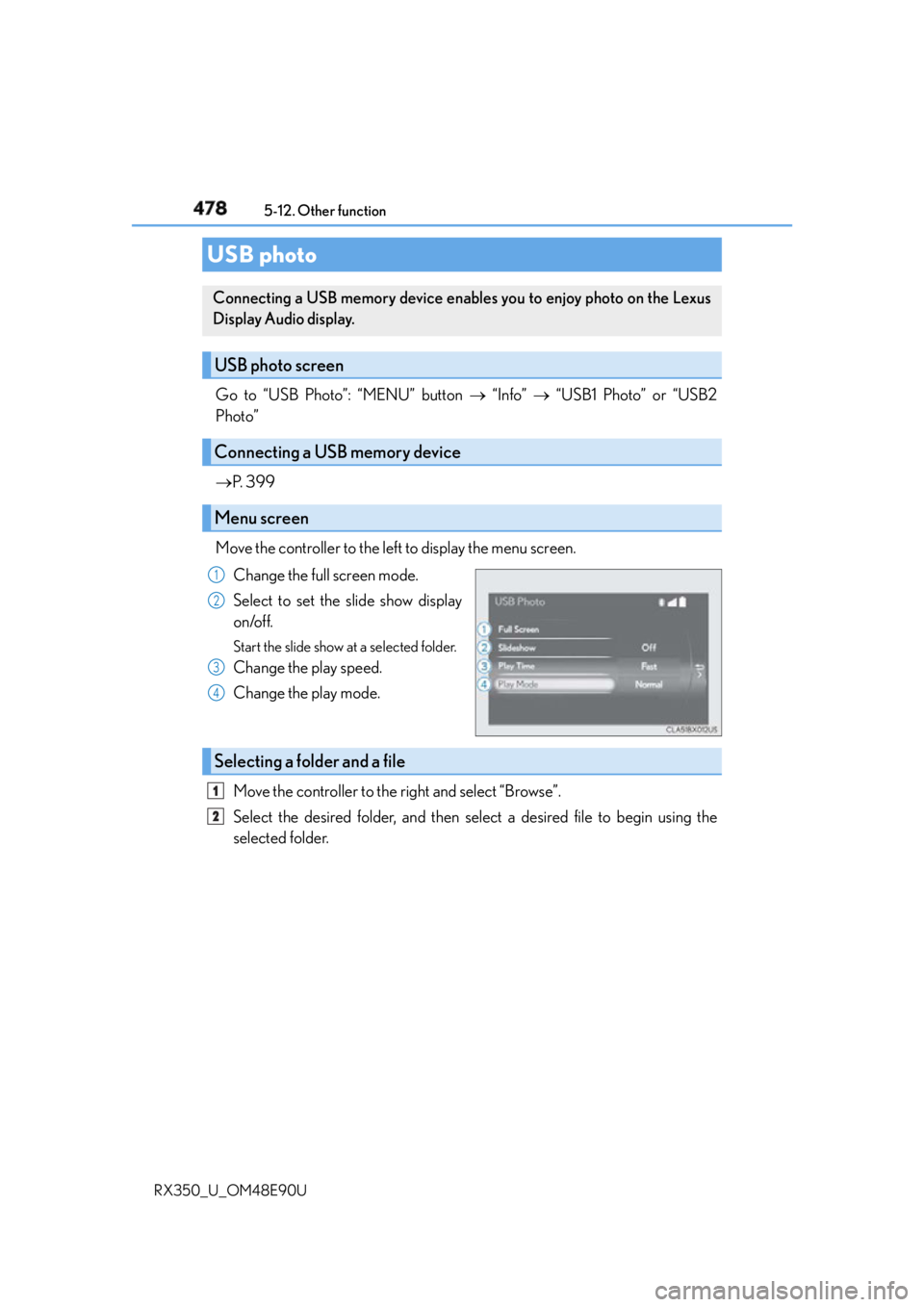
Move the controller to the left to display the menu screen.
Change the full screen mode.
Select to set the slide show display
on/off. Start the slide show at a selected folder.
Change the play speed.
Change the play mode.
Move the controller to the right and select “Browse”.
Select the desired folder, and then select a desired file to begin using the
selected folder.USB photo Connecting a USB memory device enables you to enjoy photo on the Lexus
Display Audio display.
USB photo screen
Connecting a USB memory device
Menu screen 1
2
3
4
Selecting a folder and a file 1
2
Page 479 of 748
4795-12. Other function
5
Lexus Display Audio system
RX350_U_OM48E90U ■
USB memory functions
P. 4 3 4 ■
USB memory ●
Compatible devices
USB memory device that can be used for JPEG display. ●
Compatible device formats
The following device format can be used:
• USB communication format: USB2.0 FS (480 Mbps)
• File system format: FAT16/32 (Windows)
• Correspondence class: Mass storage class ●
JPEG file compatibility
• Compatible image size: Maximum 10MB
• Compatible pixel size: Maximum 10,000,000 pixels
NOTICE ■
To prevent damage to the USB me mory device or its terminals
P. 4 3 6
Page 480 of 748
480 5-12. Other function
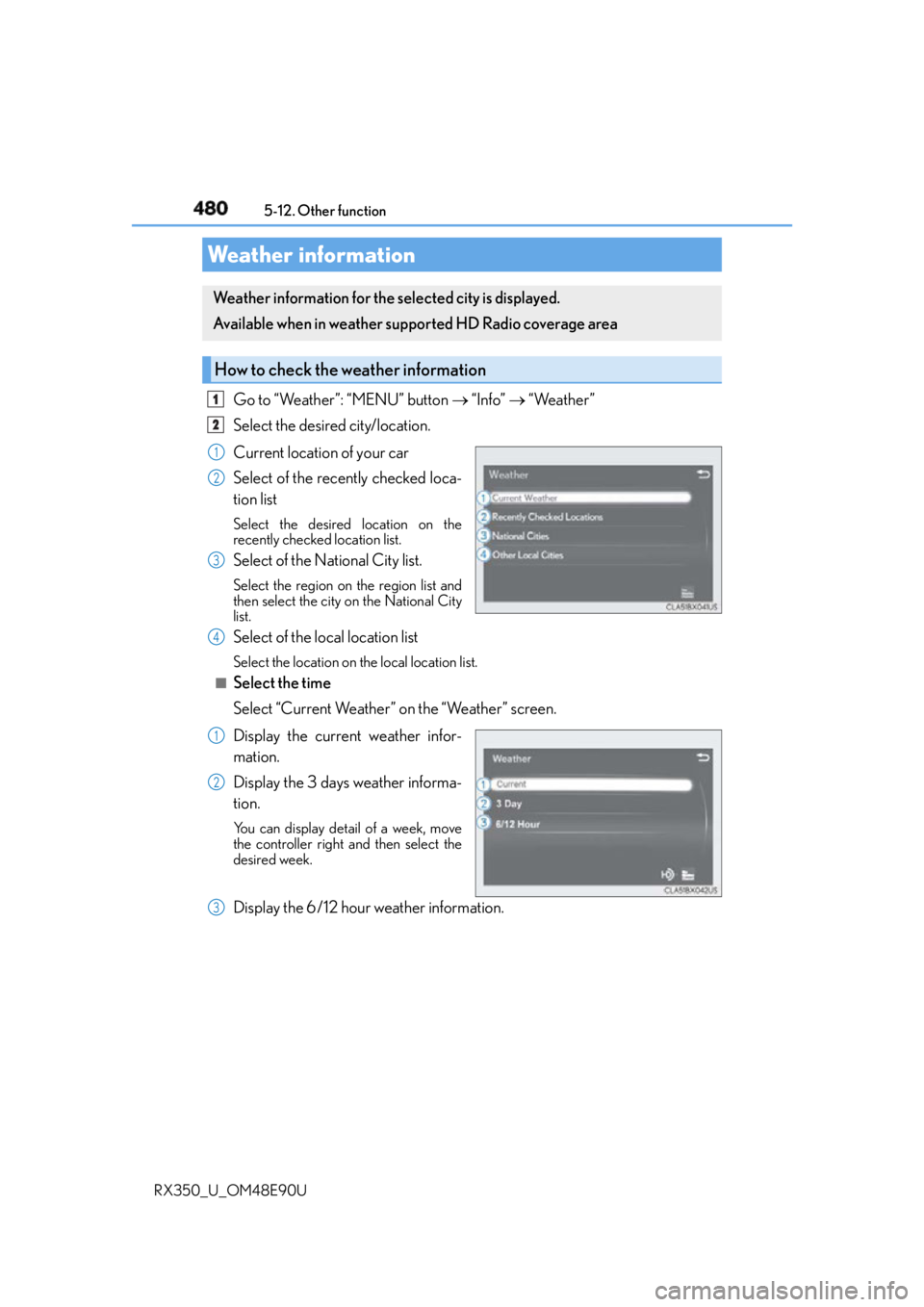
RX350_U_OM48E90U Go to “Weather”: “MENU” button “Info” “Weather”
Select the desired city/location.
Current location of your car
Select of the recently checked loca-
tion list Select the desired location on the
recently checked location list.
Select of the National City list. Select the region on the region list and
then select the city on the National City
list.
Select of the local location list Select the location on th e local location list.■
Select the time
Select “Current Weather” on the “Weather” screen.
Display the current weather infor-
mation.
Display the 3 days weather informa-
tion. You can display detail of a week, move
the controller right and then select the
desired week.
Display the 6/12 hour weather information.Weather information Weather information for the selected city is displayed.
Available when in weather supported HD Radio coverage area
How to check the weather information 1
2
1
2
3
4
1
2
3
Page 481 of 748
4815-12. Other function
5
Lexus Display Audio system
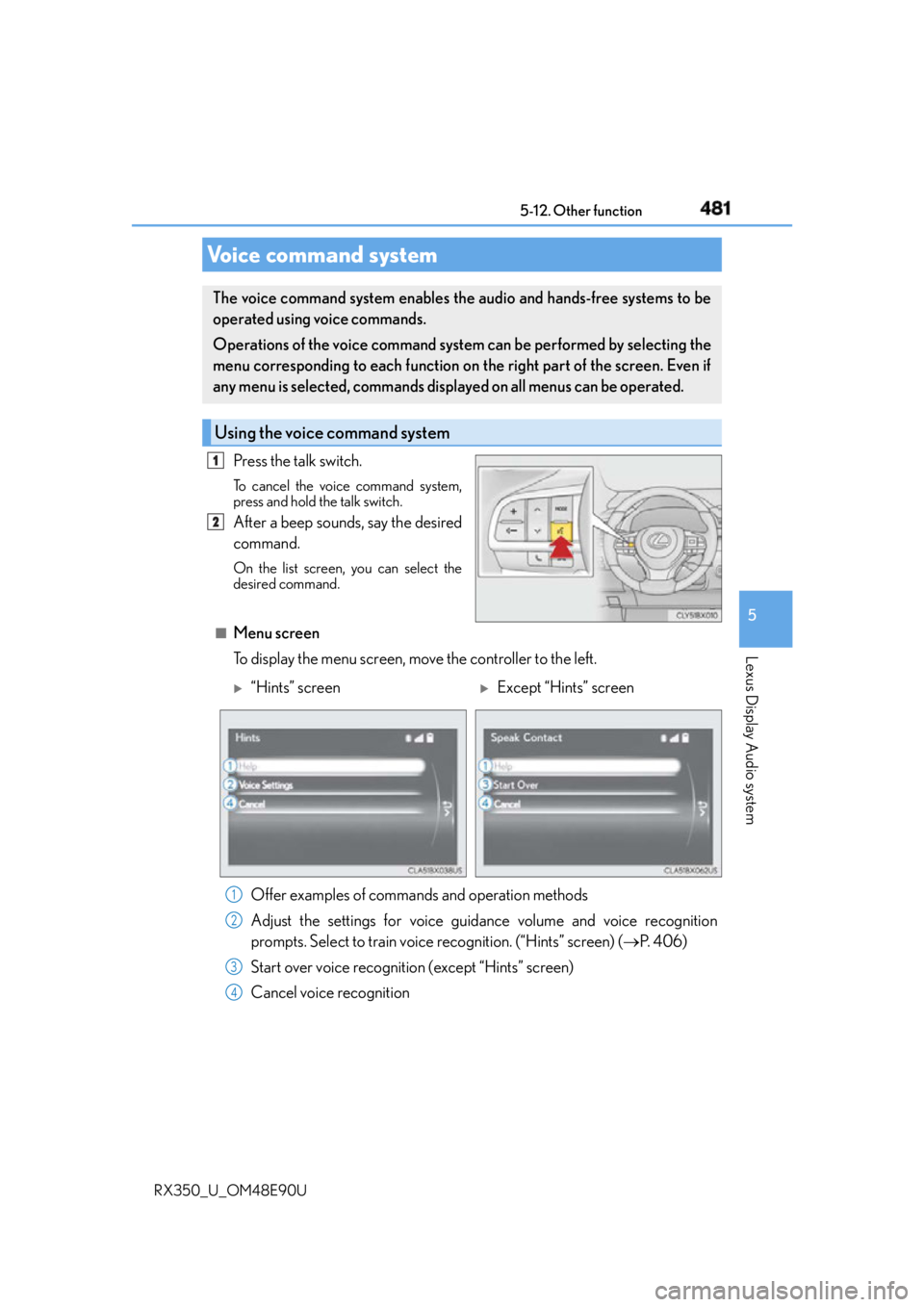
RX350_U_OM48E90U Press the talk switch. To cancel the voice command system,
press and hold the talk switch.
After a beep sounds, say the desired
command. On the list screen, you can select the
desired command.
■
Menu screen
To display the menu screen, move the controller to the left.Voice command system The voice command system enables the audio and hands-free systems to be
operated using voice commands.
Operations of the voice command system can be performed by selecting the
menu corresponding to each function on the right part of the screen. Even if
any menu is selected, commands displayed on all menus can be operated.
Using the voice command system 1
2
“Hints” screen
Except “Hints” screen
Offer examples of commands and operation methods
Adjust the settings for voice guidance volume and voice recognition
prompts. Select to train voice recognition. (“Hints” screen) ( P. 4 0 6 )
Start over voice recognition (except “Hints” screen)
Cancel voice recognition 1
2
3
4
Page 483 of 748
4835-12. Other function
5
Lexus Display Audio system
RX350_U_OM48E90U ■
Expression examples for each function
* : Say the desired artist name or al bum name in the place of the “<>”.
Some recognizable voice commands an d their actions are shown below as
examples.
Basic Command Expression examples
“Call
I need to call
“Dial
Ring <3334445555>.
“Play Artist
I’d like to hear the band
*“Play Album
Music from album
*
Command list Command Action
“Help” Prompts voice guidance to offer examples of com-
mands or operation methods
“Go Back” Returns to the previous screen
“Go to
Page 484 of 748
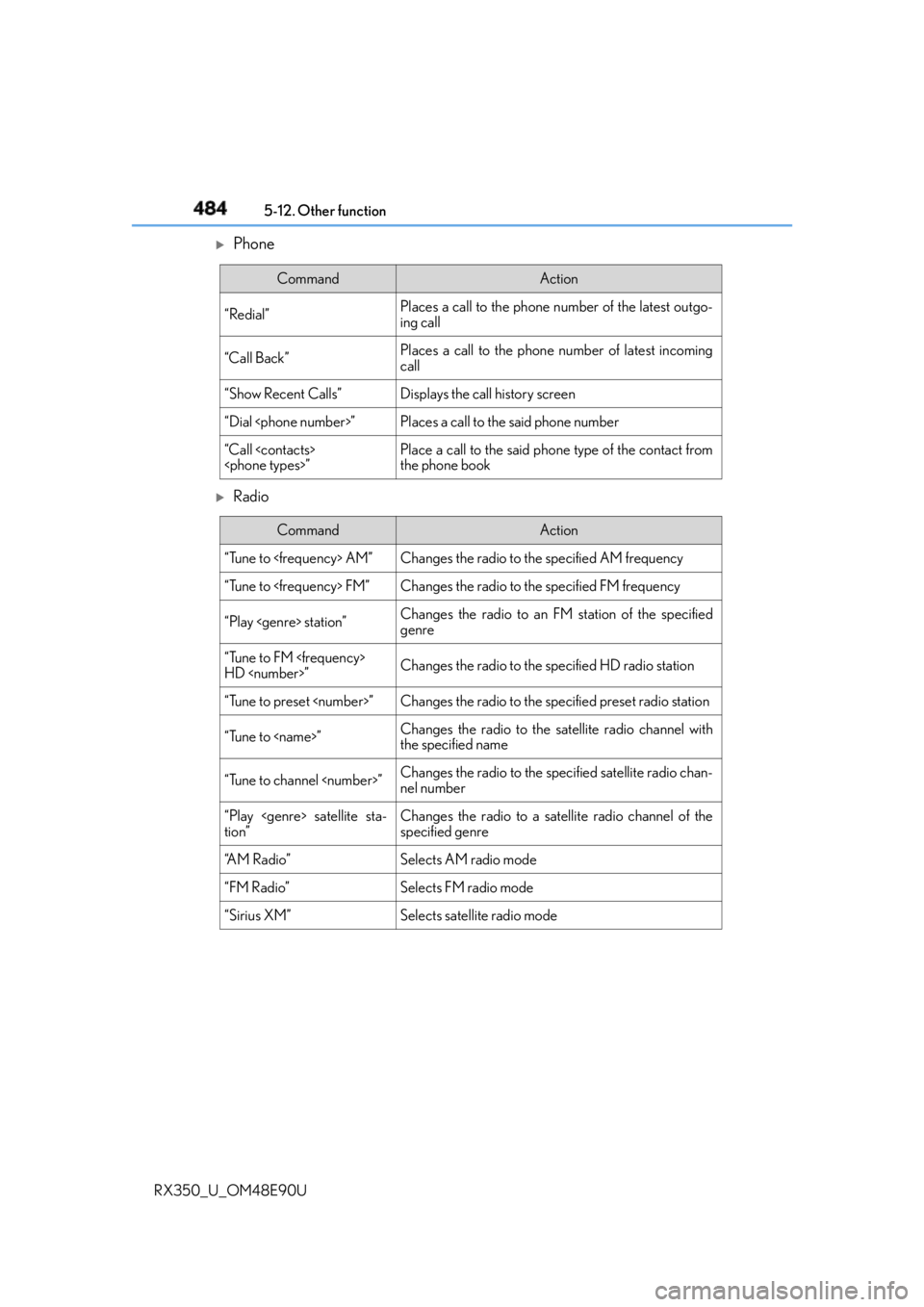
484 5-12. Other function
RX350_U_OM48E90U
Phone
Radio Command Action
“Redial” Places a call to the phone nu mber of the latest outgo-
ing call
“Call Back” Places a call to the phone number of latest incoming
call
“Show Recent Calls” Displays the call history screen
“Dial
“Call
the phone book
Command Action
“Tune to
“Tune to
“Play
genre
“Tune to FM
HD
“Tune to preset
“Tune to
the specified name
“Tune to channel
nel number
“Play
tion” Changes the radio to a satellite radio channel of the
specified genre
“A M R a d i o ” Selects AM radio mode
“FM Radio” Selects FM radio mode
“Sirius XM” Selects satellite radio mode