display LEXUS RX350 2016 Owners Manual
[x] Cancel search | Manufacturer: LEXUS, Model Year: 2016, Model line: RX350, Model: LEXUS RX350 2016Pages: 748, PDF Size: 12.36 MB
Page 497 of 748
4976-2. Using the air conditioning system and defogger
6
Interior features
RX350_U_OM48E90U
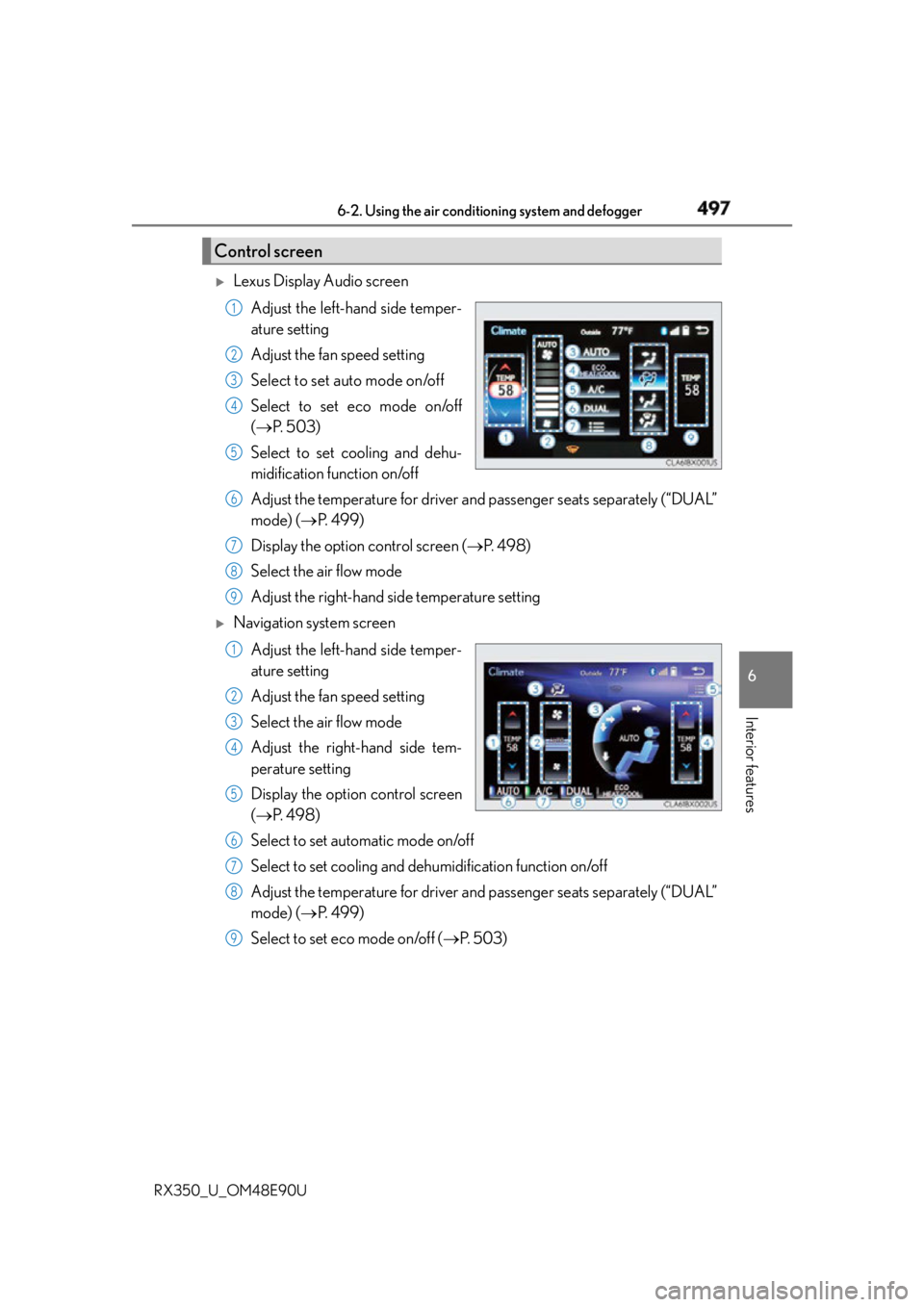
Lexus Display Audio screen
Adjust the left-hand side temper-
ature setting
Adjust the fan speed setting
Select to set auto mode on/off
Select to set eco mode on/off
( P. 5 0 3 )
Select to set cooling and dehu-
midification function on/off
Adjust the temperature for driver and passenger seats separately (“DUAL”
mode) ( P. 4 9 9 )
Display the option control screen ( P. 4 9 8 )
Select the air flow mode
Adjust the right-hand side temperature setting
Navigation system screen
Adjust the left-hand side temper-
ature setting
Adjust the fan speed setting
Select the air flow mode
Adjust the right-hand side tem-
perature setting
Display the option control screen
( P. 4 9 8 )
Select to set automatic mode on/off
Select to set cooling and de humidification function on/off
Adjust the temperature for driver and passenger seats separately (“DUAL”
mode) ( P. 4 9 9 )
Select to set eco mode on/off ( P. 5 0 3 )Control screen 1
2
3
4
5
6
7
8
9
1
2
3
4
5
6
7
8
9
Page 498 of 748
498 6-2. Using the air conditio ning system and defogger
RX350_U_OM48E90U ■
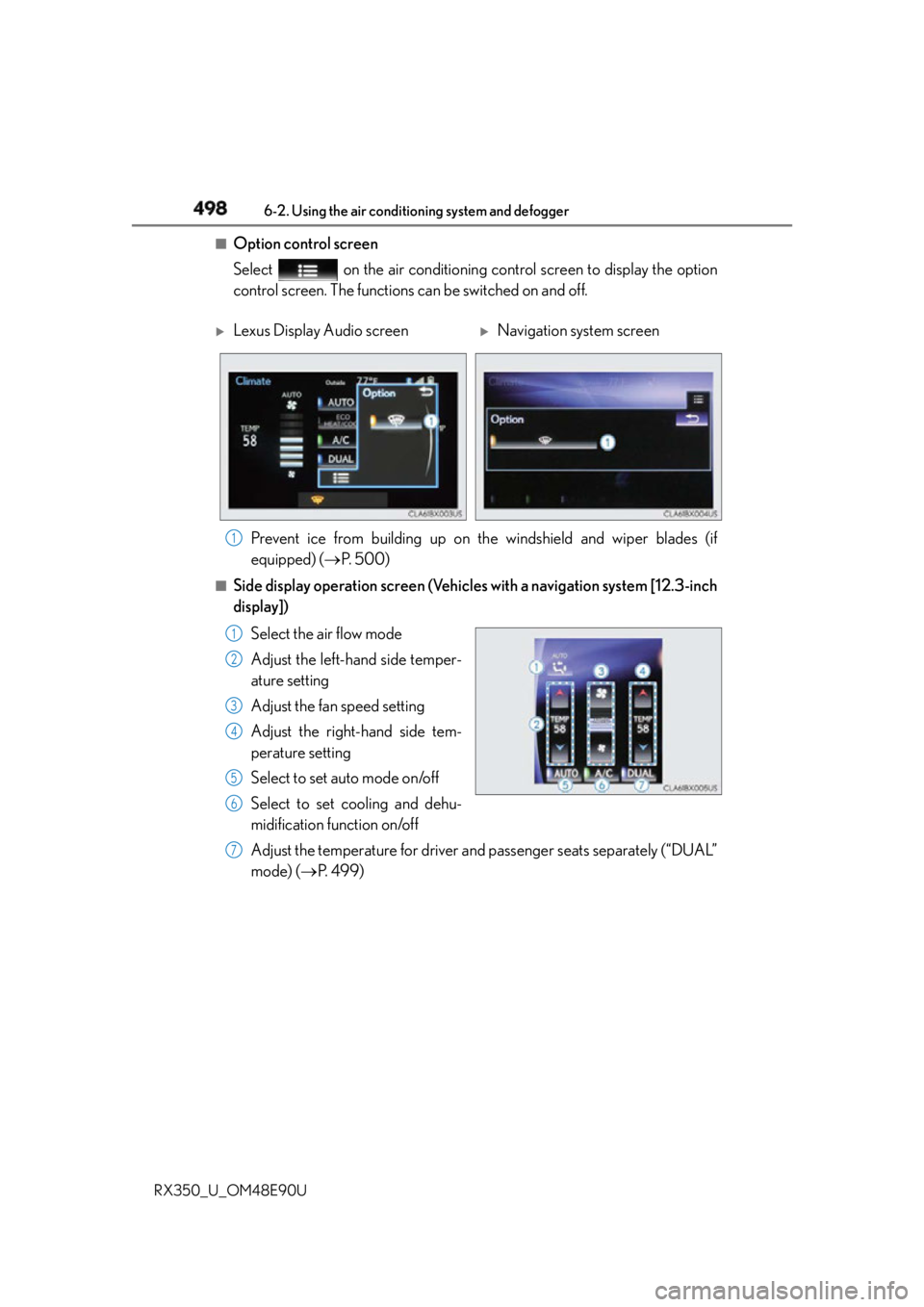
Option control screen
Select on the air conditioning control screen to display the option
control screen. The functions can be switched on and off.
■
Side display operation screen (Vehicle s with a navigation system [12.3-inch
display])
Select the air flow mode
Adjust the left-hand side temper-
ature setting
Adjust the fan speed setting
Adjust the right-hand side tem-
perature setting
Select to set auto mode on/off
Select to set cooling and dehu-
midification function on/off
Adjust the temperature for driver and passenger seats separately (“DUAL”
mode) ( P. 4 9 9 )
Lexus Display Audio screen
Navigation system screen
Prevent ice from building up on th e windshield and wiper blades (if
equipped) ( P. 5 0 0 ) 1
1
2
3
4
5
6
7
Page 499 of 748
4996-2. Using the air conditioning system and defogger
6
Interior features
RX350_U_OM48E90U ■
Using the automatic mode
Press the “AUTO” button or select “AUTO” on the air conditioning control
screen.
Press to switch to automatic air intake mode. (if equipped)
The air conditioning system automati cally switches between outside air
and recirculated air modes.
Adjust the temperature setting.
To stop the operation, press the “OFF” button.■
Automatic mode indicator
If the fan speed setting or air flow modes are operated, the automatic mode
indicator goes off. However, automati c mode for functions other than that
operated is maintained. ■
Adjusting the temperature for driver and passenger seats separately
(“DUAL” mode)
To turn on the “DUAL” mode, perform any of the following procedures: ●
Select “DUAL” on the air co nditioning control screen.●
Select “DUAL” on the side display operation screen.(Vehicles with a navi-
gation system [12.3-inch display]) ●
Adjust the temperature setting of the passenger side with the passenger
side temperature adjustment button. The indicator comes on when the “DUAL” mode is on.
■
Switching between outside air and recirculated air modes
Ty p e A
Press . The mode switches between (recirculated air mode) and (outside
air mode) modes each time the button is pressed.Air conditioning controls
Other functions 1
2
3
4
Page 500 of 748

500 6-2. Using the air conditio ning system and defogger
RX350_U_OM48E90U
Ty p e B
Press . The mode switches between (recirculated air mode), automatic and
(outside air mode) modes each time the button is pressed.
When the system is switched to automatic mode, the air conditioning system oper-
ates automatically.■
Defogging the windshield
Defoggers are used to defog the windshield and front side windows.
Press . Set the outside/recirculated air mode button to outside air mode if the recirculated
air mode is used. (It may switch automatically.)
To defog the windshield and the side windows early, turn the air flow and tempera-
ture up.
To return to the previous mode, press again when the windshield is
defogged.■
Defogging the rear window and outside rear view mirrors
Defoggers are used to defog the rear window and to remove raindrops, dew
and frost from the outside rear view mirrors.
Press . The defoggers will automatically turn off after a period of time.■
Windshield wiper de-icer (if equipped)
This feature is used to prevent ice fr om building up on the windshield and
wiper blades.
Select on the option control screen. When the windshield wiper de-icer is on , is displayed on the air condition-
ing control screen.
The windshield wiper de-icer will automati cally turn off after a period of time.
Page 524 of 748
524 6-5. Using the other interior features
RX350_U_OM48E90U
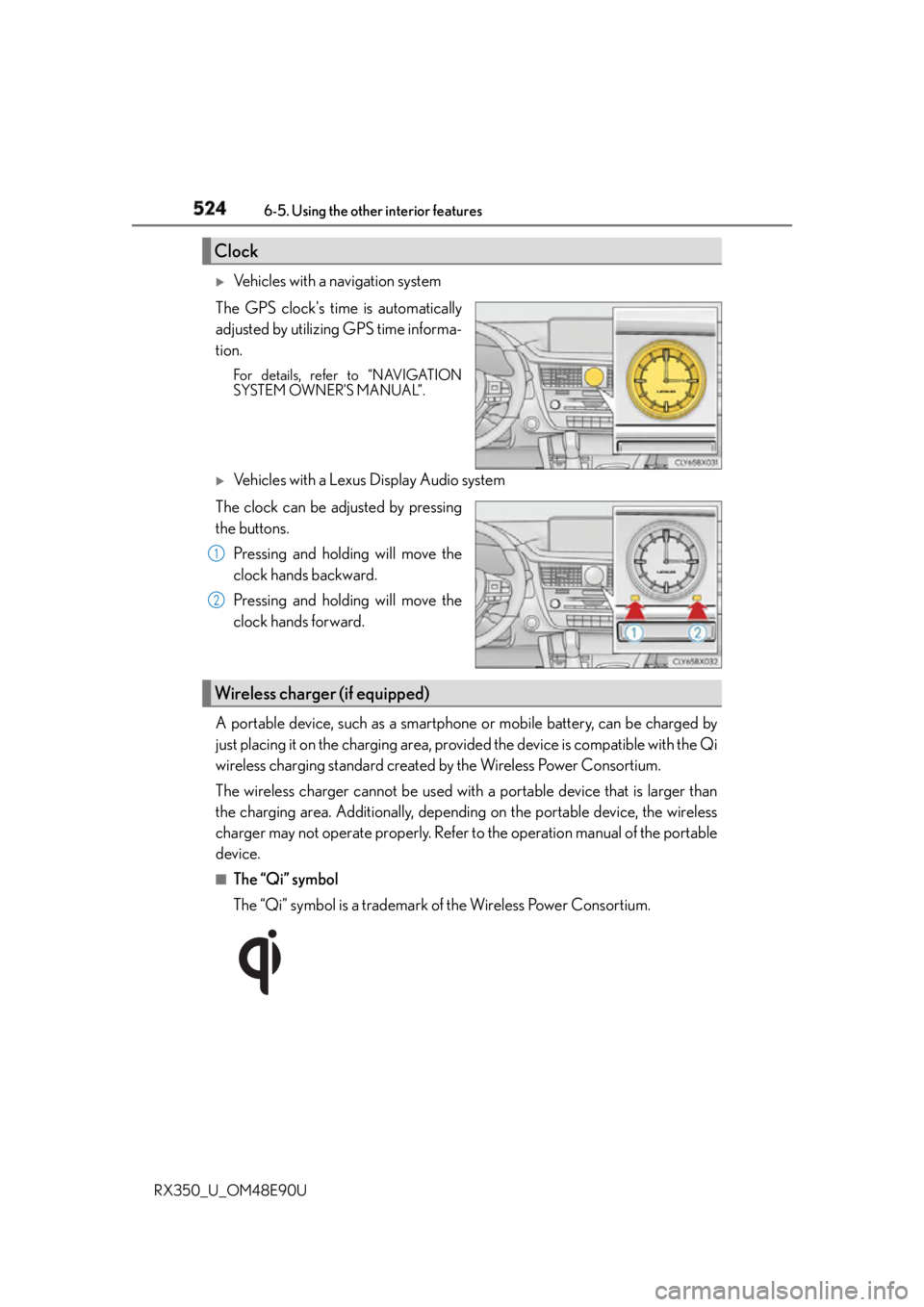
Vehicles with a navigation system
The GPS clock's time is automatically
adjusted by utilizing GPS time informa-
tion. For details, refer to “NAVIGATION
SYSTEM OWNER’S MANUAL”.
Vehicles with a Lexus Display Audio system
The clock can be adjusted by pressing
the buttons.
Pressing and holding will move the
clock hands backward.
Pressing and holding will move the
clock hands forward.
A portable device, such as a smartphone or mobile battery, can be charged by
just placing it on the charging area, provided the device is compatible with the Qi
wireless charging standard created by the Wireless Power Consortium.
The wireless charger cannot be used with a portable device that is larger than
the charging area. Additionally, depending on the portable device, the wireless
charger may not operate properly. Refer to the operation manual of the portable
device. ■
The “Qi” symbol
The “Qi” symbol is a trademark of the Wireless Power Consortium.Clock
1
2
Wireless charger (if equipped)
Page 530 of 748

530 6-5. Using the other interior features
RX350_U_OM48E90U NOTICE ■
Conditions in which the wireless charger may not operate correctly
In the following situations, the wireless charger may not operate correctly: ●
When a portable device is fully charged ●
When there is a foreign object between the charging area and portable device●
When a portable device becomes hot while charging ●
When a portable device is placed on the wireless area with its charging surface fac-
ing up ●
When a portable device is not centered on the charging area ●
When the vehicle is near a TV tower, electric power plant, gas station, radio station,
large display, airport or other facility that generates strong radio waves or electrical
noise ●
When the portable device is in contact with, or is covered by any of the following
metallic objects
• Cards to which aluminum foil is attached
• Cigarette boxes that have aluminum foil inside
• Metallic wallets or bags
•Coins
• Metal hand warmers
• Media such as CDs and DVDs ●
When wireless keys (that emit radio waves) other than those of your vehicle are being
used nearby.
If in situations other than above the wirele ss charger does not op erate properly or the
operation indicator light is blinking, the wireless charge r may be malfunctioning. Con-
tact your Lexus dealer. ■
To prevent failure or damage to data ●
Do not bring magnetic cards, such as a credit card, or magnetic recording media,
close to the wireless charger while chargi ng. Otherwise, data may be erased due to
the influence of magnetism.
Additionally, do not bring precision instrume nts such as wrist watches, close to the
wireless charger, as such objects may malfunction. ●
Do not leave portable devices in the cab in. The temperature inside the cabin may
become high when parked in the su n, and cause damage to the device.■
To prevent battery discharge
Do not use the wireless charger for a long period of time with the engine is stopped.
Page 540 of 748
540 6-5. Using the other interior features
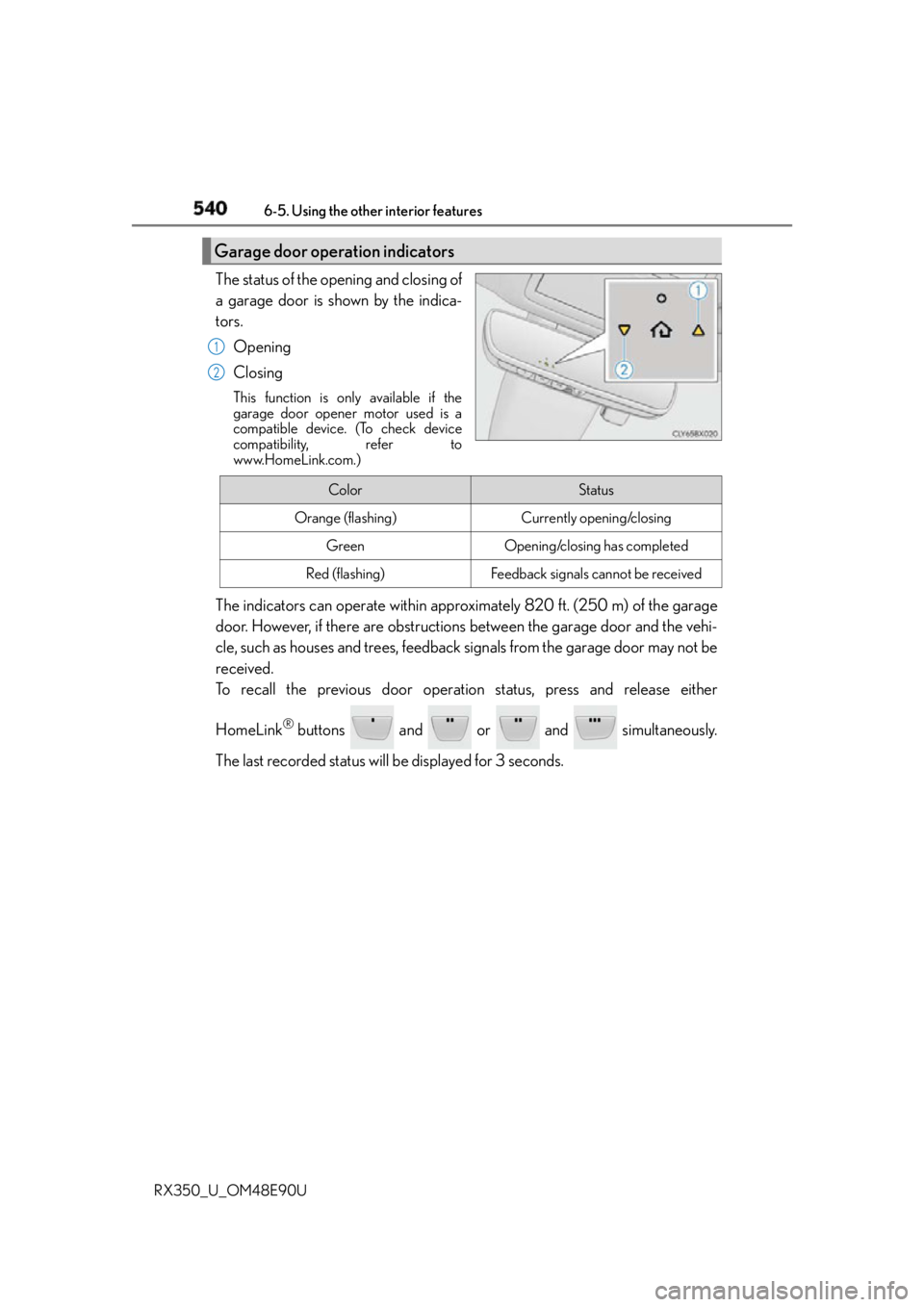
RX350_U_OM48E90U The status of the opening and closing of
a garage door is shown by the indica-
tors.
Opening
Closing This function is only available if the
garage door opener motor used is a
compatible device. (To check device
compatibility, refer to
www.HomeLink.com.)
The indicators can operate within approximately 820 ft. (250 m) of the garage
door. However, if there are obstructions between the garage door and the vehi-
cle, such as houses and trees, feedback signals from the garage door may not be
received.
To recall the previous door operation status, press and release either
HomeLink ®
buttons and or and simultaneously.
The last recorded status w ill be displayed for 3 seconds.Garage door operation indicators 1
2
Color Status
Orange (flashing) Currently opening/closing
Green Opening/closing has completed
Red (flashing) Feedback signals cannot be received
Page 543 of 748
5436-5. Using the other interior features
6
Interior features
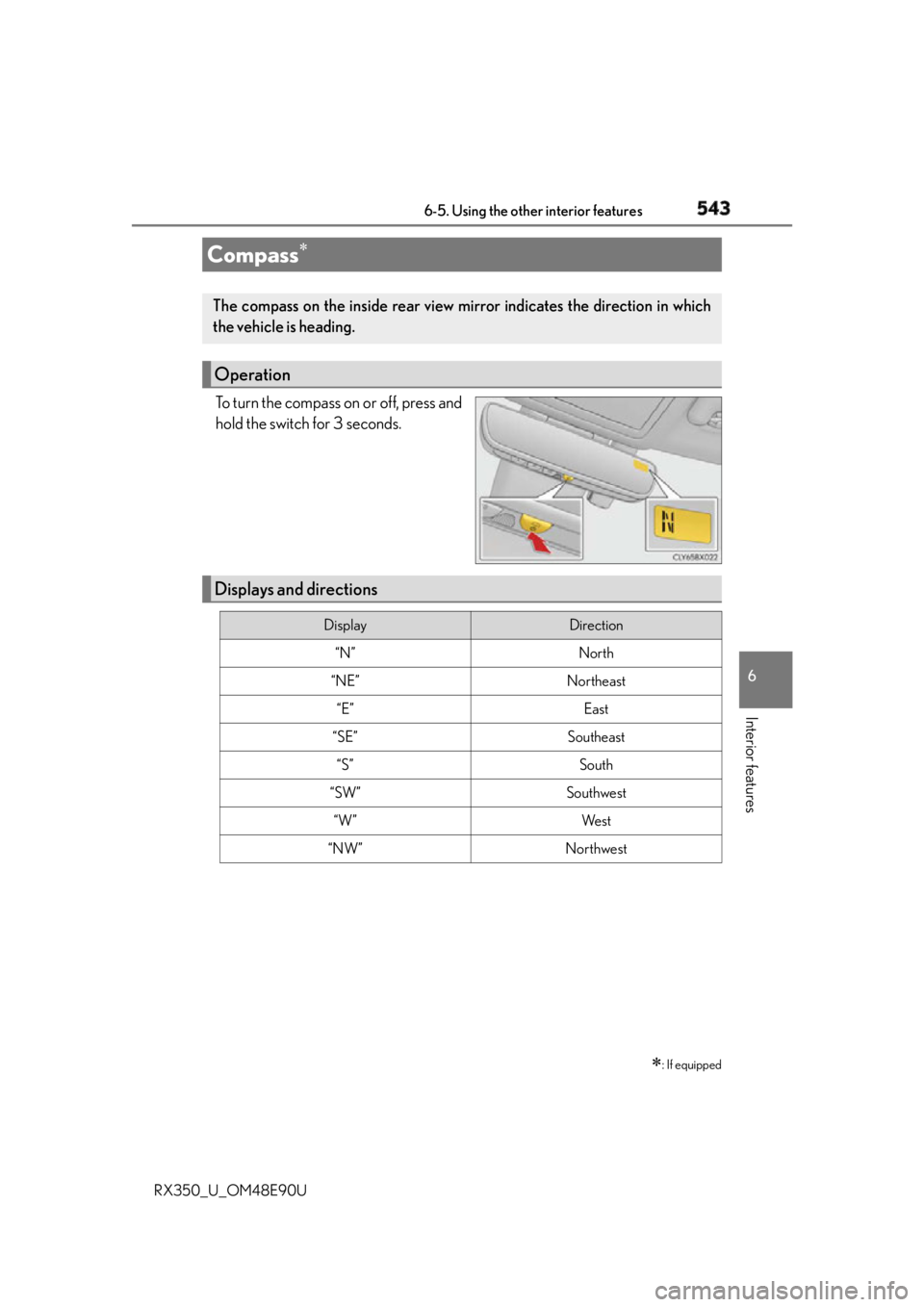
RX350_U_OM48E90U To turn the compass on or off, press and
hold the switch for 3 seconds.
Compass
: If equippedThe compass on the inside rear view mi rror indicates the direction in which
the vehicle is heading.
Operation
Displays and directions Display Direction
“N” North
“NE” Northeast
“E” East
“SE” Southeast
“S” South
“SW” Southwest
“W” We s t
“NW” Northwest
Page 544 of 748
544 6-5. Using the other interior features
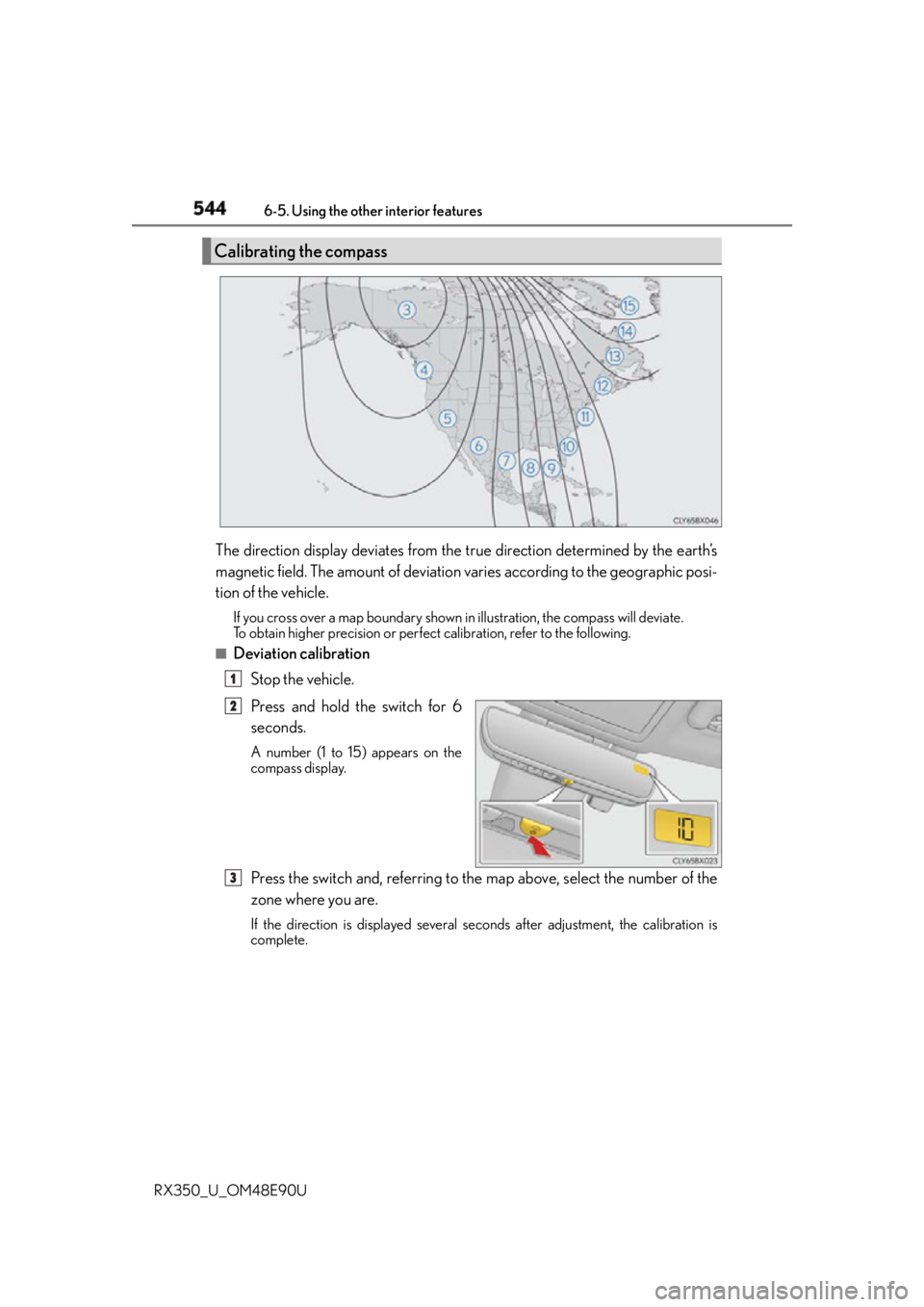
RX350_U_OM48E90U The direction display deviates from the true direction determined by the earth’s
magnetic field. The amount of deviation varies according to the geographic posi-
tion of the vehicle. If you cross over a map boundary shown in illustration, the compass will deviate.
To obtain higher precision or perfect calibration, refer to the following.■
Deviation calibration
Stop the vehicle.
Press and hold the switch for 6
seconds. A number (1 to 15) appears on the
compass display.
Press the switch and, referring to the map above, select the number of the
zone where you are. If the direction is displayed several se conds after adjustment, the calibration is
complete.Calibrating the compass
1
2
3
Page 545 of 748
5456-5. Using the other interior features
6
Interior features
RX350_U_OM48E90U ■
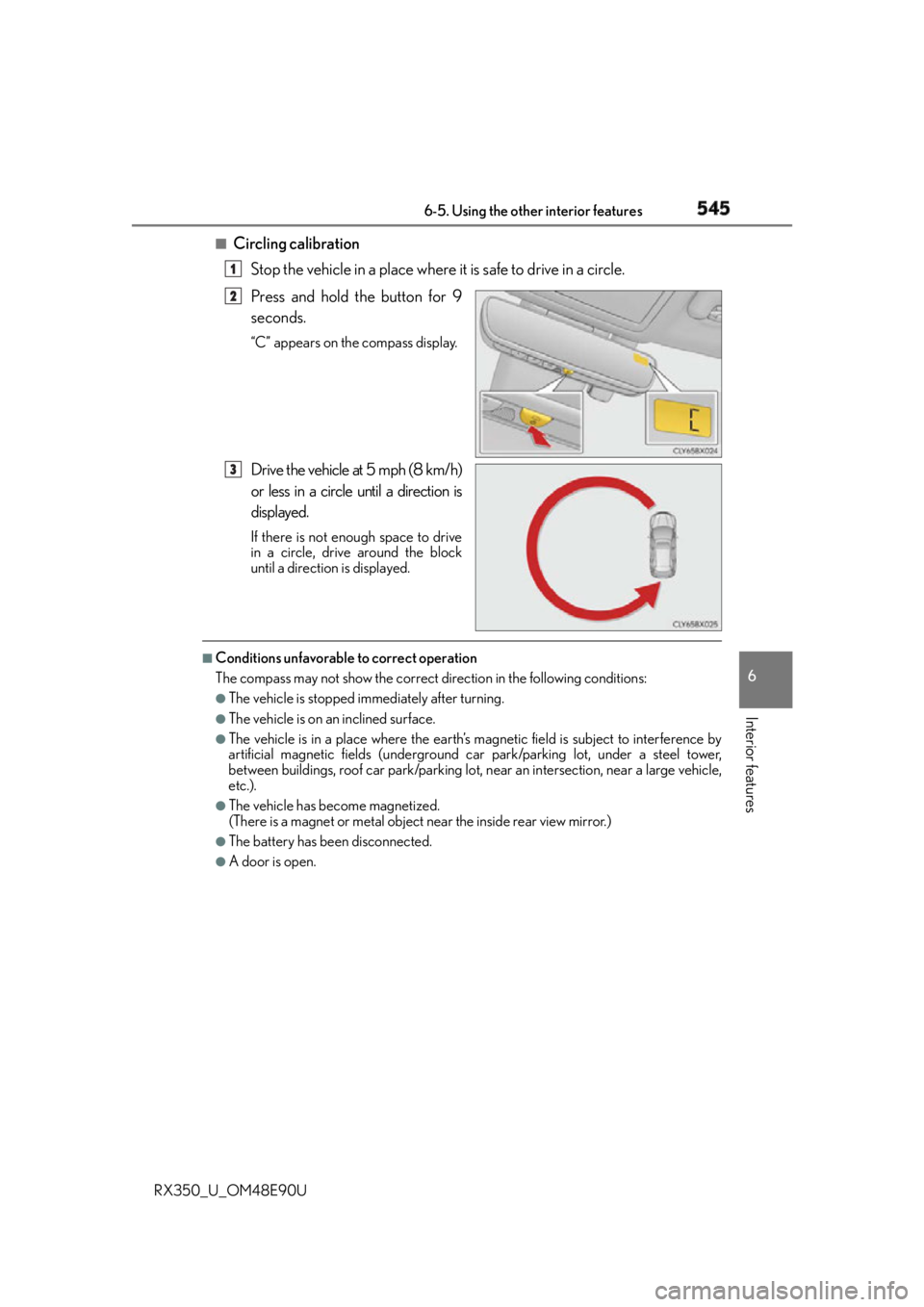
Circling calibration
Stop the vehicle in a place where it is safe to drive in a circle.
Press and hold the button for 9
seconds. “C” appears on the compass display.
Drive the vehicle at 5 mph (8 km/h)
or less in a circle until a direction is
displayed. If there is not enough space to drive
in a circle, drive around the block
until a direction is displayed.■
Conditions unfavorable to correct operation
The compass may not show the correct direction in the following conditions: ●
The vehicle is stopped immediately after turning. ●
The vehicle is on an inclined surface. ●
The vehicle is in a place where the earth’s ma gnetic field is subjec t to interference by
artificial magnetic fields (underground car park/parking lot, under a steel tower,
between buildings, roof car park/parking lot, near an intersection, near a large vehicle,
etc.). ●
The vehicle has become magnetized.
(There is a magnet or metal object near the inside rear view mirror.) ●
The battery has been disconnected. ●
A door is open. 1
2
3