door lock LEXUS RX350 2016 Workshop Manual
[x] Cancel search | Manufacturer: LEXUS, Model Year: 2016, Model line: RX350, Model: LEXUS RX350 2016Pages: 748, PDF Size: 12.36 MB
Page 243 of 748
2434-3. Operating the lights and wipers
4
Driving
RX350_U_OM48E90U ■
Daytime running light system ●
To make your vehicle more visible to other drivers during daytime driving, the daytime
running lights turn on automatically whenever the engine is started and the parking
brake is released with the headlight sw itch in (Canada only) or position.
(Illuminate brighter th an the parking li ghts.) Daytime running lights are not designed for
use at night.
For the U.S.A.: Daytime running lights can be turned off by operating the headlight
switch to position. ●
Compared to turning on the headlights, the daytime running light system offers greater
durability and consumes less electricity, so it can help improve fuel economy. ■
Cornering lights (if equipped)
When the cornering lights are on for more th an 30 minutes, they will turn off automati-
cally. ■
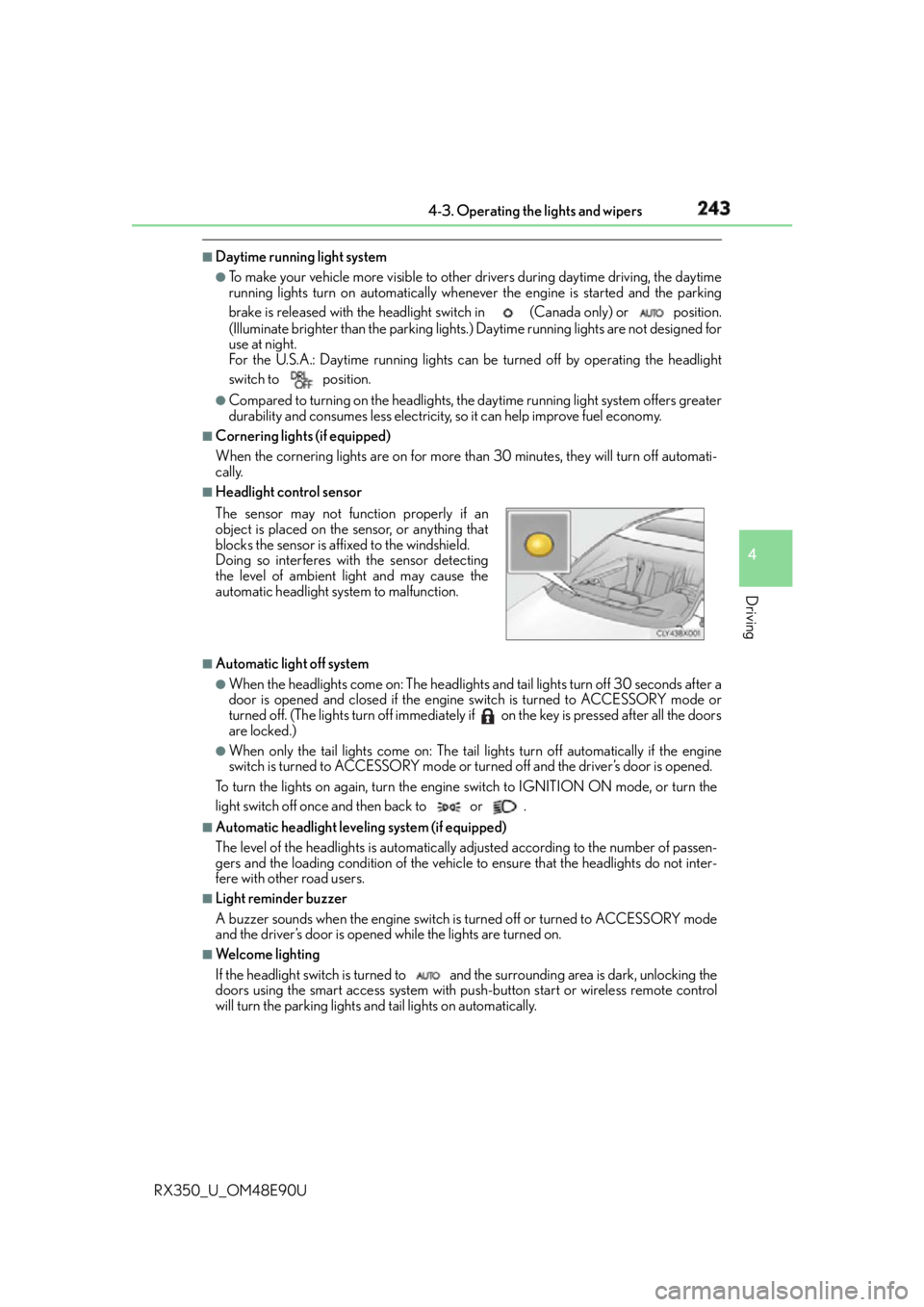
Headlight control sensor
■
Automatic light off system ●
When the headlights come on: The headlights and tail lights turn off 30 seconds after a
door is opened and closed if the engine switch is turned to ACCESSORY mode or
turned off. (The lights turn off immediately if on the key is pressed after all the doors
are locked.) ●
When only the tail lights come on: The tail lights turn off automatically if the engine
switch is turned to ACCESSORY mode or turned off and the driver’s door is opened.
To turn the lights on again, turn the engine switch to IGNITION ON mode, or turn the
light switch off once and then back to or . ■
Automatic headlight leveling system (if equipped)
The level of the headlights is automatically ad justed according to the number of passen-
gers and the loading condition of the vehicle to ensure that the headlights do not inter-
fere with other road users. ■
Light reminder buzzer
A buzzer sounds when the engine switch is turned off or turned to ACCESSORY mode
and the driver’s door is opened while the lights are turned on. ■
We l c o m e l i g h t i n g
If the headlight switch is turned to and the surrounding area is dark, unlocking the
doors using the smart access system with pu sh-button start or wireless remote control
will turn the parking lights and tail lights on automatically.The sensor may not function properly if an
object is placed on the sensor, or anything that
blocks the sensor is affixed to the windshield.
Doing so interferes with the sensor detecting
the level of ambient light and may cause the
automatic headlight system to malfunction.
Page 253 of 748

2534-3. Operating the lights and wipers
4
Driving
RX350_U_OM48E90U ■
Front door opening linked windshield wiper stop function (vehicles with rain-sensing
windshield wipers)
When “AUTO” is selected and the windshield wipers are operating, if a front door is
opened, the operation of the windshield wipe rs will be stopped to prevent anyone near
the vehicle from being sprayed by water from the wipers, provided the vehicle is stopped
with the parking brake applied or the shift lever in P. When th e front door is closed, wiper
operation will resume. ■
Customization
Some functions can be customized. ( P. 6 9 9 )
WA R N I N G ■
Caution regarding the use of windshield wi pers in AUTO mode (vehicles with rain-
sensing windshield wipers)
The windshield wipers may operate unexpectedly if the sensor is touched or the wind-
shield is subject to vibration in AUTO mode. Take care that your fingers, etc. do not
become caught in the windshield wipers. ■
Caution regarding the use of washer fluid
When it is cold, do not use the washer fluid until the windshield becomes warm. The
fluid may freeze on the windshield and cause lo w visibility. This may lead to an accident,
resulting in death or serious injury.
NOTICE ■
When the windshield is dry
Do not use the wipers, as they may damage the windshield. ■
When the washer fluid tank is empty
Do not operate the switch continually as the washer fluid pump may overheat. ■
When a nozzle becomes blocked
In this case, contact your Lexus dealer.
Do not try to clear it with a pin or other object. The nozzle will be damaged.
Page 260 of 748
260 4-4. Refueling
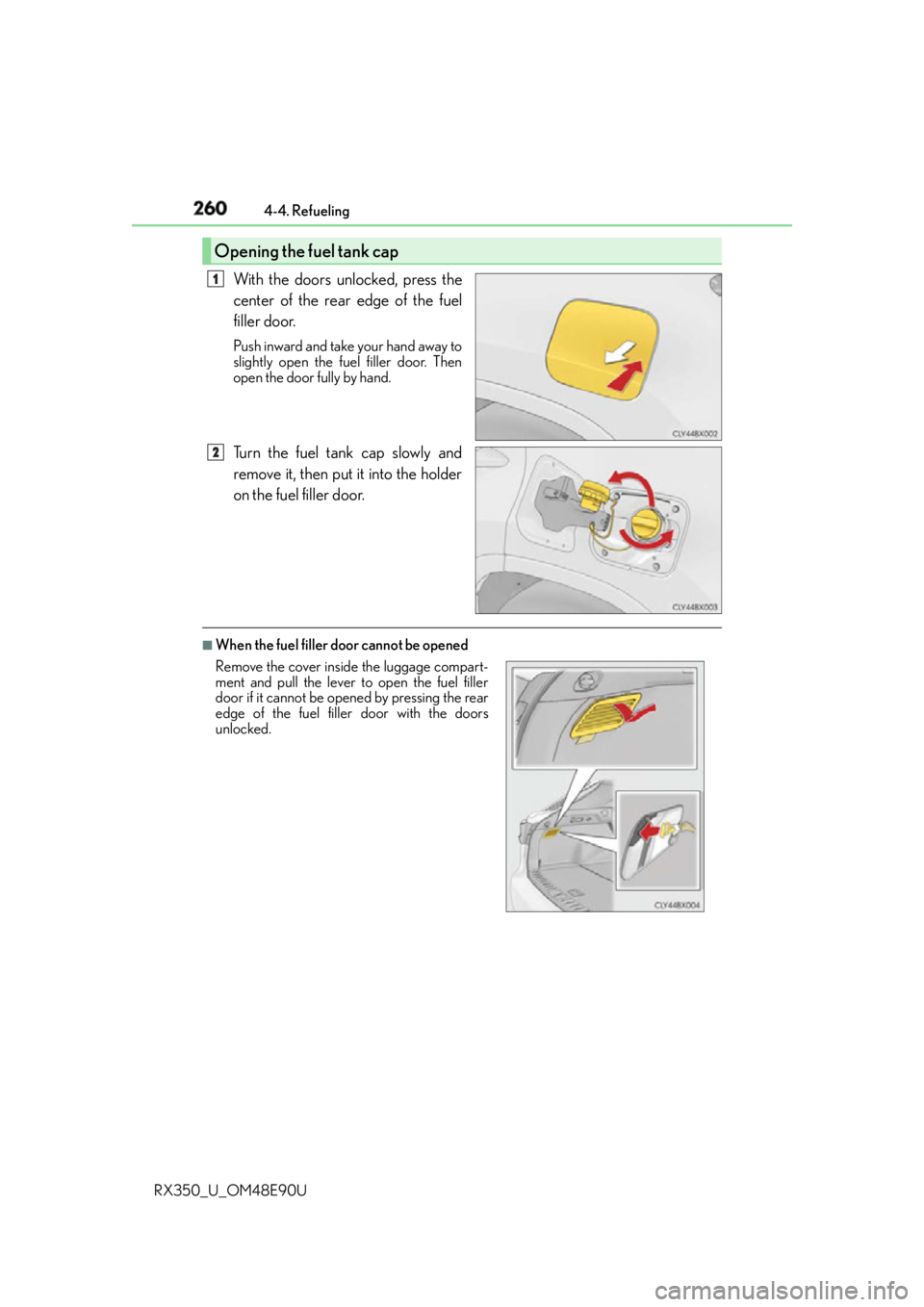
RX350_U_OM48E90U With the doors unlocked, press the
center of the rear edge of the fuel
filler door. Push inward and take your hand away to
slightly open the fuel filler door. Then
open the door fully by hand.
Turn the fuel tank cap slowly and
remove it, then put it into the holder
on the fuel filler door. ■
When the fuel filler door cannot be openedOpening the fuel tank cap 1
2
Remove the cover inside the luggage compart-
ment and pull the lever to open the fuel filler
door if it cannot be opened by pressing the rear
edge of the fuel filler door with the doors
unlocked.
Page 261 of 748
2614-4. Refueling
4
Driving
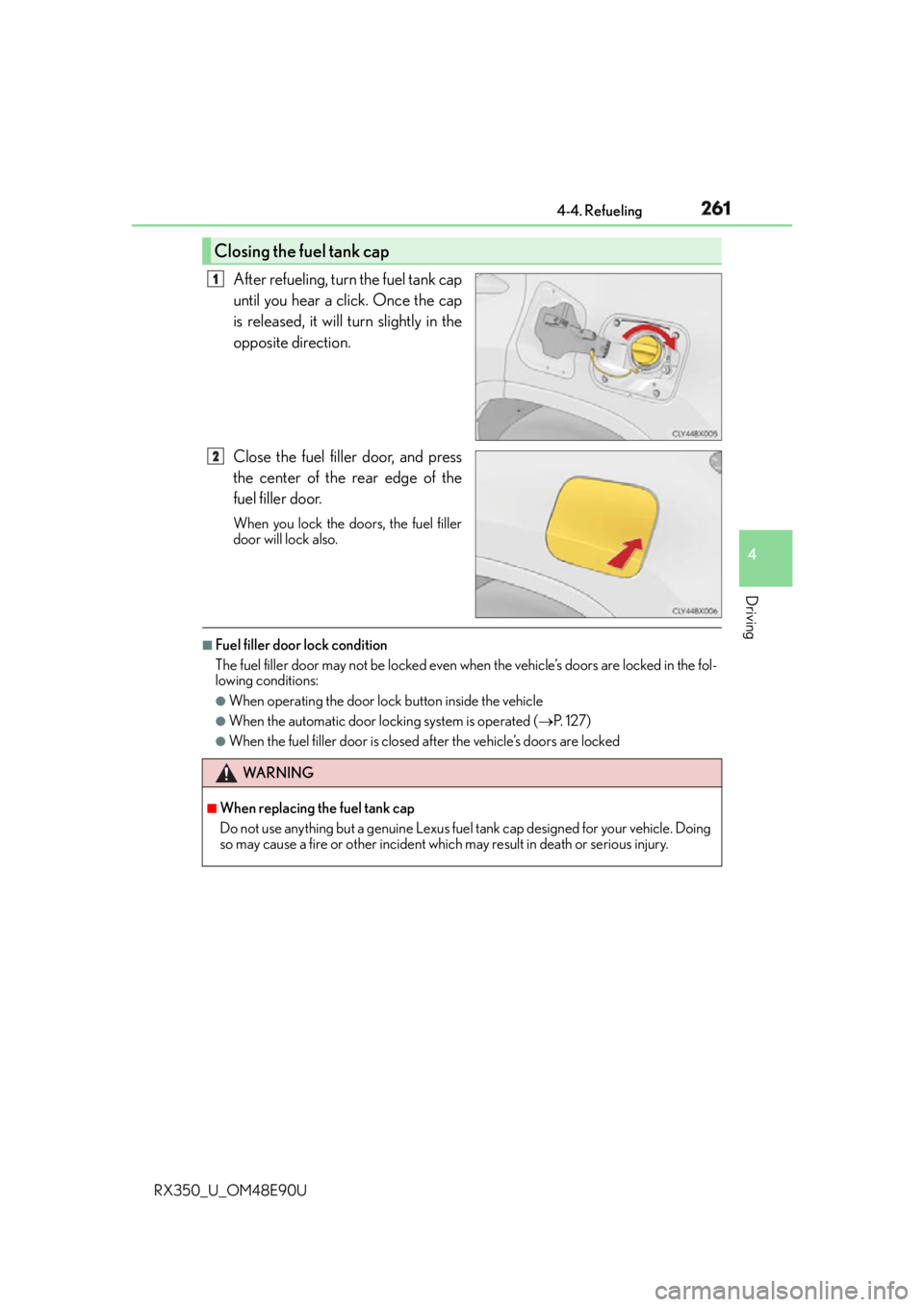
RX350_U_OM48E90U After refueling, turn the fuel tank cap
until you hear a click. Once the cap
is released, it will turn slightly in the
opposite direction.
Close the fuel filler door, and press
the center of the rear edge of the
fuel filler door. When you lock the doors, the fuel filler
door will lock also. ■
Fuel filler door lock condition
The fuel filler door may not be locked even wh en the vehicle’s doors are locked in the fol-
lowing conditions: ●
When operating the door lock button inside the vehicle ●
When the automatic door locking system is operated ( P. 1 2 7 )●
When the fuel filler door is closed after the vehicle’s doors are lockedClosing the fuel tank cap 1
2
WA R N I N G ■
When replacing the fuel tank cap
Do not use anything but a genuine Lexus fuel tank cap designed for your vehicle. Doing
so may cause a fire or other incident whic h may result in death or serious injury.
Page 487 of 748

487
6Interior features
RX350_U_OM48E90U 6-1. Basic operation of the
Remote Touch screen
Remote Touch............................. 488
12.3-inch display......................... 492
6-2. Using the air conditioning
system and defogger
Lexus Climate Concierge ...... 494
Automatic air conditioning
system .......................................... 495
Heated steering wheel/
seat heaters/
seat ventilators......................... 505
6-3. Using the interior lights
Interior lights list......................... 508
• Interior lights ......................... 509
• Personal lights......................... 510
6-4. Using the storage features
List of storage features.............. 512
• Glove box................................. 513
• Console box ............................ 513
• Cup holders............................. 514
• Door pockets .......................... 515
• Bottle holders ......................... 515
• Coin box ................................... 516
• Auxiliary boxes....................... 517
Luggage compartment
features ......................................... 518 6-5. Using the other interior
features
Other interior features ............ 523
• Sun visors ................................ 523
• Vanity mirrors ........................ 523
• Clock ........................................ 524
• Wireless charger.................. 524
• Power outlets
(12 VDC) .................................. 531
• Power outlet
(120 VAC) .............................. 532
• Front passenger footwell
hooks......................................... 533
• Rear door sunshades ......... 534
• Armrest ....................................534
• Assist grips.............................. 535
• Coat hooks ............................. 535
Garage door opener................ 536
Compass ....................................... 543
LEXUS Enform Safety
Connect ...................................... 547
LEXUS Enform Remote ......... 552
LEXUS Enform Service
Connect ...................................... 554
Page 502 of 748

502 6-2. Using the air conditio ning system and defogger
RX350_U_OM48E90U ■
Registering air conditioning settings to elec tronic keys (vehicles with driving position
memory) ●
Unlocking the vehicle using an electronic ke y and turning the engine switch to IGNI-
TION ON mode will recall that key’s registered air conditioning settings. ●
When the engine switch is tu rned off, the current air conditioning settings will automat-
ically be registered to the electronic key that was used to unlock the vehicle.●
The system may not operate correctly if more th an one electronic key is in the vicinity or
if the smart access system with push-button start is used to unlock a passenger door. ●
The doors that can recall the air conditioni ng setting when unlocked using the smart
access system with push-b utton start can be changed.
* For details, contact your Lexus
dealer.
* : The doors that can recall the driving positi on memory are changed at the same time.■
Using automatic mode
Fan speed is adjusted automatically accordin g to the temperature setting and the ambi-
ent conditions.
Therefore, the fan may stop for a while until warm or cool air is ready to flow immediately
after the “AUTO” button is pr essed or “AUTO” is selected.■
Operation of S-FLOW mode
In automatic mode, S-FLOW mode will be turned off if a rear door has been opened and
closed. To activate S-FLOW mode again, press . ■
Using the voice command system (veh icles with a navigation system)
Air conditioning system can be operated usin g voice commands. For details, refer to the
“NAVIGATION SYSTEM OWNER’S MANUAL”. ■
When the outside temperature exceeds 75 F (24 C) and the air conditioning system
is on ●
In order to reduce the air conditioning po wer consumption, the ai r conditioning system
may switch to recirculated air mode automatically.
This may also reduce fuel consumption. ●
Recirculated air mode is selected as a defaul t mode when the engine switch is turned to
IGNITION ON mode. ●
It is possible to switch to outside air mode at any time by pressing the outside/recircu-
lated air mode button. ■
Automatic mode for air intake control (if equipped)
In automatic mode, the system detects exhaust gas and other pollutants and automati-
cally switches between outside air and recirculated air modes.
When the dehumidification function is off, and the fan is operating, turning automatic
mode on will activate the dehumidification function.■
Fogging up of the windows ●
The windows will easily fog up when the humidi ty in the vehicle is high. Selecting “A/C”
will dehumidify the air from the outlet s and defog the windshield effectively. ●
If you turn “A/C” off, the windows may fog up more easily. ●
The windows may fog up if the recirculated air mode is used.
Page 511 of 748
5116-3. Using the interior lights
6
Interior features
RX350_U_OM48E90U ●
Illuminated entry system: The lights automa tically turn on/off according to engine
switch mode, the presence of the electronic key, whether the doors are locked/
unlocked, and whether the doors are opened/closed. ●
If the interior lights remain on when the engine switch is turned off, the lights will go off
automatically after 20 minutes. ●
In the following cases, the interior lights and front personal lights may not respond as
normal.
• When water, dirt, etc., have adhered to the lens surface
• When operated with a wet hand
• When wearing gloves, etc. ●
Some functions can be customized. ( P. 699)
NOTICE ●
Never remove the lens for the front interior light and front personal lights. Otherwise,
the lights will be damaged. If the lens ne ed to remove, contact your Lexus dealer.●
To prevent battery discharge, do not leav e the lights on longer than necessary when
the engine is off.
Page 536 of 748
536 6-5. Using the other interior features
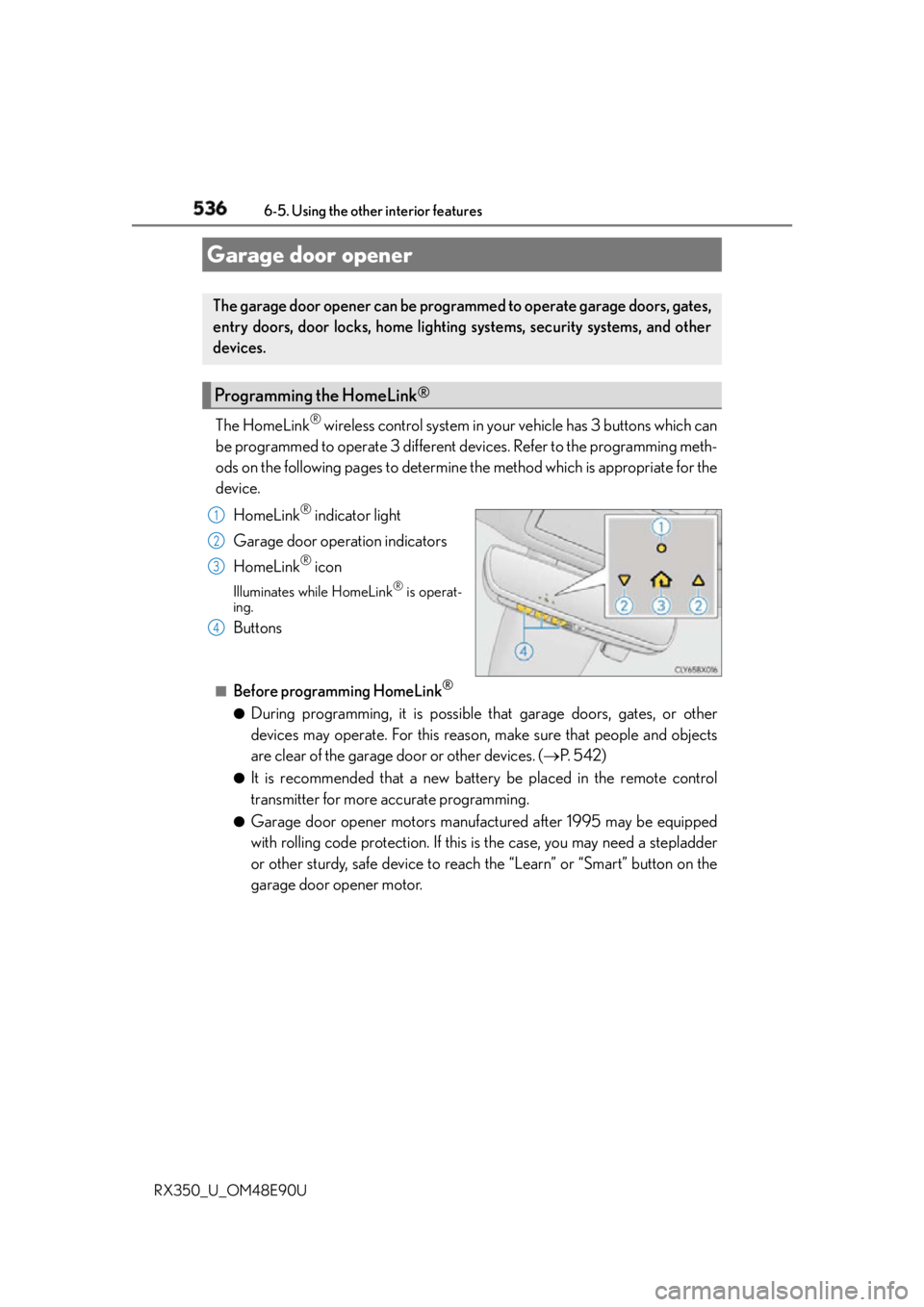
RX350_U_OM48E90U The HomeLink ®
wireless control system in your vehicle has 3 buttons which can
be programmed to operate 3 different devices. Refer to the programming meth-
ods on the following pages to determine the method which is appropriate for the
device.
HomeLink ®
indicator light
Garage door operation indicators
HomeLink ®
iconIlluminates while HomeLink ®
is operat-
ing.
Buttons ■
Before programming HomeLink ®
●
During programming, it is possible th at garage doors, gates, or other
devices may operate. For this reason, make sure that people and objects
are clear of the garage door or other devices. ( P. 5 4 2 )●
It is recommended that a new battery be placed in the remote control
transmitter for more accurate programming. ●
Garage door opener motors manufactured after 1995 may be equipped
with rolling code protection. If this is the case, you may need a stepladder
or other sturdy, safe device to reach the “Learn” or “Smart” button on the
garage door opener motor.Garage door opener The garage door opener can be programmed to operate garage doors, gates,
entry doors, door locks, home lighting systems, security systems, and other
devices.
Programming the HomeLink ®
1
2
3
4
Page 545 of 748
5456-5. Using the other interior features
6
Interior features
RX350_U_OM48E90U ■
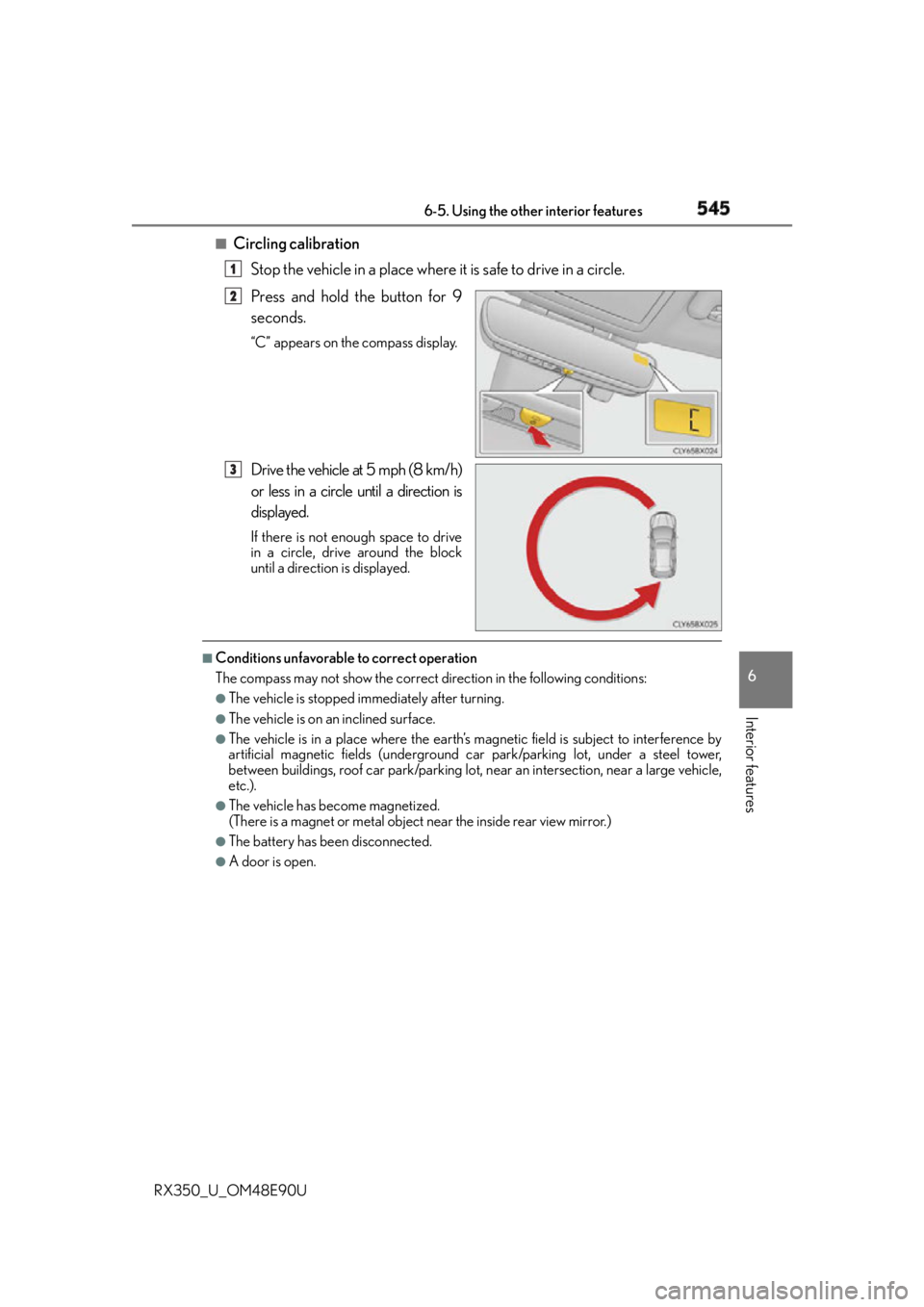
Circling calibration
Stop the vehicle in a place where it is safe to drive in a circle.
Press and hold the button for 9
seconds. “C” appears on the compass display.
Drive the vehicle at 5 mph (8 km/h)
or less in a circle until a direction is
displayed. If there is not enough space to drive
in a circle, drive around the block
until a direction is displayed.■
Conditions unfavorable to correct operation
The compass may not show the correct direction in the following conditions: ●
The vehicle is stopped immediately after turning. ●
The vehicle is on an inclined surface. ●
The vehicle is in a place where the earth’s ma gnetic field is subjec t to interference by
artificial magnetic fields (underground car park/parking lot, under a steel tower,
between buildings, roof car park/parking lot, near an intersection, near a large vehicle,
etc.). ●
The vehicle has become magnetized.
(There is a magnet or metal object near the inside rear view mirror.) ●
The battery has been disconnected. ●
A door is open. 1
2
3
Page 557 of 748

5577-1. Maintenance and care
7
Maintenance and care
RX350_U_OM48E90U ■
Note for a smart access system with push-button start ●
If the door handle becomes wet while the el ectronic key is within the effective range,
the door may lock and unlock repeatedly. Place the key in a position 6 ft. (2 m) or more
separate from the vehicle while the vehicle is being washed. (Take care to ensure that
the key is not stolen.) ●
If the electronic key is insi de the vehicle and a door handle becomes wet during a car
wash, a buzzer will sound outside the vehicle. To turn off the alarm, lock all the doors. ●
Set the electronic key to battery-saving mode to disable the smart access system with
push-button start. ( P. 1 4 7 )■
Aluminum wheels ●
Remove any dirt immediately by using a neutral detergent. Do not use hard brushes or
abrasive cleaners. Do not use strong or harsh chemical cleaners.
Use the same mild detergent as used on the paint. ●
Do not use detergent on the wheels when they are hot, for example after driving for
long distance in the hot weather. ●
Wash detergent from the wheels immediately after use. ■
Bumpers
Do not scrub with abrasive cleaners. ■
Front side windows water-repellent coating ●
The following precautions can extend the effectiveness of the water-repellent coating.
• Remove any dirt, etc. from the front side windows regularly.
• Do not allow dirt and dust to accumulate on the windows for a long period.
Clean the windows with a soft, da mp cloth as soon as possible.
• Do not use wax or glass cleaners that co ntain abrasives when cleaning the windows.
• Do not use any metallic objects to remove condensation build up.●
When the water-repellent performance has become insufficient, the coating can be
repaired. Contact your Lexus dealer.