door lock LEXUS RX350 2016 Repair Manual
[x] Cancel search | Manufacturer: LEXUS, Model Year: 2016, Model line: RX350, Model: LEXUS RX350 2016Pages: 748, PDF Size: 12.36 MB
Page 568 of 748
568 7-2. Maintenance
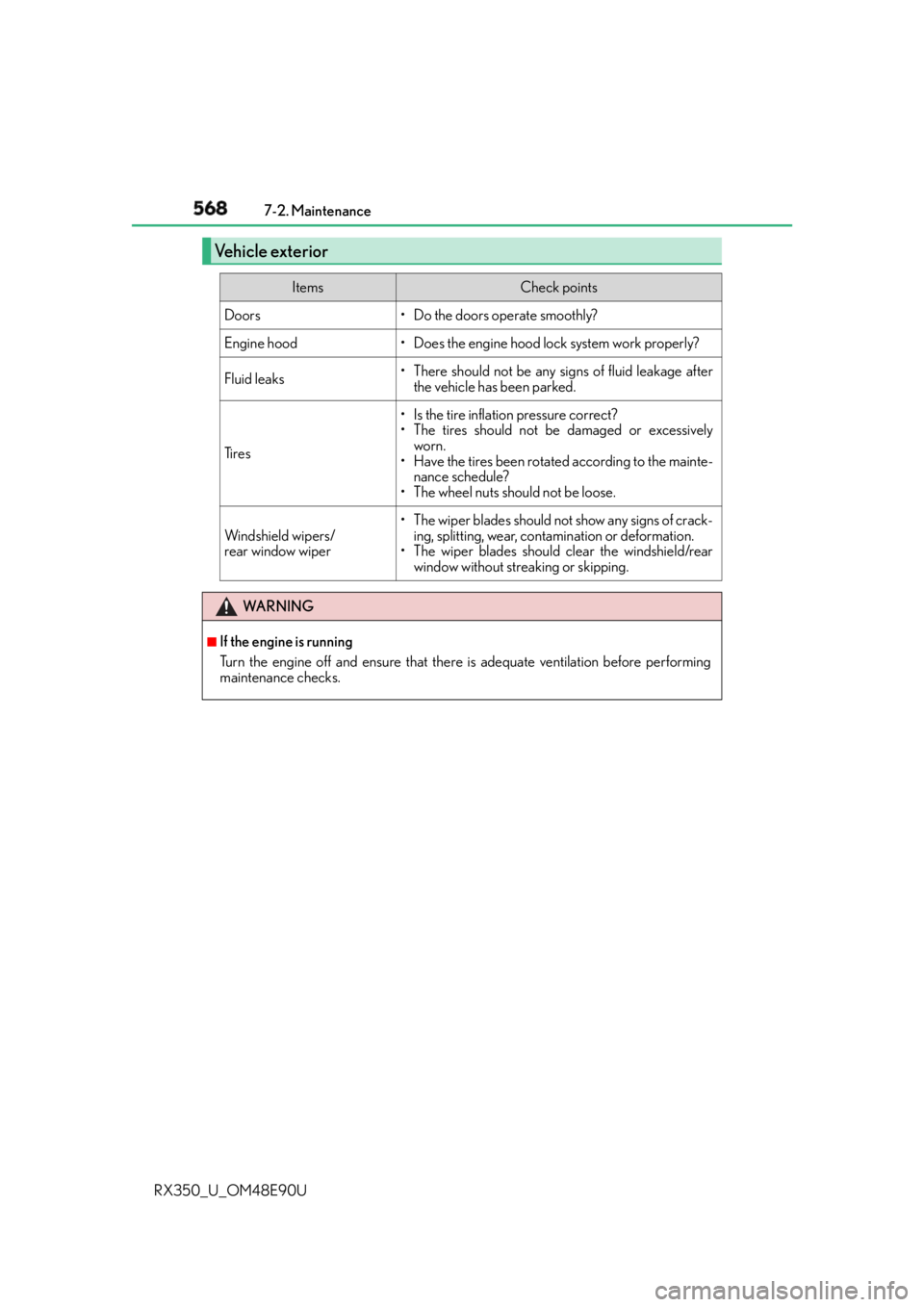
RX350_U_OM48E90U Vehicle exterior Items Check points
Doors • Do the doors operate smoothly?
Engine hood • Does the engine hood lock system work properly?
Fluid leaks • There should not be any si gns of fluid leakage after
the vehicle has been parked.
Ti r e s • Is the tire inflation pressure correct?
• The tires should not be damaged or excessively
worn.
• Have the tires been rotated according to the mainte-
nance schedule?
• The wheel nuts should not be loose.
Windshield wipers/
rear window wiper • The wiper blades should no t show any signs of crack-
ing, splitting, wear, contamination or deformation.
• The wiper blades should clear the windshield/rear
window without streaking or skipping.
WA R N I N G ■
If the engine is running
Turn the engine off and ensure that there is adequate ventilation before performing
maintenance checks.
Page 581 of 748
5817-3. Do-it-yourself maintenance
7
Maintenance and care
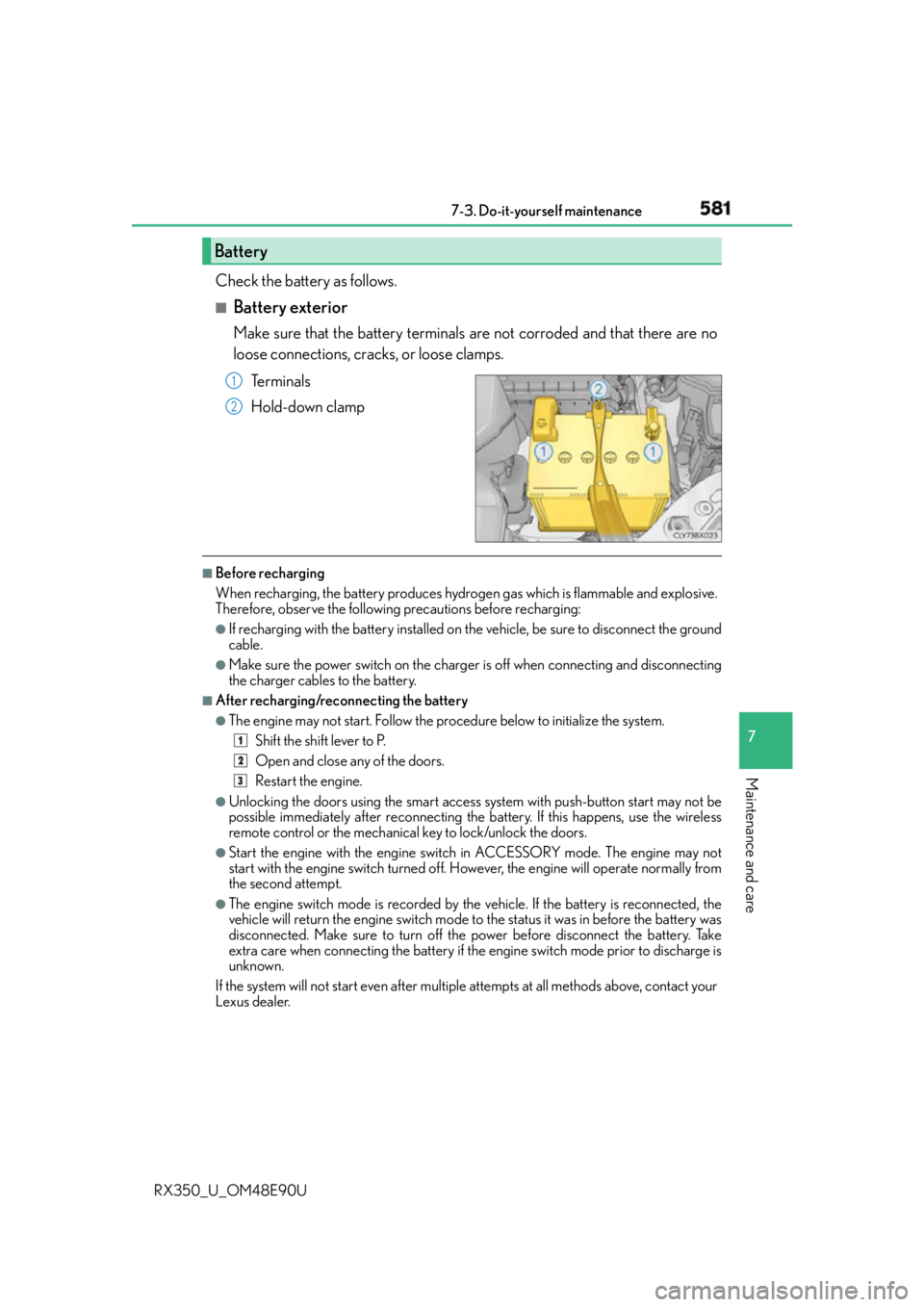
RX350_U_OM48E90U Check the battery as follows. ■
Battery exterior Make sure that the battery terminals are not corroded and that there are no
loose connections, cracks, or loose clamps.
Te r m i n a l s
Hold-down clamp ■
Before recharging
When recharging, the battery produces hydrogen gas which is flammable and explosive.
Therefore, observe the following precautions before recharging: ●
If recharging with the battery installed on the vehicle, be sure to disconnect the ground
cable. ●
Make sure the power switch on the charger is off when connecting and disconnecting
the charger cables to the battery. ■
After recharging/reconnecting the battery ●
The engine may not start. Follow the pr ocedure below to initialize the system.
Shift the shift lever to P.
Open and close any of the doors.
Restart the engine.●
Unlocking the doors using the smart access system with push-button start may not be
possible immediately after reconnecting the battery. If this happens, use the wireless
remote control or the mechanical key to lock/unlock the doors. ●
Start the engine with the engine switch in ACCESSORY mode. The engine may not
start with the engine switch turned off. However, the engine will operate normally from
the second attempt. ●
The engine switch mode is recorded by the vehicle. If the battery is reconnected, the
vehicle will return the engine switch mode to the status it was in before the battery was
disconnected. Make sure to turn off the power before disconnect the battery. Take
extra care when connecting the battery if the engine switch mode prior to discharge is
unknown.
If the system will not start even after multiple attempts at all methods above, contact your
Lexus dealer.Battery 1
2
1
2
3
Page 620 of 748
620 7-3. Do-it-yourself maintenance
RX350_U_OM48E90U ■
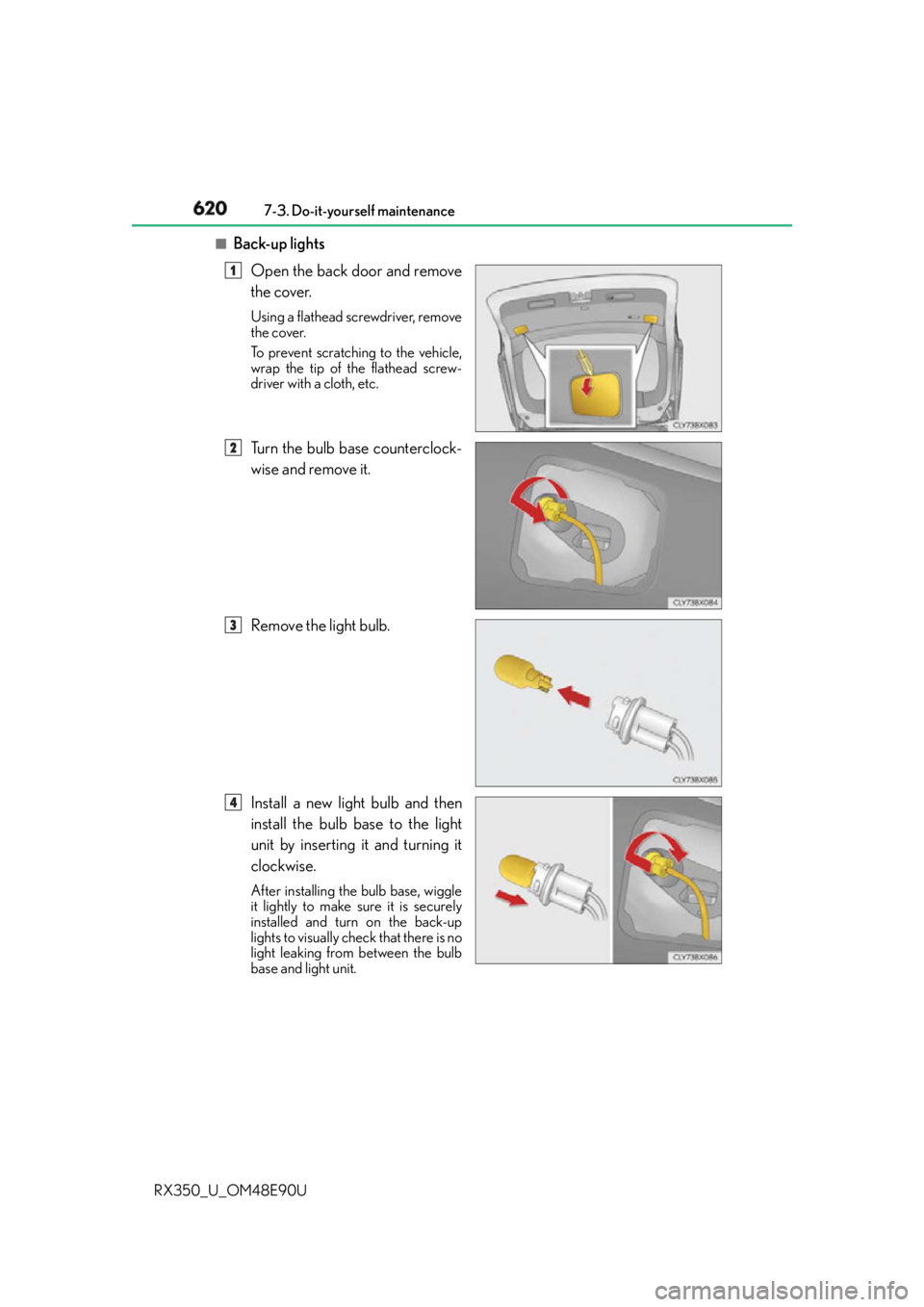
Back-up lights
Open the back door and remove
the cover. Using a flathead screwdriver, remove
the cover.
To prevent scratching to the vehicle,
wrap the tip of the flathead screw-
driver with a cloth, etc.
Turn the bulb base counterclock-
wise and remove it.
Remove the light bulb.
Install a new light bulb and then
install the bulb base to the light
unit by inserting it and turning it
clockwise. After installing the bulb base, wiggle
it lightly to make sure it is securely
installed and turn on the back-up
lights to visually check that there is no
light leaking from between the bulb
base and light unit. 1
2
3
4
Page 643 of 748
6438-2. Steps to take in an emergency
8
When trouble arises
RX350_U_OM48E90U Take the appropriate actions as in structed in the message displayed.
If any of the following messages are displa yed, also refer to this Owner’s Manual.■
If “Shift to P Before Exiting Vehicle” is shown
Message is displayed when the driver’s door is opened without turning the
engine switch off with the shift lever in any position other than P.
Shift the shift lever to P. ■
If “Power Turned Off to Save Battery” is displayed
This message is displayed when the power was cut off due to the automatic
power off function.
The next time the engine is started, increase the engine speed slightly and
maintain it at that spee d for approximately 5 minutes to recharge the battery.■
If “AWD System Overheated Switching to 2WD Mode” or “AWD System
Overheated 2WD Mode Engaged” is displayed (AWD models)
This message may be displayed when driving under extremely high load con-
ditions.
Drive the vehicle at low speeds or stop the vehicle in a safe place with the
engine running until the message is cleared.
If the message is not cleared, have the vehicle inspected by your Lexus dealer.■
If “A New Key has been Registered Contact Your Dealer for Details” is dis-
played
This message will be displayed each time the driver’s door is opened when the
doors are unlocked from the outside for approximately one week after a new
electronic key has been registered.
If this message is displayed but you have not had a new electronic key regis-
tered, ask your Lexus dealer to check if an unknown electronic key (other than
those in your possession) has been registered. ■
When “Headlight System Malfunctio n Visit Your Dealer” is displayed
The following systems may be malfunct ioning. Have the vehicle inspected by
your Lexus dealer immediately. ●
The LED headlight system ●
The automatic headlight leveling system ●
Automatic High Beam (if equipped) ●
AFS (Adaptive Front-lighting System) (if equipped)Other messages displayed on the multi-information display
Page 661 of 748
6618-2. Steps to take in an emergency
8
When trouble arises
RX350_U_OM48E90U ■
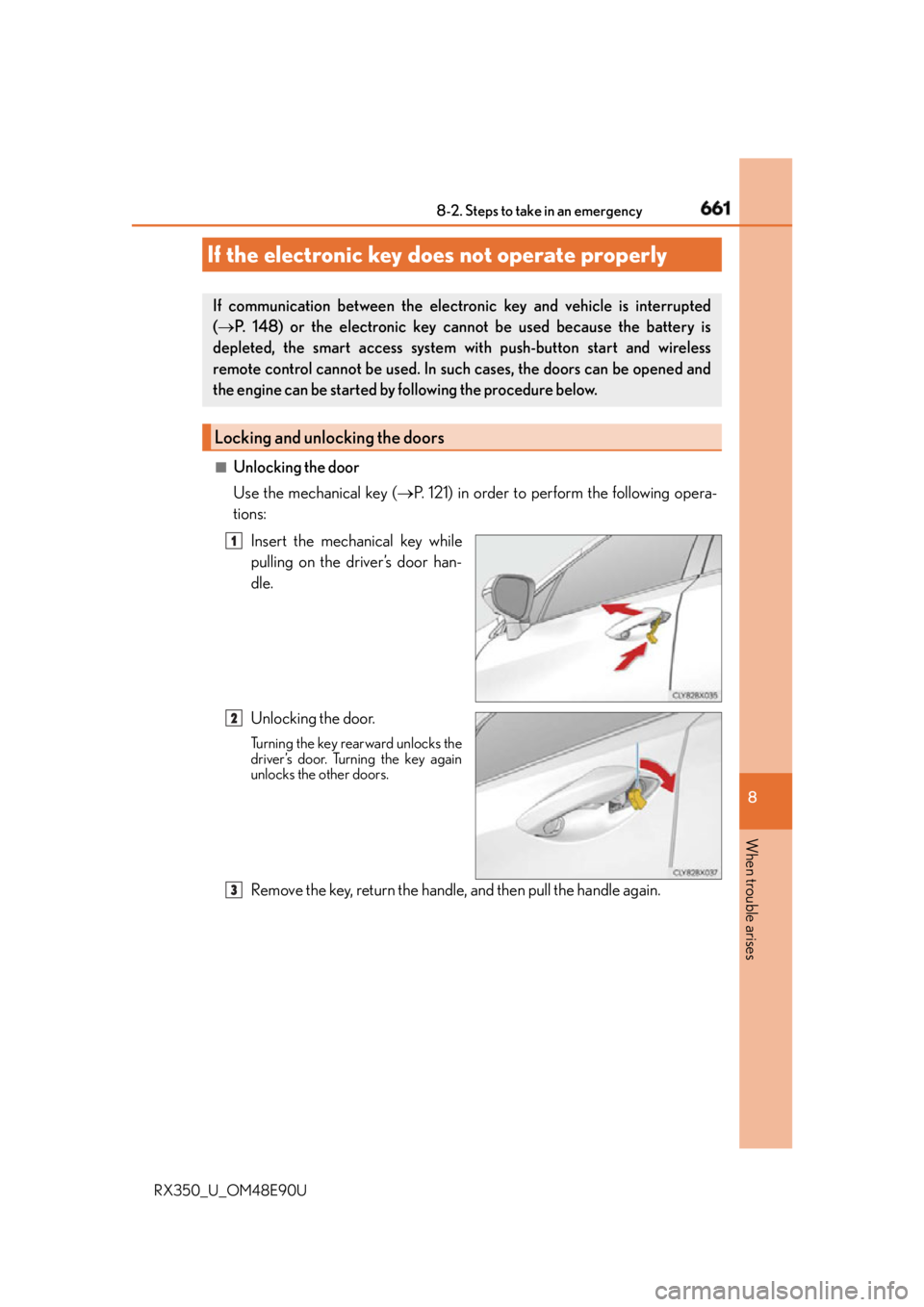
Unlocking the door
Use the mechanical key ( P. 121) in order to perform the following opera-
tions:
Insert the mechanical key while
pulling on the driver’s door han-
dle.
Unlocking the door. Turning the key rearward unlocks the
driver’s door. Turning the key again
unlocks the other doors.
Remove the key, return the handle, and then pull the handle again.If the electronic key do es not operate properlyIf communication between the electron ic key and vehicle is interrupted
( P. 148) or the electronic key ca nnot be used because the battery is
depleted, the smart access system with push-button start and wireless
remote control cannot be used. In such cases, the doors can be opened and
the engine can be started by following the procedure below.
Locking and unlocking the doors 1
2
3
Page 662 of 748
662 8-2. Steps to take in an emergency
RX350_U_OM48E90U ■
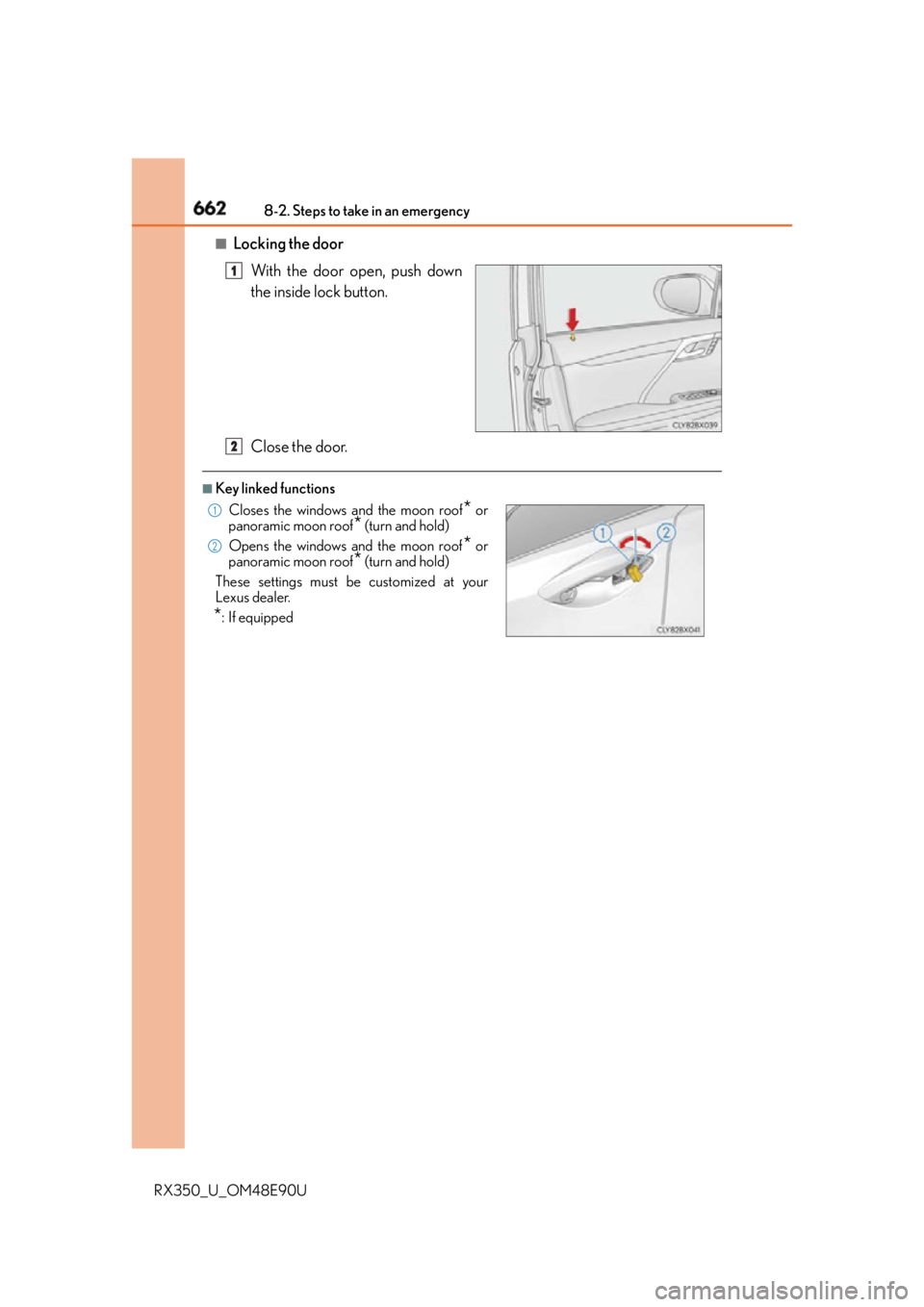
Locking the door
With the door open, push down
the inside lock button.
Close the door. ■
Key linked functions 1
Closes the windows and the moon roof
* or
panoramic moon roof
* (turn and hold)
Opens the windows and the moon roof
* or
panoramic moon roof
* (turn and hold)
These settings must be customized at your
Lexus dealer.
* : If equipped 2 1
2
2
Page 665 of 748
6658-2. Steps to take in an emergency
8
When trouble arises
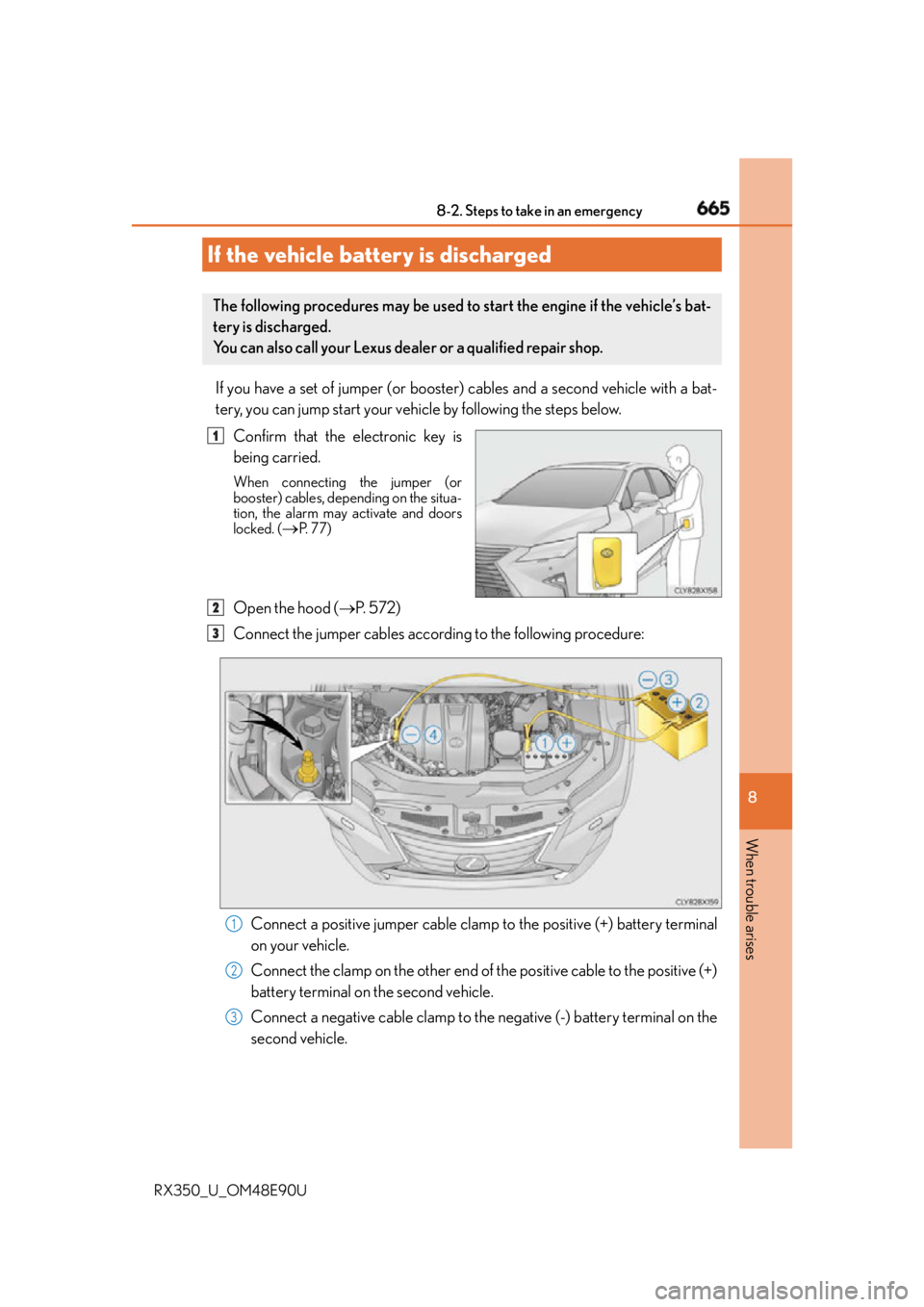
RX350_U_OM48E90U If you have a set of jumper (or booster) cables and a second vehicle with a bat-
tery, you can jump start your vehicle by following the steps below.
Confirm that the electronic key is
being carried. When connecting the jumper (or
booster) cables, depending on the situa-
tion, the alarm may activate and doors
locked. (
P. 77)
Open the hood ( P. 5 7 2 )
Connect the jumper cables according to the following procedure:
Connect a positive jumper cable clamp to the positive (+) battery terminal
on your vehicle.
Connect the clamp on the other end of the positive cable to the positive (+)
battery terminal on the second vehicle.
Connect a negative cable clamp to the negative (-) battery terminal on the
second vehicle.If the vehicle battery is discharged The following procedures may be used to start the engine if the vehicle’s bat-
tery is discharged.
You can also call your Lexus dealer or a qualified repair shop. 1
2
3
1
2
3
Page 666 of 748
666 8-2. Steps to take in an emergency
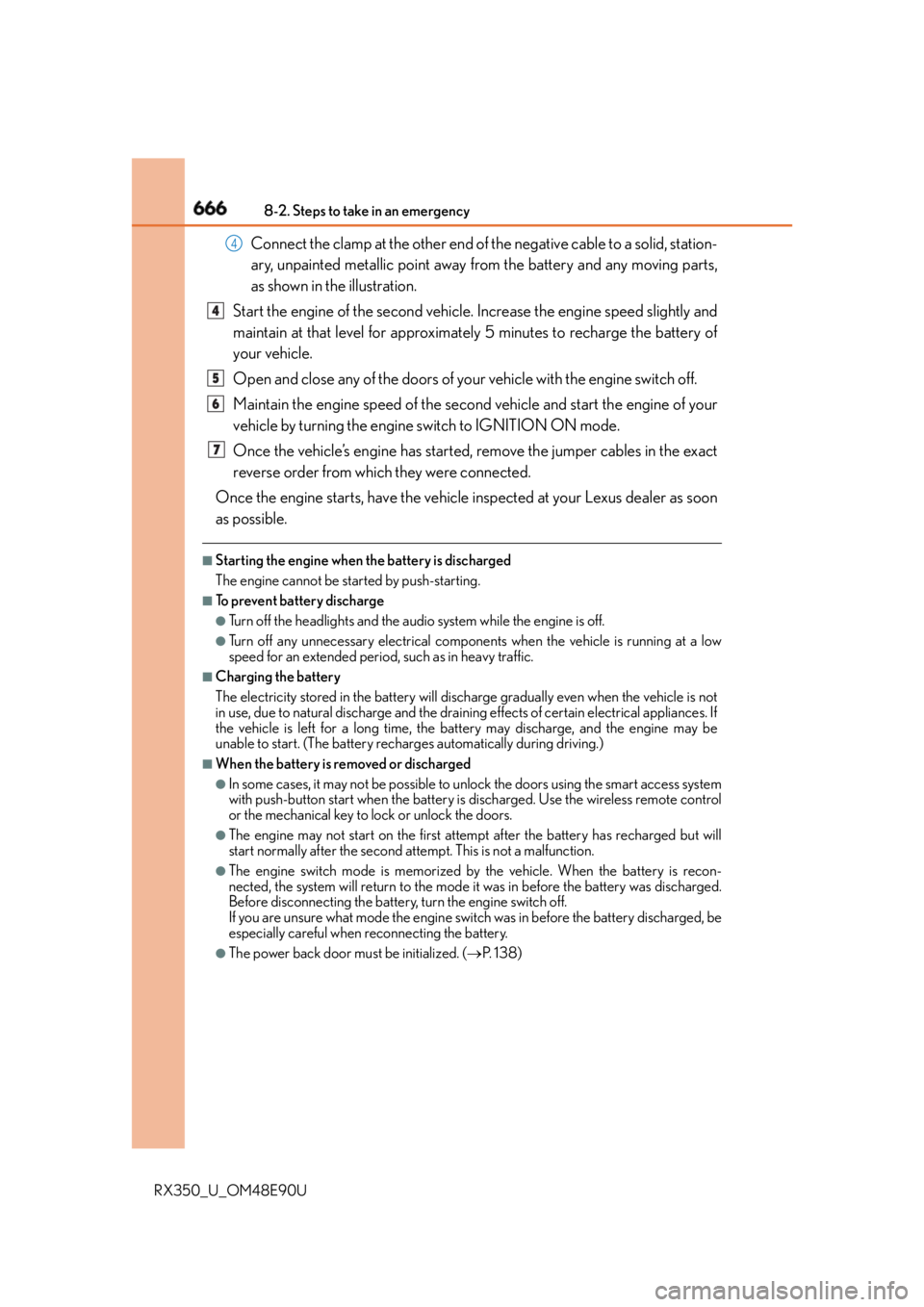
RX350_U_OM48E90U Connect the clamp at the other end of the negative cable to a solid, station-
ary, unpainted metallic point away from the battery and any moving parts,
as shown in the illustration.
Start the engine of the second vehicle. Increase the engine speed slightly and
maintain at that level for approximately 5 minutes to recharge the battery of
your vehicle.
Open and close any of the doors of your vehicle with the engine switch off.
Maintain the engine speed of the second vehicle and start the engine of your
vehicle by turning the engine switch to IGNITION ON mode.
Once the vehicle’s engine has started, remove the jumper cables in the exact
reverse order from which they were connected.
Once the engine starts, have the vehicle inspected at your Lexus dealer as soon
as possible. ■
Starting the engine when the battery is discharged
The engine cannot be started by push-starting. ■
To prevent battery discharge ●
Turn off the headlights and the audio system while the engine is off. ●
Turn off any unnecessary electrical components when the vehicle is running at a low
speed for an extended period, such as in heavy traffic. ■
Charging the battery
The electricity stored in the battery will discharge gradually even when the vehicle is not
in use, due to natural discharg e and the draining effects of certain electrical appliances. If
the vehicle is left for a long time, the battery may discharge, and the engine may be
unable to start. (The battery recharges automatically during driving.) ■
When the battery is removed or discharged ●
In some cases, it may not be possible to unlock the doors using the smart access system
with push-button start when the battery is discharged. Use the wireless remote control
or the mechanical key to lock or unlock the doors. ●
The engine may not start on the first attempt after the battery has recharged but will
start normally after the second attempt. This is not a malfunction. ●
The engine switch mode is memorized by the vehicle. When the battery is recon-
nected, the system will return to the mode it was in before the battery was discharged.
Before disconnecting the battery, turn the engine switch off.
If you are unsure what mode the engine switch was in before the battery discharged, be
especially careful when reconnecting the battery. ●
The power back door must be initialized. ( P. 1 3 8 )4
4
5
6
7
Page 701 of 748
7019-2. Customization
9
Vehicle specifications
RX350_U_OM48E90U ■
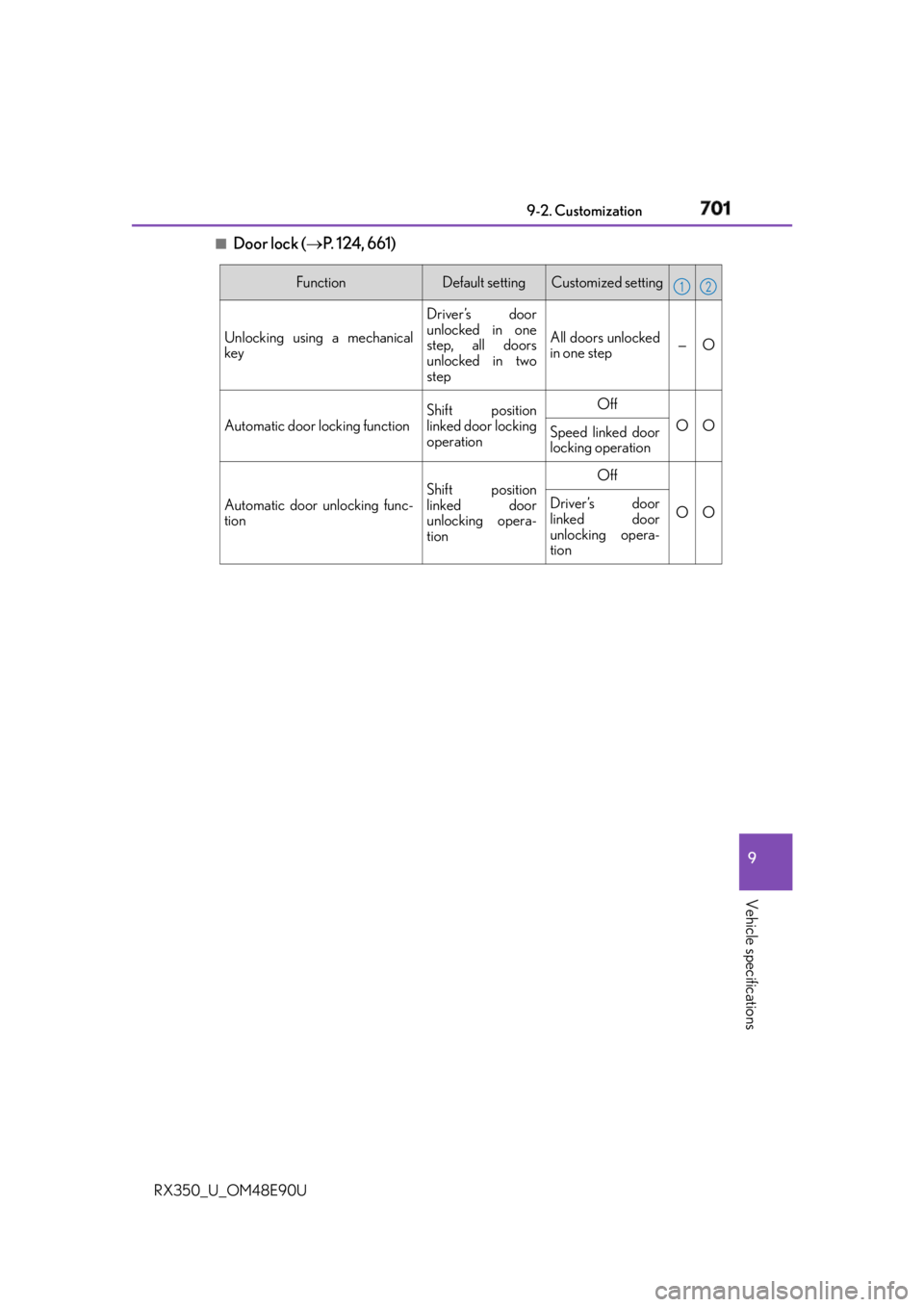
Door lock ( P. 124, 661) Function Default setting Customized setting
Unlocking using a mechanical
key Driver’s door
unlocked in one
step, all doors
unlocked in two
step All doors unlocked
in one step — O
Automatic door locking function Shift position
linked door locking
operation Off
O O
Speed linked door
locking operation
Automatic door unlocking func-
tion Shift position
linked door
unlocking opera-
tion Off
O ODriver’s door
linked door
unlocking opera-
tion 1 2
Page 703 of 748
7039-2. Customization
9
Vehicle specifications
RX350_U_OM48E90U ■
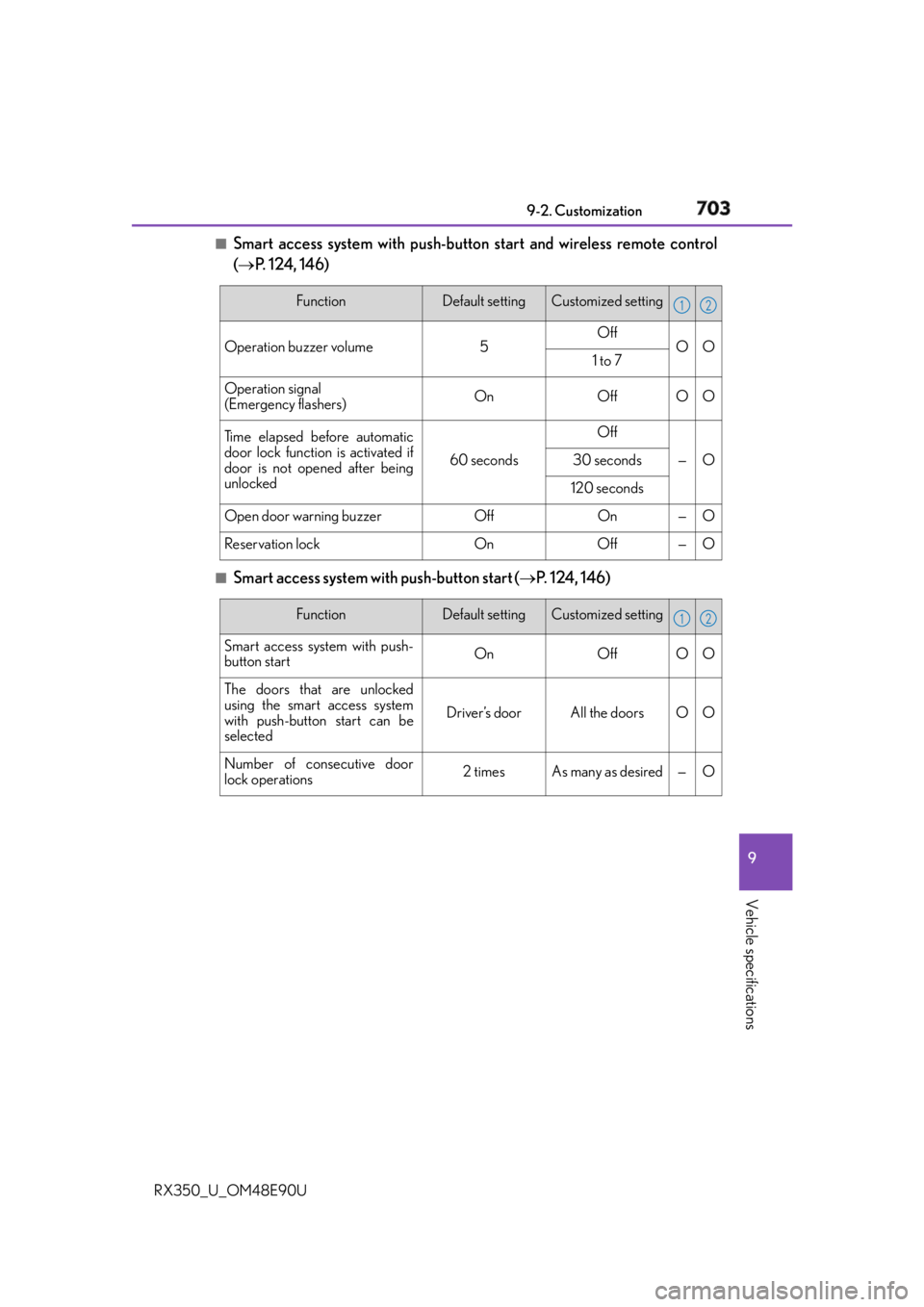
Smart access system with push-button start and wireless remote control
( P. 124, 146)
■
Smart access system with push-button start
( P. 124, 146)Function Default setting Customized setting
Operation buzzer volume 5 Off
O O
1 to 7
Operation signal
(Emergency flashers) On Off O O
Ti m e e l a p s e d b e f o r e a u t o m a t i c
door lock function is activated if
door is not opened after being
unlocked 60 seconds Off
— O30 seconds
120 seconds
Open door warning buzzer Off On — O
Reservation lock On Off — O 1 2
Function Default setting Customized setting
Smart access system with push-
button start On Off O O
The doors that are unlocked
using the smart access system
with push-button start can be
selected Driver’s door All the doors O O
Number of consecutive door
lock operations 2 times As many as desired — O 1 2