ABS LEXUS RX350 2016 Owners Manual
[x] Cancel search | Manufacturer: LEXUS, Model Year: 2016, Model line: RX350, Model: LEXUS RX350 2016Pages: 748, PDF Size: 12.36 MB
Page 74 of 748
74
RX350_U_OM48E90U 1-3. Theft deterrent system
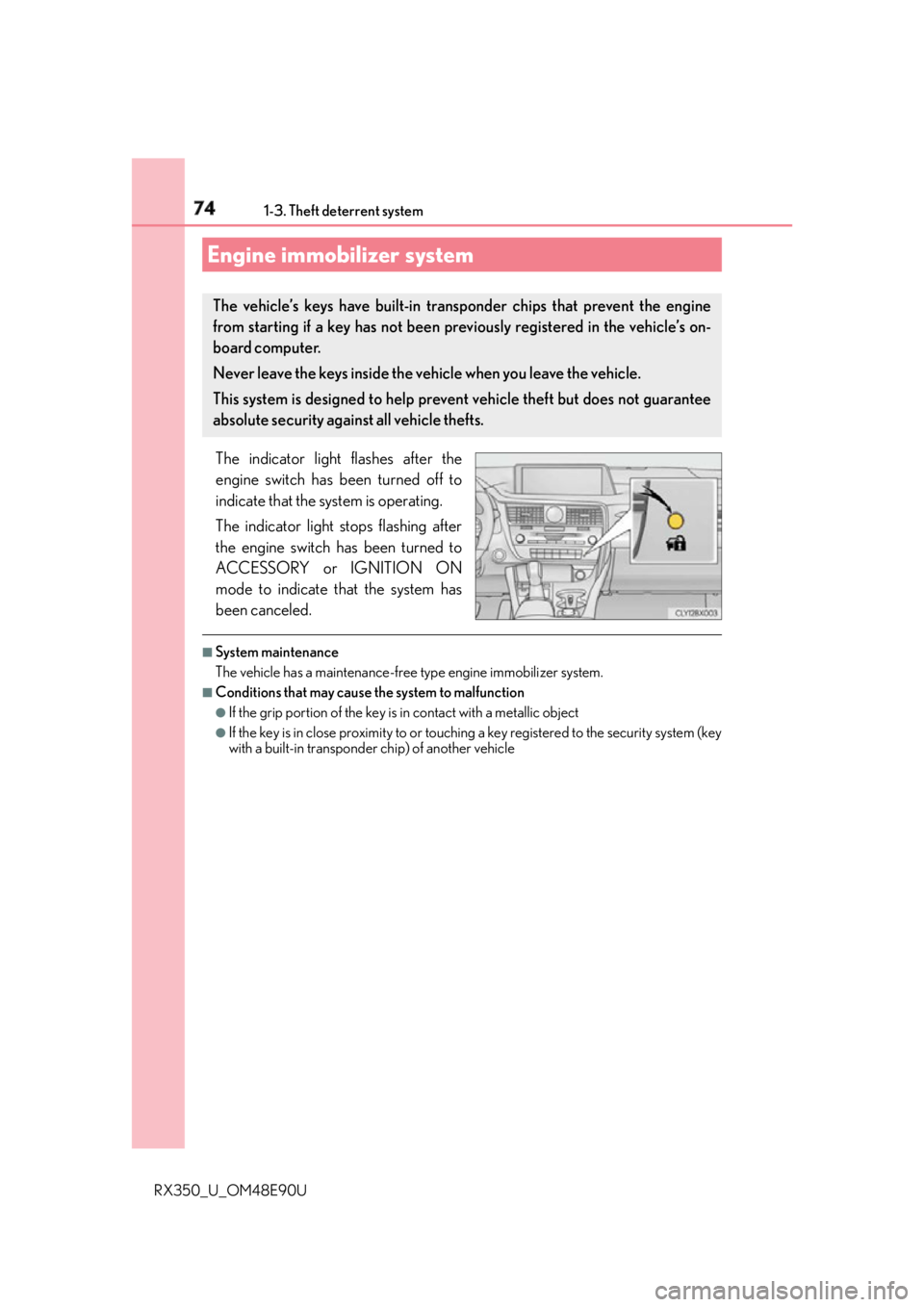
The indicator light flashes after the
engine switch has been turned off to
indicate that the system is operating.
The indicator light stops flashing after
the engine switch has been turned to
ACCESSORY or IGNITION ON
mode to indicate that the system has
been canceled. ■
System maintenance
The vehicle has a maintenance-free type engine immobilizer system. ■
Conditions that may cause the system to malfunction ●
If the grip portion of the key is in contact with a metallic object●
If the key is in close proximity to or touching a key registered to the security system (key
with a built-in transponder chip) of another vehicleEngine immobilizer system The vehicle’s keys have built-in transponder chips that prevent the engine
from starting if a key has not been prev iously registered in the vehicle’s on-
board computer.
Never leave the keys inside the vehicle when you leave the vehicle.
This system is designed to help prev ent vehicle theft but does not guarantee
absolute security against all vehicle thefts.
Page 81 of 748
812. Instrument cluster
2
Instrument cluster
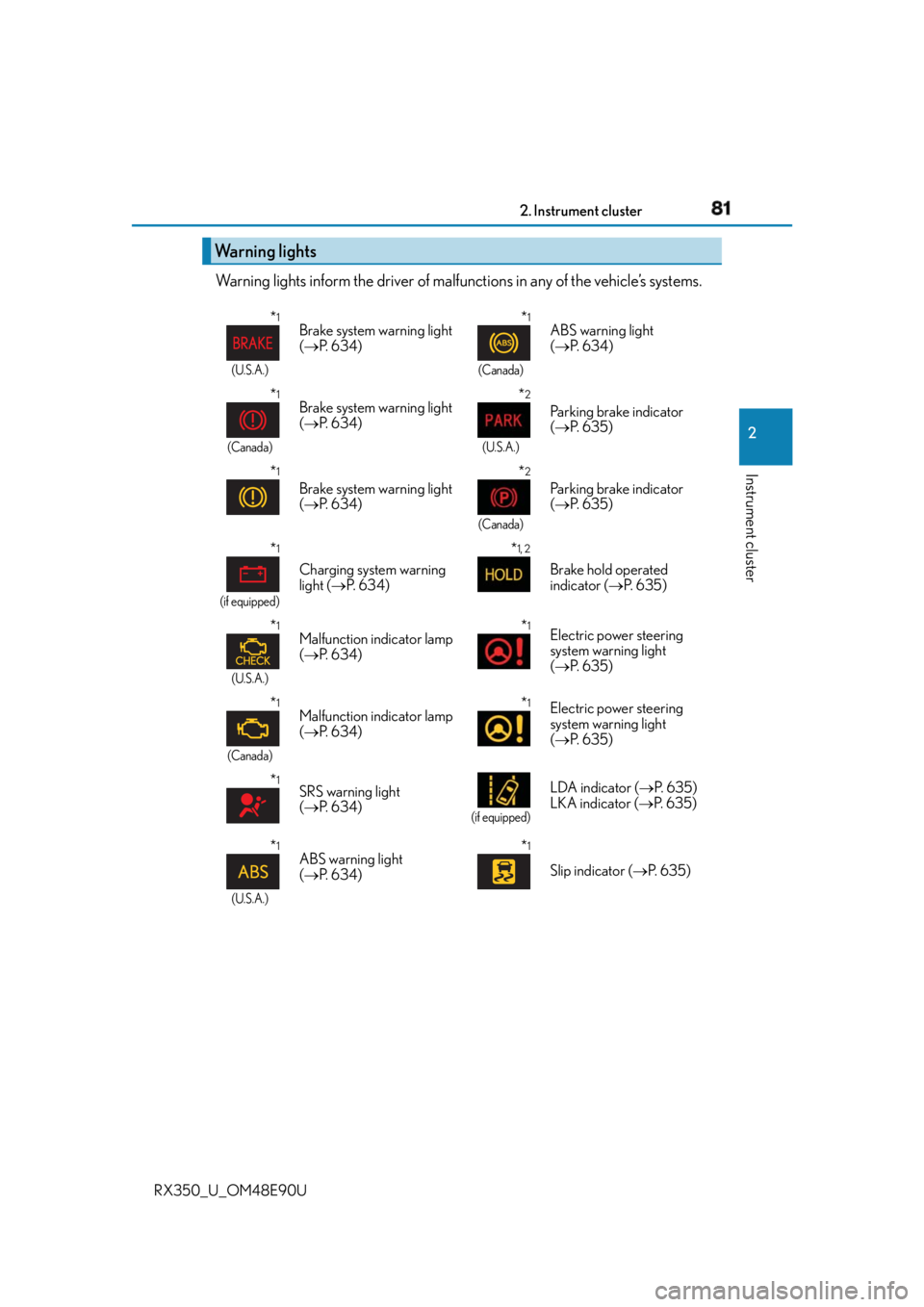
RX350_U_OM48E90U Warning lights inform the driver of malfun ctions in any of the vehicle’s systems.
Warning lights * 1
(U.S.A.)
Brake system warning light
( P. 6 3 4 )
* 1
(Canada)
ABS warning light
( P. 6 3 4 )
* 1
(Canada)
Brake system warning light
( P. 6 3 4 )
* 2
(U.S.A.)
Parking brake indicator
( P. 6 3 5 )
* 1
Brake system warning light
( P. 6 3 4 )
* 2
(Canada)
Parking brake indicator
( P. 6 3 5 )
* 1
(if equipped)
Charging system warning
light ( P. 6 3 4 ) * 1, 2
Brake hold operated
indicator ( P. 6 3 5 )
* 1
(U.S.A.)
Malfunction indicator lamp
( P. 6 3 4 ) * 1
Electric power steering
system warning light
( P. 6 3 5 )
* 1
(Canada)
Malfunction indicator lamp
( P. 6 3 4 ) * 1
Electric power steering
system warning light
( P. 6 3 5 )
* 1
SRS warning light
( P. 6 3 4 ) (if equipped)
LDA indicator ( P. 6 3 5 )
LKA indicator ( P. 6 3 5 )
* 1
(U.S.A.)
ABS warning light
( P. 6 3 4 ) * 1
Slip indicator ( P. 6 3 5 )
Page 84 of 748
84 2. Instrument cluster
RX350_U_OM48E90U
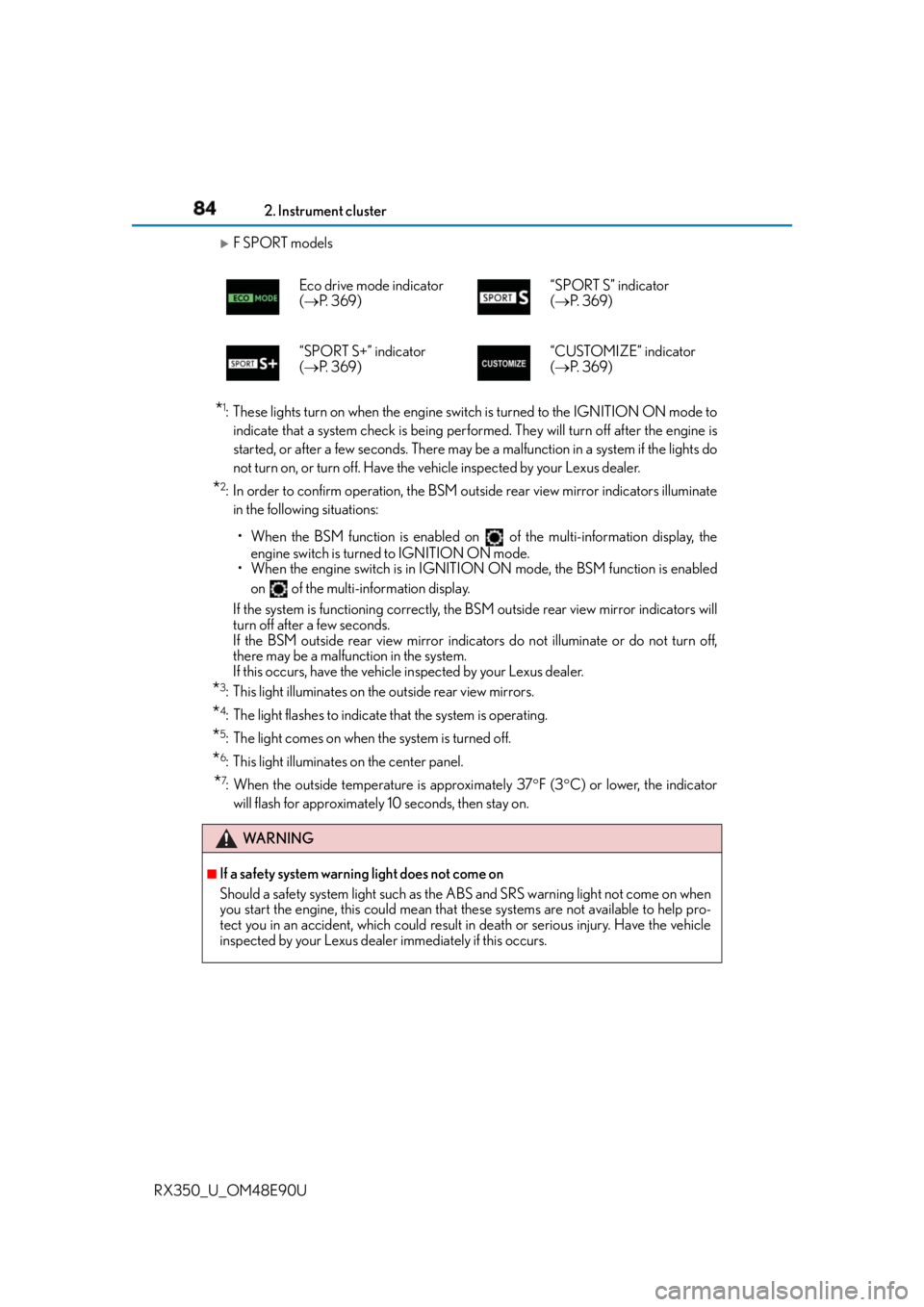
F SPORT models
* 1
: These lights turn on when the engine switch is turned to the IGNITION ON mode to
indicate that a system check is being perfor med. They will turn off after the engine is
started, or after a few seconds. There may be a malfunction in a system if the lights do
not turn on, or turn off. Have the vehicle inspected by your Lexus dealer.
* 2
: In order to confirm operation, the BSM outside rear view mirror indicators illuminate
in the following situations:
• When the BSM function is enabled on of the multi-information display, the
engine switch is turned to IGNITION ON mode.
• When the engine switch is in IGNITION ON mode, the BSM function is enabled
on of the multi-information display.
If the system is functioning correctly, the BSM outside rear view mirror indicators will
turn off after a few seconds.
If the BSM outside rear view mirror indica tors do not illuminate or do not turn off,
there may be a malfunction in the system.
If this occurs, have the vehicle inspected by your Lexus dealer.
* 3
: This light illuminates on the outside rear view mirrors.
* 4
: The light flashes to indicate that the system is operating.
* 5
: The light comes on when the system is turned off.
* 6
: This light illuminates on the center panel.
* 7
: When the outside temperature is approximately 37 F (3 C) or lower, the indicator
will flash for approximately 10 seconds, then stay on.Eco drive mode indicator
( P. 3 6 9 ) “SPORT S” indicator
( P. 3 6 9 )
“SPORT S+” indicator
( P. 3 6 9 ) “CUSTOMIZE” indicator
( P. 3 6 9 )
WA R N I N G ■
If a safety system warning light does not come on
Should a safety system light such as the ABS and SRS warning light not come on when
you start the engine, this could mean that these systems are not available to help pro-
tect you in an accident, which could result in death or serious injury. Have the vehicle
inspected by your Lexus dealer immediately if this occurs.
Page 213 of 748
2134-1. Before driving
4
Driving
RX350_U_OM48E90U ●
To maintain engine braking efficiency and charging system performance
when using engine braking, do not put th e transmission in D. If in the M or S
mode, the transmission shift range position must be in 6 or lower. ( P. 2 2 9 )●
Instability happens more frequently when descending steep or long downhill
grades. Before descending, slow down and downshift. Do not make sudden
downshifts while descending steep or long downhill grades. ●
Avoid holding the brake pedal down too long or applying the brakes too fre-
quently. This could cause the brakes to overheat and result in reduced braking
efficiency. ●
Due to the added load of the trailer, yo ur vehicle’s engine may overheat on hot
days (at temperatures over 85 F [30 C]) when driving up a long or steep
grade. If the engine coolant temperat ure gauge indicates overheating, imme-
diately turn off the air cond itioning (if in use), pull your vehicle off the road and
stop in a safe spot. ( P. 668)●
Always place wheel blocks under both the vehicle’s and the trailer’s wheels
when parking. Put the transmission in P and apply the parking brake. Avoid
parking on a slope, but if unavoidable, do so only after performing the follow-
ing:
Apply the brakes and keep them applied.
Have someone place wheel blocks under both the vehicle’s and trailer’s
wheels.
When the wheel blocks are in place, release the brakes slowly until the
blocks absorb the load.
Shift into P and apply the parking brake.
Turn off the engine.●
When restarting after parking on a slope:
With the transmission in P, start the engine. Be sure to keep the brake pedal
depressed.
Shift into a forward gear. If reversing, shift into R.
If the parking brake is in manual mode, release the parking brake.
( P. 2 3 6 )
Release the brake pedal, and slowly pull or back away from the wheel
blocks. Stop and apply the brakes.
Have someone retrieve the blocks. 1
2
3
4
5
1
2
3
4
5
Page 271 of 748
2714-5. Using the driving support systems
4
Driving
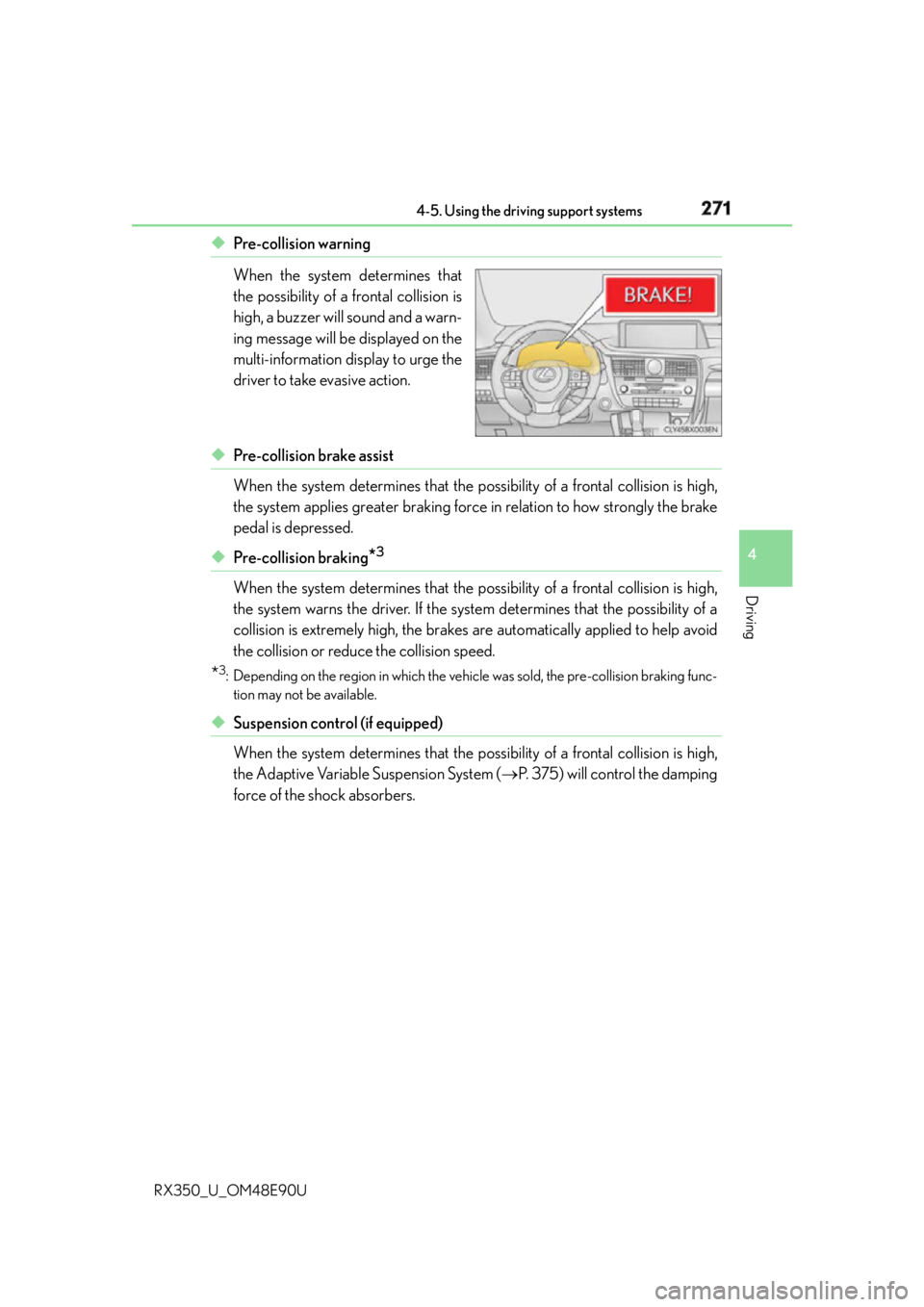
RX350_U_OM48E90U ◆ Pre-collision warning
When the system determines that
the possibility of a frontal collision is
high, a buzzer will sound and a warn-
ing message will be displayed on the
multi-information display to urge the
driver to take evasive action.
◆ Pre-collision brake assist
When the system determines that the po ssibility of a frontal collision is high,
the system applies greater braking force in relation to how strongly the brake
pedal is depressed.
◆ Pre-collision braking
* 3
When the system determines that the po ssibility of a frontal collision is high,
the system warns the driver. If the system determines that the possibility of a
collision is extremely high, the brakes are automatically applied to help avoid
the collision or reduce the collision speed.
* 3
: Depending on the region in which the vehi cle was sold, the pre-collision braking func-
tion may not be available.
◆ Suspension control (if equipped)
When the system determines that the po ssibility of a frontal collision is high,
the Adaptive Variable Suspension System ( P. 375) will control the damping
force of the shock absorbers.
Page 289 of 748
2894-5. Using the driving support systems
4
Driving
RX350_U_OM48E90U ■
Operation conditions of each function ●
Lane departure alert function
This function operates when all of the following conditions are met.
• LKA is turned on.
• Vehicle speed is approximately 32 mph (50 km/h) or more.
• System recognizes white (yellow) lines.
• Width of traffic lane is approximately 9.8 ft. (3 m) or more.
• Turn signal lever is not operated.
• Vehicle is driven on a straight road or around a gentle curve with a radius of more
than approximately 492 ft. (150 m).
• No system malfunctions are detected. ( P. 6 3 4 )●
Steering assist function
This function operates when all of the foll owing conditions are met in addition to the
operation conditions for the lane departure alert function.
• Setting for “Steering Assist” in of the multi-information display is set to “On”.
( P. 9 6 )
• Vehicle is not accelerated or decelerated by a fixed amount or more.
• Steering wheel is not operated with a st eering force level suitable for changing
lanes.
• ABS, VSC, TRAC and PCS are not operating.
• TRAC or VSC is not turned off. ●
Ve h i c l e s w a y w a r n i n g
This function operates when all of the following conditions are met.
• Setting for “Sway Warning” in of the multi-information display is set to “On”.
( P. 9 6 )
• Vehicle speed is approximately 32 mph (50 km/h) or more.
• Width of traffic lane is approximately 9.8 ft. (3 m) or more.
• No system malfunctions are detected. ( P. 6 3 4 )●
Lane centering function
This function operates when all of the following conditions are met.
• LKA is turned on.
• Setting for “Lane Center” in of the mu lti-information display are set to “On”.
( P. 9 6 )
• System recognizes white (yellow) lines.
• Dynamic radar cruise control with full-speed range is operating.
• Width of traffic lane is approximat ely 8.2 to 13.5 ft. (2.5 to 4.1 m).
• Turn signal lever is not operated.
• Vehicle is driven on a straight road or around a gentle curve with a radius of more
than approximately 656 ft. (200 m).
• No system malfunctions are detected. ( P. 6 3 4 )
• Vehicle does not accelerate or decelerate by a fixed amount or more.
• Steering wheel is not operated with a st eering force level suitable for changing
lanes.
• ABS, VSC, TRAC and PCS are not operating.
• TRAC or VSC is not turned off.
• Steering assist function is not operating.
Page 298 of 748
298 4-5. Using the driving support systems
RX350_U_OM48E90U ■
Operation conditions of each function ●
Lane departure alert function
This function operates when all of the following conditions are met.
• LDA is turned on.
• Vehicle speed is approximately 32 mph (50 km/h) or more.
• System recognizes white (yellow) lines.
• Width of traffic lane is approximately 9.8 ft. (3 m) or more.
• Turn signal lever is not operated.
• Vehicle is driven on a straight road or around a gentle curve with a radius of more
than approximately 492 ft. (150 m).
• No system malfunctions are detected. ( P. 6 3 4 )●
Steering assist function
This function operates when all of the foll owing conditions are met in addition to the
operation conditions for the lane departure alert function.
• Setting for “Steering Assist” in of the multi-information display is set to “On”.
( P. 9 6 )
• Vehicle is not accelerated or decelerated by a fixed amount or more.
• Steering wheel is not operated with a st eering force level suitable for changing
lanes.
• ABS, VSC, TRAC and PCS are not operating.
• TRAC or VSC is not turned off. ●
Ve h i c l e s w a y w a r n i n g
This function operates when all of the following conditions are met.
• Setting for “Sway Warning” in of the multi-information display is set to “On”.
( P. 9 6 )
• Vehicle speed is approximately 32 mph (50 km/h) or more.
• Width of traffic lane is approximately 9.8 ft. (3 m) or more.
• No system malfunctions are detected. ( P. 6 3 4 )
Page 303 of 748
3034-5. Using the driving support systems
4
Driving
RX350_U_OM48E90U WA R N I N G ■
Before using dynamic radar cruise control with full-speed range
Driving safely is the sole responsibility of th e driver. Do not rely solely on the system,
and drive safely by always paying ca reful attention to your surroundings.
The dynamic radar cruise control with full- speed range provides driving assistance to
reduce the driver's burden. However, there are limitations to the assistance provided.
Even when the system is functioning normal ly, the condition of the preceding vehicle as
detected by the system may differ from the condition observed by the driver. There-
fore, the driver must always remain alert, assess the danger of each situation and drive
safely. Relying on this system or assuming the system ensures safe ty while driving can
lead to an accident, resultin g in death or serious injury.■
Cautions regarding the driving assist systems
Observe the following precautions, as there are limitations to the assistance provided
by the system.
Failure to do so may cause an accident resulting in death or serious injury. ●
Assisting the driver to measure following distance
The dynamic radar cruise control with full-sp eed range is only intended to help the
driver in determining the following distan ce between the driver’s own vehicle and a
designated vehicle traveling ahead. It is no t a mechanism that allows careless or inat-
tentive driving, and it is not a system that can assist the driver in low-visibility condi-
tions. It is still necessary for driver to pay close attention to the vehicle’s surroundings. ●
Assisting the driver to judge proper following distance
The dynamic radar cruise control with full-speed range determines whether the fol-
lowing distance between the driver’s own vehicle and a designated vehicle traveling
ahead is appropriate or not. It is not ca pable of making any othe r type of judgement.
Therefore, it is absolutely necessary for the driver to remain vigilant and to determine
whether or not there is a possibilit y of danger in any given situation.●
Assisting the driver to operate the vehicle
The dynamic radar cruise control with full- speed range has limited capability to pre-
vent or avoid a collision with a vehicle travel ing ahead. Therefore, if there is ever any
danger, the driver must take immediate and direct control of the vehicle and act
appropriately in order to ensure the safety of all involved.■
To avoid inadvertent dynamic radar cruise control with full-speed range activation
Switch the dynamic radar cruise control wi th full-speed range off using the “ON/OFF”
button when not in use.
Page 315 of 748
3154-5. Using the driving support systems
4
Driving
RX350_U_OM48E90U WA R N I N G ■
Before using dynamic radar cruise control
Driving safely is the sole responsibility of th e driver. Do not rely solely on the system,
and drive safely by always paying ca reful attention to your surroundings.
The dynamic radar cruise control provides driving assistance to reduce the driver's
burden. However, there are limitatio ns to the assistance provided.
Even when the system is functioning normal ly, the condition of the preceding vehicle as
detected by the system may differ from the condition observed by the driver. There-
fore, the driver must always remain alert, assess the danger of each situation and drive
safely. Relying on this system or assuming the system ensures safe ty while driving can
lead to an accident, resultin g in death or serious injury.■
Cautions regarding the driving assist systems
Observe the following precautions, as there are limitations to the assistance provided
by the system.
Failure to do so may cause an accident resulting in death or serious injury. ●
Assisting the driver to measure following distance
The dynamic radar cruise control is only in tended to help the dr iver in determining
the following distance between the driver’s own vehicle and a designated vehicle
traveling ahead. It is not a mechanism that al lows careless or inattentive driving, and it
is not a system that can assist the driver in low-visibility conditions. It is still necessary
for driver to pay close attention to the vehicle’s surroundings. ●
Assisting the driver to judge proper following distance
The dynamic radar cruise control determines whether the following distance
between the driver’s own vehicle and a designated vehicle traveling ahead is appro-
priate or not. It is not capable of making an y other type of judgement. Therefore, it is
absolutely necessary for the driver to remain vigilant and to determine whether or not
there is a possibility of danger in any given situation. ●
Assisting the driver to operate the vehicle
The dynamic radar cruise control has limited capability to prevent or avoid a collision
with a vehicle traveling ahead. Therefore, if there is ever any danger, the driver must
take immediate and direct control of the vehicle and act appropriately in order to
ensure the safety of all involved. ■
To avoid inadvertent dynamic radar cruise control activation
Switch the dynamic radar cruise control off using the “ON/OFF” button when not in
use.
Page 337 of 748

3374-5. Using the driving support systems
4
Driving
RX350_U_OM48E90U ●
The shape of the obstacle may prevent a sensor from detecting it. Pay particular atten-
tion to the following obstacles:
• Wires, fences, ropes, etc.
• Cotton, snow and other materials that absorb sound waves
• Sharply-angled objects
•Low obstacles
• Tall obstacles with upper sections projecting outwards in the direction of your vehi-
cle ●
The following situations may occur during use.
• Depending on the shape of the obstacle and other factors, the detection distance
may shorten, or detect ion may be impossible.
• Obstacles may not be detected if they are too close to the sensor.
• There will be a short delay between obst acle detection and display. Even at slow
speeds, there is a possibility that the obstacle w ill come within the sensor’s detection
areas before the display is shown and the buzzer sounds.
• Thin posts or objects lower than the sensor may not be detected when approached,
even if they have been detected once.
• It might be difficult to hear beeps due to th e volume of audio system or air flow noise
of the air conditioning system.■
If “Clean Parking Assist Sensor” is di splayed on the multi-information display
A sensor may be dirty or covered with snow or ice. In such cases, if it is removed from the
sensor, the system should return to normal.
Also, due to the sensor being frozen at low temperatures, a malfunction display may
appear or an obstacle may no t be detected. If the sensor thaws out, the system should
return to normal. ■
If “Parking Assist Malfunction” is di splayed on the multi-information display
Depending on the malfunction of the sensor, the device may not be working normally.
Have the vehicle inspected by your Lexus dealer. ■
Certification
For vehicles sold in Canada
This ISM device complies with Canadian ICES-001.
Cet appareil ISM est conforme a la norme NMB-001 du Canada. ■
Customization
Some functions can be customized. ( P. 335, 699)