power steering LEXUS RX350 2016 Owners Manual
[x] Cancel search | Manufacturer: LEXUS, Model Year: 2016, Model line: RX350, Model: LEXUS RX350 2016Pages: 748, PDF Size: 12.36 MB
Page 2 of 748

TABLE OF CONTENTS
2
RX350_U_OM48E90U For your information ................................... 8
Reading this manual................................... 12
How to search ..............................................13
Pictorial index ............................................... 14
1-1. For safe use
Before driving................................. 26
For safety drive............................... 28
Seat belts .......................................... 30
SRS airbags ..................................... 36
Front passenger occupant
classification system.................. 49
Exhaust gas precautions ............ 55
1-2. Child safety
Riding with children ..................... 56
Child restraint systems ................57
1-3. Theft deterrent system
Engine immobilizer system........ 74
Alarm .................................................. 76
Theft prevention labels ............... 78
2. Instrument cluster
Warning lights and
indicators.......................................80
Gauges and meters ..................... 85
Multi-information display .......... 89
Head-up display ...........................107
Fuel consumption
information ................................... 113 3-1. Key information
Keys ...................................................120
3-2. Opening, closing and
locking the doors
Side doors....................................... 124
Power back door......................... 130
Smart access system
with push-button start .............146
3-3. Adjusting the seats
Front seats....................................... 152
Rear seats........................................153
Driving position memory.......... 162
Head restraints ............................. 167
3-4. Adjusting the steering
wheel and mirrors
Steering wheel ..............................169
Inside rear view mirror ............... 171
Outside rear view mirrors........ 173
3-5. Opening, closing
the windows and
moon roof
Power windows............................. 177
Moon roof ........................................ 181
Panoramic moon roof ............... 1851
For safety and security
2
Instrument cluster 3
Operation of each
component
Page 5 of 748

5 1
9875432
10
RX350_U_OM48E90U 65-11. Bluetooth ®
What to do if...
(Troubleshooting) ....................467
Bluetooth ®
..................................... 471
5-12. Other function
“Information” screen.................. 476
USB photo .....................................478
Weather information ................480
Voice command system ........... 481
6-1. Basic operation of the
Remote Touch screen
Remote Touch .............................488
12.3-inch display ........................ 492
6-2. Using the air conditioning
system and defogger
Lexus Climate Concierge...... 494
Automatic air conditioning
system .......................................... 495
Heated steering wheel/
seat heaters/
seat ventilators .........................505
6-3. Using the interior lights
Interior lights list .........................508
• Interior lights ..........................509
• Personal lights ........................ 510 6-4. Using the storage features
List of storage features ..............512
• Glove box .................................513
• Console box ............................513
• Cup holders .............................514
• Door pockets...........................515
• Bottle holders ..........................515
• Coin box ....................................516
• Auxiliary boxes ....................... 517
Luggage compartment
features ........................................ 518
6-5. Using the other interior
features
Other interior features ............ 523
• Sun visors ................................ 523
• Vanity mirrors ........................ 523
• Clock .........................................524
• Wireless charger...................524
•Power outlets
(12 VDC)...................................531
•Power outlet
(120 VAC) .............................. 532
• Front passenger footwell
hooks ........................................ 533
• Rear door sunshades ......... 534
• Armrest.................................... 534
• Assist grips ............................. 535
• Coat hooks............................. 535
Garage door opener ............... 536
Compass ....................................... 543
LEXUS Enform Safety
Connect.......................................547
LEXUS Enform Remote ......... 552
LEXUS Enform Service
Connect...................................... 5546
Interior features
Page 18 of 748
18 Pictorial index
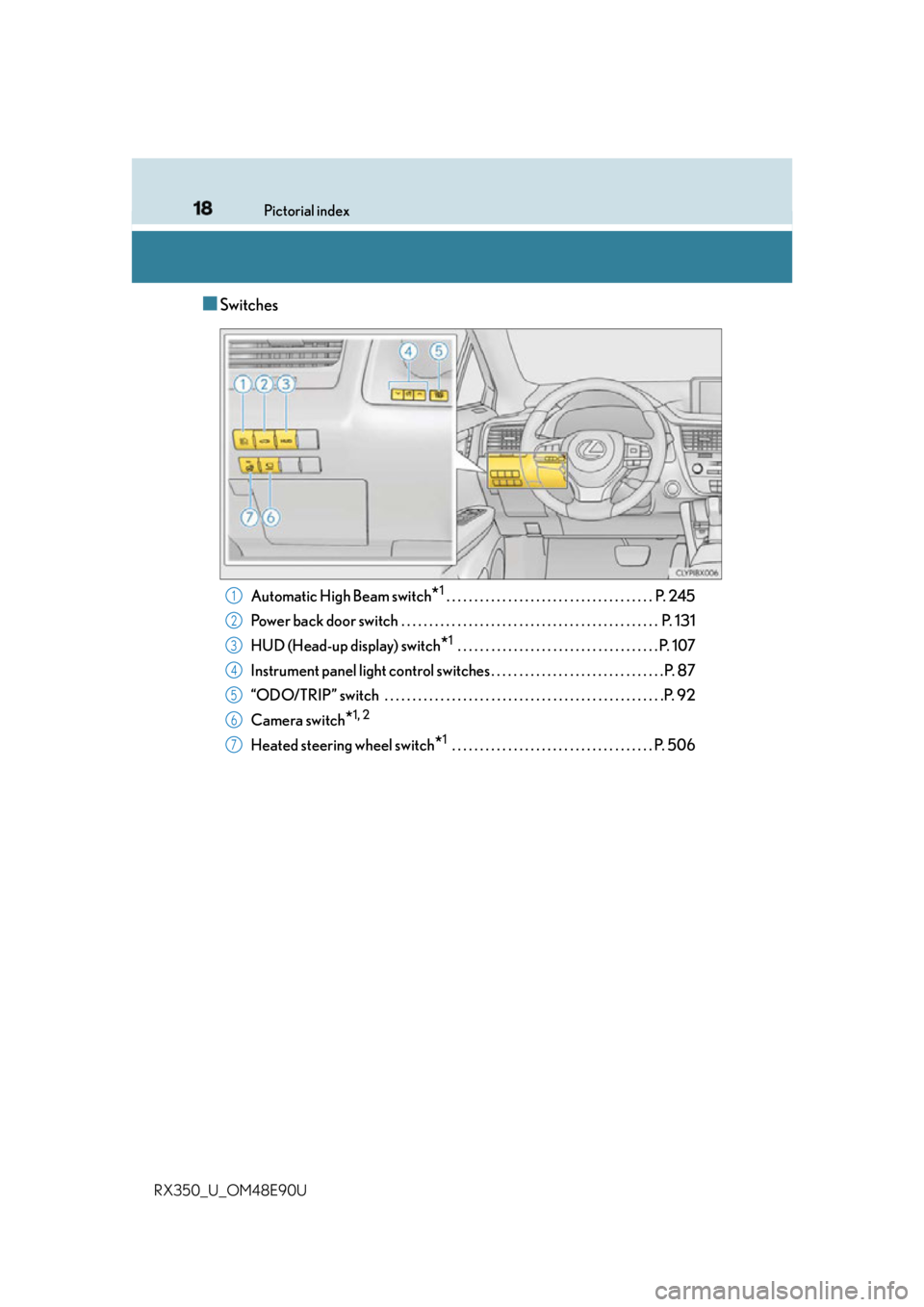
RX350_U_OM48E90U ■ Switches
Automatic High Beam switch
* 1
. . . . . . . . . . . . . . . . . . . . . . . . . . . . . . . . . . . . . P. 245
Power back door switch . . . . . . . . . . . . . . . . . . . . . . . . . . . . . . . . . . . . . . . . . . . . . . P. 131
HUD (Head-up display) switch
* 1
. . . . . . . . . . . . . . . . . . . . . . . . . . . . . . . . . . . . P. 107
Instrument panel light control swit ches . . . . . . . . . . . . . . . . . . . . . . . . . . . . . . . P. 87
“ODO/TRIP” switch . . . . . . . . . . . . . . . . . . . . . . . . . . . . . . . . . . . . . . . . . . . . . . . . . .P. 92
Camera switch
* 1, 2
Heated steering wheel switch
* 1
. . . . . . . . . . . . . . . . . . . . . . . . . . . . . . . . . . . . P. 5061
2
3
4
5
6
7
Page 81 of 748
812. Instrument cluster
2
Instrument cluster
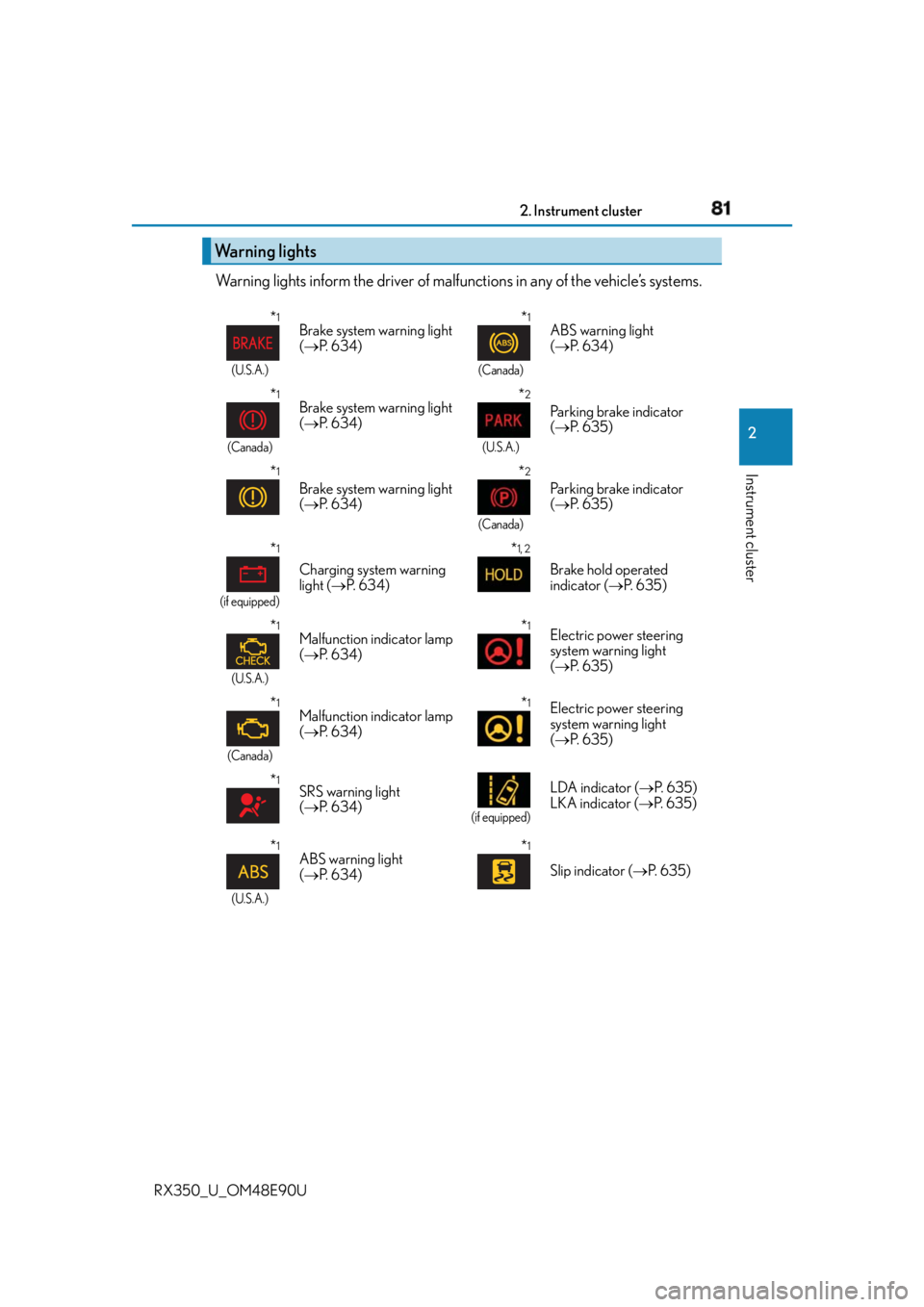
RX350_U_OM48E90U Warning lights inform the driver of malfun ctions in any of the vehicle’s systems.
Warning lights * 1
(U.S.A.)
Brake system warning light
( P. 6 3 4 )
* 1
(Canada)
ABS warning light
( P. 6 3 4 )
* 1
(Canada)
Brake system warning light
( P. 6 3 4 )
* 2
(U.S.A.)
Parking brake indicator
( P. 6 3 5 )
* 1
Brake system warning light
( P. 6 3 4 )
* 2
(Canada)
Parking brake indicator
( P. 6 3 5 )
* 1
(if equipped)
Charging system warning
light ( P. 6 3 4 ) * 1, 2
Brake hold operated
indicator ( P. 6 3 5 )
* 1
(U.S.A.)
Malfunction indicator lamp
( P. 6 3 4 ) * 1
Electric power steering
system warning light
( P. 6 3 5 )
* 1
(Canada)
Malfunction indicator lamp
( P. 6 3 4 ) * 1
Electric power steering
system warning light
( P. 6 3 5 )
* 1
SRS warning light
( P. 6 3 4 ) (if equipped)
LDA indicator ( P. 6 3 5 )
LKA indicator ( P. 6 3 5 )
* 1
(U.S.A.)
ABS warning light
( P. 6 3 4 ) * 1
Slip indicator ( P. 6 3 5 )
Page 119 of 748
119
3 Operation of
each component
RX350_U_OM48E90U 3-1. Key information
Keys .................................................. 120
3-2. Opening, closing and
locking the doors
Side doors ....................................... 124
Power back door ......................... 130
Smart access system with
push-button start...................... 146
3-3. Adjusting the seats
Front seats .......................................152
Rear seats ....................................... 153
Driving position memory ..........162
Head restraints ............................. 167
3-4. Adjusting the steering
wheel and mirrors
Steering wheel ..............................169
Inside rear view mirror................ 171
Outside rear view mirrors ........ 173
3-5. Opening, closing
the windows and
moon roof
Power windows ............................. 177
Moon roof ........................................181
Panoramic moon roof ............... 185
Page 162 of 748

162 3-3. Adjusting the seats
RX350_U_OM48E90U The seat and steering wheel are automati cally adjusted to allow the driver to
enter and exit the vehicle easily.
When all of the following have been
performed, the seat and steering wheel
are automatically adjusted to a position
that allows driver to enter and exit the
vehicle easily.
• The shift lever has been shifted to P.
• The engine switch has been turned
off.
• The driver’s seat belt has been unfastened.
When any of the following has been performed, the seat and steering wheel
automatically return to their original positions.
• The engine switch has been turn ed to ACCESSORY mode or IGNITION
ON mode.
• The driver’s seat belt has been fastened. ■
Operation of the power easy access system
When exiting the vehicle, the power easy acc ess system may not operate if the seat is
already close to the rearmost position, etc. ■
Customization
Some functions can be customized. ( P. 6 9 9 )Driving position memory
: If equippedThis feature automatically adjusts the dr iver’s seat (on some models), steering
wheel and outside rear view mirrors to make entering and exiting the vehicle
easier or to suit your preferences.
Power easy access system (driver’s side only)
Page 170 of 748

170 3-4. Adjusting the steering wheel and mirrors
RX350_U_OM48E90U ■
The steering wheel can be adjusted when
The engine switch is in ACCESSORY or IGNITION ON mode
* .
* : If the driver’s seat belt is fastened, the steering wheel can be adjusted regardless of
engine switch mode. ■
Automatic adjustment of the steering position (if equipped)
A desired steering position can be entered to memory and recalled automatically by the
driving position memory system. ( P. 1 6 2 )■
Power easy access system
The steering wheel and driver’s seat (on so me models) move in accordance with engine
switch mode and the driver’s seat belt condition. ( P. 1 6 2 )■
Customization
Some functions can be customized. ( P. 6 9 9 )
WA R N I N G
Do not adjust the steering wheel while driving.
Doing so may cause the driver to mishandle the vehicle and cause an accident, result-
ing in death or serious injury.
Page 174 of 748
174 3-4. Adjusting the steering wheel and mirrors
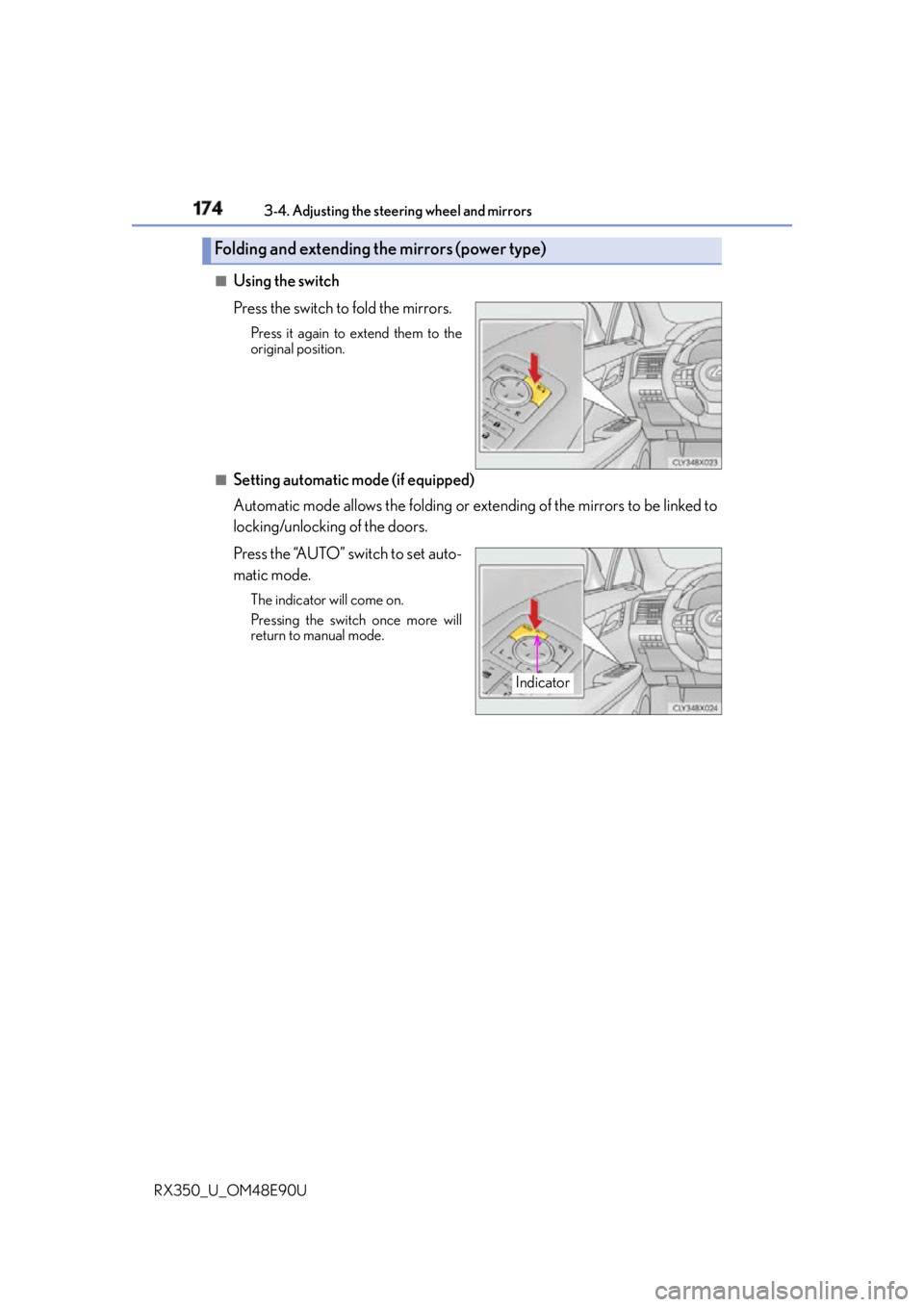
RX350_U_OM48E90U ■
Using the switch
Press the switch to fold the mirrors. Press it again to extend them to the
original position.
■
Setting automatic mode (if equipped)
Automatic mode allows the folding or extending of the mirrors to be linked to
locking/unlocking of the doors.
Press the “AUTO” switch to set auto-
matic mode. The indicator will come on.
Pressing the switch once more will
return to manual mode.Folding and extending the mirrors (power type)
Indicator
Page 195 of 748
1954-1. Before driving
4
Driving
RX350_U_OM48E90U WA R N I N G
Observe the following precautions.
Failure to do so may result in death or serious injury. ■
When starting the vehicle
Always keep your foot on the brake pedal while stopped engine running. This prevents
the vehicle from creeping. ■
When driving the vehicle ●
Do not drive if you are unfamiliar with the location of the brake and accelerator ped-
als to avoid depressing the wrong pedal.
• Accidentally depressing th e accelerator pedal instead of the brake pedal will
result in sudden acceleration that may lead to an accident.
• When backing up, you may twist your body around, leading to difficulty in operat-
ing the pedals. Make sure to operate the pedals properly.
• Make sure to keep a correct driving posture even when moving the vehicle only
slightly. This allows you to depress th e brake and accelerator pedals properly.
• Depress the brake pedal using your righ t foot. Depressing the brake pedal using
your left foot may delay response in an emergency, resulting in an accident. ●
Do not drive the vehicle over or stop the vehicle near flammable materials.
The exhaust system and exhaust gases can be extremely hot. These hot parts may
cause a fire if there is any flammable material nearby. ●
During normal driving, do not turn off the engine. Turning the engine off while driving
will not cause loss of steering or braking co ntrol, but the power assist to these systems
will be lost. This will make it more difficul t to steer and brake, so you should pull over
and stop the vehicle as soon as it is safe to do so.
However, in the event of an emergency, such as if it becomes impossible to stop the
vehicle in the normal way: P. 6 2 5●
Use engine braking (downshift) to maintain a safe speed when driving down a steep
hill.
Using the brakes continuously may cause th e brakes to overheat and lose effective-
ness. ( P. 2 2 9 )●
Do not adjust the positions of the steering wh eel, the seat, or the inside or outside rear
view mirrors while driving.
Doing so may result in a loss of vehicle control. ●
Always check that all passengers’ arms, heads or other parts of their body are not
outside the vehicle. ●
AWD models: Do not drive the vehicle off-road.
This is not an AWD vehicle designed for of f-road driving. Proceed with all due cau-
tion if it becomes unavoidable to drive off-road. ●
Do not drive across a river or through other bodies of water.
This may cause electric/electronic components to short circuit, damage the engine or
cause other serious damage to the vehicle. ●
Do not drive in excess of the speed limit. Ev en if the legal speed lim it permits it, do not
drive over 85 mph (140 km/h) unless your vehicle has high-speed capability tires.
Driving over 85 mph (140 km/h) may result in tire failure, loss of control and possible
injury. Be sure to consult a tire dealer to determine whether the tires on your vehicle
are high-speed capability tires or not before driving at such speeds.
Page 199 of 748
1994-1. Before driving
4
Driving
RX350_U_OM48E90U NOTICE ■
When driving the vehicle ●
Do not depress the accelerator and brake peda ls at the same time during driving, as
this may restrain driving torque. ●
Do not use the accelerator pedal or depress the accelerator and brake pedals at the
same time to hold the vehicle on a hill. ■
When parking the vehicle
Always shift the shift lever to P, set the parking brake. Failure to do so may cause the
vehicle to move or the vehicle may accelerate suddenly if the acce lerator pedal is acci-
dentally depressed. ■
Avoiding damage to vehicle parts ●
Do not turn the steering wheel fully in either direction and hold it there for an
extended period of time.
Doing so may damage the power steering motor. ●
When driving over bumps in the road, drive as slowly as possible to avoid damaging
the wheels, underside of the vehicle, etc. ■
If you get a flat tire while driving
A flat or damaged tire may cause the follo wing situations. Hold the steering wheel
firmly and gradually depress the brak e pedal to slow down the vehicle.●
It may be difficult to control your vehicle. ●
The vehicle will make abnormal sounds or vibrations. ●
The vehicle will lean abnormally.
Information on what to do in case of a flat tire ( P. 646)■
When encountering flooded roads
Do not drive on a road that has flooded after heavy rain, etc. Doing so may cause the
following serious damage to the vehicle: ●
Engine stalling ●
Short in electrical components ●
Engine damage caused by water immersion
In the event that you drive on a flooded road and the vehicle is flooded, be sure to have
your Lexus dealer check the following: ●
Brake function ●
Changes in quantity and quality of oil and fl uid used for the engine, transaxle, transfer
(AWD models), rear differential (AWD models), etc. ●
Lubricant condition for the propeller shaft (AWD models), bearings and suspension
joints (where possible), and the fu nction of all joints, bearings, etc.