charging LEXUS RX350 2019 User Guide
[x] Cancel search | Manufacturer: LEXUS, Model Year: 2019, Model line: RX350, Model: LEXUS RX350 2019Pages: 777, PDF Size: 12.44 MB
Page 547 of 777
546 6-5. Using the other interior features
RX350/RX350L_U ■
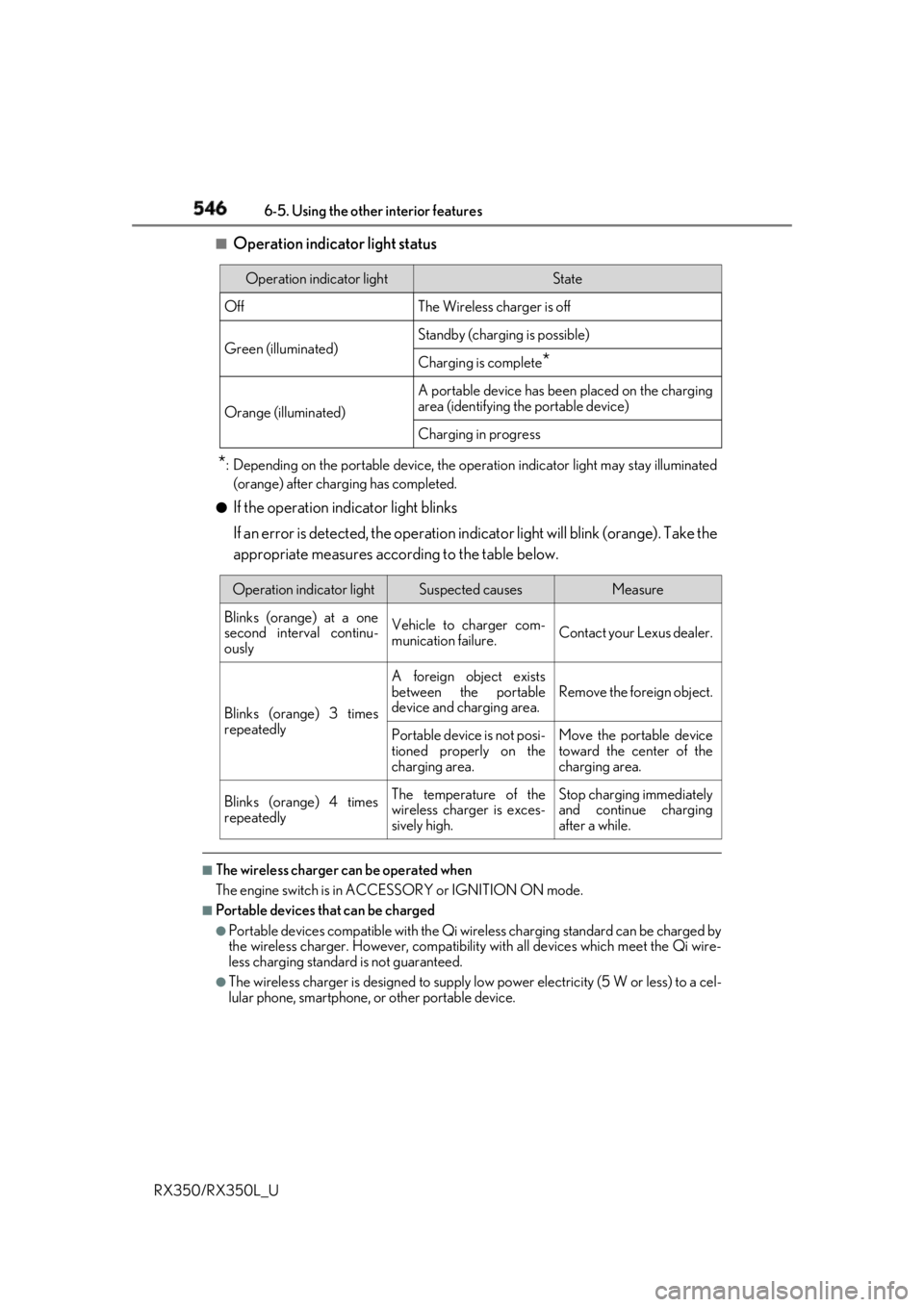
Operation indicator light status
* : Depending on the portable device, the oper ation indicator light may stay illuminated
(orange) after charging has completed.●
If the operation indicator light blinks
If an error is detected, the operation in dicator light will blink (orange). Take the
appropriate measures according to the table below.
■
The wireless charger can be operated when
The engine switch is in ACCESSORY or IGNITION ON mode. ■
Portable devices t hat can be charged●
Portable devices compatible with the Qi wireless charging standard can be charged by
the wireless charger. However, compatibility with all devices which meet the Qi wire-
less charging standard is not guaranteed. ●
The wireless charger is designed to supply low power electricity (5 W or less) to a cel-
lular phone, smartphone, or other portable device.Operation indicator light State
Off The Wireless charger is off
Green (illuminated) Standby (charging is possible)
Charging is complete
*Orange (illuminated) A portable device has been placed on the charging
area (identifying the portable device)
Charging in progress
Operation indicator light Suspected causes Measure
Blinks (orange) at a one
second interval continu-
ously Vehicle to charger com-
munication failure. Contact your Lexus dealer.
Blinks (orange) 3 times
repeatedly A foreign object exists
between the portable
device and charging area. Remove the foreign object.
Portable device is not posi-
tioned properly on the
charging area. Move the portable device
toward the center of the
charging area.
Blinks (orange) 4 times
repeatedly The temperature of the
wireless charger is exces-
sively high. Stop charging immediately
and continue charging
after a while.
Page 548 of 777
5476-5. Using the other interior features
6
Interior features
RX350/RX350L_U ■
If a cover or accessory is attached to the portable device
Do not charge a portable device if a cover or accessory which is not Qi compatible is
attached. Depending on the type of cover an d/or accessory attached, it may not be pos-
sible to charge the portable device. If the po rtable device is placed on the charging area
and does not charge, remove the cover and/or accessories. ■
If interference is heard in AM radio broadcasts while charging
Turn off the wireless charger and check if the noise is reduced. If noise is reduced, press
and hold the power supply switch of the wireless charger for 2 seconds. The frequency of
the wireless charger is changed and noise may be reduced. When the frequency is
changed, the operation indicator lig ht will blink (orange) 2 times.■
Charging precautions ●
If the electronic key cannot be detected in the cabin, charging cannot be performed.
When a door is opened and closed, ch arging may be temporarily suspended.●
While charging, the wireless charger and the po rtable device will become warm. This is
not a malfunction.
If a portable device become s warm while charging and ch arging stops due to the pro-
tection function of the portable device, wait until the portable device cools down and
charge it again. ■
Sound generated during operation
When the power supply switch is turned on or while a portable device is being identified,
operation sounds may be heard. This is not a malfunction.■
Cleaning the wireless charger
P. 582 ■
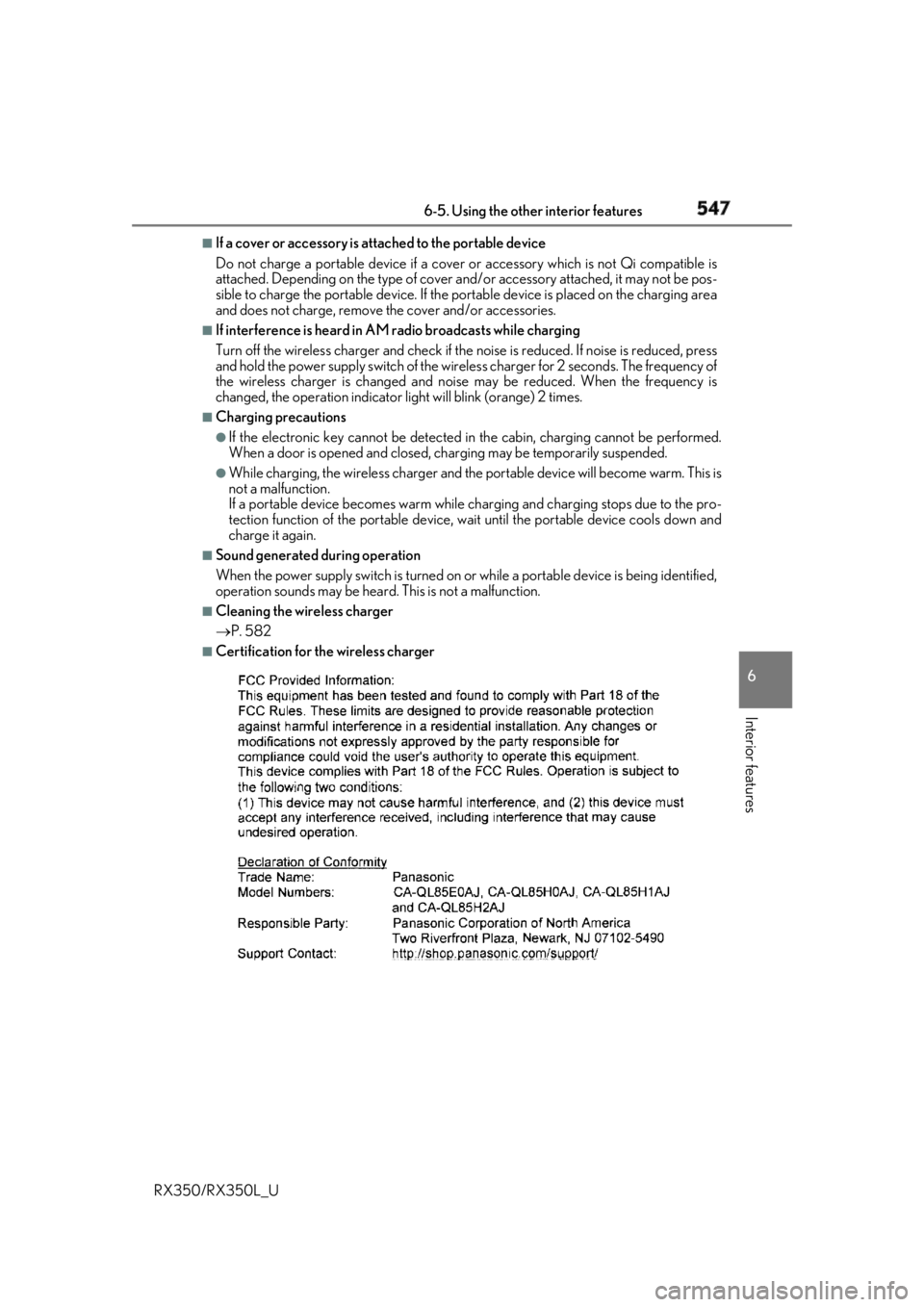
Certification for the wireless charger
Page 550 of 777
5496-5. Using the other interior features
6
Interior features
RX350/RX350L_U WARNING ■
Caution while driving
When charging a portable device while driv ing, for safety reason s, the driver should
not operate the portable device. ■
Caution regarding interference with electronic devices
People with implantable card iac pacemakers, cardiac resynchronization therapy pace-
makers or implantable cardioverter defibrilla tors, as well as any other electrical medi-
cal device, should consult their physician about the usage of the wireless charger.
Operations of the wireless charger may have an affect on medical devices. ■
To prevent damage or burns
Observe the following precautions.
Failure to do so may result in the possibi lity of fire, equipment failure or damage, or
burns due to heat. ●
Do not put any metallic objects between th e charging area and the portable device
while charging. ●
Do not attach metallic objects, such as aluminum stickers, to the charging area.●
Do not cover the wireless charger with a cloth or other object while charging.●
Do not attempt to charge portable devi ces which are not compatible with the Qi
wireless charging standard. ●
Do not disassemble, modify or remove the wireless charger. ●
Do not apply force or impact to the wireless charger.
Page 551 of 777
550 6-5. Using the other interior features
RX350/RX350L_U NOTICE ■
Conditions in which the wireless charger may not operate correctly
In the following situations, the wire less charger may not operate correctly:●
When a portable device is fully charged ●
When there is a foreign object between the charging area and portable device●
When a portable device becomes hot while charging●
When a portable device is placed on the wireless area with its charging surface fac-
ing up ●
When a portable device is not centered on the charging area ●
When the vehicle is near a TV tower, electric power plant, gas station, radio station,
large display, airport or other facility that generates stro ng radio waves or electrical
noise ●
When the portable device is in contact with, or is covered by any of the following
metallic objects:
• Cards to which aluminum foil is attached
• Cigarette boxes that ha ve aluminum foil inside
• Metallic wallets or bags
•Coins
•Metal hand warmers
• Media such as CDs and DVDs ●
When wireless keys (that emit radio waves) other than those of your vehicle are being
used nearby.
If in situations other than above the wirele ss charger does not operate properly or the
operation indicator light is blinking, the wireless charge r may be malfunctioning. Con-
tact your Lexus dealer. ■
To prevent failure or damage to data ●
Do not bring magnetic cards, such as a cr edit card, or magnetic recording media,
close to the wireless charger while charging. Otherwise, data may be erased due to
the influence of magnetism.
Additionally, do not bring pr ecision instruments such as wrist watches, close to the
wireless charger, as such objects may malfunction. ●
Do not leave portable devices in the cab in. The temperature inside the cabin may
become high when parked in the sun, and cause damage to the device. ■
To prevent battery discharge
Do not use the wireless charger for a long pe riod of time with the engine is stopped.
Page 554 of 777
5536-5. Using the other interior features
6
Interior features
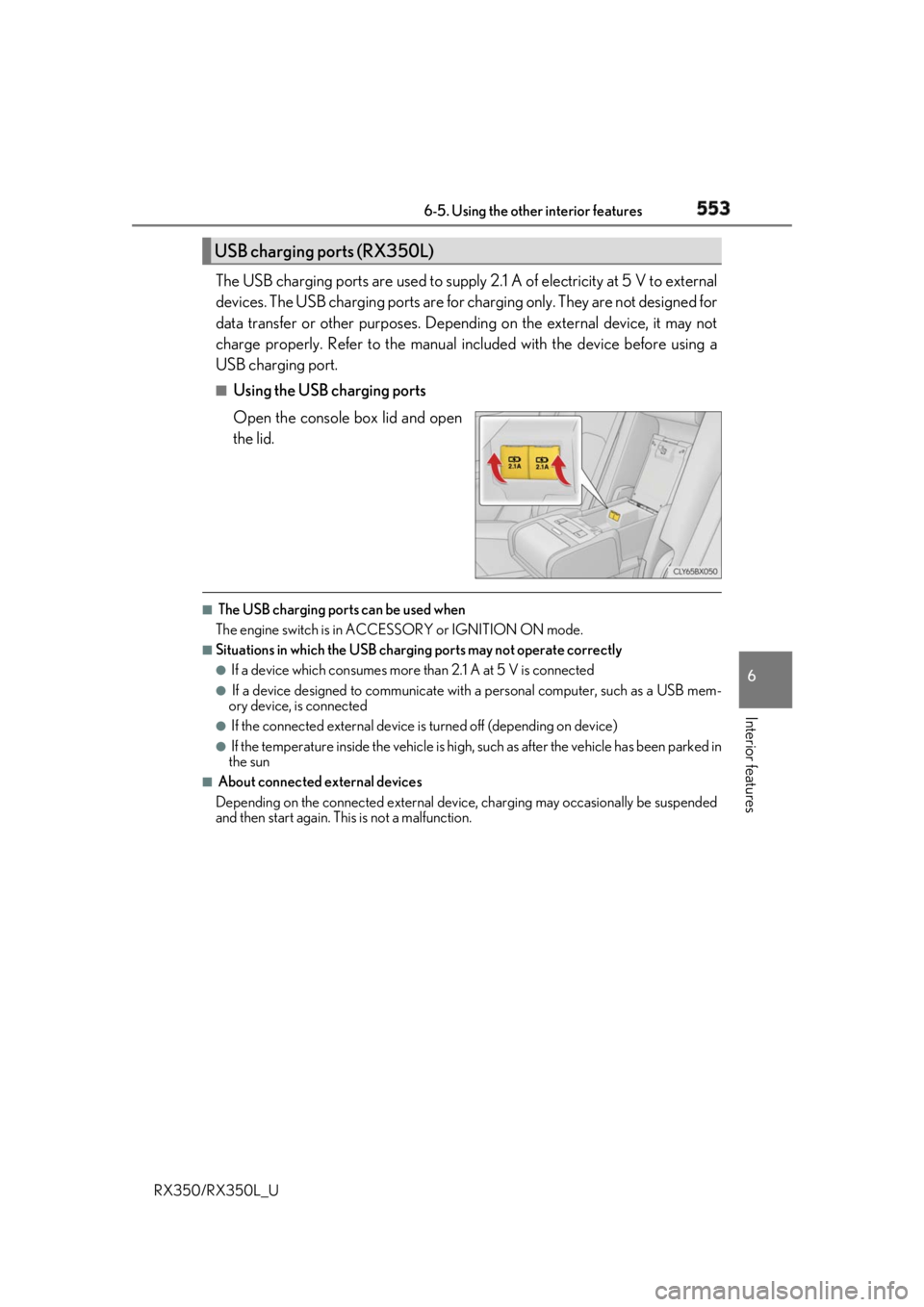
RX350/RX350L_U The USB charging ports are used to supply 2.1 A of electricity at 5 V to external
devices. The USB charging ports are for charging only. They are not designed for
data transfer or other purposes. Depending on the external device, it may not
charge properly. Refer to the manual in cluded with the device before using a
USB charging port. ■
Using the USB charging ports
Open the console box lid and open
the lid. ■
The USB charging ports can be used when
The engine switch is in ACCESSORY or IGNITION ON mode. ■
Situations in which the USB charging ports may not operate correctly ●
If a device which consumes more than 2.1 A at 5 V is connected●
If a device designed to communicate with a personal computer, such as a USB mem-
ory device, is connected ●
If the connected external device is turned off (depending on device)●
If the temperature inside the vehicle is high, such as after the vehicle has been parked in
the sun ■
About connected external devices
Depending on the connected external device , charging may occasionally be suspended
and then start again. This is not a malfunction.USB charging ports (RX350L)
Page 555 of 777
554 6-5. Using the other interior features
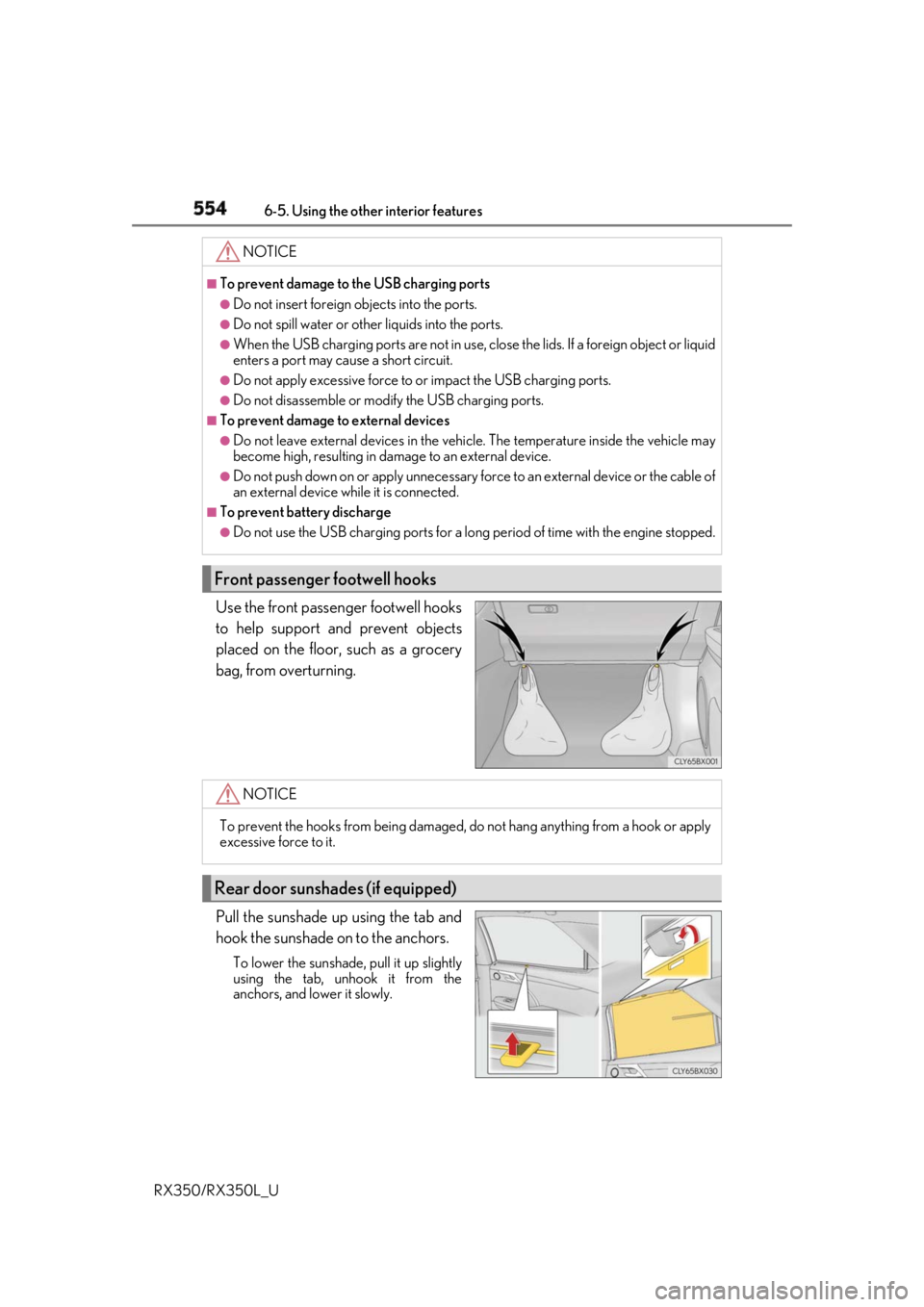
RX350/RX350L_U Use the front passenger footwell hooks
to help support and prevent objects
placed on the floor, such as a grocery
bag, from overturning.
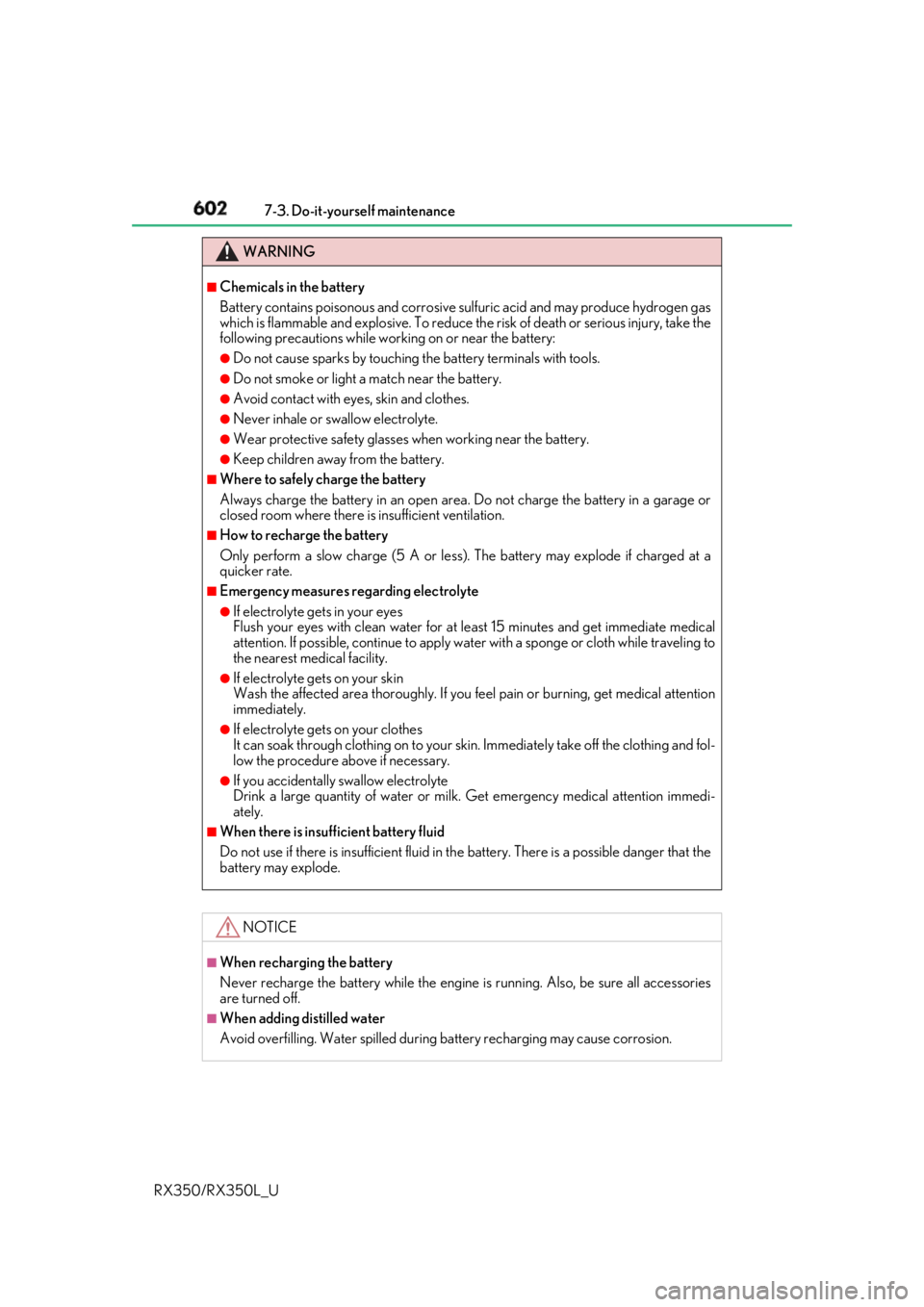
Pull the sunshade up using the tab and
hook the sunshade on to the anchors. To lower the sunshade, pull it up slightly
using the tab, unhook it from the
anchors, and lower it slowly. NOTICE ■
To prevent damage to the USB charging ports●
Do not insert foreign objects into the ports. ●
Do not spill water or othe r liquids into the ports.●
When the USB charging ports are not in use, close the lids. If a foreign object or liquid
enters a port may cause a short circuit. ●
Do not apply excessive force to or impact the USB charging ports.●
Do not disassemble or modi fy the USB charging ports.■
To prevent damage to external devices●
Do not leave external devices in the vehicle. The temperature inside the vehicle may
become high, resulting in damage to an external device. ●
Do not push down on or appl y unnecessary force to an exte rnal device or the cable of
an external device while it is connected. ■
To prevent battery discharge ●
Do not use the USB charging ports for a long period of time with the engine stopped.
Front passenger footwell hooks
NOTICE
To prevent the hooks from being damaged, do not hang anything from a hook or apply
excessive force to it.
Rear door sunshades (if equipped)
Page 602 of 777
6017-3. Do-it-yourself maintenance
7
Maintenance and care
RX350/RX350L_U Check the battery as follows. ■
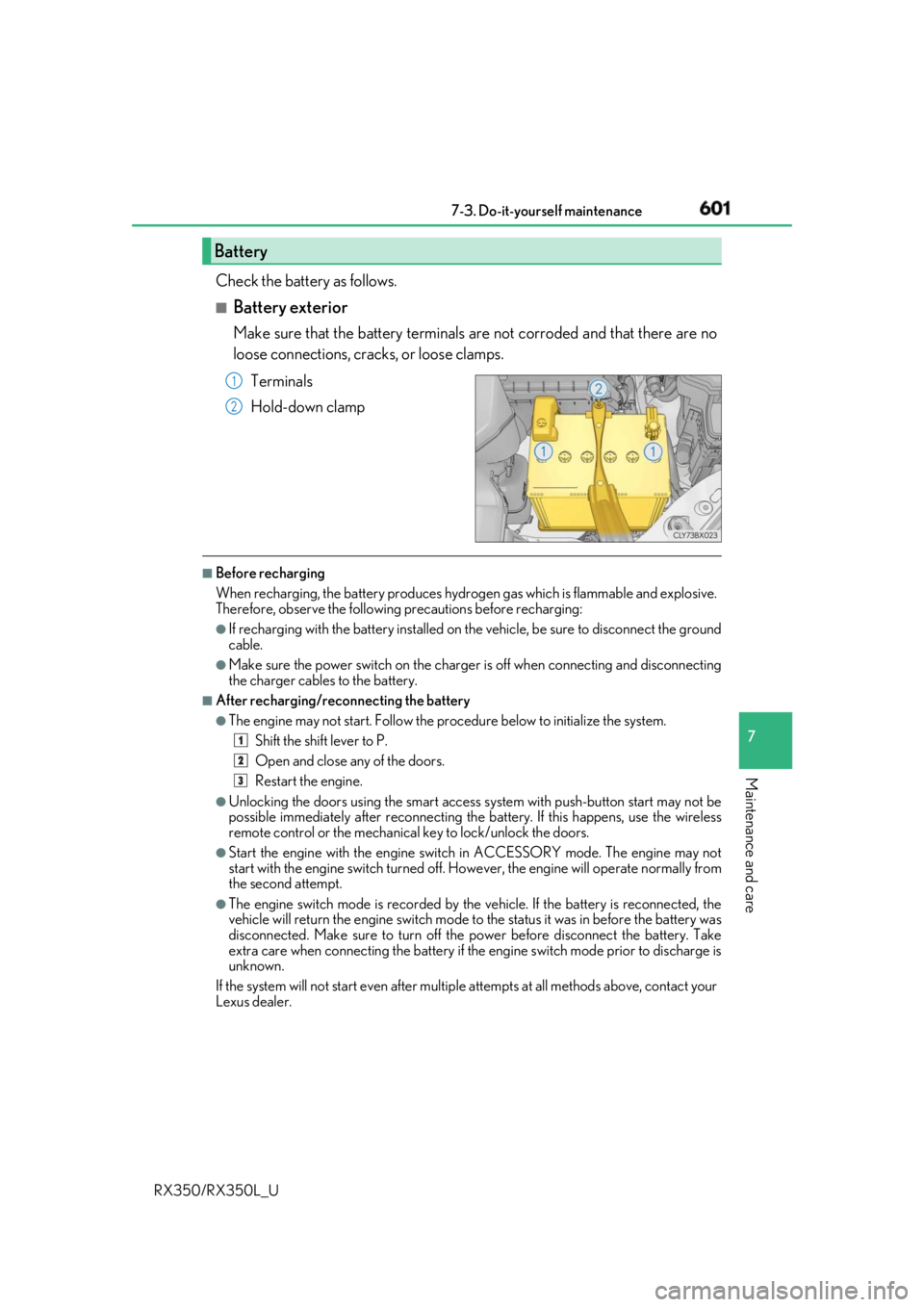
Battery exterior Make sure that the battery terminals are not corroded and that there are no
loose connections, cracks, or loose clamps.
Terminals
Hold-down clamp ■
Before recharging
When recharging, the battery produces hydrogen gas which is flammable and explosive.
Therefore, observe the following precautions before recharging: ●
If recharging with the battery installed on the vehicle, be sure to disconnect the ground
cable. ●
Make sure the power switch on the charge r is off when connecting and disconnecting
the charger cables to the battery. ■
After recharging/reconnecting the battery ●
The engine may not start. Follow the pr ocedure below to in itialize the system.
Shift the shift lever to P.
Open and close any of the doors.
Restart the engine.●
Unlocking the doors using the smart access system with push-button start may not be
possible immediately after reconnecting the battery. If this happens, use the wireless
remote control or the mechanical key to lock/unlock the doors.●
Start the engine with the engine switch in ACCESSORY mode. The engine may not
start with the engine switch turned off. However, the engine will operate normally from
the second attempt. ●
The engine switch mode is recorded by the vehicle. If the battery is reconnected, the
vehicle will return the engine switch mode to the status it was in before the battery was
disconnected. Make sure to turn off the power before disconnect the battery. Take
extra care when connecting the battery if the engine switch mode prior to discharge is
unknown.
If the system will not start even after multip le attempts at all methods above, contact your
Lexus dealer.Battery 1
2
1
2
3
Page 603 of 777
602 7-3. Do-it-yourself maintenance
RX350/RX350L_U WARNING ■
Chemicals in the battery
Battery contains poisonous and corrosive sulfuric acid and may produce hydrogen gas
which is flammable and explosive. To reduce the risk of deat h or serious injury, take the
following precautions while wor king on or near the battery:●
Do not cause sparks by touching the battery terminals with tools. ●
Do not smoke or light a match near the battery. ●
Avoid contact with eyes, skin and clothes. ●
Never inhale or swallow electrolyte. ●
Wear protective safety glasses when working near the battery. ●
Keep children away from the battery. ■
Where to safely charge the battery
Always charge the battery in an open area . Do not charge the battery in a garage or
closed room where there is insufficient ventilation.■
How to recharge the battery
Only perform a slow charge (5 A or less) . The battery may explode if charged at a
quicker rate. ■
Emergency measures regarding electrolyte ●
If electrolyte gets in your eyes
Flush your eyes with clean water for at least 15 minutes and get immediate medical
attention. If possible, continue to apply water with a sponge or cloth while traveling to
the nearest medical facility. ●
If electrolyte gets on your skin
Wash the affected area thoroughly. If you fe el pain or burning, get medical attention
immediately. ●
If electrolyte gets on your clothes
It can soak through clothing on to your s kin. Immediately take off the clothing and fol-
low the procedure above if necessary. ●
If you accidentally swallow electrolyte
Drink a large quantity of water or milk. Get emergenc y medical attention immedi-
ately. ■
When there is insufficient battery fluid
Do not use if there is insufficient fluid in th e battery. There is a possible danger that the
battery may explode.
NOTICE ■
When recharging the battery
Never recharge the battery while the engine is running. Also, be sure all accessories
are turned off. ■
When adding distilled water
Avoid overfilling. Water spilled during battery recharging may cause corrosion.
Page 655 of 777
654 8-2. Steps to take in an emergency
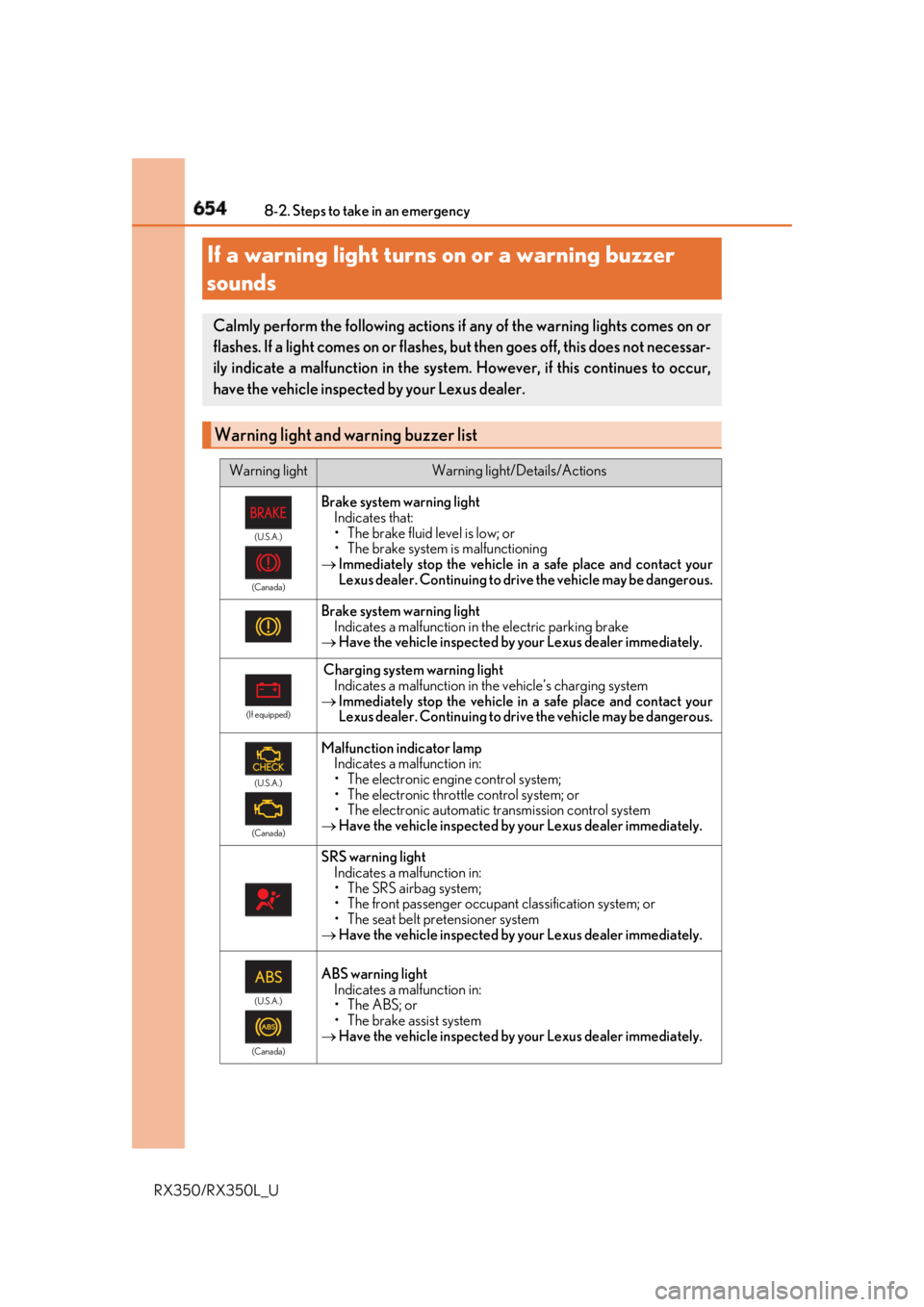
RX350/RX350L_UIf a warning light turns on or a warning buzzer
sounds Calmly perform the following actions if any of the warning lights comes on or
flashes. If a light comes on or flashes, but then goes off, this does not necessar-
ily indicate a malfunction in the system . However, if this continues to occur,
have the vehicle inspecte d by your Lexus dealer.
Warning light and warning buzzer list Warning light Warning light/Details/Actions(U.S.A.)
(Canada)
Brake system warning light
Indicates that:
• The brake fluid level is low; or
• The brake system is malfunctioning
Immediately stop the vehicle in a safe place and contact your
Lexus dealer. Continuing to drive the vehicle may be dangerous.
Brake system warning light
Indicates a malfunction in the electric parking brake
Have the vehicle inspected by your Lexus dealer immediately. (If equipped)
Charging system warning light
Indicates a malfunction in the vehicle’s charging system
Immediately stop the vehicle in a safe place and contact your
Lexus dealer. Continuing to drive the vehicle may be dangerous. (U.S.A.)
(Canada)
Malfunction indicator lamp
Indicates a malfunction in:
• The electronic engine control system;
• The electronic throttle control system; or
• The electronic automatic transmission control system
Have the vehicle inspected by your Lexus dealer immediately.
SRS warning light
Indicates a malfunction in:
• The SRS airbag system;
• The front passenger occupant classification system; or
• The seat belt pretensioner system
Have the vehicle inspected by your Lexus dealer immediately. (U.S.A.)
(Canada)
ABS warning light
Indicates a malfunction in:
• The ABS; or
• The brake assist system
Have the vehicle inspected by your Lexus dealer immediately.
Page 663 of 777
662 8-2. Steps to take in an emergency
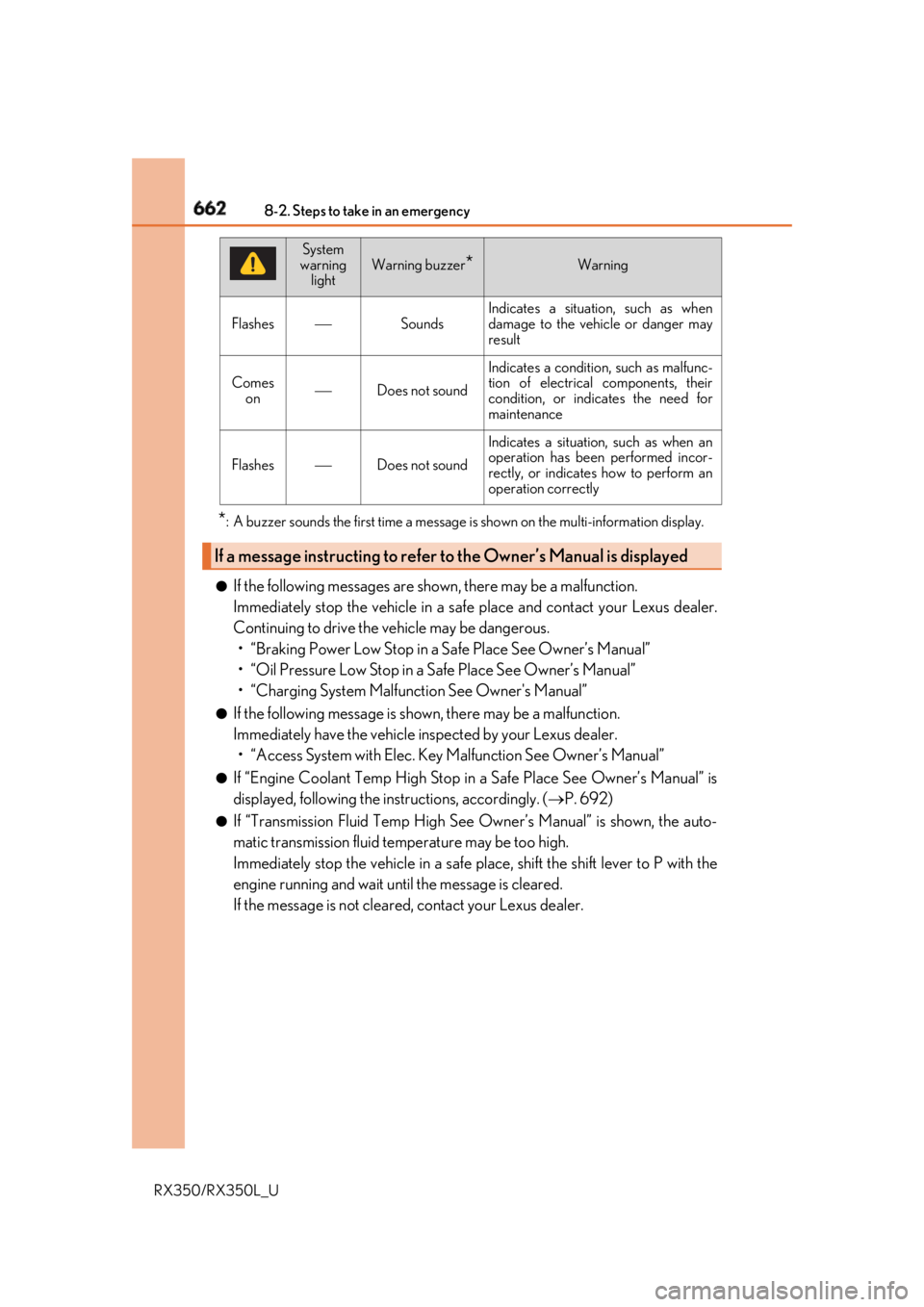
RX350/RX350L_U * : A buzzer sounds the first time a message is shown on the multi-information display.
●
If the following messages are shown, there may be a malfunction.
Immediately stop the vehicle in a safe place and contact your Lexus dealer.
Continuing to drive the vehicle may be dangerous.
• “Braking Power Low Stop in a Safe Place See Owner’s Manual”
• “Oil Pressure Low Stop in a Safe Place See Owner’s Manual”
• “Charging System Malfun ction See Owner's Manual”●
If the following message is shown, there may be a malfunction.
Immediately have the vehicle inspected by your Lexus dealer.
• “Access System with Elec. Key Malfunction See Owner’s Manual” ●
If “Engine Coolant Temp High Stop in a Safe Place See Owner’s Manual” is
displayed, following the instructions, accordingly. ( P. 692)●
If “Transmission Fluid Temp High See Owner’s Manual” is shown, the auto-
matic transmission fluid temperature may be too high.
Immediately stop the vehicle in a safe place, shift the shift lever to P with the
engine running and wait until the message is cleared.
If the message is not cleared, contact your Lexus dealer.Flashes Sounds Indicates a situation, such as when
damage to the vehicle or danger may
result
Comes
on Does not sound Indicates a condition, such as malfunc-
tion of electrical components, their
condition, or indicates the need for
maintenance
Flashes Does not sound Indicates a situation, such as when an
operation has been performed incor-
rectly, or indicates how to perform an
operation correctly
If a message instructing to refer to the Owner’s Manual is displayed System
warning
light Warning buzzer
* Warning