head LEXUS RX350 2019 Owner's Guide
[x] Cancel search | Manufacturer: LEXUS, Model Year: 2019, Model line: RX350, Model: LEXUS RX350 2019Pages: 777, PDF Size: 12.44 MB
Page 108 of 777
1072. Instrument cluster
2
Instrument cluster
RX350/RX350L_U WARNING ■
Caution for use while driving ●
When operating the multi-information display while driving, pay extra attention to the
safety of the area around the vehicle. ●
Do not look continuously at the multi-info rmation display while dr iving as you may fail
to see pedestrians, objects on the road, etc. ahead of the vehicle. ■
The information display at low temperatures
Allow the interior of the vehicle to warm up before using the liquid crystal information
display. At extremely low temperatures, th e information display monitor may respond
slowly, and display changes may be delayed.
For example, there is a lag between the dr iver’s shifting and the new gear number
appearing on the display. This lag could ca use the driver to downshift again, causing
rapid and excessive engine braking and possibly an accident resulting in death or
injury. ■
Cautions during setting up the display
As the engine needs to be running during sett ing up the display, en sure that the vehicle
is parked in a place with adequate ventilation. In a closed area such as a garage,
exhaust gases including harmful carbon mo noxide (CO) may collect and enter the
vehicle. This may lead to death or a serious health hazard.
NOTICE ■
While setting up the display
To prevent battery discharge, ensure that the engine is running while setting up the dis-
play features.
Page 109 of 777
108 2. Instrument cluster
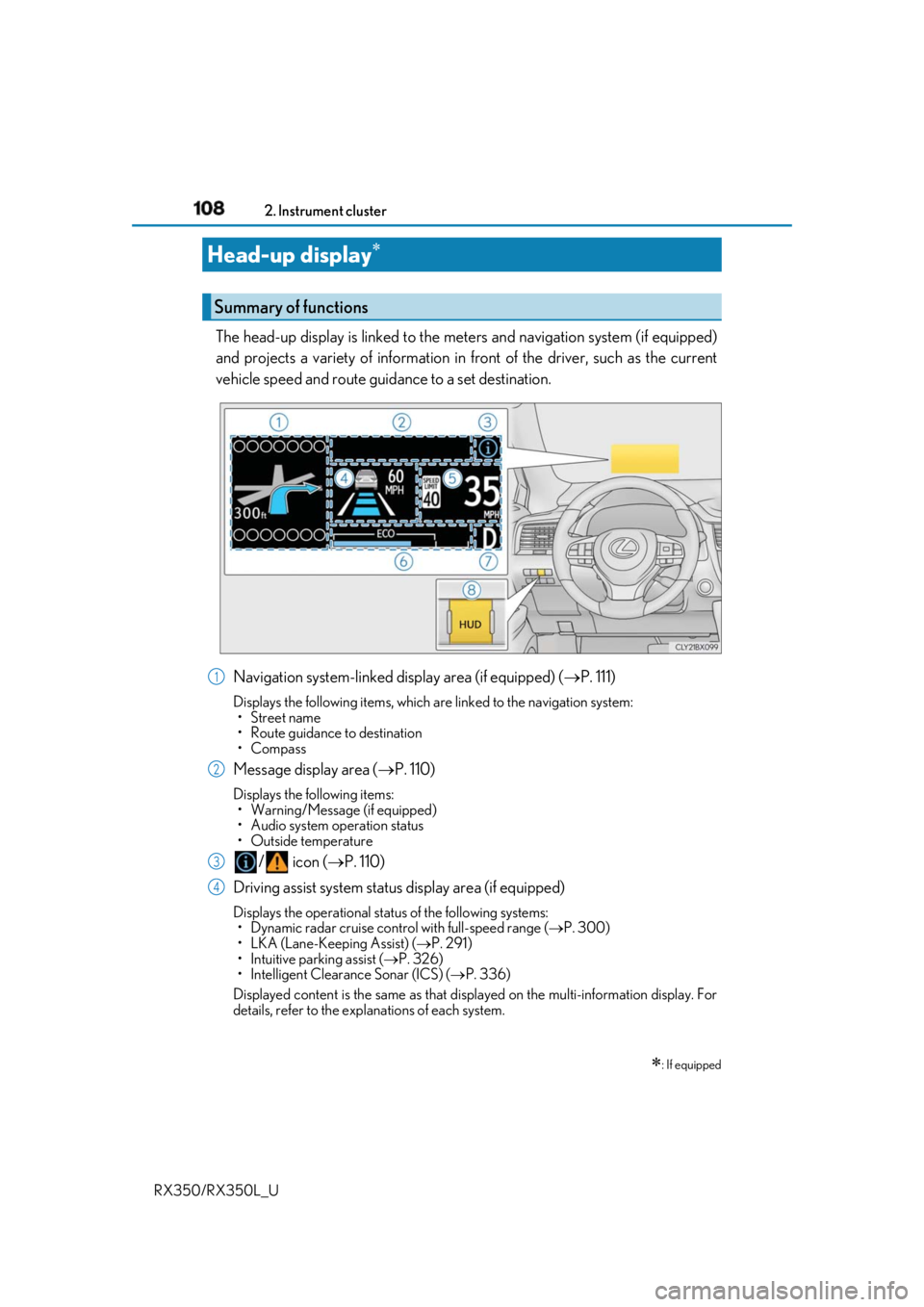
RX350/RX350L_U The head-up display is linked to the meters and navigation system (if equipped)
and projects a variety of information in front of the driver, such as the current
vehicle speed and route guid ance to a set destination.
Navigation system-linked display area (if equipped) ( P. 111)Displays the following items, which are linked to the navigation system:
•Street name
• Route guidance to destination
•Compass
Message display area ( P. 110)Displays the following items:
• Warning/Message (if equipped)
• Audio system operation status
• Outside temperature
/ icon ( P. 110)
Driving assist system status display area (if equipped) Displays the operational stat us of the following systems:
• Dynamic radar cruise control with full-speed range ( P. 300)
• LKA (Lane-Keeping Assist) ( P. 291)
• Intuitive parking assist ( P. 326)
• Intelligent Clearance Sonar (ICS) ( P. 336)
Displayed content is the same as that disp layed on the multi-information display. For
details, refer to the explanations of each system.Head-up display
: If equippedSummary of functions
1
2
3
4
Page 110 of 777
1092. Instrument cluster
2
Instrument cluster
RX350/RX350L_U Vehicle speed display area Displays the following items:
• Vehicle speed
• Speed limit (vehicles with a na vigation system) (U.S.A. only)
Eco Driving Indicator/Tachometer ( P. 111)
Shift position display ( P. 236, 240)
HUD (Head-up display) switch ( P. 109)
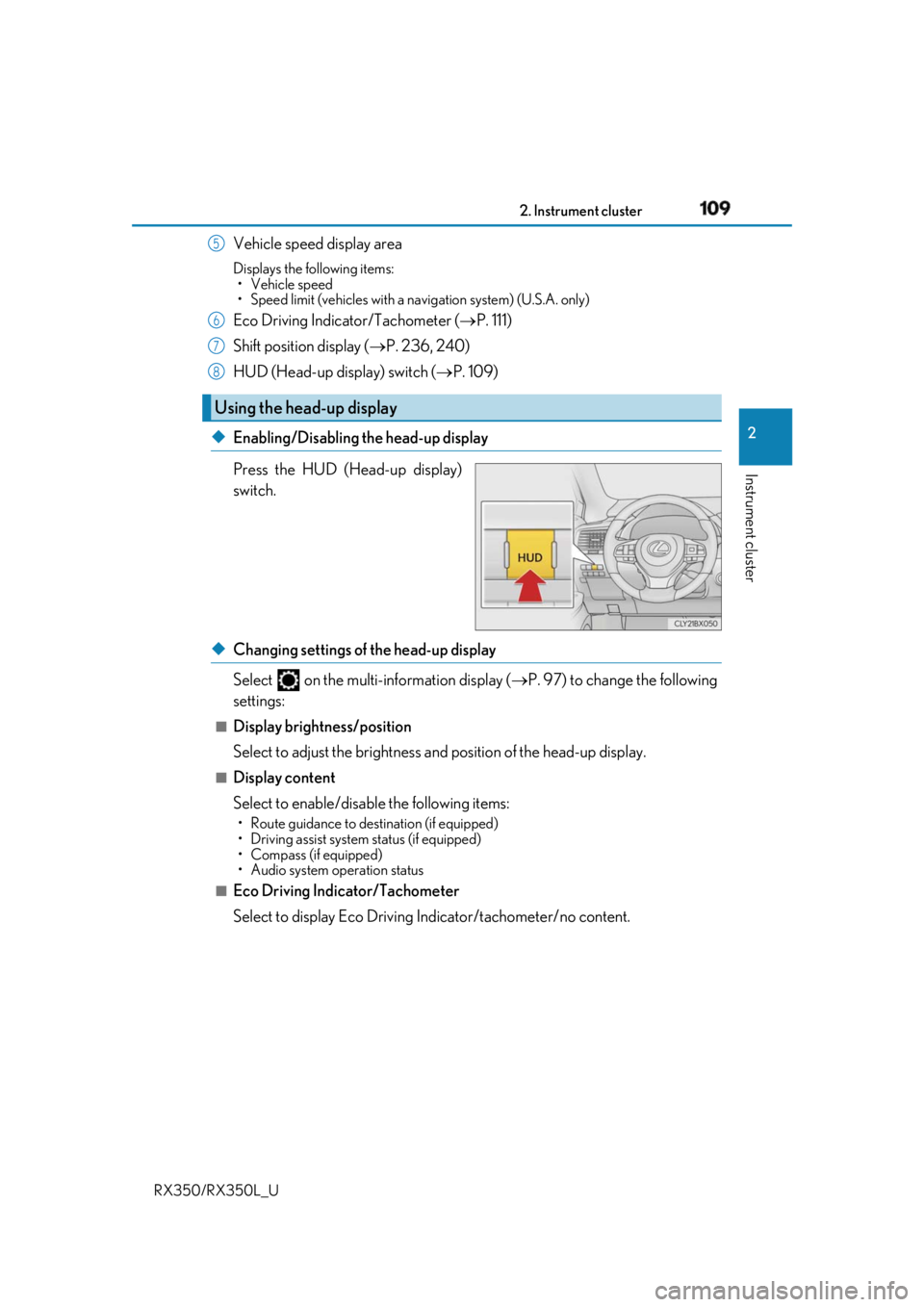
◆ Enabling/Disabling the head-up display
Press the HUD (Head-up display)
switch.
◆ Changing settings of the head-up display
Select on the multi-information display ( P. 97) to change the following
settings: ■
Display brightness/position
Select to adjust the brightness and position of the head-up display. ■
Display content
Select to enable/disable the following items: • Route guidance to destination (if equipped)
• Driving assist system status (if equipped)
• Compass (if equipped)
• Audio system operation status
■
Eco Driving Indicator/Tachometer
Select to display Eco Driving Indicator/tachometer/no content. Using the head-up display 5
6
7
8
Page 113 of 777
112 2. Instrument cluster
RX350/RX350L_U ■
Head-up display
The head-up display may seem dark or hard to see when viewed through sunglasses,
especially pola rized sunglasses.
Adjust the brightness of the head-up display or remove your sunglasses.■
When the battery is disconnected
The customize settings of the head-up display will be reset.■
Display brightness
The brightness of the head-up display can be adjusted on of the multi-information
display. Also, it is automatically adju sted according to th e ambient brightness.■
Enabling/disabling of the head-up display
If the head-up display is disabled, it will rema in disabled when the engine switch is turned
off then back to IGNITION ON mode. ■
Automatic adjustment of the head-up display position
A desired head-up display position can be entered to memory and recalled automati-
cally by the driving position memory system. ( P. 172)■
Street name display (vehicle s with a navigation system)
Only street names which are included in the map data will be displayed.
WARNING ■
Before using the head-up display ●
Check that the position and brightness of the head-up display image does not inter-
fere with safe driving. Inco rrect adjustment of the image’s position or brightness may
obstruct the driver’s view and lead to an acc ident, resulting in de ath or serious injury.●
Do not continuously look at the head-up di splay while driving as you may fail to see
pedestrians, objects on the road, etc. ahead of the vehicle. ■
Caution for changing settings of the head-up display
As the engine needs to be running while changing the settings of the head-up display,
ensure that the vehicle is parked in a place with adequate ventilation. In a closed area
such as a garage, exhaust gases including harmful carbon monoxide (CO) may collect
and enter the vehicle. This may lead to death or a serious health hazard.
Page 114 of 777
1132. Instrument cluster
2
Instrument cluster
RX350/RX350L_U NOTICE ■
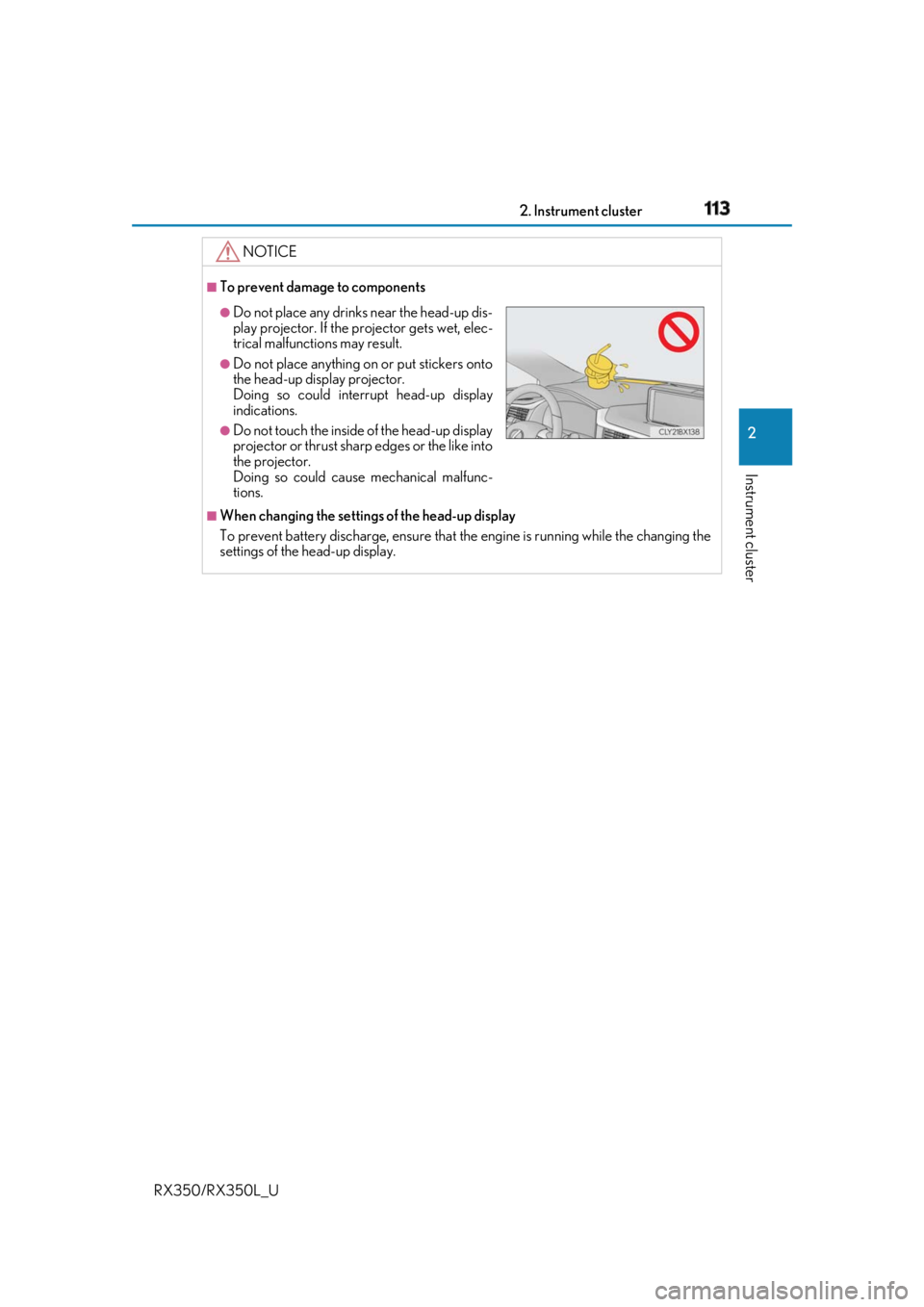
To prevent damage to components
■
When changing the settings of the head-up display
To prevent battery discharge, ensure that the engine is running while the changing the
settings of the head-up display. ●
Do not place any drinks near the head-up dis-
play projector. If the projector gets wet, elec-
trical malfunctions may result. ●
Do not place anything on or put stickers onto
the head-up display projector.
Doing so could interrupt head-up display
indications. ●
Do not touch the inside of the head-up display
projector or thrust sharp edges or the like into
the projector.
Doing so could cause mechanical malfunc-
tions.
Page 120 of 777
119
3 Operation of
each component
RX350/RX350L_U 3-1. Key information
Keys .................................................. 120
3-2. Opening, closing and
locking the doors
Side doors .......................................124
Power back door ........................ 130
Smart access system with
push-button start ...................... 146
3-3. Adjusting the seats
Front seats...................................... 156
Rear seats........................................157
Driving position memory .......... 172
Head restraints ............................. 177
3-4. Adjusting the steering
wheel and mirrors
Steering wheel ............................. 180
Inside rear view mirror ............. 182
Outside rear view mirrors....... 184
3-5. Opening, closing the
windows and moon roof
Power windows ........................... 187
Moon roof ........................................ 191
Panoramic moon roof ............... 195
Page 137 of 777
136 3-2. Opening, closing and locking the doors
RX350/RX350L_U ■
Luggage compartment lights
●
RX350L: The luggage compartment lights turn on when the back door is opened. ●
When the engine switch is turned off, the lights will go off automatically after 20 min-
utes. ■
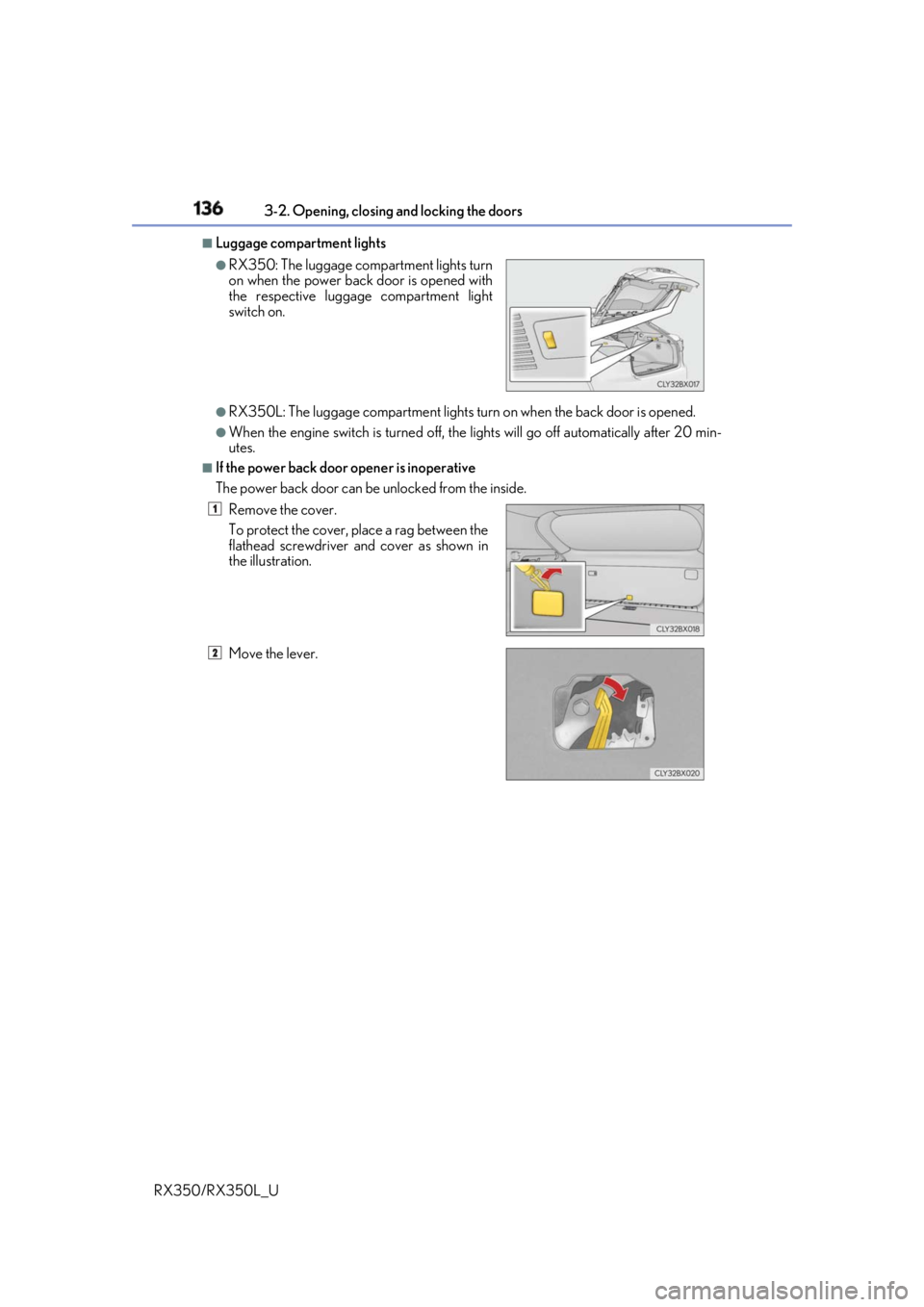
If the power back door opener is inoperative
The power back door can be unlocked from the inside. ●
RX350: The luggage compartment lights turn
on when the power back door is opened with
the respective luggage compartment light
switch on.
Remove the cover.
To protect the cover, place a rag between the
flathead screwdriver and cover as shown in
the illustration.
Move the lever. 1
2
Page 141 of 777
140 3-2. Opening, closing and locking the doors
RX350/RX350L_U WARNING
Observe the following precautions.
Failure to do so may cause parts of the body to be caught, resulting in death or serious
injury. ■
Before driving the vehicle
Before driving the vehicle, ma ke sure that the power back door is fully closed. If the
power back door is not fully closed, it may open unexpectedly while driving, causing an
accident. ■
Caution while driving ●
Keep the power back door closed while driving.
If the power back door is left open, it ma y hit nearby objects while driving or luggage
may be unexpectedly thrown out, causing an accident.
In addition, exhaust gases may enter the ve hicle, causing death or a serious health
hazard. Make sure to close the po wer back door before driving. ●
Never let anyone sit in the luggage compartment.
In the event of sudden braking, sudden swerving or a collision, they are susceptible to
death or serious injury. ■
When children are in the vehicle
Observe the following precautions.
Failure to do so may result in death or serious injury.●
Do not allow children to play in the luggage compartment.
If a child is accidentally lo cked in the luggage compartment, they could have heat
exhaustion or other injuries. ●
Do not allow a child to open or close the power back door.
Doing so may cause the power back door to move unexpectedly, or cause the child’s
hands, arms, head, or neck to be caught by the closing power back door. (The power
back door will not operate when it is disabled: P. 101)
Page 142 of 777
1413-2. Opening, closing and locking the doors
3
Operation of each component
RX350/RX350L_U WARNING ■
Operating the power back door
Observe the following precautions.
Failure to do so may cause parts of the body to be caught, resultin g in death or serious
injury. ●
Remove any heavy loads, such as snow an d ice, from the power back door before
opening it. Failure to do so may cause the power back door to suddenly shut again
after it is opened. ●
When opening or closing the power back d oor, thoroughly check to make sure the
surrounding area is safe. ●
If anyone is in the vicinity, make sure they are safe and let them know that the power
back door is about to open or close. ●
Use caution when opening or closing the power back door in windy weather as it may
move abruptly in strong wind.
●
Do not pull on the back door spindle ( P. 144) to close the power back door, and
do not hang on the back door spindle.
Doing so may cause hands to be caught or the back door spindle to break, causing
an accident. ●
If a bicycle carrier or similar heavy object is attached to the power back door, it may
suddenly shut again after being opened, causing someone’s hands, arms, head or
neck to be caught and injured. When inst alling an accessory part to the power back
door, using a genuine Lexus part is recommended. ●
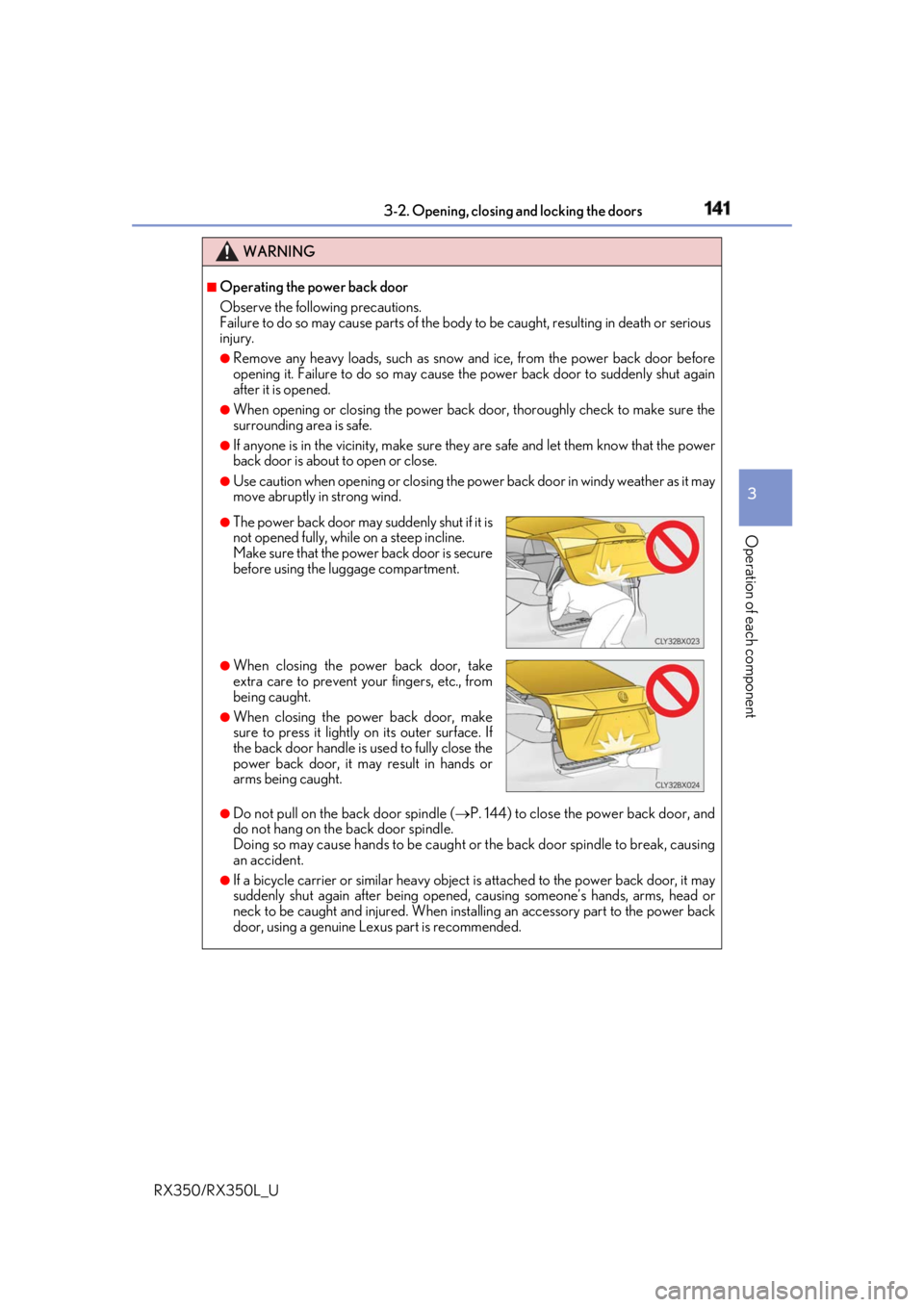
The power back door may suddenly shut if it is
not opened fully, while on a steep incline.
Make sure that the power back door is secure
before using the luggage compartment. ●
When closing the power back door, take
extra care to prevent your fingers, etc., from
being caught. ●
When closing the power back door, make
sure to press it lightly on its outer surface. If
the back door handle is used to fully close the
power back door, it may result in hands or
arms being caught.
Page 144 of 777
1433-2. Opening, closing and locking the doors
3
Operation of each component
RX350/RX350L_U WARNING ●
If a bicycle carrier or similar heavy object is attached to the power back door, the
power back door may not operate, causin g a malfunction, or the power back door
may suddenly shut again after being open ed, causing someone’s hands, arms, head
or neck to be caught and injured. When installing an accessory part to the power
back door, using a genuine Lexus part is recommended. ■
Jam protection function
Observe the following precautions.
Failure to do so may cause death or serious injury. ●
Never use any part of your body to intentionally activate the jam protection function. ●
The jam protection function may not work if something gets caught just before the
power back door fully closes. Be careful no t to get fingers caught or anything else.●
The jam protection function may not work depending on the shape of the object that
is caught. Be careful not to catch fingers or anything else.