head LEXUS RX350 2019 Workshop Manual
[x] Cancel search | Manufacturer: LEXUS, Model Year: 2019, Model line: RX350, Model: LEXUS RX350 2019Pages: 777, PDF Size: 12.44 MB
Page 192 of 777
1913-5. Opening, closing the windows and moon roof
3
Operation of each component
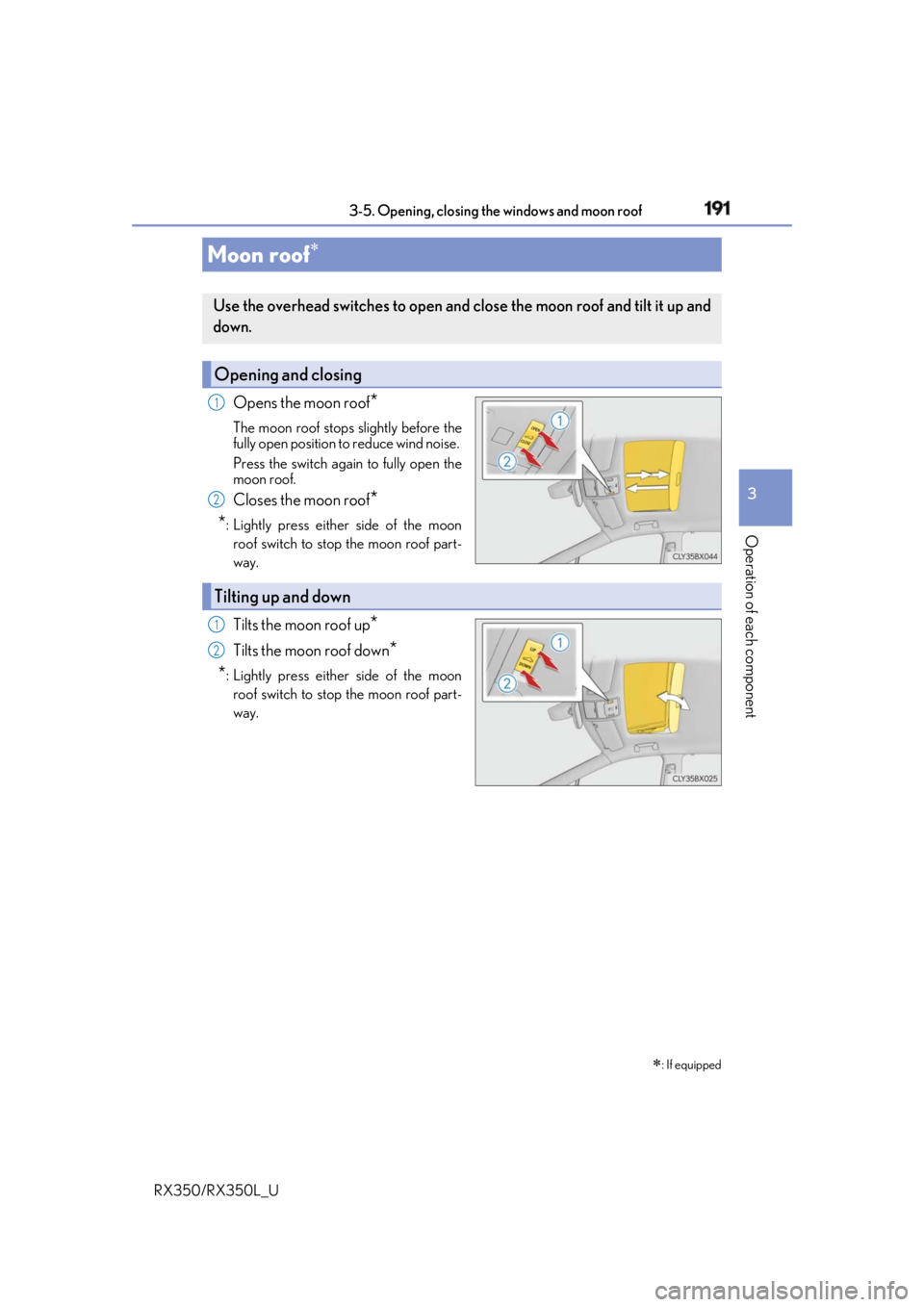
RX350/RX350L_U Opens the moon roof
*The moon roof stops slightly before the
fully open position to reduce wind noise.
Press the switch again to fully open the
moon roof.
Closes the moon roof
*
* : Lightly press either side of the moon
roof switch to stop the moon roof part-
way.
Tilts the moon roof up
*Tilts the moon roof down
*
* : Lightly press either side of the moon
roof switch to stop the moon roof part-
way.Moon roof
: If equippedUse the overhead switches to open and close the moon roof and tilt it up and
down.
Opening and closing 1
2
Tilting up and down 1
2
Page 195 of 777
194 3-5. Opening, closing the windows and moon roof
RX350/RX350L_U WARNING
Observe the following precautions.
Failing to do so may cause death or serious injury. ■
Opening the moon roof ●
Do not allow any passengers to put their hands or heads outside the vehicle while it is
moving. ●
Do not sit on top of the moon roof. ■
Opening and closing the moon roof ●
The driver is responsible for moon roof opening and closing operations.
In order to prevent accidental operation, especially by a child, do not let a child oper-
ate the moon roof. It is possible for child ren and other passengers to have body parts
caught in the moon roof.
■
Jam protection function ●
Never use any part of your body to intentionally activate the jam protection function. ●
The jam protection function may not work if something gets caught just before the
moon roof is fully closed. Also, the jam prot ection function is not designed to operate
while the switch is being pressed. Take care so that your fingers, etc. do not get
caught. ●
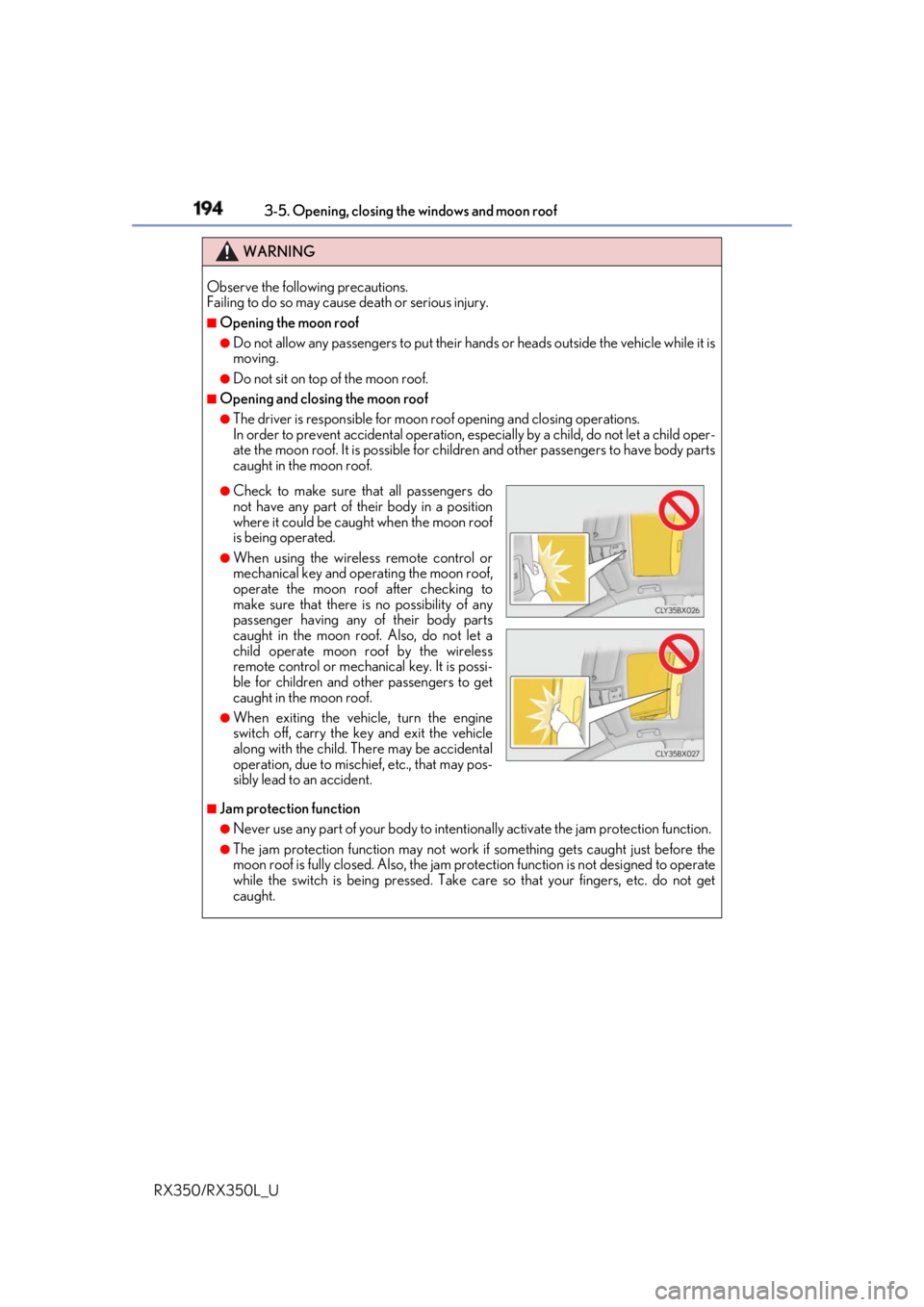
Check to make sure th at all passengers do
not have any part of their body in a position
where it could be caught when the moon roof
is being operated. ●
When using the wireless remote control or
mechanical key and operating the moon roof,
operate the moon roof after checking to
make sure that there is no possibility of any
passenger having any of their body parts
caught in the moon roof. Also, do not let a
child operate moon roof by the wireless
remote control or mechanical key. It is possi-
ble for children and other passengers to get
caught in the moon roof. ●
When exiting the vehicle, turn the engine
switch off, carry the ke y and exit the vehicle
along with the child. There may be accidental
operation, due to mischief, etc., that may pos-
sibly lead to an accident.
Page 196 of 777
1953-5. Opening, closing the windows and moon roof
3
Operation of each component
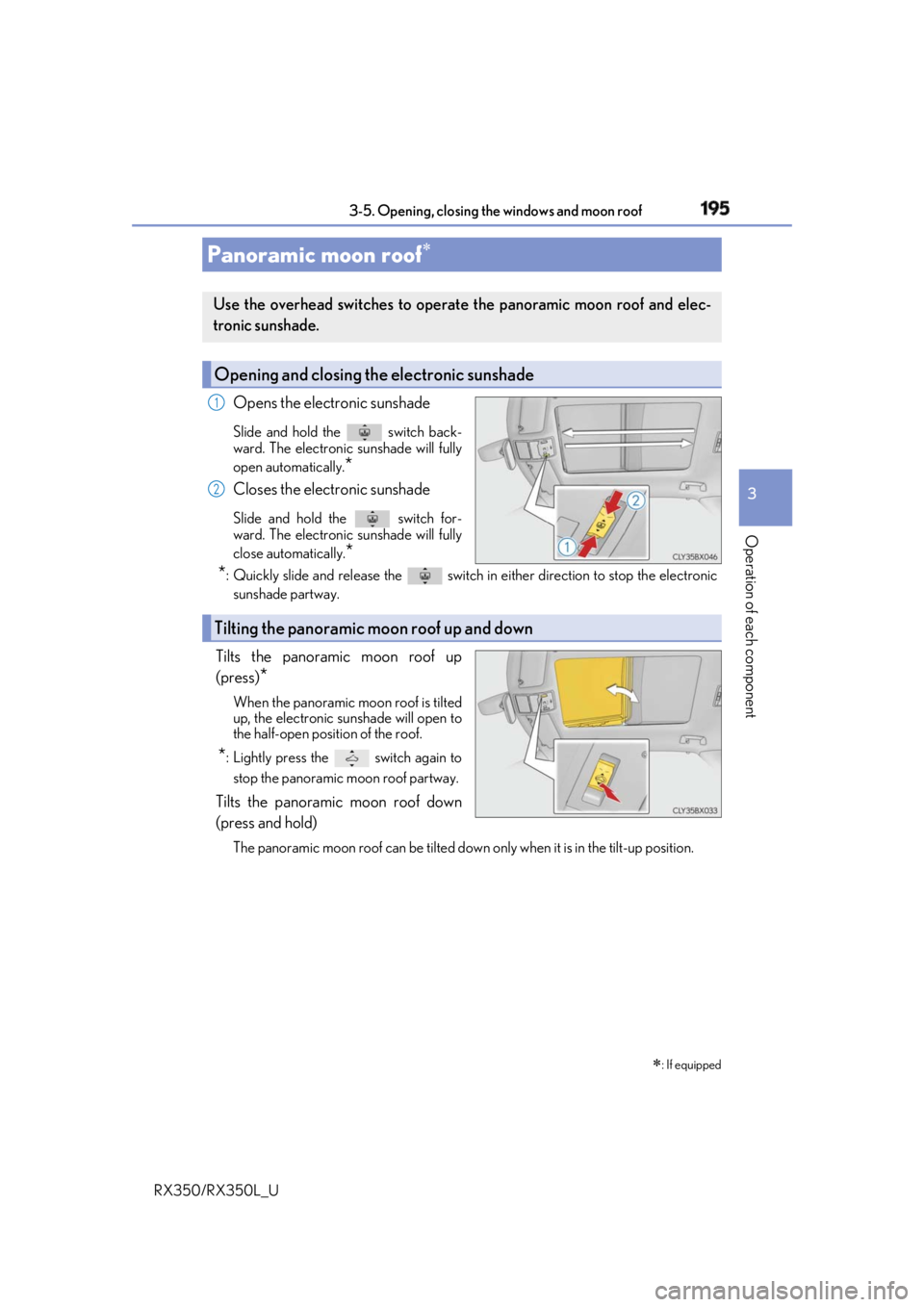
RX350/RX350L_U Opens the electronic sunshade Slide and hold the switch back-
ward. The electronic sunshade will fully
open automatically.
*Closes the electronic sunshade Slide and hold th e switch for-
ward. The electronic sunshade will fully
close automatically.
*
* : Quickly slide and release th e switch in either direct ion to stop the electronic
sunshade partway.
Tilts the panoramic moon roof up
(press)
* When the panoramic moon roof is tilted
up, the electronic su nshade will open to
the half-open position of the roof.
* : Lightly press the switch again to
stop the panoramic moon roof partway.
Tilts the panoramic moon roof down
(press and hold) The panoramic moon roof can be tilted down only when it is in the tilt-up position.Panoramic moon roof
: If equippedUse the overhead switches to operat e the panoramic moon roof and elec-
tronic sunshade.
Opening and closing the electronic sunshade 1
2
Tilting the panoramic moon roof up and down
Page 202 of 777

201
4 Driving
RX350/RX350L_U 4-3. Operating the lights and
wipers
Headlight switch .........................252
Automatic High Beam .............256
Fog light switch .......................... 260
Windshield wipers and
washer........................................... 261
Rear window wiper and
washer.......................................... 267
4-4. Refueling
Opening the fuel tank
cap .................................................269 4-5. Using the driving support
systems
Lexus Safety System+ .............. 274
PCS
(Pre-Collision System) .......... 281
LKA
(Lane-Keeping A ssist) ........... 291
Dynamic radar cruise
control with full-speed
range ........................................... 300
BSM (Blind Spot Monitor) ...... 313
• BSM function ...........................317
• RCTA function....................... 321
Intuitive parking assist .............. 326
Intelligent Clearance Sonar
(ICS) ............................................. 336
Lexus parking assist
monitor ........................................ 357
Driving mode select
switch ........................................... 373
All-wheel drive lock
switch ........................................... 377
Driving assist systems .............. 378
4-6. Driving tips
Winter driving tips .....................384
Utility vehicle
precautions............................... 388
Page 223 of 777
222 4-1. Before driving
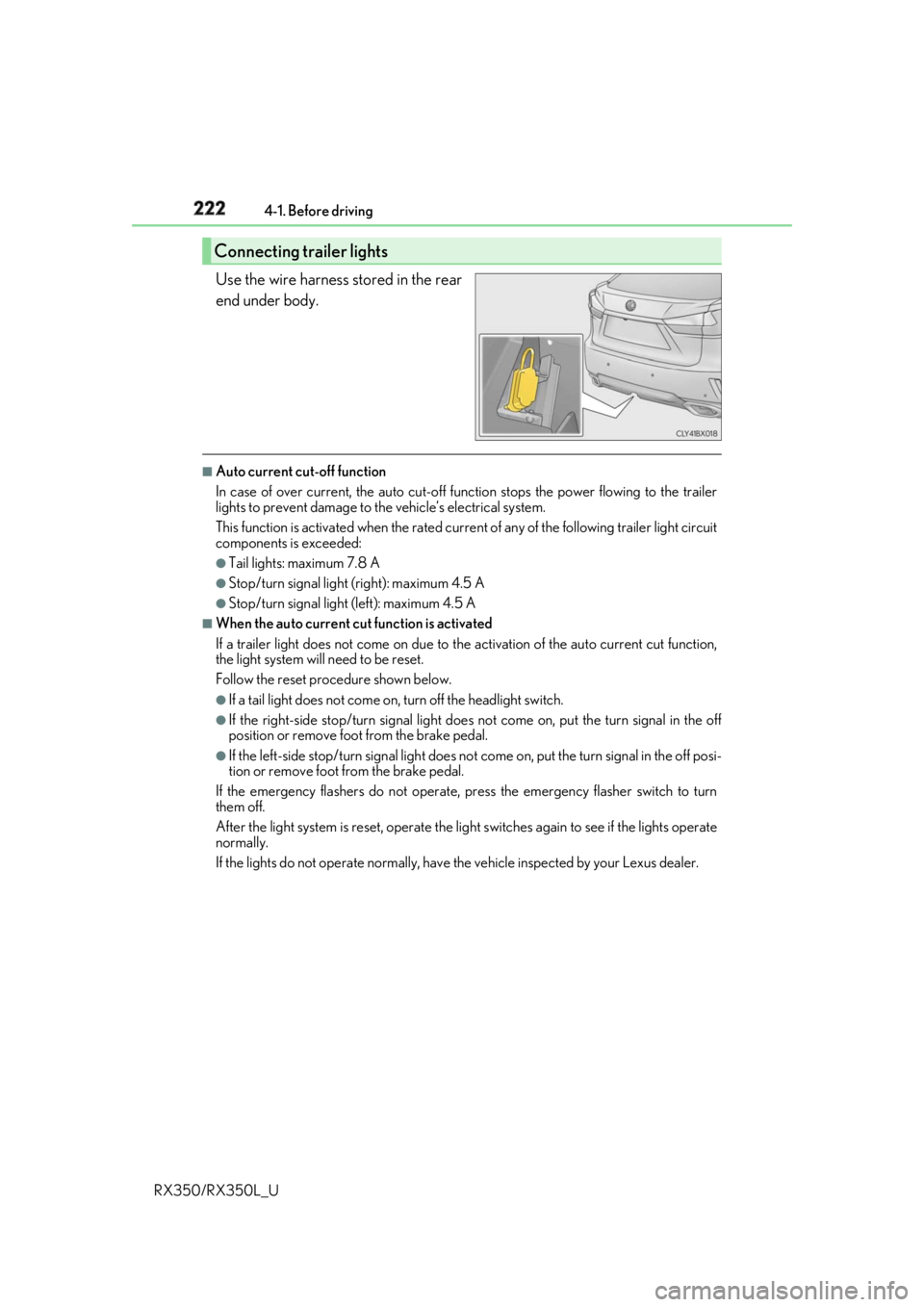
RX350/RX350L_U Use the wire harness stored in the rear
end under body. ■
Auto current cut-off function
In case of over current, the auto cut-off function stops the power flowing to the trailer
lights to prevent damage to the vehicle’s electrical system.
This function is activated when the rated current of any of the following trailer light circuit
components is exceeded: ●
Tail lights: maximum 7.8 A ●
Stop/turn signal light (right): maximum 4.5 A ●
Stop/turn signal light (left): maximum 4.5 A ■
When the auto current cu t function is activated
If a trailer light does not come on due to th e activation of the auto current cut function,
the light system will need to be reset.
Follow the reset procedure shown below. ●
If a tail light does not come on, turn off the headlight switch. ●
If the right-side stop/turn signal light does not come on, put the turn signal in the off
position or remove foot from the brake pedal.●
If the left-side stop/turn signal light does not come on, put the turn signal in the off posi-
tion or remove foot from the brake pedal.
If the emergency flashers do not operate, press the emergency flasher switch to turn
them off.
After the light system is reset, operate the lig ht switches again to see if the lights operate
normally.
If the lights do not operate normally, have the vehicle inspected by your Lexus dealer.Connecting trailer lights
Page 227 of 777

226 4-1. Before driving
RX350/RX350L_U ■
Break-in schedule
If your vehicle is new or equipped with any new power train components (such as an
engine, transaxle, transfer (AWD models), rear differential (AWD models) or wheel
bearing), Lexus recommends that you do not tow a trailer until the vehicle has been
driven for over 500 miles (800 km).
After the vehicle has been driven for over 500 miles (800 km), you can start towing.
However, for the next 500 miles (800 km), drive the vehicle at a speed of less than
50 mph (80 km/h) when towing a trailer, and avoid full throttle acceleration.■
Maintenance ●
If you tow a trailer, your vehicle will requir e more frequent maintenance due to the addi-
tional load. (See “Warranty and Services Guide”, “Owner’s Manual Supplement” or
“Scheduled Maintenance”.) ●
Retighten the fixing bolts of the towing ba ll and bracket after approximately 600 miles
(1000 km) of trailer towing. ■
If trailer sway occurs
One or more factors (crosswinds, passing ve hicles, rough roads, etc.) can adversely
affect handling of your vehicle and trailer, causing instability. ●
If trailer swaying occurs:
• Firmly grip the steering wh eel. Steer straight ahead.
Do not try to control trailer sway ing by turning the steering wheel.
• Begin releasing the accelerator pedal im mediately but very gradually to reduce
speed.
Do not increase speed. Do not apply vehicle brakes.
If you make no extreme correction with the st eering or brakes, your vehicle and trailer
should stabilize. (if enabled, Trailer Sway Control can also he lp to stabilize the vehicle and
trailer.) ●
After the trailer sw aying has stopped:
• Stop in a safe place. Get all occupants out of the vehicle.
• Check the tires of the vehicle and the trailer.
• Check the load in the trailer.
Make sure the load has not shifted.
Make sure the tongue weight is appropriate, if possible.
• Check the load in the vehicle.
Make sure the vehicle is not ov erloaded after occupants get in.
If you cannot find any problems, the speed at which trailer swaying occurred is beyond
the limit of your particular vehicle-trailer combination.
Drive at a lower speed to prevent instability. Remember that swaying of the towing vehi-
cle-trailer increases as speed increases.
Page 240 of 777
2394-2. Driving procedures
4
Driving
RX350/RX350L_U ■
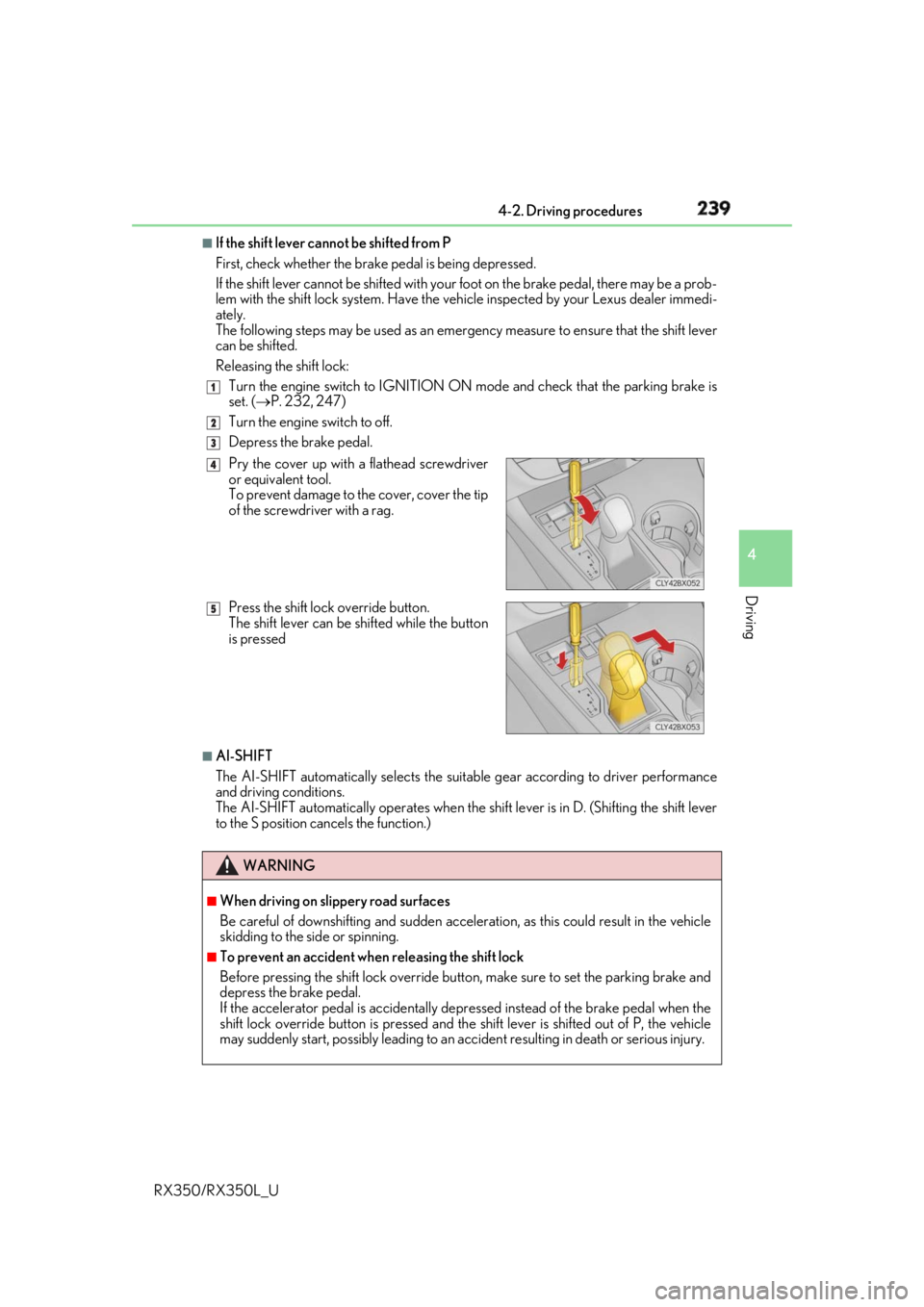
If the shift lever cannot be shifted from P
First, check whether the brak e pedal is being depressed.
If the shift lever cannot be shifted with your foot on the brake pedal, there may be a prob-
lem with the shift lock system. Have the vehi cle inspected by your Lexus dealer immedi-
ately.
The following steps may be used as an emergency measure to ensure that the shift lever
can be shifted.
Releasing the shift lock:
Turn the engine switch to IGNITION ON mode and check that the parking brake is
set. ( P. 232, 247)
Turn the engine switch to off.
Depress the brake pedal.
■
AI-SHIFT
The AI-SHIFT automatically se lects the suitable gear according to driver performance
and driving conditions.
The AI-SHIFT automatically operates when the sh ift lever is in D. (Shifting the shift lever
to the S position cancels the function.) 1
2
3
Pry the cover up with a flathead screwdriver
or equivalent tool.
To prevent damage to the cover, cover the tip
of the screwdriver with a rag.
Press the shift lock override button.
The shift lever can be shifted while the button
is pressed
WARNING ■
When driving on slippery road surfaces
Be careful of downshifting an d sudden acceleration, as this could result in the vehicle
skidding to the side or spinning. ■
To prevent an accident wh en releasing the shift lock
Before pressing the shift lock override butto n, make sure to set the parking brake and
depress the brake pedal.
If the accelerator pedal is accidentally depressed instead of the brake pedal when the
shift lock override button is pressed and the shift lever is shifted out of P, the vehicle
may suddenly start, possibly leading to an a ccident resulting in death or serious injury.4
5
Page 245 of 777
244 4-2. Driving procedures
RX350/RX350L_U ■
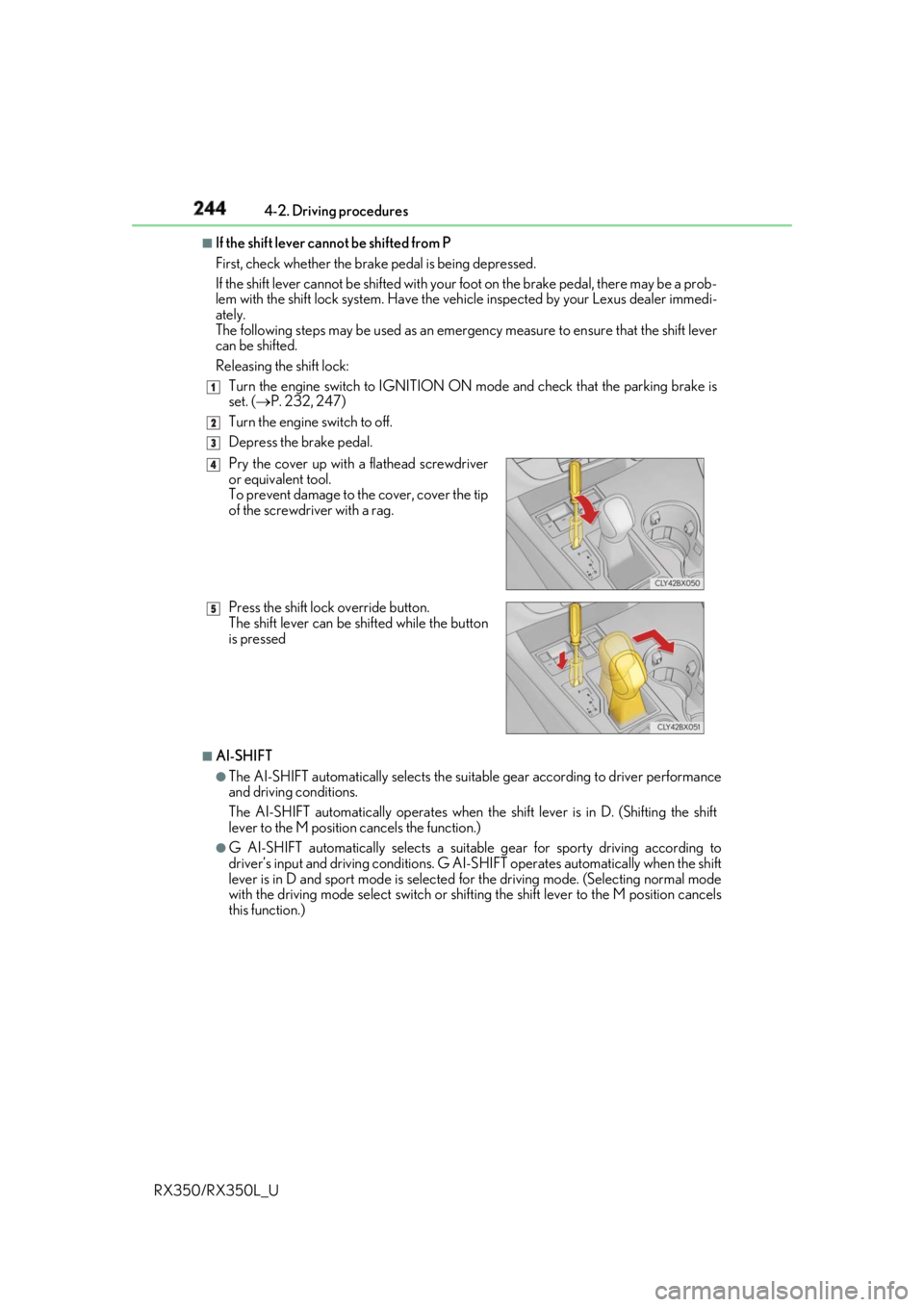
If the shift lever cannot be shifted from P
First, check whether the brak e pedal is being depressed.
If the shift lever cannot be shifted with your foot on the brake pedal, there may be a prob-
lem with the shift lock system. Have the vehi cle inspected by your Lexus dealer immedi-
ately.
The following steps may be used as an emergency measure to ensure that the shift lever
can be shifted.
Releasing the shift lock:
Turn the engine switch to IGNITION ON mode and check that the parking brake is
set. ( P. 232, 247)
Turn the engine switch to off.
Depress the brake pedal.
■
AI-SHIFT ●
The AI-SHIFT automatically selects the suitab le gear according to driver performance
and driving conditions.
The AI-SHIFT automatically operates when th e shift lever is in D. (Shifting the shift
lever to the M position cancels the function.) ●
G AI-SHIFT automatically selects a suitable gear for sporty driving according to
driver’s input and driving conditions. G AI-S HIFT operates automatically when the shift
lever is in D and sport mode is selected for the driving mode. (Selecting normal mode
with the driving mode select switch or shifting the shift lever to the M position cancels
this function.) 1
2
3
Pry the cover up with a flathead screwdriver
or equivalent tool.
To prevent damage to the cover, cover the tip
of the screwdriver with a rag.
Press the shift lock override button.
The shift lever can be shifted while the button
is pressed 4
5
Page 253 of 777
252
RX350/RX350L_U 4-3. Operating the lights and wipers
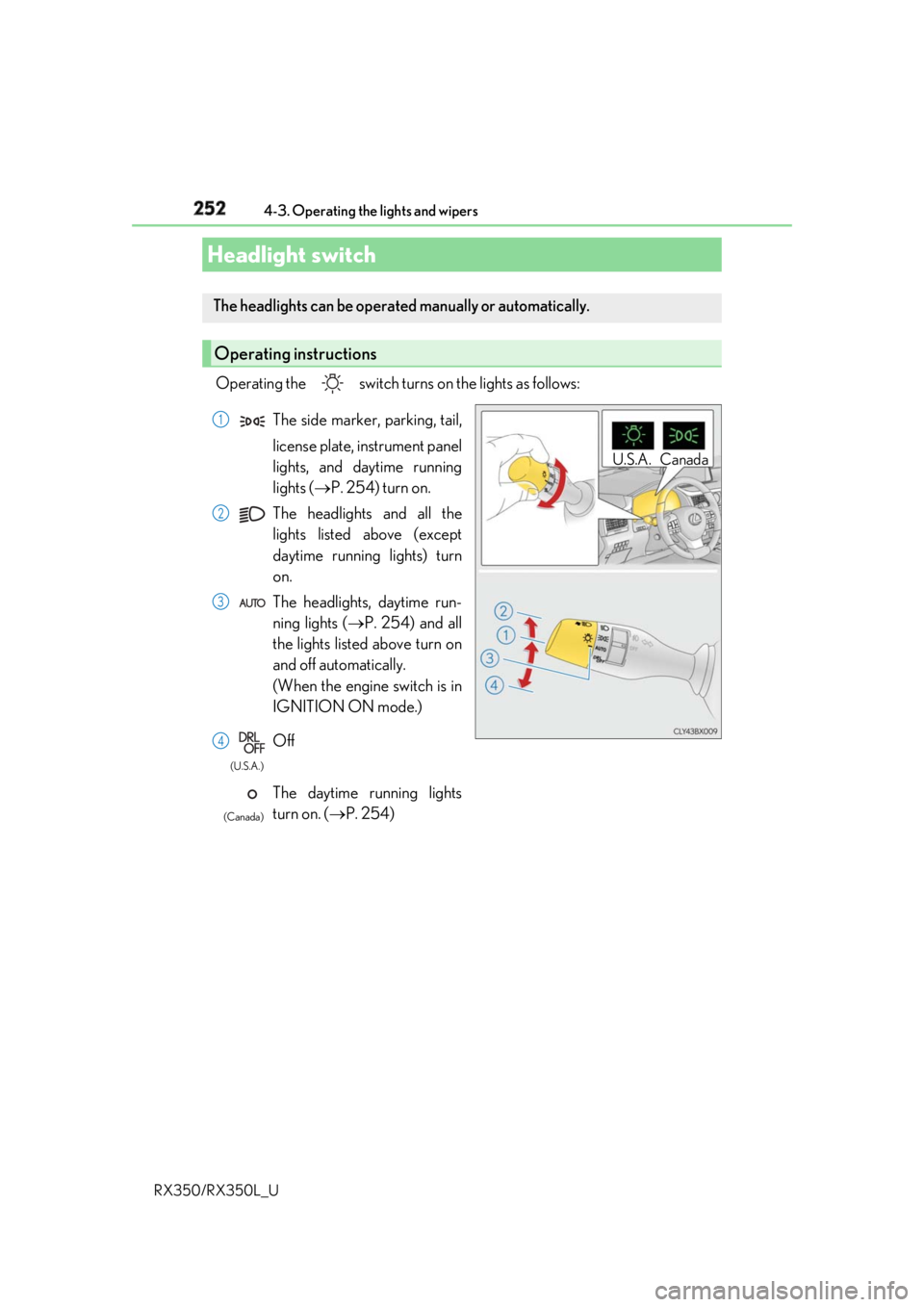
Operating the switch turn s on the lights as follows:
Headlight switch The headlights can be operated manually or automatically.
Operating instructions U.S.A. CanadaThe side marker, parking, tail,
license plate, instrument panel
lights, and daytime running
lights ( P. 254) turn on.
The headlights and all the
lights listed above (except
daytime running lights) turn
on.
The headlights, daytime run-
ning lights ( P. 254) and all
the lights listed above turn on
and off automatically.
(When the engine switch is in
IGNITION ON mode.)
Off
The daytime running lights
turn on. ( P. 254) 1
2
3
4 (U.S.A.)
(Canada)
Page 254 of 777
2534-3. Operating the lights and wipers
4
Driving
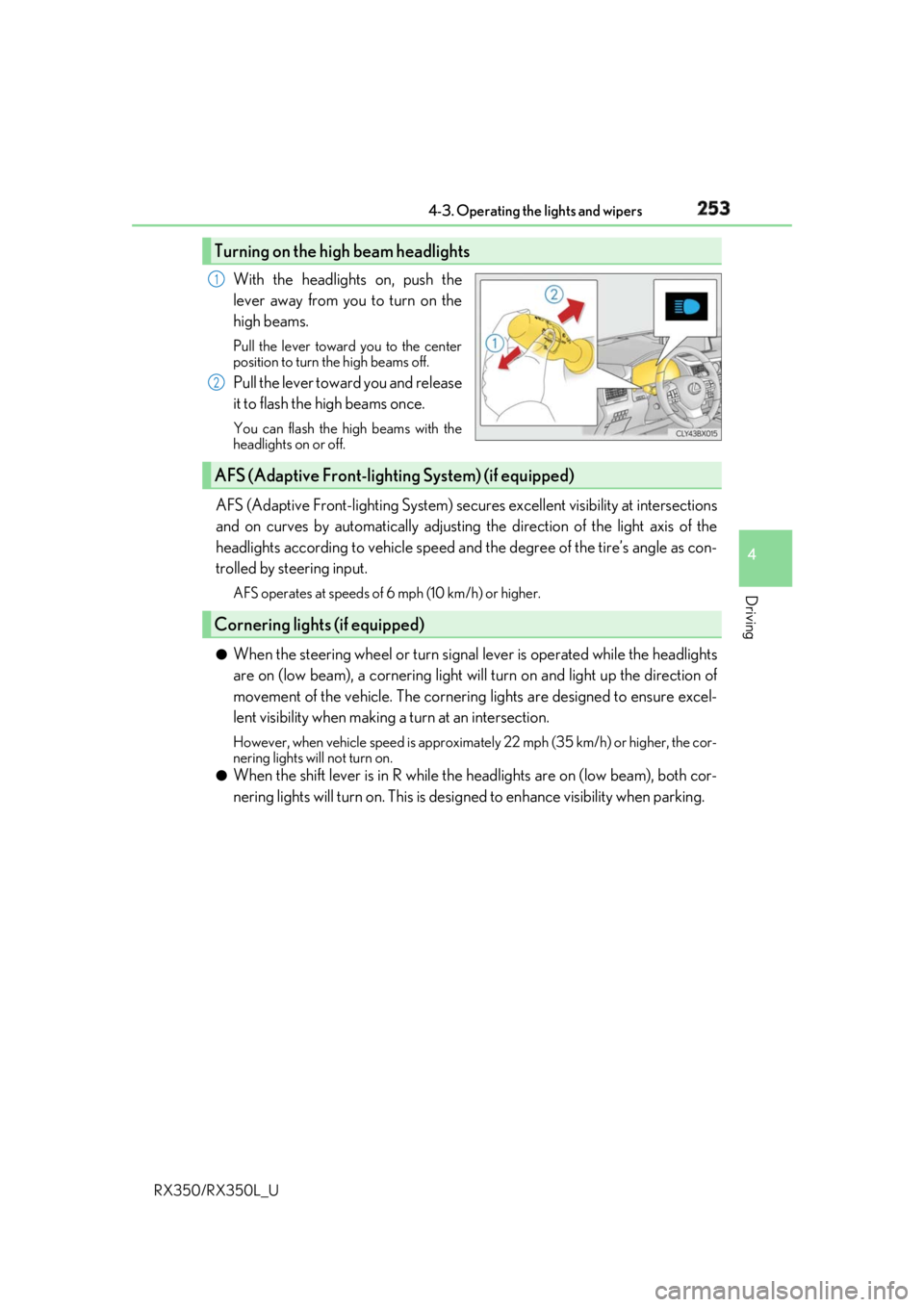
RX350/RX350L_U With the headlights on, push the
lever away from you to turn on the
high beams. Pull the lever toward you to the center
position to turn the high beams off.
Pull the lever toward you and release
it to flash the high beams once. You can flash the high beams with the
headlights on or off.
AFS (Adaptive Front-lighting System) secures excellent visibility at intersections
and on curves by automatically adjusting the direction of the light axis of the
headlights according to vehicle speed and the degree of the tire’s angle as con-
trolled by steering input. AFS operates at speeds of 6 mph (10 km/h) or higher.
●
When the steering wheel or turn signal lever is operated while the headlights
are on (low beam), a cornering light w ill turn on and light up the direction of
movement of the vehicle. The cornerin g lights are designed to ensure excel-
lent visibility when making a turn at an intersection. However, when vehicle speed is approximately 22 mph (35 km/h) or higher, the cor-
nering lights will not turn on.●
When the shift lever is in R while the headlights are on (low beam), both cor-
nering lights will turn on. This is desi gned to enhance visibility when parking.Turning on the high beam headlights 1
2
AFS (Adaptive Front-lighting System) (if equipped)
Cornering lights (if equipped)