tow LEXUS RX350 2019 Service Manual
[x] Cancel search | Manufacturer: LEXUS, Model Year: 2019, Model line: RX350, Model: LEXUS RX350 2019Pages: 777, PDF Size: 12.44 MB
Page 303 of 777
302 4-5. Using the driving support systems
RX350/RX350L_U WARNING ■
Situations unsuitable for dynamic rada r cruise control with full-speed range
Do not use dynamic radar cruise control with full-speed range in any of the following
situations.
Doing so may result in inappropriate speed control and could cause an accident result-
ing in death or serious injury. ●
Roads where there are pedestrians, cyclers, etc. ●
In heavy traffic ●
On roads with sharp bends ●
On winding roads ●
On slippery roads, such as thos e covered with rain, ice or snow●
On steep downhills, or where there are sudden changes between sharp up and down
gradients
Vehicle speed may exceed the set speed when driving down a steep hill.●
At entrances to freeways and highways ●
When weather conditions are bad enough that they may prevent the sensors from
detecting correctly (fog, snow, sandstorm, heavy rain, etc.)●
When there is rain, snow, etc. on the fron t surface of the radar sensor or camera sen-
sor ●
In traffic conditions that require frequent repeated a cceleration and deceleration●
When your vehicle is towing a trailer or during emergency towing ●
When an approach warning buzzer is heard often
Page 308 of 777
3074-5. Using the driving support systems
4
Driving
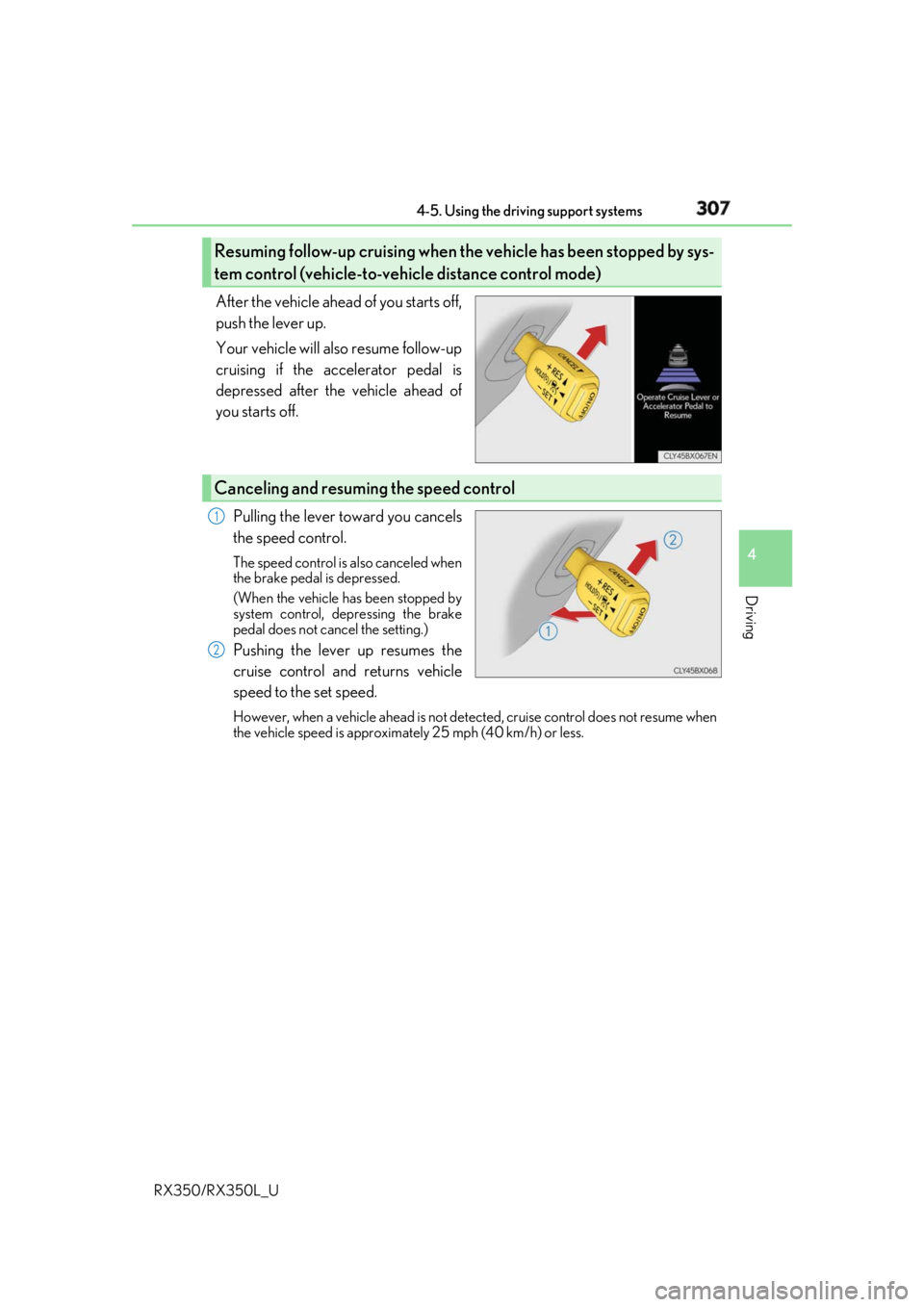
RX350/RX350L_U After the vehicle ahead of you starts off,
push the lever up.
Your vehicle will also resume follow-up
cruising if the accelerator pedal is
depressed after the vehicle ahead of
you starts off.
Pulling the lever toward you cancels
the speed control. The speed control is also canceled when
the brake pedal is depressed.
(When the vehicle has been stopped by
system control, depressing the brake
pedal does not cancel the setting.)
Pushing the lever up resumes the
cruise control and returns vehicle
speed to the set speed. However, when a vehicle ahead is not detected, cruise control does not resume when
the vehicle speed is approximately 25 mph (40 km/h) or less.Resuming follow-up cruising when the vehicle has been stopped by sys-
tem control (vehicle-to-vehicle distance control mode)
Canceling and resuming the speed control 1
2
Page 315 of 777
314 4-5. Using the driving support systems
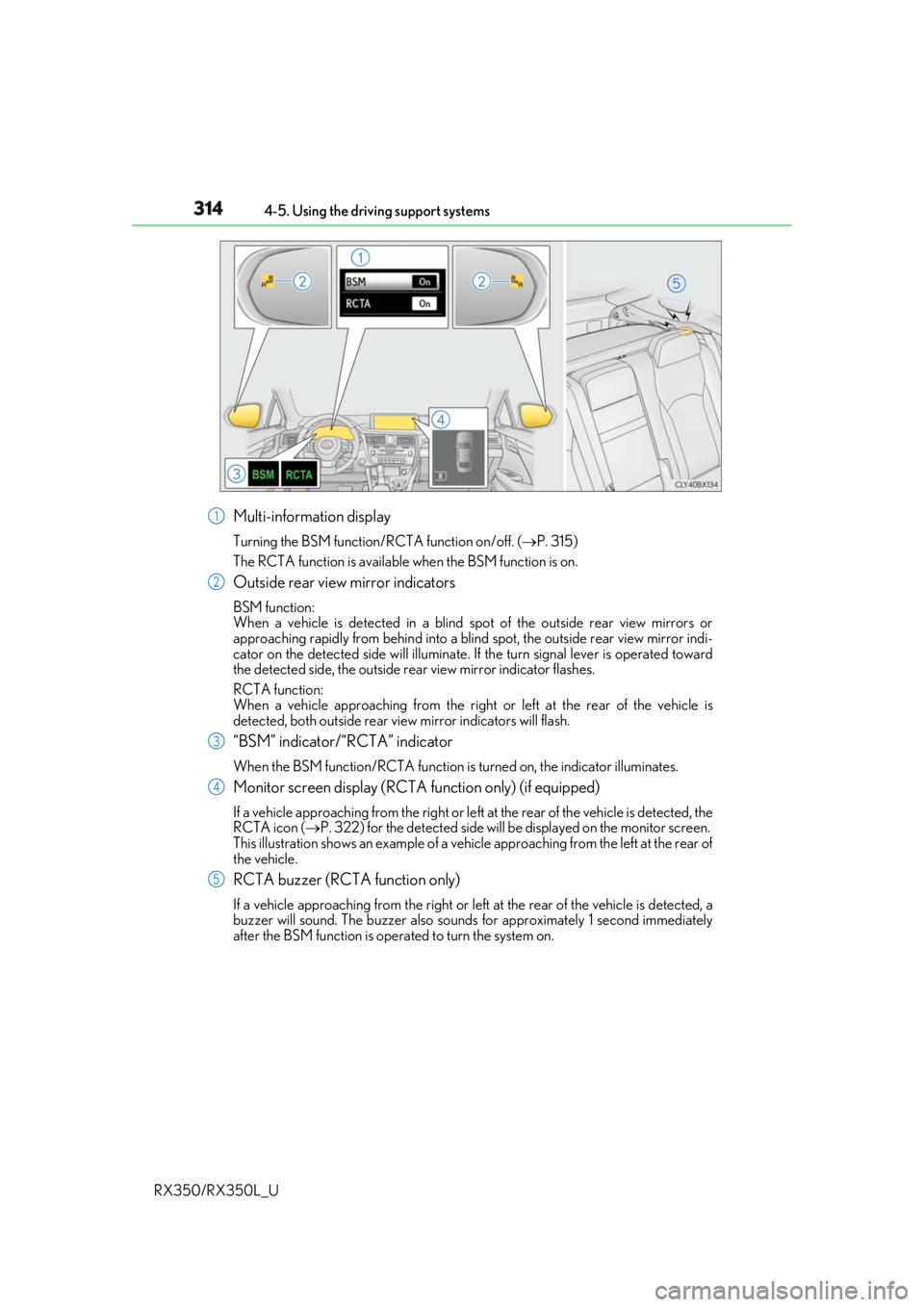
RX350/RX350L_U Multi-information display Turning the BSM function/RCTA function on/off. ( P. 315)
The RCTA function is available when the BSM function is on.
Outside rear view mirror indicators BSM function:
When a vehicle is detected in a blind spot of the outside rear view mirrors or
approaching rapidly from behind into a blin d spot, the outside rear view mirror indi-
cator on the detected side will illuminate. If the turn signal lever is operated toward
the detected side, the outside rear view mirror indicator flashes.
RCTA function:
When a vehicle approaching from the right or left at the rear of the vehicle is
detected, both outsid e rear view mirror indicators will flash.
“BSM” indicator/“RCTA” indicator When the BSM function/RCTA function is turned on, the indicator illuminates.
Monitor screen display (RCTA function only) (if equipped)If a vehicle approaching from the right or left at the rear of the vehicle is detected, the
RCTA icon ( P. 322) for the detected side will be displayed on the monitor screen.
This illustration shows an example of a vehi cle approaching from the left at the rear of
the vehicle.
RCTA buzzer (RCTA function only) If a vehicle approaching from the right or left at the rear of the vehicle is detected, a
buzzer will sound. The buzzer also sounds for approximately 1 second immediately
after the BSM function is operated to turn the system on. 1
2
3
4
5
Page 321 of 777
320 4-5. Using the driving support systems
RX350/RX350L_U ■
Conditions under which the BSM function may not function correctly ●
The BSM function may not detect vehicles correctly in the following situations:
• When the sensor is misaligned due to a stro ng impact to the sensor or its surround-
ing area
• When mud, snow, ice, a sticke r, etc. is covering the sensor or surrounding area on
the rear bumper
• When driving on a road surf ace that is wet with standi ng water during bad weather,
such as heavy rain, snow, or fog
• When multiple vehicles are approaching wi th only a small gap between each vehicle
• When the distance between your vehicle and a following vehicle is short
• When there is a significant difference in speed between your vehicle and the vehicle
that enters the detection area
• When the difference in speed between your vehicle and another vehicle is changing
• When a vehicle enters a detection area traveling at about the same speed as your
vehicle
• As your vehicle starts from a stop, a vehicle remains in the detection area
• When driving up and down cons ecutive steep inclines, such as hills, dips on the road,
etc.
• When driving on roads with sharp bends, consecutive curves, or uneven surfaces
• When vehicle lanes are wide, or when driving on the edge of a lane, and the vehicle
in an adjacent lane is far away from your vehicle
• When towing a trailer (vehicles with towing package)
• When items such as a bicycle carrier are installed on the rear of the vehicle
• When there is a significant difference in height between your vehicle and the vehicle
that enters the detection area
• Immediately after the BSM function is turned on ●
Instances of the BSM function unnecessarily detecting a vehicle and/or object may
increase in the following situations:
• When the sensor is misaligned due to a stro ng impact to the sensor or its surround-
ing area
• When the distance between your vehicle and a guardrail, wall, etc. that enters the
detection area is short
• When driving up and down cons ecutive steep inclines, such as hills, dips on the road,
etc.
• When vehicle lanes are narrow, or when driv ing on the edge of a lane, and a vehicle
traveling in a lane other than the ad jacent lanes enters the detection area
• When driving on roads with sharp bends, consecutive curves, or uneven surfaces
• When the tires are slipping or spinning
• When the distance between your vehicle and a following vehicle is short
• When a bicycle carrier or other accessory is installed to the rear of the vehicle
• When towing a trailer (vehicles with towing package)
Page 325 of 777
324 4-5. Using the driving support systems
RX350/RX350L_U ■
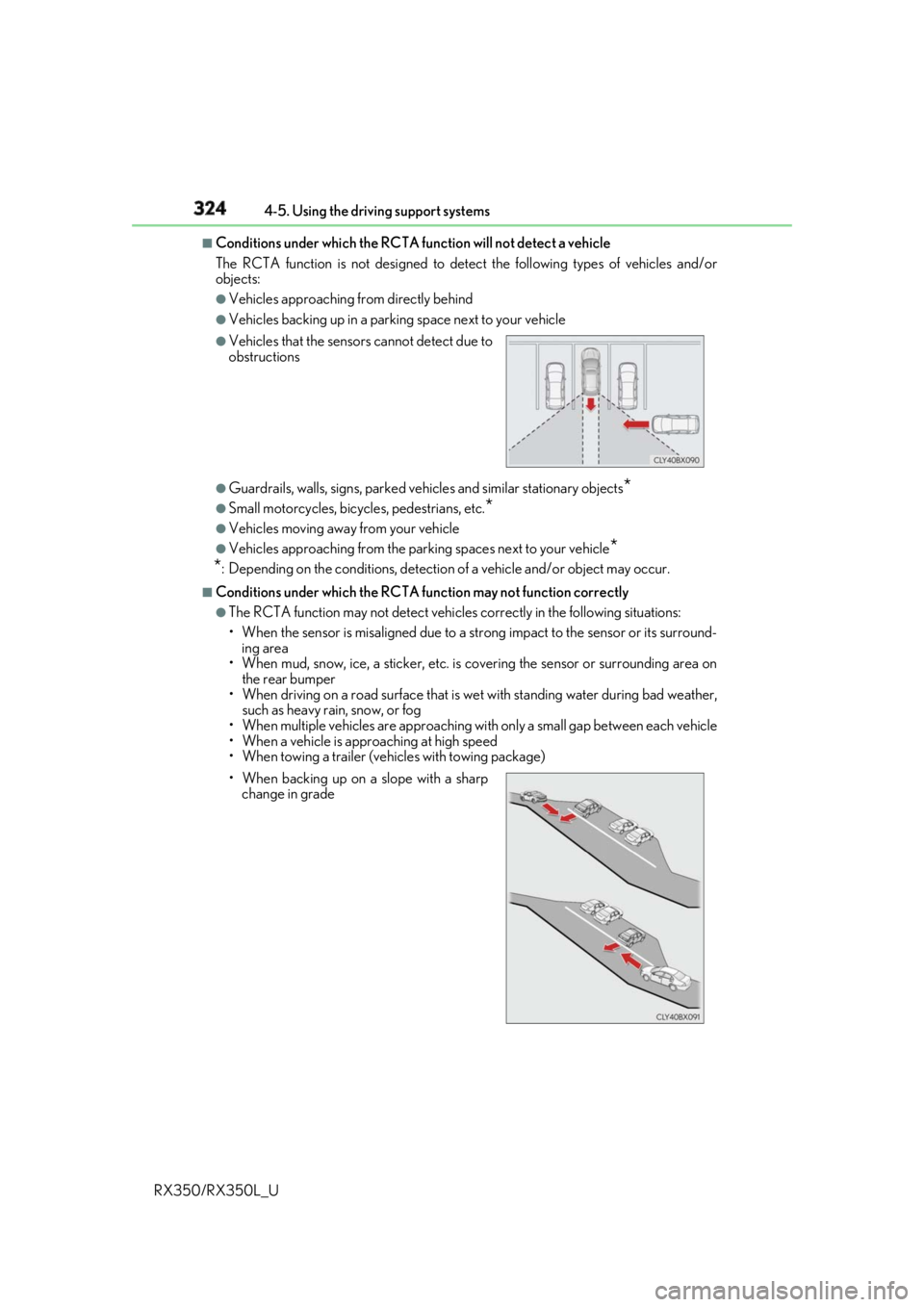
Conditions under which the RCTA fu nction will not detect a vehicle
The RCTA function is not designed to detect the following types of vehicles and/or
objects: ●
Vehicles approaching from directly behind ●
Vehicles backing up in a parkin g space next to your vehicle
●
Guardrails, walls, signs, parked vehi cles and similar stationary objects
*●
Small motorcycles, bicycles, pedestrians, etc.
*●
Vehicles moving away from your vehicle ●
Vehicles approaching from the parking spaces next to your vehicle
*
* : Depending on the conditions, detection of a vehicle and/or object may occur.■
Conditions under which the RCTA function may not function correctly ●
The RCTA function may not detect vehicles correctly in the following situations:
• When the sensor is misaligned due to a stro ng impact to the sensor or its surround-
ing area
• When mud, snow, ice, a sticke r, etc. is covering the sensor or surrounding area on
the rear bumper
• When driving on a road surf ace that is wet with standi ng water during bad weather,
such as heavy rain, snow, or fog
• When multiple vehicles are approaching wi th only a small gap between each vehicle
• When a vehicle is approaching at high speed
• When towing a trailer (vehicles with towing package) ●
Vehicles that the sensors cannot detect due to
obstructions
• When backing up on a slope with a sharp
change in grade
Page 326 of 777
3254-5. Using the driving support systems
4
Driving
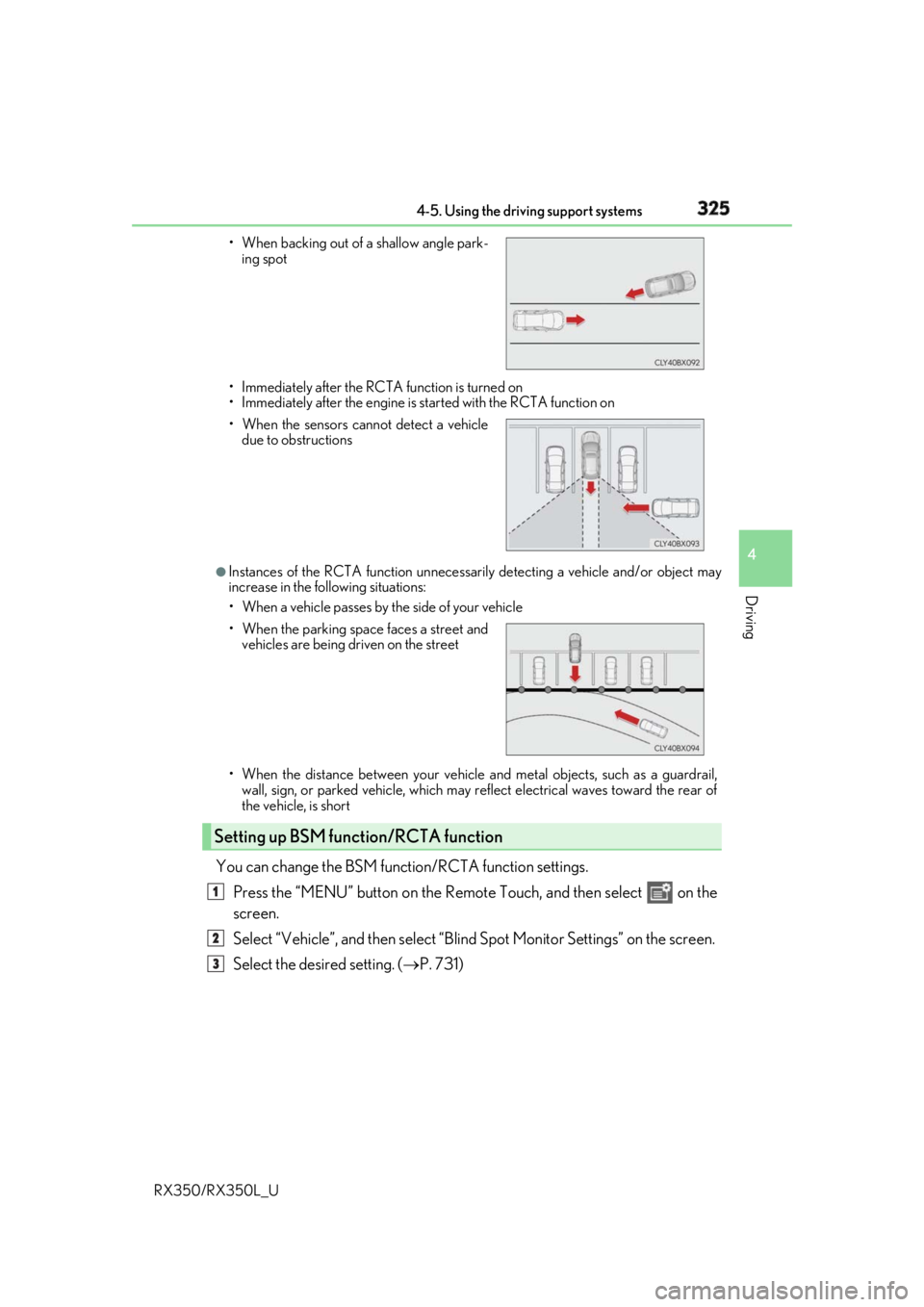
RX350/RX350L_U • Immediately after the RCTA function is turned on
• Immediately after the engine is started with the RCTA function on
●
Instances of the RCTA function unnecessari ly detecting a vehicle and/or object may
increase in the following situations:
• When a vehicle passes by th e side of your vehicle
• When the distance between your vehicle and metal objects, such as a guardrail,
wall, sign, or parked vehicle, which may re flect electrical waves toward the rear of
the vehicle, is short
You can change the BSM function/RCTA function settings.
Press the “MENU” button on the Remote Touch, and then select on the
screen.
Select “Vehicle”, and then select “Blind Spot Monito r Settings” on the screen.
Select the desired setting. ( P. 731)• When backing out of a shallow angle park-
ing spot
• When the sensors cannot detect a vehicle
due to obstructions
• When the parking space faces a street and
vehicles are being driven on the street
Setting up BSM function/RCTA function 1
2
3
Page 336 of 777
3354-5. Using the driving support systems
4
Driving
RX350/RX350L_U WARNING ■
When using the intuitive parking assist
Observe the following precautions.
Failing to do so may result in the vehicle be ing unable to be driv en safely and possibly
cause an accident. ●
Do not use the sensor at speeds in excess of 6 mph (10 km/h). ●
The sensors’ detection areas and reaction ti mes are limited. When moving forward or
reversing, check the areas surrounding the vehicle (especially th e sides of the vehi-
cle) for safety, and drive slowly, using the brake to control the vehicle’s speed. ●
Do not install accessories within the sensors’ detection areas.●
The vehicle is equipped with a fender pole or wireless antenna. ●
The front or rear bumper or a se nsor receives a strong impact.●
A non-genuine Lexus suspension (lower ed suspension, etc.) is installed.●
Towing eyelets are installed. ●
A backlit license plate is installed. ■
When using intuitive parking assist
In the following situations, the system may not function correctly due to a sensor mal-
function, etc. Have the vehicle checked by your Lexus dealer. ●
The intuitive parking assist operation disp lay flashes, and a buzzer sounds when no
obstacles are detected. ●
If the area around a sensor co llides with something, or is subjected to strong impact.●
If the bumper collides with something. ●
If the display shows continuously withou t beeping, except when the buzzer mute
switch has been turned on. ●
If a display error occurs , first check the sensor.
If the error occurs even if there is no ice, sn ow or mud on the sensor, it is likely that the
sensor is malfunctioning. ■
Notes when washing the vehicle
Do not apply intensive bursts of water or steam to the sensor area.
Doing so may result in th e sensor malfunctioning.●
When using a high pressure washer to wa sh the vehicle, do not spray the sensors
directly, as doing so may cause a sensor to malfunction. ●
When using steam to clean the vehicle, do not direct steam too close to the sensors
as doing so may cause a sensor to malfunction.
Page 346 of 777
3454-5. Using the driving support systems
4
Driving
RX350/RX350L_U ■
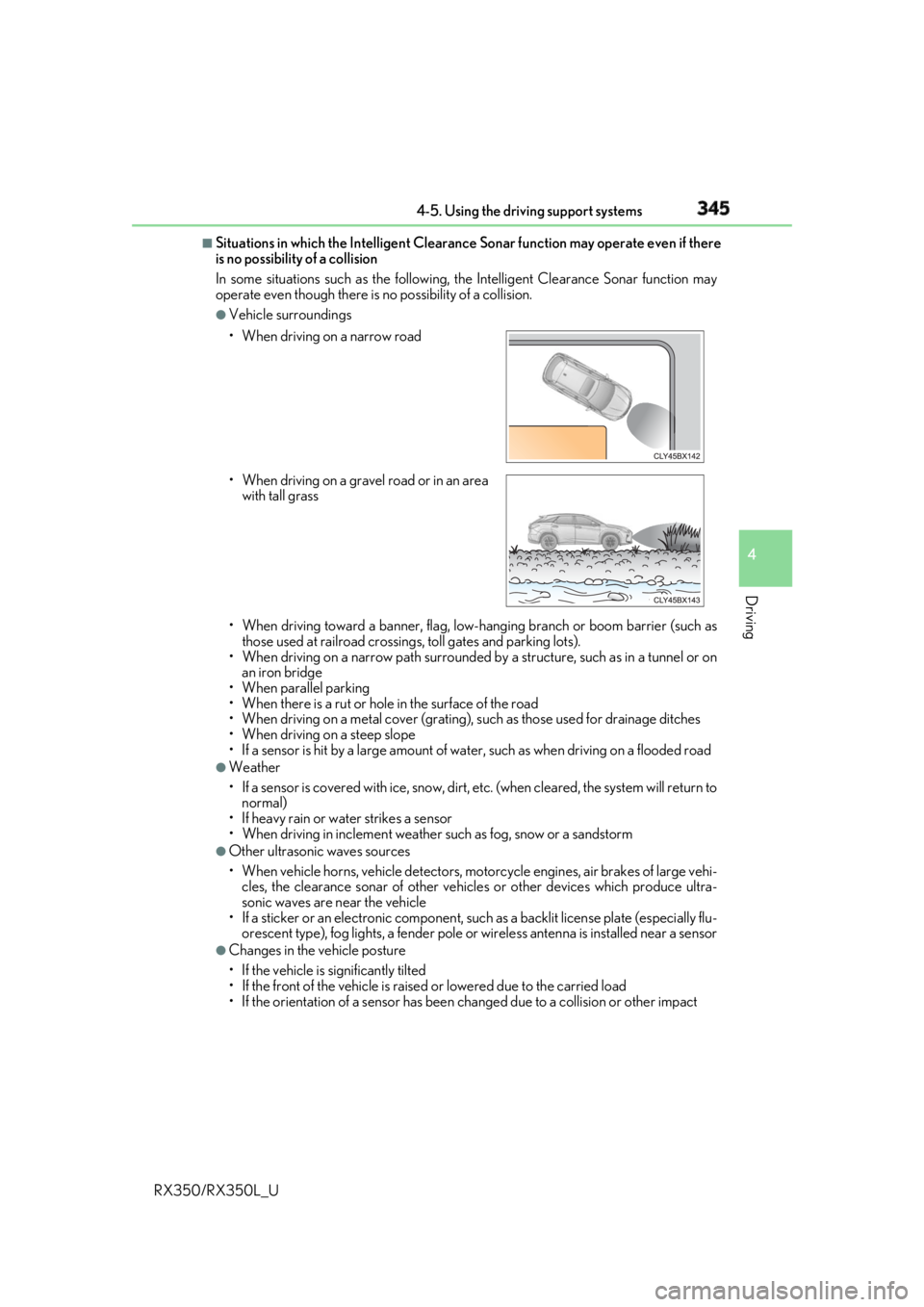
Situations in which the Intelligent Clearance Sonar function may operate even if there
is no possibility of a collision
In some situations such as the following, the Intelligent Clearanc e Sonar function may
operate even though there is no possibility of a collision. ●
Vehicle surroundings
• When driving toward a banner, flag, low- hanging branch or boom barrier (such as
those used at railroad crossing s, toll gates and parking lots).
• When driving on a narrow path surrounded by a structure, such as in a tunnel or on
an iron bridge
• When parallel parking
• When there is a rut or hole in the surface of the road
• When driving on a metal cover (grating), such as those used for drainage ditches
• When driving on a steep slope
• If a sensor is hit by a large amount of wa ter, such as when driving on a flooded road●
Weather
• If a sensor is covered with ice, snow, dirt, etc. (when cleared, the system will return to
normal)
• If heavy rain or water strikes a sensor
• When driving in inclemen t weather such as fog, snow or a sandstorm●
Other ultrasonic waves sources
• When vehicle horns, vehicle detectors, motorcycle engines, air brakes of large vehi-
cles, the clearance sonar of other vehicles or other devices which produce ultra-
sonic waves are near the vehicle
• If a sticker or an electronic component, su ch as a backlit license plate (especially flu-
orescent type), fog lights, a fender pole or wireless antenna is installed near a sensor●
Changes in the vehicle posture
• If the vehicle is significantly tilted
• If the front of the vehicle is raised or lowered due to the carried load
• If the orientation of a sens or has been changed due to a collision or other impact• When driving on a narrow road
• When driving on a gravel road or in an area
with tall grass
Page 350 of 777
3494-5. Using the driving support systems
4
Driving
RX350/RX350L_U NOTICE ■
To prevent the system from malfunctioning ●
If the area around a sensor is subjected to an impact, the system may not operate
properly due to the sensor being misaligned. Have the vehicle inspected by your
Lexus dealer. ●
When using a high pressure washer to wa sh the vehicle, do not spray the sensors
directly, as doing so may cause a sensor to malfunction. ●
When using steam to clean the vehicle, do not direct steam too close to the sensors
as doing so may cause a sensor to malfunction. ■
To prevent a radar sensor from malfunctioning ●
If the area around a radar sensor is subjected to an impact, the system may not oper-
ate properly due to a sensor malfunction. Have the vehicle inspected by your Lexus
dealer. ●
Observe the radar sensor handling precautions. ( P. 316)■
To prevent unnecessary operation of the Intelligent Clearance Sonar system
In the following situations, disable the Inte lligent Clearance Sonar system as the system
may operate even though there is no possibility of a collision.●
When inspecting the vehicle using a chassi s roller, chassis dynamo or free roller●
When loading the vehicle onto a boat, truck or other transport vessel ●
If the suspension has been modified or tires of a size other than specified are installed●
If the front of the vehicle is raised or lowered due to the carried load ●
If towing eyelets are installed
Page 355 of 777
354 4-5. Using the driving support systems
RX350/RX350L_U ■
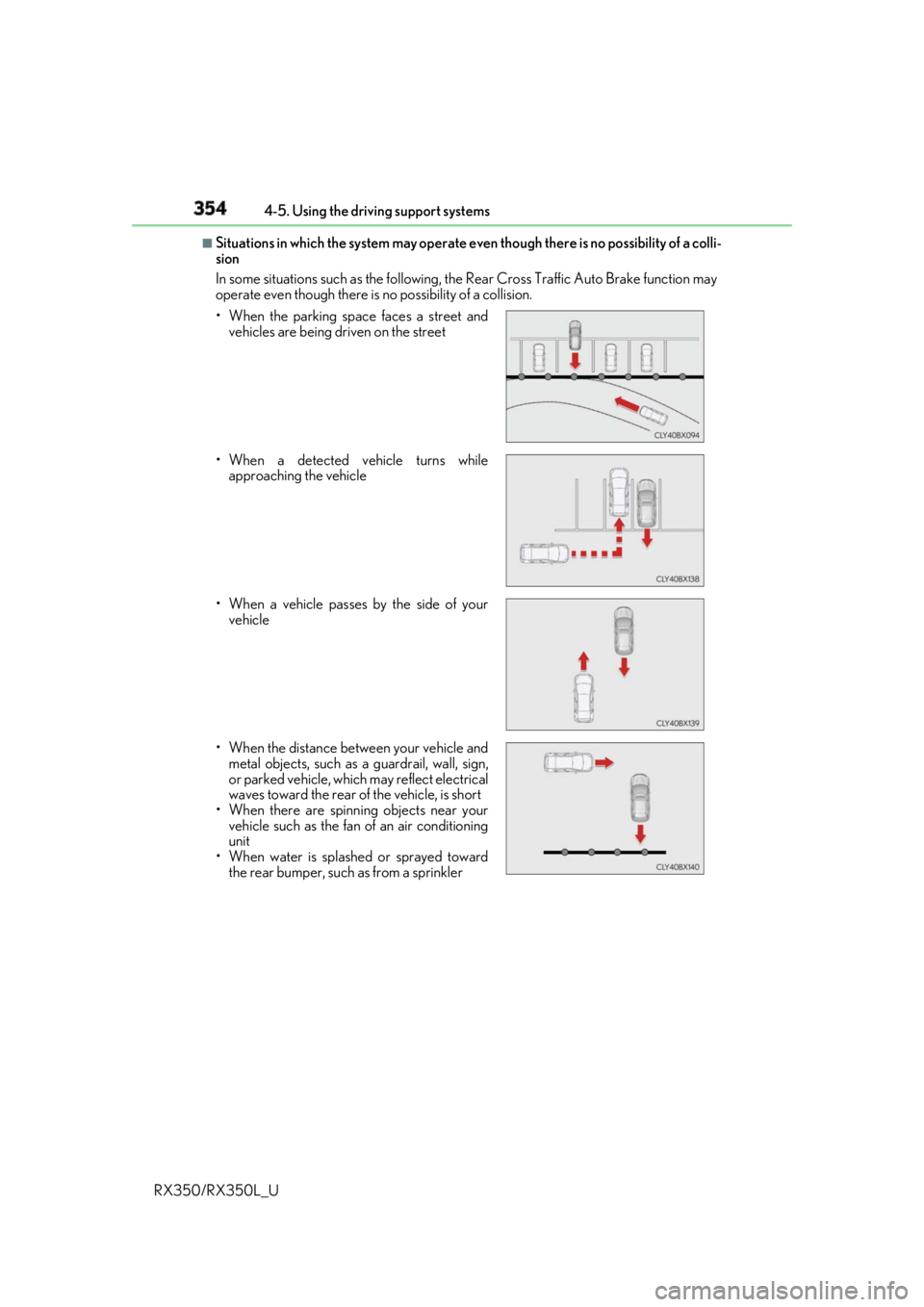
Situations in which the system may operate ev en though there is no possibility of a colli-
sion
In some situations such as the following, th e Rear Cross Traffic Auto Brake function may
operate even though there is no possibility of a collision.
• When the parking space faces a street and
vehicles are being driven on the street
• When a detected vehicle turns while
approaching the vehicle
• When a vehicle passes by the side of your
vehicle
• When the distance between your vehicle and
metal objects, such as a guardrail, wall, sign,
or parked vehicle, which may reflect electrical
waves toward the rear of the vehicle, is short
• When there are spinni ng objects near your
vehicle such as the fan of an air conditioning
unit
• When water is splash ed or sprayed toward
the rear bumper, such as from a sprinkler