tow LEXUS RX350 2019 Workshop Manual
[x] Cancel search | Manufacturer: LEXUS, Model Year: 2019, Model line: RX350, Model: LEXUS RX350 2019Pages: 777, PDF Size: 12.44 MB
Page 356 of 777
3554-5. Using the driving support systems
4
Driving
RX350/RX350L_U ■
Situations in which the Rear Cross Traffic Auto Brake function may not operate prop-
erly
In some situations such as the following , this function may not operate properly.●
Objects and vehicles which the radar sensors are not designed to detect
• Stationary objects
• Vehicles which are moving away from your vehicle
• Pedestrians, motorcycles, bicycles, etc.
*• Objects which are extremely close to a radar sensor
• Vehicles which are approaching from the right or left at the rear of the vehicle at a
traveling speed of less than approximately 5 mph (8 km/h)
• Vehicles which are approaching from the right or left at the rear of the vehicle at a
traveling speed of more than approximately 15 mph (24 km/h)
* : Depending on conditions, detection of a vehicle and/or object may occur.●
Situations in which the radar sensors may not be able to detect an object
• When a sensor or the area around a sensor is extremely hot or cold
• If the rear bumper is covere d with ice, snow, dirt, etc.
• If heavy rain or water strikes the vehicle
• When the detection area of a radar sensor is obstructed by an adjacent vehicle
• If the vehicle is significantly tilted
• If towing eyelets are installed
• If the suspension has been modified or tires of a size othe r than specified are
installed
• If the front of the vehicle is raised or lowered due to the carried load
• If a sticker or an electronic component, su ch as a backlit license plate (especially flu-
orescent type), fog lights, a fender pole or wireless antenna is installed near a radar
sensor
• If the orientation of a rada r sensor has been changed due to a collision or other
impact or removal and installation
• When multiple vehicles are approaching wi th only a small gap between each vehicle
• When a vehicle is approaching at high speed ●
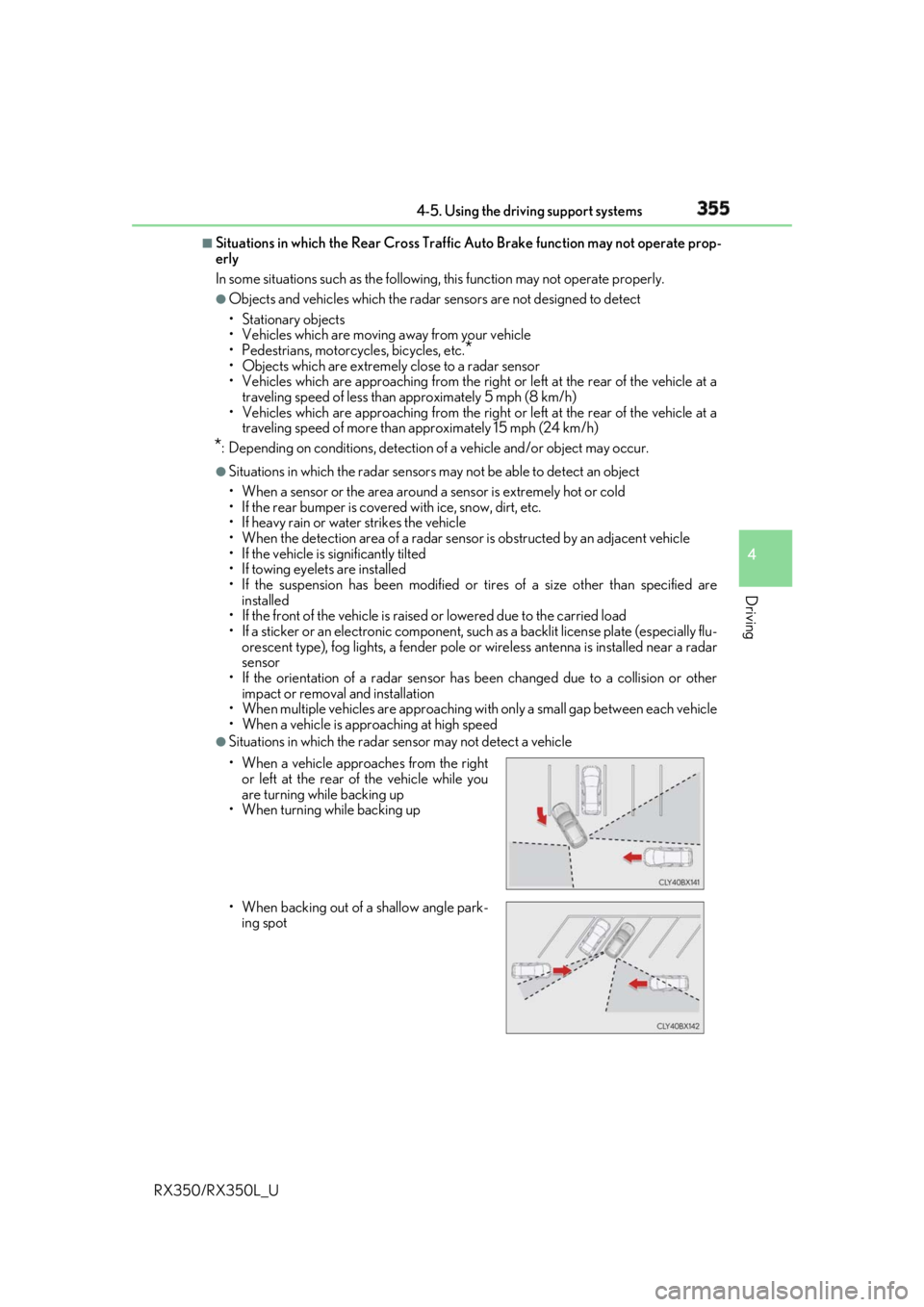
Situations in which the radar sensor may not detect a vehicle
• When a vehicle approaches from the right
or left at the rear of the vehicle while you
are turning while backing up
• When turning while backing up
• When backing out of a shallow angle park-
ing spot
Page 384 of 777

3834-5. Using the driving support systems
4
Driving
RX350/RX350L_U WARNING ■
Hill-start assist control does not operate effectively when ●
Do not overly rely on hill-start assist control. Hill-start assist control may not operate
effectively on steep inclines and roads covered with ice. ●
Unlike the parking brake, hill-start assist co ntrol is not intended to hold the vehicle
stationary for an exte nded period of time. Do not atte mpt to use hill-start assist con-
trol to hold the vehicle on an incline, as doing so may lead to an accident. ■
When the TRAC/VSC/Trailer Sw ay Control is activated
The slip indicator light flashes. Always drive carefully. Reckle ss driving may cause an
accident. Exercise particular care when the indicator light flashes.■
When the TRAC/VSC/Trailer Sway Control systems are turned off
Be especially careful and drive at a speed appropriate to the road conditions. As these
are the systems to help ensure vehicle stab ility and driving force, do not turn the
TRAC/VSC/Trailer Sway Contro l systems off unless necessary.
Trailer Sway Control is part of the VSC syst em and will not operate if VSC is turned off
or experiences a malfunction. ■
Replacing tires
Make sure that all tires are of the specified size, brand, tread pattern and total load
capacity. In addition, make sure that the tire s are inflated to the recommended tire infla-
tion pressure level.
The ABS, TRAC, Trailer Sway Control and VS C systems will not function correctly if
different tires are installed on the vehicle.
Contact your Lexus dealer for further in formation when replacing tires or wheels.■
Handling of tires and the suspension
Using tires with any kind of problem or modi fying the suspension w ill affect the driving
assist systems, and may cause a system to malfunction. ■
Trailer Sway Control precaution
The Trailer Sway Control system is not able to reduce trailer sway in all situations.
Depending on many factors such as the condit ions of the vehicle, trailer, road surface,
and driving environment, the Trailer Sway Control system may not be effective. Refer to
your trailer owner’s manual for information on how to tow your trailer properly. ■
If trailer sway occurs
Observe the following precautions.
Failing to do so may cause death or serious injury. ●
Firmly grip the steering wh eel. Steer straight ahead.
Do not try to control trailer sway by turning the steering wheel.●
Begin releasing the accelerator pedal immediately but very gradually to reduce
speed.
Do not increase speed. Do not apply vehicle brakes.
If you make no extreme correction with the steering or brakes, your vehicle and trailer
should stabilize. ( P. 226)
Page 403 of 777

402 5-1. Basic Operations
RX350/RX350L_U ■
Adjusting the volume
The volume of the Mobile Assist ant can be adjusted using the
“ PWR·VOL
” knob or
steering wheel volume switch es. The Mobile Assistant an d phone call volumes are syn-
chronized. ■
Microphone
It is not necessary to speak directly into the microphone when using the Mobile Assis-
tant. ●
Wait for the listening beeps before using the Mobile Assistant.●
The Mobile Assistant may not recognize commands in the following situations:
• When spoken too quickly.
• When spoken at a low or high volume.
• When the roof or windows are open.
• When passengers are talking while th e Mobile Assistan t is being used.
• When the air conditioning syst em’s fan speed is set high.
• When the air conditioning vents ar e turned toward the microphone.■
Mobile Assistant precautions ●
The available features and functions may vary based on the iOS version installed on the
connected device. ●
Some Siri features are limited in Eyes Free mode. If you attempt to use an unavailable
function, Siri will inform you that the function is not available. ●
If Siri is not enabled on the ce llular phone connected via Bluetooth
, an error message
will be displayed on the screen. ●
While a phone call is active, the Mobile Assistant cannot be used. ●
If using the navigation featur e of the cellular phone, ensure the active audio source is
Bluetooth
audio or iPod in order to hear turn by turn direction prompts.
Page 489 of 777

488 5-12. Other function
RX350/RX350L_U ■
Microphone
P. 456 ■
When using the microphone ●
It is unnecessary to speak directly into the microphone when giving a command.●
Wait for the confirmation beep before speaking a command.●
Voice commands may not be recognized if:
• Spoken too quickly.
• Spoken at a low or high volume.
• The roof or windows are open.
• Passengers are talking while voice commands are spoken.
• The air conditioning speed is set high.
• The air conditioning vents are turned towards the microphone.●
In the following conditions, the system ma y not recognize the command properly and
using voice commands may not be possible:
• The command is incorrect or unclear. No te that certain words, accents or speech
patterns may be difficult for the system to recognize.
• There is excessive background noise, such as wind noise. ■
When searching for a track ●
A USB memory or iPod must be connected to enable track searching and playback.
( P. 403) ●
When a USB memory or iPod is connected, recognition data is created so tracks can
be searched using voice commands. ●
Recognition data is updated un der the following conditions:
• When the USB memory or iPod data has changed.
• When the voice recognition language is changed. ( P. 407)●
While the recognition data is being created or being updated, a track search cannot be
performed using a voice command. ■
The Gracenote ®
media database
Page 533 of 777
532 6-4. Using the storage features
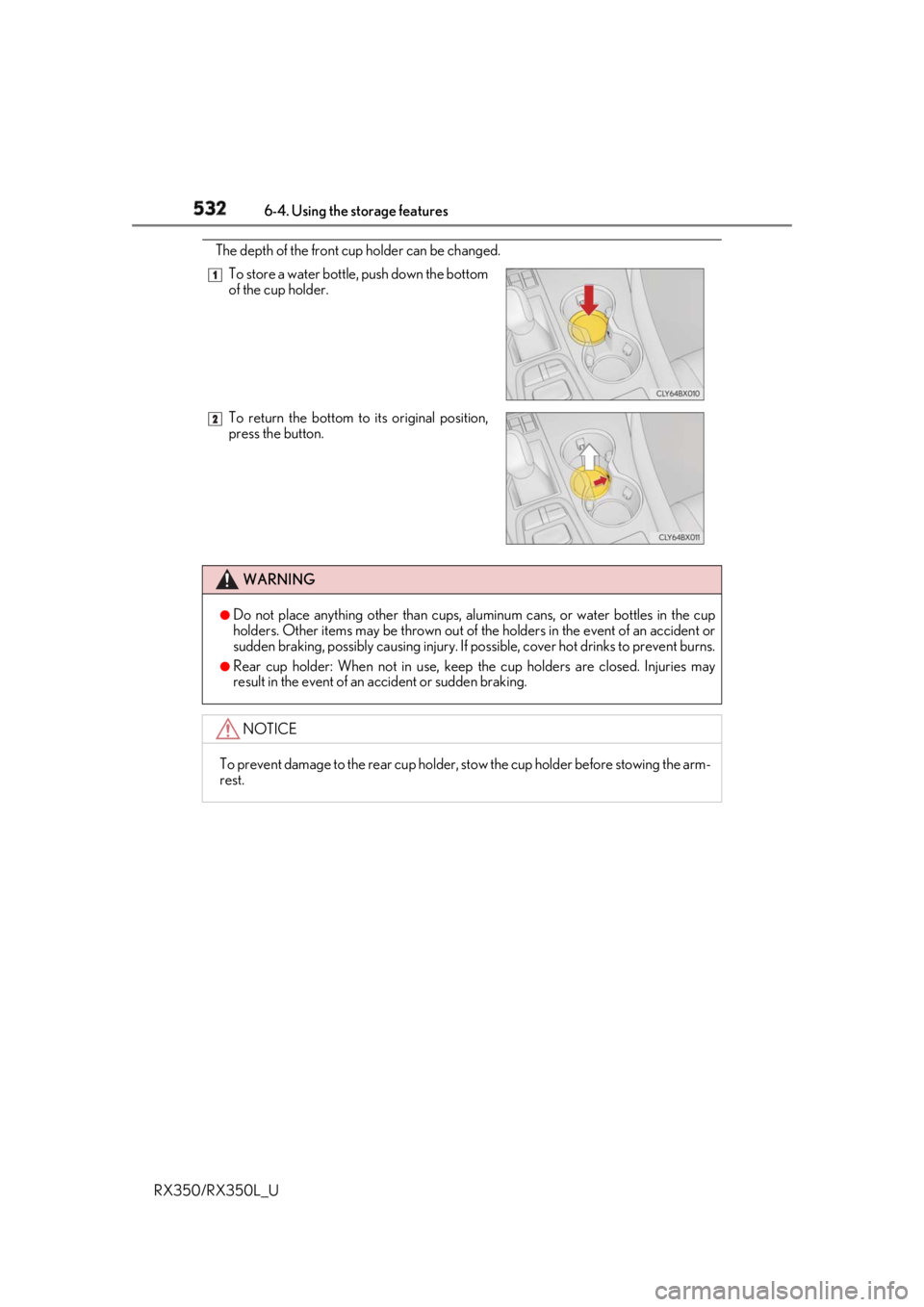
RX350/RX350L_U The depth of the front cup holder can be changed.
To store a water bottle, push down the bottom
of the cup holder.
To return the bottom to its original position,
press the button.
WARNING ●
Do not place anything other than cups, aluminum cans, or water bottles in the cup
holders. Other items may be thrown out of the holders in the event of an accident or
sudden braking, possibly causing injury. If possible, cover hot drinks to prevent burns.●
Rear cup holder: When not in use, keep the cup holders are closed. Injuries may
result in the event of an accident or sudden braking.
NOTICE
To prevent damage to the rear cup holder, stow the cup holder before stowing the arm-
rest. 1
2
Page 537 of 777
536 6-4. Using the storage features
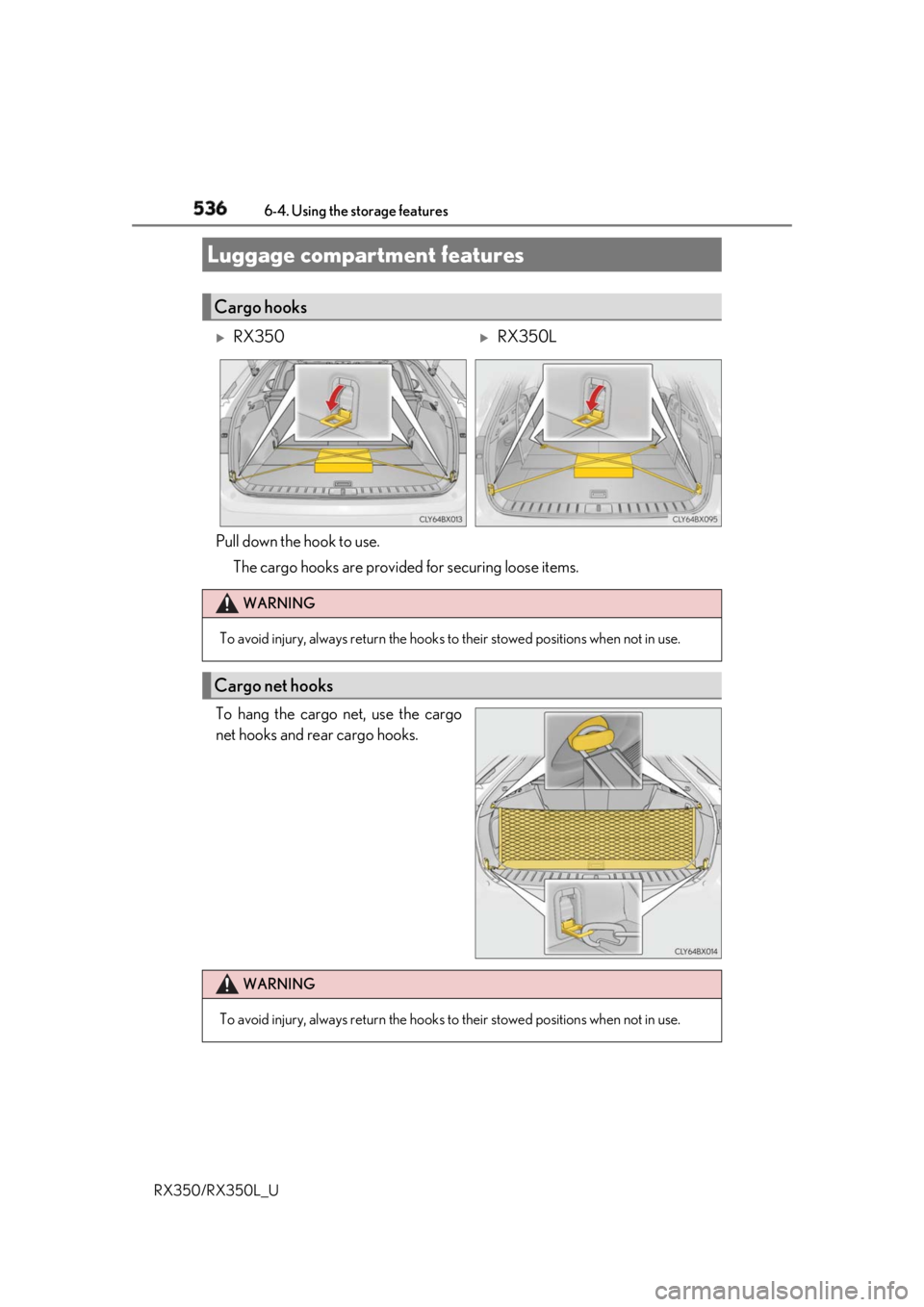
RX350/RX350L_U Pull down the hook to use.
The cargo hooks are provided for securing loose items.
To hang the cargo net, use the cargo
net hooks and rear cargo hooks.Luggage compartment features Cargo hooks
RX350
RX350L
WARNING
To avoid injury, always return the hooks to their stowed positions when not in use.
Cargo net hooks
WARNING
To avoid injury, always return the hooks to their stowed positions when not in use.
Page 540 of 777
5396-4. Using the storage features
6
Interior features
RX350/RX350L_U ■
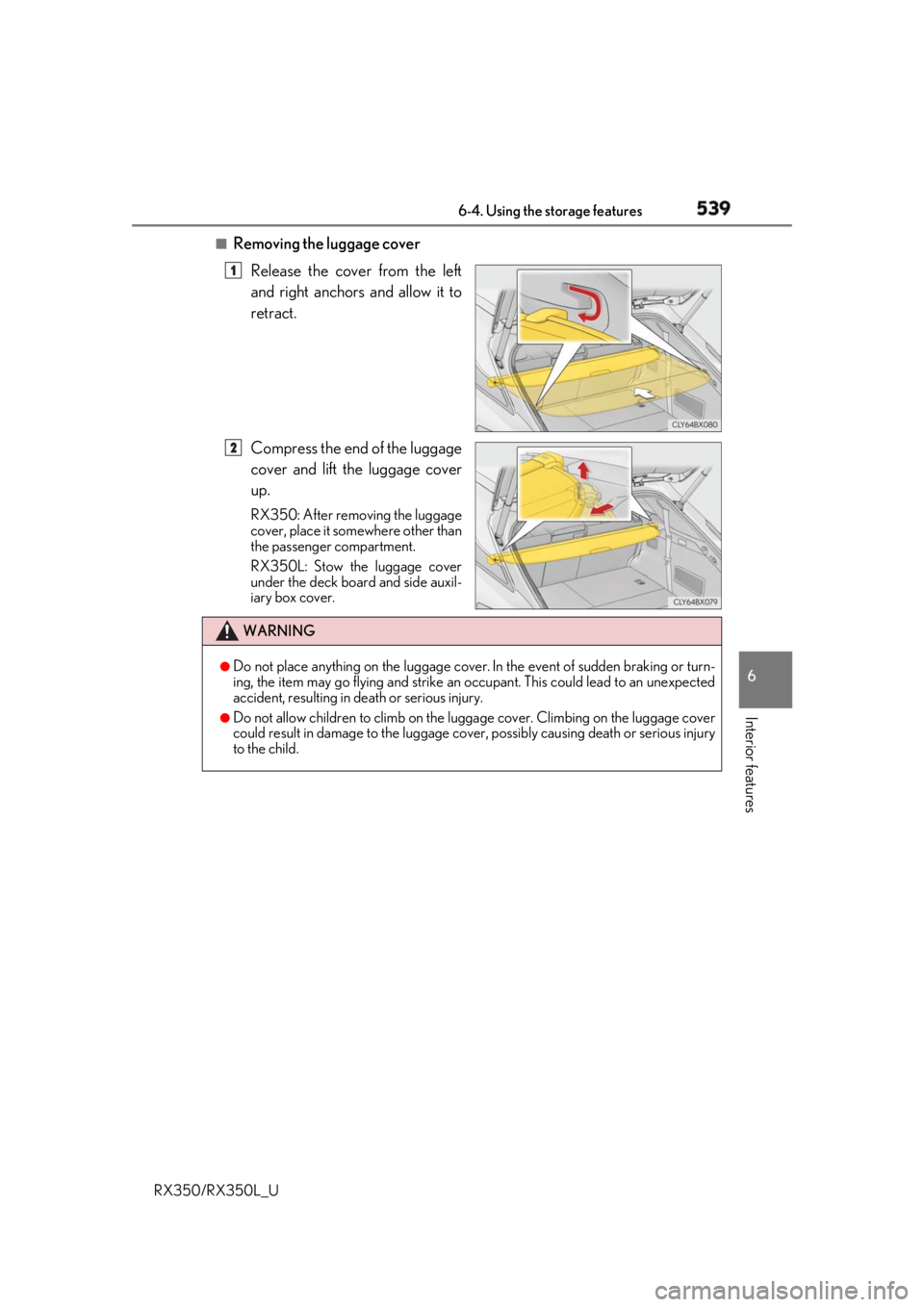
Removing the luggage cover
Release the cover from the left
and right anchors and allow it to
retract.
Compress the end of the luggage
cover and lift the luggage cover
up. RX350: After removing the luggage
cover, place it somewhere other than
the passenger compartment.
RX350L: Stow the luggage cover
under the deck board and side auxil-
iary box cover. 1
2
WARNING ●
Do not place anything on the luggage cover.
In the event of sudden braking or turn-
ing, the item may go flying and strike an occupant. This could lead to an unexpected
accident, resulting in death or serious injury. ●
Do not allow children to climb on the lugg age cover. Climbing on the luggage cover
could result in damage to the luggage cove r, possibly causing de ath or serious injury
to the child.
Page 547 of 777
546 6-5. Using the other interior features
RX350/RX350L_U ■
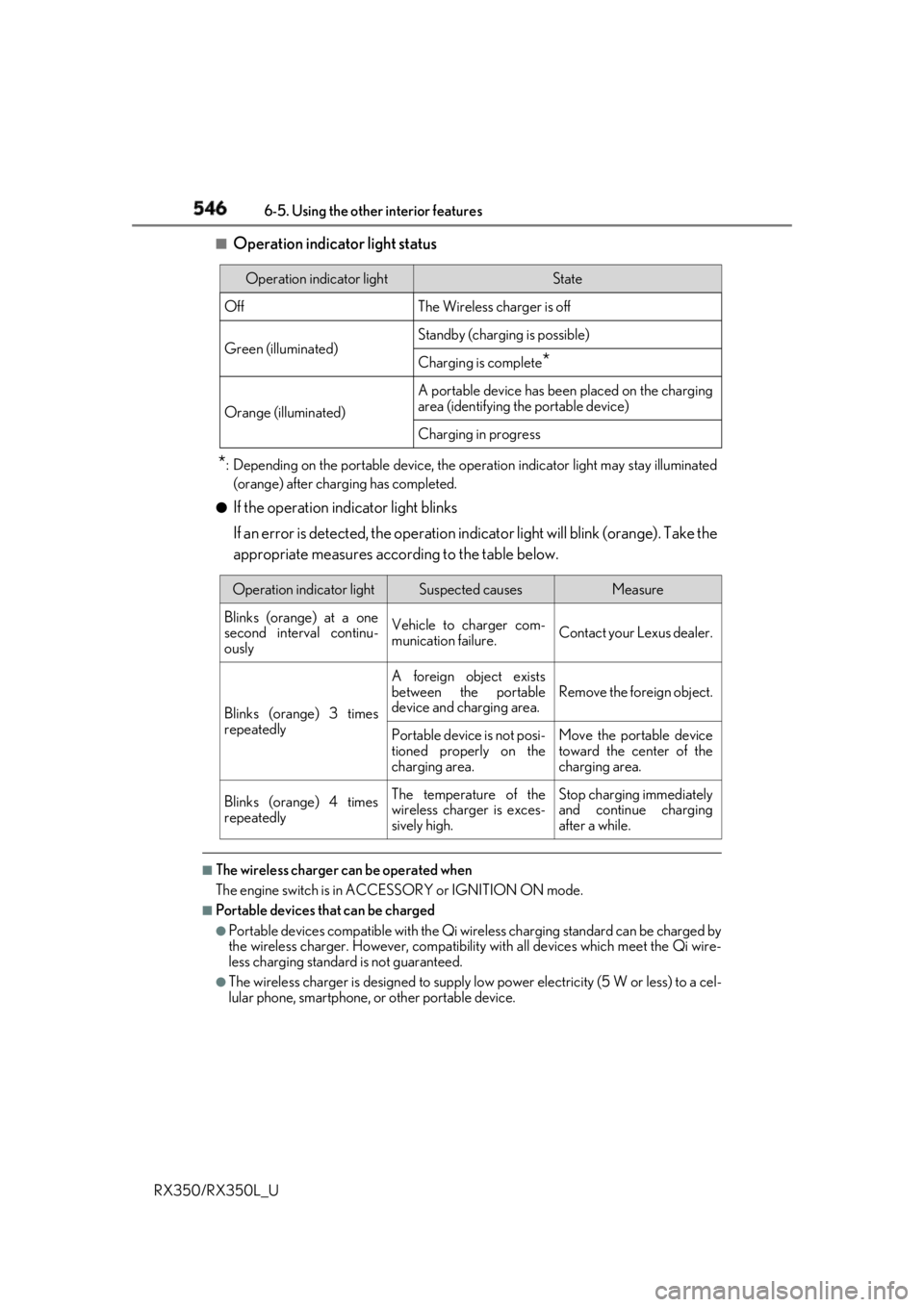
Operation indicator light status
* : Depending on the portable device, the oper ation indicator light may stay illuminated
(orange) after charging has completed.●
If the operation indicator light blinks
If an error is detected, the operation in dicator light will blink (orange). Take the
appropriate measures according to the table below.
■
The wireless charger can be operated when
The engine switch is in ACCESSORY or IGNITION ON mode. ■
Portable devices t hat can be charged●
Portable devices compatible with the Qi wireless charging standard can be charged by
the wireless charger. However, compatibility with all devices which meet the Qi wire-
less charging standard is not guaranteed. ●
The wireless charger is designed to supply low power electricity (5 W or less) to a cel-
lular phone, smartphone, or other portable device.Operation indicator light State
Off The Wireless charger is off
Green (illuminated) Standby (charging is possible)
Charging is complete
*Orange (illuminated) A portable device has been placed on the charging
area (identifying the portable device)
Charging in progress
Operation indicator light Suspected causes Measure
Blinks (orange) at a one
second interval continu-
ously Vehicle to charger com-
munication failure. Contact your Lexus dealer.
Blinks (orange) 3 times
repeatedly A foreign object exists
between the portable
device and charging area. Remove the foreign object.
Portable device is not posi-
tioned properly on the
charging area. Move the portable device
toward the center of the
charging area.
Blinks (orange) 4 times
repeatedly The temperature of the
wireless charger is exces-
sively high. Stop charging immediately
and continue charging
after a while.
Page 551 of 777

550 6-5. Using the other interior features
RX350/RX350L_U NOTICE ■
Conditions in which the wireless charger may not operate correctly
In the following situations, the wire less charger may not operate correctly:●
When a portable device is fully charged ●
When there is a foreign object between the charging area and portable device●
When a portable device becomes hot while charging●
When a portable device is placed on the wireless area with its charging surface fac-
ing up ●
When a portable device is not centered on the charging area ●
When the vehicle is near a TV tower, electric power plant, gas station, radio station,
large display, airport or other facility that generates stro ng radio waves or electrical
noise ●
When the portable device is in contact with, or is covered by any of the following
metallic objects:
• Cards to which aluminum foil is attached
• Cigarette boxes that ha ve aluminum foil inside
• Metallic wallets or bags
•Coins
•Metal hand warmers
• Media such as CDs and DVDs ●
When wireless keys (that emit radio waves) other than those of your vehicle are being
used nearby.
If in situations other than above the wirele ss charger does not operate properly or the
operation indicator light is blinking, the wireless charge r may be malfunctioning. Con-
tact your Lexus dealer. ■
To prevent failure or damage to data ●
Do not bring magnetic cards, such as a cr edit card, or magnetic recording media,
close to the wireless charger while charging. Otherwise, data may be erased due to
the influence of magnetism.
Additionally, do not bring pr ecision instruments such as wrist watches, close to the
wireless charger, as such objects may malfunction. ●
Do not leave portable devices in the cab in. The temperature inside the cabin may
become high when parked in the sun, and cause damage to the device. ■
To prevent battery discharge
Do not use the wireless charger for a long pe riod of time with the engine is stopped.
Page 567 of 777
566 6-5. Using the other interior features
RX350/RX350L_U ■
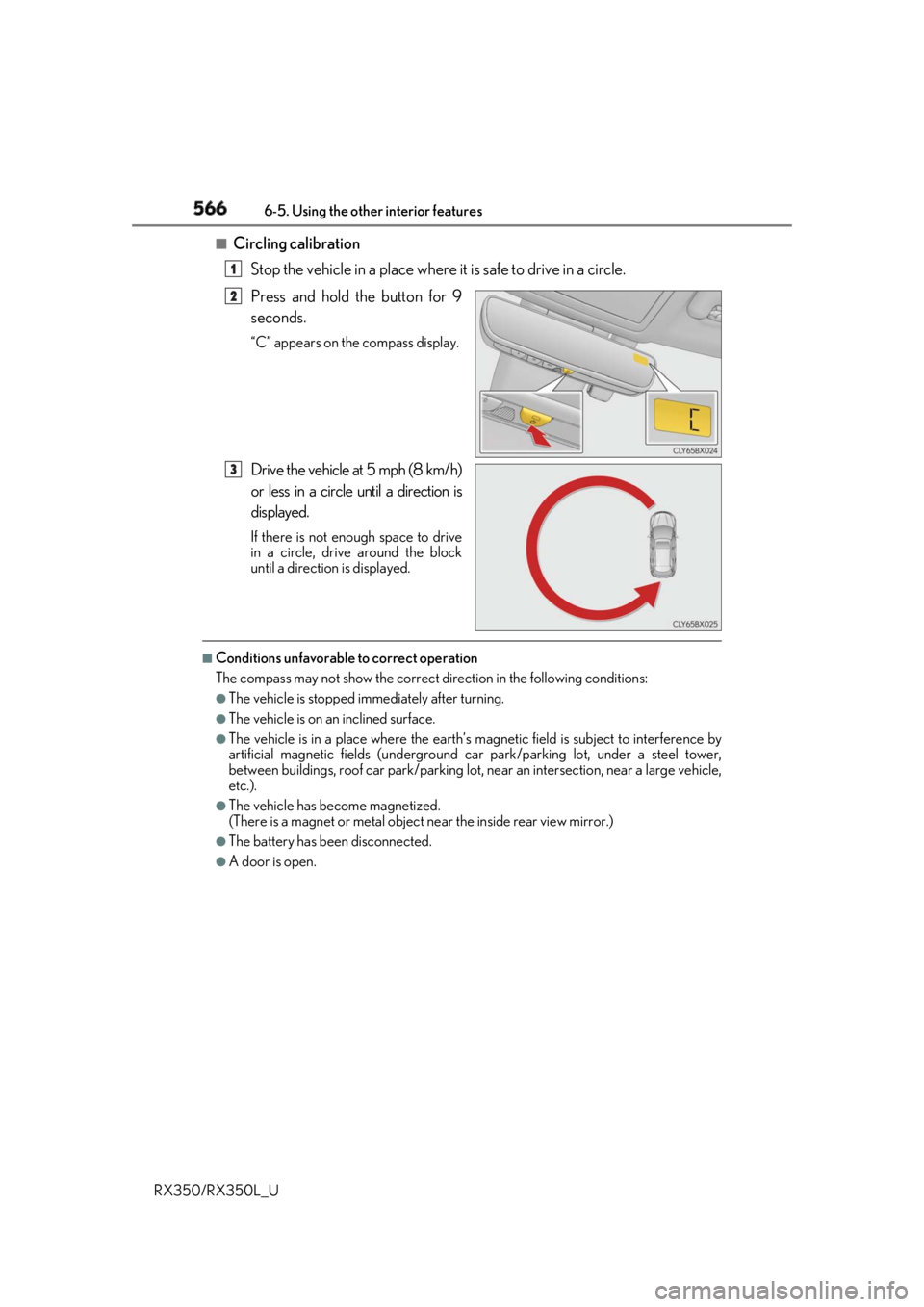
Circling calibration
Stop the vehicle in a place where it is safe to drive in a circle.
Press and hold the button for 9
seconds. “C” appears on the compass display.
Drive the vehicle at 5 mph (8 km/h)
or less in a circle until a direction is
displayed. If there is not enough space to drive
in a circle, drive around the block
until a direction is displayed.■
Conditions unfavorable to correct operation
The compass may not show the correct di rection in the follo wing conditions:●
The vehicle is stopped immediately after turning. ●
The vehicle is on an inclined surface. ●
The vehicle is in a place where the earth’s magnetic field is subject to interference by
artificial magnetic fields (underground car park/parking lot, under a steel tower,
between buildings, roof car park/parking lot, near an intersection, near a large vehicle,
etc.). ●
The vehicle has become magnetized.
(There is a magnet or metal object near the inside rear view mirror.)●
The battery has been disconnected. ●
A door is open. 1
2
3