audio LEXUS RX350 2019 Workshop Manual
[x] Cancel search | Manufacturer: LEXUS, Model Year: 2019, Model line: RX350, Model: LEXUS RX350 2019Pages: 777, PDF Size: 12.44 MB
Page 413 of 777
412
RX350/RX350L_U 5-3. Using the audio system
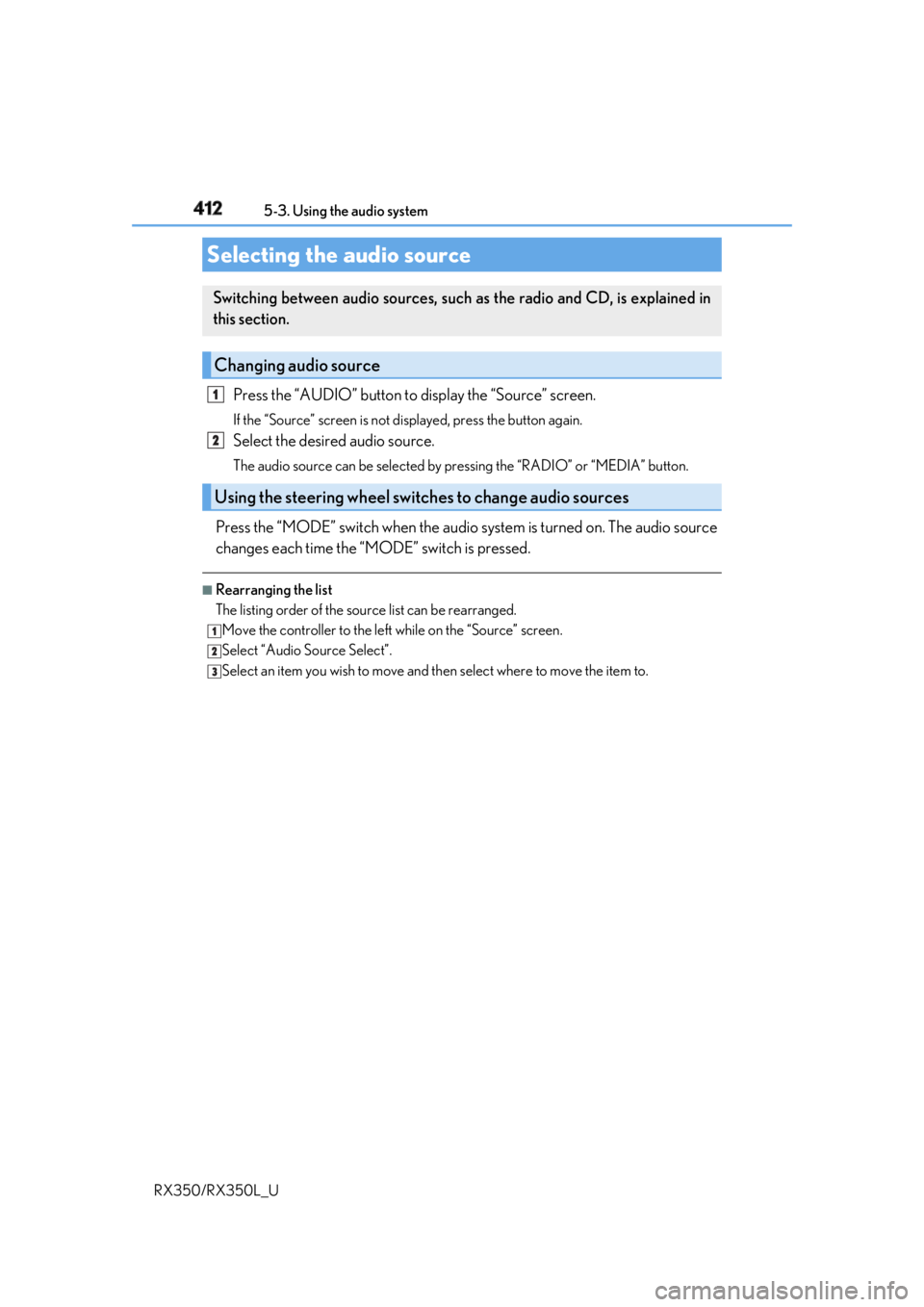
Press the “AUDIO” button to display the “Source” screen.If the “Source” screen is not displayed, press the button again.
Select the desired audio source. The audio source can be se lected by pressing the “RADIO” or “MEDIA” button.
Press the “MODE” switch when the audio system is turned on. The audio source
changes each time the “MODE” switch is pressed. ■
Rearranging the list
The listing order of the sour ce list can be rearranged.
Move the controller to the left while on the “Source” screen.
Select “Audio Source Select”.
Select an item you wish to move and th en select where to move the item to.Selecting the audio source Switching between audio sources, such as the radio and CD, is explained in
this section.
Changing audio source
Using the steering wheel switches to change audio sources 1
2
1
2
3
Page 414 of 777
4135-3. Using the audio system
5
Lexus Display Audio system
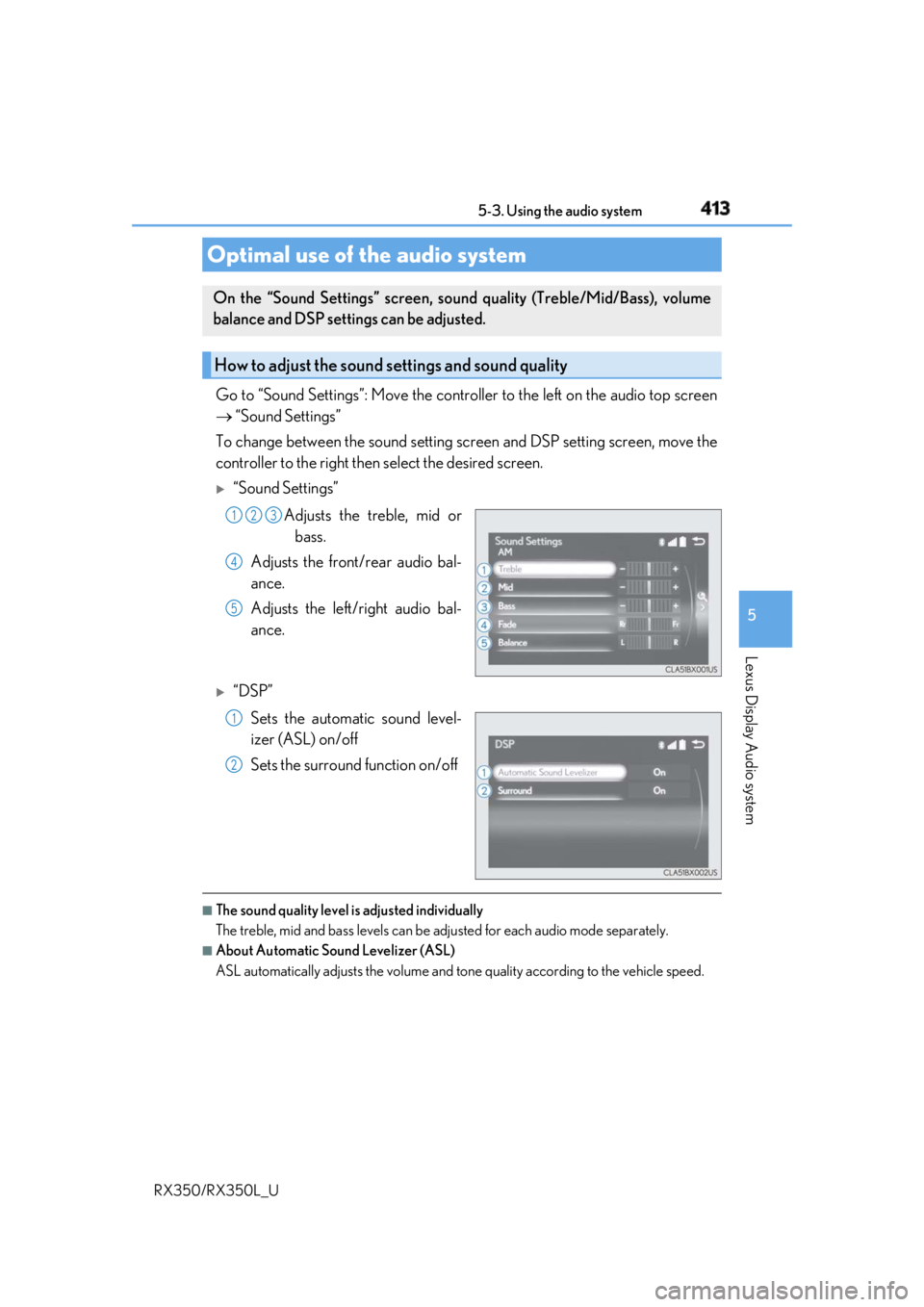
RX350/RX350L_U Go to “Sound Settings”: Move the contro ller to the left on the audio top screen
“Sound Settings”
To change between the sound setting sc reen and DSP setting screen, move the
controller to the right then select the desired screen.
“Sound Settings”
Adjusts the treble, mid or
bass.
Adjusts the front/rear audio bal-
ance.
Adjusts the left/right audio bal-
ance.
“DSP”
Sets the automatic sound level-
izer (ASL) on/off
Sets the surround function on/off
■
The sound quality level is adjusted individually
The treble, mid and bass levels can be adjusted for each audio mode separately. ■
About Automatic Sound Levelizer (ASL)
ASL automatically adjusts the volume and to ne quality according to the vehicle speed.Optimal use of the audio system On the “Sound Settings” screen, soun d quality (Treble/Mid/Bass), volume
balance and DSP settings can be adjusted.
How to adjust the sound settings and sound quality 1 2 3
4
5
1
2
Page 415 of 777
414 5-3. Using the audio system
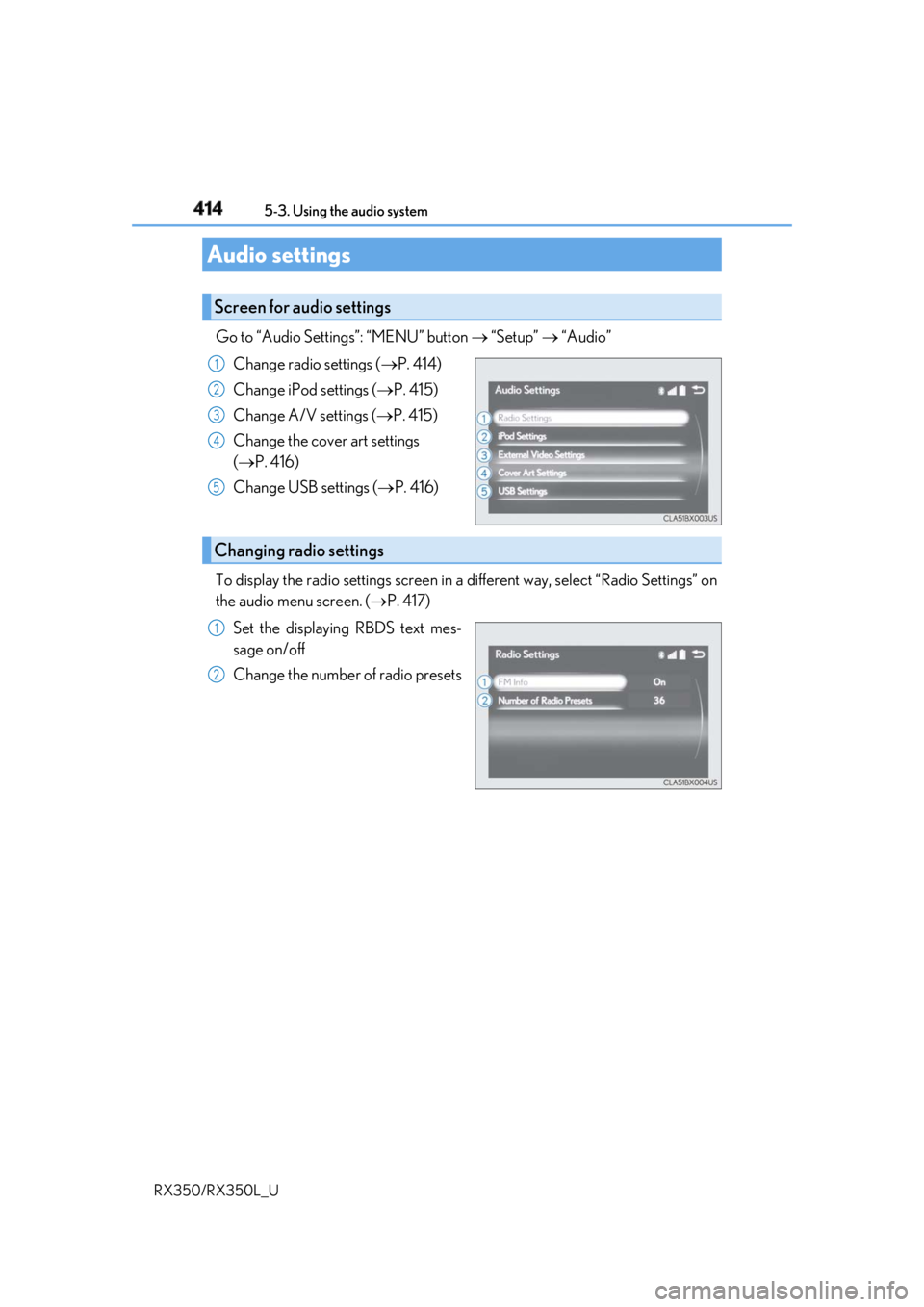
RX350/RX350L_U Go to “Audio Settings”: “MENU” button “Setup” “Audio”
Change radio settings ( P. 414)
Change iPod settings ( P. 415)
Change A/V settings ( P. 415)
Change the cover art settings
( P. 416)
Change USB settings ( P. 416)
To display the radio settings screen in a different way, select “Radio Settings” on
the audio menu screen. ( P. 417)
Set the displaying RBDS text mes-
sage on/off
Change the number of radio presetsAudio settings Screen for audio settings 1
2
3
4
5
Changing radio settings 1
2
Page 416 of 777
4155-3. Using the audio system
5
Lexus Display Audio system
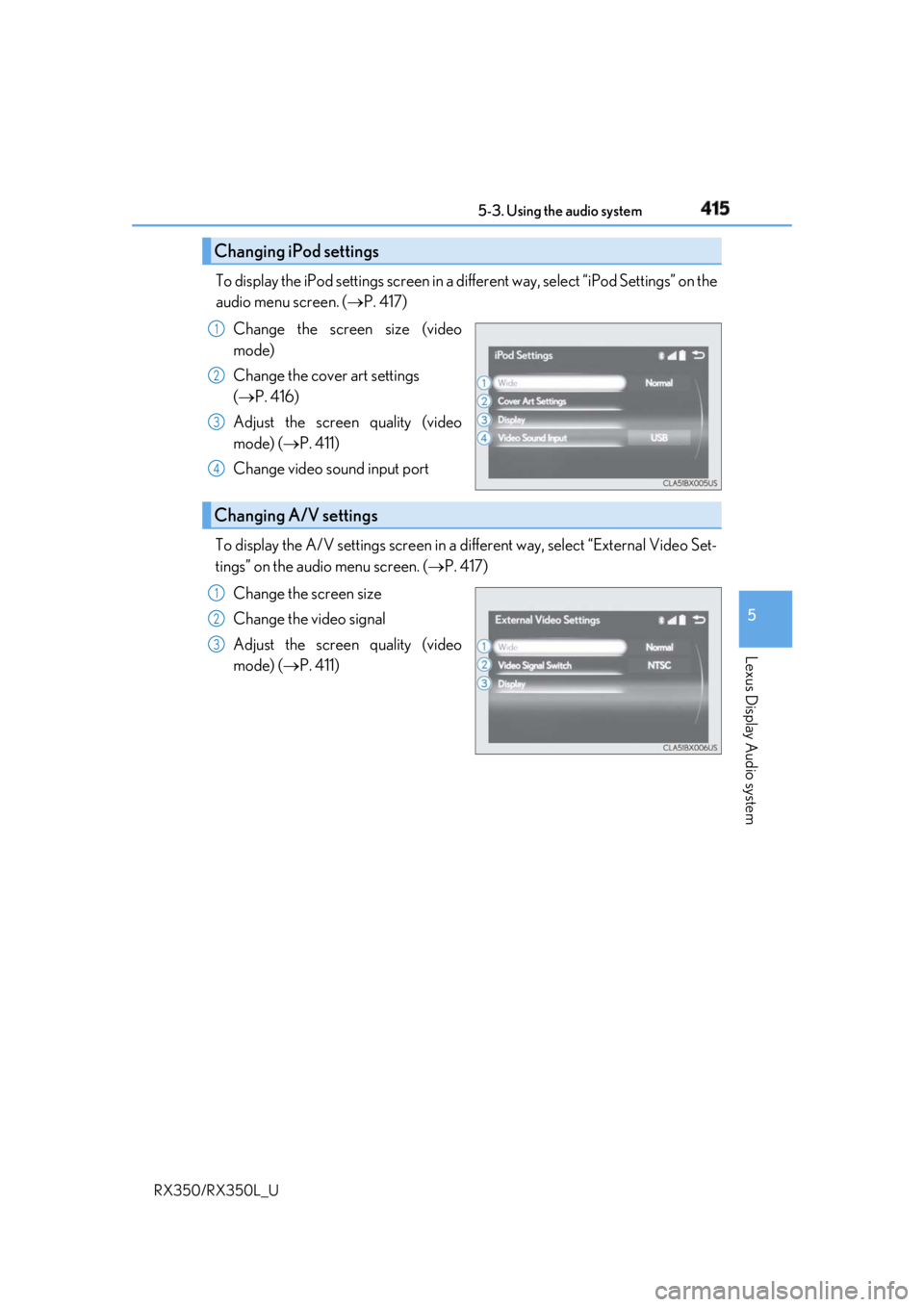
RX350/RX350L_U To display the iPod settings screen in a di fferent way, select “iPod Settings” on the
audio menu screen. ( P. 417)
Change the screen size (video
mode)
Change the cover art settings
( P. 416)
Adjust the screen quality (video
mode) ( P. 411)
Change video sound input port
To display the A/V settings screen in a different way, select “External Video Set-
tings” on the audio menu screen. ( P. 417)
Change the screen size
Change the video signal
Adjust the screen quality (video
mode) ( P. 411)Changing iPod settings 1
2
3
4
Changing A/V settings 1
2
3
Page 417 of 777
416 5-3. Using the audio system
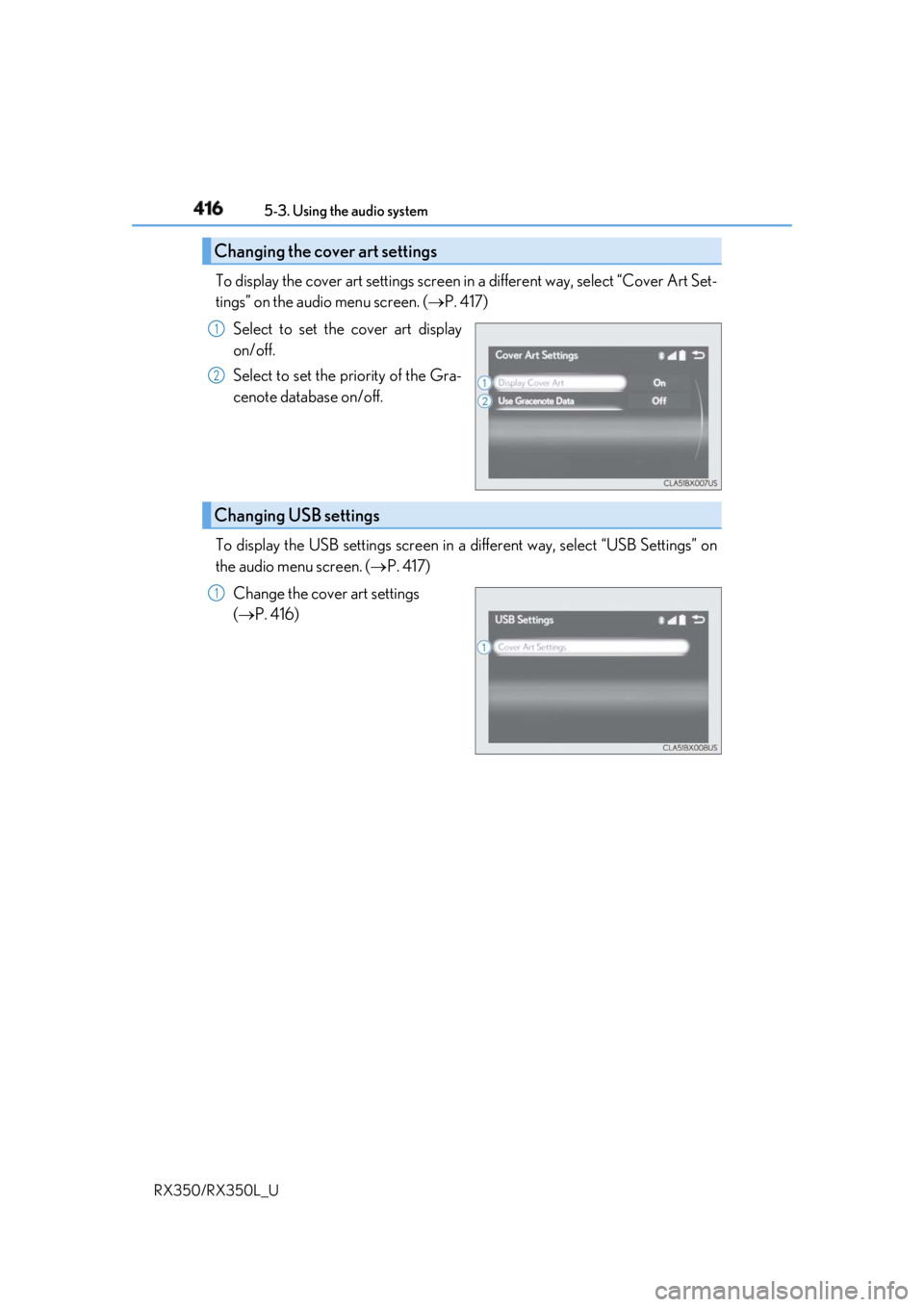
RX350/RX350L_U To display the cover art settings screen in a different way, select “Cover Art Set-
tings” on the audio menu screen. ( P. 417)
Select to set the cover art display
on/off.
Select to set the priority of the Gra-
cenote database on/off.
To display the USB settings screen in a different way, select “USB Settings” on
the audio menu screen. ( P. 417)
Change the cover art settings
( P. 416)Changing the cover art settings 1
2
Changing USB settings 1
Page 418 of 777
4175-3. Using the audio system
5
Lexus Display Audio system
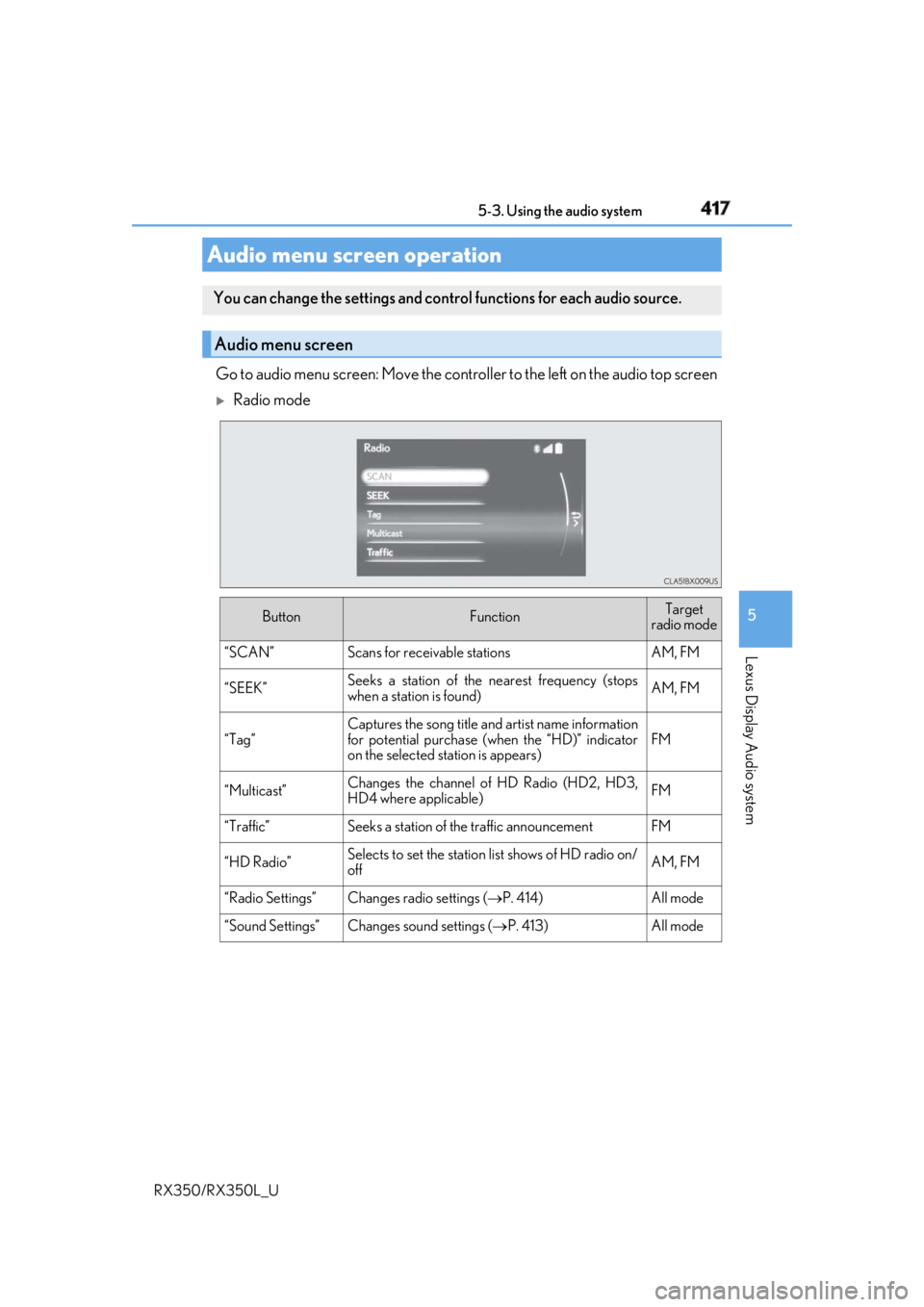
RX350/RX350L_U Go to audio menu screen: Move the contro ller to the left on the audio top screen
Radio mode
Audio menu screen operation You can change the settings and contro l functions for each audio source.
Audio menu screen
Button Function Target
radio mode
“SCAN” Scans for receivable stations AM, FM
“SEEK” Seeks a station of the nearest frequency (stops
when a station is found) AM, FM
“Tag” Captures the song title and artist name information
for potential purchase (when the “HD)” indicator
on the selected st ation is appears) FM
“Multicast” Changes the channel of HD Radio (HD2, HD3,
HD4 where applicable) FM
“Traffic” Seeks a station of th e traffic announcement FM
“HD Radio” Selects to set the station list shows of HD radio on/
off AM, FM
“Radio Settings” Changes radio settings ( P. 414) All mode
“Sound Settings” Changes sound settings ( P. 413) All mode
Page 419 of 777
418 5-3. Using the audio system
RX350/RX350L_U
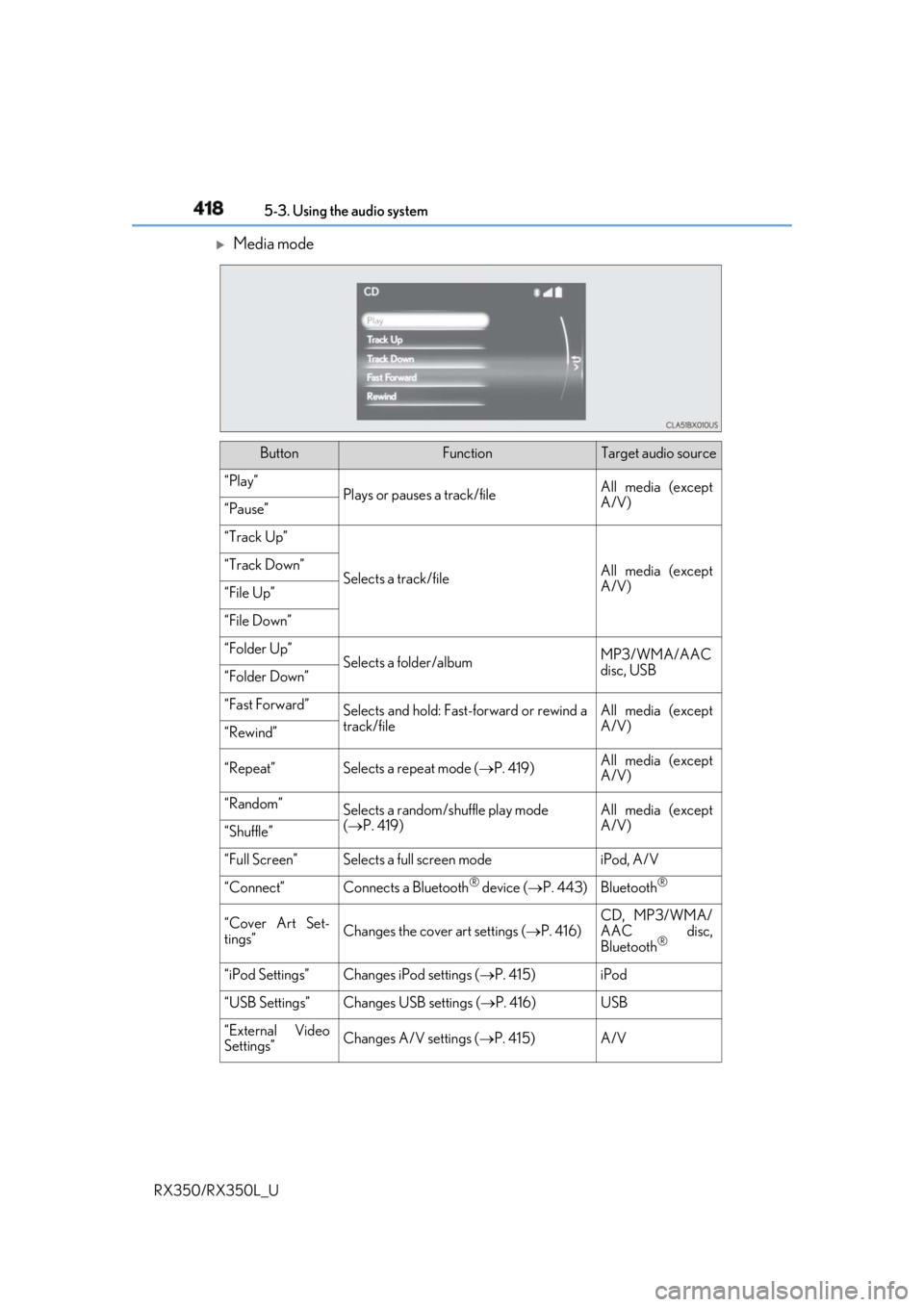
Media mode
Button Function Target audio source
“Play”
Plays or pauses a track/file All media (except
A/V)
“Pause”
“Track Up”
Selects a track/file All media (except
A/V)“Track Down”
“File Up”
“File Down”
“Folder Up”
Selects a folder/album MP3/WMA/AAC
disc, USB
“Folder Down”
“Fast Forward”
Selects and hold: Fast-f orward or rewind a
track/file All media (except
A/V)
“Rewind”
“Repeat” Selects a repeat mode ( P. 419) All media (except
A/V)
“Random”
Selects a random/shuffle play mode
( P. 419) All media (except
A/V)
“Shuffle”
“Full Screen” Selects a full screen mode iPod, A/V
“Connect” Connects a Bluetooth ®
device ( P. 443) Bluetooth ®
“Cover Art Set-
tings” Changes the cover art settings ( P. 416) CD, MP3/WMA/
AAC disc,
Bluetooth ®
“iPod Settings” Changes iPod settings ( P. 415) iPod
“USB Settings” Changes USB settings ( P. 416) USB
“External Video
Settings” Changes A/V settings ( P. 415) A/V
Page 420 of 777
4195-3. Using the audio system
5
Lexus Display Audio system
RX350/RX350L_U “Sound Settings” Changes sound settings ( P. 413) All media
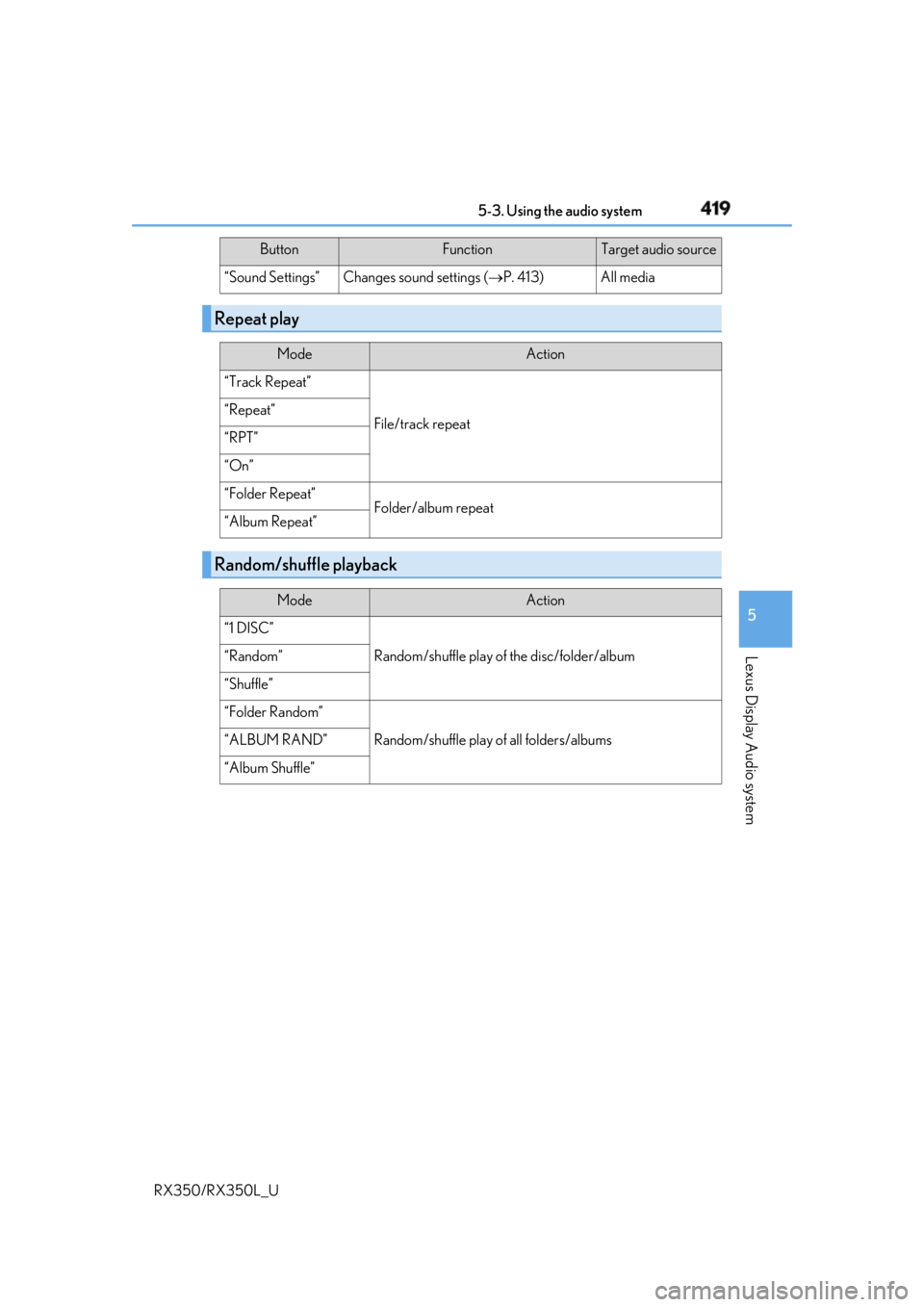
Repeat play Mode Action
“Track Repeat”
File/track repeat“Repeat”
“RPT”
“On”
“Folder Repeat”
Folder/album repeat
“Album Repeat”
Random/shuffle playback Mode Action
“1 DISC”
Random/shuffle play of the disc/folder/album“Random”
“Shuffle”
“Folder Random”
Random/shuffle play of all folders/albums“ALBUM RAND”
“Album Shuffle” Button Function Target audio source
Page 421 of 777
420
RX350/RX350L_U 5-4. Using the radio
Pressing the “RADIO” button displays th e radio top screen from any screen of
the selected source. ■
Menu screen
P. 417
Tune in to the desired station using one of the following methods. ■
Seek tuning
Press and hold then release the “ PRST” or “TRACK ” button.
Seek tuning can also be operated on the menu screen. ( P. 417)
The radio will begin seeking up or down for a station of the nearest frequency
and will stop when a station is found. ■
Manual tuning
Turn the “TUNE•SCROLL” knob. ■
Preset stations
Select the desired preset station by pressing the “ PRST” or “TRACK ” but-
ton, or turning and pr essing the controller.■
Station list
Move the controller to the right and selecting “Station List”.
AM radio: Selectin g a desired station.
FM radio: Selecting a desired type of station and selecting a desired sta-
tion. To refreshing the station list, select “Refresh”. Select “Source” on the refresh
screen, can be change to the othe r audio source while refreshing.Radio operation Select “AM”, “FM” or “SAT” on the audi o source selection screen to begin lis-
tening to the radio.
Radio top screen
Selecting a station (AM or FM radio)
1
2
Page 422 of 777
4215-4. Using the radio
5
Lexus Display Audio system
RX350/RX350L_U When “HD Radio” is set to “On”, availabl e stations with HD Radio channels are
marked with “HD)”.
In AM or FM mode, select a station marked with “HD)”.
Turn the “TUNE•SCROLL” knob to select an HD Radio channel.HD Radio channels can also be selected by selecting “Mul ticast” on the menu screen.
( P. 417)
Select in to the desired channel using one of the following methods.■
Turning up/down the channel
Press and hold the “ PRST” or “TRACK ” button or turn the
“TUNE•SCROLL” knob. ■
Preset channels
Select the desired preset channel by pressing the “ PRST” or “TRACK ”
button or controller. ■
Channel list
Move the controller to the right an d selecting “Select a SAT Category”.
Selecting a desired category of cha nnel and selecting a desired channel.
Search for desired stations or channel.
Select and hold one of the pr eset until you hear a beep.■
Display the song information
Move the controller to the right and selecting “Text”.■
Display the Additional information (HD radio)
Move the controller to the right and selecting “Additional Information”.Selecting an HD Radio channel
Selecting a channel (XM Satellite Radio)
Setting presets
Display the text message 1
2
1
2
1
2