ignition LEXUS RX350 2019 Repair Manual
[x] Cancel search | Manufacturer: LEXUS, Model Year: 2019, Model line: RX350, Model: LEXUS RX350 2019Pages: 777, PDF Size: 12.44 MB
Page 516 of 777
5156-2. Using the air conditioning system and defogger
6
Interior features
RX350/RX350L_U ■
Registering air conditioning settings to elec tronic keys (vehicles with driving position
memory) ●
Unlocking the vehicle using an electronic ke y and turning the engine switch to IGNI-
TION ON mode will recall that key’s re gistered air conditioning settings.●
When the engine switch is tu rned off, the current air cond itioning settings will automat-
ically be registered to the electronic key that was used to unlock the vehicle. ●
The system may not operate correctly if more th an one electronic key is in the vicinity or
if the smart access system with push-button start is used to unlock a passenger door.●
The doors that can recall the air conditioni ng setting when unlocked using the smart
access system with push-b utton start can be changed.
* For details, contact your Lexus
dealer.
* : The doors that can recall the driving positi on memory are changed at the same time.■
Using automatic mode
Fan speed is adjusted automatically according to the temperature setting and the ambi-
ent conditions.
Therefore, the fan may stop for a while until wa rm or cool air is ready to flow immediately
after the “AUTO” button is pressed or “AUTO” is selected. ■
How the system judges if a passenger is in the vehicle when in S-FLOW mode
In S-FLOW mode, the system judges if a passenger is in the vehicle as follows:
• Front passenger seat: A passeng er is judged to be in the front passenger seat when the
system detects an object on the front passe nger seat, fastening of the front passenger
seat belt, changing of the set temperature for the front passenger seat or the opening
and closing of the front passenger door. (However, when only opening and closing of
the front passenger door is detected, the sy stem will judge that a passenger is not in
the front passenger seat after the vehicl e speed reaches approximately 12 mph (20
km/h) or more.)
• Rear seats (automatic S-FLOW mode only): A passenger is judged to be in a rear seat
when the system detects the opening and closin g of a rear door or the operation of the
rear air conditioning system (RX350L).
If a passenger is judged to be in the vehicl e, the system will retain the judgement for a
certain amount of time after th e engine switch is turned off.■
Operation of automatic S-FLOW mode
When the system is operating in automati c S-FLOW mode, if the system detects the
opening and closing of a rear door or the op eration of the rear air conditioning system
(RX350L), S-FLOW mode will be disabled . To enable S-FLOW mode, select on
the option control screen. (I n this case, the system w ill operate in manual S-FLOW
mode.) ■
Changing from manual S-FLOW mode to automatic S-FLOW mode
Select on the option control screen to disable S-FLOW mode.
Turn the engine switch off.
Wait for 60 minutes or more and change the engine switch to IGNITION ON mode.■
Using the voice command system (vehicles with a navigation system)
Air conditioning system can be operated using voic e commands. For details, refer to the
“NAVIGATION SYSTEM OWNER’S MANUAL”. 1
2
3
Page 517 of 777

516 6-2. Using the air conditio ning system and defogger
RX350/RX350L_U ■
When the outside temperature exceeds 75 F (24 C) and the air conditioning system
is on ●
In order to reduce the air co nditioning power consumption, the air conditioning system
may switch to recirculated air mode automatically.
This may also reduce fuel consumption. ●
Recirculated air mode is selected as a defaul t mode when the engine switch is turned to
IGNITION ON mode. ●
It is possible to switch to outside air mode at any time by pressing the outside/recircu-
lated air mode button. ■
Automatic mode for air intake control (if equipped)
In automatic mode, the system detects exhaust gas and other pollutants and automati-
cally switches between outside air and recirculated air modes.
When the dehumidification function is off, and the fan is operating, turning automatic
mode on will activate the dehumidification function. ■
Fogging up of the windows ●
The windows will easily fog up when the humidity in the vehicle is high. Selecting “A/C”
will dehumidify the air from the outlets and defog the windshield effectively. ●
If you turn “A/C” off, the windows may fog up more easily. ●
The windows may fog up if the recirculated air mode is used. ■
Outside/recirculated air mode ●
When driving on dusty roads such as tunnels or in heavy traffic, set the outside/recircu-
lated air mode button to the recirculated air mode. This is effective in preventing out-
side air from enteri ng the vehicle interior. During cooling operation, setting the
recirculated air mode will also cool the vehicle interior effectively. ●
Outside/recirculated air mode may automa tically switch depending on the tempera-
ture setting or the inside temperature. ■
When the outside temperature is low
The dehumidification function may not operate even when “A/C” is selected. ■
Operation of the air conditioning system in Eco drive mode ●
In the Eco drive mode, the air conditioning sy stem is controlled as follows to prioritize
fuel efficiency
• Engine speed and compressor operation controlled to restrict heating/cooling
capacity
• Fan speed restricted when automatic mode is selected ●
To improve air conditioning performanc e, perform the following operations:
• Adjust the fan speed
• Turn off Eco drive mode
Page 523 of 777
522 6-2. Using the air conditio ning system and defogger
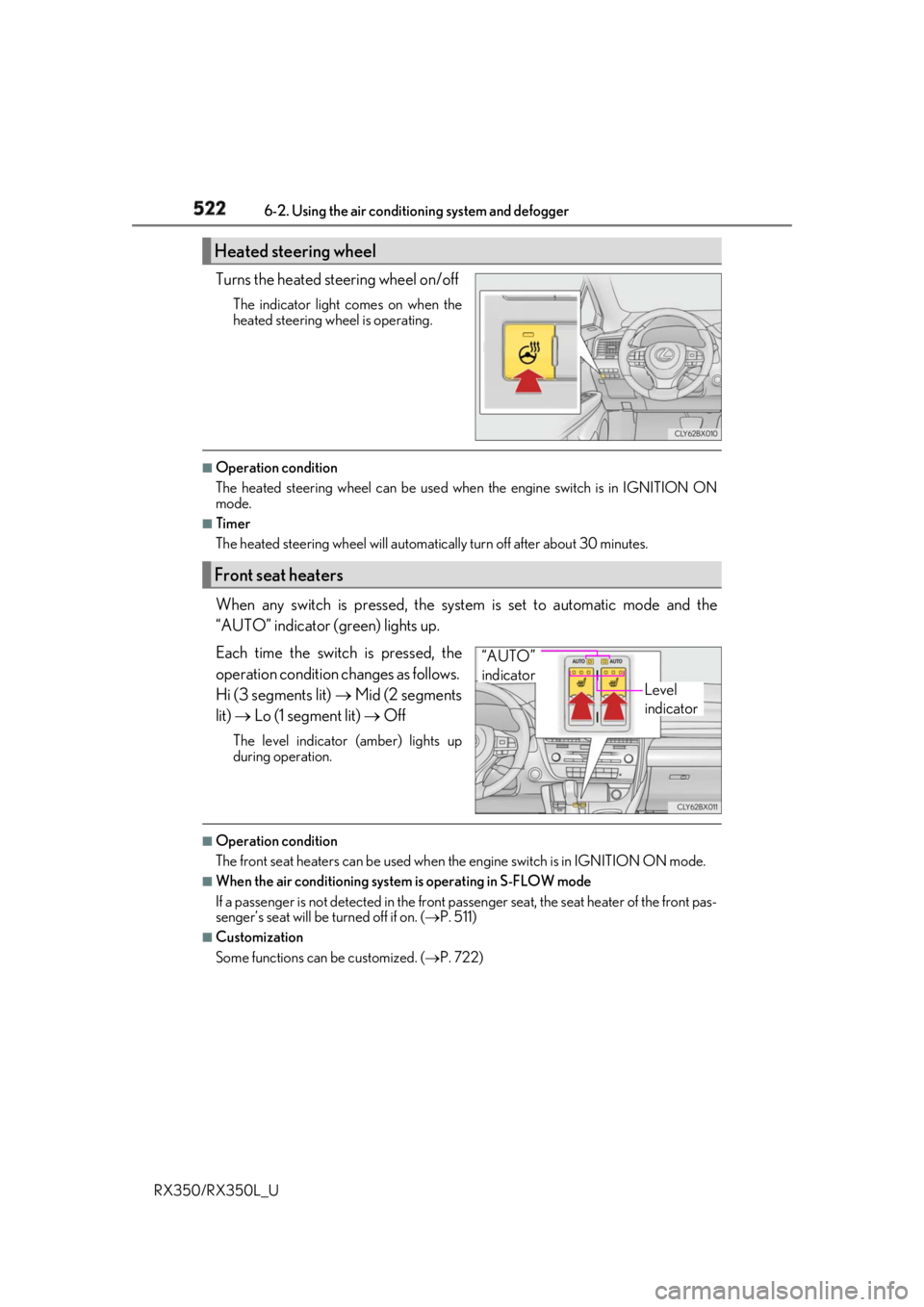
RX350/RX350L_U Turns the heated steering wheel on/off The indicator light comes on when the
heated steering wheel is operating. ■
Operation condition
The heated steering wheel can be used when the engine switch is in IGNITION ON
mode. ■
Timer
The heated steering wheel will automati cally turn off after about 30 minutes.
When any switch is pressed, the system is set to automatic mode and the
“AUTO” indicator (green) lights up.
Each time the switch is pressed, the
operation cond ition changes as follows.
Hi (3 segments lit) Mid (2 segments
lit) Lo (1 segment lit) OffThe level indicator (amber) lights up
during operation.
■
Operation condition
The front seat heaters can be used when the engine switch is in IGNITION ON mode. ■
When the air conditioning system is operating in S-FLOW mode
If a passenger is not detected in the front pa ssenger seat, the seat he ater of the front pas-
senger’s seat will be turned off if on. ( P. 511)■
Customization
Some functions can be customized. ( P. 722)Heated steering wheel
Front seat heaters
Level
indicator“AUTO”
indicator
Page 524 of 777
5236-2. Using the air conditioning system and defogger
6
Interior features
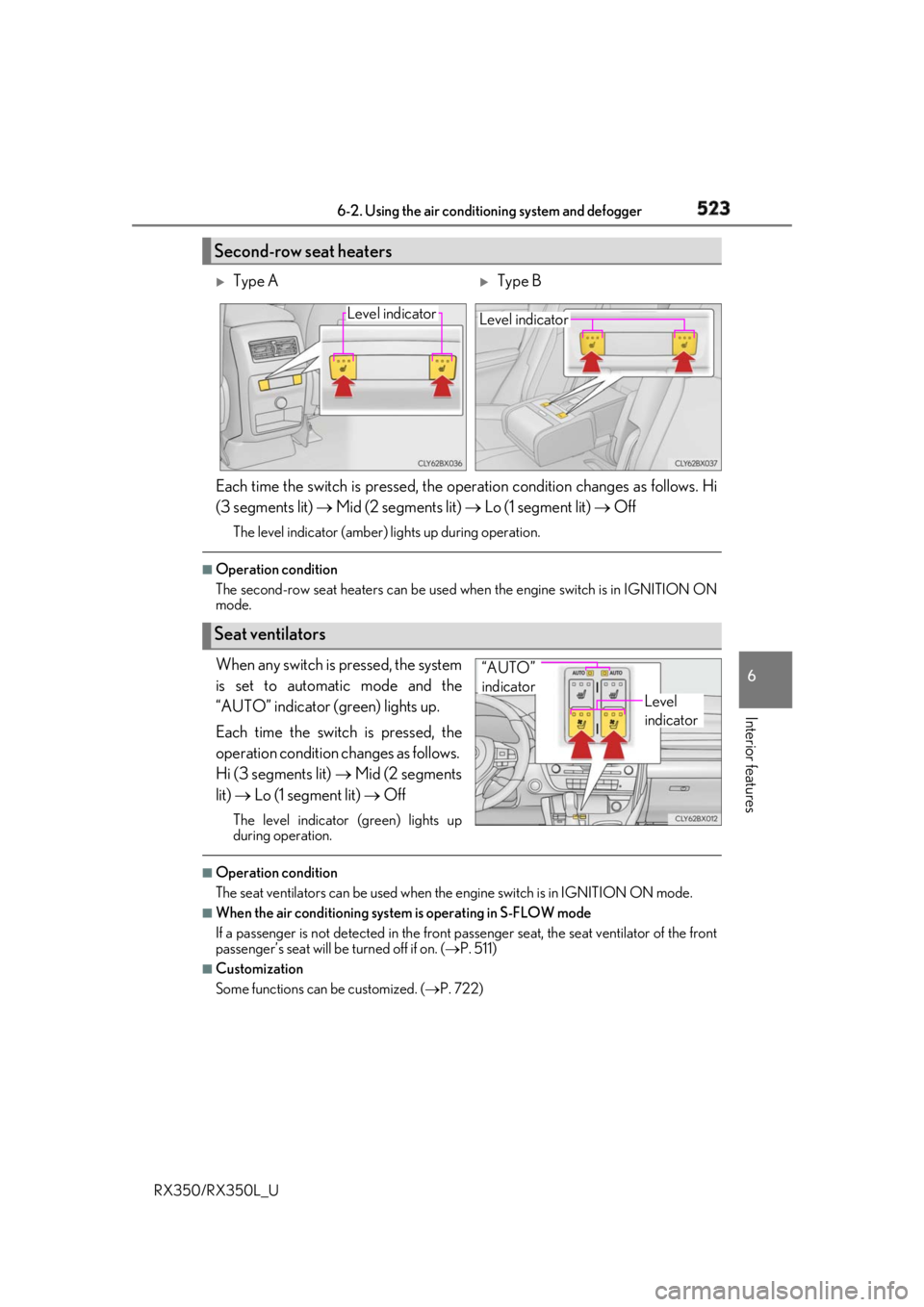
RX350/RX350L_U Each time the switch is pressed, the operation condition changes as follows. Hi
(3 segments lit) Mid (2 segments lit) Lo (1 segment lit) OffThe level indicator (amber) lights up during operation.■
Operation condition
The second-row seat heaters can be used when the engine switch is in IGNITION ON
mode.
When any switch is pressed, the system
is set to automatic mode and the
“AUTO” indicator (green) lights up.
Each time the switch is pressed, the
operation cond ition changes as follows.
Hi (3 segments lit) Mid (2 segments
lit) Lo (1 segment lit) OffThe level indicator (green) lights up
during operation. ■
Operation condition
The seat ventilators can be used when the engine switch is in IGNITION ON mode.■
When the air conditioning system is operating in S-FLOW mode
If a passenger is not detected in the front passenger seat, the seat ventilator of the front
passenger’s seat will be turned off if on. ( P. 511)■
Customization
Some functions can be customized. ( P. 722)Second-row seat heaters
Type A
Type BLevel indicator
Level indicator
Seat ventilators Level
indicator“AUTO”
indicator
Page 547 of 777
546 6-5. Using the other interior features
RX350/RX350L_U ■
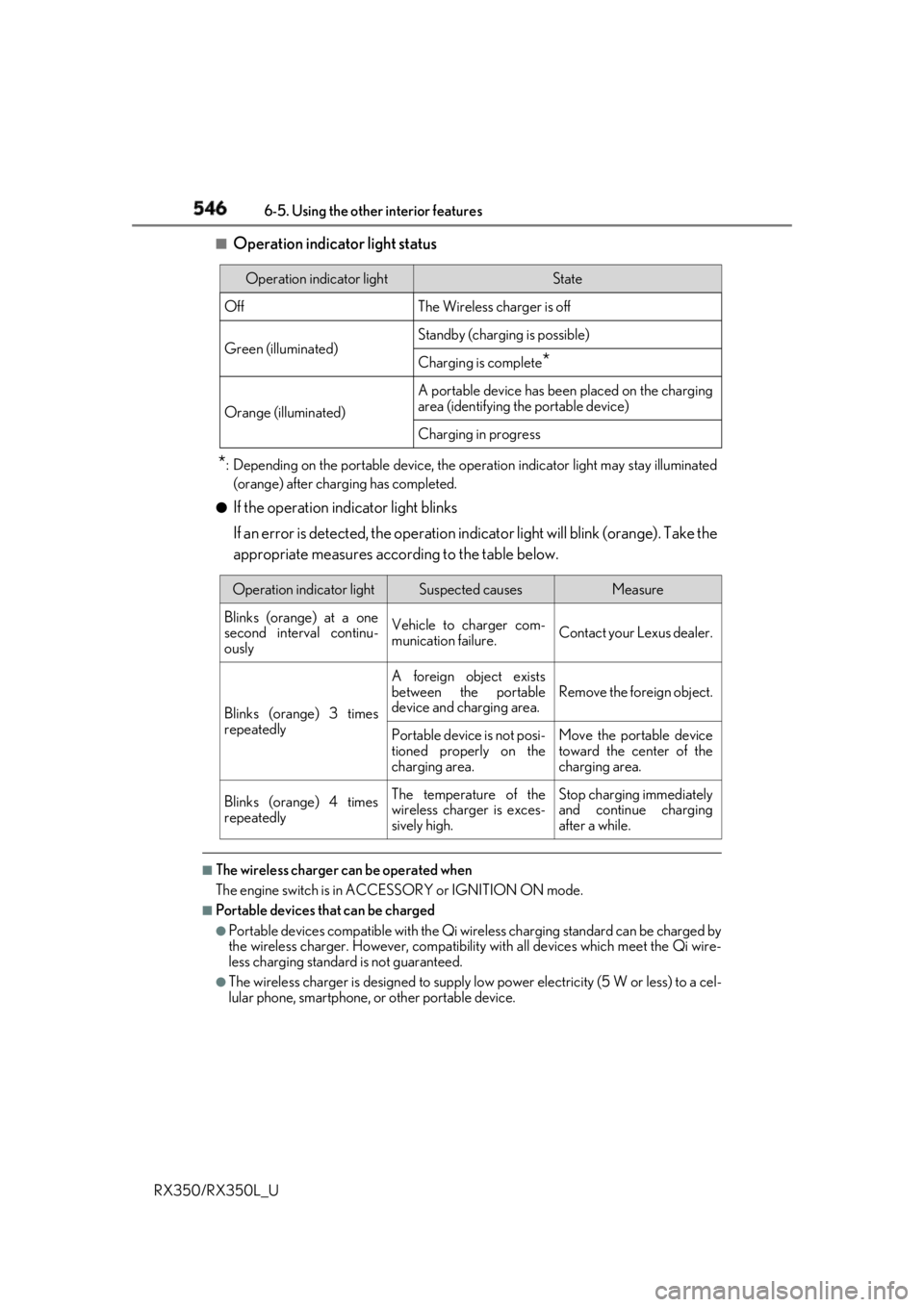
Operation indicator light status
* : Depending on the portable device, the oper ation indicator light may stay illuminated
(orange) after charging has completed.●
If the operation indicator light blinks
If an error is detected, the operation in dicator light will blink (orange). Take the
appropriate measures according to the table below.
■
The wireless charger can be operated when
The engine switch is in ACCESSORY or IGNITION ON mode. ■
Portable devices t hat can be charged●
Portable devices compatible with the Qi wireless charging standard can be charged by
the wireless charger. However, compatibility with all devices which meet the Qi wire-
less charging standard is not guaranteed. ●
The wireless charger is designed to supply low power electricity (5 W or less) to a cel-
lular phone, smartphone, or other portable device.Operation indicator light State
Off The Wireless charger is off
Green (illuminated) Standby (charging is possible)
Charging is complete
*Orange (illuminated) A portable device has been placed on the charging
area (identifying the portable device)
Charging in progress
Operation indicator light Suspected causes Measure
Blinks (orange) at a one
second interval continu-
ously Vehicle to charger com-
munication failure. Contact your Lexus dealer.
Blinks (orange) 3 times
repeatedly A foreign object exists
between the portable
device and charging area. Remove the foreign object.
Portable device is not posi-
tioned properly on the
charging area. Move the portable device
toward the center of the
charging area.
Blinks (orange) 4 times
repeatedly The temperature of the
wireless charger is exces-
sively high. Stop charging immediately
and continue charging
after a while.
Page 553 of 777
552 6-5. Using the other interior features
RX350/RX350L_U ●
The power outlets can be used when the engine switch is in ACCESSORY or
IGNITION ON mode.
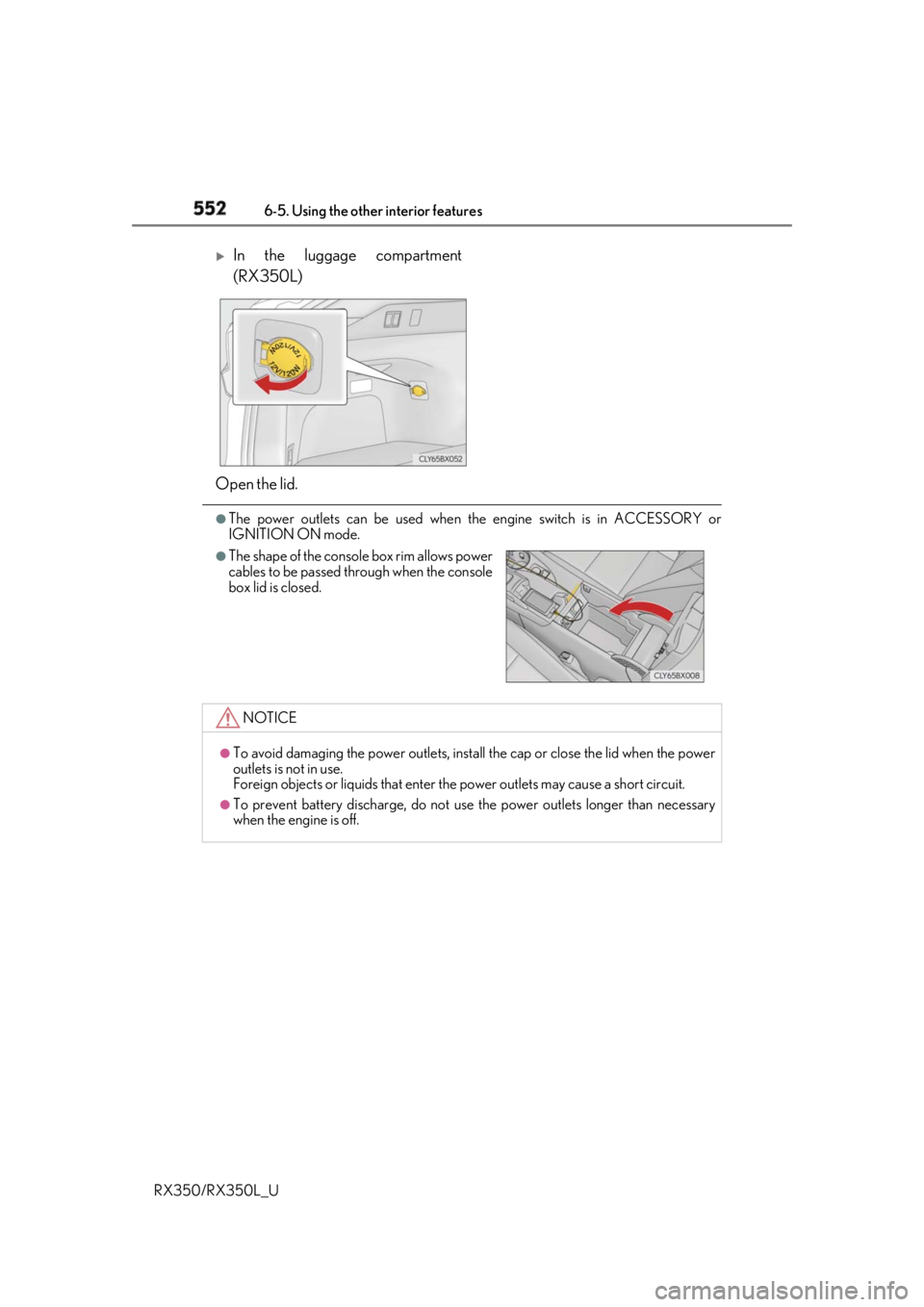
In the luggage compartment
(RX350L)
Open the lid. ●
The shape of the console box rim allows power
cables to be passed through when the console
box lid is closed.
NOTICE ●
To avoid damaging the power outlets, insta ll the cap or close the lid when the power
outlets is not in use.
Foreign objects or liquids that enter the power outlets may cause a short circuit. ●
To prevent battery discharge, do not use the power outlets longer than necessary
when the engine is off.
Page 554 of 777
5536-5. Using the other interior features
6
Interior features
RX350/RX350L_U The USB charging ports are used to supply 2.1 A of electricity at 5 V to external
devices. The USB charging ports are for charging only. They are not designed for
data transfer or other purposes. Depending on the external device, it may not
charge properly. Refer to the manual in cluded with the device before using a
USB charging port. ■
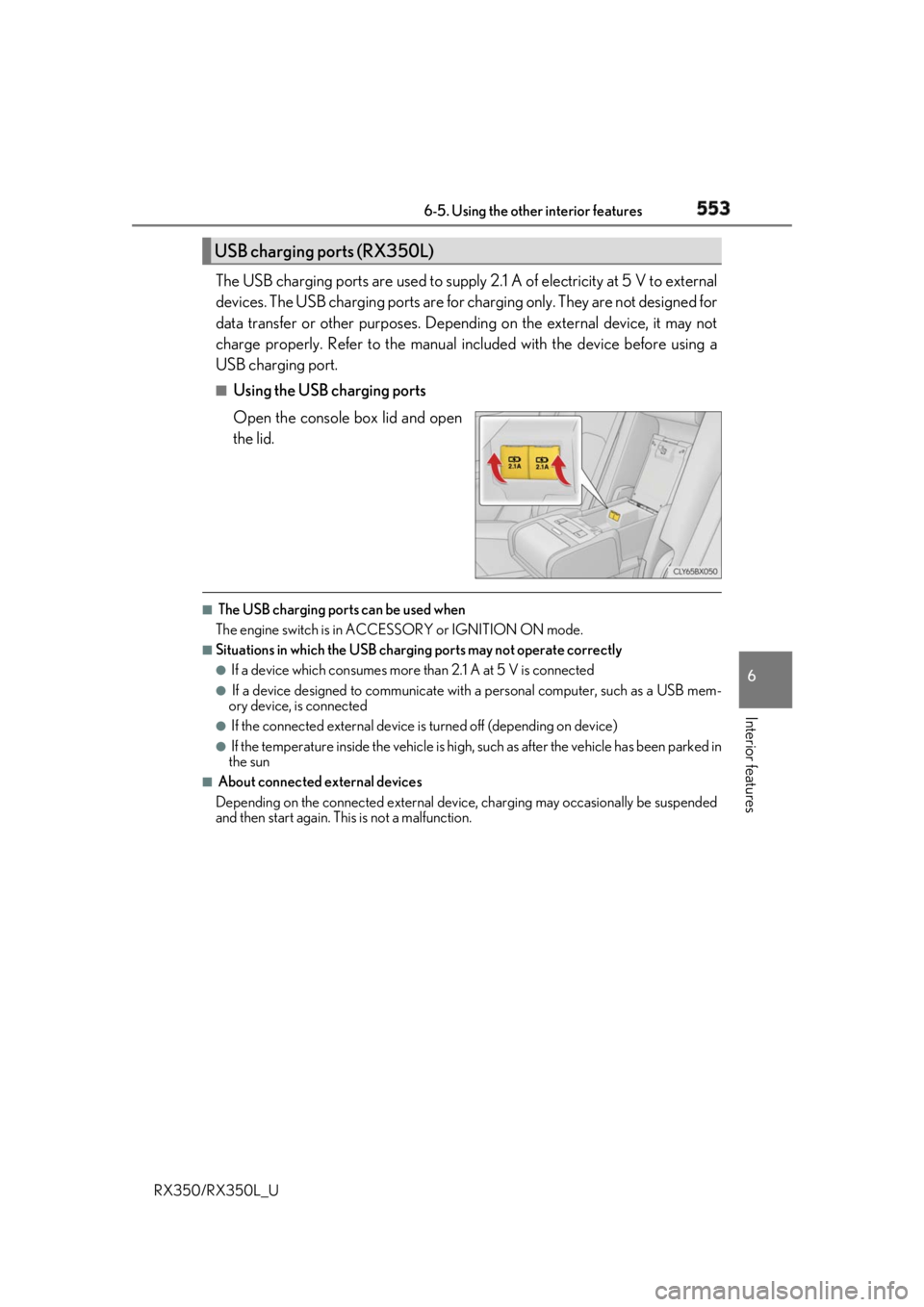
Using the USB charging ports
Open the console box lid and open
the lid. ■
The USB charging ports can be used when
The engine switch is in ACCESSORY or IGNITION ON mode. ■
Situations in which the USB charging ports may not operate correctly ●
If a device which consumes more than 2.1 A at 5 V is connected●
If a device designed to communicate with a personal computer, such as a USB mem-
ory device, is connected ●
If the connected external device is turned off (depending on device)●
If the temperature inside the vehicle is high, such as after the vehicle has been parked in
the sun ■
About connected external devices
Depending on the connected external device , charging may occasionally be suspended
and then start again. This is not a malfunction.USB charging ports (RX350L)
Page 571 of 777
570 6-5. Using the other interior features
RX350/RX350L_U ■
Safety Connect Serv ices Information●
Phone calls using the vehicles Bluetooth ®
technology will not be possible during Safety
Connect. ●
Safety Connect is available be ginning Fall 2009 on select Lexus models (in the contig-
uous United States only). Contact with th e Safety Connect respon se center is depen-
dent upon the telematics device being in operative condition, cellular connection
availability, and GPS sa tellite signal receptio n, which can limit the ability to reach the
response center or receive emergency se rvice support. Enro llment and Telematics
Subscription Service Agreement required. A va riety of subscription terms is available;
charges vary by subscription term selected and location. ●
Automatic Collision Notification, Emergenc y Assistance and Stolen Vehicle Location
will function in the United States, includin g Hawaii and Alaska, Puerto Rico and in Can-
ada, and Enhanced Roadside Assistance will function in the United States, Puerto Rico
and in Canada. ●
Automatic Collision Notification, Emergency Assistance, Stolen Vehicle Location and
Enhanced Roadside Assistance will not func tion in the United States Virgin Islands.
No Safety Connect services will function outs ide of the United States in countries other
than Canada.
For vehicles first sold in the USVI, no Safety Connect services will function in and out-
side the United States Virgin Islands. ●
Safety Connect services are not subject to section 255 of the Telecommunications Act
and the device is not TTY compatible. ■
Languages
The Safety Connect response ce nter will offer support in mu ltiple languages. The Safety
Connect system will offer voice prompts in English, Spanish and French. Please indicate
your language of ch oice when enrolling.■
When contacting the response center
You may be unable to contact the resp onse center if the network is busy.
When the engine switch is turned to IGNITION ON mode, the red indicator
light comes on for 2 seconds then turns off. Afterward, the green indicator light
comes on, indicating that the service is active.
The following indicator light patterns indicate specific system usage conditions: ●
Green indicator light on = Active service ●
Green indicator light flashing = Safety Connect call in process●
Red indicator light (except at vehicle start-up) = System malfunction (contact
your Lexus dealer) ●
No indicator light (off) = Safety Connect service not activeSafety Connect LED light Indicators
Page 592 of 777
5917-3. Do-it-yourself maintenance
7
Maintenance and care
RX350/RX350L_U * : Vehicles with single-beam headlightsTire inflation pres-
sure ( P. 613) • Tire pressure gauge • Compressed air source
Washer fluid
( P. 603) • Water or washer fluid containing antifreeze (for winter use)
• Funnel (used only for adding water or washer fluid)
WARNING
The engine compartment contains many mechan isms and fluids that may move suddenly,
become hot, or become electrically energize d. To avoid death or serious injury, observe
the following precautions. ■
When working on the engine compartment ●
Keep hands, clothing and tools away from the moving fan and engine drive belt.●
Be careful not to touch the engine, radiator, exhaust manifold, etc. right after driving
as they may be hot. Oil and other fluids may also be hot. ●
Do not leave anything that may burn easily, such as paper and rags, in the engine
compartment. ●
Do not smoke, cause sparks or expose an open flame to fuel or the battery. Fuel and
battery fumes are flammable. ●
Be extremely cautions when working on the battery. It contains poisonous and corro-
sive sulfuric acid. ■
When working near the electric cooling fans or radiator grille
Be sure the engine switch is off.
With the engine switch in IGNITION ON mode, the electric cooling fans may auto-
matically start to run if the air conditioning is on and/or the coolant temperature is high.
( P. 599) ■
Safety glasses
Wear safety glasses to prevent flying or falling material, flui d spray, etc. from getting in
your eyes.
NOTICE ■
If you remove the air cleaner filter
Driving with the air cleaner f ilter removed may cause excessive engine wear due to dirt
in the air. Items Parts and tools
Page 607 of 777
606 7-3. Do-it-yourself maintenance
RX350/RX350L_U ■
How to initialize the tire pressure warning system
Park the vehicle in a safe place and turn the engine switch off.Initialization cannot be performed while the vehicle is moving.
Adjust the tire inflation pressure to th e specified cold tire inflation pressure
level. ( P. 704)Make sure to adjust the tire pressure to the specified cold tire inflation pressure
level. The tire pressure warning system will operate based on this pressure level.
Turn the engine switch to IGNITION ON mode.
Select on the multi-information display. ( P. 97)
Press or of the meter control sw itch, select the “Vehicle Settings”
screen and then press the .
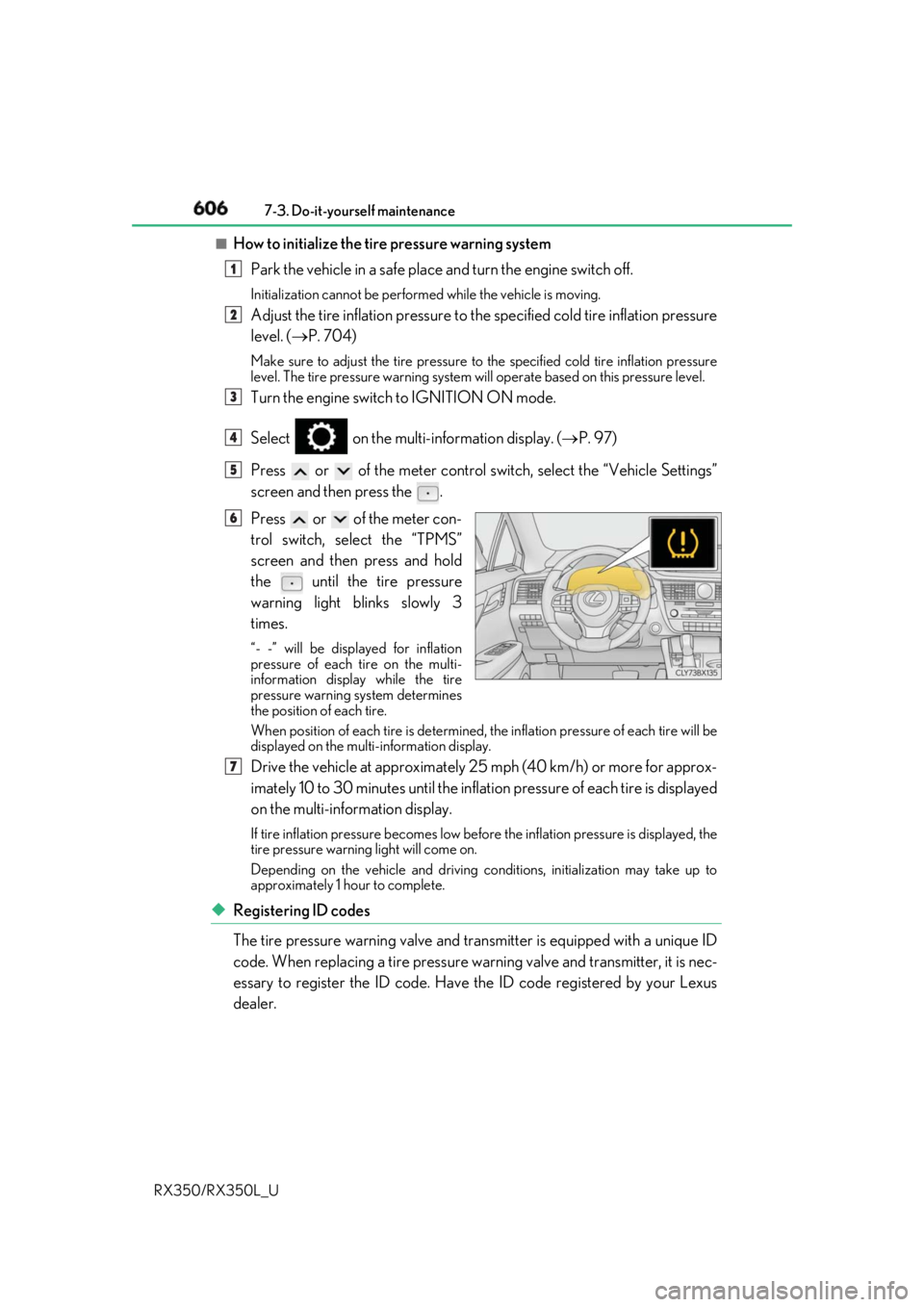
Press or of the meter con-
trol switch, select the “TPMS”
screen and then press and hold
the
until the tire pressure
warning light blinks slowly 3
times. “- -” will be displayed for inflation
pressure of each tire on the multi-
information displa y while the tire
pressure warning system determines
the position of each tire.
When position of each tire is determined, the inflation pressure of each tire will be
displayed on the mult i-information display.
Drive the vehicle at approximately 25 mph (40 km/h) or more for approx-
imately 10 to 30 minutes until the inflat ion pressure of each tire is displayed
on the multi-information display. If tire inflation pressure becomes low before the inflation pressure is displayed, the
tire pressure warning light will come on.
Depending on the vehicle and driving co nditions, initialization may take up to
approximately 1 hour to complete.
◆ Registering ID codes
The tire pressure warning valve and tran smitter is equipped with a unique ID
code. When replacing a tire pressure warning valve and transmitter, it is nec-
essary to register the ID code. Have the ID code registered by your Lexus
dealer. 1
2
3
4
5
6
7