ignition LEXUS RX350 2020 Owner's Manual
[x] Cancel search | Manufacturer: LEXUS, Model Year: 2020, Model line: RX350, Model: LEXUS RX350 2020Pages: 516, PDF Size: 17.3 MB
Page 147 of 516
1473-5. Opening, closing the windows and moon roof
3
Before driving
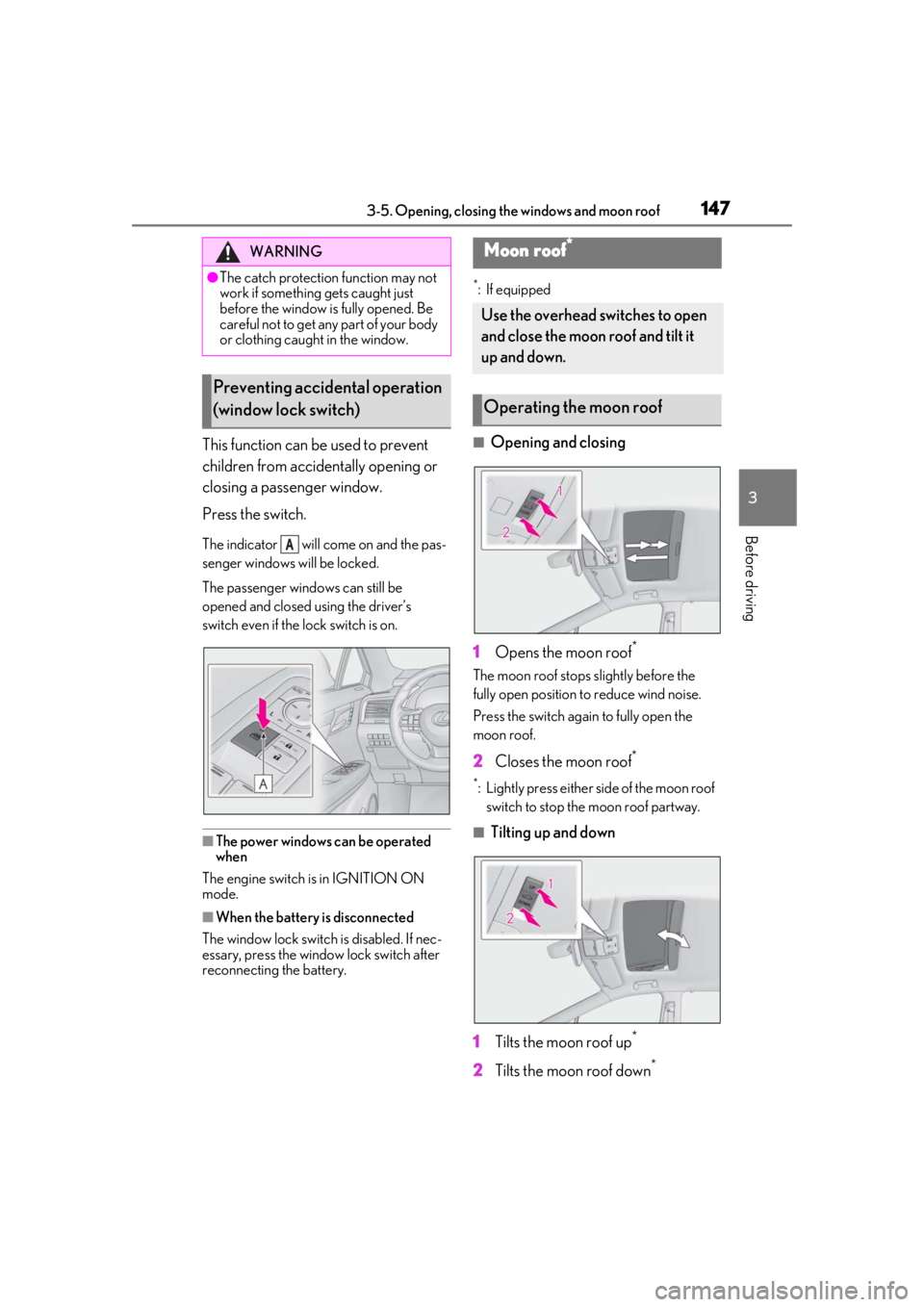
This function can be used to prevent
children from accidentally opening or
closing a passenger window.
Press the switch.
The indicator will come on and the pas-
senger windows will be locked.
The passenger windows can still be
opened and closed using the driver’s
switch even if the lock switch is on.
■The power windows can be operated
when
The engine switch is in IGNITION ON
mode.
■When the battery is disconnected
The window lock switch is disabled. If nec-
essary, press the window lock switch after
reconnecting the battery.
*: If equipped
■Opening and closing
1 Opens the moon roof
*
The moon roof stops slightly before the
fully open position to reduce wind noise.
Press the switch again to fully open the
moon roof.
2 Closes the moon roof*
*: Lightly press either side of the moon roof
switch to stop the moon roof partway.
■Tilting up and down
1 Tilts the moon roof up
*
2Tilts the moon roof down*
WARNING
●The catch protection function may not
work if something gets caught just
before the window is fully opened. Be
careful not to get any part of your body
or clothing caught in the window.
Preventing accidental operation
(window lock switch)
A
Moon roof*
Use the overhead switches to open
and close the moon roof and tilt it
up and down.
Operating the moon roof
Page 148 of 516

1483-5. Opening, closing the windows and moon roof
*: Lightly press either side of the moon roof switch to stop the moon roof partway.
■The moon roof can be operated when
The engine switch is in IGNITION ON
mode.
■Operating the moon roof after turning
the engine off
The moon roof can be operated for approx-
imately 45 seconds after the engine switch
is turned to ACCESSORY mode or turned
off. It cannot, however, be operated once
the driver’s door is opened.
■Jam protection function
If an object is detected between the moon
roof and the frame while the moon roof is
closing or tilting down, travel is stopped and
the moon roof opens slightly.
■Sunshade
The sunshade can be opened and closed
manually. However, the sunshade will open
automatically when the moon roof is
opened.
■Door lock linked moon roof operation
●The moon roof can be opened and
closed using the mechanical key.*
( P.442)
●The moon roof can be opened using the
wireless remote control.* ( P.97)
●The alarm may be triggered if the alarm is
set and the moon roof is closed using the
door lock linked moon roof operation
function. ( P.67)
*: These settings must be customized at
your Lexus dealer.
■When the moon roof does not close nor-
mally
Perform the following procedure:
If the moon roof closes but then re-opens
slightly
1 Stop the vehicle.
2 Press and hold the “CLOSE” switch.
*1
The moon roof will close, reopen and pause
for approximately 10 seconds.*2 Then it will close again, tilt up and pause for approxi-
mately 1 second. Finally, it will tilt down,
open and close.
3
Check to make sure that the moon roof
is completely closed and then release
the switch.
If the moon roof tilts down but then tilts
back up
1 Stop the vehicle.
2 Press and hold the “UP” switch
*1 until
the moon roof moves into the tilt up
position and stops.
3 Release the “UP” switch once and then
press and hold the “UP” switch
again.
*1The moon roof will pause for
approximately 10 seco nds in the tilt up
position.
*2 Then it will adjust slightly and
pause for approximately 1 second.
Finally, it will tilt down, open and close.
4 Check to make sure that the moon roof
is completely closed and then release
the switch.
*1: If the switch is rele ased at the incorrect
time, the procedure will have to be per-
formed again from the beginning.
*2: If the switch is released after the above mentioned 10 second pause, automatic
operation will be disabled. In that case,
press and hold the “CLOSE” or “UP”
switch, and the moon roof will tilt up and
pause for approximately 1 second. Then
it will tilt down, open and close. Check
to make sure that the moon roof is com-
pletely closed and then release the
switch.
If the moon roof does not fully close even
after performing the above procedure cor-
rectly, have the vehicle inspected by your
Lexus dealer.
■Moon roof open warning buzzer
A buzzer sounds and a message is shown
on the multi-informat ion display in the
instrument cluster when the engine switch
is turned off and the driver’s door is opened
with the moon roof open.
Page 151 of 516

1513-5. Opening, closing the windows and moon roof
3
Before driving
Closes the panoramic moon roof
Slide and hold the switch forward.
The panoramic moon roof will fully
close automatically.
■The panoramic moon roof can be oper-
ated when
The engine switch is in IGNITION ON
mode.
■Operating the panoramic moon roof
after turning the engine off
The panoramic moon roof and electronic
sunshade can be operated for approxi-
mately 45 seconds afte r the engine switch
is turned to ACCESSORY mode or turned
off. They cannot, ho wever, be operated
once the driver’s door is opened.
■Jam protection function
If an object is detected between the pan-
oramic moon roof and the frame in the fol-
lowing situations, travel is stopped and the
panoramic moon roof opens slightly:
●The panoramic moon roof is closing or
tilting down.
●The electronic sunshade is closing.
■Door lock linked panoramic moon roof
operation
●The panoramic moon roof can be
opened and closed using the mechanical
key.
* ( P.442)
●The panoramic moon roof can be
opened using the wireless remote con-
trol.
*( P.97)
*: These settings must be customized at
your Lexus dealer.
■Closing both the panoramic moon roof
and electronic sunshade
Slide the switch forward.
The electronic sunshade will close to the
half-open position and pause. The pan-
oramic moon roof will then fully close. Then
the electronic sunshade will fully close.
■When the panoramic moon roof or elec-
tronic sunshade does not close normally
Perform the following procedure:
1 Stop the vehicle.
2 Turn the engine switch to IGNITION
ON mode.
3 Slide and hold the switch or
switch forward. Continue pressing the
switch for approximately 10 seconds
after the panoramic moon roof or elec-
tronic sunshade closes and reopens.
The panoramic moon roof and elec-
tronic sunshade will start to close.
*
4Check that the panoramic moon roof
and electronic sunshade are fully closed
and release the switch.
*: If the switch is released at the incorrect
time, the procedure will have to be per-
formed again from the beginning.
If the panoramic moon roof or electronic
sunshade does not fully close even after
performing the above procedure correctly,
have the vehicle inspected by your Lexus
dealer.
■Alarm
The alarm may be triggered if the alarm is
set and the panoramic moon roof is closed
using the door lock linked panoramic moon
roof operation function. ( P.68)
■Panoramic moon roof open warning
buzzer
A buzzer sounds and a message is shown
on the multi-informat ion display in the
instrument cluster when the engine switch
is turned off and the driver’s door is opened
with the panoramic moon roof open.
■Customization
Some functions can be customized.
( P.470)
Page 155 of 516
155
4
4
Driving
Driving
.4-1. Before drivingDriving the vehicle ..................... 156
Cargo and luggage .................... 161
Vehicle load limits ...................... 164
Trailer towing (vehicles without towing package) ...................... 165
Trailer towing (vehicles with tow- ing package).............................. 165
Dinghy towing ............................. 175
4-2. Driving procedures Engine (ignition) switch ........... 176
Automatic transmission........... 180
Turn signal lever.......................... 184
Parking brake .............................. 185
Brake Hold.................................... 188
4-3. Operating the lights and wipers Headlight switch ......................... 190
Automatic High Beam ............. 193
Fog light switch ........................... 195
Windshield wipers and washer ......................................................... 196
Rear window wiper and washer ........................................................ 200
4-4. Refueling Opening the fuel tank cap..... 202
4-5. Using the driving support sys- tems
Lexus Safety System + 2.0 .... 205
PCS (Pre-Collision System)... 211
LTA (Lane Tracing Assist)...... 218RSA (Road Sign Assist)...........227
Dynamic radar cruise control with
full-speed range...................... 230
BSM (Blind Spot Monitor) .... 239
PKSA (Parking Support Alert) ....................................................... 245
Intuitive parking assist ............. 247
RCTA (Rear cross traffic alert) function....................................... 253
PKSB (Parking Support Brake) ....................................................... 258
Parking Support Brake function (static objects) ......................... 264
Parking Support Brake function (rear-crossing vehicles) ...... 270
Driving mode select switch .. 274
All-wheel drive lock switch ... 276
Driving assist systems.............. 277
4-6. Driving tips Winter driving tips .................... 283
Utility vehicle precautions..... 285
Page 176 of 516
1764-2. Driving procedures
4-2.Driving procedures
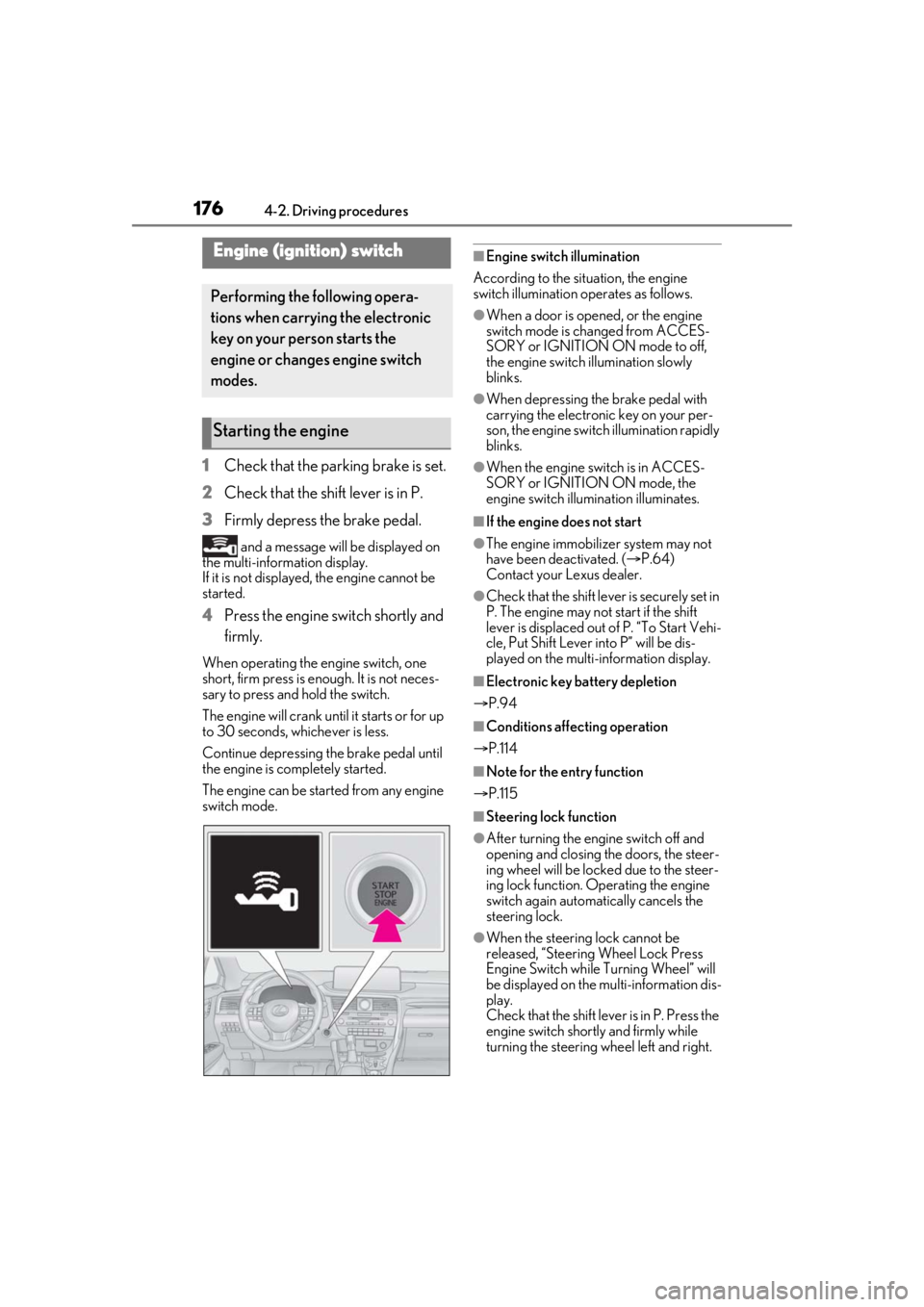
1Check that the parking brake is set.
2 Check that the shift lever is in P.
3 Firmly depress the brake pedal.
and a message will be displayed on
the multi-information display.
If it is not displayed, the engine cannot be
started.
4 Press the engine switch shortly and
firmly.
When operating the engine switch, one
short, firm press is enough. It is not neces-
sary to press and hold the switch.
The engine will crank until it starts or for up
to 30 seconds, whichever is less.
Continue depressing the brake pedal until
the engine is completely started.
The engine can be started from any engine
switch mode.
■Engine switch illumination
According to the situation, the engine
switch illumination operates as follows.
●When a door is opened, or the engine
switch mode is changed from ACCES-
SORY or IGNITION ON mode to off,
the engine switch illumination slowly
blinks.
●When depressing the brake pedal with
carrying the electronic key on your per-
son, the engine switch illumination rapidly
blinks.
●When the engine sw itch is in ACCES-
SORY or IGNITION ON mode, the
engine switch illumination illuminates.
■If the engine does not start
●The engine immobilizer system may not
have been deactivated. ( P.64)
Contact your Lexus dealer.
●Check that the shift leve r is securely set in
P. The engine may not start if the shift
lever is displaced out of P. “To Start Vehi-
cle, Put Shift Lever into P” will be dis-
played on the multi-information display.
■Electronic key battery depletion
P.94
■Conditions affecting operation
P.114
■Note for the entry function
P.115
■Steering lock function
●After turning the engine switch off and
opening and closing the doors, the steer-
ing wheel will be lock ed due to the steer-
ing lock function. Operating the engine
switch again automatically cancels the
steering lock.
●When the steering lock cannot be
released, “Steering Wheel Lock Press
Engine Switch while Turning Wheel” will
be displayed on the multi-information dis-
play.
Check that the shift lever is in P. Press the
engine switch shortly and firmly while
turning the steering wheel left and right.
Engine (ignition) switch
Performing the following opera-
tions when carryin g the electronic
key on your person starts the
engine or changes engine switch
modes.
Starting the engine
Page 179 of 516

1794-2. Driving procedures
4
Driving
the engine switch with brake pedal
released. (The mode changes each
time the switch is pressed.)
1Off
*
The emergency flashers can be used.
2ACCESSORY mode
Some electrical components such as the
audio system can be used.
“ACCESSORY” will be displayed on the
meters.
3IGNITION ON mode
All electrical components can be used.
“IGNITION ON” will be displayed on the
meters.
*: If the shift lever is in a position other than
P when turning off the engine, the
engine switch will be turned to ACCES-
SORY mode, not to off.
■Auto power off function
If the vehicle is left in ACCESSORY mode
for more than 20 minutes or IGNITION
ON mode (with the engine not running) for
more than an hour with the shift lever in P, the engine switch will automatically turn off.
However, this function cannot entirely pre-
vent battery discharge. Do not leave the
vehicle with the engine switch in ACCES-
SORY or IGNITION ON mode for long
periods of time when the engine is not run-
ning.
If the engine is stopped with the shift
lever in a position other than P, the
engine switch will not be turned off but
instead be turned
to ACCESSORY
mode. Perform the following proce-
dure to turn the switch off:
1 Check that the parking brake is set.
2 Shift the shift lever to P.
3 Check that “Turn Off Vehicle” is
displayed on the multi-information
display and then press the engine
switch once.
4 Check that “Turn Off Vehicle” on
the multi-information display is off.
NOTICE
■To prevent battery discharge
●Do not leave the engine switch in
ACCESSORY or IGNITION ON
mode for long periods of time without
the engine running.
●If “ACCESSORY” or “IGNITION
ON” is displayed on the meters while
the engine is not running, the engine
switch is not off.
Exit the vehicle after turning the
engine switch off.
When stopping the engine with
the shift lever in a position other
than P
Page 181 of 516

1814-2. Driving procedures
4
Driving
because dynamic radar cruise control with
full-speed range will not be canceled.
●While driving in D position, downshifting
to 7, 6, 5 or 4. ( P.230)
●When switching the driving mode to
sport mode while driving in the D position
( P.274)
■Restraining sudden start (Drive-Start
Control)
P.157
■AI-SHIFT
●The AI-SHIFT automatically selects the
suitable gear accordin g to driver perfor-
mance and driving conditions.
The AI-SHIFT automatically operates
when the shift lever is in D. (Shifting the
shift lever to the M position cancels the
function.)
●G AI-SHIFT automatically selects a suit-
able gear for sporty driving according to
driver’s input and driving conditions. G
AI-SHIFT operates automatically when
the shift lever is in D and sport mode is
selected for the driving mode. (Selecting
normal mode with the driving mode
select switch or shifti ng the shift lever to
the M position cancels this function.)
While the engine switch is in IGNI-
TION ON mode, move the shift lever
with the brake pedal depressed.
When shifting the shift lever between P
and D, make sure that the vehicle is com-
pletely stopped.
■Shift lock system
The shift lock system is a system to prevent
accidental operation of the shift lever in
starting.
The shift lever can be shifted from P only
when the engine swit ch is in IGNITION
ON mode and the brake pedal is being
depressed.
■If the shift lever cannot be shifted from P
First, check whether the brake pedal is
being depressed.
If the shift lever cannot be shifted with your
foot on the brake pedal, there may be a
problem with the shift lock system. Have the
vehicle inspected by your Lexus dealer
immediately.
The following steps may be used as an
WARNING
■When driving on slippery road sur-
faces
Be careful of downshifting and sudden
acceleration, as this could result in the
vehicle skidding to th e side or spinning.
Shifting the shift lever
Page 182 of 516

1824-2. Driving procedures
emergency measure to ensure that the shift
lever can be shifted.
Releasing the shift lock:
1Turn the engine switch to IGNITION
ON mode and check that the parking
brake is set. ( P.179, 185)
2 Turn the engine switch to off.
3 Depress the brake pedal.
4 Pry the cover up with a flathead screw-
driver or equivalent tool.
To prevent damage to the cover, cover the
tip of the screwd river with a rag.
5 Press the shift lock override button.
The shift lever can be shifted while the but-
ton is pressed.
P.274
To drive using temporary shift range
selection, operate the “-” or “+” paddle
shift switch.
When the “-” paddle shift switch is
operated, the shift range will be down-
shifted to a range that enables engine
braking force that is suitable to driving
conditions. When the “+” paddle shift
switch is operated, the shift range will
be one gear higher than the gear in use
during normal D position driving.
Changing the shift range allows
restriction of the highest gear, prevent-
ing unnecessary upshifting and
enabling the level of engine braking
force to be selected.
1 Upshifting
2 Downshifting
The selected shift rang e, from D1 to D8,
will be displayed on the meters.
WARNING
■To prevent an accident when releas-
ing the shift lock
Before pressing the shift lock override
button, make sure to set the parking
brake and depress the brake pedal.
If the accelerator pe dal is accidentally
depressed instead of the brake pedal
when the shift lock override button is
pressed and the shift lever is shifted out
of P, the vehicle may suddenly start, pos-
sibly leading to an accident resulting in
death or serious injury.
Selecting the driving mode
Selecting shift ranges in the D
position
Page 184 of 516

1844-2. Driving procedures
engine).
In the following situations, the gear will
not shift even if the shift lever or paddle
shift switches are operated.
The vehicle speed is low (upshift
only).
■Downshifting restriction warning
buzzer
To help ensure safety and driving perfor-
mance, downshifting operation may some-
times be restricted. In some circumstances,
downshifting may not be possible even
when the paddle shift switch is operated. (A
buzzer will sound twice.)
1 Right turn
2 Lane change to the right (move the
lever partway and release it)
The right hand signals will flash 3 times.
3Lane change to the left (move the
lever partway and release it)
The left hand signals will flash 3 times.
4Left turn
■Turn signals can be operated when
The engine switch is in IGNITION ON
mode.
■If the indicator flashes faster than usual
Check that a light bulb in the front or rear
turn signal lights has not burned out.
■If the turn signals stop flashing before a
lane change has been performed
Operate the lever again.
Turn signal lever
Operating instructions
Page 187 of 516

1874-2. Driving procedures
4
Driving
system warning light is not illuminated.
If the automatic release function does not
operate, manually release the parking
brake.
■If “Parking Brake Overheated Parking
Brake Unavailable” is displayed on the
multi-information display
If the parking brake is operated repeatedly
over a short period of time, the system may
restrict operation to prevent overheating. If
this happens, refrain from operating the
parking brake. Normal operation will return
after about 1 minute.
■If “EPB Activation Stopped Incom-
pletely” or “Parking Brake Unavailable”
is displayed on th e multi-information
display
Operate the parking brake switch. If the
message does not disappear after operat-
ing the switch several times, the system may
be malfunctioning. Have the vehicle
inspected by your Lexus dealer immedi-
ately.
■Parking brake operation sound
When the parking brake operates, a motor
sound (whirring sound) may be heard. This
does not indicate a malfunction.
■Parking brake indicator light and park-
ing brake light
●Depending on the engine switch mode,
the parking brake in dicator light and
parking brake light will turn on and stay
on as described below:
IGNITION ON mode: Comes on until
the parking brake is released.
Not in IGNITION ON mode: Stays on
for approximately 15 seconds.
●When the engine switch is turned off with
the parking brake set, the parking brake
indicator light and parking brake light will
stay on for about 15 seconds. This does
not indicate a malfunction.
■Changing the mode
When changing the automatic mode on/off,
the message will be shown on the
multi-information display and the buzzer
sounds.
■Parking the vehicle
P.156
■Parking brake engaged warning buzzer
A buzzer will sound if the vehicle is driven
with the parking brake engaged. “Release
Parking Brake” is displayed on the
multi-information display.
■Warning messages and buzzers
Warning messages and buzzers are used to
indicate a system malfunction or to inform
the driver of the need for caution. If a warn-
ing message is shown on the multi-informa-
tion display, read the message and follow
the instructions.
■If the brake system warning light comes
on
P.413
■Usage in winter time
P.285
WARNING
■When parking the vehicle
Do not leave a child in the vehicle alone.
The parking brake may be released unin-
tentionally and there is the danger of the
vehicle moving that may lead to an acci-
dent resulting in death or serious injury.
■Parking brake switch
Do not set any objects near the parking
brake switch. Objects may interfere with
the switch and may lead the parking
brake to unexpectedly operate.
NOTICE
■When parking the vehicle
Before you leave the vehicle, shift the
shift lever to P, set the parking brake and
make sure that the vehicle does not
move.
■When the system malfunctions
Stop the vehicle in a safe place and
check the warning messages.