equipped LEXUS RX350 2021 User Guide
[x] Cancel search | Manufacturer: LEXUS, Model Year: 2021, Model line: RX350, Model: LEXUS RX350 2021Pages: 508, PDF Size: 10.33 MB
Page 48 of 508
481-2. Child safety
*: The third-row seats are not equipped with Child restraint LATCH anchors.
■When installing a child restraint
system to a front passenger seat
For the safety of a child, install child restraint systems to second-row seats.
When installing child restraint system
to a front passenger seat is unavoid-
able, adjust the seat as follows and
install the child restraint system.
Move the seat to the rearmost posi-
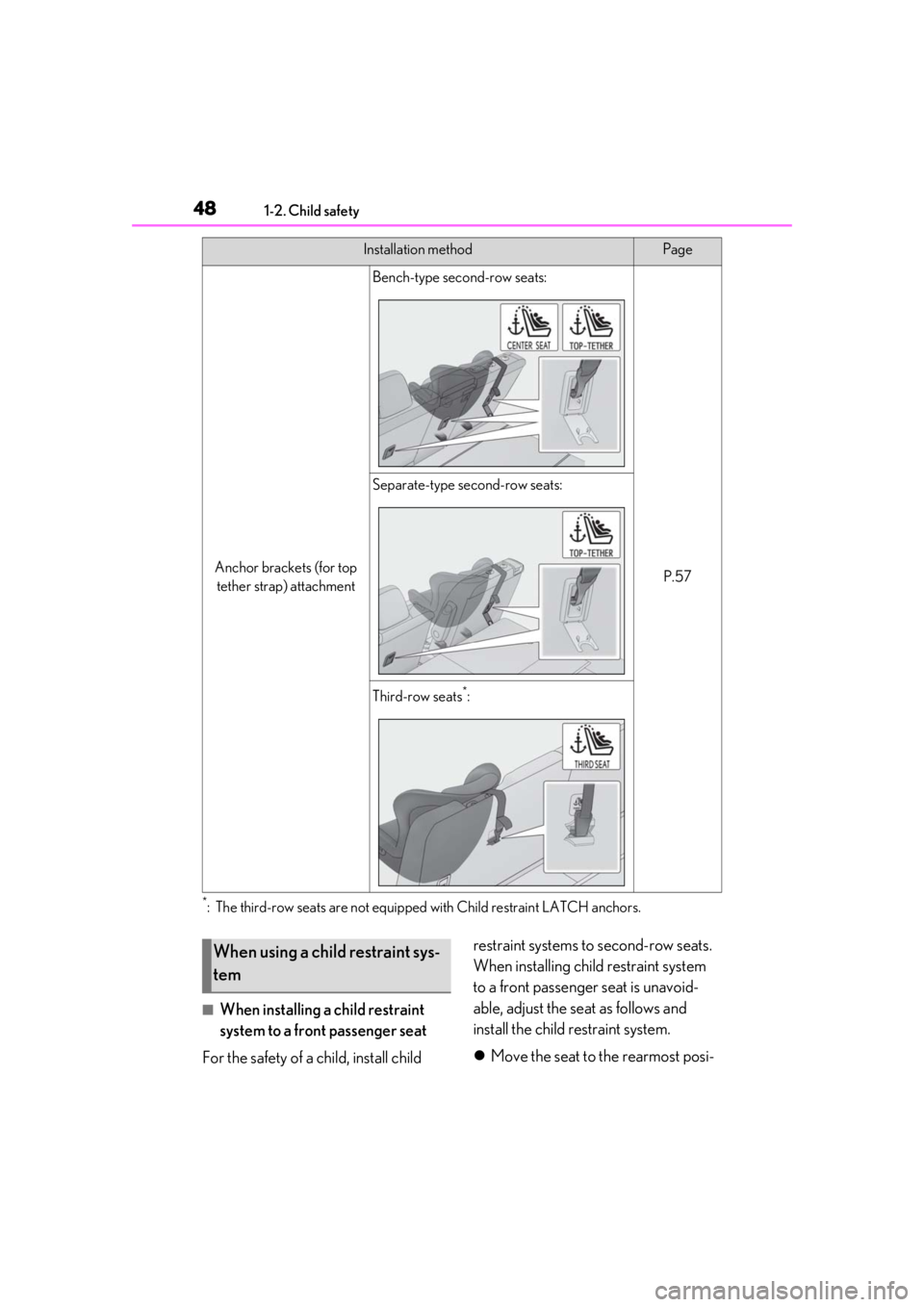
Anchor brackets (for top
tether strap) attachment
Bench-type second-row seats:
P.57
Separate-type second-row seats:
Third-row seats*:
Installation methodPage
When using a child restraint sys-
tem
Page 57 of 508
571-2. Child safety
1
For safety and security
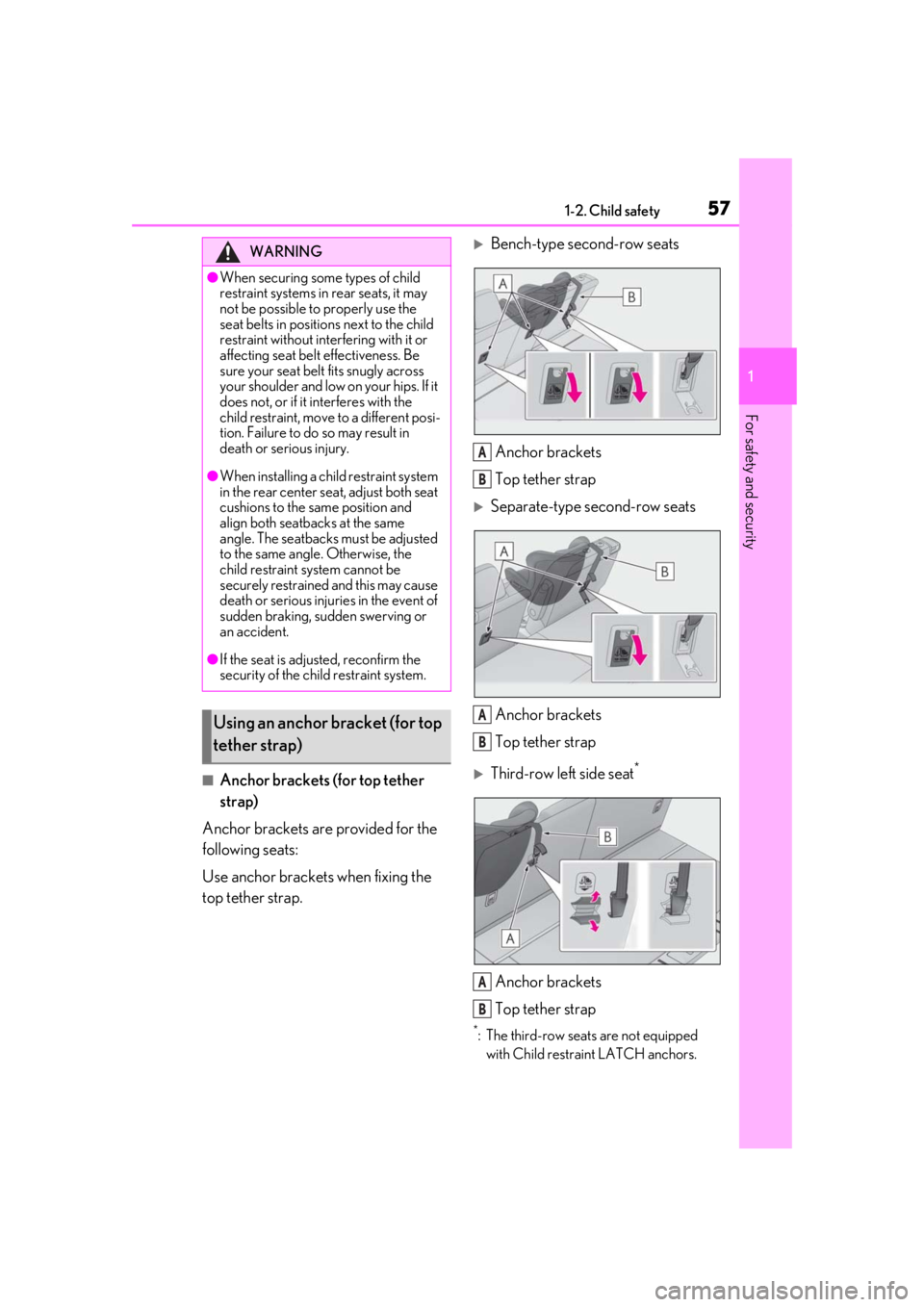
■Anchor brackets (for top tether
strap)
Anchor brackets are provided for the
following seats:
Use anchor brackets when fixing the
top tether strap.
Bench-type second-row seats
Anchor brackets
Top tether strap
Separate-type second-row seats
Anchor brackets
Top tether strap
Third-row left side seat*
Anchor brackets
Top tether strap
*: The third-row seats are not equipped with Child restra int LATCH anchors.
WARNING
●When securing some types of child
restraint systems in rear seats, it may
not be possible to properly use the
seat belts in position s next to the child
restraint without inte rfering with it or
affecting seat belt effectiveness. Be
sure your seat belt fits snugly across
your shoulder and low on your hips. If it
does not, or if it interferes with the
child restraint, move to a different posi-
tion. Failure to do so may result in
death or serious injury.
●When installing a child restraint system
in the rear center seat, adjust both seat
cushions to the same position and
align both seatbacks at the same
angle. The seatbacks must be adjusted
to the same angle. Otherwise, the
child restraint system cannot be
securely restrained and this may cause
death or serious injuri es in the event of
sudden braking, sudden swerving or
an accident.
●If the seat is adju sted, reconfirm the
security of the child restraint system.
Using an anchor bracket (for top
tether strap)
A
B
A
B
A
B
Page 60 of 508
601-3. Lexus Enform
1-3.Lexus Enform
*:If equipped
“SOS” button
LED light indicators
Microphone
Lexus Enform Safety Con-
nect*
Safety Connect is a subscrip-
tion-based telematics service that
uses Global Positioning System
(GPS) data and embedded cellular
technology to provide safety and
security features to subscribers.
Safety Connect is supported by
Lexus’ designated response center,
which operates 24 hours per day, 7
days per week.
Safety Connect service is available
by subscription on select, telemat-
ics hardware-equipped vehicles.
By using the Safety Connect ser-
vice, you are agreeing to be bound
by the Telematics Subscription Ser-
vice Agreement and its Terms and
Conditions, as in effect and
amended from time to time, a cur-
rent copy of which is available at
Lexus.com. All use of the Safety
Connect service is subject to such
then-applicable Terms and Condi-
tions.
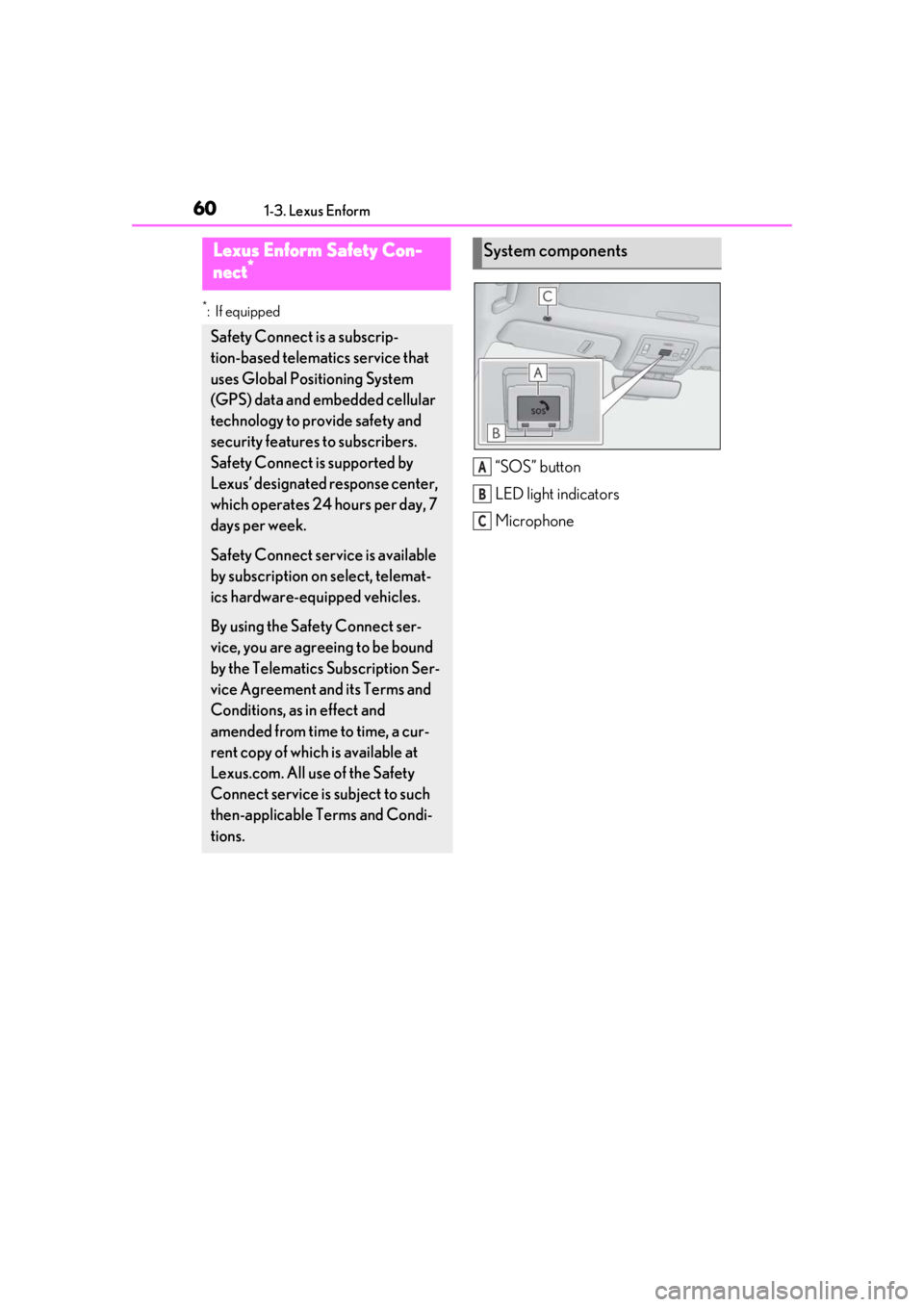
System components
A
B
C
Page 64 of 508
641-3. Lexus Enform
location.
■Stolen Vehicle Location
If your vehicle is stolen, Safety Connect
can work with local authorities to assist
them in locating and recovering the
vehicle. After filing a police report, call
the Safety Connect response center at
1-800-25-LEXUS
(1-800-255-3987) in the United
States, 1-877-539-8777 in Puerto
Rico or 1-800-265- 3987 in Canada,
and follow the prompts for Safety Con-
nect to initiate this service.
In addition to assisting law enforce-
ment with recovery of a stolen vehicle,
Safety-Connect-equipped vehicle
location data may, under certain cir-
cumstances, be shared with third par-
ties to locate your vehicle. Further
information is available at Lexus.com.
■Emergency Assistance Button
(“SOS”)
In the event of an emergency on the
road, push the “SOS” button to reach
the Safety Connect response center.
The answering agent will determine
your vehicle’s location, assess the
emergency, and dispatch the neces-
sary assistance required.
If you accidentally press the “SOS” button,
tell the response-center agent that you are
not experiencing an emergency.
■Enhanced Roadside Assistance
Enhanced Roadside Assistance adds
GPS data to the already included war-
ranty-based Lexus roadside service.
Subscribers can press the “SOS” but-
ton to reach a Safety Connect response-center agent, who can help
with a wide range of needs, such as:
towing, flat tire, fuel delivery, etc. For a
description of the Roadside Assistance
services and their limitations, please
see the Safety Connect Terms and
Conditions, which are available at
Lexus.com.
Important! Read this information about
exposure to radio frequency signals
before using Safety Connect;
The Safety Connect system installed in
your vehicle is a low-power radio trans-
mitter and receiver. It receives and also
sends out radio frequency (RF) signals.
In August 1996, the Federal Commu-
nications Commission (FCC) adopted
RF exposure guidelines with safety lev-
els for mobile wireless phones. Those
guidelines are consistent with the
safety standards previously set by the
following U.S. and international stan-
dards bodies.
ANSI (American National Stan-
dards Institute) C95.1 [1992]
NCRP (National Council on Radia-
tion Protection and Measurement)
Report 86 [1986]
ICNIRP (International Commission
on Non-Ionizing Radiation Protec-
tion) [1996]
Those standards were based on com-
prehensive and periodic evaluations of
the relevant scientific literature. Over
Safety information for Safety
Connect
Page 68 of 508

681-4. Theft deterrent system
■Items to check before locking the
vehicle
To prevent unexpected triggering of
the alarm and vehicle theft, make sure
of the following:
Nobody is in the vehicle.
The windows, moon roof (if
equipped) and panoramic moon
roof (if equipped) are closed before
the alarm is set.
No valuables or other personal
items are left in the vehicle.
■Setting
Close the doors and hood, and lock all
the doors. The system will be set auto-
matically after 30 seconds.
The indicator light changes from being on
to flashing when the system is set.
■Canceling or stopping
Do one of the following to deactivate
or stop the alarm:
Unlock the doors.
Turn the engine switch to ACCES-
SORY or IGNITION ON mode, or
start the engine. (The alarm will be
deactivated or stopped after a few
seconds.)
■System maintenance
The vehicle has a maintenance-free type
alarm system.
■Triggering of the alarm
The alarm may be triggered in the following
situations:
(Stopping the alarm deactivates the alarm
system.)
●For Canada: The doors are unlocked
using the mechanical key.
Alarm
The alarm uses light and sound to
give an alert when an intrusion is
detected.
The alarm is triggered in the follow-
ing situations when the alarm is set:
Except for Canada: A locked
door is unlocked or opened in any
way other than using the entry
function, wireless remote control
or mechanical key. (The doors will
lock again automatically.)
For Canada: A locked door is
unlocked or opened in any way
other than using the entry func-
tion or wireless remote control.
(The doors will lock again auto-
matically.)
The hood is opened.
Setting/canceling/stopping the
alarm system
Page 73 of 508
732-1. Instrument cluster
2
Vehicle status information and indicators
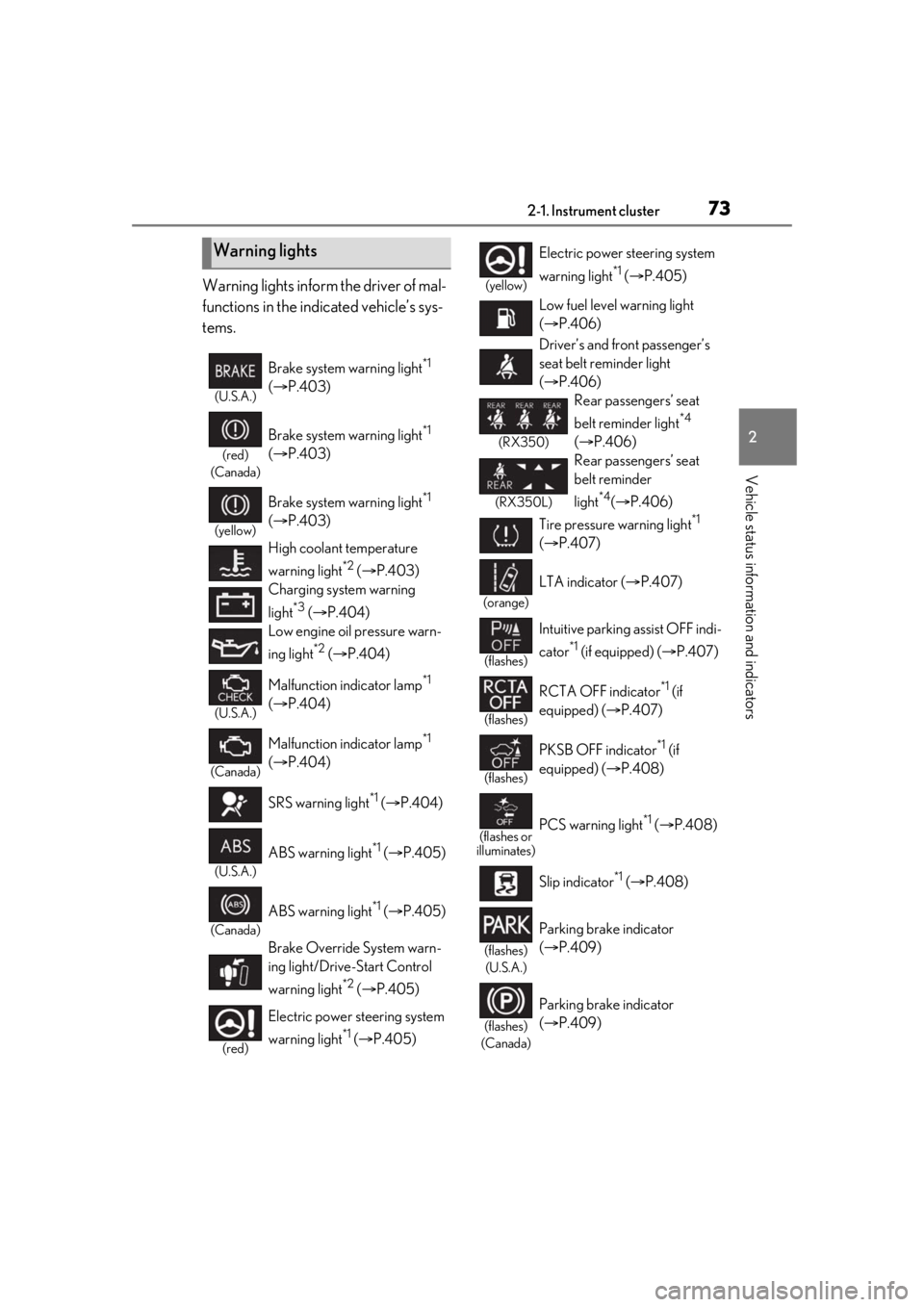
Warning lights inform the driver of mal-
functions in the indicated vehicle’s sys-
tems.
Warning lights
(U.S.A.)
Brake system warning light*1
( P.403)
(red)
(Canada)
Brake system warning light*1
( P.403)
(yellow)
Brake system warning light*1
( P.403)
High coolant temperature
warning light
*2 ( P.403)
Charging system warning
light
*3 ( P.404)
Low engine oil pressure warn-
ing light
*2 ( P.404)
(U.S.A.)
Malfunction indicator lamp*1
( P.404)
(Canada)
Malfunction indicator lamp*1
( P.404)
SRS warning light
*1 ( P.404)
(U.S.A.)
ABS warning light*1 ( P.405)
(Canada)
ABS warning light*1 ( P.405)
Brake Override System warn-
ing light/Drive-Start Control
warning light
*2 ( P.405)
(red)
Electric power st eering system
warning light
*1 ( P.405)
(yellow)
Electric power steering system
warning light
*1 ( P.405)
Low fuel level warning light
( P.406)
Driver’s and front passenger’s
seat belt reminder light
( P.406)
(RX350)
Rear passengers’ seat
belt reminder light
*4
( P.406)
(RX350L)
Rear passengers’ seat
belt reminder
light
*4( P.406)
Tire pressure warning light
*1
( P.407)
(orange)
LTA indicator ( P.407)
(flashes)
Intuitive parking assist OFF indi-
cator
*1 (if equipped) ( P.407)
(flashes)
RCTA OFF indicator*1 (if
equipped) ( P.407)
(flashes)
PKSB OFF indicator*1 (if
equipped) ( P.408)
(flashes or
illuminates)PCS warning light*1 ( P.408)
Slip indicator
*1 ( P.408)
(flashes)
(U.S.A.)
Parking brake indicator
( P.409)
(flashes)
(Canada)
Parking brake indicator
( P.409)
Page 74 of 508
742-1. Instrument cluster
*1: These lights turn on when the engine switch is turned to IGNITION ON
mode to indicate that a system check is
being performed. They will turn off after
the engine is started, or after a few sec-
onds. There may be a malfunction in a
system if a light does not come on, or
turn off. Have the vehicle inspected by
your Lexus dealer.
*2: This light illuminates on the multi-infor-mation display.
*3: Except F SPORT models: This light illu-minates on the multi-information dis-
play.
F SPORT models: This light illuminates
on the meter.
*4: This light illuminates on the center panel.
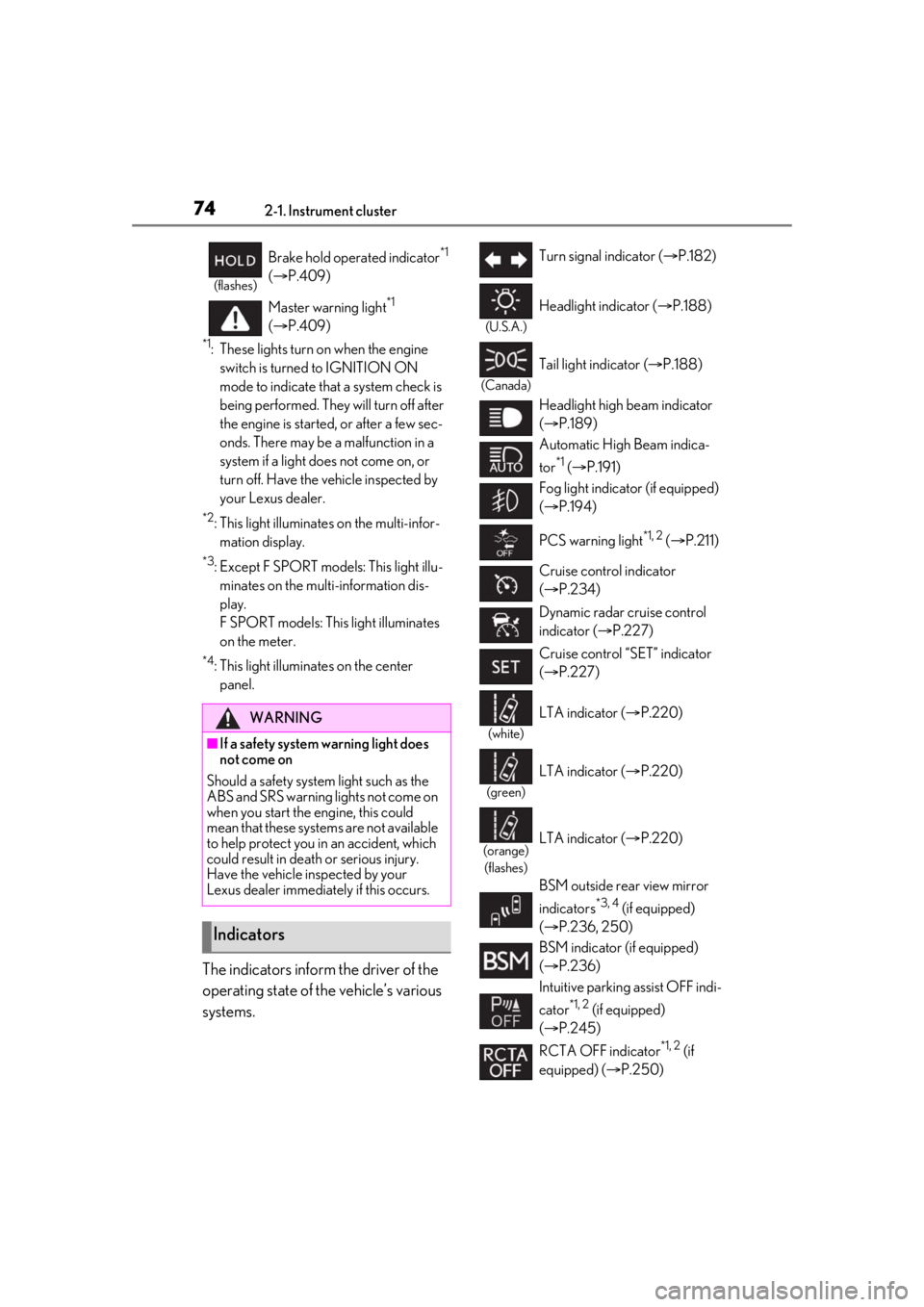
The indicators inform the driver of the
operating state of the vehicle’s various
systems.
(flashes)
Brake hold operated indicator*1
( P.409)
Master warning light
*1
( P.409)
WARNING
■If a safety system warning light does
not come on
Should a safety system light such as the
ABS and SRS warning lights not come on
when you start the engine, this could
mean that these systems are not available
to help protect you in an accident, which
could result in death or serious injury.
Have the vehicle inspected by your
Lexus dealer immediately if this occurs.
Indicators
Turn signal indicator ( P.182)
(U.S.A.)
Headlight indicator ( P.188)
(Canada)
Tail light indicator ( P.188)
Headlight high beam indicator
( P.189)
Automatic High Beam indica-
tor
*1 ( P.191)
Fog light indicator (if equipped)
( P.194)
PCS warning light
*1, 2 ( P.211)
Cruise control indicator
( P.234)
Dynamic radar cruise control
indicator ( P.227)
Cruise control “SET” indicator
( P.227)
(white)
LTA indicator ( P.220)
(green)
LTA indicator ( P.220)
(orange)
(flashes)LTA indicator ( P.220)
BSM outside rear view mirror
indicators
*3, 4 (if equipped)
( P.236, 250)
BSM indicator (if equipped)
( P.236)
Intuitive parking assist OFF indi-
cator
*1, 2 (if equipped)
( P.245)
RCTA OFF indicator
*1, 2 (if
equipped) ( P.250)
Page 75 of 508
752-1. Instrument cluster
2
Vehicle status information and indicators
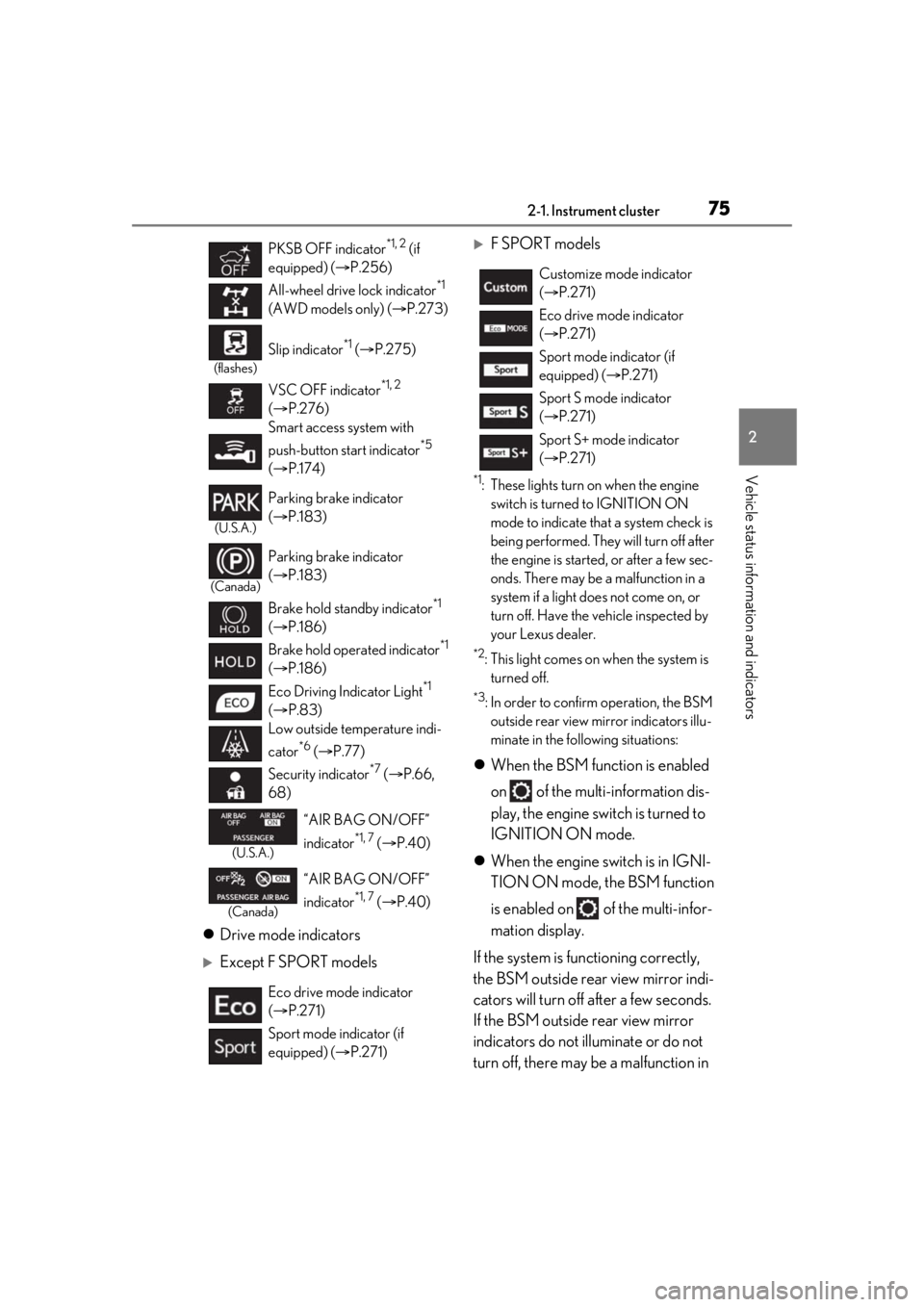
Drive mode indicators
Except F SPORT models
F SPORT models
*1: These lights turn on when the engine
switch is turned to IGNITION ON
mode to indicate that a system check is
being performed. They will turn off after
the engine is started, or after a few sec-
onds. There may be a malfunction in a
system if a light does not come on, or
turn off. Have the vehicle inspected by
your Lexus dealer.
*2: This light comes on when the system is turned off.
*3: In order to confirm operation, the BSM
outside rear view mirror indicators illu-
minate in the following situations:
When the BSM function is enabled
on of the multi-information dis-
play, the engine switch is turned to
IGNITION ON mode.
When the engine switch is in IGNI-
TION ON mode, the BSM function
is enabled on of the multi-infor-
mation display.
If the system is functioning correctly,
the BSM outside rear view mirror indi-
cators will turn off after a few seconds.
If the BSM outside rear view mirror
indicators do not illuminate or do not
turn off, there may be a malfunction in
PKSB OFF indicator*1, 2 (if
equipped) ( P.256)
All-wheel drive lock indicator
*1
(AWD models only) ( P.273)
(flashes)
Slip indicator*1 ( P.275)
VSC OFF indicator
*1, 2
( P.276)
Smart access system with
push-button start indicator
*5
( P.174)
(U.S.A.)
Parking brake indicator
( P.183)
(Canada)
Parking brake indicator
( P.183)
Brake hold standby indicator
*1
( P.186)
Brake hold operated indicator
*1
( P.186)
Eco Driving Indicator Light
*1
( P.83)
Low outside temperature indi-
cator
*6 ( P.77)
Security indicator
*7 ( P.66,
68)
(U.S.A.)
“AIR BAG ON/OFF”
indicator
*1, 7 ( P.40)
(Canada)
“AIR BAG ON/OFF”
indicator
*1, 7 ( P.40)
Eco drive mode indicator
( P.271)
Sport mode indicator (if
equipped) ( P.271)
Customize mode indicator
( P.271)
Eco drive mode indicator
( P.271)
Sport mode indicator (if
equipped) ( P.271)
Sport S mode indicator
( P.271)
Sport S+ mode indicator
( P.271)
Page 81 of 508
812-1. Instrument cluster
2
Vehicle status information and indicators
■Display
Except F SPORT models
By selecting menu icons on the
multi-information display, a variety of
driving-related information can be dis-
played. The multi-information display
can also be used to change display set-
tings and other vehicle settings.
Warning or suggestion/advice pop-up
displays are also displayed in certain
situations.
F SPORT models
By selecting menu icons on the
multi-information display, a variety of
driving-related information can be dis-
played. The multi-information display
can also be used to change display set-
tings and other vehicle settings.
Warning or suggestion/advice pop-up
displays are also displayed in certain
situations.
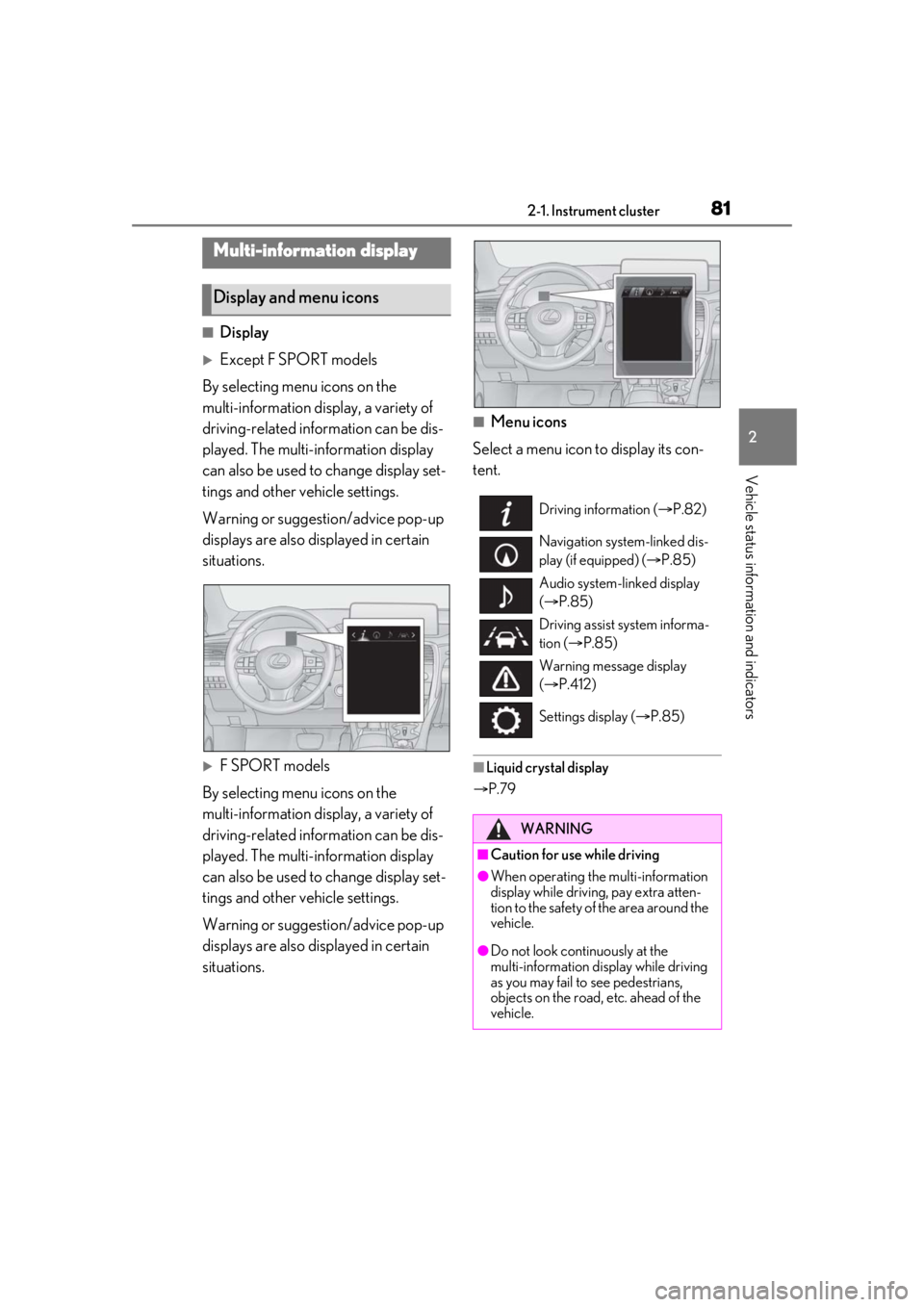
■Menu icons
Select a menu icon to display its con-
tent.
■Liquid crystal display
P.79
Multi-information display
Display and menu icons
Driving information ( P.82)
Navigation system-linked dis-
play (if equipped) ( P.85)
Audio system-linked display
( P.85)
Driving assist system informa-
tion ( P.85)
Warning message display
( P.412)
Settings display ( P.85)
WARNING
■Caution for use while driving
●When operating the multi-information
display while driving, pay extra atten-
tion to the safety of the area around the
vehicle.
●Do not look continuously at the
multi-information display while driving
as you may fail to see pedestrians,
objects on the road, etc. ahead of the
vehicle.
Page 83 of 508
832-1. Instrument cluster
2
Vehicle status information and indicators
Average fuel economy
After reset: Displays average fuel con-
sumption since the display was reset
*1, 2
After start: Displays average fuel con-
sumption since engine start
*2
After refuel: Displays average fuel con-
sumption since refuel
*2, 3
Average vehicle speed
After reset: Displays average vehicle
speed since the display was reset
*1
After start: Displays average vehicle speed
since engine start
Elapsed time
After reset: Displays elapsed time since the
display was reset
*1
After start: Displays elapsed time since
engine start
Distance
Driving range: Displays driving range with
remaining fuel
*3, 4
After start: Displays drive distance since
vehicle start
Other
Blank: No item
*1: To reset, display the desired item and
press and hold of the meter con-
trol switch.
If both of the displayed items are reset-
table, a message will be displayed ask-
ing which item(s) to reset.
*2: Use the displayed fuel consumption as a reference.
*3: When only a small amount of fuel is added to the tank, the display may not
be updated.
When refueling, turn the engine switch
off. If the vehicle is refueled without turning the engine switch off, the display
may not be updated.
*4: This distance is computed based on
your average fuel consumption. As a
result, the actual distance that can be
driven may differ from that displayed.
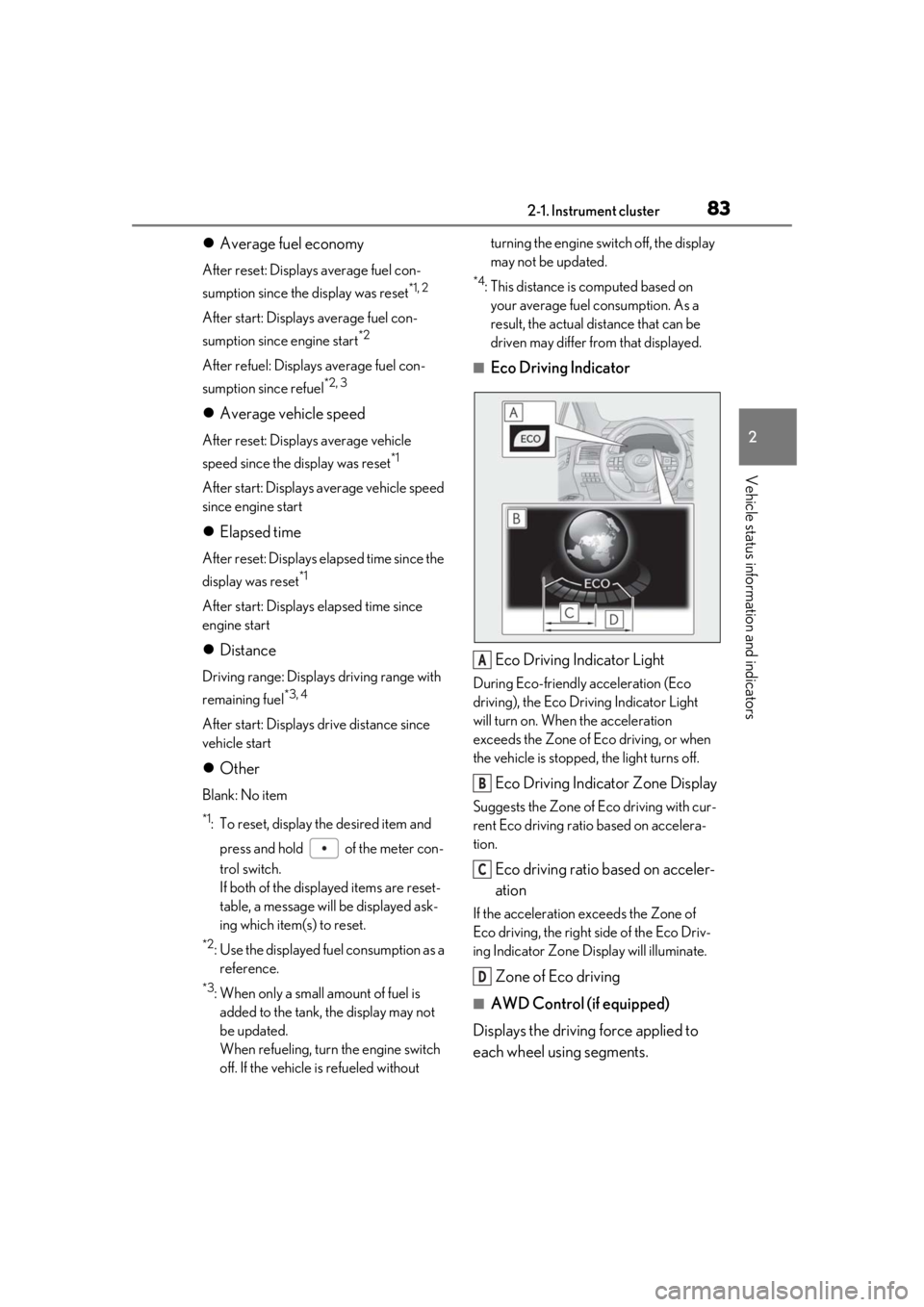
■Eco Driving Indicator
Eco Driving Indicator Light
During Eco-friendly acceleration (Eco
driving), the Eco Driving Indicator Light
will turn on. When the acceleration
exceeds the Zone of Eco driving, or when
the vehicle is stopped, the light turns off.
Eco Driving Indicator Zone Display
Suggests the Zone of Eco driving with cur-
rent Eco driving ratio based on accelera-
tion.
Eco driving ratio based on acceler-
ation
If the acceleration exceeds the Zone of
Eco driving, the right side of the Eco Driv-
ing Indicator Zone Display will illuminate.
Zone of Eco driving
■AWD Control (if equipped)
Displays the driving force applied to
each wheel using segments.
A
B
C
D