ignition LEXUS RX350 2021 User Guide
[x] Cancel search | Manufacturer: LEXUS, Model Year: 2021, Model line: RX350, Model: LEXUS RX350 2021Pages: 508, PDF Size: 10.33 MB
Page 91 of 508
912-1. Instrument cluster
2
Vehicle status information and indicators
( P.412)
: Information icon
Displayed when a suggestion/advice
pop-up display is displayed on the
multi-information display. ( P.86)
Displays the following items in the
appropriate situation:
■Warning/Message (if equipped)
Displays the following system warn-
ing/messages:
PCS (Pre-Collision System)
( P.209)
Parking Support Brake function (for
static objects) ( P.261)
Dynamic radar cruise control with
full-speed range ( P.227)
Brake Override System ( P.155)
Drive-Start Control ( P.155)
Details of content displayed on the
head-up display may differ from that dis-
played on the multi-information display. For
details, refer to the explanation of each sys-
tem.
■Audio system operation status
Displayed when the audio system is
operated.
■Outside temperature
Displayed in the following situations:
When the engine switch is turned to
IGNITION ON mode
When the low outside temperature
indicator is flashing
Displayed content is the same as that displayed on the multi-information dis-
play. For details, refer to the explana-
tion of the outside temperature display
on the multi-information display.
(
P.79)
Displays the following items which are
linked to the navigation system:
■Street name
The name of the street that the vehicle
is currently driving on is displayed on
the bottom of the display area.
When the navigation system is per-
forming route guidance, the name of
the next street will be displayed on the
top of the display area.
■Street name display (vehicles with a nav-
igation system)
Only street names which are included in the
map data will be displayed.
Displays the following items which are
linked to the navigation system:
■Route guidance to destination
Displayed when the navigation system
is performing route guidance. When
approaching an intersection, an arrow
will be displayed to indicate the sug-
gested direction of travel.
■Compass
Displays the direction of travel.
Message display area
Navigation system-linked dis-
play area (if equipped)
Page 93 of 508

932-1. Instrument cluster
2
Vehicle status information and indicators
menu screen.
If a screen other than “Trip Information”
is displayed, select “Trip Information”.
This system can also be operated by
the touch screen.
Resetting the consumption data
Fuel consumption in the past 15
minutes
Current fuel consumption
Average vehicle speed since the
engine was started.
Elapsed time since the engine was
started.
Cruising range
Average fuel consumption for the past
15 minutes is divided by color into past
averages and averages attained since
the engine switch was last turned to
IGNITION ON mode. Use the dis-
played average fuel consumption as a
reference.
The image is an example only, and may
vary slightly from actual conditions.
■History
Press the “MENU” button on the
Remote Touch, then select on the
menu screen. If a screen other than “History” is dis-
played, select “History”.
This system can also be operated by
the touch screen.
Best recorded fuel consumption
Latest fuel consumption
Previous fuel consumption record
Resetting the history data
Updating the latest fuel consump-
tion data
The average fuel consumption history
is divided by color into past averages
and the average fuel consumption
since the last updated. Use the dis-
played average fuel consumption as a
reference.
The image is an example only, and may
vary slightly from actual conditions.
■Updating the history data
Update the latest fuel consumption by
selecting “Update” to measure the current
fuel consumption again.
■Resetting the data
The fuel consumption data can be deleted
by selecting “Clear”.
■Cruising range
Displays the estimated maximum distance
that can be driven with the quantity of fuel
remaining.
A
B
C
D
E
F
A
B
C
D
E
Page 102 of 508

1023-2. Opening, closing and locking the doors
When the door is unlocked, the inside lock
button will pop up.
■Locking the doors from the outside with-
out a key
1 Push down the inside lock button.
2 Close the door.
The door cannot be locked if the engine
switch is in ACCESSORY or IGNITION
ON mode, or the electronic key is left
inside the vehicle. However, the key may not
be detected correctly and the door may be
locked.
■Open door warning buzzer
If the vehicle speed reaches 3 mph (5
km/h), the master warning light flashes and
a buzzer sounds to indicate that door(s) or
the hood in not fully closed.
The open door(s) or h ood is displayed on
the multi-information display.
The door cannot be opened from
inside the vehicle when the lock is set.
1 Unlock 2
Lock
These locks can be set to prevent children
from opening the rear doors. Push down
on each rear door switch to lock both rear
doors.
The following functions can be set or
canceled:
For instructions on customizing, refer to
P.461.
Rear door child-protector lock
Automatic door locking and
unlocking systems
FunctionOperation
Speed linked
door locking
function
All doors are automati-
cally locked when vehi-
cle speed is
approximately 12 mph
(20 km/h) or higher.
Shift position
linked door lock-
ing functionAll doors are automati-
cally locked when shift-
ing the shift lever out of
P.
Shift position
linked door
unlocking func-
tionAll doors are automati-
cally unlocked when
shifting the shift lever
to P.
Driver’s door
linked door
unlocking func-
tionAll doors are automati-
cally unlocked when
driver’s door is
opened.
Page 107 of 508

1073-2. Opening, closing and locking the doors
3
Before driving
for the operation to occur.Kick sensor
Hands Free Power Back Door
operation detection area
3 When the kick sensor detects that
your foot is pulled back, a buzzer
will sound and the power back door
will automatically fully open/close.
If kick operation is performed again in the
middle of back door operating, the opera-
tion will stop.
■Hands free close & lock function*
(vehicles with Hands Free Power
Back Door)
*: This setting can be customized by your
Lexus dealer.
If the power back door is closed using a
Hands Free Power Back Door close
operation, all of the doors will be
locked at the same time.
A different buzzer than the normal one will
sound before the power back door begins
to close. The door lock operation signals
will operate to indicate that the power back
door has closed and all of the doors have
locked simultaneously.
If a Hands Free Power Back Door opera-
tion is performed while the power back
door is operating, the power back door will
stop.
If a Hands Free Power Back Door opera- tion is performed again, the power back
door will open.
■Luggage compartment lights
●The luggage compartment lights turn on
when the back door is opened.
●When the engine switch
is turned off, the
lights will go off automatically after 20
minutes.
■Power back door operating conditions
If the following conditions are met with the
power back door operation enabled, the
power back door can be opened and
closed automatically.
●When an electronic key is being carried
and the back door opener switch is
pressed
*
●When the wireless remote control is
used*
●When the engine swit ch is in IGNITION
ON mode, the vehicle speed must be
lower than 2 mph (3 km/h) and one of
the following conditions must be met in
addition to the above conditions:
• The parking brake is engaged.
• The brake pedal is depressed.
• The shift lever is in P.
*: When the operation of the power back
door when it is locked has been disabled
by a customized setting, operate the
power back door after it has been
unlocked.
■Close & lock function operating condi-
tions
This function can be operated when all of
the following conditions are met:
• An electronic key is not detected within the vehicle.
• All of the doors other than the power back door are closed.
• The engine switch is off.
■Hands Free Power Back Door operating
conditions (if equipped)
●The Hands Free Power Back Door (kick
sensor) setting is on.
A
B
Page 111 of 508

1113-2. Opening, closing and locking the doors
3
Before driving
WARNING
●If the operating conditions of the
power back door (P.107) are no lon-
ger met, a buzzer may sound and the
power back door may stop opening or
closing. The power back door must
then be operated manually. Take extra
care on an incline in this situation, as
the power back door may move sud-
denly.
●On an incline, the power back door
may suddenly shut af ter it opens. Make
sure the power back door is fully open
and secure.
●In the following situations, the power
back door may detect an abnormality
and automatic operation may be
stopped. In this case, the power back
door must then be operated manually.
Take extra care in this situation, as the
stopped power back door may sud-
denly open or close, causing an acci-
dent.
• When the power back door contacts an obstacle
• When the battery voltage suddenly drops, such as when the engine switch
is turned to IGNITION ON mode or
the engine is started during automatic
operation
●If a bicycle carrier or similar heavy
object is attached to the power back
door, the power back door may not
operate, causing a malfunction, or the
power back door may suddenly shut
again after being opened, causing
someone’s hands, arms, head or neck
to be caught and in jured. When install-
ing an accessory part to the power
back door, using a genuine Lexus part
is recommended.
■Jam protection function
Observe the following precautions.
Failure to do so may cause death or seri-
ous injury.
●Never use any part of your body to
intentionally activa te the jam protec-
tion function.
●The jam protection function may not
work if something gets caught just
before the power back door fully
closes. Be careful not to get fingers
caught or anything else.
●The jam protection function may not
work depending on the shape of the
object that is caught. Be careful not to
catch fingers or anything else.
■Hands Free Power Back Door (if
equipped)
Observe the following precautions.
Failure to do so may cause death or seri-
ous injury.
●Check the safety of the surrounding
area to make sure there are no obsta-
cles or anything that could cause any
of your belongings to get caught.
●Exhaust gasses cause the exhaust
pipes to become quite hot. When
operating the Hands Free Power Back
Door, be careful not to touch the
exhaust pipe.
●Do not operate the Hands Free Power
Back Door if there is little space under
the rear bumper.
Page 128 of 508
1283-3. Adjusting the seats
A buzzer will sound and then the operation
will start. When the operation is com-
pleted, the buzzer will sound twice again.
To stop the operation partway, press either
side of the switch fo r the operating seat.
Any rear seat operation switch for the
operating seat, regardless of location, can
be used to stop the operation. (A buzzer
may sound depending on the position that
the rear seatback is stopped.)
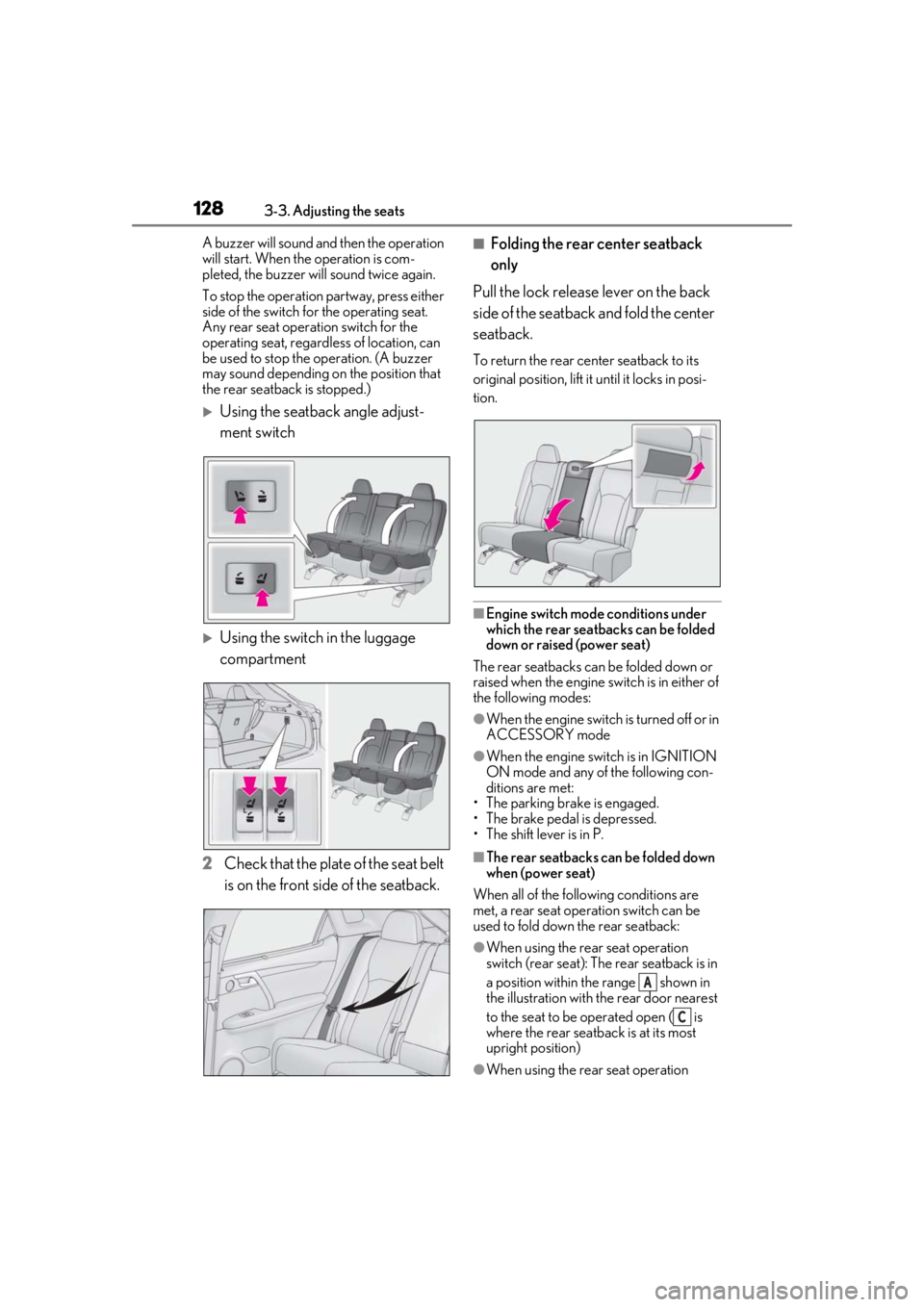
Using the seatback angle adjust-
ment switch
Using the switch in the luggage
compartment
2 Check that the plate of the seat belt
is on the front side of the seatback.
■Folding the rear center seatback
only
Pull the lock release lever on the back
side of the seatback and fold the center
seatback.
To return the rear center seatback to its
original position, lift it until it locks in posi-
tion.
■Engine switch mode conditions under
which the rear seatbacks can be folded
down or raised (power seat)
The rear seatbacks can be folded down or
raised when the engine sw itch is in either of
the following modes:
●When the engine switch is turned off or in
ACCESSORY mode
●When the engine swit ch is in IGNITION
ON mode and any of the following con-
ditions are met:
• The parking brake is engaged.
• The brake pedal is depressed.
• The shift lever is in P.
■The rear seatbacks can be folded down
when (power seat)
When all of the following conditions are
met, a rear seat operation switch can be
used to fold down the rear seatback:
●When using the rear seat operation
switch (rear seat): The rear seatback is in
a position within the range shown in
the illustration with th e rear door nearest
to the seat to be operated open ( is
where the rear seatback is at its most
upright position)
●When using the rear seat operation
A
C
Page 136 of 508
1363-3. Adjusting the seats
■Recall procedure
1 Make sure that the doors are
locked before recalling the driving
position. Carry the electronic key
that has been registered to the driv-
ing position, and then unlock and
open the driver’s door using the
smart access system with push-but-
ton start or wireless remote control.
The driving position will move to the
recorded position (not including the steer-
ing wheel and head-up display [if
equipped]). However, the seat will move to
a position slightly behind the recorded
position in order to make entering the vehi-
cle easier.
If the driving position is in a position that
has already been recorded, the seat and
outside rear view mirrors will not move.
2Turn the engine switch to ACCES-
SORY mode or IGNITION ON
mode, or fasten a seat belt.
The seat, steering wheel and head-up dis-
play (if equipped) will move to the
recorded position.
■Recalling the driving position using the
memory recall function
●Different driving positions can be regis-
tered for each electronic key. Therefore,
the driving position that is recalled may
be different depending on the key being
carried.
●If a door other than the driver’s door is
unlocked with the smart access system
with push-button start, the driving posi-
tion cannot be recalled. In this case, press
the driving position button which has
been set.
■Customization
Some functions can be customized.
( P.461)
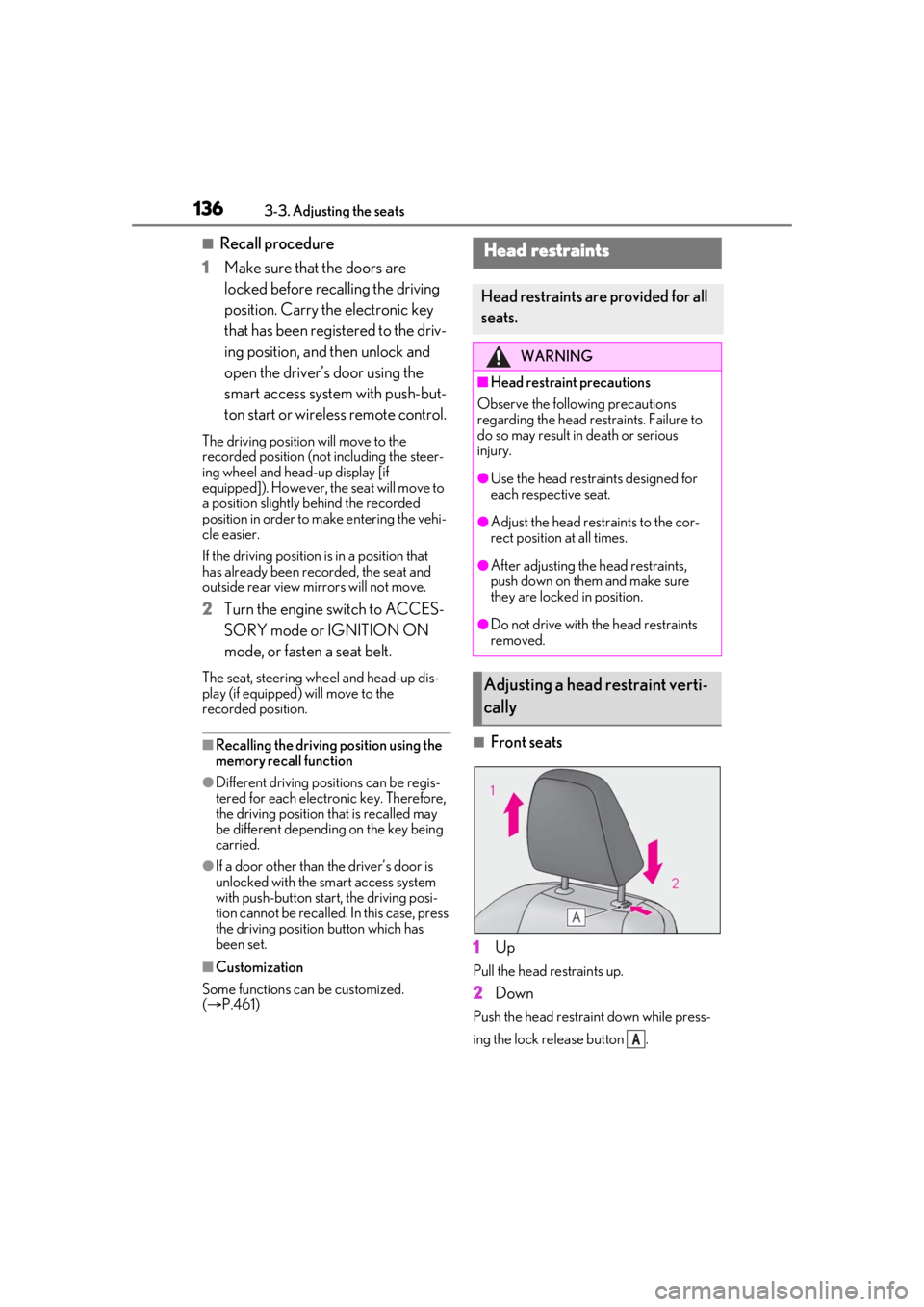
■Front seats
1 Up
Pull the head restraints up.
2Down
Push the head restra int down while press-
ing the lock release button .
Head restraints
Head restraints are provided for all
seats.
WARNING
■Head restraint precautions
Observe the following precautions
regarding the head re straints. Failure to
do so may result in death or serious
injury.
●Use the head restraints designed for
each respective seat.
●Adjust the head restraints to the cor-
rect position at all times.
●After adjusting the head restraints,
push down on them and make sure
they are locked in position.
●Do not drive with the head restraints
removed.
Adjusting a head restraint verti-
cally
A
Page 139 of 508
1393-4. Adjusting the steering wheel and mirrors
3
Before driving
3-4.Adjusting the steering wheel and mirrors
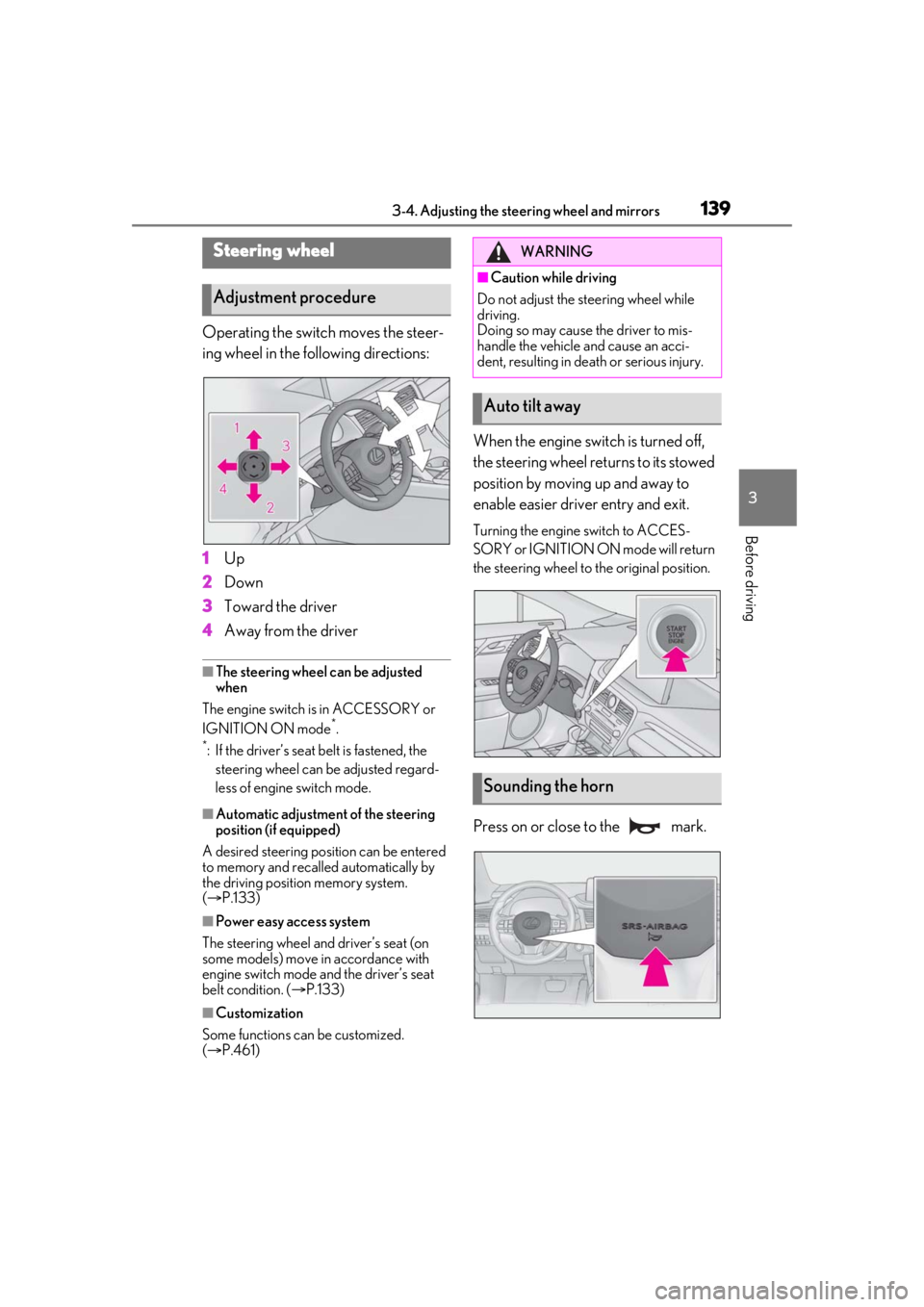
Operating the switch moves the steer-
ing wheel in the following directions:
1Up
2 Down
3 Toward the driver
4 Away from the driver
■The steering wheel can be adjusted
when
The engine switch is in ACCESSORY or
IGNITION ON mode
*.
*: If the driver’s seat belt is fastened, the steering wheel can be adjusted regard-
less of engine switch mode.
■Automatic adjustment of the steering
position (if equipped)
A desired steering position can be entered
to memory and recalled automatically by
the driving position memory system.
( P.133)
■Power easy access system
The steering wheel and driver’s seat (on
some models) move in accordance with
engine switch mode and the driver’s seat
belt condition. ( P.133)
■Customization
Some functions can be customized.
( P.461)
When the engine swit ch is turned off,
the steering wheel returns to its stowed
position by moving up and away to
enable easier driver entry and exit.
Turning the engine switch to ACCES-
SORY or IGNITION ON mode will return
the steering wheel to the original position.
Press on or close to the mark.
Steering wheel
Adjustment procedure
WARNING
■Caution while driving
Do not adjust the steering wheel while
driving.
Doing so may cause the driver to mis-
handle the vehicle and cause an acci-
dent, resulting in death or serious injury.
Auto tilt away
Sounding the horn
Page 141 of 508
1413-4. Adjusting the steering wheel and mirrors
3
Before driving
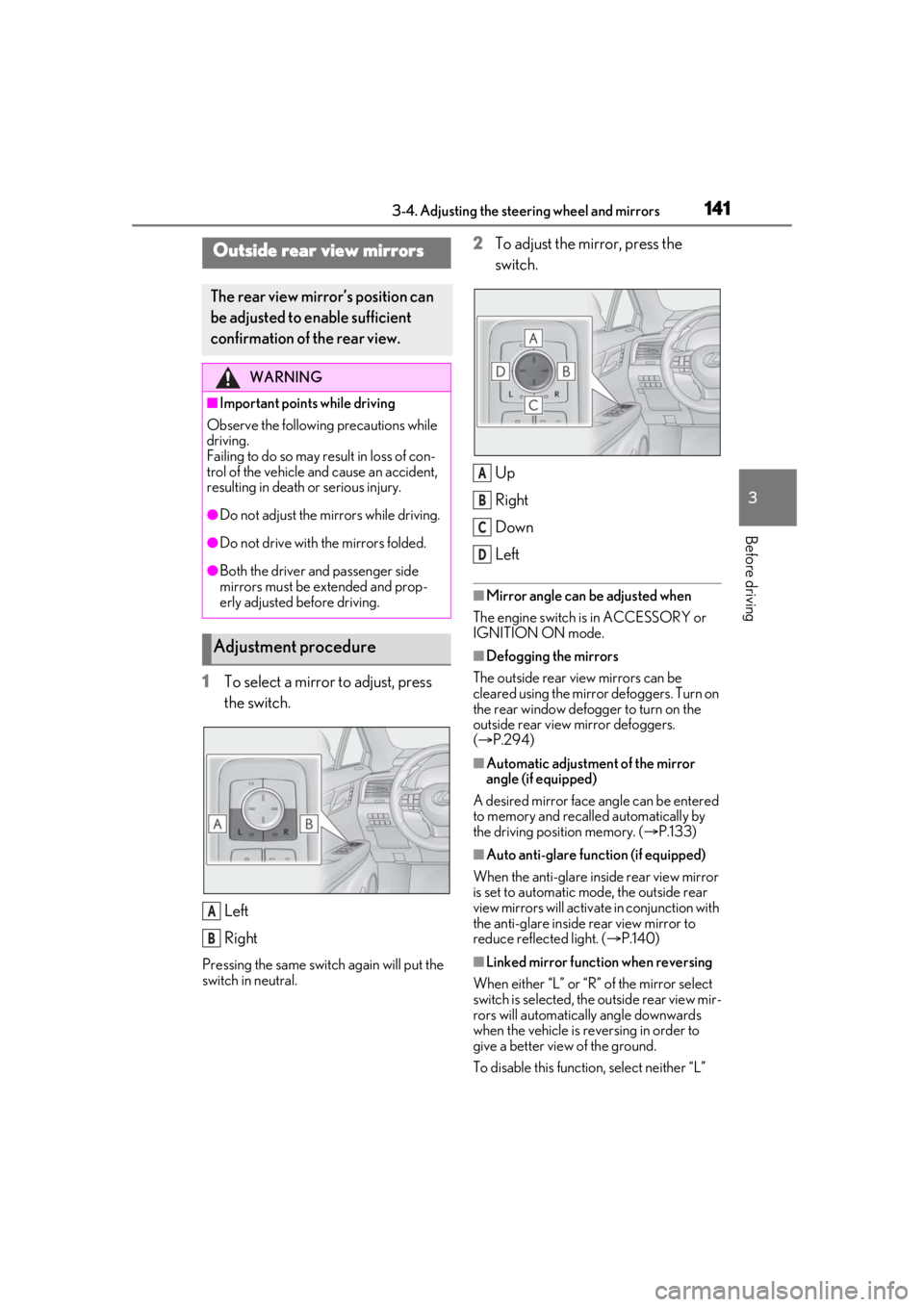
1To select a mirror to adjust, press
the switch.
Left
Right
Pressing the same switch again will put the
switch in neutral.
2To adjust the mirror, press the
switch.
Up
Right
Down
Left
■Mirror angle can be adjusted when
The engine switch is in ACCESSORY or
IGNITION ON mode.
■Defogging the mirrors
The outside rear view mirrors can be
cleared using the mirror defoggers. Turn on
the rear window defogger to turn on the
outside rear view mirror defoggers.
( P.294)
■Automatic adjustment of the mirror
angle (if equipped)
A desired mirror face angle can be entered
to memory and recalled automatically by
the driving position memory. ( P.133)
■Auto anti-glare function (if equipped)
When the anti-glare inside rear view mirror
is set to automatic mode, the outside rear
view mirrors will activate in conjunction with
the anti-glare inside rear view mirror to
reduce reflec ted light. (P.140)
■Linked mirror function when reversing
When either “L” or “R” of the mirror select
switch is selected, the outside rear view mir-
rors will automatically angle downwards
when the vehicle is re versing in order to
give a better view of the ground.
To disable this function, select neither “L”
Outside rear view mirrors
The rear view mirror’s position can
be adjusted to enable sufficient
confirmation of the rear view.
WARNING
■Important points while driving
Observe the following precautions while
driving.
Failing to do so may result in loss of con-
trol of the vehicle and cause an accident,
resulting in death or serious injury.
●Do not adjust the mirrors while driving.
●Do not drive with the mirrors folded.
●Both the driver and passenger side
mirrors must be extended and prop-
erly adjusted before driving.
Adjustment procedure
A
B
A
B
C
D
Page 144 of 508
1443-5. Opening, closing the windows and moon roof
3-5.Opening, closing the windows and moon roof
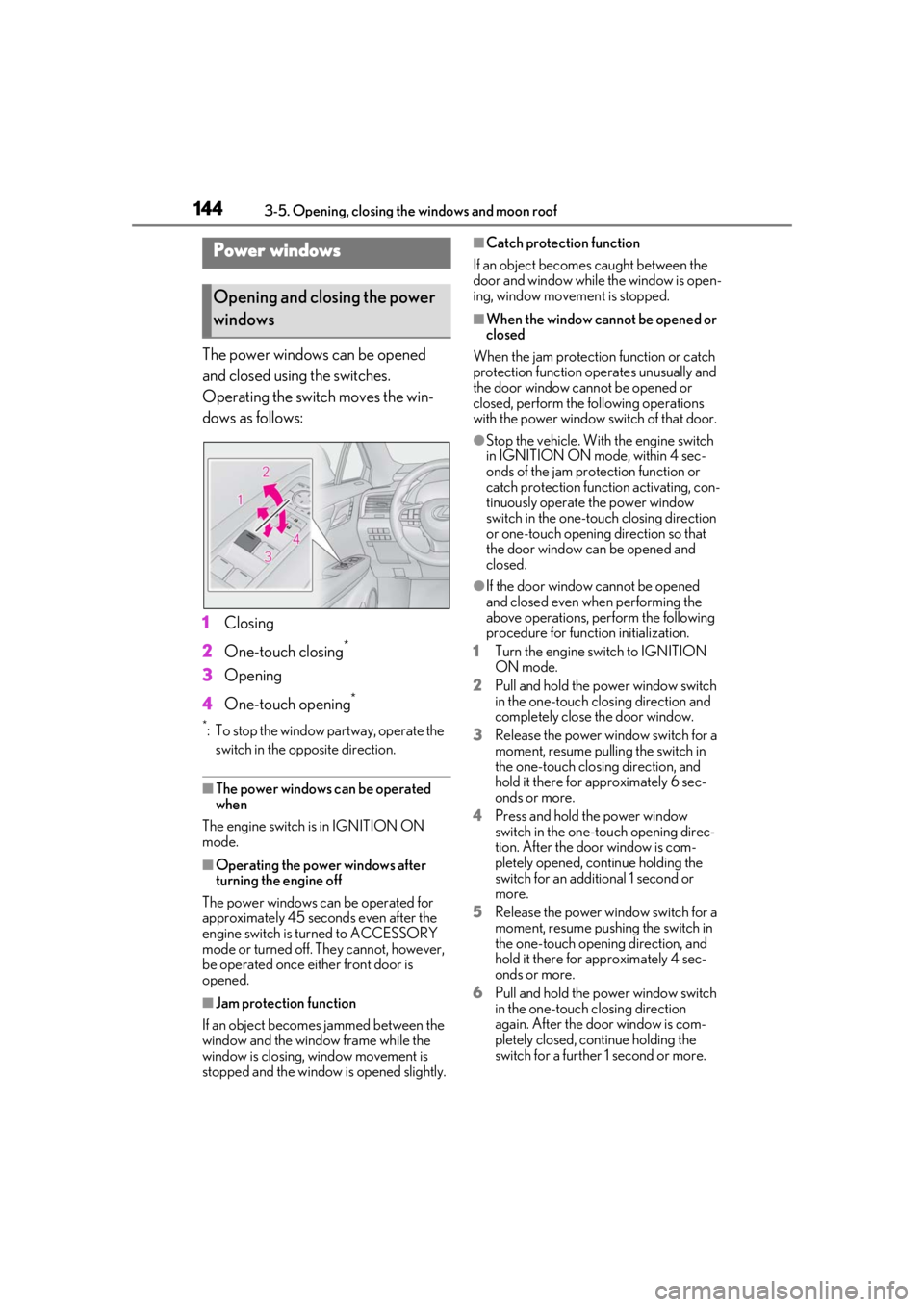
The power windows can be opened
and closed using the switches.
Operating the switch moves the win-
dows as follows:
1Closing
2 One-touch closing
*
3Opening
4 One-touch opening
*
*: To stop the window partway, operate the
switch in the op posite direction.
■The power windows can be operated
when
The engine switch is in IGNITION ON
mode.
■Operating the power windows after
turning the engine off
The power windows can be operated for
approximately 45 seconds even after the
engine switch is turned to ACCESSORY
mode or turned off. They cannot, however,
be operated once either front door is
opened.
■Jam protection function
If an object becomes jammed between the
window and the window frame while the
window is closing, window movement is
stopped and the window is opened slightly.
■Catch protection function
If an object becomes caught between the
door and window while the window is open-
ing, window movement is stopped.
■When the window cannot be opened or
closed
When the jam protection function or catch
protection function operates unusually and
the door window cannot be opened or
closed, perform the following operations
with the power window switch of that door.
●Stop the vehicle. With the engine switch
in IGNITION ON mode, within 4 sec-
onds of the jam protection function or
catch protection function activating, con-
tinuously operate the power window
switch in the one-touch closing direction
or one-touch opening direction so that
the door window can be opened and
closed.
●If the door window cannot be opened
and closed even when performing the
above operations, perform the following
procedure for function initialization.
1 Turn the engine switch to IGNITION
ON mode.
2 Pull and hold the power window switch
in the one-touch closing direction and
completely close the door window.
3 Release the power window switch for a
moment, resume pulling the switch in
the one-touch closing direction, and
hold it there for approximately 6 sec-
onds or more.
4 Press and hold the power window
switch in the one-touch opening direc-
tion. After the door window is com-
pletely opened, continue holding the
switch for an additional 1 second or
more.
5 Release the power window switch for a
moment, resume pushing the switch in
the one-touch opening direction, and
hold it there for approximately 4 sec-
onds or more.
6 Pull and hold the power window switch
in the one-touch closing direction
again. After the door window is com-
pletely closed, continue holding the
switch for a further 1 second or more.
Power windows
Opening and closing the power
windows