Sound LEXUS RX350 2021 Owner's Manual
[x] Cancel search | Manufacturer: LEXUS, Model Year: 2021, Model line: RX350, Model: LEXUS RX350 2021Pages: 508, PDF Size: 10.33 MB
Page 127 of 508
1273-3. Adjusting the seats
3
Before driving
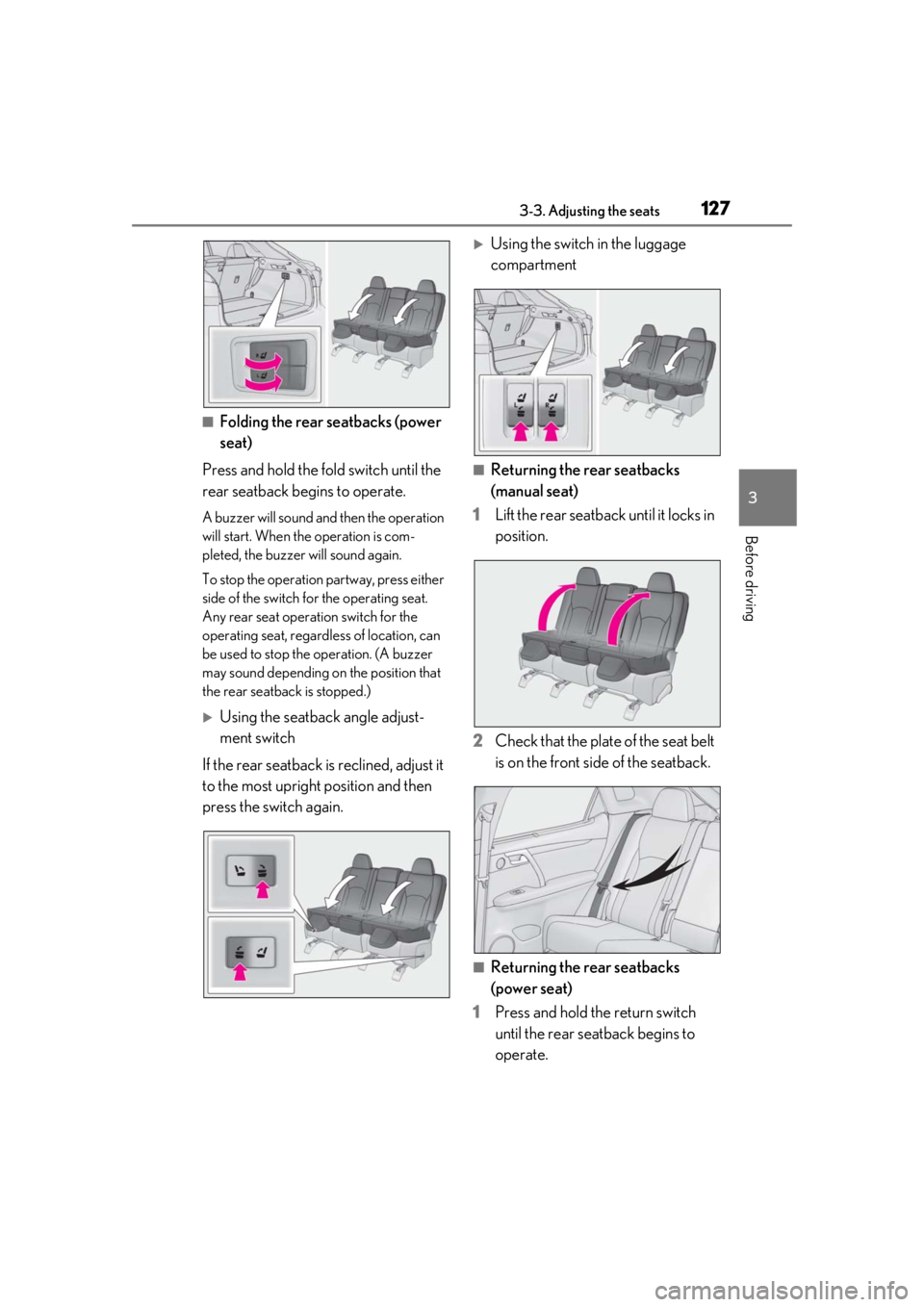
■Folding the rear seatbacks (power
seat)
Press and hold the fold switch until the
rear seatback begins to operate.
A buzzer will sound and then the operation
will start. When th e operation is com-
pleted, the buzzer will sound again.
To stop the operation partway, press either
side of the switch fo r the operating seat.
Any rear seat operation switch for the
operating seat, regardless of location, can
be used to stop the operation. (A buzzer
may sound depending on the position that
the rear seatback is stopped.)
Using the seatback angle adjust-
ment switch
If the rear seatback is reclined, adjust it
to the most upright position and then
press the switch again.
Using the switch in the luggage
compartment
■Returning the rear seatbacks
(manual seat)
1 Lift the rear seatback until it locks in
position.
2 Check that the plate of the seat belt
is on the front side of the seatback.
■Returning the rear seatbacks
(power seat)
1 Press and hold the return switch
until the rear seatback begins to
operate.
Page 128 of 508
1283-3. Adjusting the seats
A buzzer will sound and then the operation
will start. When the operation is com-
pleted, the buzzer will sound twice again.
To stop the operation partway, press either
side of the switch fo r the operating seat.
Any rear seat operation switch for the
operating seat, regardless of location, can
be used to stop the operation. (A buzzer
may sound depending on the position that
the rear seatback is stopped.)
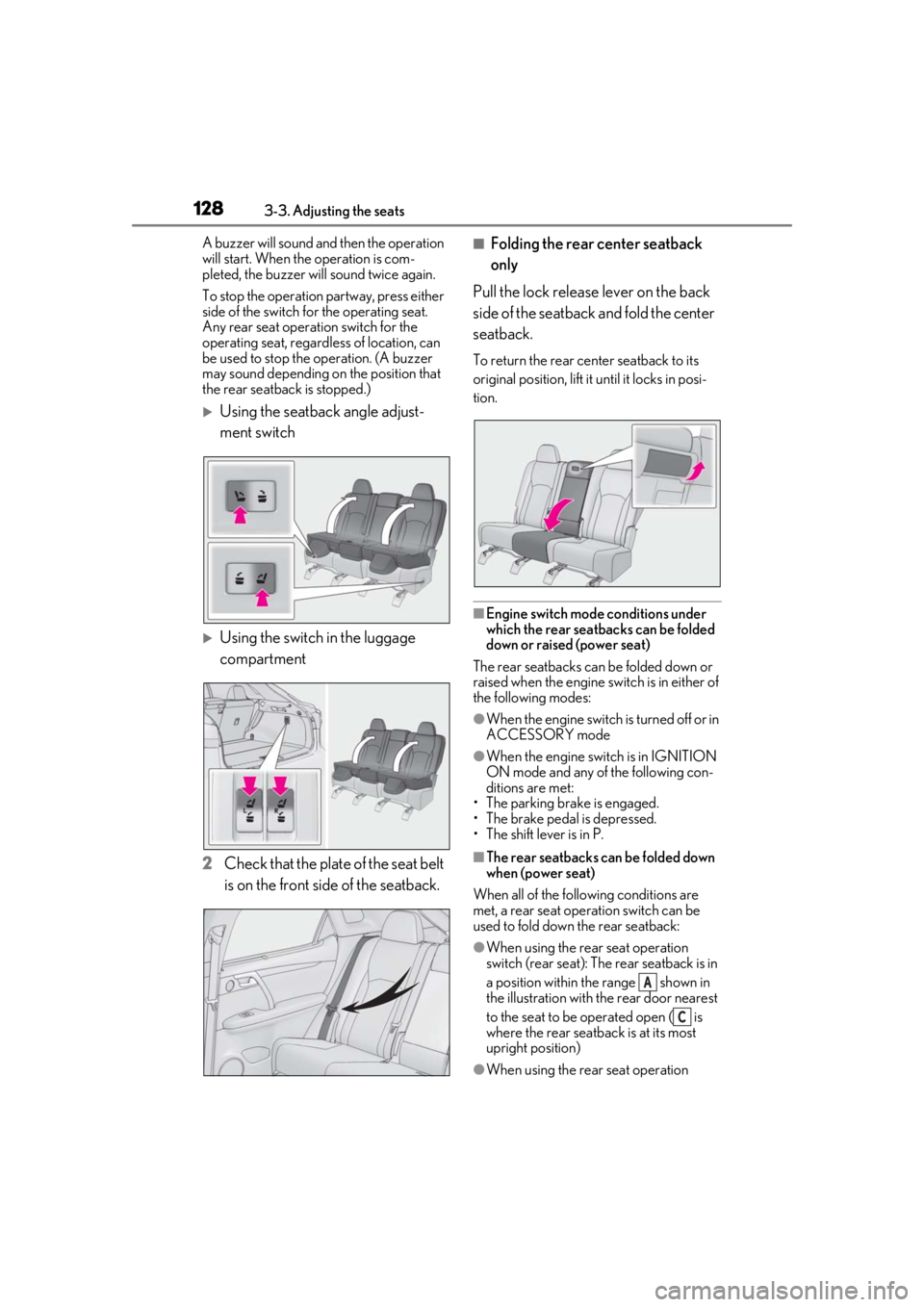
Using the seatback angle adjust-
ment switch
Using the switch in the luggage
compartment
2 Check that the plate of the seat belt
is on the front side of the seatback.
■Folding the rear center seatback
only
Pull the lock release lever on the back
side of the seatback and fold the center
seatback.
To return the rear center seatback to its
original position, lift it until it locks in posi-
tion.
■Engine switch mode conditions under
which the rear seatbacks can be folded
down or raised (power seat)
The rear seatbacks can be folded down or
raised when the engine sw itch is in either of
the following modes:
●When the engine switch is turned off or in
ACCESSORY mode
●When the engine swit ch is in IGNITION
ON mode and any of the following con-
ditions are met:
• The parking brake is engaged.
• The brake pedal is depressed.
• The shift lever is in P.
■The rear seatbacks can be folded down
when (power seat)
When all of the following conditions are
met, a rear seat operation switch can be
used to fold down the rear seatback:
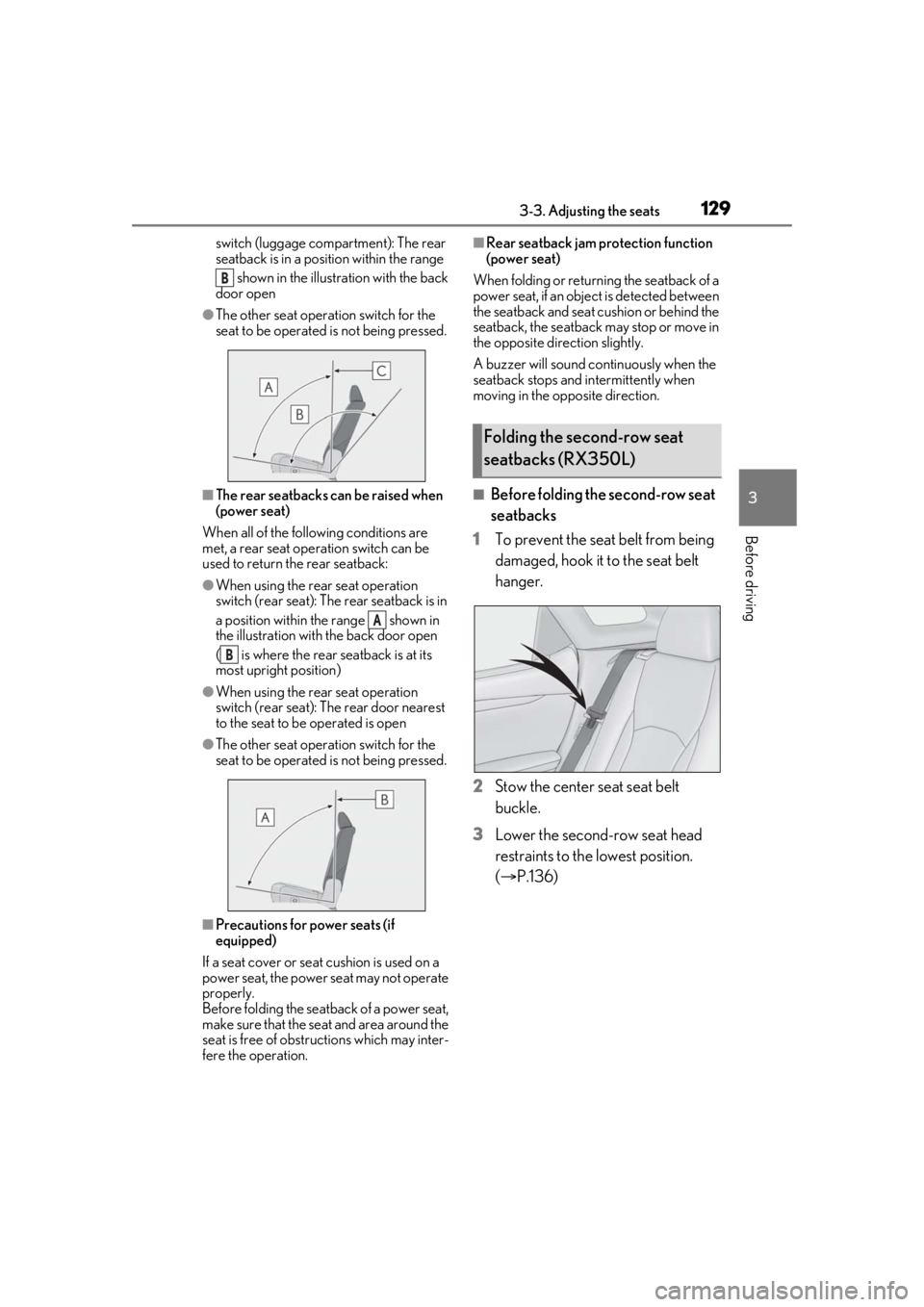
●When using the rear seat operation
switch (rear seat): The rear seatback is in
a position within the range shown in
the illustration with th e rear door nearest
to the seat to be operated open ( is
where the rear seatback is at its most
upright position)
●When using the rear seat operation
A
C
Page 129 of 508
1293-3. Adjusting the seats
3
Before driving
switch (luggage compartment): The rear
seatback is in a position within the range shown in the illustration with the back
door open
●The other seat operation switch for the
seat to be operated is not being pressed.
■The rear seatbacks can be raised when
(power seat)
When all of the following conditions are
met, a rear seat operation switch can be
used to return the rear seatback:
●When using the rear seat operation
switch (rear seat): The rear seatback is in
a position within the range shown in
the illustration with the back door open
( is where the rear seatback is at its
most upright position)
●When using the rear seat operation
switch (rear seat): The rear door nearest
to the seat to be operated is open
●The other seat operation switch for the
seat to be operated is not being pressed.
■Precautions for power seats (if
equipped)
If a seat cover or seat cushion is used on a
power seat, the power seat may not operate
properly.
Before folding the seat back of a power seat,
make sure that the seat and area around the
seat is free of obstru ctions which may inter-
fere the operation.
■Rear seatback jam protection function
(power seat)
When folding or return ing the seatback of a
power seat, if an object is detected between
the seatback and seat cushion or behind the
seatback, the seatback may stop or move in
the opposite direction slightly.
A buzzer will sound continuously when the
seatback stops and in termittently when
moving in the opposite direction.
■Before folding the second-row seat
seatbacks
1 To prevent the seat belt from being
damaged, hook it to the seat belt
hanger.
2 Stow the center seat seat belt
buckle.
3 Lower the second-row seat head
restraints to the lowest position.
(P.136)
B
A
B
Folding the second-row seat
seatbacks (RX350L)
Page 132 of 508
1323-3. Adjusting the seats
■Before folding the third-row seat
seatbacks
1 To prevent the seat belt from being
damaged, hook it to the seat belt
hanger.
2 Lower the third-row seat head
restraints to the lowest position.
(P.136)
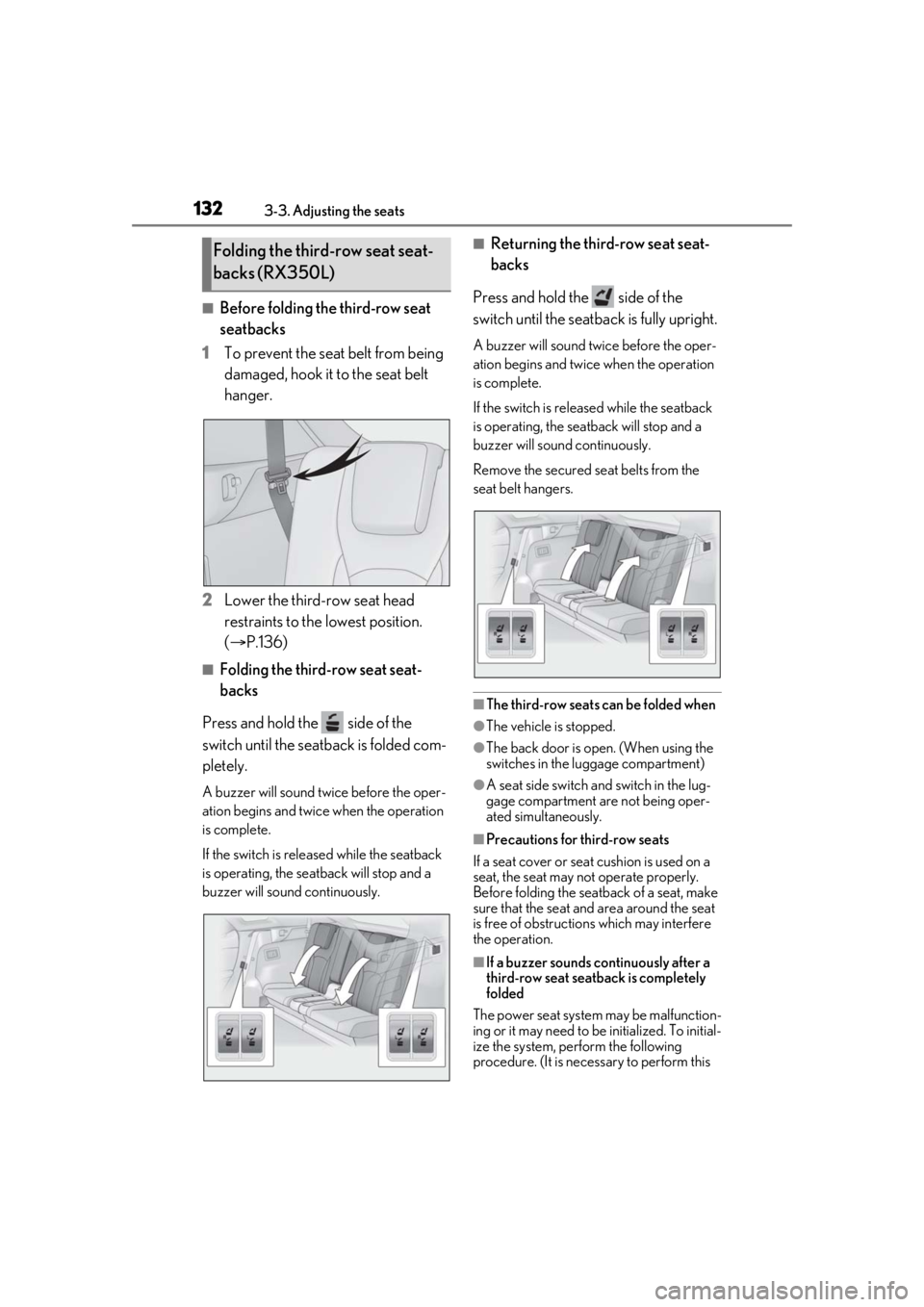
■Folding the third-row seat seat-
backs
Press and hold the side of the
switch until the seatback is folded com-
pletely.
A buzzer will sound twice before the oper-
ation begins and twice when the operation
is complete.
If the switch is releas ed while the seatback
is operating, the seatback will stop and a
buzzer will sound continuously.
■Returning the third-row seat seat-
backs
Press and hold the side of the
switch until the seatback is fully upright.
A buzzer will sound twice before the oper-
ation begins and twice when the operation
is complete.
If the switch is releas ed while the seatback
is operating, the seatback will stop and a
buzzer will sound continuously.
Remove the secured se at belts from the
seat belt hangers.
■The third-row seats can be folded when
●The vehicle is stopped.
●The back door is open. (When using the
switches in the luggage compartment)
●A seat side switch and switch in the lug-
gage compartment are not being oper-
ated simultaneously.
■Precautions for third-row seats
If a seat cover or seat cushion is used on a
seat, the seat may not operate properly.
Before folding the seatback of a seat, make
sure that the seat and area around the seat
is free of obstructio ns which may interfere
the operation.
■If a buzzer sounds co ntinuously after a
third-row seat seatback is completely
folded
The power seat system may be malfunction-
ing or it may need to be initialized. To initial-
ize the system, perform the following
procedure. (It is necessary to perform this
Folding the third-row seat seat-
backs (RX350L)
Page 133 of 508
1333-3. Adjusting the seats
3
Before driving
procedure with two people.)
1Check that the seat is free of obstruc-
tions.
2 Press and hold the side switch of
the luggage compartment side switch
for the seat which the buzzer is sound-
ing.
3 Within 10 seconds of the performing
the above step, press the side
switch of the seat side switch 5 times.
4 When a buzzer sounds 3 times, release
the luggage compartment side switch.
5 Press the side switch of the seat
side switch until the seatback is folded
completely.
A buzzer will sound twice when the opera-
tion is complete.
If the buzzer does not stop sounding even
though the above procedure has been per-
formed, have the vehicle inspected by your
Lexus dealer.
*: If equipped
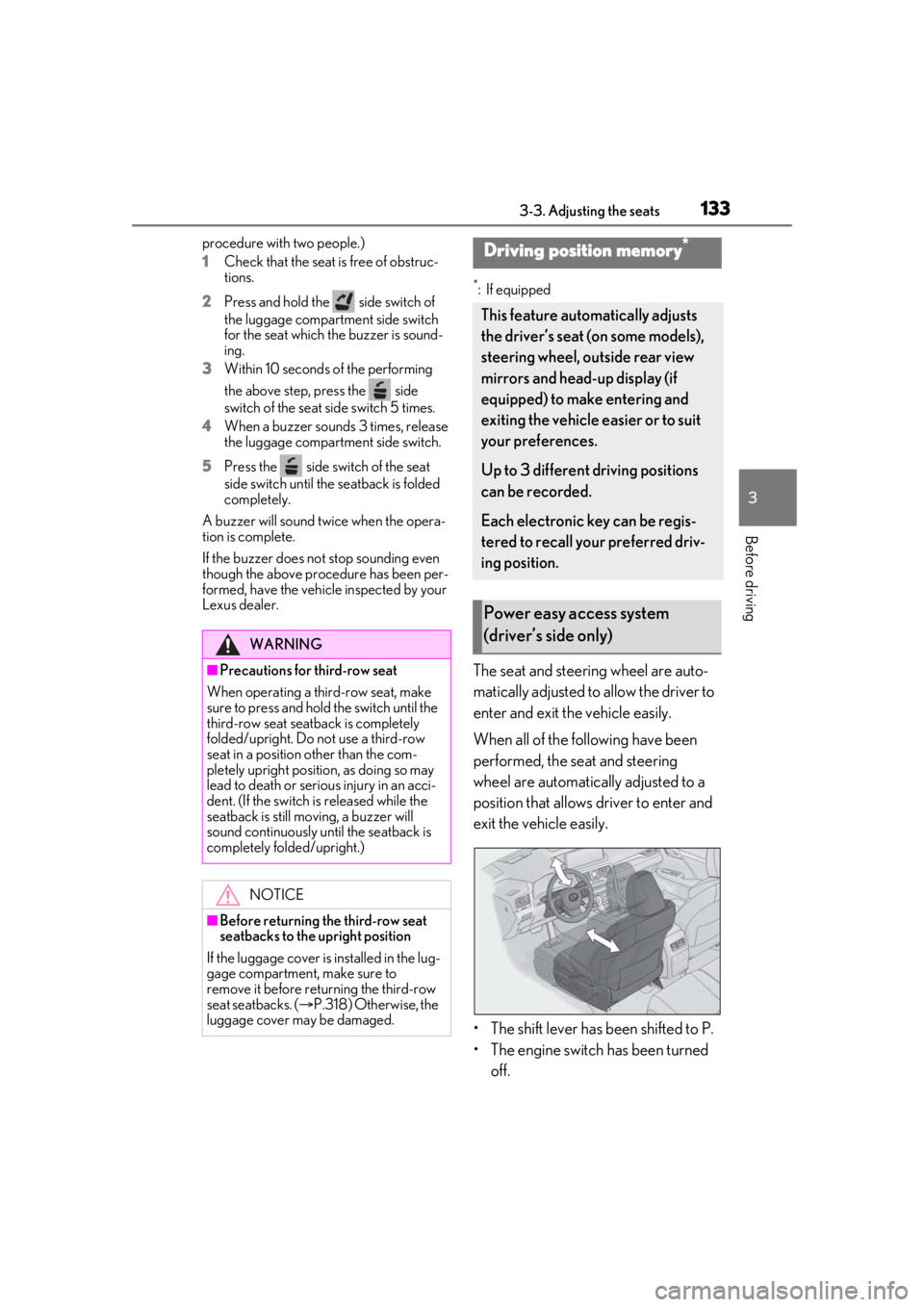
The seat and steering wheel are auto-
matically adjusted to allow the driver to
enter and exit the vehicle easily.
When all of the following have been
performed, the seat and steering
wheel are automatically adjusted to a
position that allows driver to enter and
exit the vehicle easily.
• The shift lever has been shifted to P.
• The engine switch has been turned off.
WARNING
■Precautions for third-row seat
When operating a third-row seat, make
sure to press and hold the switch until the
third-row seat seatba ck is completely
folded/upright. Do not use a third-row
seat in a position other than the com-
pletely upright position, as doing so may
lead to death or serious injury in an acci-
dent. (If the switch is released while the
seatback is still moving, a buzzer will
sound continuously until the seatback is
completely folded/upright.)
NOTICE
■Before returning th e third-row seat
seatbacks to the upright position
If the luggage cover is installed in the lug-
gage compartment, make sure to
remove it before re turning the third-row
seat seatbacks. ( P.318) Otherwise, the
luggage cover may be damaged.
Driving position memory*
This feature automatically adjusts
the driver’s seat (on some models),
steering wheel, outside rear view
mirrors and head-up display (if
equipped) to make entering and
exiting the vehicle easier or to suit
your preferences.
Up to 3 different driving positions
can be recorded.
Each electronic key can be regis-
tered to recall your preferred driv-
ing position.
Power easy access system
(driver’s side only)
Page 134 of 508

1343-3. Adjusting the seats
• The driver’s seat belt has been unfastened.
When any of the following has been
performed, the seat and steering
wheel automatically return to their
original positions.
• The engine switch has been turned to ACCESSORY mode or IGNI-
TION ON mode.
• The driver’s seat belt has been fas- tened.
■Operation of the power easy access sys-
tem
When exiting the vehicle, the power easy
access system may not operate if the seat is
already close to the rearmost position, etc.
■Customization
Some functions can be customized.
( P.461)
1 Check that the shift lever is in P.
2 Turn the engine switch to IGNI-
TION ON mode.
3 Adjust the driver’s seat, steering
wheel, outside rear view mirrors
and head-up display (if equipped)
to the desired positions.
4 While pressing the “SET” button, or
within 3 seconds after the “SET”
button is pressed, press button “1”,
“2” or “3” until the buzzer sounds.
If the selected button has already been
preset, the previously recorded position will be overwritten.
■Seat positions that can be memorized
(
P.121)
The adjusted positions other than the posi-
tion adjusted by lumb ar support switch can
be recorded.
■In order to correctly use the driving
position memory function
If a seat position is already in the furthest
possible position and the seat is operated in
the same direction, the recorded position
may be slightly differen t when it is recalled.
1Check that the shift lever is in P.
2 Turn the engine switch to IGNI-
TION ON mode.
Recording a driving position into
memoryWARNING
■Seat adjustme nt caution
Take care during seat adjustment so that
the seat does not strike the rear passen-
ger or squeeze your body against the
steering wheel.
Recalling a driving position
Page 135 of 508
1353-3. Adjusting the seats
3
Before driving
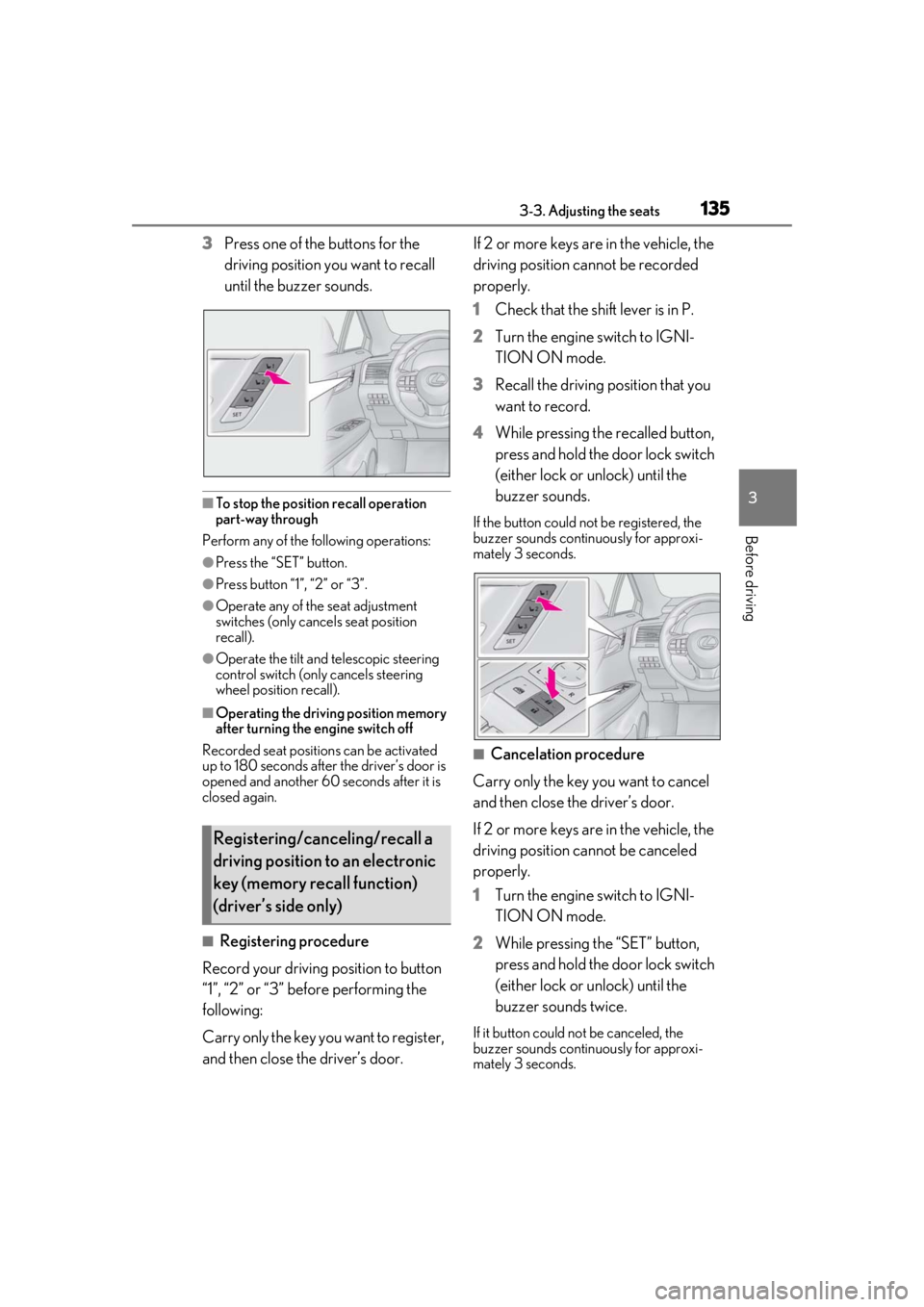
3Press one of the buttons for the
driving position you want to recall
until the buzzer sounds.
■To stop the position recall operation
part-way through
Perform any of the fo llowing operations:
●Press the “SET” button.
●Press button “1”, “2” or “3”.
●Operate any of the seat adjustment
switches (only cancels seat position
recall).
●Operate the tilt and telescopic steering
control switch (only cancels steering
wheel position recall).
■Operating the driving position memory
after turning the engine switch off
Recorded seat positions can be activated
up to 180 seconds after the driver’s door is
opened and another 60 seconds after it is
closed again.
■Registering procedure
Record your driving position to button
“1”, “2” or “3” before performing the
following:
Carry only the key you want to register,
and then close the driver’s door. If 2 or more keys are in the vehicle, the
driving position cannot be recorded
properly.
1
Check that the shift lever is in P.
2 Turn the engine switch to IGNI-
TION ON mode.
3 Recall the driving position that you
want to record.
4 While pressing the recalled button,
press and hold the door lock switch
(either lock or unlock) until the
buzzer sounds.
If the button could not be registered, the
buzzer sounds continuously for approxi-
mately 3 seconds.
■Cancelation procedure
Carry only the key you want to cancel
and then close the driver’s door.
If 2 or more keys are in the vehicle, the
driving position cannot be canceled
properly.
1 Turn the engine switch to IGNI-
TION ON mode.
2 While pressing the “SET” button,
press and hold the door lock switch
(either lock or unlock) until the
buzzer sounds twice.
If it button could not be canceled, the
buzzer sounds continuously for approxi-
mately 3 seconds.
Registering/canceling/recall a
driving position to an electronic
key (memory recall function)
(driver’s side only)
Page 139 of 508
1393-4. Adjusting the steering wheel and mirrors
3
Before driving
3-4.Adjusting the steering wheel and mirrors
Operating the switch moves the steer-
ing wheel in the following directions:
1Up
2 Down
3 Toward the driver
4 Away from the driver
■The steering wheel can be adjusted
when
The engine switch is in ACCESSORY or
IGNITION ON mode
*.
*: If the driver’s seat belt is fastened, the steering wheel can be adjusted regard-
less of engine switch mode.
■Automatic adjustment of the steering
position (if equipped)
A desired steering position can be entered
to memory and recalled automatically by
the driving position memory system.
( P.133)
■Power easy access system
The steering wheel and driver’s seat (on
some models) move in accordance with
engine switch mode and the driver’s seat
belt condition. ( P.133)
■Customization
Some functions can be customized.
( P.461)
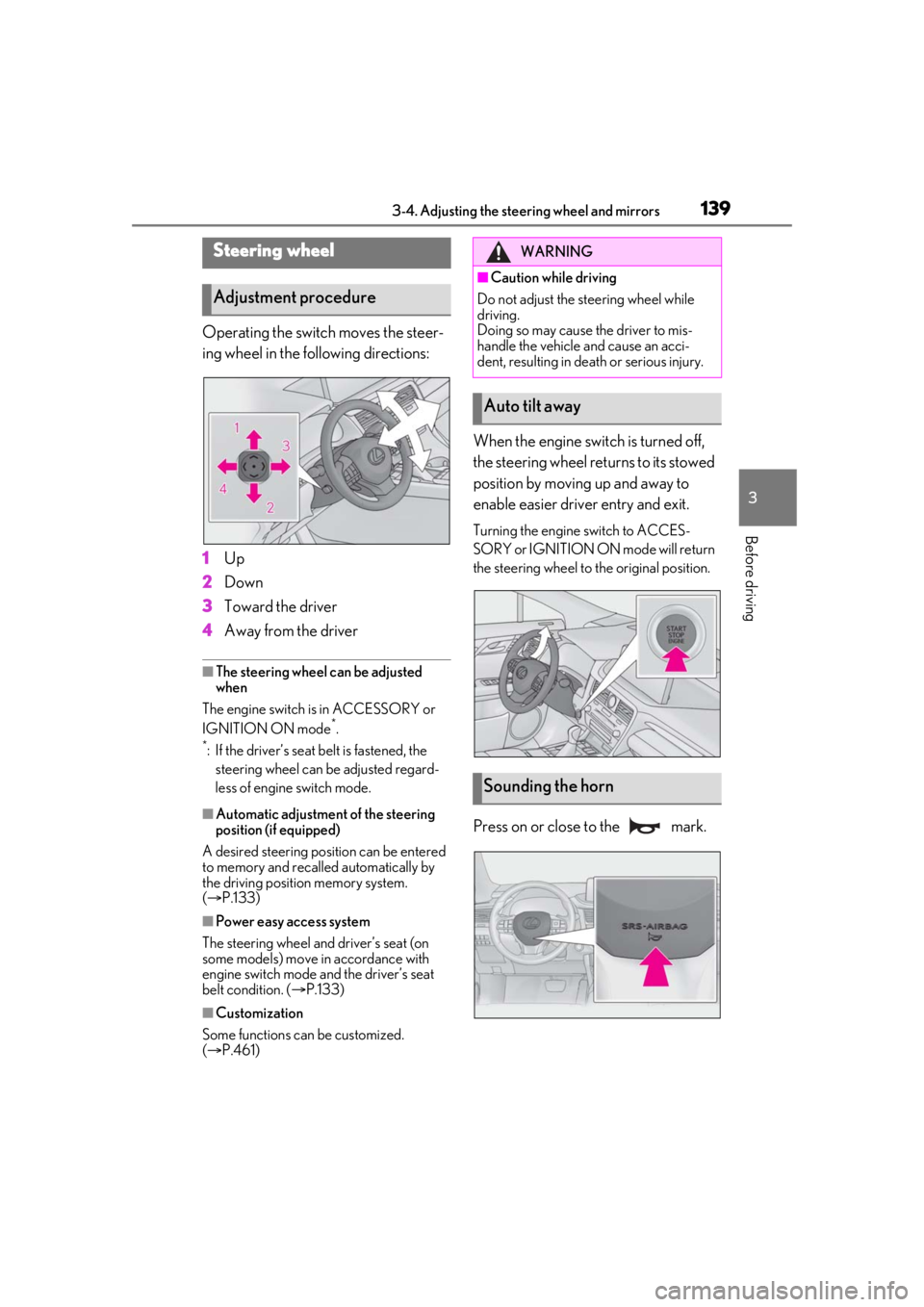
When the engine swit ch is turned off,
the steering wheel returns to its stowed
position by moving up and away to
enable easier driver entry and exit.
Turning the engine switch to ACCES-
SORY or IGNITION ON mode will return
the steering wheel to the original position.
Press on or close to the mark.
Steering wheel
Adjustment procedure
WARNING
■Caution while driving
Do not adjust the steering wheel while
driving.
Doing so may cause the driver to mis-
handle the vehicle and cause an acci-
dent, resulting in death or serious injury.
Auto tilt away
Sounding the horn
Page 145 of 508
1453-5. Opening, closing the windows and moon roof
3
Before driving
If you release the switch while the window is
moving, start again from the beginning.
If the window reverses and cannot be fully
closed or opened, have the vehicle
inspected by your Lexus dealer.
■Door lock linked window operation
●The power windows can be opened and
closed using the mechanical key.*
( P.432)
●The power windows can be opened using
the wireless remote control.* ( P.99)
*: These settings must be customized at
your Lexus dealer.
■Alarm
The alarm may be triggered if the alarm is
set and a power window is closed using the
door lock linked power window operation
function. ( P.68)
■Power windows open warning buzzer
A buzzer sounds and a message is shown
on the multi-information display in the
instrument cluster when the engine switch
is turned off and the driver’s door is opened
with the power windows open.
■Customization
Some functions can be customized.
( P.461)
WARNING
Observe the following precautions.
Failing to do so may result in death or
serious injury.
■Closing the windows
●The driver is responsible for all the
power window operations, including
the operation for the passengers. In
order to prevent accidental operation,
especially by a child, do not let a child
operate the power windows. It is possi-
ble for children an d other passengers
to have body parts caught in the power
window. Also, when riding with a child,
it is recommended to use the window
lock switch. (
P.146)
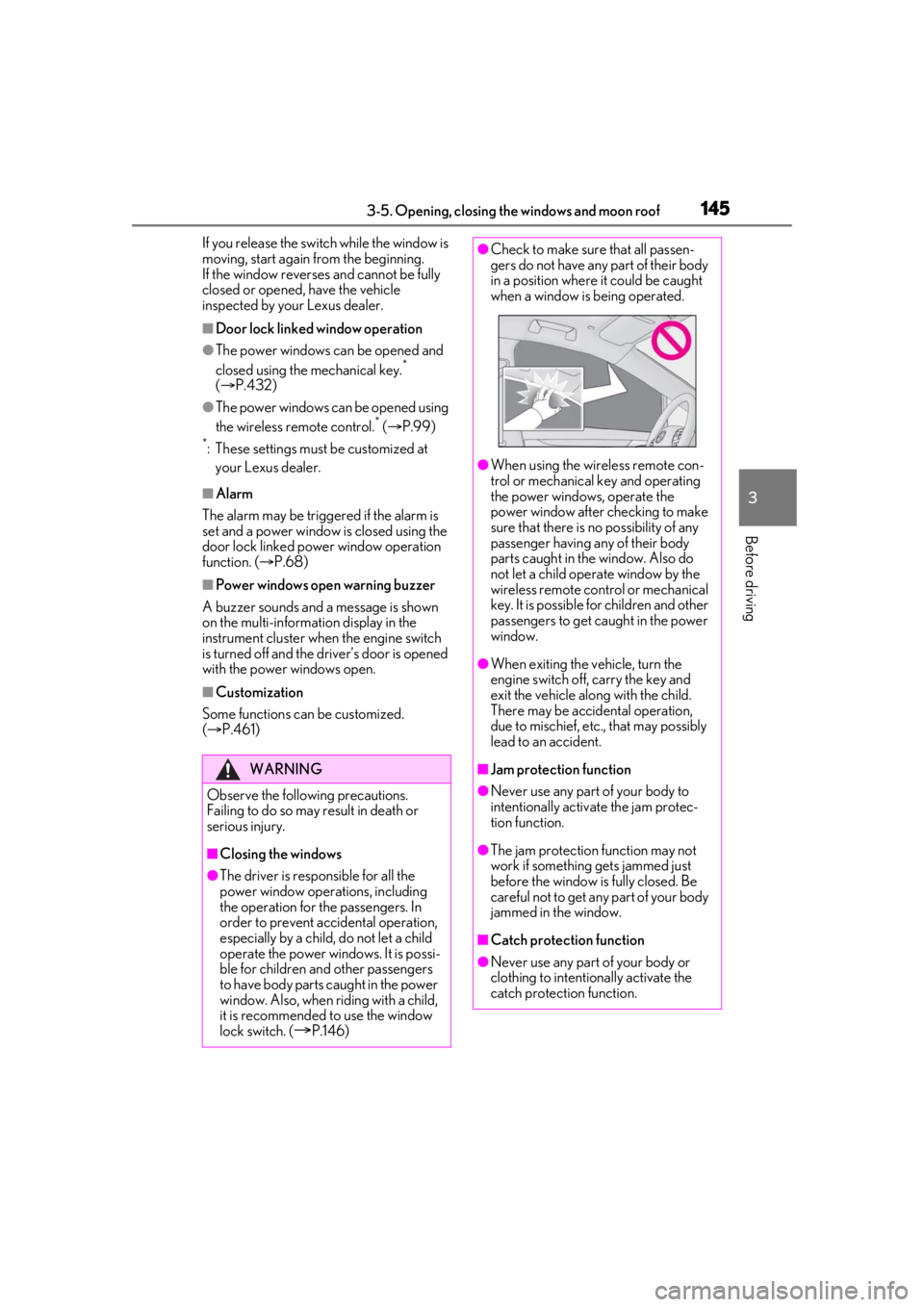
●Check to make sure that all passen-
gers do not have any part of their body
in a position where it could be caught
when a window is being operated.
●When using the wireless remote con-
trol or mechanical key and operating
the power windows, operate the
power window after checking to make
sure that there is no possibility of any
passenger having any of their body
parts caught in the window. Also do
not let a child operate window by the
wireless remote control or mechanical
key. It is possible for children and other
passengers to get caught in the power
window.
●When exiting the vehicle, turn the
engine switch off, carry the key and
exit the vehicle along with the child.
There may be accidental operation,
due to mischief, etc., that may possibly
lead to an accident.
■Jam protection function
●Never use any part of your body to
intentionally activa te the jam protec-
tion function.
●The jam protection function may not
work if something gets jammed just
before the window is fully closed. Be
careful not to get any part of your body
jammed in the window.
■Catch protection function
●Never use any part of your body or
clothing to intentionally activate the
catch protection function.
Page 147 of 508

1473-5. Opening, closing the windows and moon roof
3
Before driving
*: Lightly press either side of the moon roof switch to stop the moon roof partway.
■The moon roof can be operated when
The engine switch is in IGNITION ON
mode.
■Operating the moon roof after turning
the engine off
The moon roof can be operated for approx-
imately 45 seconds after the engine switch
is turned to ACCESSORY mode or turned
off. It cannot, however, be operated once
the driver’s door is opened.
■Jam protection function
If an object is detected between the moon
roof and the frame while the moon roof is
closing or tilting down, travel is stopped and
the moon roof opens slightly.
■Sunshade
The sunshade can be opened and closed
manually. However, the sunshade will open
automatically when the moon roof is
opened.
■Door lock linked moon roof operation
●The moon roof can be opened and
closed using the mechanical key.*
( P.432)
●The moon roof can be opened using the
wireless remote control.* ( P.99)
●The alarm may be triggered if the alarm is
set and the moon roof is closed using the
door lock linked moon roof operation
function. ( P.68)
*: These settings must be customized at
your Lexus dealer.
■When the moon roof does not close nor-
mally
Perform the following procedure:
If the moon roof closes but then re-opens
slightly
1 Stop the vehicle.
2 Press and hold the “CLOSE” switch.
*1
The moon roof will close, reopen and pause
for approximately 10 seconds.*2 Then it will close again, tilt up and pause for approxi-
mately 1 second. Finally, it will tilt down,
open and close.
3
Check to make sure that the moon roof
is completely closed and then release
the switch.
If the moon roof tilts down but then tilts
back up
1 Stop the vehicle.
2 Press and hold the “UP” switch
*1 until
the moon roof moves into the tilt up
position and stops.
3 Release the “UP” switch once and then
press and hold the “UP” switch
again.
*1The moon roof will pause for
approximately 10 seco nds in the tilt up
position.
*2 Then it will adjust slightly and
pause for approximately 1 second.
Finally, it will tilt down, open and close.
4 Check to make sure that the moon roof
is completely closed and then release
the switch.
*1: If the switch is rele ased at the incorrect
time, the procedure will have to be per-
formed again from the beginning.
*2: If the switch is released after the above mentioned 10 second pause, automatic
operation will be disabled. In that case,
press and hold the “CLOSE” or “UP”
switch, and the moon roof will tilt up and
pause for approximately 1 second. Then
it will tilt down, open and close. Check
to make sure that the moon roof is com-
pletely closed and then release the
switch.
If the moon roof does not fully close even
after performing the above procedure cor-
rectly, have the vehicle inspected by your
Lexus dealer.
■Moon roof open warning buzzer
A buzzer sounds and a message is shown
on the multi-informat ion display in the
instrument cluster when the engine switch
is turned off and the driver’s door is opened
with the moon roof open.