seats LEXUS RX350 2022 Service Manual
[x] Cancel search | Manufacturer: LEXUS, Model Year: 2022, Model line: RX350, Model: LEXUS RX350 2022Pages: 508, PDF Size: 26.2 MB
Page 134 of 508

1323-3. Adjusting the seats
■Recall procedure
1 Make sure that the doors are
locked before recalling the driving
position. Carry the electronic key
that has been registered to the driv-
ing position, and then unlock and
open the driver’s door using the
smart access system with push-but-
ton start or wireless remote control.
The driving position will move to the
recorded position (not including the steer-
ing wheel and head-up display [if
equipped]). However, the seat will move to
a position slightly behind the recorded
position in order to make entering the vehi-
cle easier.
If the driving position is in a position that
has already been recorded, the seat and
outside rear view mirrors will not move.
2Turn the engine switch to ACCES-
SORY mode or IGNITION ON
mode, or fasten a seat belt.
The seat, steering wheel and head-up dis-
play (if equipped) will move to the
recorded position.
■Recalling the driving position using the
memory recall function
●Different driving positions can be regis-
tered for each electronic key. Therefore,
the driving position that is recalled may
be different depending on the key being
carried.
●If a door other than the driver’s door is
unlocked with the smart access system
with push-button start, the driving posi-
tion cannot be recalled. In this case, press
the driving position button which has
been set.
■Customization
Some functions can be customized.
( P.449)
■Front seats
1 Up
Pull the head restraints up.
2Down
Push the head restra int down while press-
ing the lock release button .
Head restraints
Head restraints are provided for all
seats.
WARNING
■Head restraint precautions
Observe the following precautions
regarding the head re straints. Failure to
do so may result in death or serious
injury.
●Use the head restraints designed for
each respective seat.
●Adjust the head restraints to the cor-
rect position at all times.
●After adjusting the head restraints,
push down on them and make sure
they are locked in position.
●Do not drive with the head restraints
removed.
Adjusting a head restraint verti-
cally
A
Page 135 of 508

1333-3. Adjusting the seats
3
Before driving
■Second-row seats
1 Up
Pull the head restraints up.
2Down
Push the head restraint down while press-
ing the lock release button .
■Third-row seats (RX350L)
1 Up
Pull the head restraints up.
2Down
Push the head restraint down while press-
ing the lock release button .
■Adjusting the height of the head
restraints Make sure that the head restraints are
adjusted so that the center of the head
restraint is closest to the top of your ears.
■Adjusting the second-row center and
third-row seat head restraints
Always raise the head restraint one level
from the stowed position when using.
The position of the head restraint can
be adjusted forward in 4 stages.
If the head restraint is pulled forward from
the foremost position, it will return to the
rearmost position.
■Front and second-row seats
Pull the head restraint up while press-
ing the lock release button .
If the head restraint touches the ceiling,
making the removal difficult, change
the seat height or angle. ( P.117, 118)
A
A
Adjusting a head restraint hori-
zontally (if equipped)
Removing the head restraints
A
Page 136 of 508

1343-3. Adjusting the seats
■Third-row seats (RX350L)
Pull the head restraint up while press-
ing the lock release button .
If the head restrain t touches the ceiling,
making the removal difficult, change
the seat angle. ( P.118)
■Front and second-row seats
Align the head restraint with the instal-
lation holes and push it down to the
lock position.
Press and hold the lock release button
when lowering the head restraint.
■Third-row seats (RX350L)
Align the head restraint with the instal-
lation holes and push it down to the
lock position.
Press and hold the lock release button when lowering the head restraint.
Installing the head restraints
A
A
A
Page 159 of 508

1574-1. Before driving
4
Driving
WARNING
●Do not stack cargo and luggage in the
luggage compartment higher than the
seatbacks.
●When you fold down the rear seats,
long items should not be placed
directly behind the front seats.
●Never allow anyone to ride in the lug-
gage compartment. It is not designed
for passengers. They should ride in
their seats with their seat belts prop-
erly fastened.
●Do not place cargo or luggage in or on
the following locations.
• At the feet of the driver
• On the front passenger or rear seats (when stacking items)
•On the luggage cover
• On the instrument panel
•On the dashboard
●Secure all items in the occupant com-
partment.
■Capacity and distribution
●Do not exceed the maximum axle
weight rating or the total vehicle
weight rating.
●Even if the total load of occupant’s
weight and the cargo load is less than
the total load capacity, do not apply the
load unevenly. Improper loading may
cause deterioration of steering or
braking control which may cause
death or serious injury.
■Roof luggage carrier precautions
Observe the following precautions:
●Place the cargo so that its weight is dis-
tributed evenly between the front and
rear axles.
●If loading long or wide cargo, never
exceed the vehicle overall length or
width. (
P.430)
●Before driving, make sure the cargo is
securely fastened on the roof luggage
carrier.
●Loading cargo on the roof luggage
carrier will make the center of gravity
of the vehicle higher. Avoid high
speeds, sudden starts, sharp turns,
sudden braking or abrupt maneuvers,
otherwise it may resu lt in loss of con-
trol or vehicle rollover due to failure to
operate this vehicle correctly and
result in death or serious injury.
●If driving for a long distance, on rough
roads, or at high speeds, stop the vehi-
cle now and then during the trip to
make sure the cargo remains in its
place.
●Do not exceed 165 lb. (75 kg) cargo
weight on the roof luggage carrier.
NOTICE
■When loading cargo (vehicles with a
moon roof or panoramic moon roof)
Be careful not to scratch the surface of
the moon roof or panoramic moon roof.
Page 285 of 508
2835-2. Lexus Climate Concierge
5
Interior features
5-2.Lexus Climate Concierge
*:If equipped
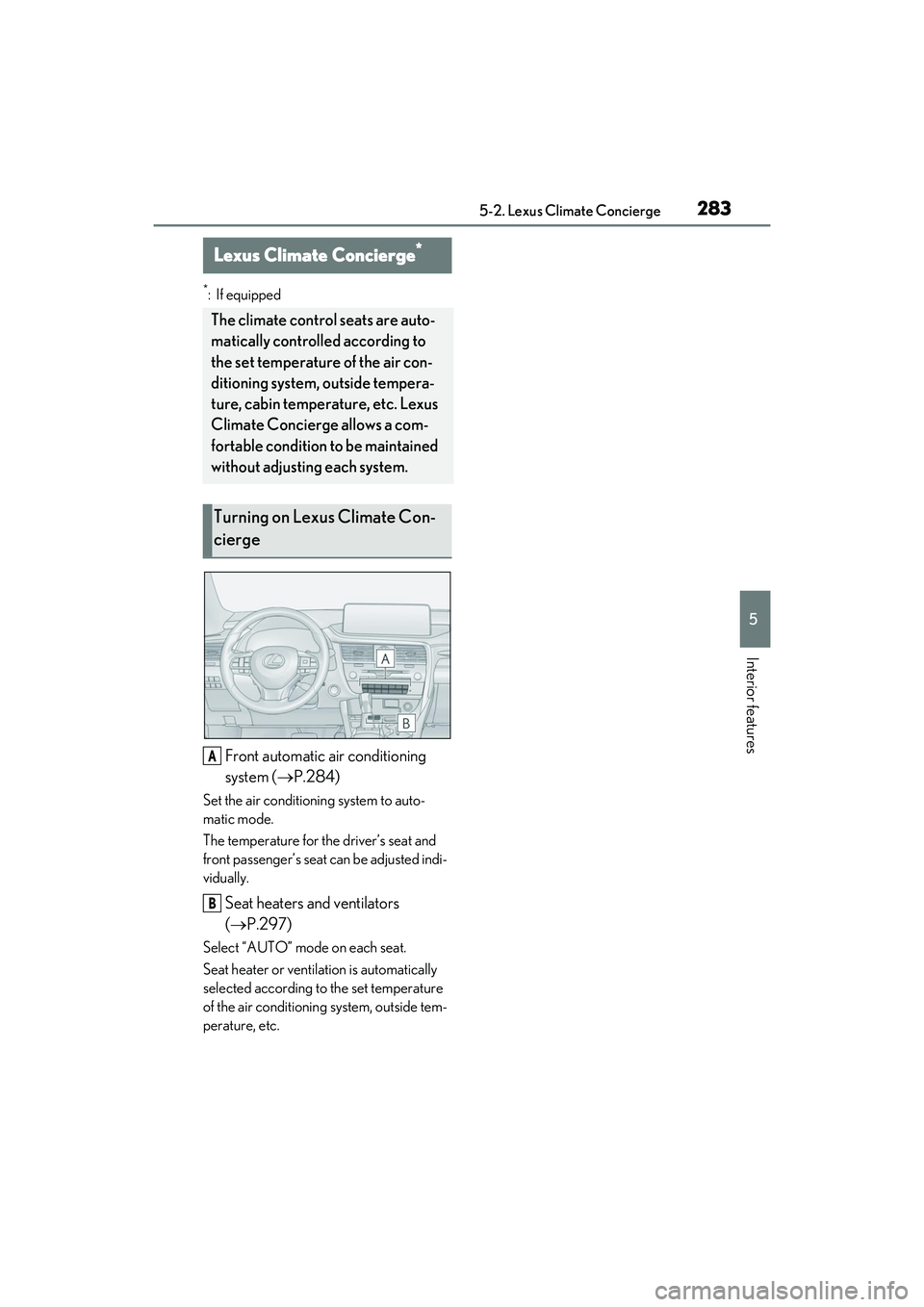
Front automatic air conditioning
system (P.284)
Set the air conditioning system to auto-
matic mode.
The temperature for the driver’s seat and
front passenger’s seat can be adjusted indi-
vidually.
Seat heaters and ventilators
( P.297)
Select “AUTO” mode on each seat.
Seat heater or ventilation is automatically
selected according to the set temperature
of the air conditioning system, outside tem-
perature, etc.
Lexus Climate Concierge*
The climate control seats are auto-
matically controlled according to
the set temperature of the air con-
ditioning system, outside tempera-
ture, cabin temperature, etc. Lexus
Climate Concierge allows a com-
fortable condition to be maintained
without adjusting each system.
Turning on Lexus Climate Con-
cierge
A
B
Page 291 of 508

2895-3. Using the air conditioning system and defogger
5
Interior features
Remote Touch is pressed, the following
functions can be switched on and off.
“AUTO”: Set automatic mode on/off
( P.291)
“OFF”: Turn the fan off
“A/C”: Set cooling and dehumidification
function
If the “A/C” display is turned off, the system
will blow ambient temperature air or
heated air.
“DUAL”: Adjust the temperature for driver
and passenger seats separately (“DUAL”
mode) ( P.292)
: Set eco air conditioning mode
Vehicles with 3-ZONE climate con-
trol
Sub menu
Selecting the sub menu item to switch the
main screen.
: Display the air conditioning control
screen
: Display the option control screen
Adjust the left side seat tempera-
ture setting
Adjust the fan speed setting
Select the air flow mode
: Air flows to the upper body : Air flows to the upper body and feet
: Air flows to the feet
: Air flows to the feet and the wind-
shield defogger operates
Adjust the right side seat tempera-
ture setting
Function on/off indicators
When the function is on, the indicator illu-
minates on the control screen.
Sub function menu
When the sub function button on the
Remote Touch is pressed, the following
functions can be switched on and off.
“AUTO”: Set automatic mode on/off
( P.291)
“OFF”: Turn the fan off
“A/C”: Set cooling and dehumidification
function
If the “A/C” display is turned off, the system
will blow ambient temperature air or
heated air.
“3-ZONE”: Adjust the temperature for the
driver, front passenger and rear passenger
seats separately (“3-ZONE” mode)
( P.292)
: Set eco air conditioning mode
■Option control screen
Select on the sub menu to display
the option control screen.
The functions can be switched on and off.
When the function is on, the indicator illu-
minates on the screen.
A
B
C
D
E
F
G
Page 292 of 508

2905-3. Using the air conditioning system and defogger
Vehicles with DUAL-ZONE climate
control
Adjusting the temperature for
driver and passenger seats sepa-
rately (“DUAL” mode) ( P.292)
Set eco air conditioning mode
Air conditioning and heater output is lim-
ited to prioritize fuel economy.
Cooling and dehumidification func-
tion
If the “A/C” indicator is turned off, the sys-
tem will blow ambient temperature air or
heated air.
Select the front seat concentrated
airflow mode (S-FLOW) ( P.292)
Prevent ice from building up on the
windshield and wiper blades
(Windshield wiper de-icer) (if
equipped)
Vehicles with 3-ZONE climate con-
trol Adjust the temperature for driver,
passenger and rear seats sepa-
rately (“3-ZONE” mode)
(
P.292)
Set eco air conditioning mode
Air conditioning and heater output is lim-
ited to prioritize fuel economy.
Cooling and dehumidification func-
tion
If the “A/C” indicator is turned off, the sys-
tem will blow ambient temperature air or
heated air.
Select the front seat concentrated
airflow mode (S-FLOW) ( P.292)
Prevent ice from building up on the
windshield and wiper blades
(Windshield wiper de-icer) (if
equipped)
■Side display
Vehicles with DUAL-ZONE climate
control
Adjust the left side seat tempera-
ture setting
Adjust the fan speed setting
Adjust the right side seat tempera-
ture setting
Set cooling and dehumidification
function on/off
A
B
C
D
E
A
B
C
D
E
A
B
C
D
Page 293 of 508

2915-3. Using the air conditioning system and defogger
5
Interior features
Adjusting the temperature for
driver and passenger seats sepa-
rately (“DUAL” mode) (P.292)
Select the air flow mode
Vehicles with 3-ZONE climate con-
trol
Adjust the left side seat tempera-
ture setting
Adjust the fan speed setting
Adjust the right side seat tempera-
ture setting
Set cooling and dehumidification
function on/off
Adjust the temperature for driver,
passenger and rear seats sepa-
rately (“3-ZONE” mode)
( P.292)
Select the air flow mode
■Windshield wiper de-icer (if equipped)
This feature is used to prevent ice from
building up on the windshield and wiper
blades.
The windshield de-icer will automatically
turn off after a while.
1 Press the automatic mode switch or
select “AUTO” on the sub function
menu. ( P.288)
2 Press the outside/recirculated air
mode switch to switch to automatic
air intake mode. (if equipped)
The air conditioning system automatically
switches between outside air and recircu-
lated air modes.
3Adjust the temperature setting.
4 To stop the operation, press the off
switch or select “OFF” on the sub
function menu. ( P.288)
If the fan speed settin g or air flow modes
are operated, the automatic mode indica-
tor goes off. However, automatic mode for
functions other than that operated is main-
tained.
■Using automatic mode
Fan speed is adjusted automatically accord-
ing to the temperature setting and the
ambient conditions.
Therefore, the fan may stop for a while until
warm or cool air is ready to flow immedi-
ately after the automatic mode switch is
pressed or “AUTO” is selected.
Cool air may blow around the upper body
even when the heater is on due to sunlight.
■Automatic mode for air intake control (if
equipped)
In automatic mode, the system detects
exhaust gas and other pollutants and auto-
E
F
A
B
C
D
E
F
WARNING
■To prevent burns (vehicles with wind-
shield wiper de-icer)
Do not touch the glass at lower part of
the windshield or to the side of the front
pillars when the windshield wiper de-icer
is on.
Using automatic mode
Page 294 of 508

2925-3. Using the air conditioning system and defogger
matically switches between outside air and
recirculated air modes.
When the dehumidification function is off,
and the fan is operating, turning automatic
mode on will activate the dehumidification
function.
This function automatically controls the
air conditioning airflo w so that priority
is given to the front seats. When the
front passenger seat is not occupied,
airflow may switch to only the driver's
seat. Unnecessary air conditioning is
suppressed, contributing to increased
fuel efficiency.
Front seat concentrated airflow mode
operates in the following situations.
No passengers are detected in the
rear seats
The windshield defogger is not
operating
While operating, illuminates.
■Manually turning front seat con-
centrated airflow mode on/off
In front seat concentrated airflow
mode, directing airflow to the front
seats only and to all seats can be
switched via switch operation. When
the mode has been switched manually,
automatic airflow control stops operat-
ing.
Select on the center display
and switch the airflow.
Indicator illuminated: Airflow to the front seats only
Indicator off: Airflow to all the seats
■Operation of automatic airflow control
●In order to maintain a comfortable inte-
rior, airflow may be directed to seats
without passengers immediately after the
engine is started and at other times
depending on the outside temperature.
●After the engine is started, if passengers
move around inside or enter/exit the vehi-
cle, the system cannot accurately detect
the presence of passengers and auto-
matic airflow control will not operate.
■Operation of manual airflow control
Even if the function is manually switched to
directing airflow to only the front seats,
when a rear seat is occupied, it may auto-
matically direct airflow to all seats.
■To return to automatic airflow control
1 With the indicator off, turn the engine
switch off.
2 After 60 minutes or more elapse, turn
the engine switch to ON.
Vehicles with DUAL-ZONE climate
control
To turn on the “DUAL” mode, perform
any of the following procedures:
Select “DUAL” on the sub function
menu. ( P.288)
Select “DUAL” on the option con-
trol screen.
Adjust the passenger’s side tem-
perature setting.
The indicator on the main control screen
comes on when the “DUAL” mode is on.
Front seat concentrated airflow
mode (S-FLOW)
Adjusting the temperature for
the driver and passenger seats
separately
Page 296 of 508

2945-3. Using the air conditioning system and defogger
1Direct air flow to the left or right, up
or down
2 Turn the knob to open or close the
vent
■Center Display
Using the touchpad of the Remote
Touch, select the button on the screen.
This system can also be operated by
the touch screen.
Adjust the rear seats fan speed set-
ting
WARNING
■To prevent the windshield defogger
from operating improperly
Do not place anything on the instrument
panel which may cover the air outlets.
Otherwise, air flow may be obstructed,
preventing the windshield defoggers
from defogging.
Rear automatic air condi-
tioning system (RX350L)
The air outlets and fan speed are
automatically adjusted according
to the temperature setting.
The rear air conditioning system
can be operated using the Center
Display and rear air conditioning
system control panel.
Press the “MENU” button on the
Remote Touch to display the main
menu and move the cursor to
to display the climate control short-
cut buttons. Then, select to dis-
play the rear air conditioning
control screen.
Rear air conditioning control
operation
A