seats LEXUS RX350 2022 Workshop Manual
[x] Cancel search | Manufacturer: LEXUS, Model Year: 2022, Model line: RX350, Model: LEXUS RX350 2022Pages: 508, PDF Size: 26.2 MB
Page 297 of 508

2955-3. Using the air conditioning system and defogger
5
Interior features
Select the rear seats air flow mode
: Air flows to the upper body
: Air flows to the upper body and feet
: Air flows to the feet
Adjust the rear seats temperature
setting
Function on/off indicators
When the function is on, the indicator illu- minates on the control screen.
Sub function menu
When the sub function button on the
Remote Touch is pressed, the following
functions can be switched on and off.
“Rear off”: Turn the rear seats fan off
“Rear AUTO”: Set the rear seats automatic
mode on/off (
P.296)
: Disables operatio n of the rear air
conditioning system using the Rear air con-
ditioning system control panel
■Rear air conditioning system control panel
Adjust the rear seats fan speed setting
Press to increase the fan speed and to decrease the fan speed.
Press the OFF switch to turn the fan off.
Adjust the rear seats temperature setting
Press to increase the temperature and to decrease the temperature.
Select the air flow mode
OFF switch
AUTO button
When the function is on, the indicat or illuminates on the control screen.
B
C
D
E
A
B
C
D
E
Page 298 of 508

2965-3. Using the air conditioning system and defogger
Center Display
1 Select “Rear AUTO” on the sub
function menu. ( P.294)
2 To stop the operation, select “Rear
off” on the sub function menu.
( P.294)
If the fan speed setting or air flow
modes are operated , the automatic
mode indicator goes off. However,
automatic mode for functions other
than that operated is maintained.
Rear air conditioning system control
panel
1 Press “AUTO” on the rear air con-
ditioning system control panel.
2 To stop the operation, select “OFF”
on the rear air conditioning system
control panel.
If the fan speed setting or air flow
modes are operated , the automatic
mode indicator goes off. However,
automatic mode for functions other
than that operated is maintained.
■Using automatic mode
Fan speed is adjusted automatically accord-
ing to the temperature setting and the
ambient conditions.
Therefore, the fan may stop for a while until
warm or cool air is ready to flow immedi-
ately after “Rear AUTO” is selected or
“AUTO” is touched.
Cool air may blow ar ound the upper body
even when the heater is on due to sunlight.
The temperature setting of the rear
seats can be adjusted using the follow-
ing methods:
When the “3-ZONE” indicator is
off: Adjust the driver’s seat tempera-
ture.
Adjust the temperature setting of each
rear seat using the Center Display or rear
air conditioning system control panel.
Adjust the temperature setting of
rear seats using the Center Display
(rear air conditioning control
screen) or rear air conditioning sys-
tem control panel.
■Location of air outlets
The air outlets and air volume changes
according to the selected air flow
mode.
■Adjusting the position of and open-
ing and closing the air outlets
Adjusting the position of and opening
and closing the air outlets
Using automatic modeAdjusting the temperature set-
ting of the rear seats
Air outlets
Page 299 of 508

2975-3. Using the air conditioning system and defogger
5
Interior features
1Direct air flow to the left or right, up
or down
2 Turn the knob fully to the back of
the vehicle to close the vent
*: If equipped
NOTICE
■To prevent battery discharge
Do not leave the air conditioning system
on longer than ne cessary when the
engine is off.
Heated steering wheel*/seat
heaters
*/seat ventilators*
Heated steering wheel
Warms up the grip of the steering
wheel
Seat heaters
Warm up the seat upholstery
Seat ventilators
Maintain good ventilation using a fan
built into the seat
WARNING
■To prevent minor burn injuries
Care should be taken if anyone in the fol-
lowing categories comes in contact with
the steering wheel or seats when the
heater is on:
●Babies, small children, the elderly, the
sick and the physically challenged
●Persons with sensitive skin
●Persons who are fatigued
●Persons who have taken alcohol or
drugs that induce sleep (sleeping
drugs, cold remedies, etc.)
NOTICE
■To prevent damage to the seat heat-
ers
Do not put heavy objects that have an
uneven surface on the seat and do not
stick sharp objects (needles, nails, etc.)
into the seat.
■To prevent battery discharge
Do not use the functions when the
engine is off.
Page 300 of 508

2985-3. Using the air conditioning system and defogger
Turns the heated steering wheel on/off
The indicator light comes on when the
heated steering wheel is operating.
■Operation condition
The engine switch is in IGNITION ON
mode.
■Timer function
The heated steering wheel will automati-
cally turn off after about 30 minutes.
■Front seats
Vehicles without seat ventilators
Each time the switch is pressed, the
operation condition changes as fol-
lows.
Hi (3 segments lit) Mid (2 segments
lit) Lo (1 segment lit) Off
The level indicator (amber) lights up
during operation.
Vehicles with seat ventilators
When any switch is pressed, the system
is set to automatic mode and the
“AUTO” indicator (green) lights up.
Each time the switch is pressed, the
operation condition changes as fol-
lows.
Hi (3 segments lit) Mid (2 segments
lit) Lo (1 segment lit) Off
The level indicator (amber) lights up
during operation.
■Second-row seats
Each time the switch is pressed, the
operation condition changes as fol-
lows.
Hi (3 segments lit) Mid (2 segments
lit) Lo (1 segment lit) Off
The level indicator (amber) lights up
during operation.
Heated steering wheel
Seat heaters
A
A
B
A
Page 301 of 508
2995-3. Using the air conditioning system and defogger
5
Interior features
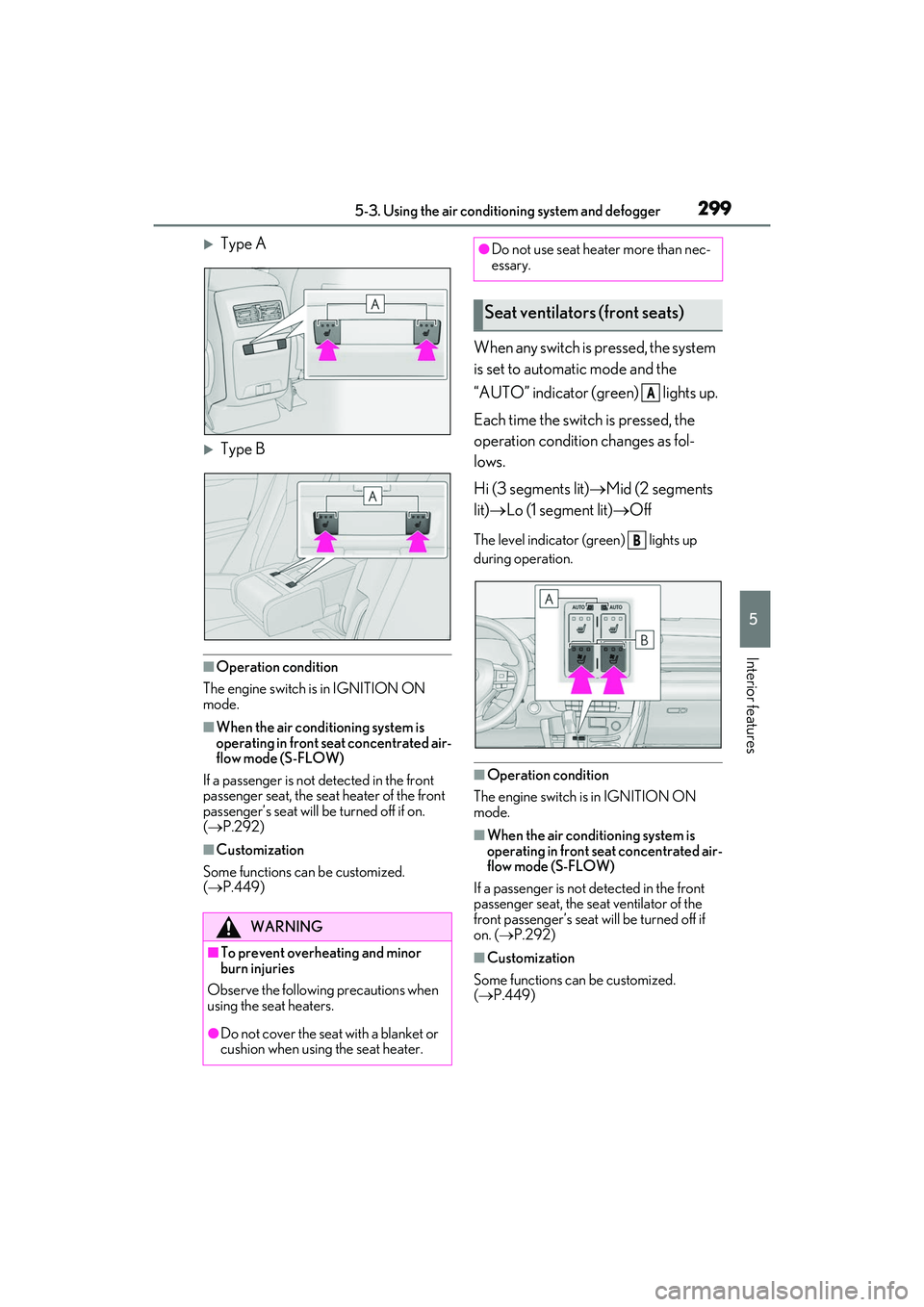
Type A
Type B
■Operation condition
The engine switch is in IGNITION ON
mode.
■When the air conditioning system is
operating in front seat concentrated air-
flow mode (S-FLOW)
If a passenger is not detected in the front
passenger seat, the seat heater of the front
passenger’s seat will be turned off if on.
( P.292)
■Customization
Some functions can be customized.
( P.449)
When any switch is pressed, the system
is set to automatic mode and the
“AUTO” indicator (green) lights up.
Each time the switch is pressed, the
operation condition changes as fol-
lows.
Hi (3 segments lit) Mid (2 segments
lit) Lo (1 segment lit) Off
The level indicator (green) lights up
during operation.
■Operation condition
The engine switch is in IGNITION ON
mode.
■When the air conditioning system is
operating in front seat concentrated air-
flow mode (S-FLOW)
If a passenger is not detected in the front
passenger seat, the se at ventilator of the
front passenger’s seat will be turned off if
on. ( P.292)
■Customization
Some functions can be customized.
( P.449)
WARNING
■To prevent overheating and minor
burn injuries
Observe the following precautions when
using the seat heaters.
●Do not cover the seat with a blanket or
cushion when using the seat heater.
●Do not use seat heater more than nec-
essary.
Seat ventilators (front seats)
A
B
Page 305 of 508
3035-5. Using the storage features
5
Interior features
5-5.Using the storage features
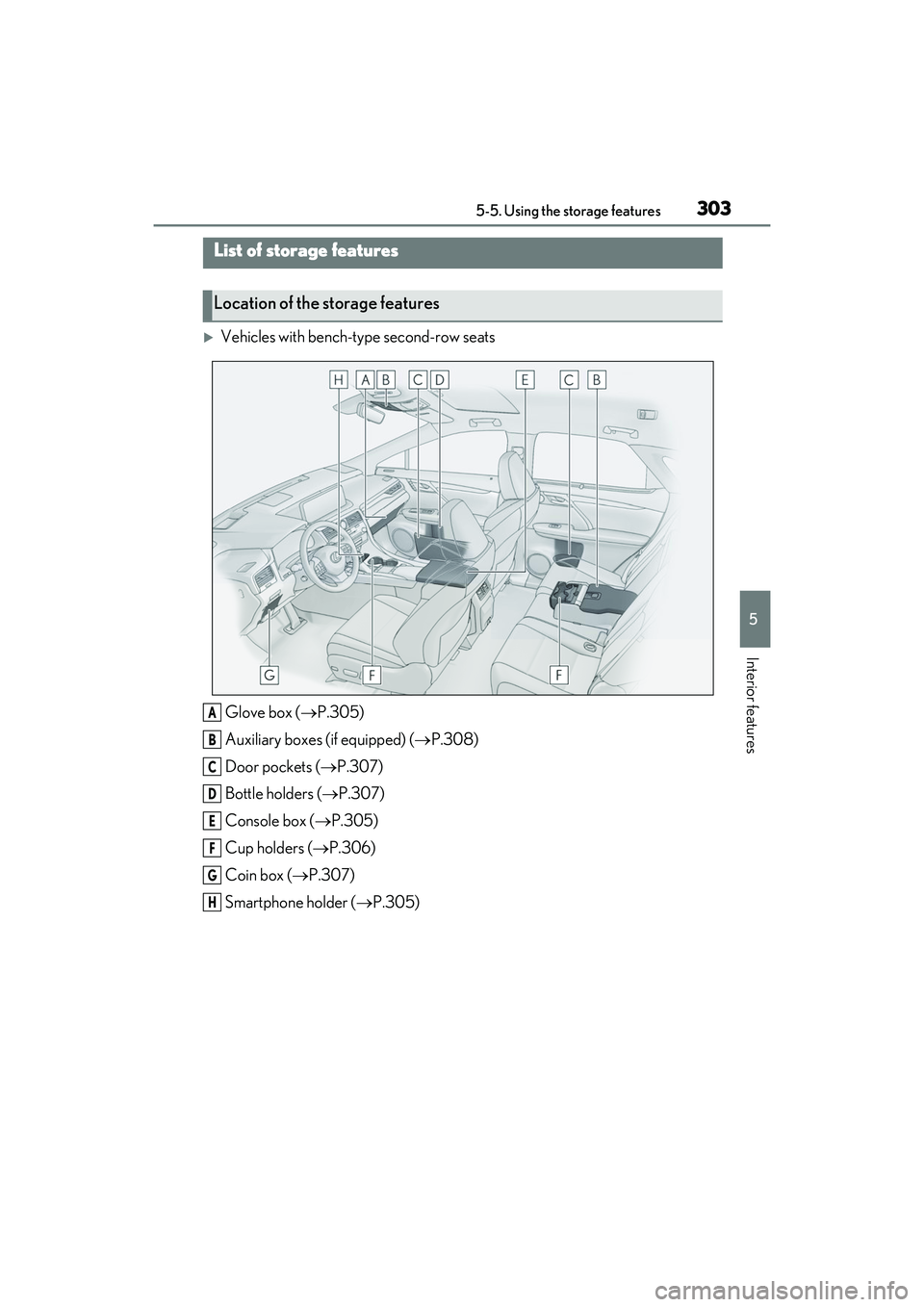
Vehicles with bench-type second-row seatsGlove box ( P.305)
Auxiliary boxes (if equipped) ( P.308)
Door pockets ( P.307)
Bottle holders ( P.307)
Console box ( P.305)
Cup holders ( P.306)
Coin box ( P.307)
Smartphone holder ( P.305)
List of storage features
Location of the storage features
A
B
C
D
E
F
G
H
Page 306 of 508
3045-5. Using the storage features
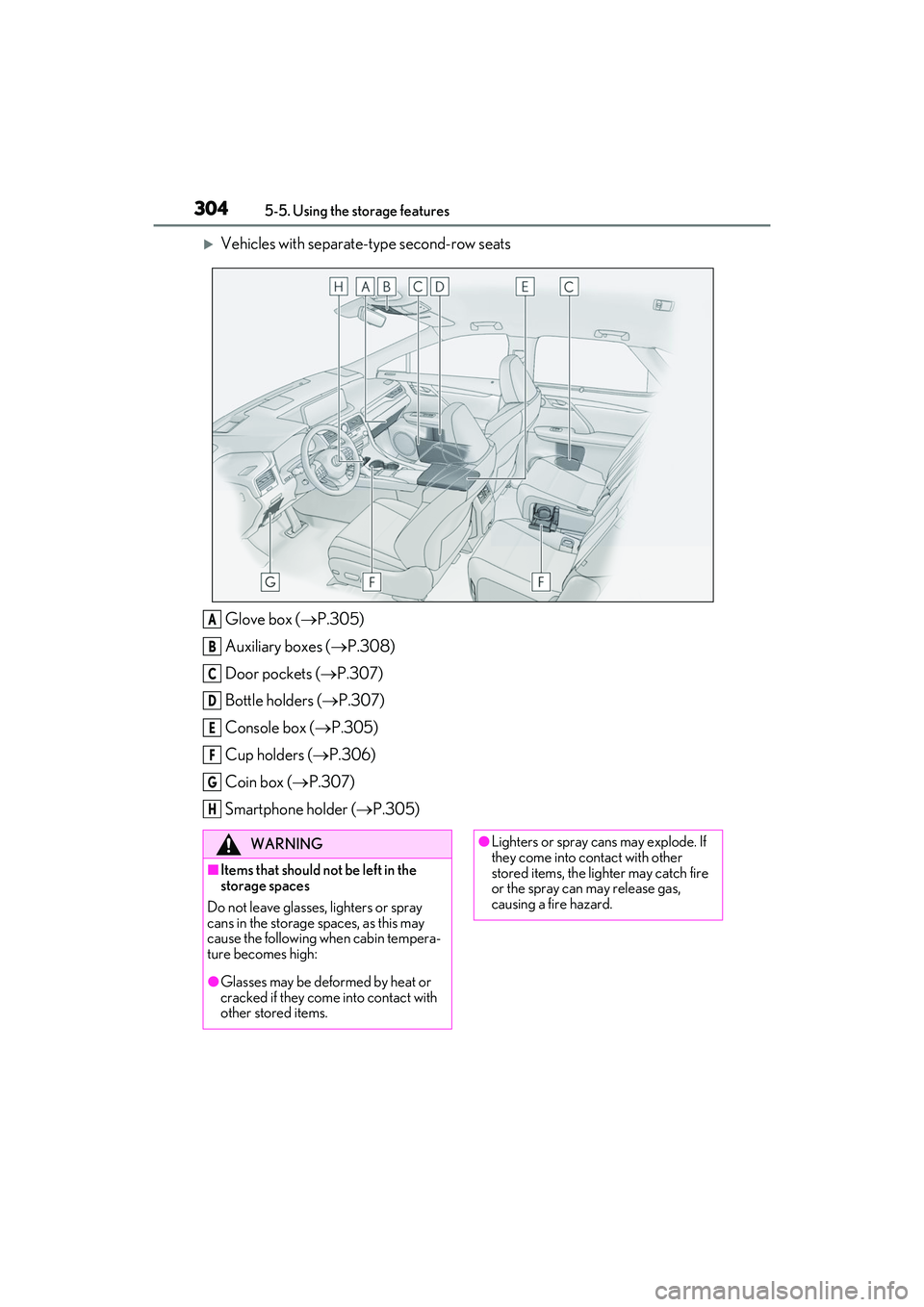
Vehicles with separate-type second-row seatsGlove box ( P.305)
Auxiliary boxes ( P.308)
Door pockets ( P.307)
Bottle holders ( P.307)
Console box ( P.305)
Cup holders ( P.306)
Coin box ( P.307)
Smartphone holder ( P.305)
A
B
C
D
E
F
G
H
WARNING
■Items that should not be left in the
storage spaces
Do not leave glasses, lighters or spray
cans in the storage spaces, as this may
cause the following when cabin tempera-
ture becomes high:
●Glasses may be deformed by heat or
cracked if they come into contact with
other stored items.
●Lighters or spray ca ns may explode. If
they come into contact with other
stored items, the lighter may catch fire
or the spray can may release gas,
causing a fire hazard.
Page 308 of 508
3065-5. Using the storage features
■Trays in the console box (if equipped)
Remove each tray to access the storage
space under the tray.
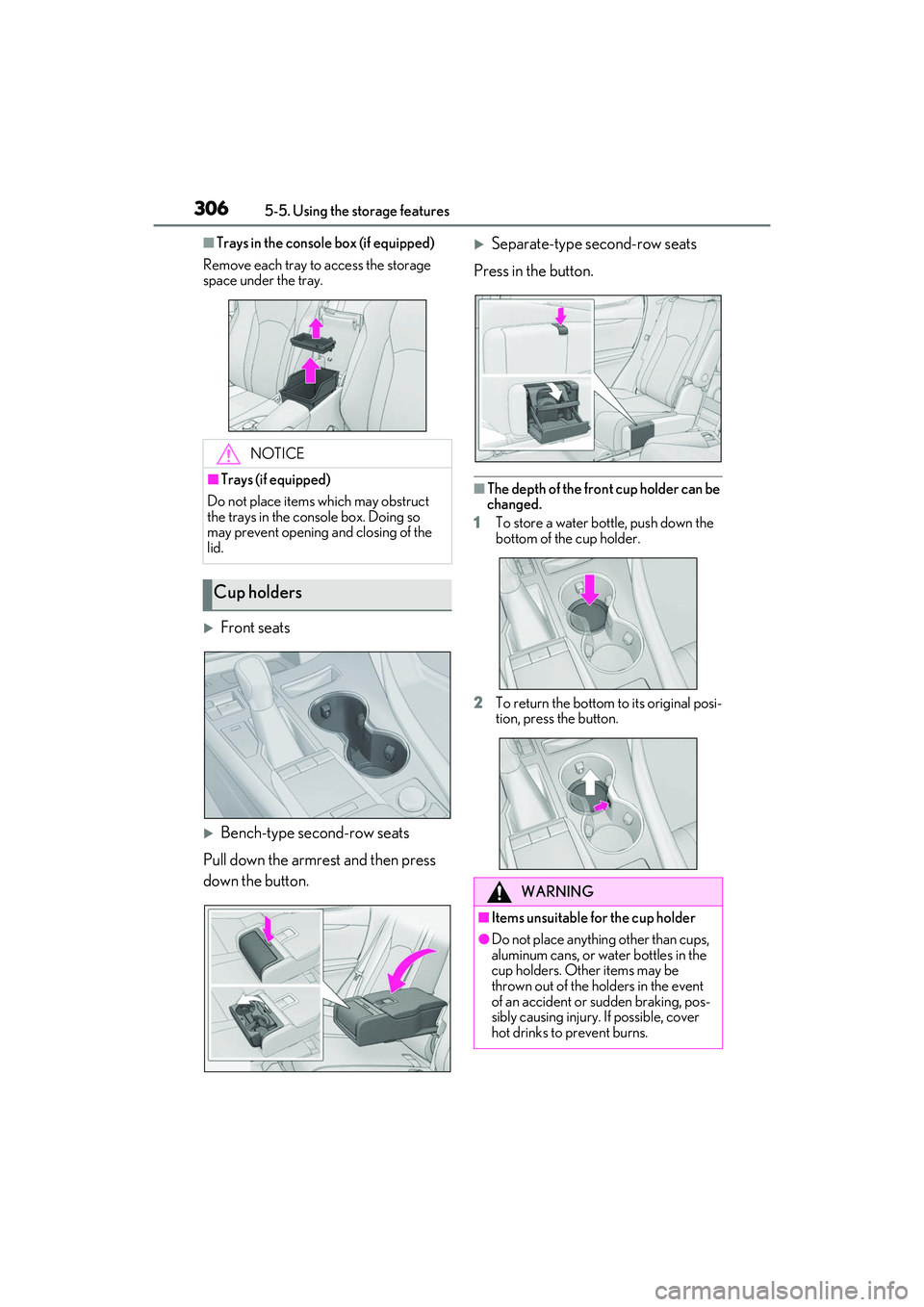
Front seats
Bench-type second-row seats
Pull down the armrest and then press
down the button.
Separate-type second-row seats
Press in the button.
■The depth of the front cup holder can be
changed.
1 To store a water bottle, push down the
bottom of the cup holder.
2 To return the bottom to its original posi-
tion, press the button.
NOTICE
■Trays (if equipped)
Do not place items which may obstruct
the trays in the console box. Doing so
may prevent opening and closing of the
lid.
Cup holders
WARNING
■Items unsuitable for the cup holder
●Do not place anything other than cups,
aluminum cans, or water bottles in the
cup holders. Other items may be
thrown out of the holders in the event
of an accident or sudden braking, pos-
sibly causing injury. If possible, cover
hot drinks to prevent burns.
Page 312 of 508
3105-5. Using the storage features
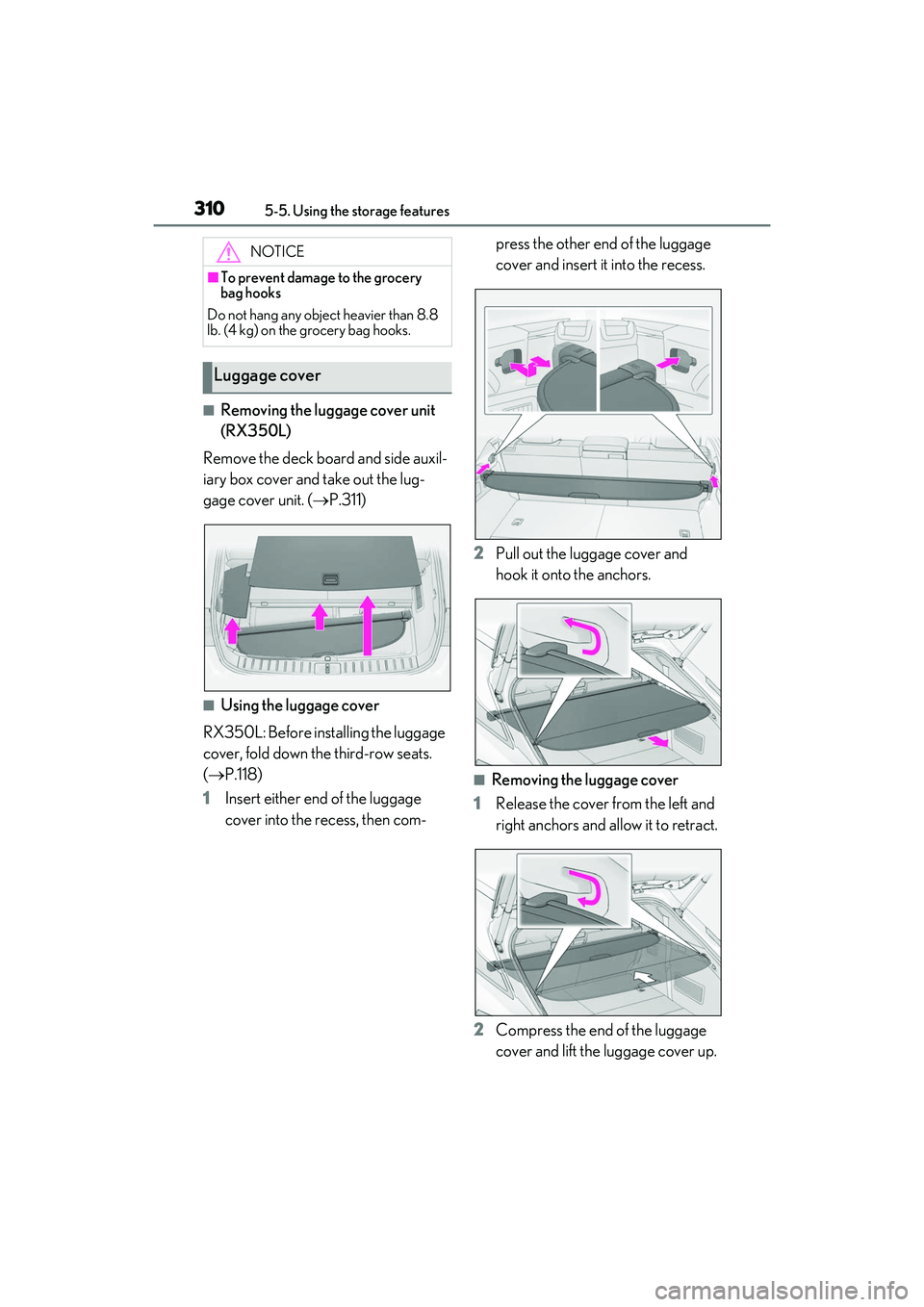
■Removing the luggage cover unit
(RX350L)
Remove the deck board and side auxil-
iary box cover and take out the lug-
gage cover unit. ( P.311)
■Using the luggage cover
RX350L: Before installing the luggage
cover, fold down the third-row seats.
( P.118)
1 Insert either end of the luggage
cover into the recess, then com- press the other end of the luggage
cover and insert it into the recess.
2 Pull out the luggage cover and
hook it onto the anchors.
■Removing the luggage cover
1 Release the cover from the left and
right anchors and allow it to retract.
2 Compress the end of the luggage
cover and lift the luggage cover up.
NOTICE
■To prevent damage to the grocery
bag hooks
Do not hang any object heavier than 8.8
lb. (4 kg) on the grocery bag hooks.
Luggage cover
Page 316 of 508

3145-6. Using the other interior features
5-6.Using the other interior features
The USB charging ports are used to
supply 2.1 A of electricity at 5 V to
external devices.
The USB charging ports are for
charging only. They are not designed
for data transfer or other purposes.
Depending on the external device, it
may not charge properly. Refer to the
manual included with the device
before using a USB charging port.
■Using the USB charging ports
On the instrument panel
On the rear console
Open the lid.
Armrest (RX350L with bench-type
second-row seats)
■The USB charging ports can be used
when
The engine switch is in ACCESSORY or
IGNITION ON mode.
■Situations in which the USB charging
ports may not operate correctly
●If a device which consumes more than 2.1
A at 5 V is connected
●If a device designed to communicate with
a personal computer, such as a USB
memory device, is connected
●If the connected external device is turned
off (depending on device)
●If the temperature inside the vehicle is
high, such as after the vehicle has been
parked in the sun
■About connected external devices
Depending on the connected external
device, charging may occasionally be sus-
pended and then start again. This is not a
malfunction.
Other interior features
USB charging ports
NOTICE
■To prevent damage to the USB
charging ports
●Do not insert foreign objects into the
ports.
●Do not spill water or other liquids into
the ports.