Shift LEXUS RX350 2022 Workshop Manual
[x] Cancel search | Manufacturer: LEXUS, Model Year: 2022, Model line: RX350, Model: LEXUS RX350 2022Pages: 508, PDF Size: 26.2 MB
Page 250 of 508

2484-5. Using the driving support systems
The buzzer can alert the driver of
faster vehicles approaching from far-
ther away.
Example:
■The RCTA function is operational when
The RCTA function operates when all of the
following conditions are met:
●The engine switch is in IGNITION ON
mode.
●The RCTA function is on.
●The shift lever is in R.
●The vehicle speed is approximately 5
mph (8 km/h) or less.
●The approaching vehicle speed is
between approximately 5 mph (8 km/h)
and 18 mph (28 km/h).
■Setting the buzzer volume
The buzzer volume can be adjusted on the
multi-information display. ( P.236)
Use the meter control switches to change
settings. ( P.80)
■Conditions under which the system will
not detect a vehicle
The RCTA function is not designed to
detect the following types of vehicles and/or objects:
●Vehicles approaching from directly
behind
●Vehicles backing up in a parking space
next to your vehicle
●Vehicles that the sensors cannot detect
due to obstructions
●Guardrails, walls, signs, parked vehicles
and similar stationary objects*
●Small motorcycles, bicycles, pedestrians,
etc.*
●Vehicles moving away from your vehicle
●Vehicles approaching from the parking
spaces next to your vehicle*
●The distance between the sensor and
approaching vehicle gets too close
*: Depending on the conditions, detection
of a vehicle and/or object may occur.
■Situations in which the system may not
operate properly
The RCTA function may not detect vehicles
correctly in the following situations:
●When the sensor is misaligned due to a
strong impact to the sensor or itssur-
rounding area
●When mud, snow, ice, a sticker, etc., is
covering the sensor or surrounding area
Approaching vehi- cle speed Approximate
alert distance
18 mph (28 km/h) (fast)65 ft. (20 m)
5 mph (8 km/h) (slow)18 ft. (5.5 m)
A
Page 257 of 508
2554-5. Using the driving support systems
4
Driving
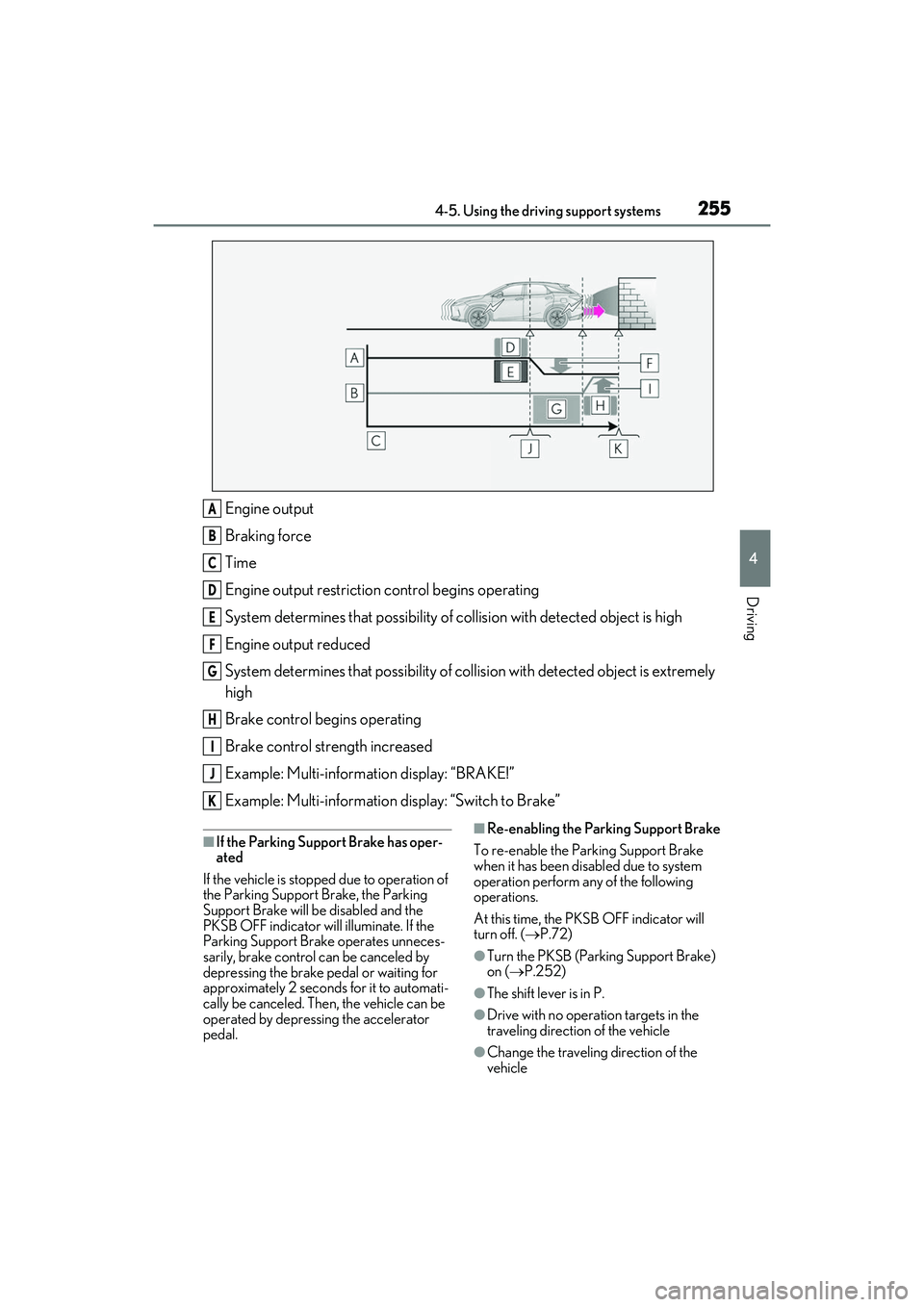
Engine output
Braking force
Time
Engine output restriction control begins operating
System determines that possibility of collision with detected object is high
Engine output reduced
System determines that possibility of col lision with detected object is extremely
high
Brake control begins operating
Brake control strength increased
Example: Multi-information display: “BRAKE!”
Example: Multi-information display: “Switch to Brake”
■If the Parking Support Brake has oper-
ated
If the vehicle is stoppe d due to operation of
the Parking Support Brake, the Parking
Support Brake will be disabled and the
PKSB OFF indicator will illuminate. If the
Parking Support Brake operates unneces-
sarily, brake control can be canceled by
depressing the brake pedal or waiting for
approximately 2 seconds for it to automati-
cally be canceled. Then, the vehicle can be
operated by depressing the accelerator
pedal.■Re-enabling the Parking Support Brake
To re-enable the Parking Support Brake
when it has been disabled due to system
operation perform any of the following
operations.
At this time, the PKSB OFF indicator will
turn off. ( P.72)
●Turn the PKSB (Parking Support Brake)
on ( P.252)
●The shift lever is in P.
●Drive with no operation targets in the
traveling direction of the vehicle
●Change the travelin g direction of the
vehicle
A
B
C
D
E
F
G
H
I
J
K
Page 258 of 508
2564-5. Using the driving support systems
■If “Parking Support Brake Unavailable”
is displayed on the multi-information
display and the PKSB OFF indicator is
flashing
If this message is displayed only when the
shift lever is in any position other than R, a
sensor on the front or rear bumper may be
dirty. Clean the sensors and their surround-
ing area on the bumpers.
■If “Parking Assist Unavailable” and
“Parking Assist Unavailable Clean
Parking Assist Sensor” are displayed on
the multi-information display and the
PKSB OFF indicator is flashing
●A sensor may be covered with ice, snow,
dirt, etc. Remove the ice, snow, dirt, etc.,
from the sensor to return the system to
normal.
If this message is shown even after
removing dirt from the sensor, or shown
when the sensor was not dirty to begin
with, have the vehicle inspected by your
Lexus dealer.
●A sensor may be frozen. Once the ice
melts, the system will return to normal.
●Water may be continuo usly flowing over
the sensor surface, such as in a heavy
rain. When the system determines that it
is normal, the system will return to nor-
mal.
■If a battery terminal has been discon-
nected and reconnected
The system needs to be initialized. To initial-
ize the system, drive the vehicle straight
ahead for 5 seconds or more at a speed of
approximately 22 mph (35 km/h) or more.
Additionally, for vehicles with the Parking
Support Brake function, turn the steering
wheel fully to the left and right with the vehi-
cle stopped.
Page 259 of 508
2574-5. Using the driving support systems
4
Driving
*:If equipped
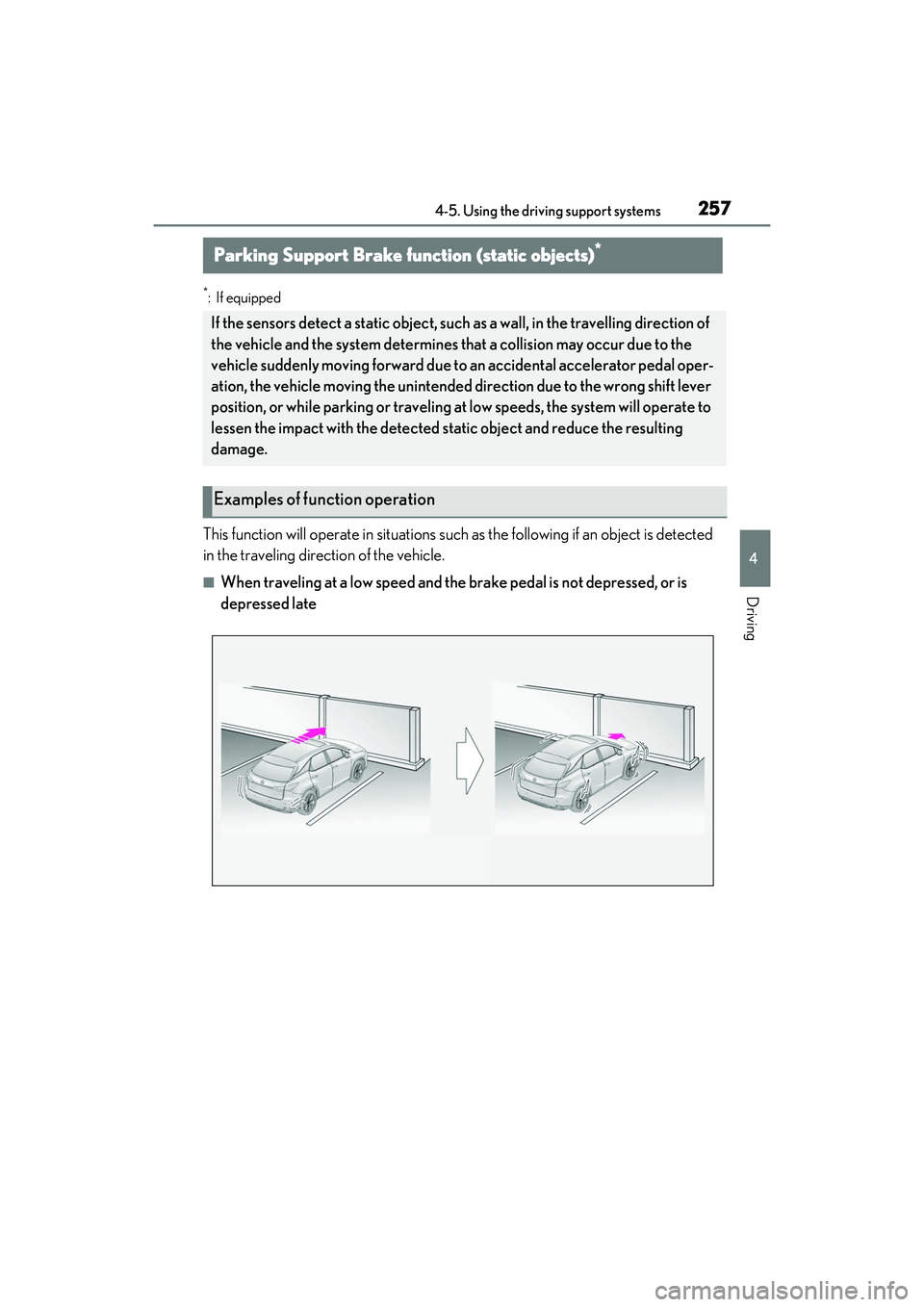
This function will operate in situations such as the following if an object is detected
in the traveling direction of the vehicle.
■When traveling at a low speed and the brake pedal is not depressed, or is
depressed late
Parking Support Brake function (static objects)*
If the sensors detect a static object, such as a wall, in the travelling direction of
the vehicle and the system determines that a collision ma y occur due to the
vehicle suddenly moving forward due to an accidental accelerator pedal oper-
ation, the vehicle moving the unintended direction due to the wrong shift lever
position, or while parking or traveling at low speeds, the system will operate to
lessen the impact with the detected static object and reduce the resulting
damage.
Examples of function operation
Page 260 of 508
2584-5. Using the driving support systems
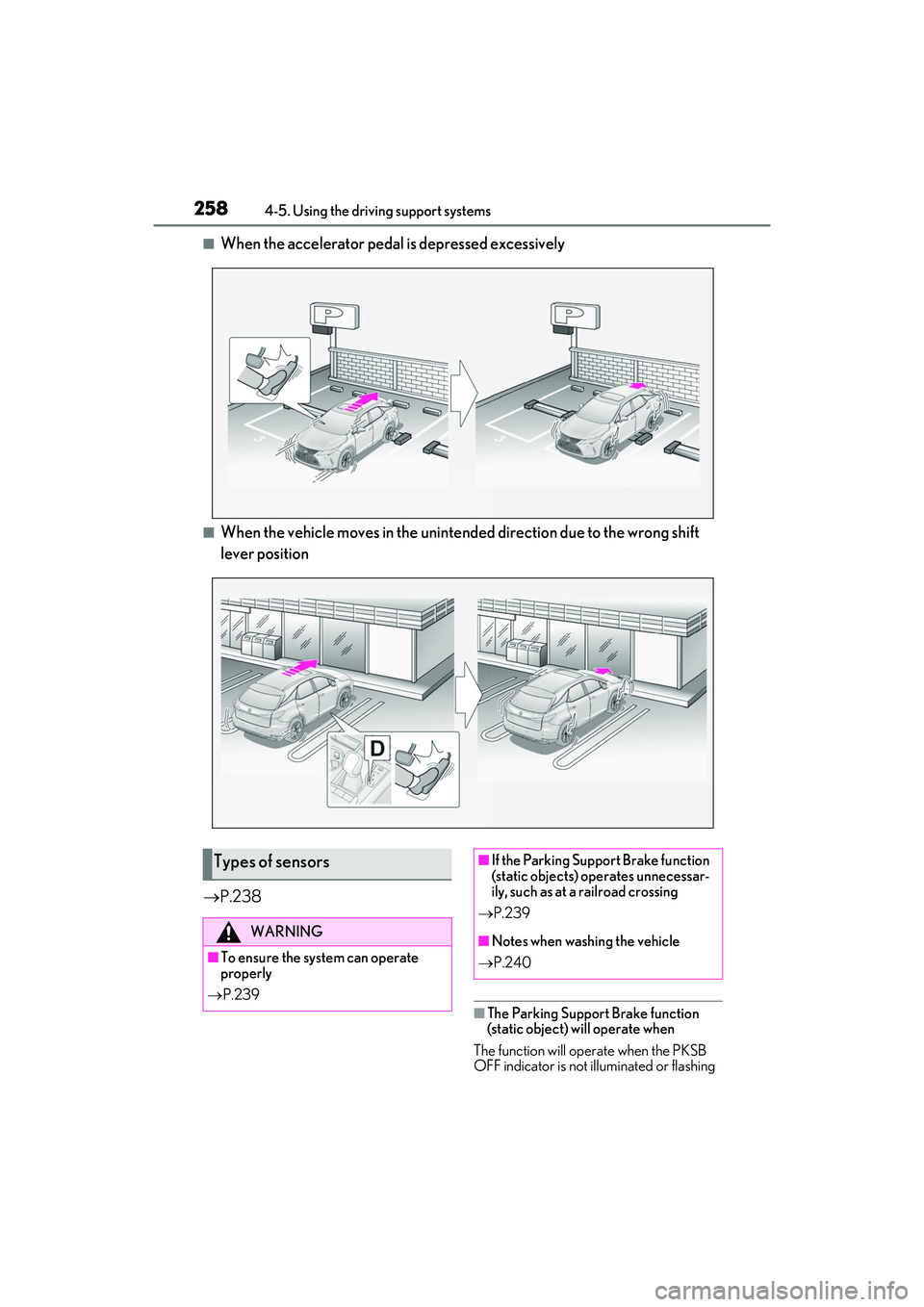
■When the accelerator pedal is depressed excessively
■When the vehicle moves in the unintend ed direction due to the wrong shift
lever position
P.238
■The Parking Support Brake function
(static object) will operate when
The function will operate when the PKSB
OFF indicator is not illuminated or flashing
Types of sensors
WARNING
■To ensure the system can operate
properly
P.239
■If the Parking Support Brake function
(static objects) operates unnecessar-
ily, such as at a railroad crossing
P.239
■Notes when washing the vehicle
P.240
Page 263 of 508
2614-5. Using the driving support systems
4
Driving
(8 km/h) or more.
• The shift lever is in R.
• The Parking Support Brake determines that a stronger than normal brake opera-
tion is necessary to avoid a collision with
an approaching vehicle.
●Brake control
• Engine output restriction control is oper-
ating.
• The Parking Support Brake determines that an emergency brake operation is
necessary to avoid a collision with an
approaching vehicle.
■The Parking Support Brake function
(rear-crossing vehicles) will stop operat-
ing when
The function will stop operating if any of the
following conditions are met:
●Engine output restriction control
• The Parking Support Brake is disabled.
• The collision becomes avoidable with normal brake operation.
• A vehicle is no longer approaching from the right or left at th e rear of the vehicle.
●Brake control
• The Parking Support Brake is disabled.
• Approximately 2 seconds have elapsed since the vehicle was stopped by brake
control.
• The brake pedal is depressed after the
vehicle is stopped by brake control.
• A vehicle is no longer approaching from the right or left at th e rear of the vehicle.
■Detection area of the Parking Support
Brake function (rear-crossing vehicles)
The detection area of the Parking Support
Brake function (rear-crossing vehicles) dif-
fers from the detection area of the RCTA
function ( P.247). Therefore, even if the
RCTA function detects a vehicle and pro-
vides an alert, the Parking Support Brake
function (rear-crossing vehicles) may not
start operating.
■Situations in which the system may not
operate properly
P.248
■Situations in which the system may
operate even if there is no possibility of a
collision
P.249
Page 269 of 508
2674-5. Using the driving support systems
4
Driving
■Disabling the TRAC system
If the vehicle gets stuck in mud, dirt or snow,
the TRAC system may reduce power from
the engine to the wheels. Pressing the
switch to turn the sy stem off may make it
easier for you to rock the vehicle in order to
free it.
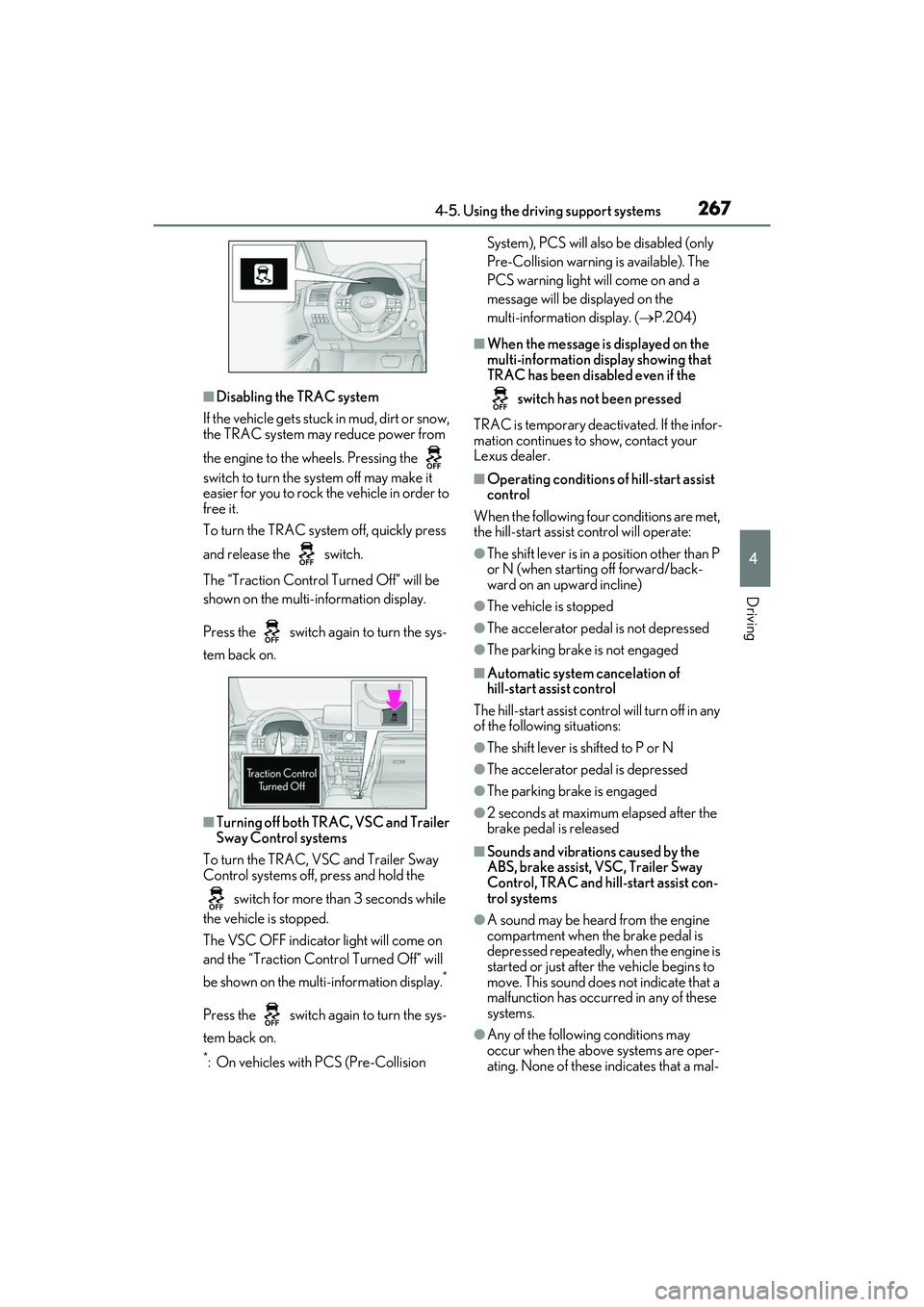
To turn the TRAC system off, quickly press
and release the switch.
The “Traction Control Turned Off” will be
shown on the multi-information display.
Press the switch again to turn the sys-
tem back on.
■Turning off both TRAC, VSC and Trailer
Sway Control systems
To turn the TRAC, VSC and Trailer Sway
Control systems off, press and hold the
switch for more th an 3 seconds while
the vehicle is stopped.
The VSC OFF indicator light will come on
and the “Traction Control Turned Off” will
be shown on the mult i-information display.
*
Press the switch again to turn the sys-
tem back on.
*: On vehicles with PCS (Pre-Collision System), PCS will also be disabled (only
Pre-Collision warning is available). The
PCS warning light will come on and a
message will be di
splayed on the
multi-information display. ( P.204)
■When the message is displayed on the
multi-information display showing that
TRAC has been disabled even if the
switch has not been pressed
TRAC is temporary deactivated. If the infor-
mation continues to show, contact your
Lexus dealer.
■Operating conditions of hill-start assist
control
When the following four conditions are met,
the hill-start assist control will operate:
●The shift lever is in a position other than P
or N (when starting off forward/back-
ward on an upward incline)
●The vehicle is stopped
●The accelerator pedal is not depressed
●The parking brake is not engaged
■Automatic system cancelation of
hill-start assist control
The hill-start assist control will turn off in any
of the following situations:
●The shift lever is shifted to P or N
●The accelerator pedal is depressed
●The parking brake is engaged
●2 seconds at maximum elapsed after the
brake pedal is released
■Sounds and vibrations caused by the
ABS, brake assist, VSC, Trailer Sway
Control, TRAC and hill-start assist con-
trol systems
●A sound may be heard from the engine
compartment when the brake pedal is
depressed repeatedly, when the engine is
started or just after the vehicle begins to
move. This sound does not indicate that a
malfunction has occurred in any of these
systems.
●Any of the followin g conditions may
occur when the above systems are oper-
ating. None of these indicates that a mal-
Page 273 of 508
2714-6. Driving tips
4
Driving
4-6.Driving tips
Use fluids that are appropriate to
the prevailing outside temperatures.
•Engine oil
• Engine coolant
•Washer fluid
Have a service technician inspect
the condition of the battery.
Have the vehicle fitted with four
snow tires or purchase a set of tire
chains for the front tires.
Ensure that all tires ar e of the specified size
and the same brand, and that chains match
the size of the tires.
Perform the following according to the
driving conditions:
Do not try to forcibly open a window
or move a wiper that is frozen. Pour
warm water over the frozen area to
melt the ice. Wipe away the water
Winter driving tips
Carry out the necessary prepara-
tions and inspections before driving
the vehicle in winter. Always drive
the vehicle in a manner appropriate
to the prevailing weather condi-
tions.
Pre-winter preparations
WARNING
■Driving with snow tires
Observe the following precautions to
reduce the risk of accidents.
Failure to do so may result in a loss of
vehicle control and cause death or seri-
ous injury.
●Use tires of the specified size.
●Maintain the recommended level of air
pressure.
●Do not drive in excess of 75 mph (120
km/h), regardless of the type of snow
tires being used.
●Use snow tires on all, not just some
wheels.
■Driving with tire chains
Observe the following precautions to
reduce the risk of accidents.
Failure to do so may result in the vehicle
being unable to be driven safely, and may
cause death or serious injury.
●Do not drive in excess of the speed
limit specified for the tire chains being
used, or 30 mph (50 km/h), which-
ever is lower.
●Avoid driving on bumpy road surfaces
or over potholes.
●Avoid sudden acceleration, abrupt
steering, sudden braking and shifting
operations that cause sudden engine
braking.
●Slow down sufficiently before entering
a curve to ensure that vehicle control is
maintained.
●Do not use the LTA (Lane Tracing
Assist) system.
NOTICE
■Repairing or replacing snow tires
Request repairs or replacement of snow
tires from your Lexus dealer or legitimate
tire retailers.
This is because the removal and attach-
ment of snow tires affects the operation
of the tire pressure warning valves and
transmitters.
Before driving the vehicle
Page 274 of 508
2724-6. Driving tips
immediately to prevent it from
freezing.
To ensure proper operation of the
climate control system fan, remove
any snow that has accumulated on
the air inlet vents in front of the
windshield.
Check for and remove any excess
ice or snow that may have accumu-
lated on the exterior lights, vehicle’s
roof, chassis, around the tires or on
the brakes.
Remove any snow or mud from the
bottom of your shoes before getting
in the vehicle.
Accelerate the vehicle slowly, keep a
safe distance between you and the
vehicle ahead, and drive at a reduced
speed suitable to road conditions.
Park the vehicle and move the shift
lever to P without setting the park-
ing brake. The parking brake may
freeze up, preventing it from being
released. If the vehicle is parked
without setting the parking brake,
make sure to block the wheels. Fail-
ure to do so may be dangerous
because it may cause the vehicle to
move unexpectedly, possibly lead-
ing to an accident.
When the parking brake is in automatic
mode, release the parking brake after shift-
ing the shift lever to P. ( P.180)
If the vehicle is parked without set-
ting the parking brake, confirm that
the shift lever cannot be moved out
of P
*.
*: The shift lever will be locked if it is
attempted to be shifted from P to any
other position with out depressing the
brake pedal. If the shift lever can be
shifted from P, ther e may be a problem
with the shift lock sy stem. Have the vehi-
cle inspected by your Lexus dealer
immediately.
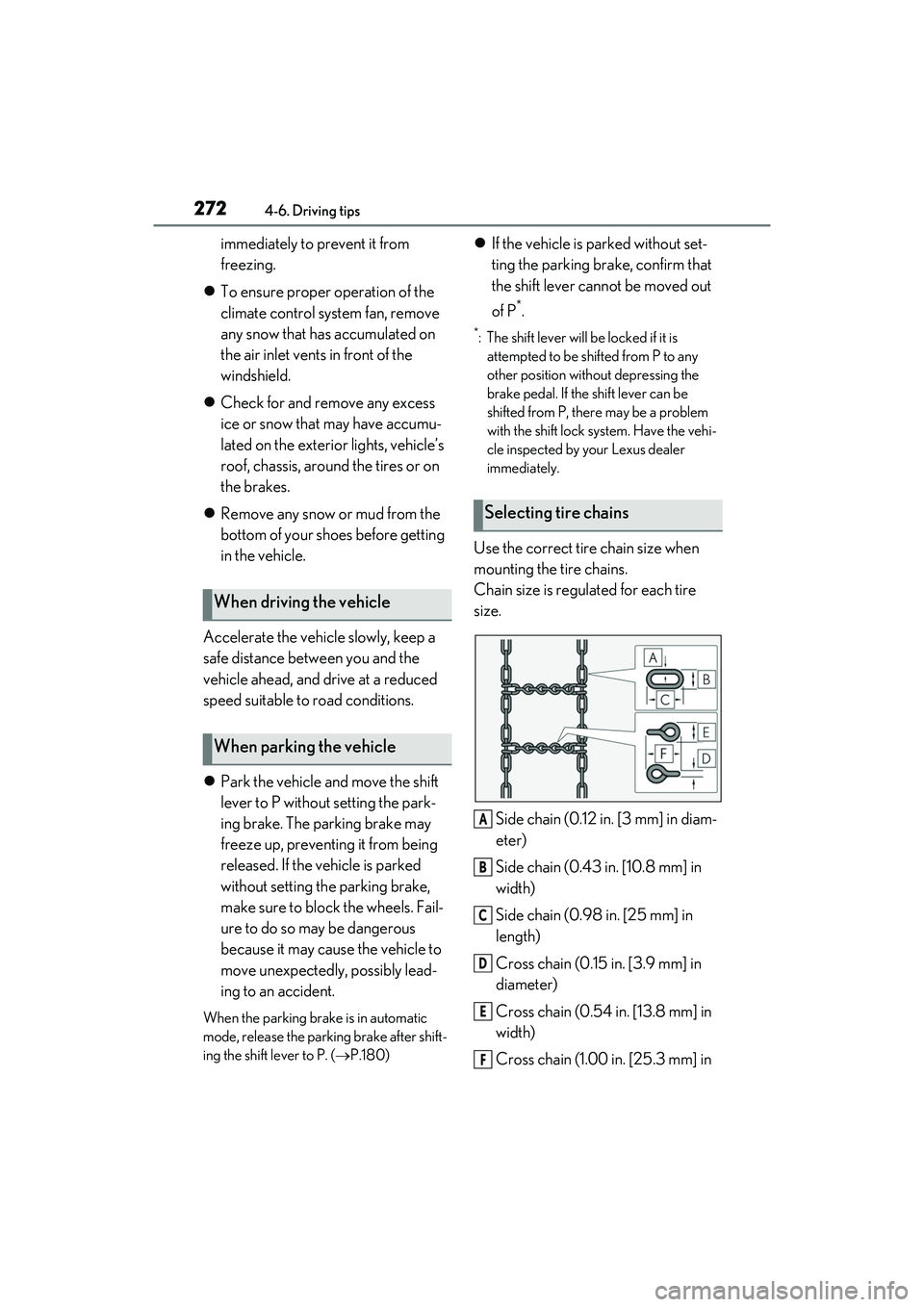
Use the correct tire chain size when
mounting the tire chains.
Chain size is regulated for each tire
size.
Side chain (0.12 in. [3 mm] in diam-
eter)
Side chain (0.43 in. [10.8 mm] in
width)
Side chain (0.98 in. [25 mm] in
length)
Cross chain (0.15 in. [3.9 mm] in
diameter)
Cross chain (0.54 in. [13.8 mm] in
width)
Cross chain (1.00 in. [25.3 mm] in
When driving the vehicle
When parking the vehicle
Selecting tire chains
A
B
C
D
E
F
Page 277 of 508
2754-6. Driving tips
4
Driving
WARNING
●After driving through tall grass, mud,
rock, sand, rivers, etc., check that there
is no grass, bush, paper, rags, stone,
sand, etc. adhering or trapped on the
underbody. Clear off any such matter
from the underbody. If the vehicle is
used with these materials trapped or
adhering to the underbody, a break-
down or fire could occur.
●When driving off-road or in rugged
terrain, do not drive at excessive
speeds, jump, make sharp turns, strike
objects, etc. This may cause loss of
control or vehicle rollover causing
death or serious injury. You are also
risking expensive damage to your
vehicle’s suspension and chassis.
NOTICE
■To prevent water damage
Take all necessary sa fety measures to
ensure that water da mage to the engine
or other components does not occur.
●Water entering the engine air intake
will cause severe engine damage.
●Water entering the automatic trans-
mission will cause deterioration in shift
quality, locking up of your transmission
accompanied by vibr ation, and ulti-
mately damage.
●Water can wash the grease from wheel
bearings, causing rusting and prema-
ture failure, and ma y also enter the dif-
ferential, transmission and transfer
(AWD models only) case, reducing
the gear oil’s lubricating qualities.
■When you drive through water
If driving through water, such as when
crossing shallow stre ams, first check the
depth of the water and the bottom of the
riverbed for firmness. Drive slowly and
avoid deep water.
■Inspection after off-road driving
●Sand and mud that has accumulated
around brake discs may affect braking
efficiency and may damage brake sys-
tem components.
●Always perform a maintenance
inspection after each day of off-road
driving that has taken you through
rough terrain, sand, mud, or water. For
scheduled maintenance information,
refer to the “Warranty and Services
Guide/Owner’s Manual Supple-
ment/Scheduled Maintenance”.