parking brake LEXUS RX350 2022 Owners Manual
[x] Cancel search | Manufacturer: LEXUS, Model Year: 2022, Model line: RX350, Model: LEXUS RX350 2022Pages: 508, PDF Size: 26.2 MB
Page 5 of 508
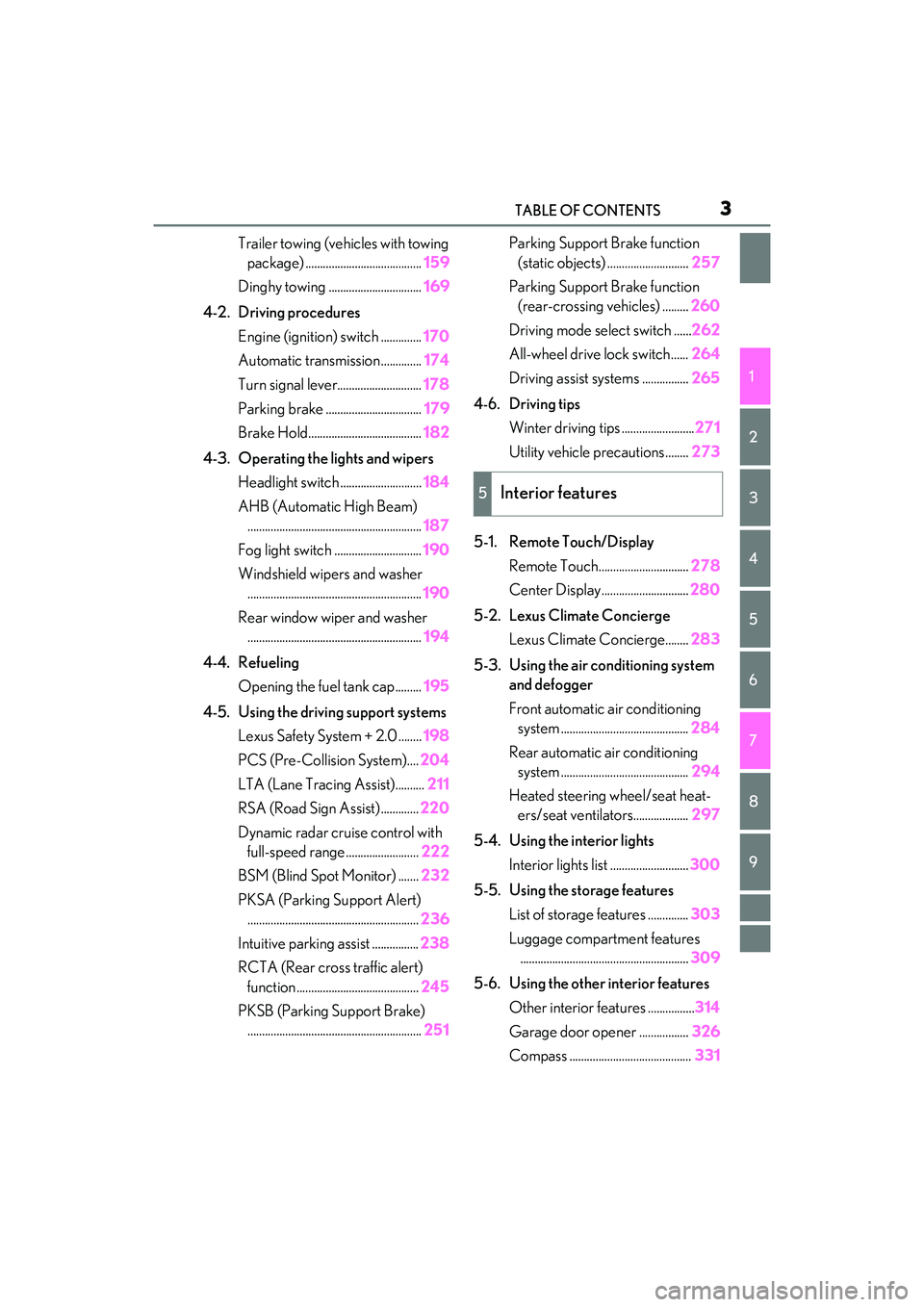
3TABLE OF CONTENTS
1
2
3
4
5
6
7
8
9
Trailer towing (vehicles with towing package) ........................................ 159
Dinghy towing ................................ 169
4-2. Driving procedures Engine (ignition) switch .............. 170
Automatic transmission.............. 174
Turn signal lever............................. 178
Parking brake ................................. 179
Brake Hold....................................... 182
4-3. Operating the lights and wipers Headlight switch ............................ 184
AHB (Automatic High Beam) ............................................................ 187
Fog light switch .............................. 190
Windshield wipers and washer ............................................................ 190
Rear window wiper and washer ............................................................ 194
4-4. Refueling Opening the fuel tank cap......... 195
4-5. Using the driving support systems Lexus Safety System + 2.0 ........ 198
PCS (Pre-Collision System).... 204
LTA (Lane Tracing Assist).......... 211
RSA (Road Sign Assist) ............. 220
Dynamic radar crui se control with
full-speed range ......................... 222
BSM (Blind Spot Monitor) ....... 232
PKSA (Parking Support Alert) ........................................................... 236
Intuitive parking assist ................ 238
RCTA (Rear cross traffic alert) function .......................................... 245
PKSB (Parking Support Brake) ............................................................ 251Parking Support Brake function
(static objects) ............................ 257
Parking Support Brake function (rear-crossing vehicles) ......... 260
Driving mode select switch ...... 262
All-wheel drive lock switch......264
Driving assist systems ................ 265
4-6. Driving tips Winter driving tips ......................... 271
Utility vehicle precautions........ 273
5-1. Remote Touch/Display Remote Touch............................... 278
Center Display.............................. 280
5-2. Lexus Climate Concierge Lexus Climate Concierge........ 283
5-3. Using the air conditioning system and defogger
Front automatic air conditioning system ............................................ 284
Rear automatic air conditioning system ............................................ 294
Heated steering wheel/seat heat- ers/seat ventilators................... 297
5-4. Using the interior lights Interior lights list ........................... 300
5-5. Using the storage features List of storag e features .............. 303
Luggage compartment features .......................................................... 309
5-6. Using the other interior features Other interior features ................ 314
Garage door opener ................. 326
Compass .......................................... 331
5Interior features
Page 17 of 508

15Pictorial index
Parking brake switch ............................................................................................. P.179
Applying/releasing ............................................................................................................P.179
Precautions for winter season ......................... ............................................................ P.272
Warning buzzer/messages.......................................................................................... P.402
Turn signal lever ...................................................................................................... P.178
Headlight switch......................................................................................................P.184
Headlights/side marker light s/parking lights/tail lights/license plate lights/daytime
running lights ................................................................................................................. ...... P.184
Fog lights
*1............................................................................................................................ P.1 90
Windshield wiper and washer switch ...................................................... P.190, 194
Usage.......................................................................................................................... .. P.190, 194
Adding washer fluid ......................................................................................................... P.3 56
Warning messages .......................................................................................................... P.402
Emergency flasher switch .................................................................................. P.384
Hood lock release lever .......................................................................................P.349
Tilt and telescopic steering control switch ......................................................P.135
Adjustment ..................................................................................................................... ...... P.135
Driving position memory
*1..............................................................................................P.129
Air conditioning system ...................................................................................... P.284
Usage.......................................................................................................................... ........... P.284
Rear window defogger................................................................................................... P.284
Audio system
*2
*1
: If equipped
*2: Refer to “NAVIGATION AND MULT IMEDIA SYSTEM OWNER’S MANUAL”.
E
F
G
H
I
J
K
L
Page 73 of 508

712-1. Instrument cluster
2
Vehicle status information and indicators
Warning lights inform the driver of mal-
functions in the indicated vehicle’s sys-
tems.
Warning lights
(U.S.A.)
Brake system warning light*1
( P.393)
(red)
(Canada)
Brake system warning light*1
( P.393)
(yellow)
Brake system warning light*1
( P.393)
High coolant temperature
warning light
*2 ( P.393)
Charging system warning
light
*3 ( P.394)
Low engine oil pressure warn-
ing light
*2 ( P.394)
(U.S.A.)
Malfunction indicator lamp*1
( P.394)
(Canada)
Malfunction indicator lamp*1
( P.394)
SRS warning light
*1 ( P.394)
(U.S.A.)
ABS warning light*1 ( P.395)
(Canada)
ABS warning light*1 ( P.395)
Brake Override System warn-
ing light/Drive-Start Control
warning light
*2 ( P.395)
(red)
Electric power st eering system
warning light
*1 ( P.395)
(yellow)
Electric power steering system
warning light
*1 (P.395)
Low fuel level warning light
( P.396)
Driver’s and front passenger’s
seat belt reminder light
( P.396)
(RX350)
Rear passengers’ seat
belt reminder light
*4
( P.396)
(RX350L)
Rear passengers’ seat
belt reminder
light
*4(P.396)
Tire pressure warning light
*1
( P.397)
(orange)
LTA indicator ( P.397)
(flashes)
Intuitive parking assist OFF indi-
cator
*1 (if equipped) (P.397)
(flashes)
RCTA OFF indicator*1 (if
equipped) ( P.397)
(flashes)
PKSB OFF indicator*1 (if
equipped) ( P.398)
(flashes or
illuminates)PCS warning light*1 ( P.398)
Slip indicator
*1 ( P.398)
(flashes)
(U.S.A.)
Parking brake indicator
( P.399)
(flashes)
(Canada)
Parking brake indicator
( P.399)
Page 74 of 508

722-1. Instrument cluster
*1: These lights turn on when the engine switch is turned to IGNITION ON
mode to indicate that a system check is
being performed. They will turn off after
the engine is started, or after a few sec-
onds. There may be a malfunction in a
system if a light does not come on, or
turn off. Have the vehicle inspected by
your Lexus dealer.
*2: This light illuminates on the multi-infor-mation display.
*3: Except F SPORT models: This light illu-minates on the multi-information dis-
play.
F SPORT models: This light illuminates
on the meter.
*4: This light illuminates on the center panel.
The indicators inform the driver of the
operating state of the vehicle’s various
systems.
(flashes)
Brake hold operated indicator*1
( P.399)
Master warning light
*1
( P.399)
WARNING
■If a safety system warning light does
not come on
Should a safety system light such as the
ABS and SRS warning lights not come on
when you start the engine, this could
mean that these systems are not available
to help protect you in an accident, which
could result in death or serious injury.
Have the vehicle inspected by your
Lexus dealer immediately if this occurs.
Indicators
Turn signal indicator ( P.178)
(U.S.A.)
Headlight indicator (P.184)
(Canada)
Tail light indicator ( P.184)
Headlight high beam indicator
( P.185)
Automatic High Beam indica-
tor
*1 ( P.187)
Fog light indicator (if equipped)
( P.190)
PCS warning light
*1, 2
( P.206)
Cruise control indicator
( P.229)
Dynamic radar cruise control
indicator ( P.222)
Cruise control “SET” indicator
( P.222)
(white)
LTA indicator ( P.215)
(green)
LTA indicator (P.215)
(orange)
(flashes)LTA indicator ( P.215)
BSM outside rear view mirror
indicators
*3, 4 (if equipped)
( P.232, 245)
BSM indicator (if equipped)
( P.232)
Intuitive parking assist OFF indi-
cator
*1, 2 (if equipped)
( P.239)
RCTA OFF indicator
*1, 2 (if
equipped) ( P.245)
Page 75 of 508

732-1. Instrument cluster
2
Vehicle status information and indicators
Drive mode indicators
Except F SPORT models
F SPORT models
*1: These lights turn on when the engine
switch is turned to IGNITION ON
mode to indicate that a system check is
being performed. They will turn off after
the engine is started, or after a few sec-
onds. There may be a malfunction in a
system if a light does not come on, or
turn off. Have the vehicle inspected by
your Lexus dealer.
*2: This light comes on when the system is turned off.
*3: In order to confirm operation, the BSM
outside rear view mirror indicators illu-
minate in the following situations:
When the BSM function is enabled
on of the multi-information dis-
play, the engine switch is turned to
IGNITION ON mode.
When the engine switch is in IGNI-
TION ON mode, the BSM function
is enabled on of the multi-infor-
mation display.
If the system is functioning correctly,
the BSM outside rear view mirror indi-
cators will turn off after a few seconds.
If the BSM outside rear view mirror
indicators do not illuminate or do not
turn off, there may be a malfunction in
PKSB OFF indicator*1, 2 (if
equipped) ( P.252)
All-wheel drive lock indicator
*1
(AWD models only) ( P.264)
(flashes)
Slip indicator*1 (P.266)
VSC OFF indicator
*1, 2
( P.267)
Smart access system with
push-button start indicator
*5
( P.170)
(U.S.A.)
Parking brake indicator
(P.179)
(Canada)
Parking brake indicator
(P.179)
Brake hold standby indicator
*1
( P.182)
Brake hold operated indicator
*1
( P.182)
Eco Driving Indicator Light
*1
( P.81)
Low outside temperature indi-
cator
*6 ( P.75)
Security indicator
*7 ( P.66,
67)
(U.S.A.)
“AIR BAG ON/OFF”
indicator
*1, 7 ( P.40)
(Canada)
“AIR BAG ON/OFF”
indicator
*1, 7 ( P.40)
Eco drive mode indicator
( P.262)
Sport mode indicator (if
equipped) ( P.262)
Customize mode indicator
(P.262)
Eco drive mode indicator
( P.262)
Sport mode indicator (if
equipped) ( P.262)
Sport S mode indicator
( P.262)
Sport S+ mode indicator
( P.262)
Page 88 of 508

862-1. Instrument cluster
*:If equipped
Illustrations used in this text are intended as examples, and may differ from the image that is
actually displayed by the head-up display.
Navigation system-linked display area (if equipped) ( P.89)
Message display area ( P.89)
Displays the following items:
• Warning/Message (if equipped)
• Audio system operation status
• Outside temperature
Displays the following item, which ar e linked to the navigation system:
•Street name
/ icon ( P.88)
Driving assist system status display area (if equipped)
Displays the operational stat us of the following systems:
• Dynamic radar cruise cont rol with full-speed range (P.222)
• LTA (Lane Tracing Assist) ( P.211)
• Intuitive parking assist ( P.238)
• Parking Support Brake functi on (for static objects) (P.257)
Head-up display*
The head-up display is linked to the mete rs and navigation system (if equipped)
and projects a variety of information in front of the driver, such as the current
vehicle speed and route guidance to a set destination.
System components
A
B
C
D
Page 91 of 508

892-1. Instrument cluster
2
Vehicle status information and indicators
( P.402)
: Information icon
Displayed when a suggestion/advice
pop-up display is displayed on the
multi-information display. ( P.84)
Displays the following items in the
appropriate situation:
■Warning/Message (if equipped)
Displays the following system warn-
ing/messages:
PCS (Pre-Collision System)
( P.204)
Parking Support Brake function (for
static objects) ( P.257)
Dynamic radar cruise control with
full-speed range ( P.222)
Brake Override System ( P.151)
Drive-Start Control ( P.151)
Details of content displayed on the
head-up display may differ from that dis-
played on the multi-information display. For
details, refer to the explanation of each sys-
tem.
■Audio system operation status
Displayed when the audio system is
operated.
■Outside temperature
Displayed in the following situations:
When the engine switch is turned to
IGNITION ON mode
When the low outside temperature
indicator is flashing
Displayed content is the same as that displayed on the multi-information dis-
play. For details, refer to the explana-
tion of the outside temperature display
on the multi-information display.
(
P.77)
Displays the following items which are
linked to the navigation system:
■Street name
The name of the street that the vehicle
is currently driving on is displayed on
the bottom of the display area.
When the navigation system is per-
forming route guidance, the name of
the next street will be displayed on the
top of the display area.
■Street name display (vehicles with a nav-
igation system)
Only street names which are included in the
map data will be displayed.
Displays the following items which are
linked to the navigation system:
■Route guidance to destination
Displayed when the navigation system
is performing route guidance. When
approaching an intersection, an arrow
will be displayed to indicate the sug-
gested direction of travel.
■Compass
Displays the dire ction of travel.
Message display area
Navigation system-linked dis-
play area (if equipped)
Page 107 of 508

1053-2. Opening, closing and locking the doors
3
Before driving
for the operation to occur.
Kick sensor
Hands Free Power Back Door
operation detection area
3 When the kick sensor detects that
your foot is pulled back, a buzzer
will sound and the power back door
will automatically fully open/close.
If kick operation is performed again in the
middle of back door operating, the opera-
tion will stop.
■Hands free close & lock function*
(vehicles with Hands Free Power
Back Door)
*: This setting can be customized by your
Lexus dealer.
If the power back door is closed using a
Hands Free Power Back Door close
operation, all of the doors will be
locked at the same time.
A different buzzer than the normal one will
sound before the power back door begins
to close. The door lock operation signals
will operate to indicate that the power back
door has closed and al l of the doors have
locked simultaneously.
If a Hands Free Power Back Door opera-
tion is performed while the power back
door is operating, the power back door will
stop.
If a Hands Free Power Back Door opera- tion is performed again, the power back
door will open.
■Luggage compartment lights
●The luggage compartment lights turn on
when the back door is opened.
●When the engine switch
is turned off, the
lights will go off automatically after 20
minutes.
■Power back door operating conditions
If the following conditions are met with the
power back door oper ation enabled, the
power back door can be opened and
closed automatically.
●When an electronic key is being carried
and the back door opener switch is
pressed
*
●When the wireless remote control is
used*
●When the engine swit ch is in IGNITION
ON mode, the vehicle speed must be
lower than 2 mph (3 km/h) and one of
the following conditions must be met in
addition to the above conditions:
• The parking brake is engaged.
• The brake pedal is depressed.
• The shift lever is in P.
*: When the operation of the power back
door when it is locked has been disabled
by a customized setting, operate the
power back door after it has been
unlocked.
■Close & lock function operating condi-
tions
This function can be operated when all of
the following conditions are met:
• An electronic key is not detected within the vehicle.
• All of the doors other than the power back door are closed.
• The engine switch is off.
■Hands Free Power Back Door operating
conditions (if equipped)
●The Hands Free Power Back Door (kick
sensor) setting is on.
A
B
Page 120 of 508
1183-3. Adjusting the seats
Rear seats
WARNING
■When a rear seatback is folded
Observe the following precautions.
Failure to do so may result in death or
serious injury.
●Do not fold down the rear seatbacks
while driving.
●Stop the vehicle on level ground, apply
the parking brake and shift the shift
lever to P.
●Do not allow anyone to sit on a folded
rear seatback or in the luggage com-
partment while driving.
●Do not allow children to enter the lug-
gage compartment.
■When operating the rear seatback
Observe the following precautions.
Failure to do so may result in death or
serious injury.
●Make sure that passengers are clear of
the rear seatback before operating it.
●To prevent hands and other body parts
from being caught, keep them away
from the gaps in the seats and the mov-
ing parts of the seat s when operating a
rear seatback.
●Power seat: Do not let children oper-
ate the rear seatback. Other passen-
gers may get caught in the seat.
●Power seat: Make su re that all passen-
gers are clear of a seat before folding
it. Do not let passeng ers sit in the seat
while it is being folded.
■Seat adjustment
Second-row seats: To reduce the risk of
sliding under the lap belt during a colli-
sion, do not recline the seat more than
necessary.
If the seat is reclin ed excessively, the lap
belt may slide past the hips and apply
restraint forces direct ly to the abdomen,
or your neck may contact the shoulder
belt, increasing the risk of death or seri-
ous injury in the event of an accident.
■After adjusting the rear seats
Observe the following precautions.
Failure to do so may result in death or
serious injury.
●Make sure that the rear seatback is
securely locked in position by lightly
pushing it back and forth.
●Check that the seat belts are not
twisted or caught between or behind
in the rear seatback.
●Arrange the seat belts in the proper
positions for ready use.
■Jam protection function (power seat)
Observe the following precautions.
Failure to do so may result in death or
serious injury.
●Never use any part of your body to
intentionally activate the jam protec-
tion function.
●The jam protection function may not
operate if somethin g is caught just
before the fully folded position. Be
careful so that finger s, etc. do not get
caught.
●The jam protection function may not
operate depending on the shape or
position of the obstruction. Be careful
so that fingers, etc. do not get caught.
Page 126 of 508

1243-3. Adjusting the seats
A buzzer will sound and then the operation
will start. When the operation is com-
pleted, the buzzer will sound twice again.
To stop the operation partway, press either
side of the switch fo r the operating seat.
Any rear seat operation switch for the
operating seat, regardless of location, can
be used to stop the operation. (A buzzer
may sound depending on the position that
the rear seatback is stopped.)
Using the seatback angle adjust-
ment switch
Using the switch in the luggage
compartment
2 Check that the plate of the seat belt
is on the front side of the seatback.
■Folding the rear center seatback
only
Pull the lock release lever on the back
side of the seatback and fold the center
seatback.
To return the rear center seatback to its
original position, lift it until it locks in posi-
tion.
■Engine switch mode conditions under
which the rear seatbacks can be folded
down or raised (power seat)
The rear seatbacks can be folded down or
raised when the engine switch is in either of
the following modes:
●When the engine switch is turned off or in
ACCESSORY mode
●When the engine swit ch is in IGNITION
ON mode and any of the following con-
ditions are met:
• The parking brake is engaged.
• The brake pedal is depressed.
• The shift lever is in P.
■The rear seatbacks can be folded down
when (power seat)
When all of the following conditions are
met, a rear seat operation switch can be
used to fold down the rear seatback:
●When using the rear seat operation
switch (rear seat): The rear seatback is in
a position within the range shown in
the illustration with t he rear door nearest
to the seat to be operated open ( is
where the rear seatback is at its most
upright position)
●When using the rear seat operation
A
C