lock LEXUS RX450h 2015 Owners Manual
[x] Cancel search | Manufacturer: LEXUS, Model Year: 2015, Model line: RX450h, Model: LEXUS RX450h 2015Pages: 878, PDF Size: 11.62 MB
Page 761 of 878
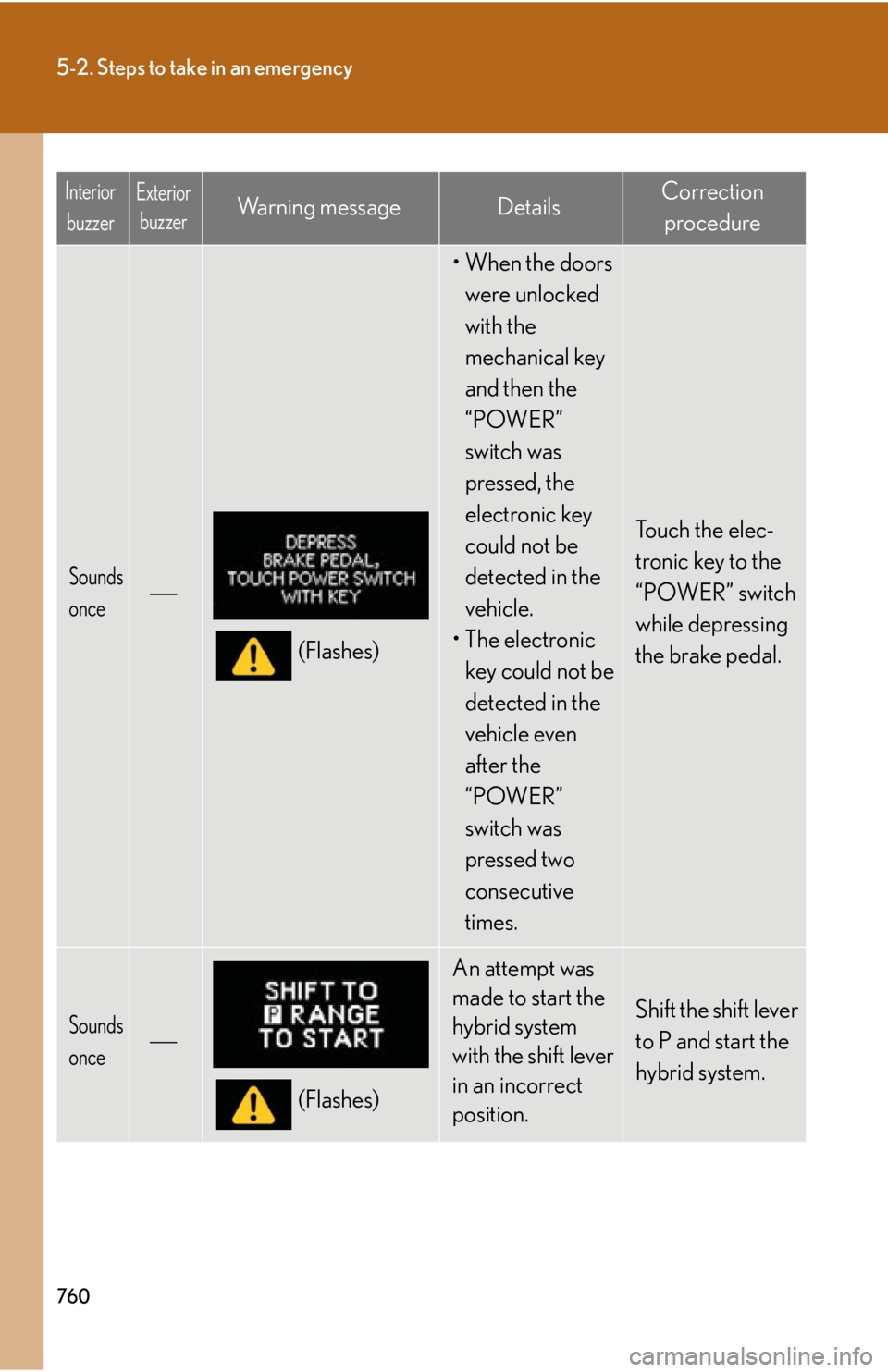
7605-2. Steps to take in an emergency
Sounds
once
(Flashes) •When the doors
were unlocked
with the
mechanical key
and then the
“POWER”
switch was
pressed, the
electronic key
could not be
detected in the
vehicle.
• The electronic
key could not be
detected in the
vehicle even
after the
“POWER”
switch was
pressed two
consecutive
times. Touch the elec-
tronic key to the
“POWER” switch
while depressing
the brake pedal.
Sounds
once
(Flashes) An attempt was
made to start the
hybrid system
with the shift lever
in an incorrect
position. Shift the shift lever
to P and start the
hybrid system.Interior
buzzer Exterior
buzzer Wa r n i n g m e s s a g e Details Correction
procedure
Page 763 of 878
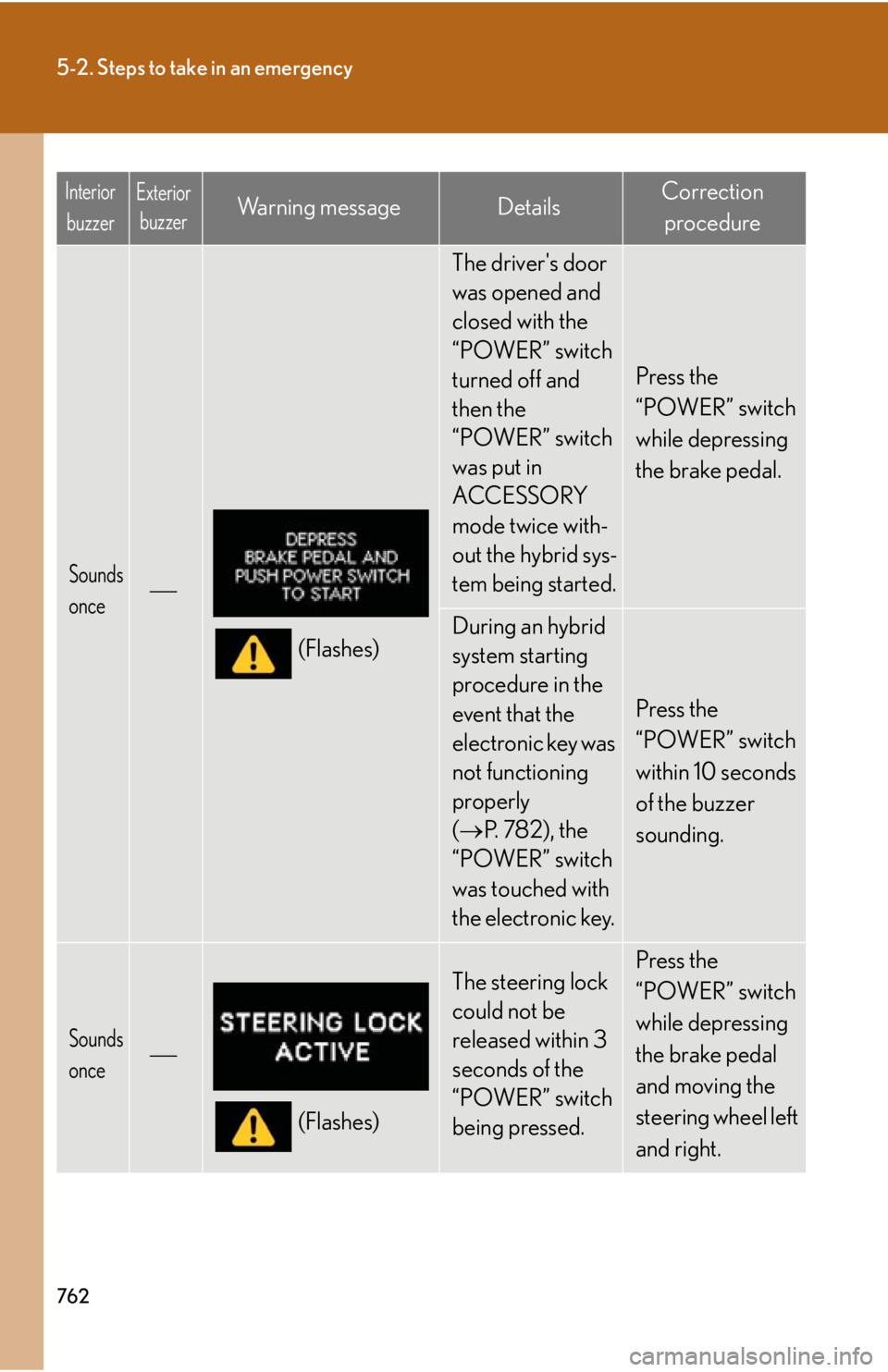
7625-2. Steps to take in an emergency
Sounds
once
(Flashes) The driver's door
was opened and
closed with the
“POWER” switch
turned off and
then the
“POWER” switch
was put in
ACCESSORY
mode twice with-
out the hybrid sys-
tem being started. Press the
“POWER” switch
while depressing
the brake pedal.
During an hybrid
system starting
procedure in the
event that the
electronic key was
not functioning
properly
( P. 7 8 2 ) , t h e
“POWER” switch
was touched with
the electronic key. Press the
“POWER” switch
within 10 seconds
of the buzzer
sounding.
Sounds
once
(Flashes) The steering lock
could not be
released within 3
seconds of the
“POWER” switch
being pressed. Press the
“POWER” switch
while depressing
the brake pedal
and moving the
steering wheel left
and right.Interior
buzzer Exterior
buzzer Wa r n i n g m e s s a g e Details Correction
procedure
Page 778 of 878
5
When trouble arises
7775-2. Steps to take in an emergency
If the hybrid system will not start Reasons for the hybrid system not starting vary depending on the situation.
Check the following and perform the appropriate procedure:
■ The hybrid system will not start even though the correct starting
procedure is being followed. ( P. 1 7 7 )
One of the following may be the cause of the problem:
● The electronic key may not be functioning properly. ( P. 7 8 2 )
● There may be a malfunction in the immobilizer system. ( P. 1 2 4 )
● There may be a malfunction in the steering lock system.
● The hybrid system may be malfunc tioning due to an electrical
problem such as an open circ uit or a blown fuse. However,
depending on the type of malfunc tion, an interim measure is avail-
able to start the hybrid system. ( P. 7 7 8 )
■ The interior lights and headlights are dim, or the horn does not
sound or sounds at a low volume.
One of the following may be the cause of the problem:
● The 12-volt battery may be discharged. ( P. 7 8 4 )
● The 12-volt battery terminal co nnections may be loose or cor-
roded.
■ The interior lights and headlights do not turn on, or the horn does
not sound.
One of the following may be the cause of the problem:
● One or both of the 12-volt battery terminals may be discon-
nected.
● The 12-volt battery may be discharged. ( P. 7 8 4 )
Contact your Lexus dealer if the problem cannot be repaired, or if
repair procedures are unknown.
Page 780 of 878
5
When trouble arises
7795-2. Steps to take in an emergency
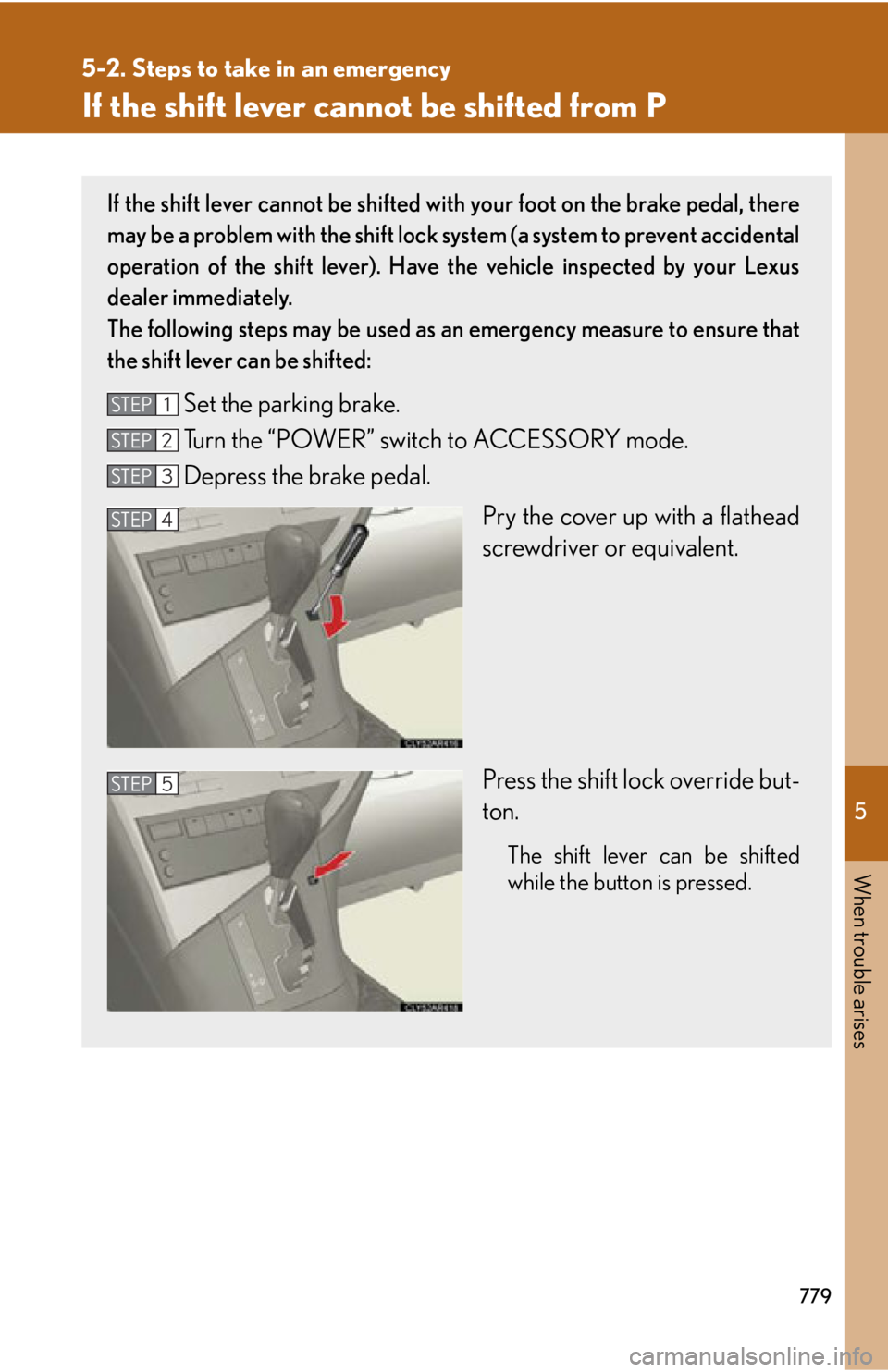
If the shift lever cannot be shifted from P If the shift lever cannot be shifted with your foot on the brake pedal, there
may be a problem with the shift lock system (a system to prevent accidental
operation of the shift lever). Have the vehicle inspected by your Lexus
dealer immediately.
The following steps may be used as an emergency measure to ensure that
the shift lever can be shifted:
Set the parking brake.
Turn the “POWER” switch to ACCESSORY mode.
Depress the brake pedal.
Pry the cover up with a flathead
screwdriver or equivalent.
Press the shift lock override but-
ton. The shift lever can be shifted
while the button is pressed.STEP 1
STEP 2
STEP 3
STEP 4
STEP 5
Page 782 of 878
5
When trouble arises
7815-2. Steps to take in an emergency
If the electronic key do es not operate properly
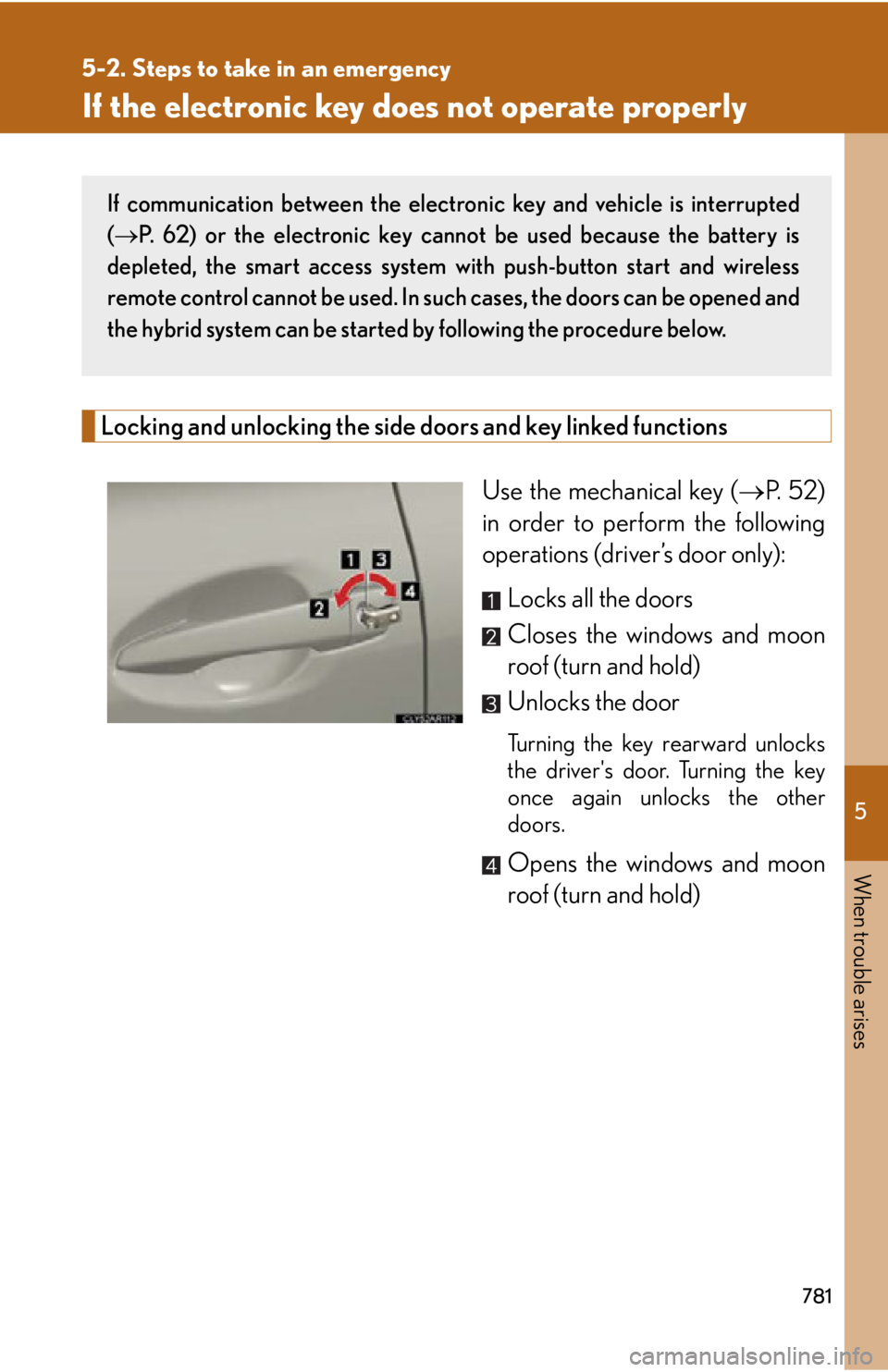
Locking and unlocking the side doors and key linked functions
Use the mechanical key ( P. 5 2 )
in order to perform the following
operations (driver’s door only):
Locks all the doors
Closes the windows and moon
roof (turn and hold)
Unlocks the door Turning the key rearward unlocks
the driver's door. Turning the key
once again unlocks the other
doors.
Opens the windows and moon
roof (turn and hold)If communication between the electron ic key and vehicle is interrupted
( P. 62) or the electronic key cannot be used because the battery is
depleted, the smart access system with push-button start and wireless
remote control cannot be used. In such cases, the doors can be opened and
the hybrid system can be started by following the procedure below.
Page 786 of 878
5
When trouble arises
7855-2. Steps to take in an emergency
■
Starting the hybrid system when the 12-volt battery is discharged
The hybrid system cannot be started by push-starting.■
To prevent 12-volt battery discharge ●
Turn off the headlights and the audio sy stem while the hybrid system is off.●
Turn off any unnecessary electrical compon ents when the vehicle is running at a
low speed for an extended period, such as in heavy traffic.■
When the 12-volt battery is removed or discharged ●
The power back door must be initialized.
( P. 8 3 7 )●
The hybrid system may not start. (
P. 6 6 8 )
●
Make sure that the key is not inside th e vehicle when recharging or replacing
the 12-volt battery. The key may be locked in the vehicle if the alarm is activated.
( P. 1 2 8 ) Start the engine of the second vehicle. Increase the engine
speed slightly and maintain that level for approximately 5 min-
utes to recharge the 12-volt battery of your vehicle.
Open and close any of the doors of your vehicle with the
“POWER” switch off.
Maintain the engine sp eed of the second ve hicle and start the
hybrid system of your vehicle by turning the “POWER” switch
to ON mode.
Make sure the “READY” indicat or comes on. If the indicator
does not come on, contact your Lexus dealer.
Once the hybrid system has st arted, remove the jumper cables
in the exact reverse order from which they were connected.
Once the hybrid system starts, have the vehicle inspected at your
Lexus dealer as soon as possible. STEP 4
STEP 5
STEP 6
STEP 7
STEP 8
Page 791 of 878
7905-2. Steps to take in an emergency
If the fans are not operating:
Stop the hybrid system immediately and contact your Lexus
dealer.
If the fans are operating:
Have the vehicle inspected at the nearest Lexus dealer.
■ If “HYBRID SYSTEM OVERHEAT” is shown on the multi-informa-
tion display
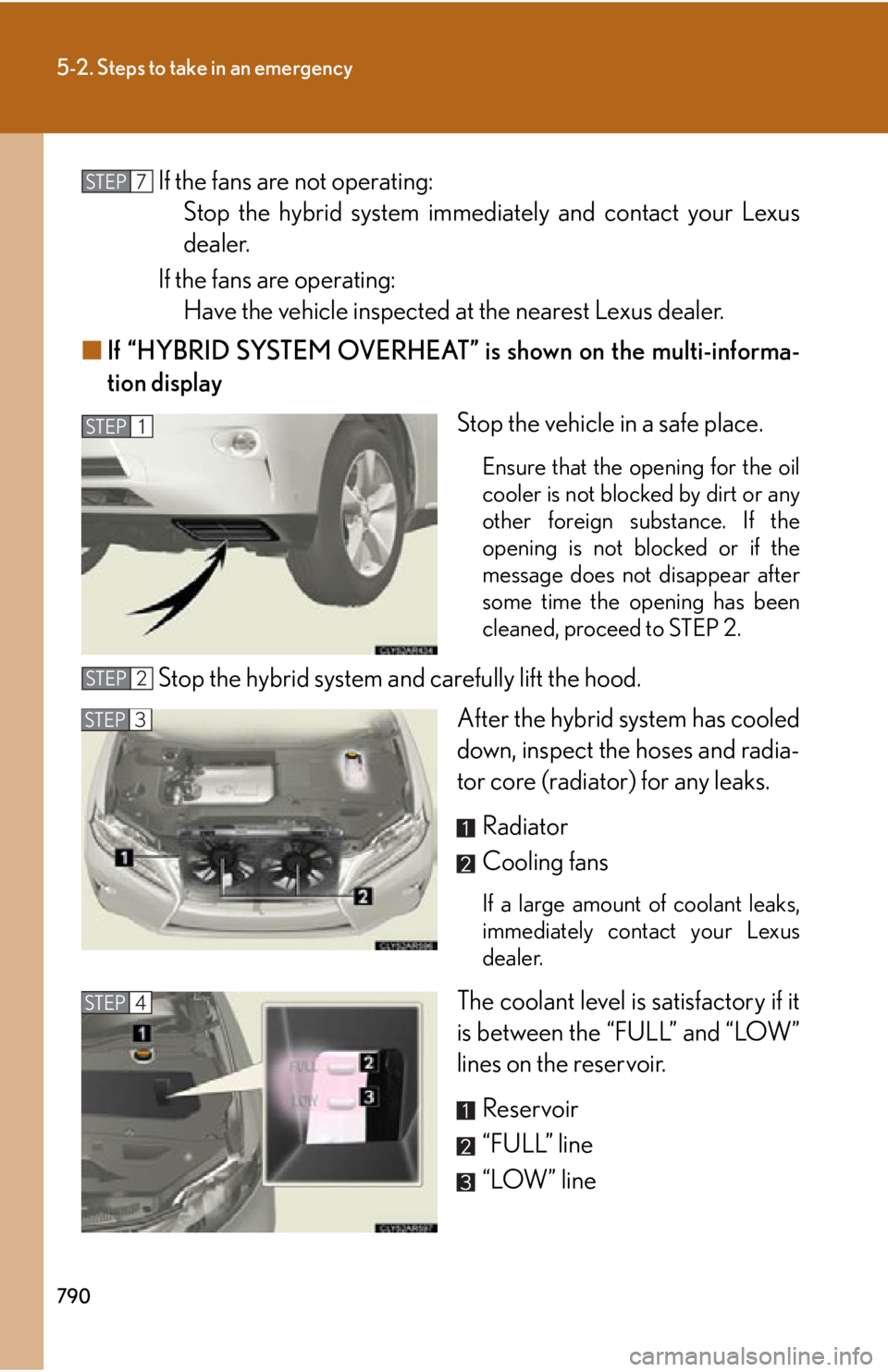
Stop the vehicle in a safe place. Ensure that the opening for the oil
cooler is not blocked by dirt or any
other foreign substance. If the
opening is not blocked or if the
message does not disappear after
some time the opening has been
cleaned, proceed to STEP 2.
Stop the hybrid system and carefully lift the hood.
After the hybrid system has cooled
down, inspect the hoses and radia-
tor core (radiator) for any leaks.
Radiator
Cooling fans If a large amount of coolant leaks,
immediately contact your Lexus
dealer.
The coolant level is satisfactory if it
is between the “FULL” and “LOW”
lines on the reservoir.
Reservoir
“FULL” line
“LOW” lineSTEP 7
STEP 1
STEP 2
STEP 3
STEP 4
Page 801 of 878
8006-1. Specifications
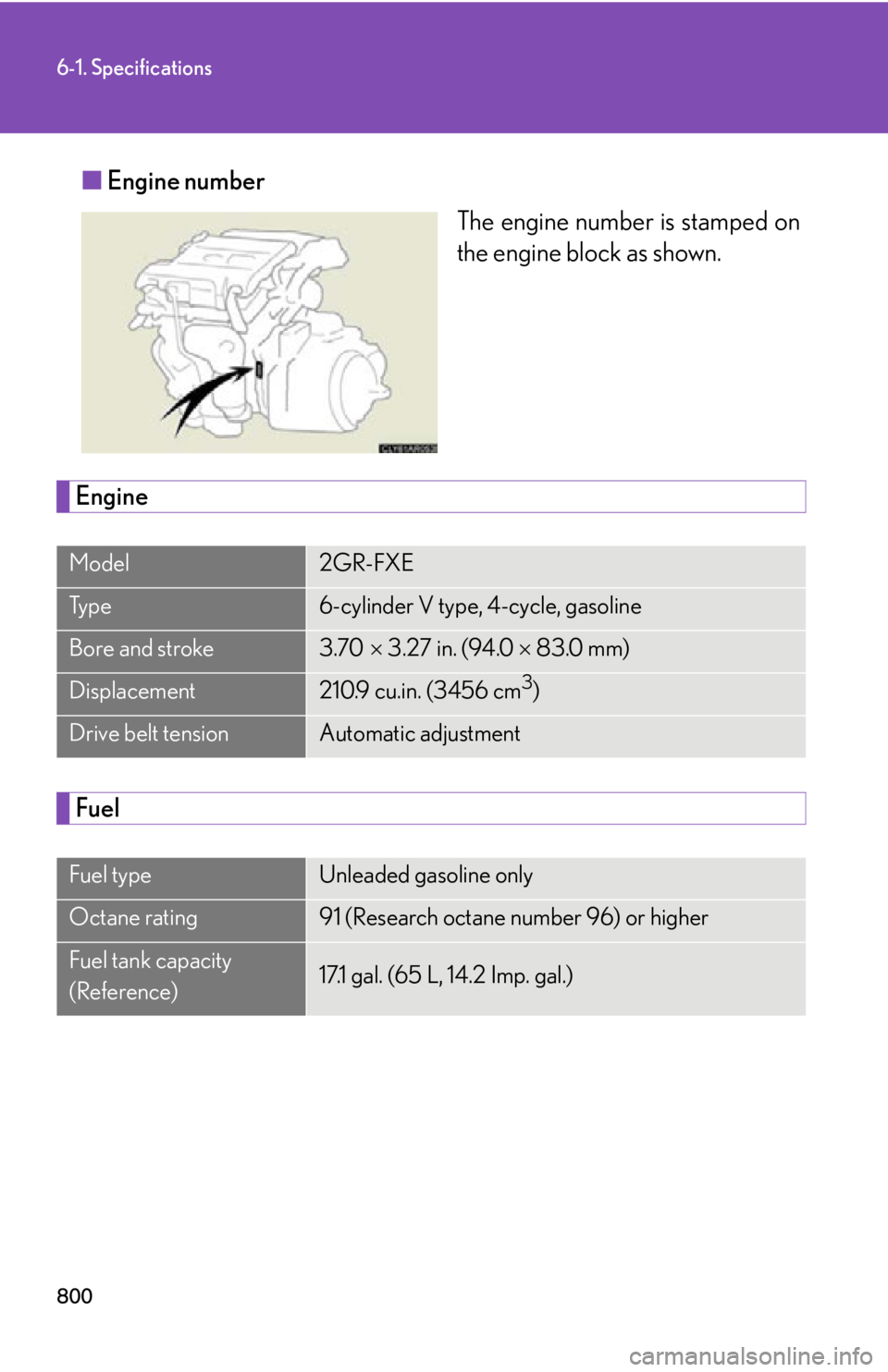
■ Engine number
The engine number is stamped on
the engine block as shown.
Engine
FuelModel 2GR-FXE
Ty p e 6-cylinder V type, 4-cycle, gasoline
Bore and stroke 3.70 3.27 in. (94.0 83.0 mm)
Displacement 210.9 cu.in. (3456 cm 3
)
Drive belt tension Automatic adjustment
Fuel type Unleaded gasoline only
Octane rating 91 (Research octane number 96) or higher
Fuel tank capacity
(Reference) 17.1 gal. (65 L, 14.2 Imp. gal.)
Page 828 of 878

8276-2. Customization
6
Vehicle specifications Door lock (
P. 7 2 , 7 8 1 )Function Default
setting Custom-
ized
setting
Unlocking using a
key Driver's
door
unlocked
in one step,
all doors
unlocked
in two
steps All doors
unlocked
in one step — —
O — —
O
Speed-detecting
automatic door lock
function Off On O —
O —
O O
Shifting gears to
position other than
P locks all doors On Off O —
O —
O O
Shifting gears to P
unlocks all doors On Off O —
O —
O O
Opening driver's
door unlocks all
doors Off On O —
O —
O O
Page 829 of 878

8286-2. Customization
Smart access system with push-button start and wireless remote control
(
P. 56, 69) Function Default
setting Custom-
ized
setting
Operation buzzer
volume Level 7 Off to level
6 O —
O —
O O
Operation signal
(buzzer) On Off O —
O —
O O
Operation signal
(emergency flash-
ers) On Off O —
O —
O O
Open door warning
buzzer On Off — — — — —
O
Time elapsed before
the automatic door
lock function is acti-
vated if a door is not
opened after being
unlocked 60 sec-
onds Off
O —
O —
O O30 sec-
onds
120 sec-
onds
Smart door unlock-
ing Driver’s
door All the
doors O —
O —
O O
Smart access sys-
tem with push-but-
ton start On Off O —
O —
O O